
VRRP and GLBP
VRRP is the industry-standard first-hop redundancy protocol: the forwarding router is the master, preemption is on by default, and it advertises to 224.0.0.18; VRRPv3 adds IPv6. GLBP, Cisco's, adds load balancing on one virtual IP: the active virtual gateway answers ARP with the virtual MACs of different forwarders, so hosts spread across several routers.
By Arif, founder of Daveth · Updated
The full 10 min walkthrough is in Daveth Pro (Network). See what the plan opens
What this page answers
What is the difference between VRRP and HSRP?
VRRP is an open standard, RFC 5798 for v3; HSRP is Cisco's. VRRP calls its roles master and backup, has preemption on by default where HSRP has it off, uses virtual MAC 0000.5e00.01xx, and advertises to 224.0.0.18. Read it in “4.1 VRRP: HSRP's standard cousin”
What is GLBP (Gateway Load Balancing Protocol)?
Cisco's FHRP that adds load balancing on one virtual IP. The active virtual gateway answers every ARP for it with the virtual MAC of one of the active virtual forwarders, so different hosts use different routers. Read it in the lesson
4.1 VRRP: HSRP's standard cousin
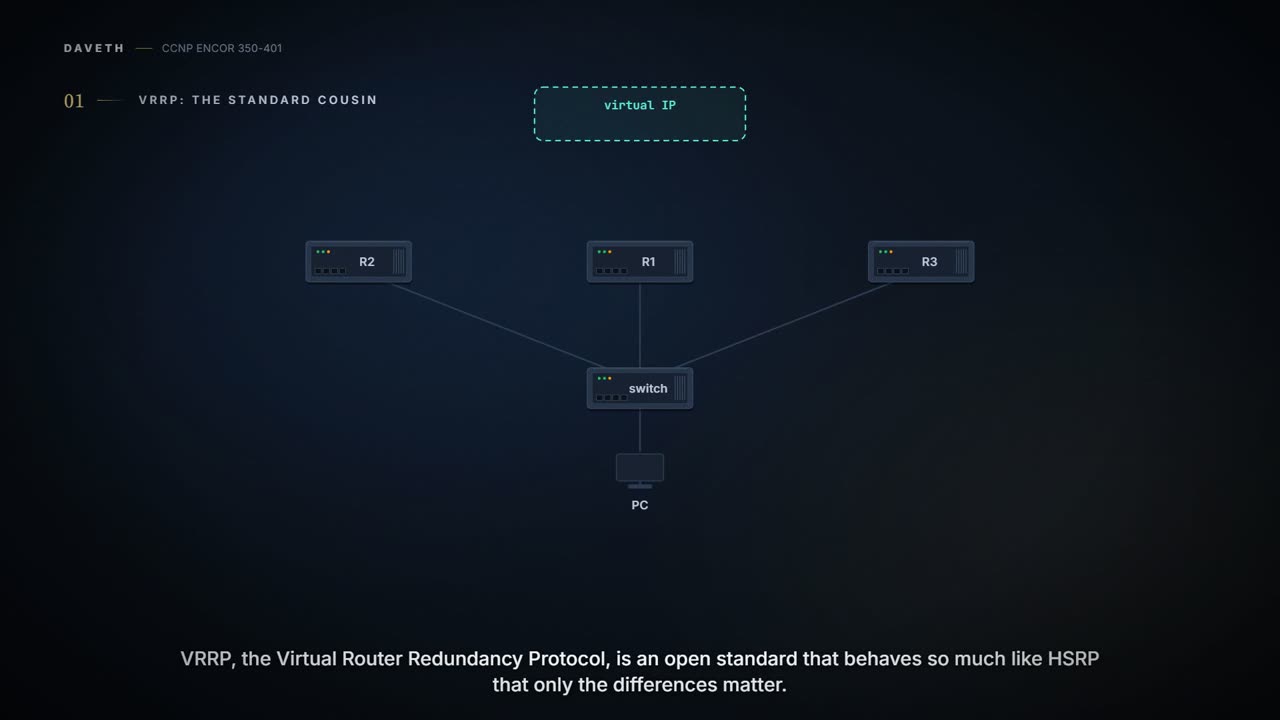
VRRP, the Virtual Router Redundancy Protocol, is an industry standard, and it behaves so much like HSRP that the guide lists only the differences: the forwarding router is the master and the others backups; preemption is on by default; the virtual MAC is 0000.5e00.01xx, where xx is the group in hex; and it advertises to 224.0.0.18. There are two versions: VRRPv2 does IPv4, and VRRPv3 does IPv4 and IPv6. If you've ever moved from one brand of phone to another, you'll know the feeling: the same idea, different names for everything, and one setting that's on where you expected it off.
VRRP turns preemption on by default and HSRP turns it off, so two protocols built for the same job disagree on the first question anyone asks.
| HSRP (03-3) | VRRP | |
|---|---|---|
| Standard | Cisco | open (RFC 5798 for v3) |
| Roles | active, standby | master, backup |
| Preemption | off by default | on by default |
| Virtual MAC | 0000.0c07.acxx (v1) | 0000.5e00.01xx (IPv4) |
| Messages | hellos to 224.0.0.2 / .102 | advertisements to 224.0.0.18 (IPv4), FF02::12 (IPv6) |
Two VRRP ideas have no HSRP equivalent. A router that actually owns the virtual IP (it's configured on its own interface) has priority 255 and always becomes master; 0 is reserved for a master handing over; backups use 1 to 254, 100 by default. It's a bit like the owner of a shop walking in: whoever was minding the till steps aside, no discussion. And a backup "will not attempt to preempt the Master unless it has higher priority".
The master advertises, by default every second. A backup that hears an advertisement from a master with equal or higher priority (or that has preemption off) resets a timer, the Master_Down_Interval; if the timer runs out, it declares the master dead and becomes master itself. A backup with higher priority and preemption on does something else: it discards the weaker master's advertisements, lets its timer run out, and takes over, which is how VRRP preemption actually happens. The timer is three advertisement intervals plus a skew, and the skew depends on priority:
- Skew_Time = (256 − priority) × advertisement interval ÷ 256
- Master_Down_Interval = 3 × advertisement interval + Skew_Time
Backups use the interval the master advertises, not their own. With 1-second advertisements and priority 100, that's 3 + 0.609 = 3.609 seconds: the "Master Down interval is 3.609 sec" in the guide's Example 15-17 and the "3609" in Example 15-16's Time column. (Those are the guide's legacy VRRPv2 outputs; the RFC 5798 formula gives the same figure at a 1-second interval.) A higher priority means a smaller skew, so after a master fails silently, the highest-priority backup's timer runs out first and it becomes master before anyone else. The memory hook: VRRP: priority sets the alarm clock. Picture yourself in a shared flat where whoever's alarm goes off first puts the kettle on: set yours earlier, and it's always you.
Before running D1, predict: R2 at priority 120 and R3 at 100 are backups, and the master fails. Who takes over, and roughly how long after the master's last advertisement?
D1
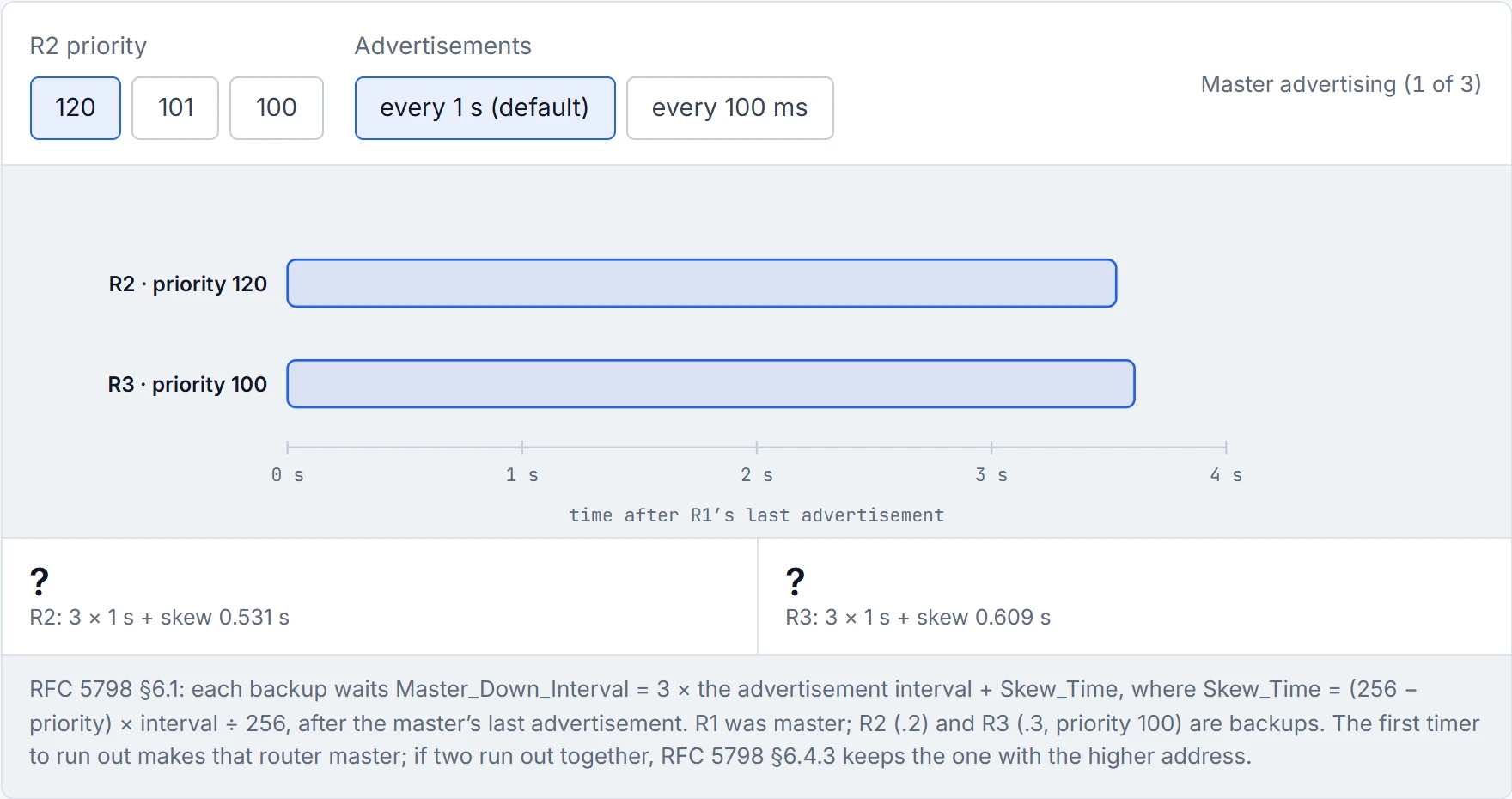
Step 1 of 3 R1 is master and advertises every second to 224.0.0.18, at a priority above both backups. R2 (priority 120) and R3 (priority 100) reset their Master_Down_Timers at every advertisement from it (RFC 5798 §6.4.2).
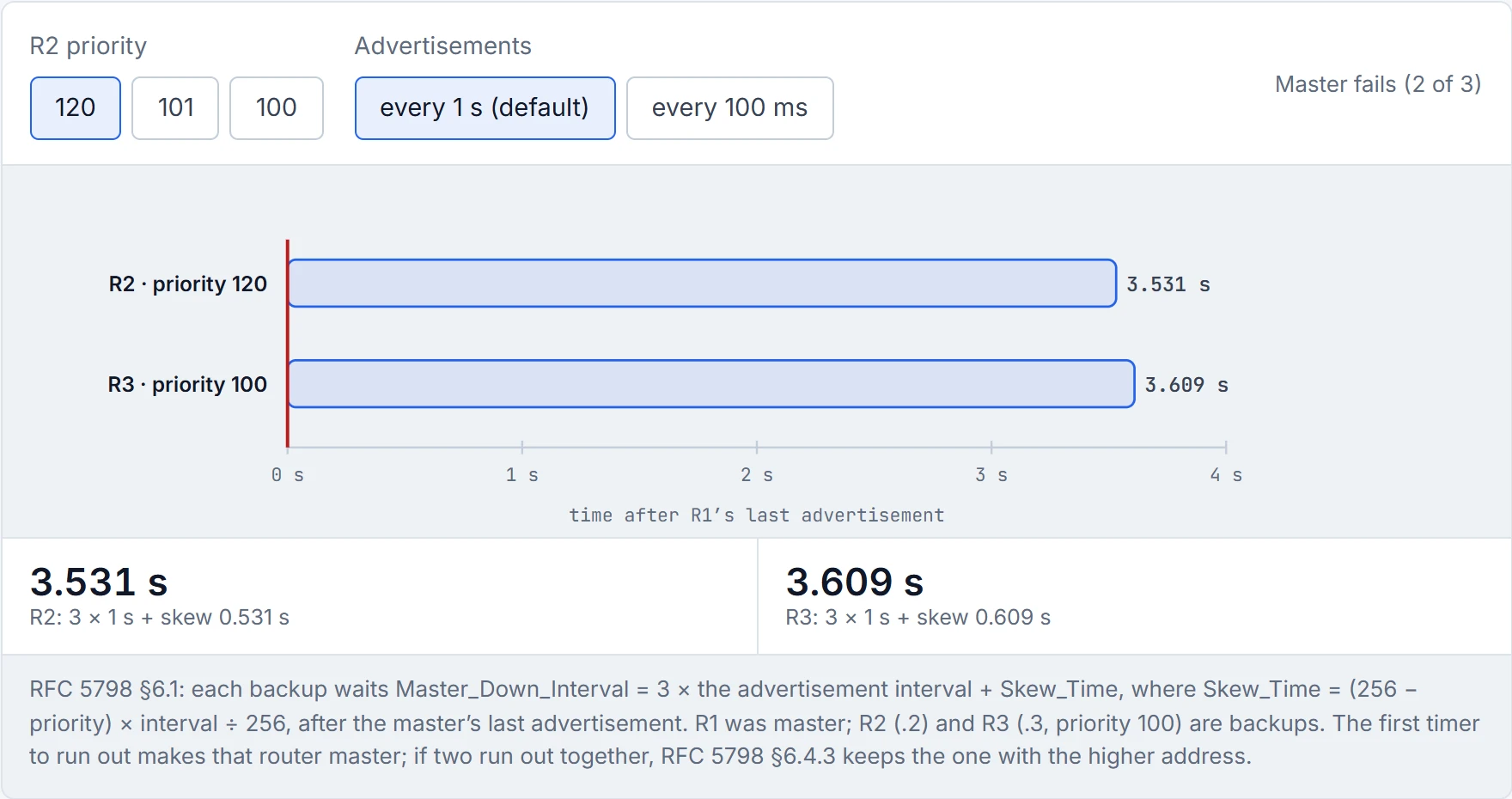
Step 2 of 3 R1 fails silently. Its advertisements stop, and each backup’s timer runs from the last one: R2 needs 3.531 s, R3 3.609 s. The skew is what differs: (256 − priority) × interval ÷ 256. (Had R1 been shut down gracefully, it would have sent priority 0 and the backups would wait only the skew.)
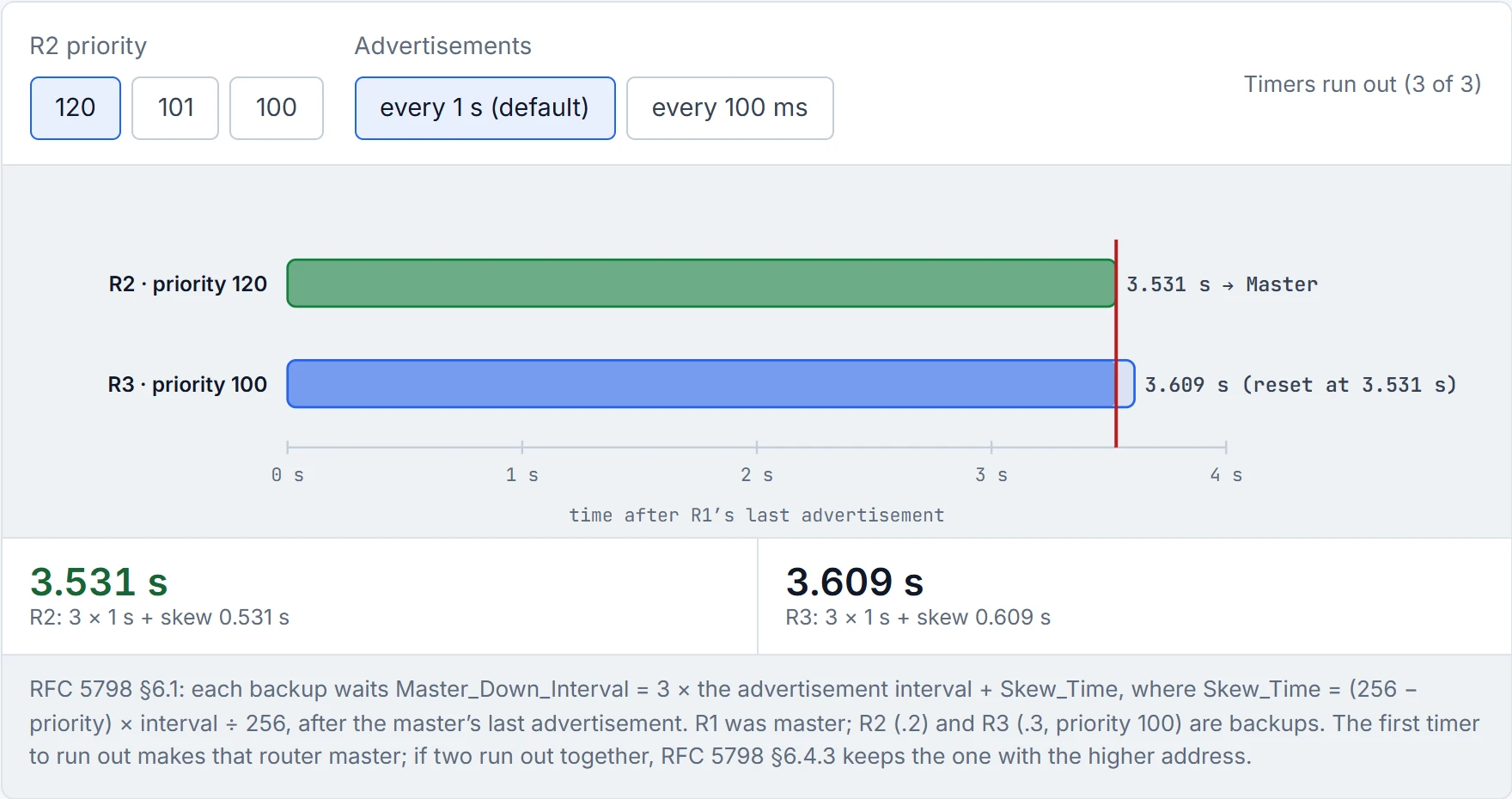
Step 3 of 3 R2’s timer runs out first, so R2 becomes master and starts advertising; the other backup hears it and resets its own timer. Higher priority means a shorter skew: that is how "the highest-priority backup takes over" actually happens.
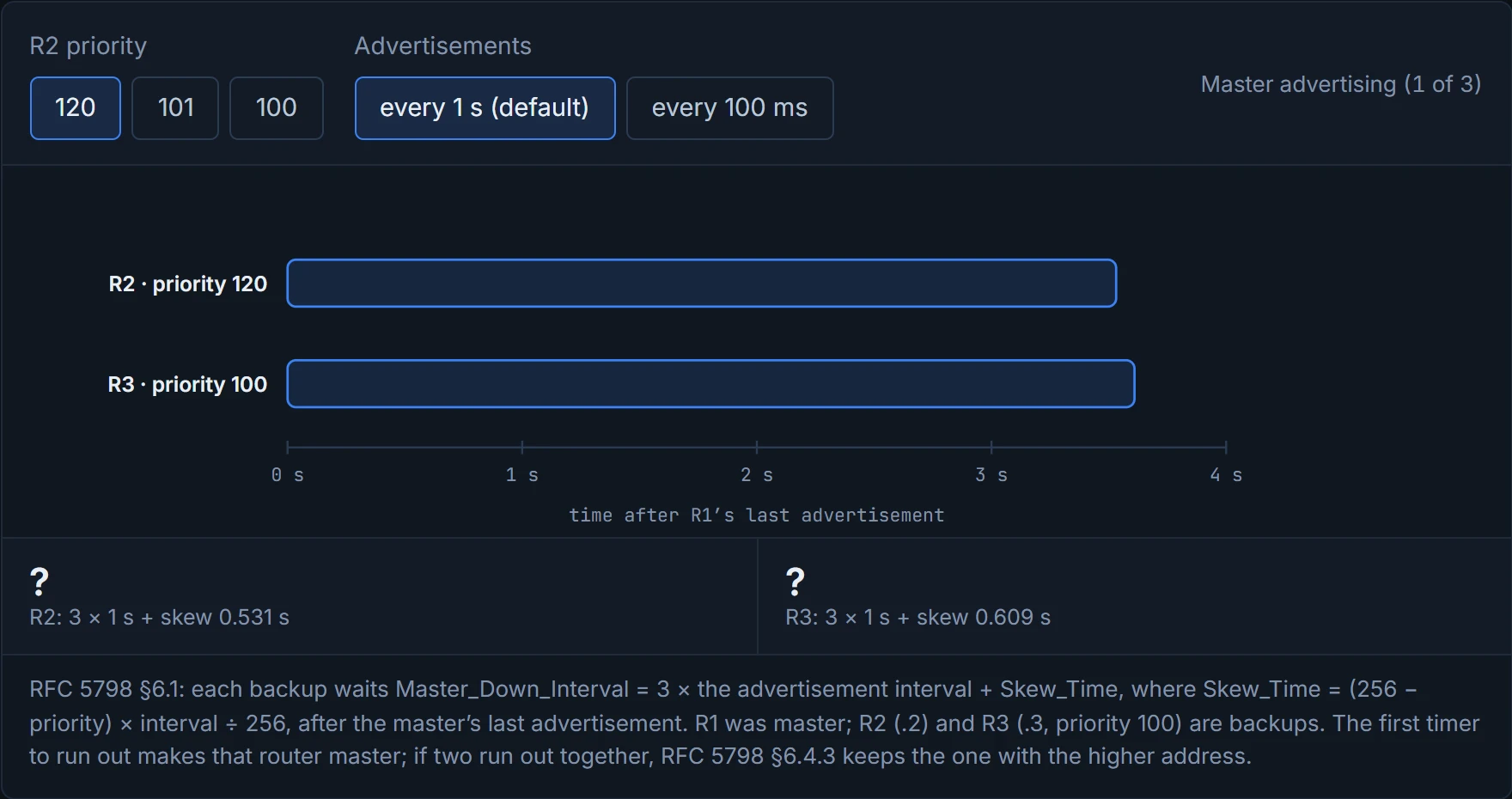
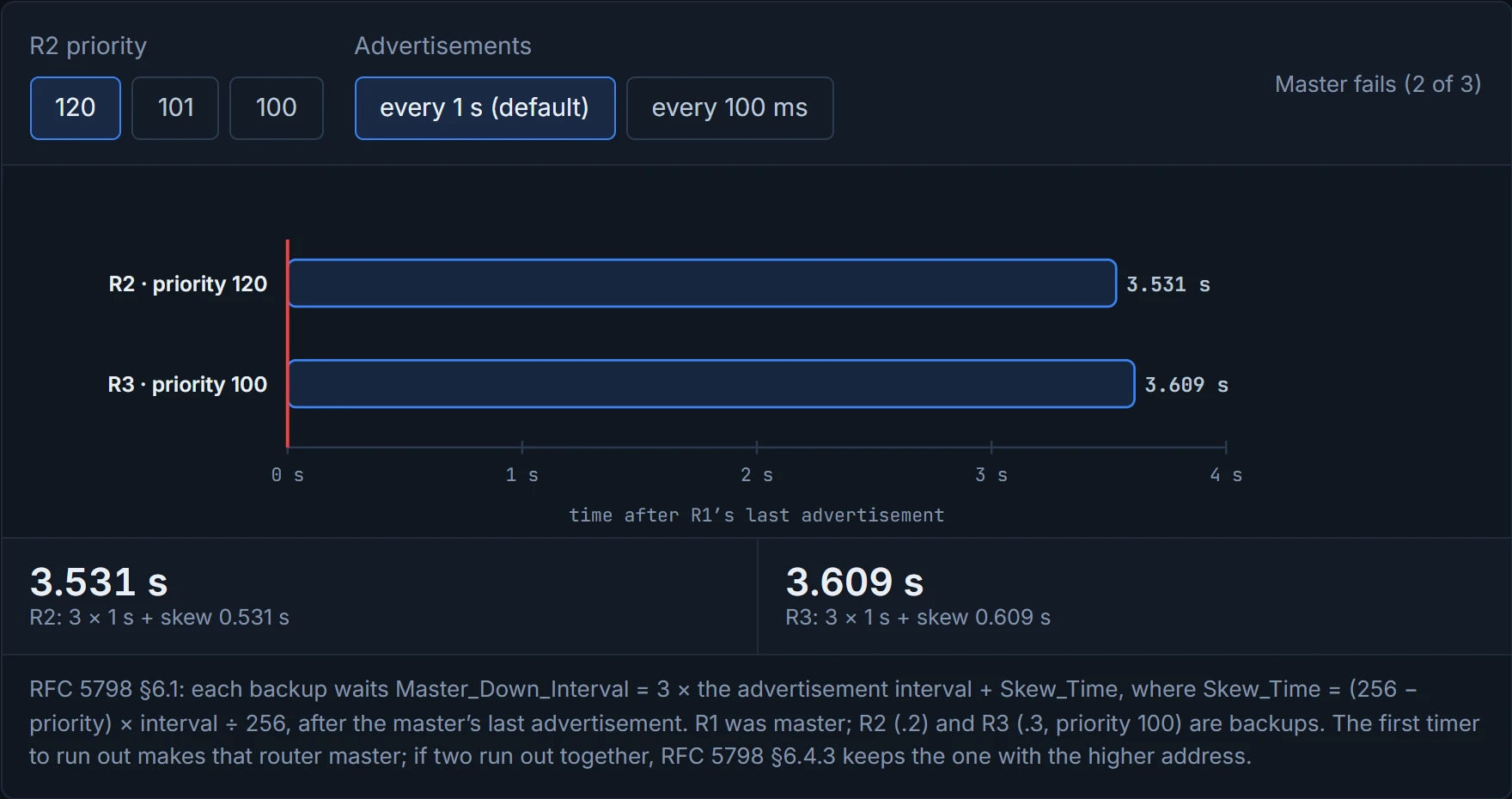
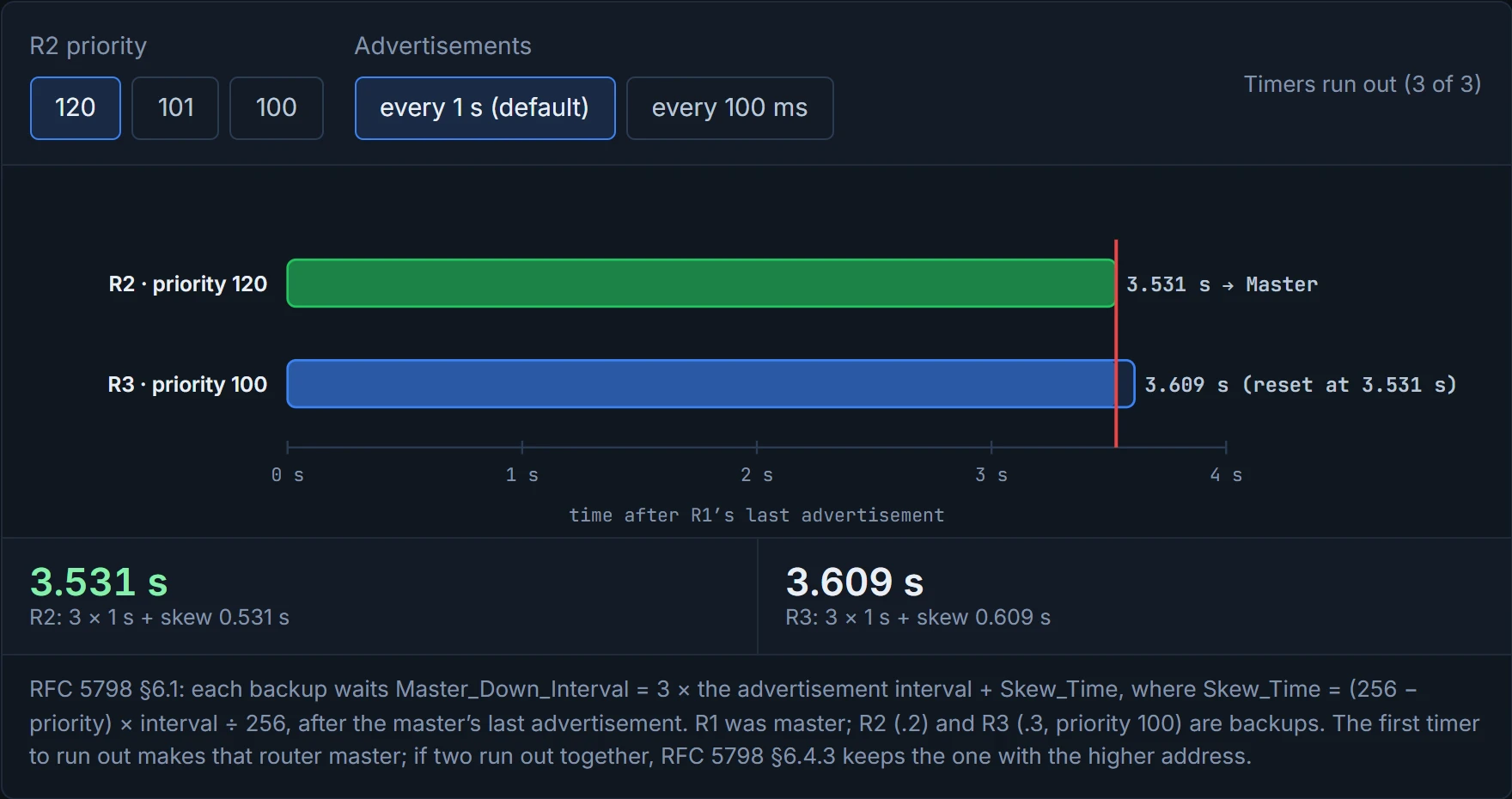
VRRP's default takeover time is 3.609 seconds, the most precisely unround number in networking, and every digit comes from the formula.
A master that is shut down on purpose doesn't make the backups wait: it sends one last advertisement with priority 0, and a backup that hears it sets its timer to just the skew. So a lab that shuts the master's interface may see a faster takeover than 3.6 seconds, depending on how IOS signals it (unconfirmed). If two backups have the same priority, their timers end together and both become master for a moment. RFC 5798 settles it: a master that hears an advertisement with the same priority from a higher address steps down, so the higher address stays master; Cisco states the same rule for an election. That's also the likeliest reading of the guide's Example 15-15, where R3 (.3) ends up master over R2 (.2) at equal priority; the exact sequence behind its log is unconfirmed. It's like two people answering the same phone call at once: after a second of "hello?", one hangs up.
The legacy syntax (VRRPv2, older software) lives on the interface:
vrrp instance-id ip vip-address- (Optional)
vrrp instance-id priority priority - (Optional)
vrrp instance-id track object-id decrement decrement-value, with a decrement big enough to drop below the other router, exactly as for HSRP - (Optional)
vrrp instance-id authentication {text-password | text text-password | md5 {key-chain key-chain | key-string key-string}}
Example 15-15 puts R2 and R3 on 172.16.20.0/24 with vrrp 20 ip 172.16.20.1; R3 ends up master. show vrrp brief lists interface, group, priority, the master-down time, whether the router owns the address, whether it preempts, the state, and the master and group addresses (Example 15-16); show vrrp adds the virtual MAC, 0000.5e00.0114 (group 20 is 0x14), the 1-second advertisement interval, and the 3.609-second master-down interval (Example 15-17).
The hierarchical syntax (VRRPv3, newer IOS XE) nests everything under the group. Example 15-18, on IOS XE 16.9.2 for VLAN 22, in the guide's order:
SW2(config)# fhrp version vrrp v3
SW2(config)# interface vlan 22
SW2(config-if)# ip address 172.16.22.2 255.255.255.0
SW2(config-if)# vrrp 22 address-family ipv4
SW2(config-if-vrrp)# address 172.16.22.1
SW2(config-if-vrrp)# track 1 decrement 20
SW2(config-if-vrrp)# priority 110
(The guide types the track line twice; SW3 gets the same group and address at the default priority, 100.) fhrp version vrrp v3 comes first; vrrp id address-family {ipv4 | ipv6} opens the group. VRRPv2 and v3 are "not compatible": a v3 group talks to v2 routers only when you put it in compatibility mode with vrrpv2 inside the group. Example 15-19 shows SW2 as MASTER at 110 (brief columns include the address family, IPv4, and a Time of 0 on the master), the virtual MAC 0000.5E00.0116 (22 is 0x16), a 1000-millisecond advertisement interval, "Track object 1 state UP decrement 20", and "Master Down interval is unknown", since the master isn't waiting for anyone. Cisco's 17.9 guide adds: once fhrp version vrrp v3 is on, VRRPv2 as such is unavailable; up to 255 groups per interface; preemption on by default, with preempt delay minimum; priorities 1 to 254; and advertisement timers in milliseconds, 100 to 40,000. That's roughly equivalent to moving from a flat list of settings to folders: the same settings, grouped under the thing they belong to.
A VRRP router that owns the address sits at priority 255 and always wins: the one election the landlord can't lose.
For IPv6, the interface needs IPv6 enabled and addressed first, and the group needs a link-local virtual address before anything else: "VRRPv3 for IPv6 requires that a primary virtual link-local IPv6 address is configured to allow the group to operate. After the primary link-local IPv6 address is established on the group, you can add the secondary global addresses". RFC 5798 agrees that the first IPv6 address "must be the Link-Local address", advertises to FF02::12, and uses the MAC 00-00-5E-00-02-{VRID}, which Cisco writes as 0000.5e00.02xx, so IPv6 groups have their own MAC block. Just like when you give a house a name before a street number, the link-local comes first and the global addresses follow. The syntax:
SW2(config-if)# ipv6 address 2001:DB8:22::2/64
SW2(config-if)# vrrp 22 address-family ipv6
SW2(config-if-vrrp)# address FE80::22 primary
SW2(config-if-vrrp)# address 2001:DB8:22::1/64
(address ip-address [primary | secondary] is C1's syntax; the addresses are this lesson's. Cisco's IOS XE 16 example writes the global address the same way, with its prefix length: address 2001:1234::FFFF/64. 17.9 wasn't checked for that form.)
To prove an IPv6 group, read show vrrp for it. Cisco's sample for an IPv6 group shows it block by block:
GigabitEthernet0/0/0 - Group 3 - Address-Family IPv6
  State is MASTER
  Virtual IP address is FE80::46B6:BEFF:FE50:DBB0
  Virtual secondary IP addresses:
    2001:1234::FFFF/64
  Virtual MAC address is 0000.5E00.0203
  Priority is 255 (owner mode)
  Master Router is FE80::46B6:BEFF:FE50:DBB0 (local), priority is 255
  VRRPv3 Advertisements: sent 1181 (errors 0) - rcvd 1
(Lines picked from the sample; Cisco's full sample is longer.) Look at what it tells you. The header names the address family, so the IPv4 and IPv6 groups of the same number are separate entries. The "Virtual IP address" is the link-local primary, and the global address is listed as a secondary. The MAC is from the IPv6 block: the same page's IPv4 group 3 shows 0000.5E00.0103, and the IPv6 group 3 shows 0000.5E00.0203. And the master is named by its link-local address, not a global one. It's a bit like a flat with two doorbells, one for each family, wired to the same hallway: pressing one tells you nothing about the other. What it doesn't prove: that hosts actually use the virtual link-local as their default gateway. That's on the hosts, in their IPv6 neighbour and route tables.
HSRP and VRRP give each group one forwarding router (you can only share load by running several groups, as 03-3 showed). GLBP, the Gateway Load Balancing Protocol, Cisco proprietary like HSRP (quiz Q4 and Q6), gives redundancy and load balancing on one virtual IP. It has two roles:
- The active virtual gateway (AVG) answers every ARP for the virtual IP, and replies with the virtual MAC of one of the forwarders.
- Each active virtual forwarder (AVF) forwards the traffic sent to its own virtual MAC. The replies are unicast, so other hosts don't hear them.
Cisco sums it up: "Load sharing is achieved by the AVG replying to the ARP requests with different virtual MAC addresses". You can think of it as a taxi-rank dispatcher: every passenger asks for "a taxi", and the dispatcher points each one to a different cab. The memory hook: GLBP: one address, a different MAC per host.
The AVG is the dispatcher who also drives a cab: it answers every "where do I go?", and in the guide's example it forwards for one of the MACs as well.
A group has one AVG and up to four AVFs, and one router can be both. If the AVG fails, a standby AVG takes over with no disruption; if an AVF fails, another router takes over its virtual MAC. Cisco adds the detail: the router the AVG gave a MAC to is its primary forwarder, the others learn it and are secondary; when a forwarder fails, a secondary takes over its MAC; the AVG keeps handing that MAC out for the redirect time, then stops, and after the secondary hold time it's removed altogether. (The guide's output calls the second timer the "forwarder time-out".) Imagine if a colleague went off sick: someone else would answer their extension, so callers who already have the number still get through, and reception would stop giving that extension out to new callers.
Before running D2, predict: with round robin, which router does PC5 end up using, and what happens to its traffic when SW3 fails?
D2
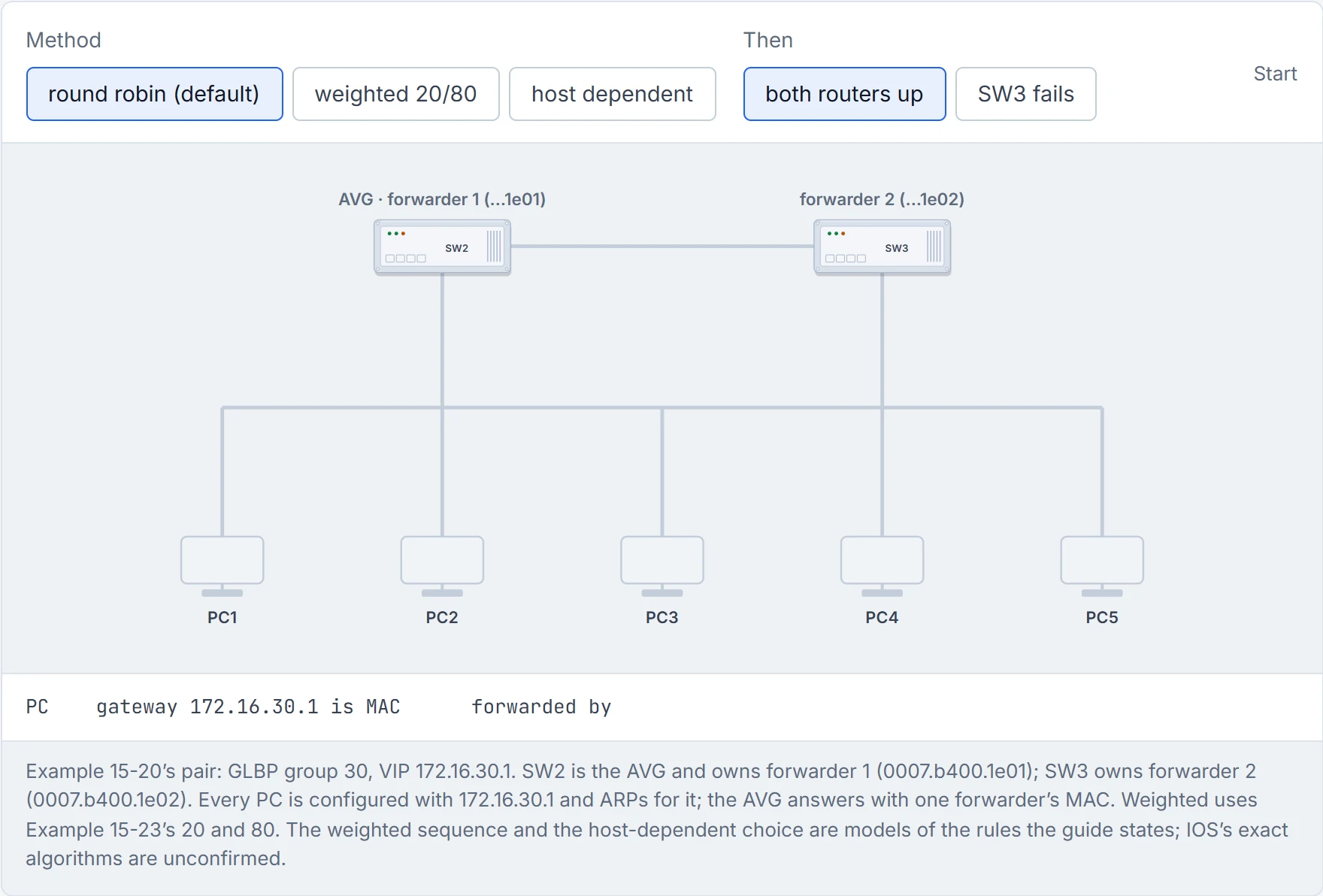
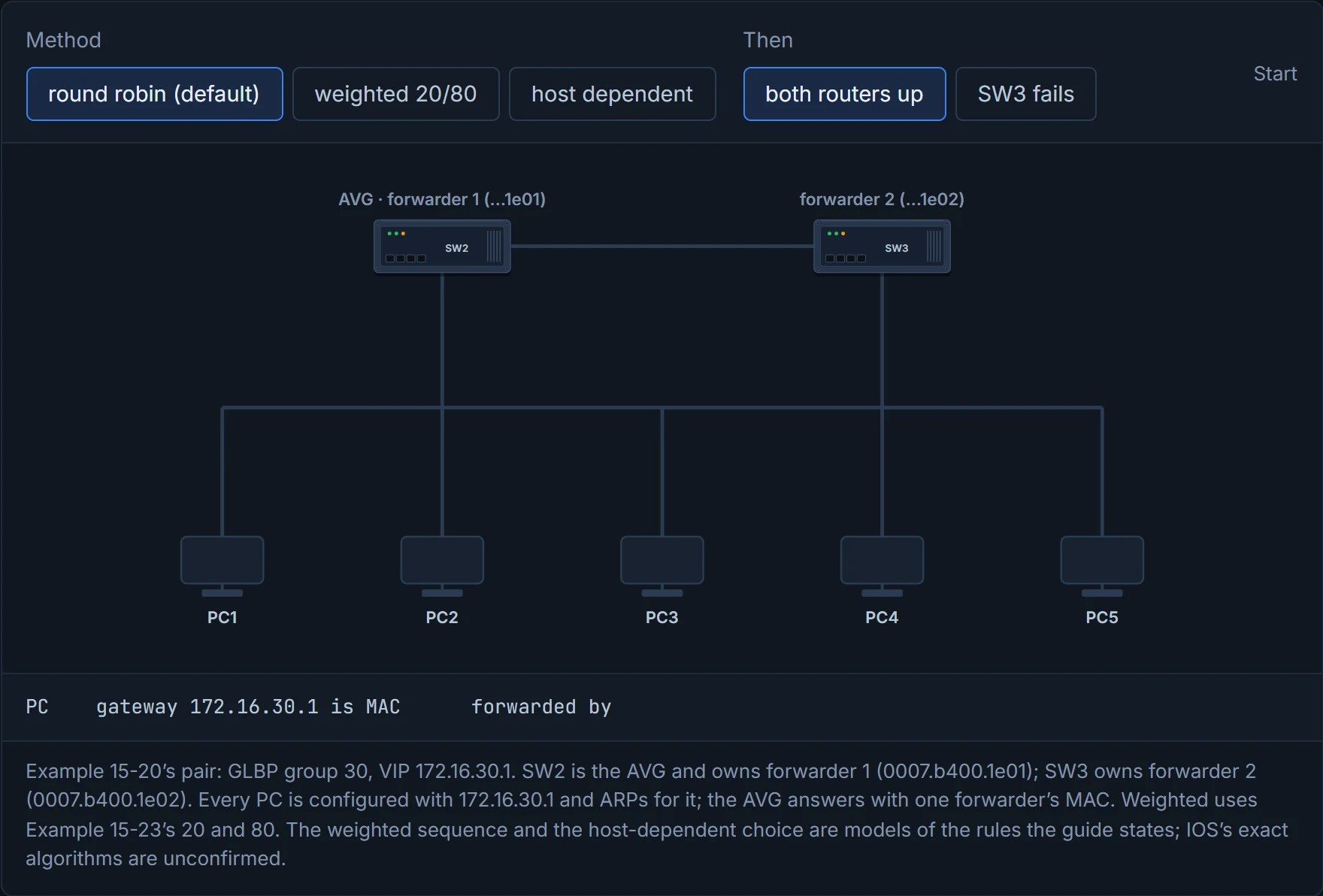
Step 1 of 7 Five PCs, one gateway address, 172.16.30.1. None has an ARP entry for it yet. GLBP’s trick is in the ARP reply.
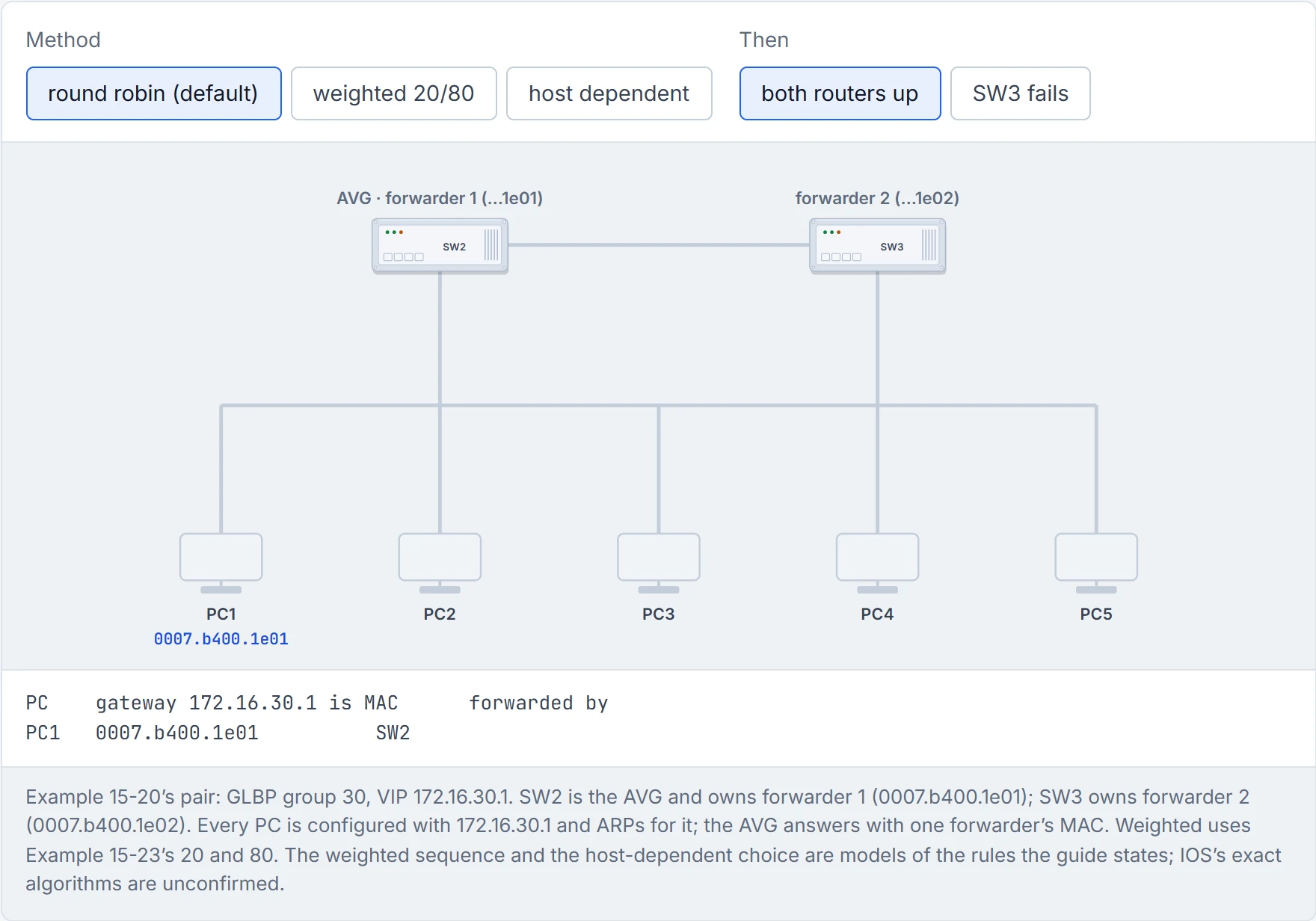
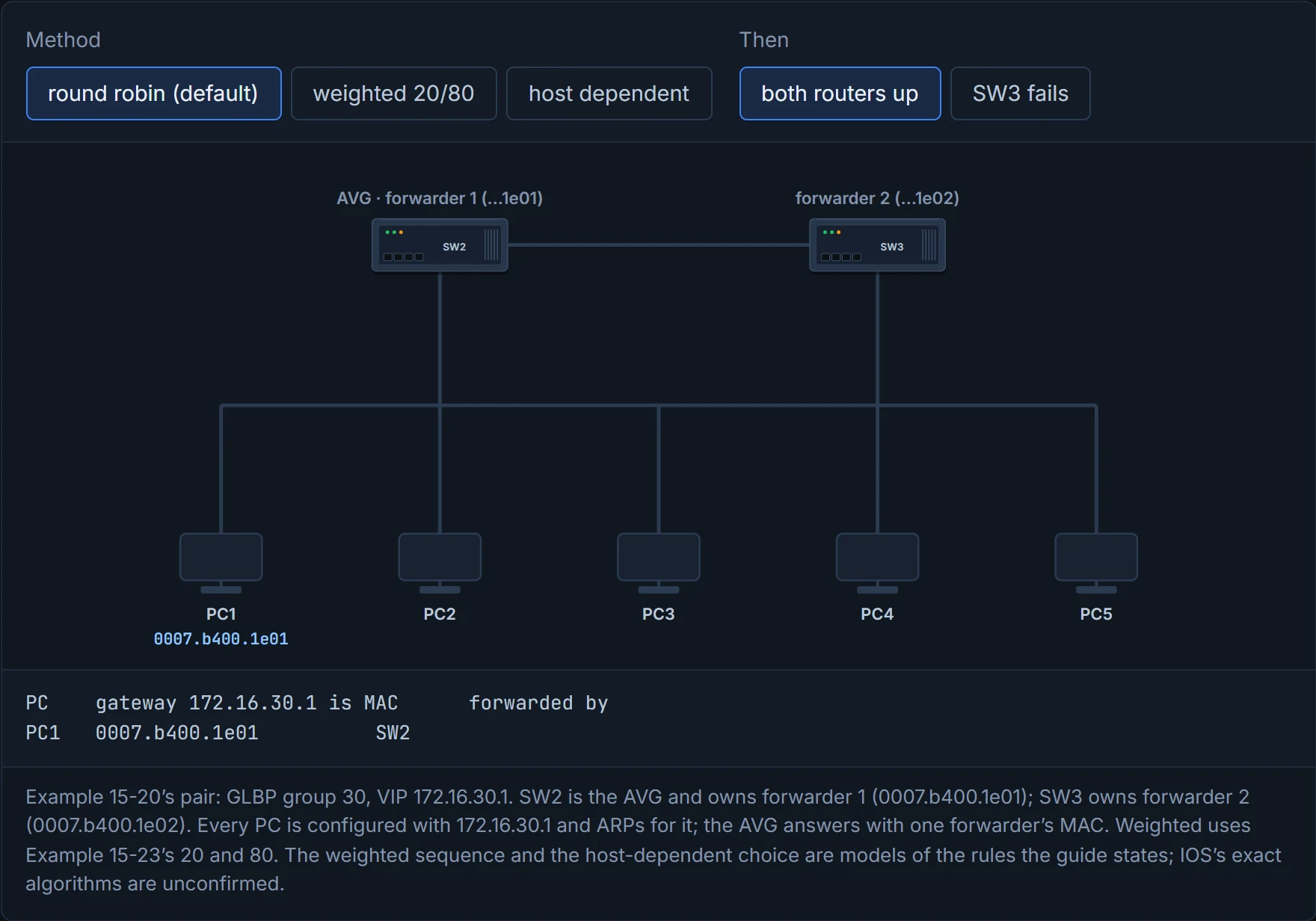
Step 2 of 7 PC1 ARPs for 172.16.30.1. The AVG (SW2) answers with forwarder 1’s MAC, 0007.b400.1e01: the next forwarder in turn. The reply is unicast, so the other PCs don’t hear it.
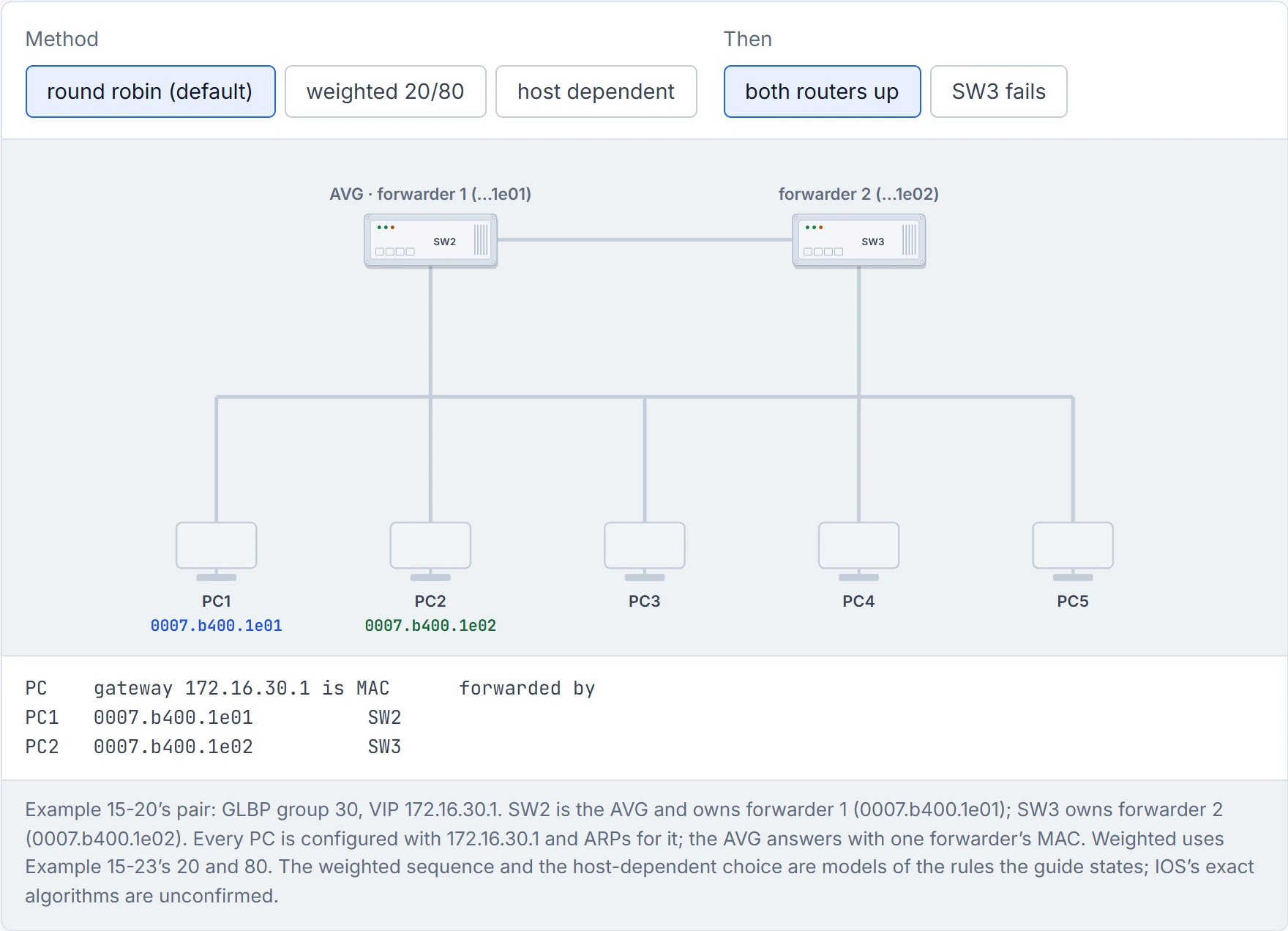
Step 3 of 7 PC2 ARPs for 172.16.30.1. The AVG (SW2) answers with forwarder 2’s MAC, 0007.b400.1e02: the next forwarder in turn. The reply is unicast, so the other PCs don’t hear it.
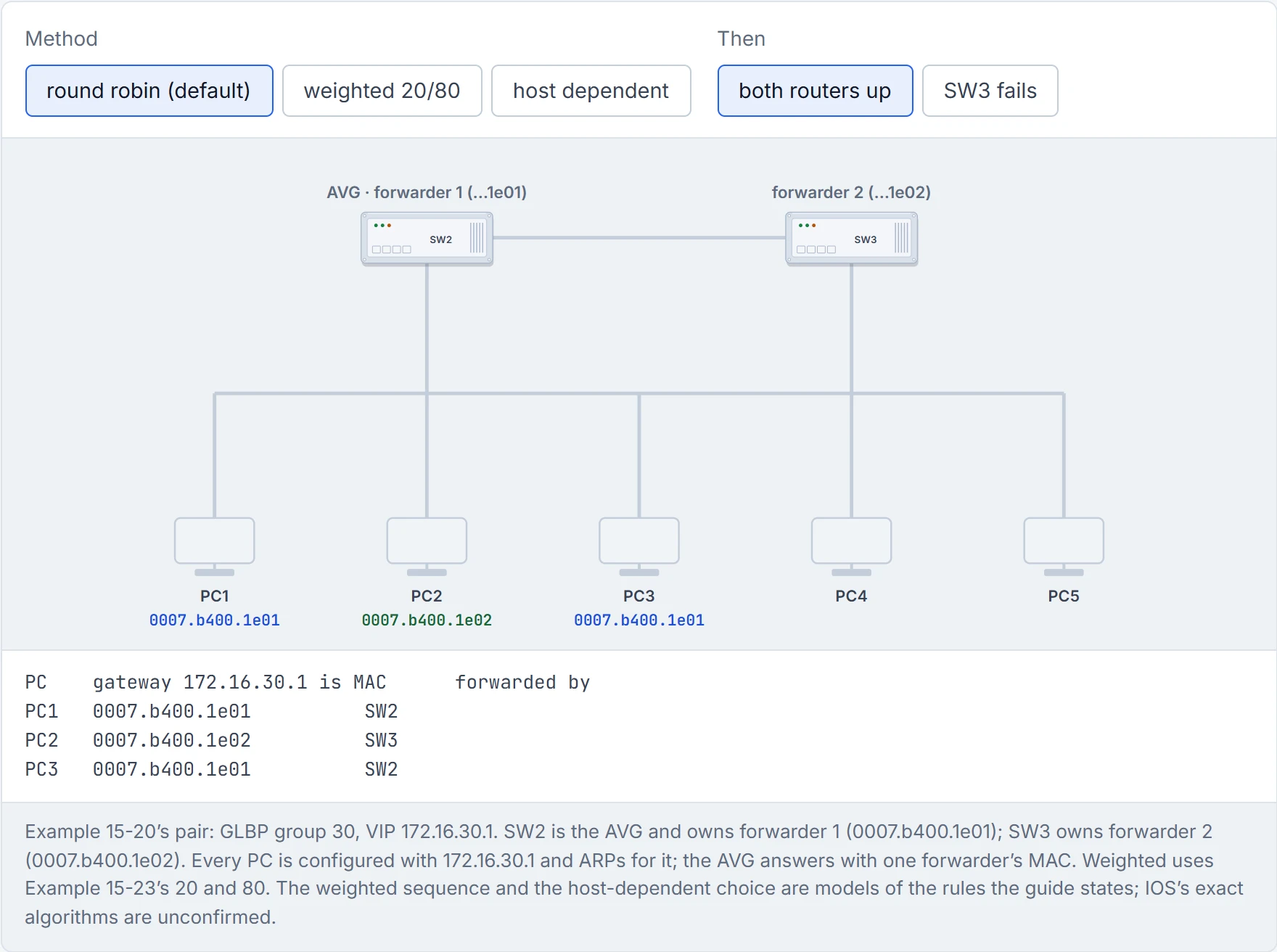
Step 4 of 7 PC3 ARPs for 172.16.30.1. The AVG (SW2) answers with forwarder 1’s MAC, 0007.b400.1e01: the next forwarder in turn. The reply is unicast, so the other PCs don’t hear it.
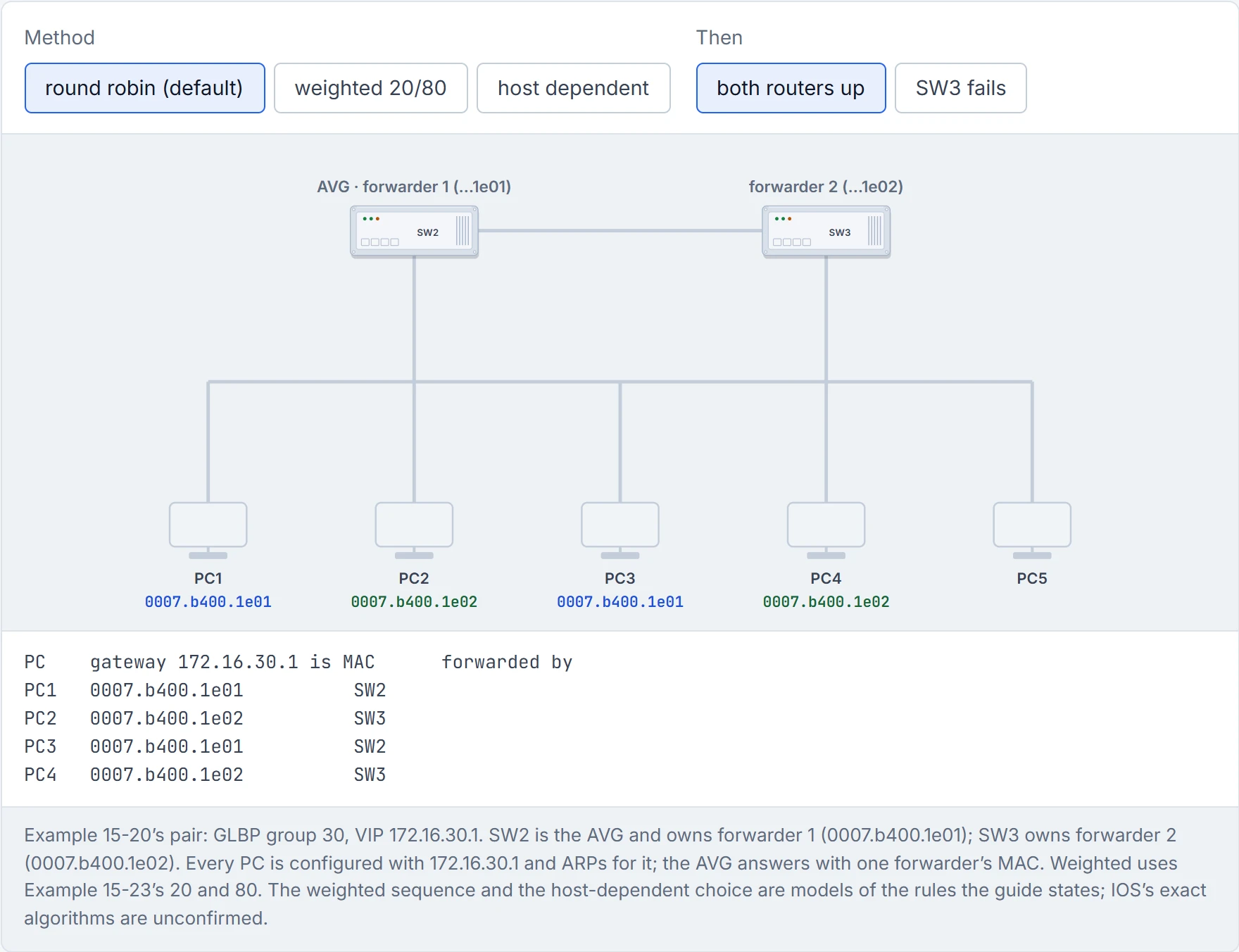
Step 5 of 7 PC4 ARPs for 172.16.30.1. The AVG (SW2) answers with forwarder 2’s MAC, 0007.b400.1e02: the next forwarder in turn. The reply is unicast, so the other PCs don’t hear it.
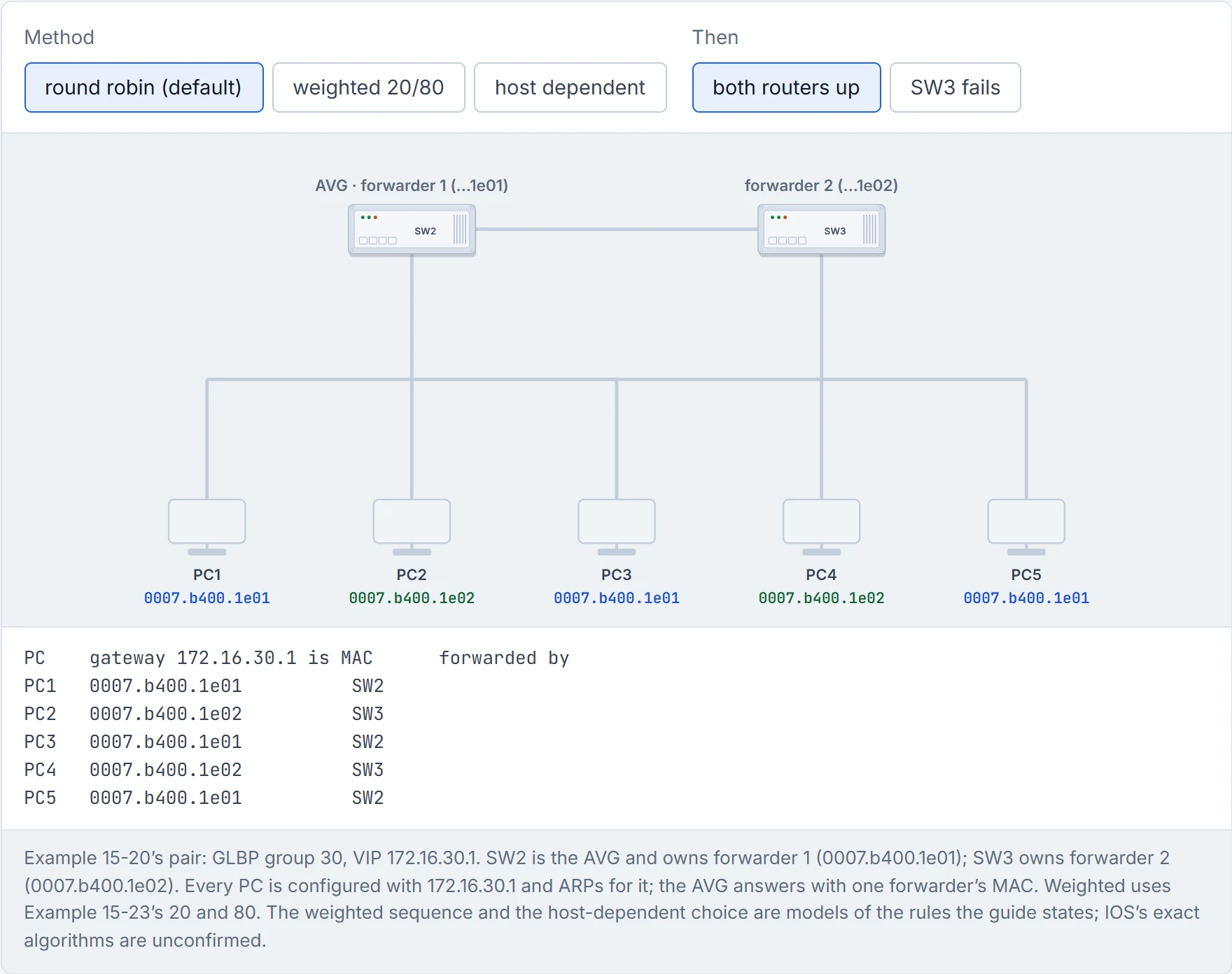
Step 6 of 7 PC5 ARPs for 172.16.30.1. The AVG (SW2) answers with forwarder 1’s MAC, 0007.b400.1e01: the next forwarder in turn. The reply is unicast, so the other PCs don’t hear it.
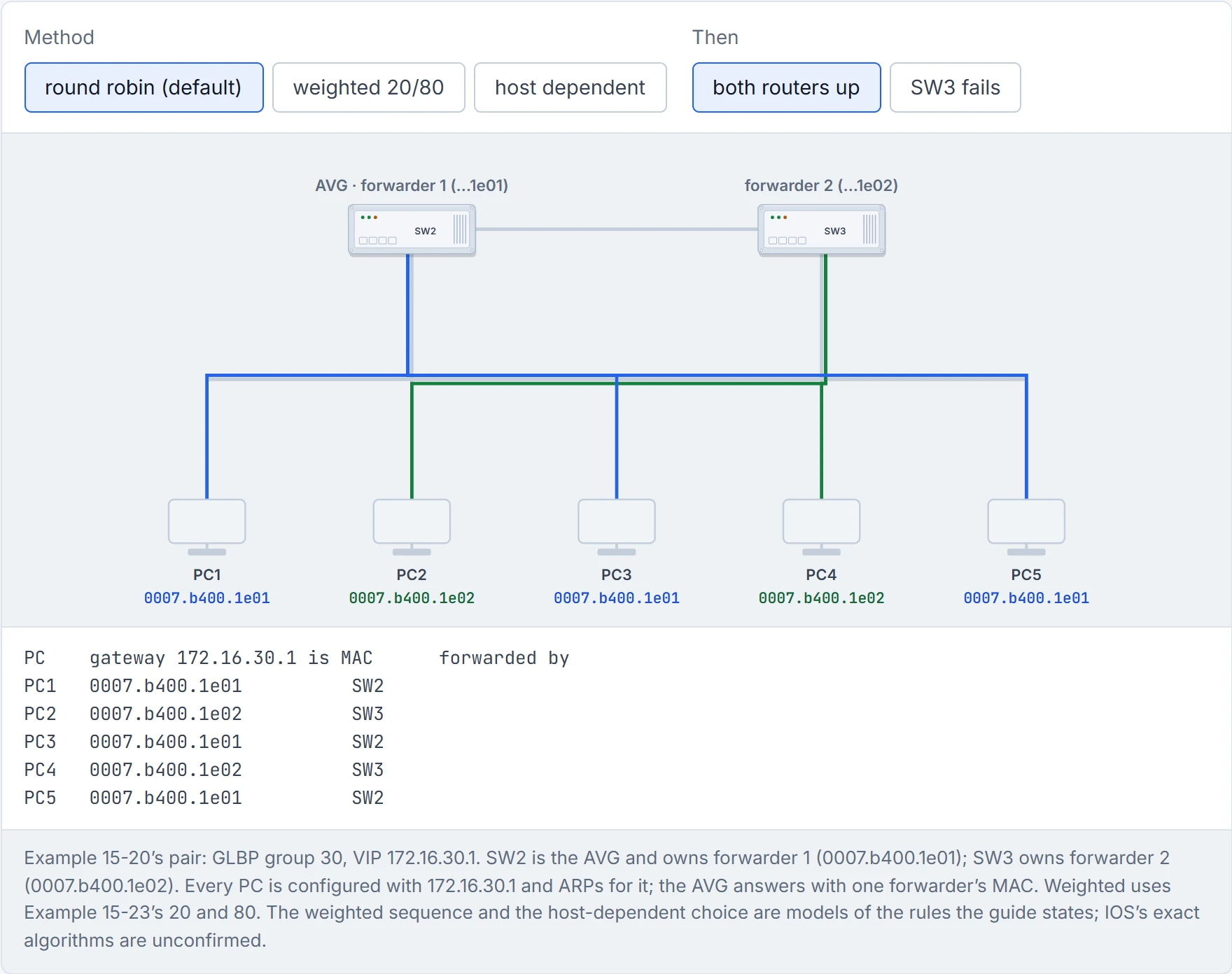
Step 7 of 7 Every PC now sends its traffic to the router that owns its MAC: both routers forward at once, with one gateway address.
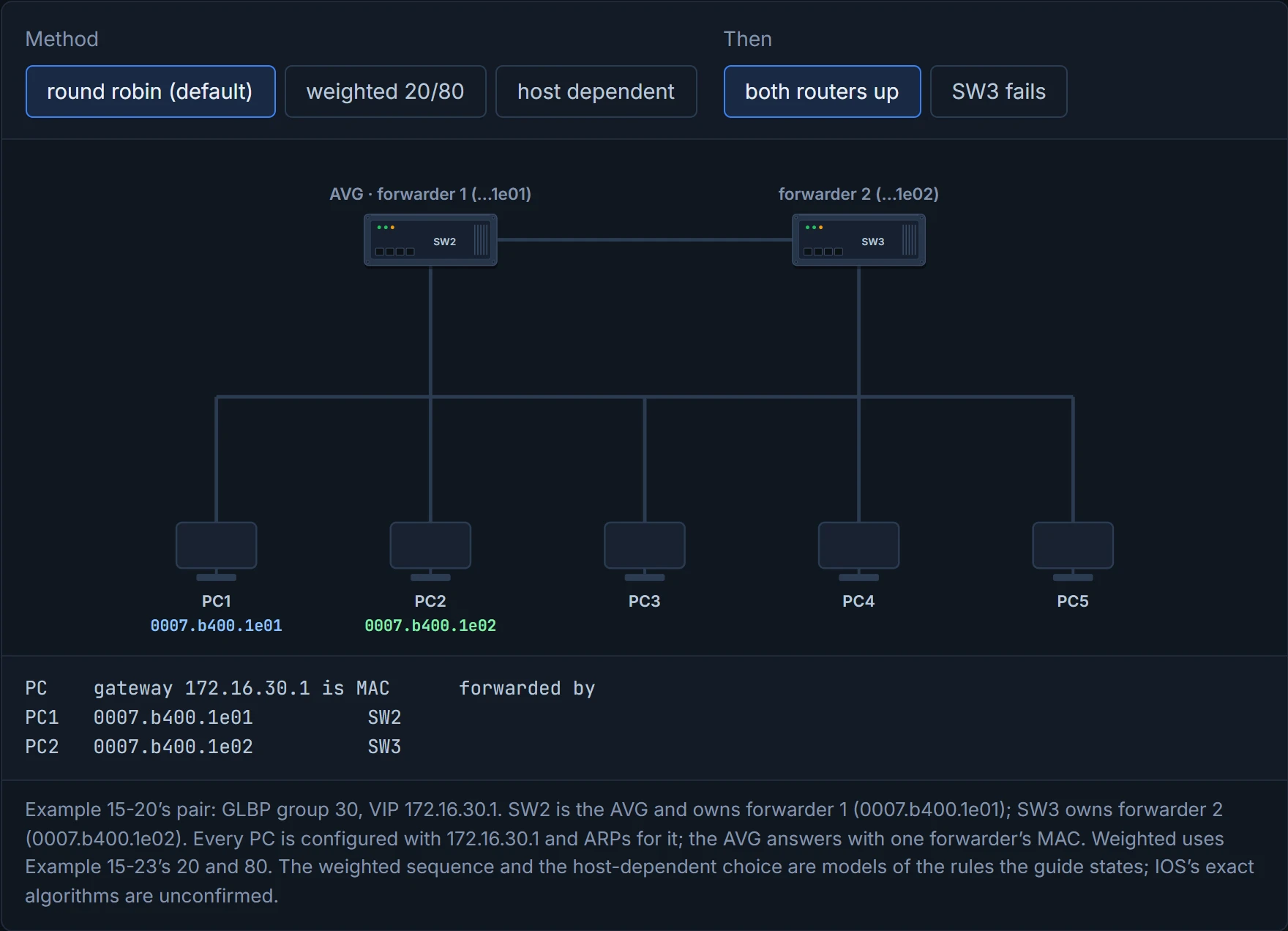
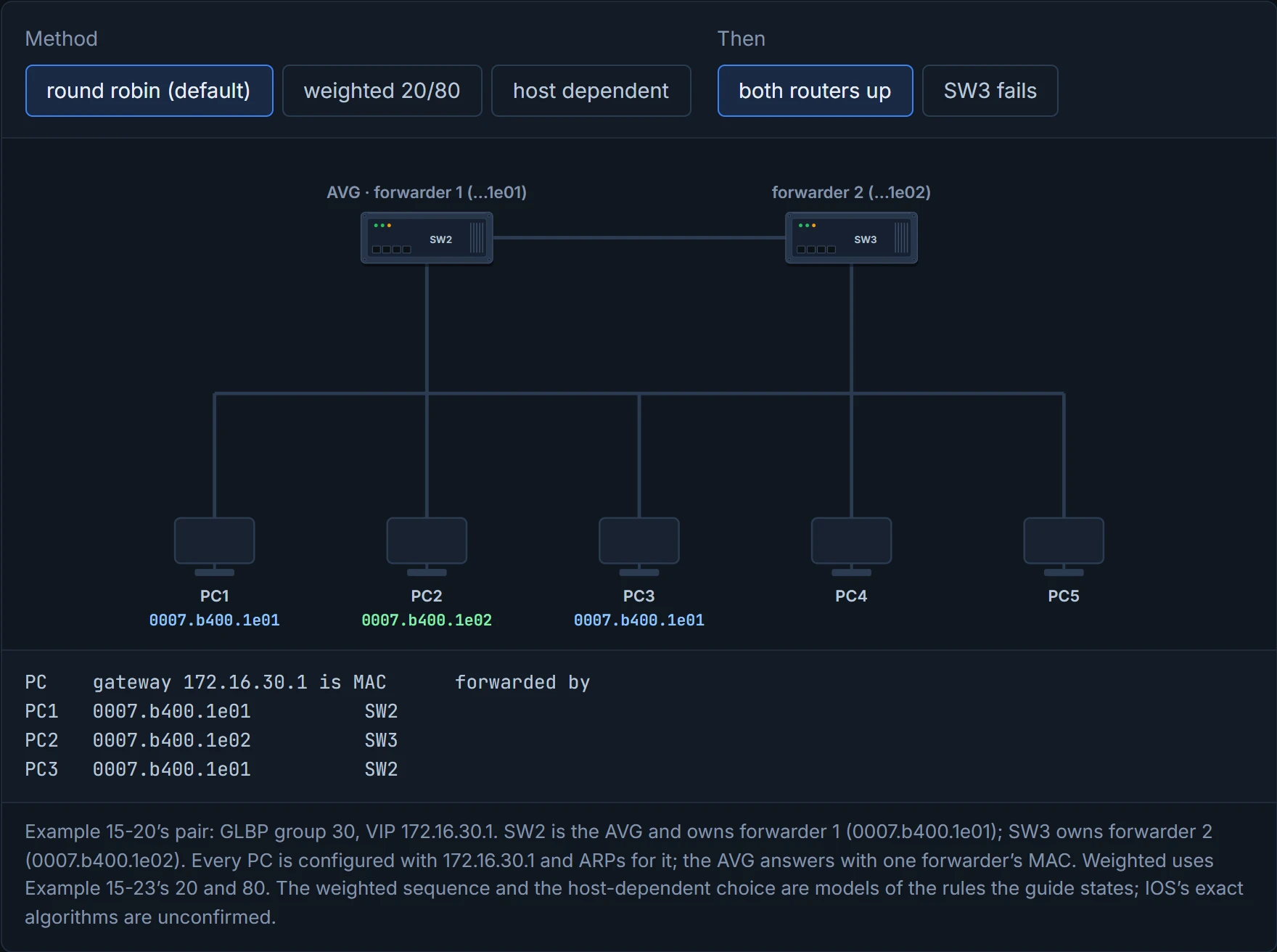
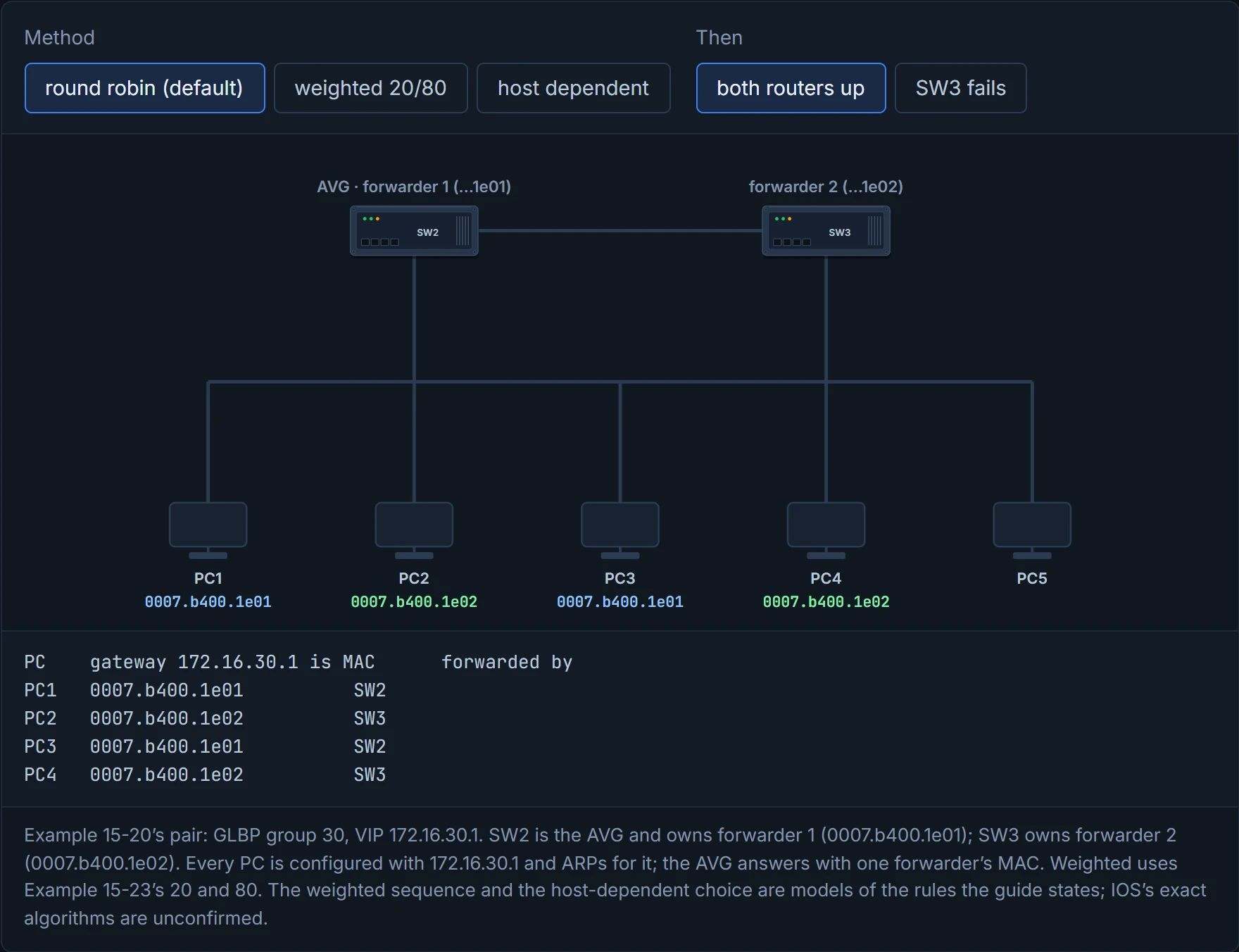
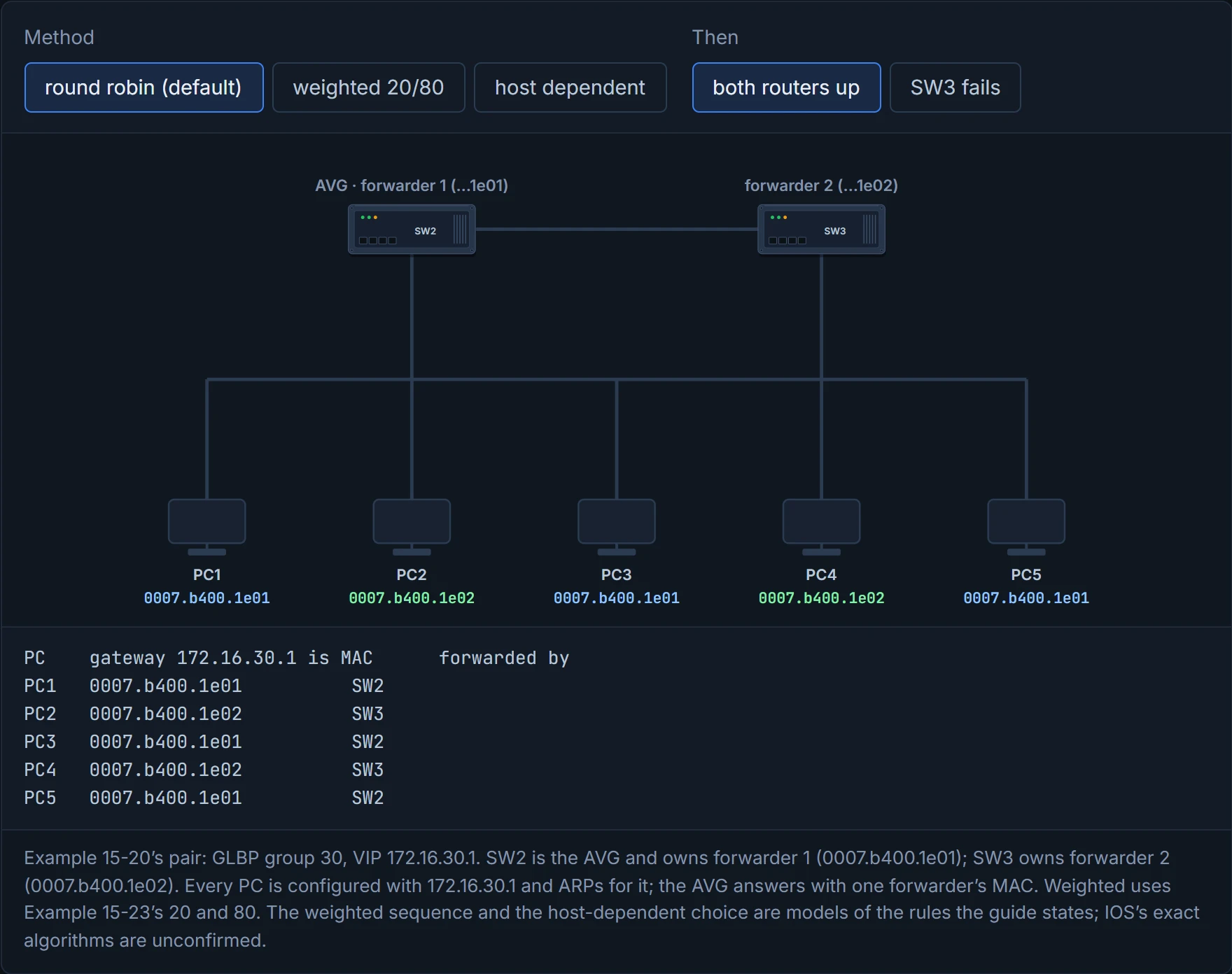
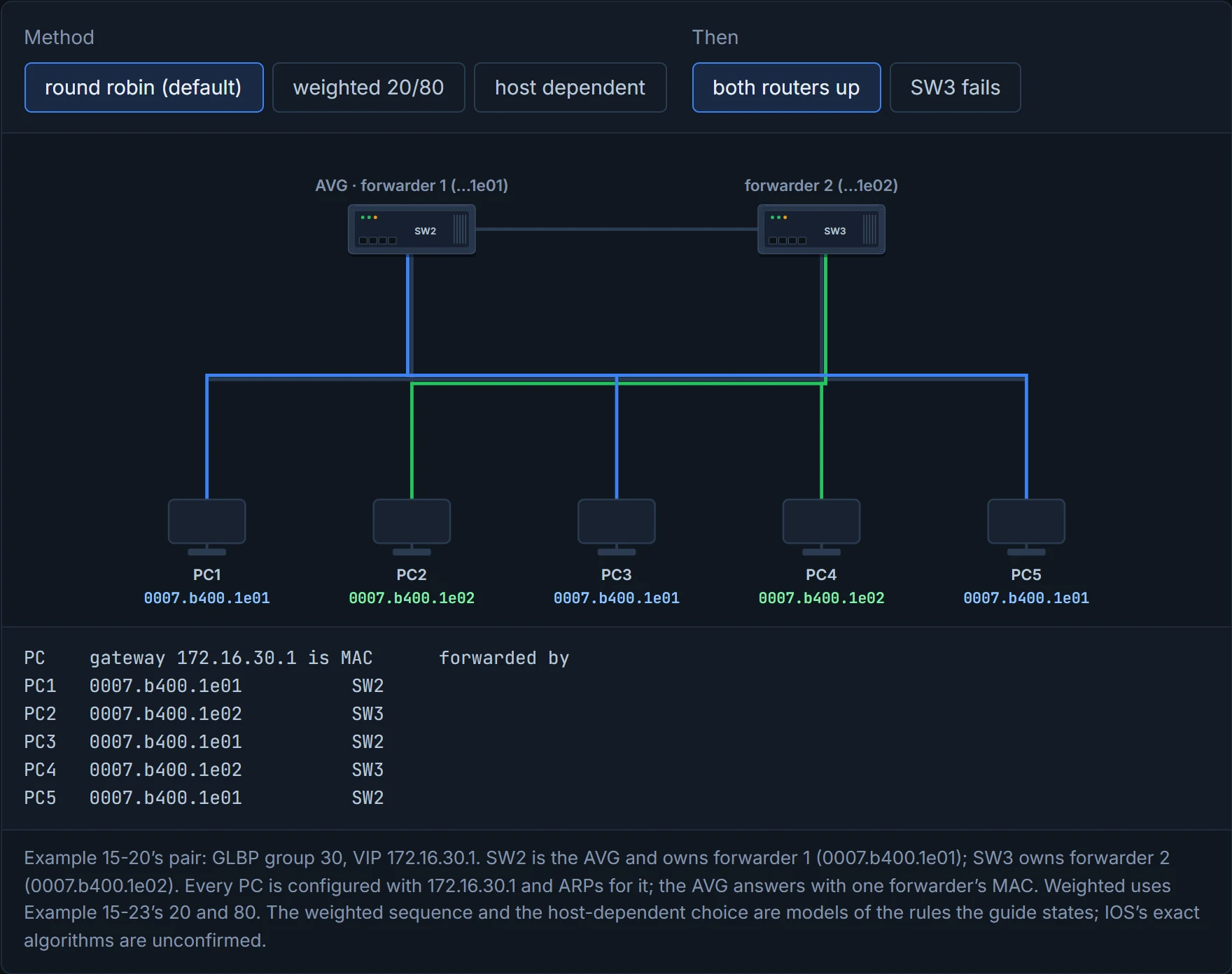
The steps mirror HSRP's: glbp instance-id ip vip-address; optionally glbp instance-id preempt (for the AVG role), glbp instance-id priority priority, glbp instance-id timers {hello-seconds | msec hello-milliseconds} {hold-seconds | msec hold-milliseconds}, and glbp instance-id authentication {text text-password | md5 {key-chain key-chain | key-string key-string}}. Example 15-20 configures glbp 30 ip 172.16.30.1 on SW2 and then SW3 for VLAN 30, each with preempt: SW2 becomes the AVG and forwarder 1 (its log shows the AVG first, then Fwd 1), and SW3 forwarder 2.
Why is SW2 (.2) the AVG, not SW3 (.3), when both are at priority 100 with preempt? Preemption needs a higher priority: "Preemption allows a backup virtual gateway to become the AVG, if the backup virtual gateway is assigned a higher priority than the current AVG". The higher-address rule only decides an election, such as when the AVG fails: "If both devices have the same priority, the backup virtual gateway with the higher IP address would be elected". SW2 was there first, so it keeps the job. It acts kind of like a queue for one desk: turning up second with the same seniority doesn't get you the chair.
show glbp brief has one line for the gateway (Fwd "-") and one per forwarder (Example 15-21):
SW2# show glbp brief
Interface   Grp  Fwd Pri State    Address         Active router   Standby router
Vl30        30   -   100 Active   172.16.30.1     local           172.16.30.3
Vl30        30   1   -   Active   0007.b400.1e01  local           -
Vl30        30   2   -   Listen   0007.b400.1e02  172.16.30.3     -
Read it as: SW2 is the AVG for 172.16.30.1 with SW3 as standby AVG; SW2 forwards for 1e01 and is listening (secondary) for 1e02, which SW3 forwards; SW3's own brief shows the mirror image. The MACs are 0007.b400, then the group (30 = 0x1e), then the forwarder number, for groups up to 255. show glbp adds the hello and hold times (3 and 10), "Redirect time 600 sec, forwarder time-out 14400 sec", preemption for the gateway and for each forwarder ("min delay 30 sec"), the default weighting of 100 and its thresholds, the group members' real MACs, the load-balancing method, and each forwarder's state and owner, "(default)" for the router's own and "(learnt)" for the other's (Example 15-22). Have you ever noticed how a staff rota and the staff handbook answer different questions? The brief view says who's covering what; the long view says the rules.
Continue the lesson
The whole lesson, with its drawings and its questions. The rest of this section and 9 more after it.