
Final Weak-Area Review and Mastery Gate
Steady practice scores can hide misses that repeat. A miss is easier to repair once it has a name, and most fall into one of six kinds, each with its own repair; re-reading everything repairs none of them. So locate each miss, repair it from its lesson with one line of real evidence, then retest it later.
By Arif, founder of Daveth · Updated
The full 10 min walkthrough is in Daveth Pro (Network). See what the plan opens
What this page answers
How do you review weak areas before the CCNA?
Give each practice-exam miss one of six names, such as a concept you cannot explain, then repair it the way that kind needs: revisit its lesson, answer one new question without notes, produce one line of evidence, and retest later. Read it in “Locate, repair, retest”
Fifteen, twice
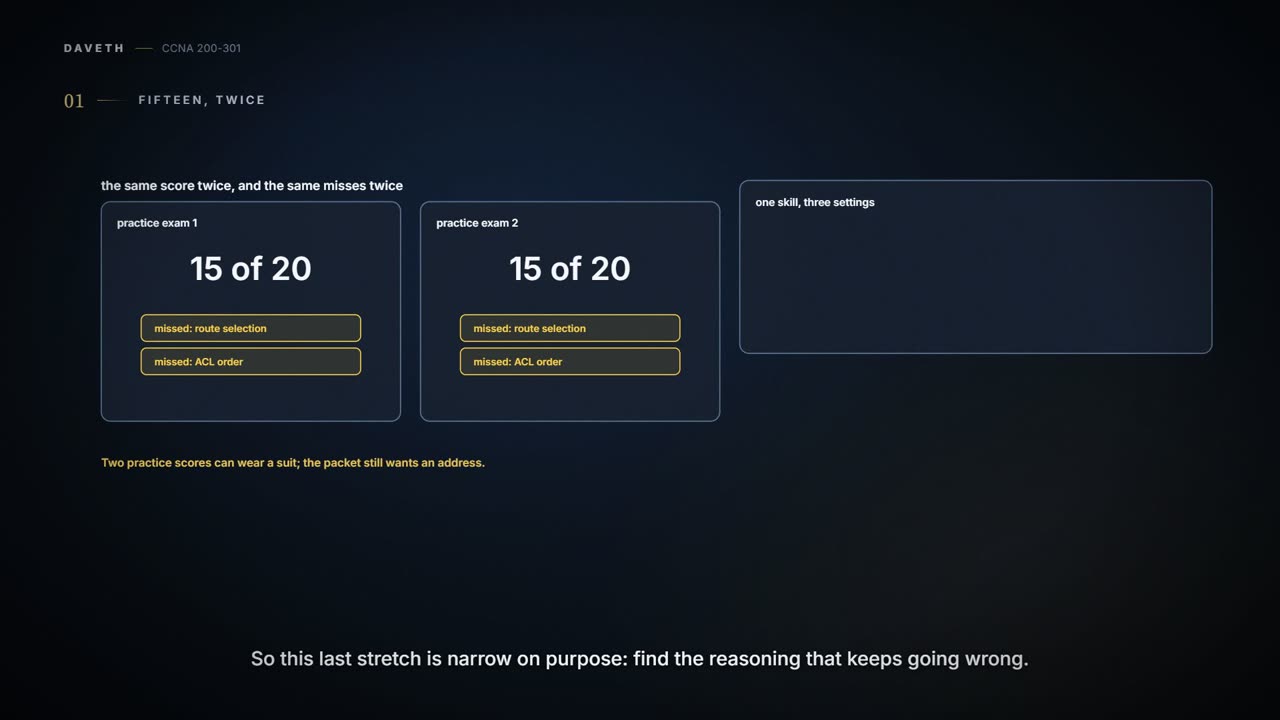
Maya scores 15 of 20 on the first practice exam, and 15 of 20 on the second. The number looks steady. The misses aren't random, though: both sets include a route-selection question and an ACL-order question. Guessing past them twice doesn't make them go away, and the last ticket on this page needs both.
Two practice scores can wear a suit; the packet still wants an address.
So the job here is narrow. Look for wrong reasoning that repeats, then practise that one skill three ways: once in words, once in a lab, and once in a new scenario.
Six kinds of miss
A miss is easier to repair once it has a name. Most misses fall into one of six kinds, and each kind has its own repair. Re-reading everything is a repair for none of them.
| Kind | What it looks like | The repair |
|---|---|---|
| Concept | you can't explain why a VLAN or a route exists | go back to the lesson and retell it in your own words, with a different everyday comparison, and name where that comparison breaks |
| Calculation | a subnet boundary or a wildcard mask comes out wrong | work three fresh addresses, writing the network, broadcast and range; predict first, and check with a calculator only after |
| Command | you know the theory, but can't configure it or verify it | in a lab, type the smallest working configuration, then collect the real show output; keep the command that changes things apart from the one that proves them |
| Interpretation | you see OSPF FULL and assume every route is installed | compare show ip ospf neighbor with show ip route ospf, then check which interfaces and prefixes are advertised |
| Troubleshooting order | you change NAT before checking the client's gateway | redraw the packet's path and test the first boundary where it could fail, before changing anything |
| Confidence | a right answer you guessed | explain why the strongest wrong option is wrong, then solve a new variant |
Locate, repair, retest
- Locate. Take each miss from 12.2, 12.3 and 12.4 and give it one of the six names. Write down the answer you chose and the clue that should have changed it. A label, not a verdict on you.
- Repair. Revisit the lesson the miss comes from, close your notes, answer one new short question, and produce one line of real evidence. Then say what that evidence doesn't prove.
- Retest. After a break, try a variant you haven't seen. If the same miss comes back, change the method: draw it, configure it, or teach it aloud.
| The miss | One line of evidence | What it proves | What it doesn't |
|---|---|---|---|
| A VLAN missing from a trunk's allowed list | show interfaces trunk | which VLANs this end allows, which are active, and which are forwarding and not pruned | that the far end agrees, or that a host in the VLAN answers |
| Longest match and distance | show ip route for one destination | which route this router would use | that the next router has a route onward, or a route back |
| ACL order | show ip access-lists | each line in order, with its match counter | where the ACL is applied or in which direction, or what the implicit deny dropped (it keeps no counter) |
| A DHCP lease | show ip dhcp binding, plus the client's own lease | that an address was leased to that client | that its gateway or DNS server works |
Re-reading the same paragraph isn't a retest. It's basically like re-reading a recipe after the cake sank: every line looks familiar, and nothing about the oven has been tested. (Where it stops: a recipe never changes between readings, while an exam question will; that's why only an unseen variant counts.)
The last ticket
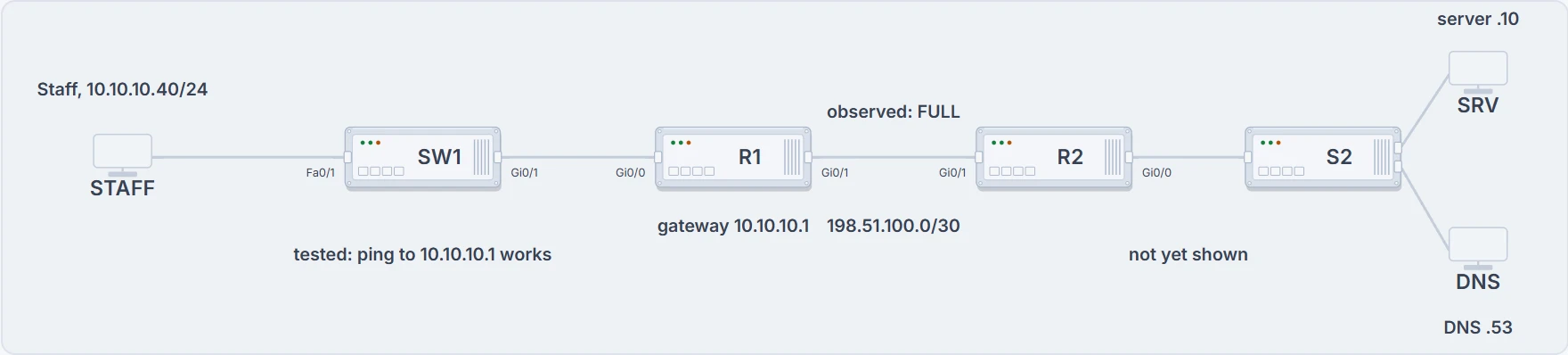
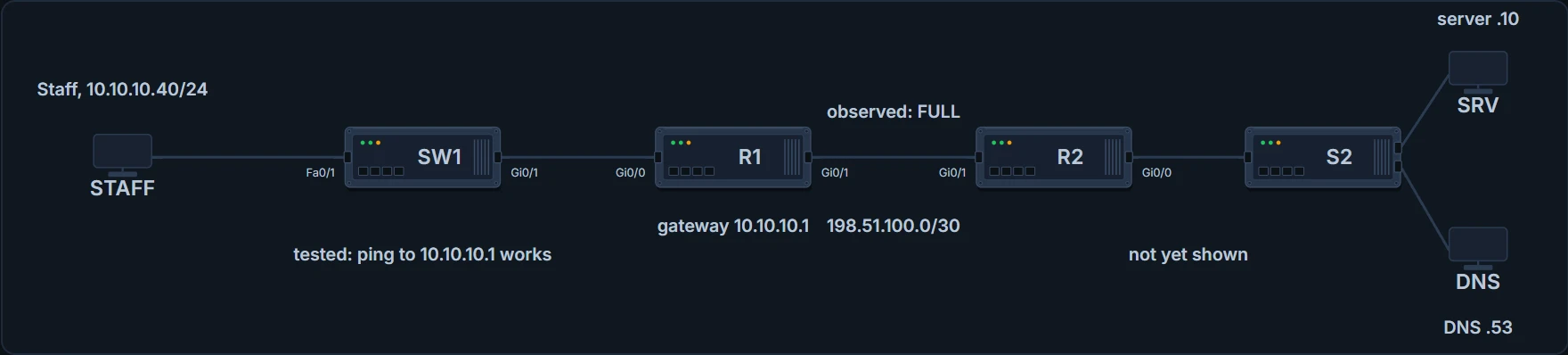
The ticket: the Staff client on SW1, R1 as its gateway, R2 across the /30, and the server and DNS server behind R2. Only three labels are evidence so far: the lease, the tested ping and the observed FULL.
A Staff client has a DHCP lease: 10.10.10.40/24, gateway 10.10.10.1, DNS 203.0.113.53. It pings its gateway, but it can't reach the server at 203.0.113.10. R1 and R2 are FULL. Before you look at any table, pick the three places you'd check first, and write the command or test you'd use at each.
- The client's switch port and VLAN
- R1's route to 203.0.113.10
- R2's route back to 10.10.10.40
- The OSPF adjacency between R1 and R2
- An ACL or policy on the path
- The server and its service
Continue the lesson
The whole lesson, with its drawings and its questions. 3 more sections after the ones above.