
Ansible and Terraform
Configuring devices by hand works for a few; with more people and changes, devices drift from what the team intended. Configuration management tools keep a central file as the truth: they compare each running-config with it and report or fix the difference, and push changes out. A template with variables files gives devices in one role one shared configuration.
By Arif, founder of Daveth · Updated
The full 11 min walkthrough is in Daveth Pro (Network). See what the plan opens
What this page answers
What is configuration drift?
A device that has drifted away from the configuration the team intended, one quiet fix at a time. Configuration monitoring catches it by comparing the running-config with the intended file. Read it in “Drift: when devices stop matching”
What do configuration management tools do?
They keep the intended configuration in central files, compare devices against it and report or enforce, and provision changes. Templates hold what a role shares, with a variables file per device filling the gaps. Read it in “Monitoring, enforcement and provisioning”
What is the difference between Ansible and Terraform?
Ansible configures devices: it is agentless, and a control node pushes changes over SSH or NETCONF, driven by a playbook and an inventory. Terraform builds infrastructure: it shows a plan before it applies anything, and keeps a state file that maps what is declared to what exists. Puppet and Chef use an agent that pulls. Read it in “Three configuration tools, and one for infrastructure”
Drift: when devices stop matching
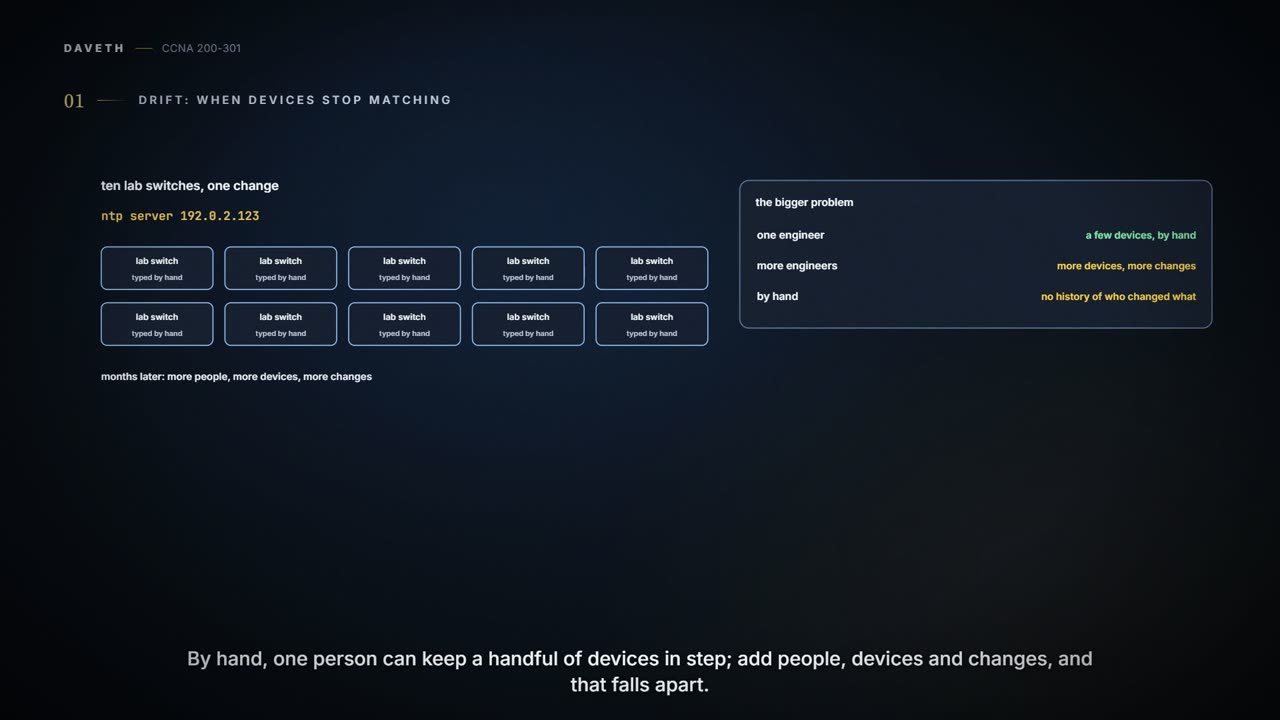
Month ten. Every lab switch needs the same NTP server, 192.0.2.123, and there are ten of them. Typing the same command ten times is ten chances for one typo. But the bigger problem is what happens over months. One engineer can manage a few devices by hand; more engineers, more devices and more changes is where it breaks.
Configuration drift: the device has drifted away from the configuration the team intended, one quiet fix at a time. Configuring a device by hand keeps no history of which lines changed, what was removed, who did it or when. A change ticket may record it, but it sits outside the configuration, it only works if everyone always fills it in, and after many changes it is hard to piece together. A change made directly on a device doesn't reach any central file either, which is why the next step matters.
The first step is to keep every device's configuration in one central place. Then comes a real question: which copy is the truth, the file or the device? Some companies keep the device as the truth and the files as backups. Others make the central file the single source of truth, and manage it with version control software, which records who changed a file, which lines, and when, and can show the differences between any two versions, or bring back an earlier one (which still has to be applied to the device). Here, someone updated one lab switch's file to the new NTP server and reworded a description:
Version control: the file last month, and today
  hostname LAB-SW4
- ntp server 192.0.2.99
+ ntp server 192.0.2.123
  interface GigabitEthernet0/1
-  description uplink
+  description uplink to the lab router
Monitoring, enforcement and provisioning
With a central file as the truth, engineers change the file and a configuration management tool applies it to the device. People can still log in and change a device by hand, though, so drift creeps back. Configuration monitoring catches it: the tool fetches the device's running-config, compares it with the intended file, and either tells the team or, if it is set to enforce, puts the device back.
Configuration provisioning is the other direction: pushing a change out once the file is edited. The tools all offer much the same features:
- apply a change to one device, to all of them, or to a subset chosen by role or other attributes;
- see whether each change was accepted or rejected, and react, including reverting a device if even one command is rejected;
- check a change without making it, and check afterwards that the device matches the intended file;
- decide whether to save the running-config to the startup-config;
- build configurations from templates and variables, and store the steps (what to change, on which devices, when, with checks before and after, and whom to notify) so they run in a change window, with nobody at the keyboard.
One template, many devices
Devices in the same role have nearly identical configurations. A tool splits them in two: a template holds what every device of that role shares, with a named gap in double curly brackets wherever devices differ, and a variables file for each device fills the gaps. The tool combines the two into each device's intended configuration.
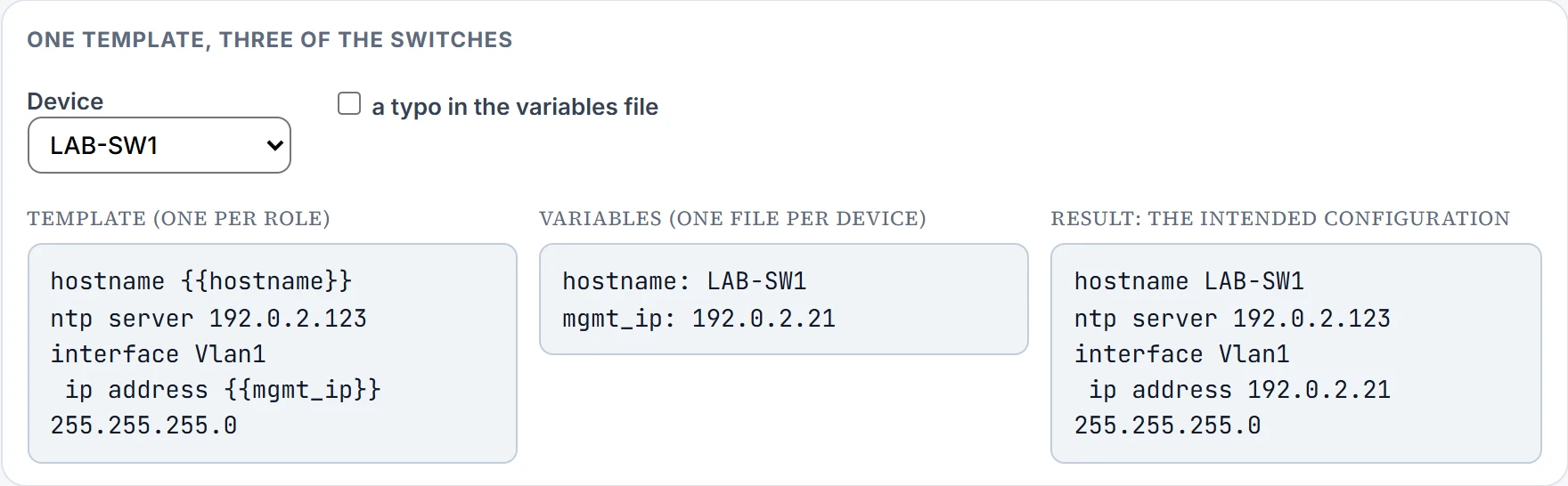
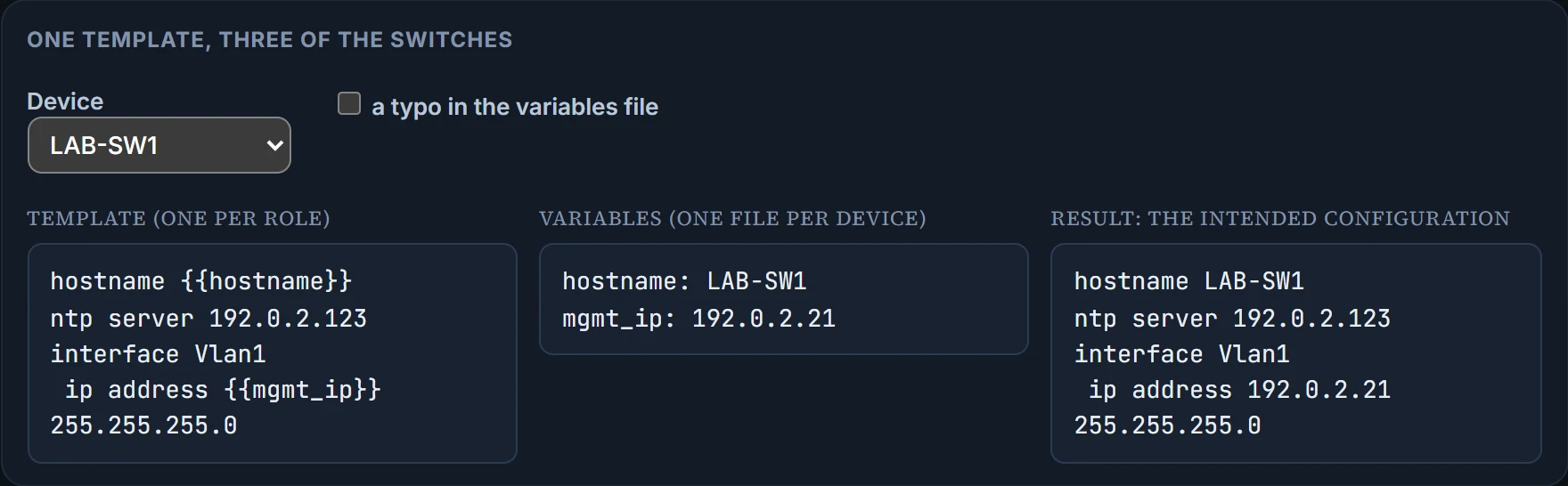
All of them. The template is what every device of the role shares, so a mistake in it reaches every one of them, exactly as a fix would. A typo in one switch's variables file, such as its management address, only reaches that switch. Templates keep each role standard, with no one-off "snowflake" devices; a new device needs only a copied and edited variables file; fixing the template fixes every device that uses it; and the template and the variables keep separate version histories, so a problem can be traced to one or the other.
A recipe helps ten kitchens serve the same soup. It also copies a wrong salt measure to all ten.
Three configuration tools, and one for infrastructure
Each tool keeps its steps in files, often in a simple language defined for that tool, and can call on a full programming language when that runs out. The descriptions below are how the tools are commonly used, not hard limits: they overlap. They differ in how they reach the devices. One is agentless: from a control node it pushes changes over SSH or NETCONF, driven by a playbook (the actions and logic) and an inventory (the devices and their roles), with templates written in a template language and variables in YAML (10.5). Its tasks call modules, each built to reach a stated result, so running a task again usually changes nothing the second time (not every command is like that). Its playbooks are imperative: they list steps and choices. It can monitor as well as provision, using modules that find differences, but it suits provisioning more naturally. Another keeps a manifest on a server, a declarative file that states the end state a device should reach and leaves the steps to the tool (a manifest is built from resources, grouped into classes and then modules, a different use of the word module from the playbook tool's, and templates can generate it); an agent, on the device or on a nearby host that reaches the device over SSH, pulls its configuration from the server. The third also uses agents that pull: its recipes, grouped into cookbooks, act on resources, and a run list, an ordered list, says which recipes a device gets. It usually runs as a server with engineers' workstations, and can also run standalone for learning.
| the agentless, push-based tool | the manifest-based tool | the recipe-based tool | |
|---|---|---|---|
| File that lists what to do | playbook | manifest | recipe, run list |
| Talks to devices with | SSH, NETCONF | HTTP (REST) | HTTP (REST) |
| Agent on the device? | agentless | agent (or an external proxy agent) | agent |
| Push or pull | push | pull | pull |
Continue the lesson
The whole lesson, with its drawings and its questions. The rest of this section and 3 more after it.