
Classification, trust boundary, and marking
With nothing configured, every marking a sender writes travels to the core, because the default trust mode for a port is DSCP. Classification distinguishes traffic by packet fields, and DSCP, precedence and CoS on that list are conclusions somebody upstream reached. Trust means exempt from checking, and trust device ties it to a detected phone. Marking writes down what you concluded instead.
By Arif, founder of Daveth · Updated
The full 5 min walkthrough is in Daveth Pro (Network). See what the plan opens
What this page answers
What is the default QoS trust on a Catalyst 9000 port?
DSCP. The default trust mode for a port is DSCP based, so a marking any sender writes travels on untouched unless a policy changes it. Read it in “How far do you keep checking?”
What is a QoS trust boundary?
The point where markings stop being believed and are re-derived. trust device on a phone port trusts traffic only while the phone is detected by CDP; if not, the trusted setting is disabled. Read it in “Trust on a condition”
What can a QoS policy map mark?
A DSCP or IP precedence value, a CoS value, a QoS group or a WLAN value, as well as setting bandwidth limits and actions for the traffic class. Read it in “Marking is the other half of the same decision”
How far do you keep checking?
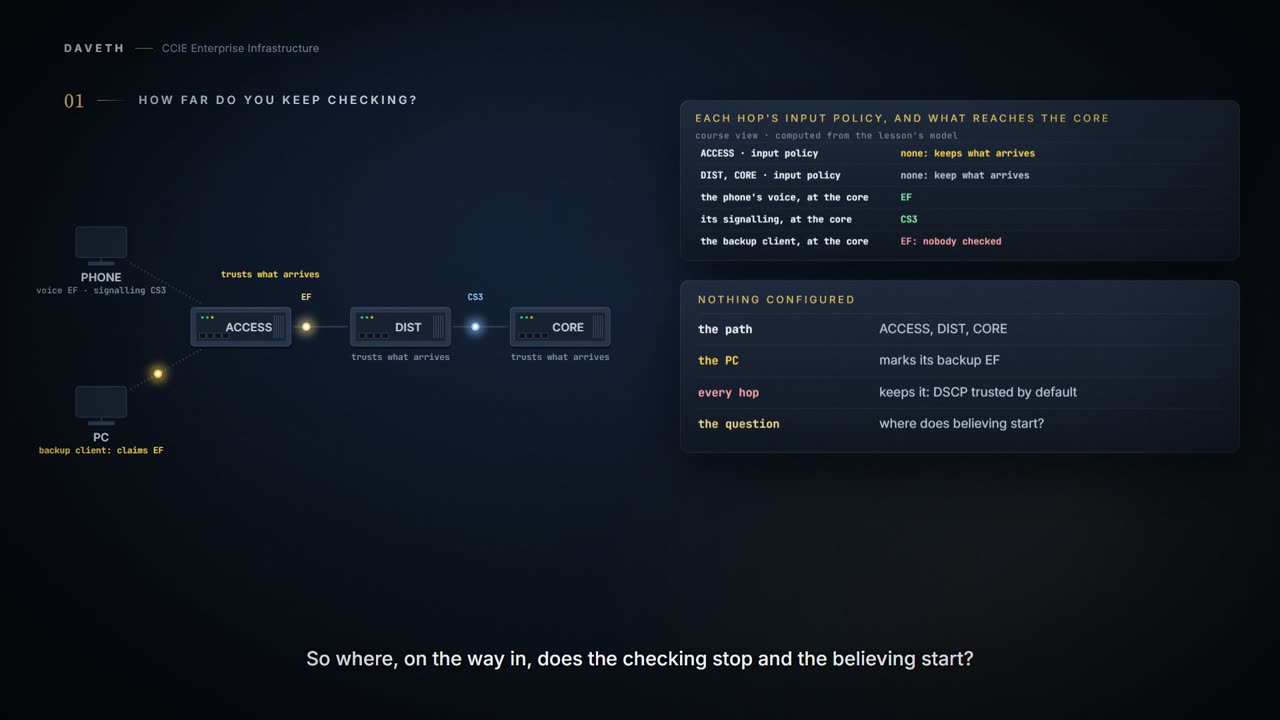
A phone and a PC on one access port, and three hops inward: ACCESS, DIST, CORE. Nothing is configured anywhere, so every marking any sender writes travels to the core untouched.
Computed from the state: every packet, and what it is carrying when it gets there. No command prints it.
traffic                             sent as      at the core  and so
the phone's own voice stream        EF           EF           correct
the phone's call signalling         CS3          CS3          correct
a backup client, marking itself EF  EF           EF           a marking it has no right to
ordinary web traffic, unmarked      default (0)  default (0)  correct
Note that the default trust mode for a port is DSCP based.
So the backup client's row isn't a fault on any device. A backup client has decided its traffic is expedited forwarding, and three devices in a row have kept what it wrote, because that's what a port with no policy does. Why would any of them do otherwise? Nobody told them to.
So the question is where, on the way in, the checking stops and the believing starts. Outside that line you run multi-field classification because you cannot believe the marking. Inside it you run behaviour aggregate classification because you can.
What classification is, and what the menu gives away
Classification is the process of distinguishing one kind of traffic from another by examining the fields in the packet.
The fields available are the classifier's menu: IP standard and extended ACLs, Layer 2 MAC ACLs, IPv6 ACLs, DSCP, IP precedence, CoS, VLAN ID, QoS group.
Look at what is on that list. DSCP, IP precedence, CoS sit alongside addresses and ports, and those three are not properties of the traffic. They are conclusions somebody upstream already reached.
Which is the whole reason this lesson exists. A laptop can set the field on its own backup traffic as easily as a phone sets it on a call, and the packet arrives looking equally confident either way. Matching on a marking means accepting an upstream device's account of itself, and the only question that matters is whether you have a reason to.
The architecture has names for the two cases, and they are definitions rather than opinions.
Behavior Aggregate (BA) classifier: a classifier that selects packets based only on the contents of the DS field. Multi-Field (MF) Classifier: a multi-field (MF) classifier which selects packets based on the content of some arbitrary number of header fields; typically some combination of source address, destination address, DS field, protocol ID, source port and destination port.
So matching on a marking is behaviour aggregate classification, and matching on an ACL is multi-field. Same command, and the difference is only which field you named.
And be clear what you have and have not done at this point: you have sorted the traffic, not scheduled it. Classification decides which class a packet belongs to. What happens to that class, and in which queue, is a separate configuration and a separate lesson. Two jobs, and getting the first one right proves nothing about the second.
So what do you configure on ACCESS to believe the phone? Nothing. ACCESS had no policy in the first reading on this page, and the backup client's EF went straight through it. That is what a default trust mode that is DSCP based means: the port is already believing every sender on it. It is tempting to write the believing kind down anyway, as a class that matches EF and does nothing, so the configuration shows the decision. The 17.9 QoS chapter that states the default rules that out, in its restrictions for wired targets:
Class-maps with empty actions are not supported.
So where does believing live? In the absence of a policy that sets. On a Catalyst 9300 you configure the checking; the believing is what every port does until you do. That is worth saying out loud because classification sounds like a single activity, and half of it is an act of faith that needs no command at all.
Trust on a condition
You met this word in 4.2, and it means the same thing here: trust means exempt from checking. A trusted marking is one the device won't re-derive.
By using the trust device interface configuration command, you configure the device port to which the telephone is connected to trust the traffic received on that port.
The guide makes that trust conditional with CDP. Its trusted boundary feature is the mechanism: If the telephone is not detected, the trusted boundary feature disables the trusted setting on the device port. The configuration the guide prints for a phone port is AutoQoS's, so that's the one this page builds.
AutoQoS goes on the phone port:
ACCESS# configure terminal
ACCESS(config)# interface GigabitEthernet1/0/1
ACCESS(config-if)# auto qos voip cisco-phone
ACCESS(config-if)# end
auto qos voip cisco-phone : If the port is connected to a Cisco IP Phone, the QoS labels of incoming packets are only trusted (conditional trust through CDP) when the telephone is detected.
So which input policy did AutoQoS put on the port, and what does each class match?
Computed from the state: show policy-map interface on ACCESS, in the layout the 17.9 samples print. This course's output; no switch printed it.
ACCESS# show policy-map interface
 GigabitEthernet1/0/1

  Service-policy input: AutoQos-4.0-CiscoPhone-Input-Policy
! This is the configuration guide's sample. The 17.9 Command Reference's sample of the same command names Voip-Data-CiscoPhone-Class matching cos 5 and Voip-Signal-CiscoPhone-Class matching cos 3.

    Class-map: AutoQos-4.0-Voip-Data-Class (match-any)
      Match: ip dscp ef (46)
      ! The configuration guide's sample reads the DSCP field here.
      QoS Set
        ip dscp ef
      police:
! The policer lines under each police: are not drawn. Policing is 4.4.e.

    Class-map: AutoQos-4.0-Voip-Signal-Class (match-any)
      Match: ip dscp cs3 (24)
      QoS Set
        ip dscp cs3
      police:

    Class-map: AutoQos-4.0-Default-Class (match-any)
      Match: access-group name AutoQos-4.0-Acl-Default
      QoS Set
        dscp default
      police:

    Class-map: class-default (match-any)
      Match: any

  Service-policy output: AutoQos-4.0-Output-Policy
  ! Its queue classes are not drawn. Queueing is 4.4.f.
That is the configuration guide's sample, class for class: AutoQos-4.0-CiscoPhone-Input-Policy, EF matched and set to EF, CS3 matched and set to CS3, a class on an ACL set to default, and class-default. The ACL's entries aren't printed in either sample, so this page doesn't claim what matches it.
Now the 17.9 Command Reference's sample of the same command, its input classes with the packet counters and the policer lines (4.4.e) left out:
From elsewhere: the 17.9 Command Reference sample, input classes only. The values in it come from elsewhere, not from this scenario.
  Service-policy input: AutoQos-4.0-CiscoPhone-Input-Policy
    Class-map: AutoQos-4.0-Voip-Data-CiscoPhone-Class (match-any)
      Match: cos  5
      QoS Set
        dscp ef
    Class-map: AutoQos-4.0-Voip-Signal-CiscoPhone-Class (match-any)
      Match: cos  3
      QoS Set
        dscp cs3
    Class-map: AutoQos-4.0-Default-Class (match-any)
      Match: access-group name AutoQos-4.0-Acl-Default
      QoS Set
        dscp default
    Class-map: class-default (match-any)
      Match: any
Which one is right? These two pages can't tell you. Same command, same release, same policy name, and the voice and signalling classes read different fields: DSCP in one, CoS in the other.
And what does the backup client get? That depends on the answer. A class on the DSCP field would match EF from anyone on the port, the PC included. A class on CoS reads a field this model doesn't carry. So the model decides nothing on this port except what both samples agree on, and the reading below says so rather than picking one. Establish which one your switch prints before designing around it.
Computed from the state: the backup client, with the phone on the port. No command prints it.
a backup client, marking itself EF, sent marked EF, and it is not entitled to that
at        arrived      left         matched         what it did
ACCESS    EF           not decided  –               not decided: samples disagree
DIST      not decided  not decided  –               no policy: kept
CORE      not decided  not decided  –               no policy: kept

the boundary for this packet is not decided: the two AutoQoS samples disagree
Then the phone is unplugged and a laptop goes in. What does the port do now?
When using this command in an AutoQoS configuration, if the connected peer device is not a corresponding device (defined as a device matching your trust policy), both CoS and DSCP values are set to 0 and any input policy will not take effect.
Computed from the state: the phone's voice, after the swap. No command prints it.
the phone's own voice stream, sent marked EF
at        arrived      left         matched         what it did
ACCESS    EF           default (0)  –               zeroed: no phone detected
DIST      default (0)  default (0)  –               no policy: kept
CORE      default (0)  default (0)  –               no policy: kept

the real trust boundary for this packet is ACCESS
Two consequences. The markings being zeroed is reasonable: an unverified device doesn't get to choose its own treatment. But any input policy will not take effect means the mismatch doesn't leave a stricter posture behind. It stands the input policy down.
So what is that port doing? It isn't running a stricter QoS policy. It's running none, and everything leaves at 0. If your design depended on that input policy re-marking traffic, it isn't happening. And keep the condition: the sentence is about an AutoQoS configuration, which is what this port has.
Marking is the other half of the same decision
Having decided not to believe what arrived, you have to write down what you concluded. That is all marking is, and it is why these are one activity and two blueprint ids.
A policy map specifies which traffic class to act on. Actions can include the following: Setting a specific DSCP or IP precedence value in the traffic class; Setting a CoS value in the traffic class; Setting a QoS group; Setting a wireless LAN (WLAN) value in the traffic class; Specifying the traffic bandwidth limitations and the action to take when the traffic is out of profile.
AutoQoS comes off the port, the phone goes back, and ACCESS gets a policy that decides for itself. The two ACLs' entries aren't drawn: which ports they match is the design's choice, not this lesson's subject.
ACCESS# configure terminal
ACCESS(config)# class-map match-all VOICE-BEARER
ACCESS(config-cmap)# match access-group name RTP-RANGE
ACCESS(config-cmap)# exit
ACCESS(config)# class-map match-all VOICE-SIGNAL
ACCESS(config-cmap)# match access-group name SIGNALLING
ACCESS(config-cmap)# exit
ACCESS(config)# policy-map ACCESS-EDGE
ACCESS(config-pmap)# class VOICE-BEARER
ACCESS(config-pmap-c)# set dscp ef
ACCESS(config-pmap-c)# class VOICE-SIGNAL
ACCESS(config-pmap-c)# set dscp cs3
ACCESS(config-pmap-c)# class class-default
ACCESS(config-pmap-c)# set dscp default
ACCESS(config-pmap-c)# exit
ACCESS(config-pmap)# exit
ACCESS(config)# interface GigabitEthernet1/0/1
ACCESS(config-if)# service-policy input ACCESS-EDGE
ACCESS(config-if)# end
Computed from the state: the phone's voice, hop by hop. No command prints it.
the phone's own voice stream, sent marked EF
at        arrived      left         matched         what it did
ACCESS    EF           EF           VOICE-BEARER    set
DIST      EF           EF           –               no policy: kept
CORE      EF           EF           –               no policy: kept

the real trust boundary for this packet is ACCESS
That policy is the trust boundary made concrete. An ACL decides what the traffic is; a set writes the conclusion into the packet. The reading above puts the boundary at ACCESS, which is where the design says it should be, and it is derived from what the devices did rather than from the design.
Computed from the state: the backup client, which is not entitled to anything. No command prints it.
a backup client, marking itself EF, sent marked EF, and it is not entitled to that
at        arrived      left         matched         what it did
ACCESS    EF           default (0)  class-default   set
DIST      default (0)  default (0)  –               no policy: kept
CORE      default (0)  default (0)  –               no policy: kept

the real trust boundary for this packet is ACCESS
The PC's EF is gone. Not because anything judged the PC dishonest, but because the access edge re-derived every marking on that port and the backup traffic did not match a class that deserved one. class-default is doing that work, and this is the part worth being precise about. class-default is in every policy whether you write it or not; the set dscp default under it is not. An unwritten class-default matches everything nothing else did and then leaves it exactly as it arrived. If you want the markings you did not authorise taken away, you have to say so.
Continue the lesson
The whole lesson, with its drawings and its questions. 6 more sections after the ones above.