
End-to-end Layer 3 QoS using MQC
Every QoS tool uses one structure, the MQC: a class map names the traffic, a policy map decides what happens to it, and service-policy says where. match-any is a logical OR of its match statements and match-all a logical AND. Traffic that matches no class falls into class-default, a class you did not write and cannot see. A policy does nothing until attached.
By Arif, founder of Daveth · Updated
The full 4 min walkthrough is in Daveth Pro (Network). See what the plan opens
What this page answers
What is the difference between match-any and match-all?
match-any performs a logical OR of the match statements, so one must match; match-all performs a logical AND, so all must match. Read it in “Step one: naming the traffic”
What happens to traffic that matches no QoS class?
It is treated as default traffic: every policy map has a system-defined class-default for packets that match none of the user-defined classes. Read it in “Where the video lands”
How do you apply a QoS policy on a Catalyst switch?
With service-policy input or output name, on a physical port or an SVI. A policy map does nothing until it is attached. Read it in “Step three: attaching it”
The same three commands every time
Marking, policing, shaping, queuing, congestion avoidance, hierarchical policy: six tools, one structure. What is that structure?
The MQC is a CLI structure that allows you to create traffic policies and attach these policies to interfaces. A traffic policy contains a traffic class and one or more QoS features.
Three decisions, kept apart: what this traffic is, what happens to it, and where that applies. Change one without touching the other two. The first two have names in the guide:
Classification: Classification is the process of distinguishing one type of traffic from another based upon access control lists (ACLs), Differentiated Services Code Point (DSCP), Class of Service (CoS), and other factors. Policing is used to impose a maximum rate on a traffic class. If the rate is exceeded, then a specific action is taken as soon as the event occurs.
This lesson comes second in this course and last in the blueprint, because every remaining topic in 4.4 is one middle step of the structure below.
Notice how little that structure says about QoS itself: it names traffic, it names actions, and it names a target. Which of the three is your next change?
Step one: naming the traffic
What does a class map do?
A class map is a mechanism that you use to name a specific traffic flow (or class) and isolate it from all other traffic. The class map defines the criteria used to match against a specific traffic flow to further classify it.
And what does the keyword after its name decide?
class-map class-map name { match-any | match-all} Perform a logical-OR of the matching statements under this class map. One or more criteria must be matched. Performs a logical-AND of the matching statements under this class map. All criterias must match.
This course's configuration: three class maps on EDGE-1
EDGE-1# configure terminal
EDGE-1(config)# class-map match-any VOICE
EDGE-1(config-cmap)# match dscp ef
EDGE-1(config-cmap)# exit
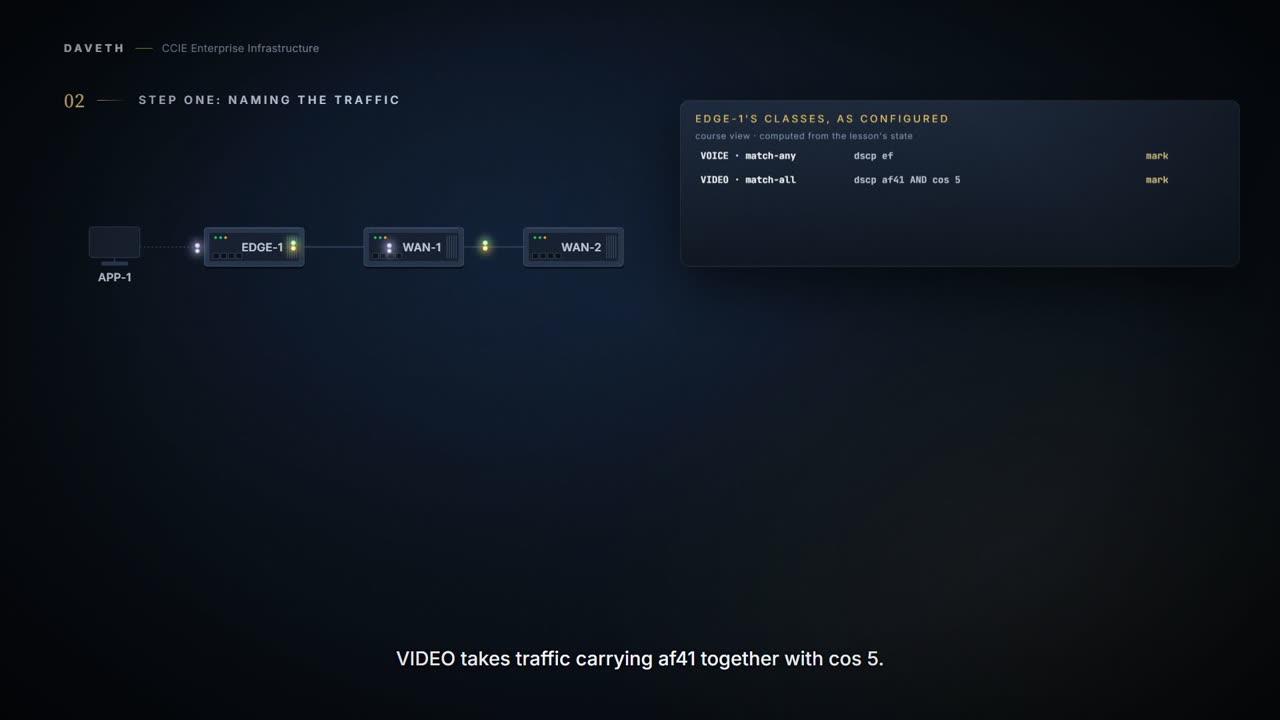
EDGE-1(config)# class-map match-all VIDEO
EDGE-1(config-cmap)# match dscp af41
EDGE-1(config-cmap)# match cos 5
EDGE-1(config-cmap)# exit
EDGE-1(config)# class-map match-any BULK
EDGE-1(config-cmap)# match access-group name BULK-SERVERS
EDGE-1(config-cmap)# end
So VIDEO above matches only traffic carrying both of its criteria; written match-any, it would match either. That is one word between a class that catches almost everything and a class that catches almost nothing, and whether cos 5 is the right second criterion for this network's video is a question this page comes back to.
Two limits on writing several criteria, and they are worth reading carefully. The command reference:
If you enter the match-any keyword, you can only use it to specify an extended named access control list (ACL) with the match access-group class-map configuration command. To define packet classification on a physical-port basis, only one match command per class map is supported.
And the configuration guide, describing a class with several match statements:
When there are multiple match statements in a class, the traffic counter is cumulative for all the match statements in the class.
Those two are hard to hold at once, and this course does not resolve them: the command reference restricts physical-port classification to one match command per class map, while the guide describes counting across several. On a target you have not tested, write one criterion per class map and split the rest into their own classes, which is also what the other restriction requires:
You cannot configure IPv4 and IPv6 classification criteria simultaneously in the same class-map. However, they can be configured in different class-maps in the same policy.
And read literally, the first of those sentences rules out VOICE above: match-any with a DSCP criterion, not an access list. Yet the guide's own hierarchical sample, further down this page, writes class-map match-any PACKET_LENGTH_1 with match packet length. This course does not resolve that either. VOICE has one criterion, so match-all would say the same thing.
Step two: deciding what happens
What does a policy map do?
A policy map specifies which traffic class to act on.
The guide lists what those actions can include. Two of them are this page's:
Setting a specific DSCP or IP precedence value in the traffic class Specifying the traffic bandwidth limitations and the action to take when the traffic is out of profile
This course's configuration: WAN-EDGE on EDGE-1
EDGE-1# configure terminal
EDGE-1(config)# policy-map WAN-EDGE
EDGE-1(config-pmap)# class VOICE
EDGE-1(config-pmap-c)# set dscp ef
EDGE-1(config-pmap-c)# class VIDEO
EDGE-1(config-pmap-c)# set dscp af41
EDGE-1(config-pmap-c)# class BULK
EDGE-1(config-pmap-c)# police 8000 conform-action transmit exceed-action drop
EDGE-1(config-pmap-c-police)# end
Every remaining lesson in this domain expands one of those lines. Here is a policy readback from the guide, with three classes and three different middles:
Not from this scenario: a published sample: show policy-map
Policy Map priority-1
    Class prio1
      priority level 1
     police rate percent 10
       conform-action transmit
       exceed-action drop
    Class prio2
      priority level 2
     police rate percent 5
       conform-action transmit
       exceed-action drop
    Class new
      bandwidth 20 (%)
Look at what changes between the classes and what does not: the class line and the action lines change; the structure does not. And when the actions are many set commands, there is a way to write them once:
This feature enables combining multiple set commands into a single table, which indicates the method to perform the mapping. This table can be referenced in multiple policies, or multiple times in the same policy. The device supports a total of eight table maps for policer exceed markdown and eight table maps for policer violate markdown.
Which of your policies would be shorter written that way?
This course's configuration: a table map, from the guide's example
EDGE-1# configure terminal
EDGE-1(config)# table-map table01
EDGE-1(config-tablemap)# map from 0 to 2
EDGE-1(config-tablemap)# exit
EDGE-1(config)# policy-map table-policy
EDGE-1(config-pmap)# class class-default
EDGE-1(config-pmap-c)# set cos dscp table table01
EDGE-1(config-pmap-c)# end
Where the video lands
EDGE-1 now has three classes and a policy. The video stream carries af41 with cos 4, and VIDEO asks for af41 and cos 5. Predict it:
Unclassified traffic (traffic that does not meet the match criteria specified in the traffic classes) is treated as default traffic. Every policy map has a default class, which is a system-defined class to match the packets that do not match any of the user-defined classes.
Forwarded, in a class you did not write and cannot see in your configuration. One more thing arrives there without being classified:
Starting with Cisco IOS XE Amsterdam 17.3.6, all fragmented traffic is assigned to the default class (class class-default).
Look back at WAN-EDGE: class-default is not in it, and it is carrying traffic anyway.
Step three: attaching it
A policy map on its own does nothing.
Where can it go, and what is not supported?
Before a policy map can be effective, you must attach it to a port. A target is an entity where a policy is applied. A wired target can be either a port or VLAN.
service-policy { input | output} policy-map-name Apply the specified policy map to the input of a physical port or an SVI. Apply the specified policy map to the output of a physical port or an SVI.
This course's configuration: WAN-EDGE attached inbound on EDGE-1 Gi1/0/1
EDGE-1# configure terminal
EDGE-1(config)# interface GigabitEthernet1/0/1
EDGE-1(config-if)# service-policy input WAN-EDGE
EDGE-1(config-if)# end
Two rules are about how many:
Only one policy map per ingress port is supported. You can apply the same policy map to multiple physical ports.
And three configurations that read correctly are not supported:
A QoS policy cannot be attached to any EtherChannel interface. Empty classes are not supported. Class-maps with empty actions are not supported.
Notice what the EtherChannel restriction does to a design. If EDGE-1's uplink is bundled, the policy cannot live on the bundle, and the page's walk shows that refusal rather than routing around it.
Continue the lesson
The whole lesson, with its drawings and its questions. 6 more sections after the ones above.