
Congestion management and avoidance
A full queue forces two decisions: who transmits next, scheduling, and whose packets are dropped, drop policy. bandwidth percent sets a minimum, a floor and not a cap, and unused bandwidth is shared. A Catalyst port supports at most 8 queuing classes, two priority queues, and WRED on at most four. Weighted tail drop is on by default; WRED drops early so senders do not back off together.
By Arif, founder of Daveth · Updated
The full 5 min walkthrough is in Daveth Pro (Network). See what the plan opens
What this page answers
Is bandwidth percent a minimum or a maximum?
A minimum: a floor, not a cap. A queue can use more when other queues do not use their share, and leftover bandwidth is divided equally among the bandwidth queues. Read it in “Management: who goes first”
How many queues does a Catalyst 9000 port support?
A maximum of 8 queuing classes per port, of which two can be priority queues and at most four can have WRED. Read it in “Eight queues”
What is the default congestion avoidance on Catalyst 9000?
Weighted Tail Drop, enabled by default on all queues: arriving packets are dropped once a queue reaches its threshold. queue-limit sets the thresholds per DSCP or CoS. Read it in “Avoidance: whose packets go”
The queue is full. What did you lose?
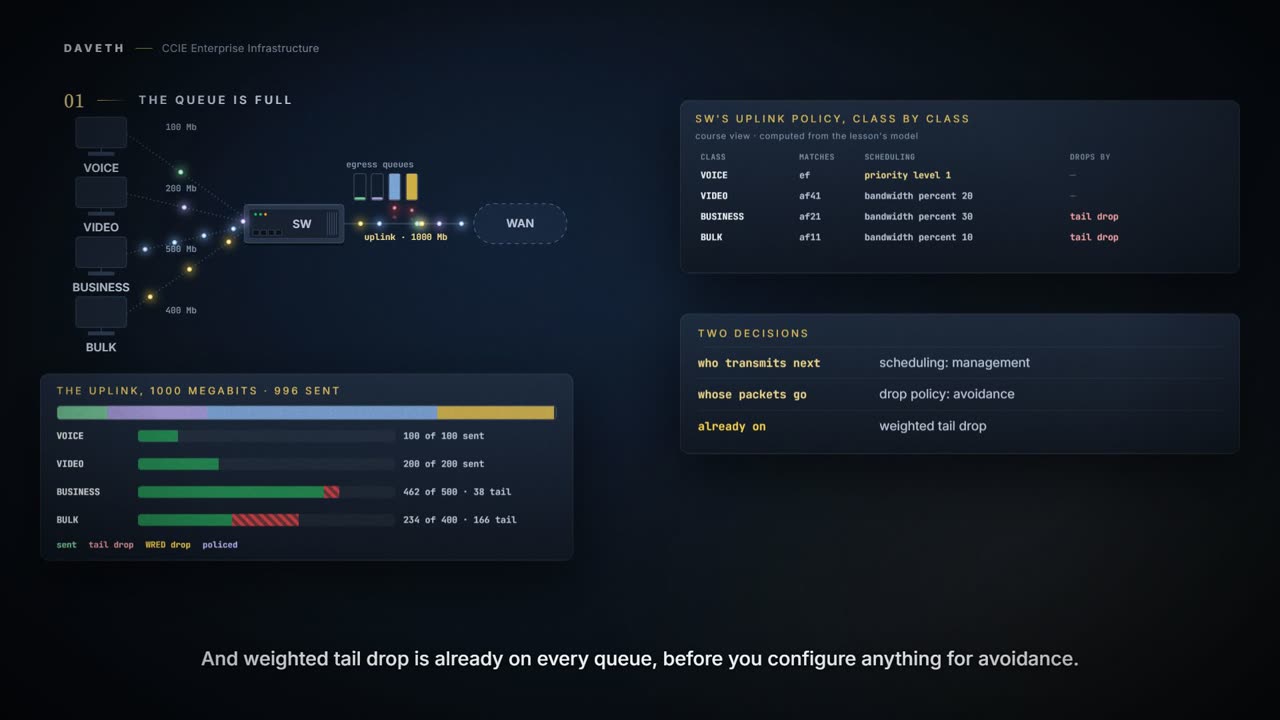
Four classes of traffic, more offered than a 1000 megabit uplink can carry, and a queue on the outbound interface that fills.
That forces two different decisions. Who transmits next? That's congestion management: scheduling. Whose packets are dropped? That's congestion avoidance: drop policy.
And on this switch the second one already has an answer before you configure anything:
Weighted Tail Drop (WTD) is enabled by default on all the queues.
A design that answers only the first question is half a design. Both end in loss, which is why they get confused. By the end of this page you'll read the output that tells them apart.
Management: who goes first
bandwidth percent allocates a minimum to a class: a floor, not a cap.
The total sum cannot exceed 100 percent and in case the total sum is less than 100 percent, then the rest of the bandwidth is divided equally among all bandwidth queues. A queue can oversubscribe bandwidth in case the other queues do not utilize the entire port bandwidth.
class     control                       offered  served  share
VOICE     priority level 1              100      100     10%
VIDEO     bandwidth percent 20          200      200     20%
BUSINESS  bandwidth percent 30          500      462.3   46.2%
BULK      bandwidth percent 10          400      233.7   23.4%
Read the share column. The percents here add up to 60, so the other 40 is divided equally among the three bandwidth classes. VIDEO needs less than that and sends everything; BUSINESS and BULK take what VIDEO leaves. They still lose traffic: a minimum isn't a promise that nothing is dropped. The link total is 99.6 percent, not 100: more on that below.
How spare capacity is split between the classes still waiting, and that the minimums are taken out of what the priority classes leave, is this course's arithmetic. Cisco states the rules above, not a formula.
State 1 Priority is not a bigger guarantee
priority puts a class ahead of the others rather than giving it a share. What does that do to the classes behind it?
Available values for level-value are 1 and 2. Level 1 is a higher priority than Level 2.
The lower number is the higher priority. Voice at level 2 and video at level 1 is exactly backwards and still configures cleanly.
Now move VIDEO to priority level 2. The command reference says bandwidth and priority can't be used in the same class, so VIDEO's minimum comes off first:
CAT9300# configure terminal
CAT9300(config)# policy-map UPLINK-QUEUING
CAT9300(config-pmap)# class VIDEO
CAT9300(config-pmap-c)# no bandwidth percent 20
CAT9300(config-pmap-c)# priority level 2
CAT9300(config-pmap-c)# end
class     control                       offered  served  share
VOICE     priority level 1              100      100     10%
VIDEO     priority level 2              600      600     60%
BUSINESS  bandwidth percent 30          500      177.6   17.8%
BULK      bandwidth percent 10          400      118.4   11.8%
VIDEO also starts offering 600 megabits. It's served straight after VOICE, and the bandwidth classes are left with 296 megabits between them.
The switch supports configuration of policing rate on priority queue.
The guide's priority queue policer examples give each policer both actions, so this one does too:
CAT9300# configure terminal
CAT9300(config)# policy-map UPLINK-QUEUING
CAT9300(config-pmap)# class VIDEO
CAT9300(config-pmap-c)# police rate percent 20
CAT9300(config-pmap-c-police)# conform-action transmit
CAT9300(config-pmap-c-police)# exceed-action drop
CAT9300(config-pmap-c-police)# end
class     control                       offered  served  share
VOICE     priority level 1              100      100     10%
VIDEO     priority level 2, police 20%  600      200     20%
BUSINESS  bandwidth percent 30          500      417.6   41.8%
BULK      bandwidth percent 10          400      278.4   27.8%
VIDEO is still served first, but only up to 200 megabits; the policer drops the rest, and the bandwidth classes get their share back. A policer is what stops a priority class taking the interface.
There can only be 99.6 percent line rate traffic with priority queue configured, ensuring a latency of less than 20 microseconds.
Eight queues
A maximum of 8 queuing classes are supported on the device port
Of those eight, two can be priority queues, and WRED can be enabled on at most four. So a 12-class marking scheme that configured beautifully as a marking policy can't be expressed as a queuing policy at all.
classes in the marking scheme         12
queuing classes this port supports    8
of which priority queues              2
of which may have WRED                4
queuing classes configured here       4

so the scheme is                      not configurable as written
This is where a whiteboard scheme meets the hardware. 12 classes into 8 queues doesn't go, and it's cheaper to find that here than in a change window.
Avoidance: whose packets go
Weighted tail drop is the default: when a queue reaches its threshold, arriving packets are dropped. queue-limit sets those WTD thresholds, as percentages per DSCP or CoS value.
State 2 There is still room in the queue
Take BULK's queue as it is now, with nothing configured for avoidance: filling, but not yet full.
Accepting everything until the queue is full produces a specific failure: when it fills, everything arriving is dropped at once. Every sender in that queue loses traffic together, backs off together, and ramps up together.
Weighted random early detection (WRED) is a mechanism to avoid congestion in networks. WRED reduces the chances of tail drop by selectively dropping packets when the output interface begins to show signs of congestion, thus avoiding large number of packet drops at once. WRED drops some packets early rather than waiting until the queue is full. If packets are not dropped using WRED, they are tail-dropped.
The goal isn't to drop fewer packets. It's to avoid dropping a large number at once.
CAT9300# configure terminal
CAT9300(config)# policy-map UPLINK-QUEUING
CAT9300(config-pmap)# class BULK
CAT9300(config-pmap-c)# random-detect dscp-based
CAT9300(config-pmap-c)# random-detect dscp af11 percent 10 20
CAT9300(config-pmap-c)# end
Three rules decide where WRED can go on this switch:
Ensure that you configure bandwidth or shape in the policy-map along with WRED. WRED for priority traffic is not supported. WRED and queue limit are not supported for the same policy.
That's why it matters that BULK already has bandwidth percent 10 beside its WRED, and why neither priority class can have it. The thresholds are this page's numbers; on this platform they're percentages only.
Continue the lesson
The whole lesson, with its drawings and its questions. 5 more sections after the ones above.