
Policing and shaping
Policing and shaping both measure traffic against a rate with a token bucket, and both know when it goes over. They differ in what happens next. A policer acts immediately: the rate is enforced exactly, no memory is used, and applications see drops. A shaper buffers packets and sends them later, so excess becomes delay, which suits a burst. Sustained demand is another matter.
By Arif, founder of Daveth · Updated
The full 4 min walkthrough is in Daveth Pro (Network). See what the plan opens
What this page answers
What is the difference between policing and shaping?
When tokens run out, a policer acts immediately, usually dropping, so excess traffic becomes loss. A shaper buffers packets and sends them when tokens return, so excess becomes delay. Read it in “The sentence that separates them”
When should you use shaping instead of policing?
When traffic arrives in bursts and the downstream needs a steady rate: a shaper holds the burst and sends it later, so it costs delay rather than loss. A policer would turn the same burst into drops. Read it in “A burst, which is what a shaper is for”
Which cost would you rather pay: loss, or delay?
Two tools. Both measure traffic against a rate. Both know, at any moment, whether you are inside the limit or over it.
They differ in exactly one respect, what they do at the moment you go over, and every practical consequence follows from that one difference.
State 1 A ten-megabit link with something behind it
Which side of this link is the policy protecting?
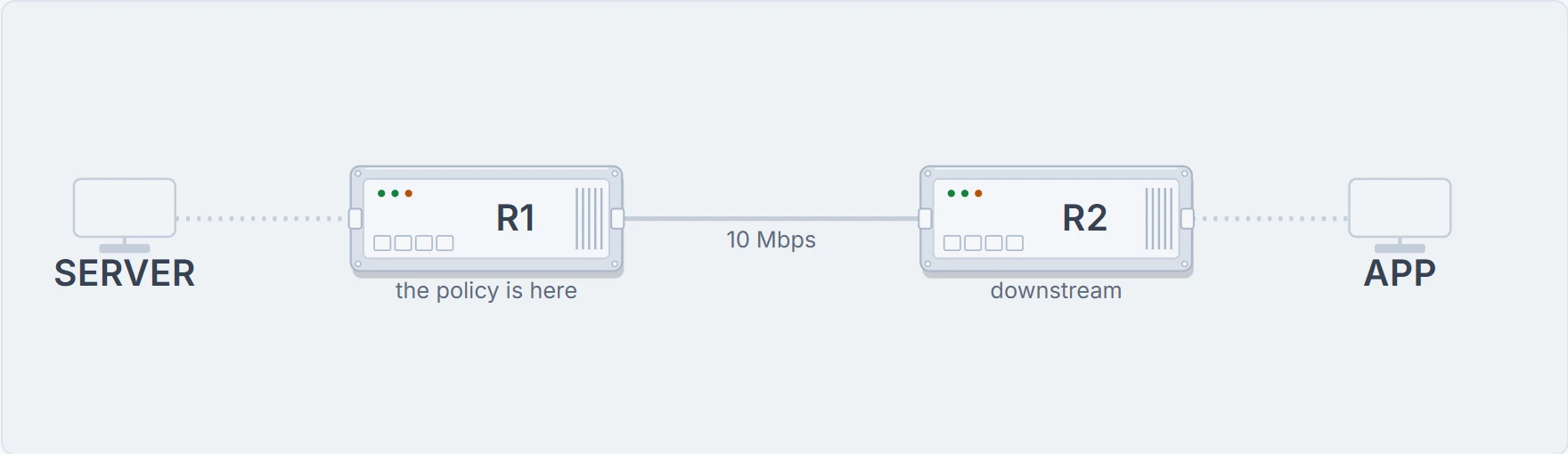
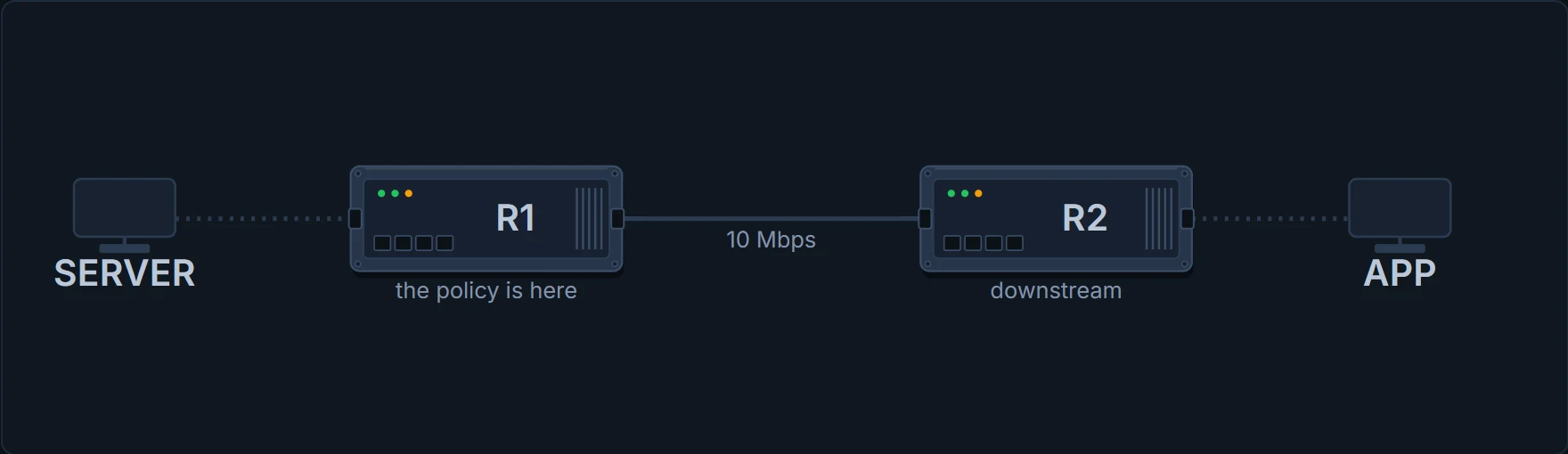
Shaping is the process of imposing a maximum rate of traffic, while regulating the traffic rate in such a way that the downstream switches and routers are not subjected to congestion.
Notice the phrase downstream switches and routers. A shaper is not primarily protecting the router it is on: it is protecting whatever is on the far side from receiving traffic faster than it can absorb, which is why shaping is normally configured on the sending side of a bottleneck rather than the receiving side.
And policing: Policing involves creating a policer that specifies the bandwidth limits for the traffic. Packets that exceed the limits are out of profile or nonconforming. Out of profile. That is the vocabulary: traffic is conforming while it is inside the rate and exceeding once it is not.
The sentence that separates them
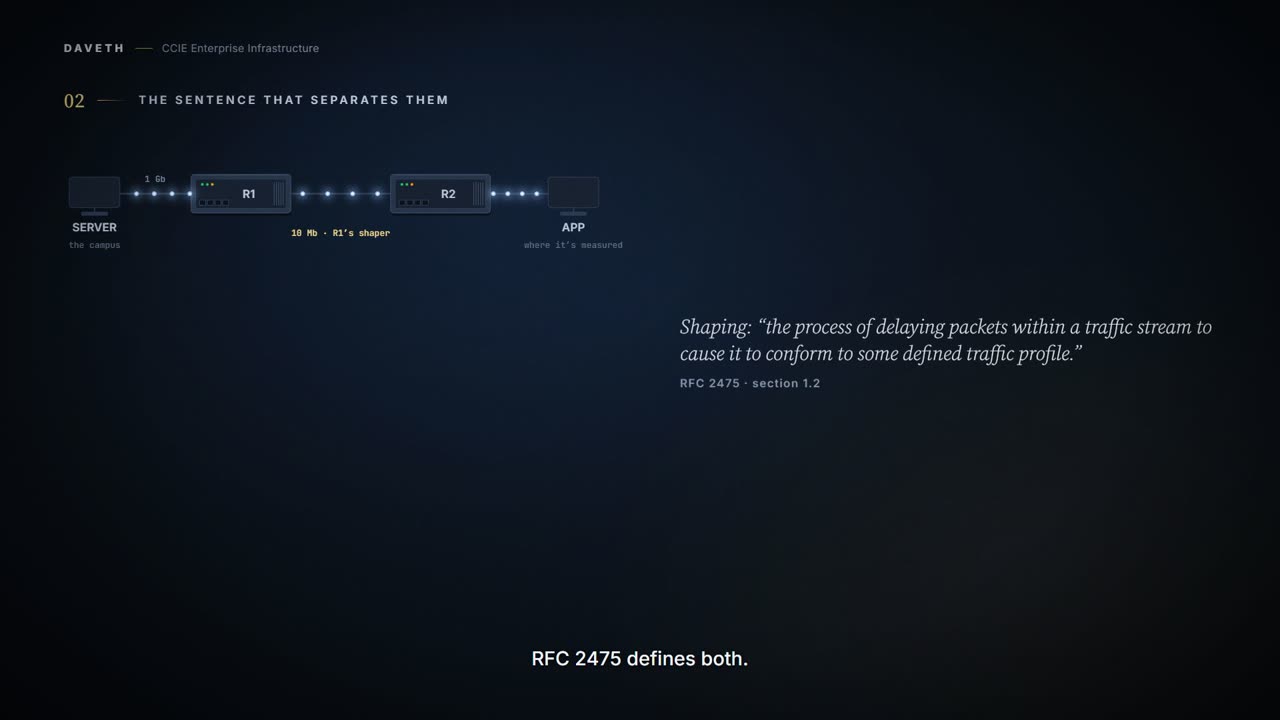
Both use a token bucket. Both run out of tokens when traffic exceeds the rate. What happens next is the whole lesson:
Shaping: When tokens are exhausted, it buffers packets and sends them out later, when tokens are available.
Policing: When tokens are exhausted, action is taken immediately.
Buffer and send later, versus act now. So the choice is not "strict or lenient". It is a choice about which cost you prefer to pay:
- A policer converts excess traffic into loss. The rate is enforced exactly, no memory is consumed, and applications see drops.
- A shaper converts excess traffic into delay. Nothing is discarded while its queue has room, the rate is smoothed, and applications see latency and jitter that grow with how much it is holding.
For TCP, a small amount of loss is a signal to slow down and is often the cheaper outcome. For a voice call, delay past a threshold is worse than loss, because a late packet is a useless packet that also consumed buffer on the way.
A burst, which is what a shaper is for
Thirty quiet seconds, then one second at 10.6 Mbps, then quiet again. Here is the shaper, eighty-five seconds in, after the burst has been and gone. Did the burst cost anything the router can count?
Computed from the state: show policy-map interface on R1, laid out as the IOS XE 17.x QoS guide prints it. The numbers are the model's; no router printed them.
R1# show policy-map interface
 GigabitEthernet0/1

  Service-policy output: BRANCH-EGRESS

    Class-map: class-default (match-any)
      43383 packets, 65075000 bytes
      5 minute offered rate 6054118 bps, drop rate 0 bps
      Match: any
      Queueing
      queue limit 64 packets
      ! the most this queue may hold, at this rate
      (queue depth/total drops/no-buffer drops) 0/0/0
      ! empty now, and nothing dropped
      shape (average) cir 10000000
      target shape rate 10000000
Computed from the state: the delay the application sees, measured at APP. Not a command.
measured at APP, not on any router

  added latency   none   ! and the delay it cost has already gone
  lost, last minute   none
The excess was held rather than discarded: 50 packets at the peak, under the limit of 64, costing 60 ms while it lasted. It drained as soon as there was room. Nothing lost, and latency that came and went.
Notice what the depth says now, though: 0. It is the queue at the instant you ask, and eighty-five seconds in, the burst has long gone from it.
The same load, the same rate, the other tool. What does the policer do with the same excess?
Computed from the state: show policy-map interface on R1, laid out as the IOS XE 17.x QoS guide prints it. The numbers are the model's; no router printed them.
R1# show policy-map interface
 GigabitEthernet0/1

  Service-policy output: BRANCH-EGRESS

    Class-map: class-default (match-any)
      43383 packets, 65075000 bytes
      5 minute offered rate 6054118 bps, drop rate 7059 bps
      Match: any
      police:
          cir 10000000 bps
        conformed 43333 packets, 65000000 bytes; actions:
          transmit
        exceeded 50 packets, 75000 bytes; actions:
        ! 50 packets over the rate
          drop   ! and the action for them is drop
        conformed 6047059 bps, exceeded 7059 bps
The excess is gone. Same burst, a different cost: 50 packets of loss instead of 60 ms of delay at the peak.
And now the demand does not stop
The shaper goes back on and the load settles at 11 Mbps, one megabit above the rate. Not a burst. A level.
Ten minutes later, an application performs badly across the shaped link. The shaper was supposed to be the gentle tool, the one that holds traffic rather than dropping it. Before you read R1, commit to what it will say.
So what is R1 saying about the class it is shaping?
Computed from the state: show policy-map interface on R1, laid out as the IOS XE 17.x QoS guide prints it. The numbers are the model's; no router printed them.
R1# show policy-map interface
 GigabitEthernet0/1

  Service-policy output: BRANCH-EGRESS

    Class-map: class-default (match-any)
      513800 packets, 770700000 bytes
      5 minute offered rate 11000000 bps, drop rate 1000000 bps
      ! about a megabit a second being dropped
      Match: any
      Queueing
      queue limit 64 packets   ! the most this queue may hold
      (queue depth/total drops/no-buffer drops) 64/42519/0
      ! full at the instant you asked, and the drops counted
      shape (average) cir 10000000
      target shape rate 10000000
The shaper is paying both costs. It can send no faster than 10 Mbps, so the megabit above that has nowhere to go but the queue, and the queue is full. Every packet that gets through joins the back of a full queue; every packet that finds the queue full is dropped.
State 2 Ten minutes later
How much is R1 holding, and what is it costing?
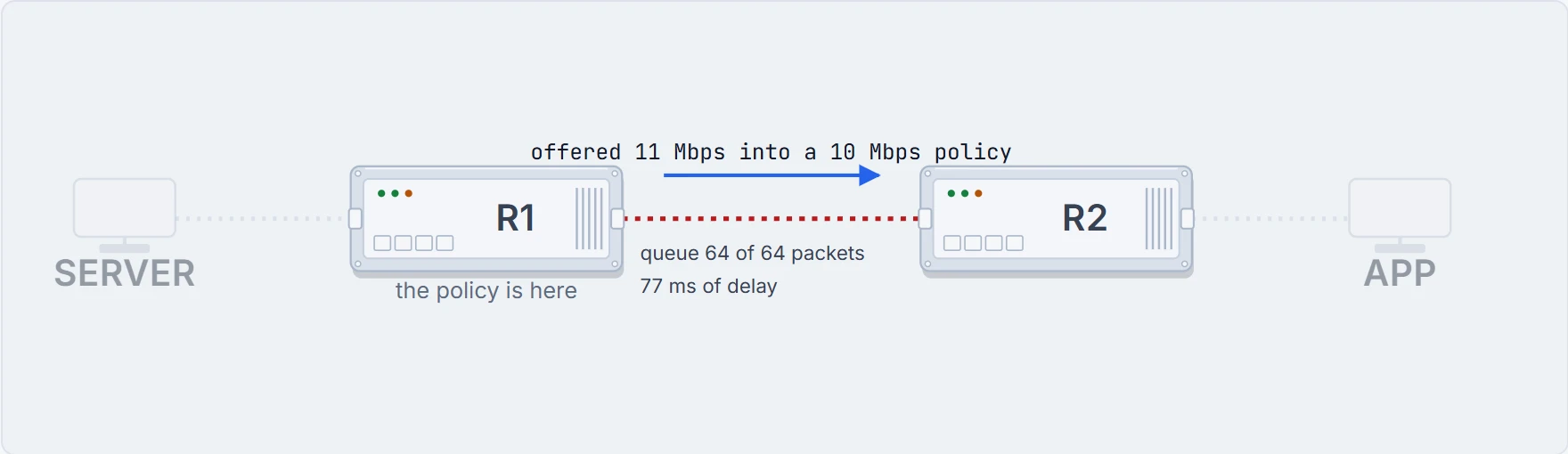
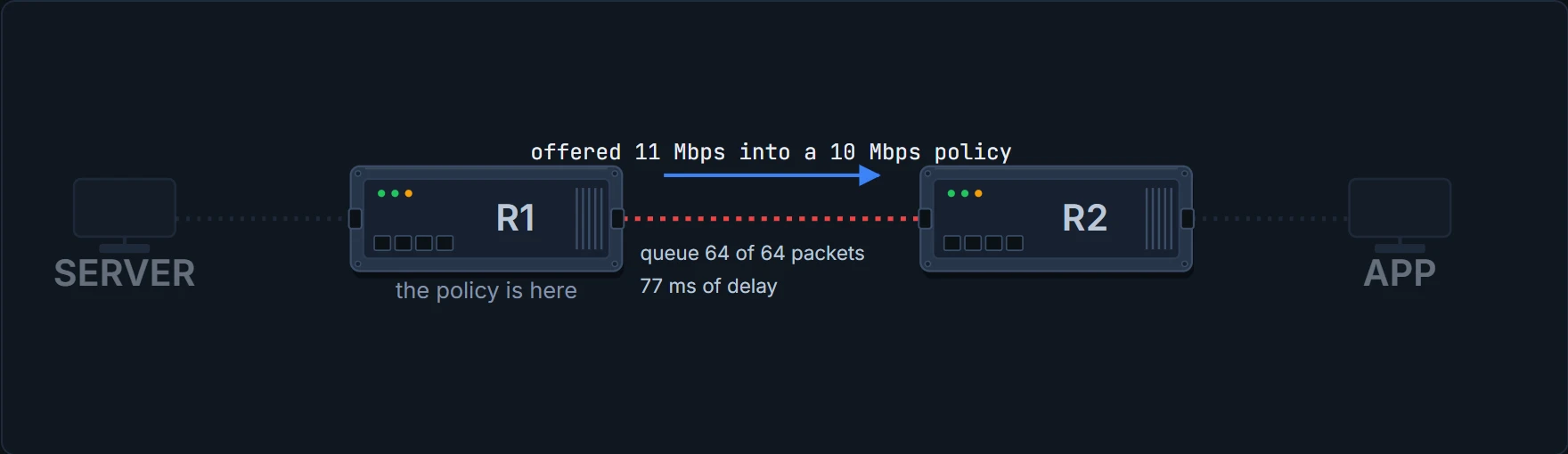
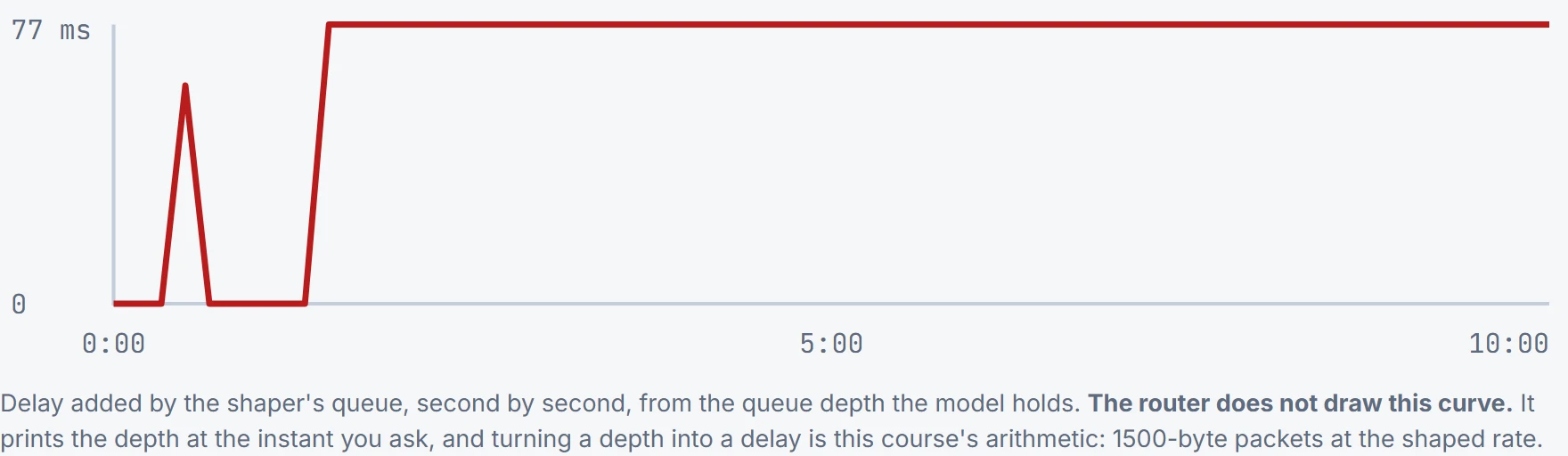
Why does the delay stop at 77 ms? Because the queue has a limit. For a shaped queue, the IOS XE 17.x QoS guide works the default out from the shape rate, "queue-limit = (visible bandwidth / 8 bits) * 50mS / MTU", and then "If the calculated queue-limit is less than 64 packets we use 64 packets". Fifty milliseconds at 10 Mbps is about 42 packets, so R1 gets 64. Sending 64 1500-byte packets at 10 Mbps takes 77 ms, and that is as long as a packet can wait. The guide gives that as the reason the limit exists: "thereby capping the latency applications in that queue will experience."
Computed from the state: the delay the application sees, measured at APP. Not a command.
measured at APP, not on any router

  added latency   77 ms
  ! a full queue, on every packet that gets through
  a minute ago    77 ms
  lost, last minute   5000 packets   ! and the megabit that did not fit
Proves: that the shaper is dropping, from the total drops and the drop rate, and that at the instant you ran it the queue held 64 packets against a limit of 64.
Does not prove: the delay any packet saw. The depth is "the instantaneous queue depth": one moment, so read it more than once. Turning 64 packets into 77 ms is this course's arithmetic, and it holds here only because every packet is 1500 bytes. What the application felt is measured at the application.
Continue the lesson
The whole lesson, with its drawings and its questions. The rest of this section and 5 more after it.