
Local AI applications: RAG pipelines, chunking, headless browsers and always-on agents
A RAG app finds nothing when a PDF holds only images of pages: pdftotext extracts zero characters, indexing stores nothing, and no error is raised. OCR turns the pictures back into text. Chunk size then decides the answers, because the search returns whole chunks to the model.
What this page answers
Why does my RAG app not find an answer that is in the PDF?
The PDF contains only images of pages: pdftotext pulled out zero characters and pdffonts lists no fonts. Indexing stored nothing without an error. OCR turns the images back into text. Read it in “The answer was in the PDF”
How does chunk size affect RAG answers?
The search returns whole chunks. Small chunks can split an answer across two pieces so the model gets half of it; huge chunks bury it in unrelated text that costs tokens and distracts the model. Read it in “Chunks decide the answers”
The answer was in the PDF
You built a local assistant over the company's contracts. You ask it a question whose answer you know is on page 4 of one of them:
$ curl -s localhost:8000/ask -d '{"q":"What is the notice period in the Acme contract?"}' | jq -r .answer
I couldn't find information about a notice period in the provided documents.
$ pdftotext contracts/acme-2024.pdf - | wc -c
0
$ pdffonts contracts/acme-2024.pdf
name                                 type              encoding         emb sub uni object ID
------------------------------------ ----------------- ---------------- --- --- --- ---------
Outputs on this page are realistic examples. Commands, settings and error messages are real.
The model is fine, and the contract is in the folder. So why can't the app find the answer?
- The model is too small to understand contracts
- The PDF is a scan: pictures of pages with no text, so nothing was indexed
- The vector database lost the data
Answer. pdftotext pulled out zero characters, and pdffonts lists no fonts at all. Together they mean this PDF contains only images of pages, like a photocopy. The indexing step read it, got nothing, and stored nothing, without an error. So when you asked, the search found nothing about notice periods, and the model honestly said so. The fix is OCR (optical character recognition), which turns the pictures back into text:
$ ocrmypdf contracts/acme-2024.pdf contracts/acme-2024.ocr.pdf
$ pdftotext contracts/acme-2024.ocr.pdf - | grep -i -m1 "notice"
Either party may terminate this agreement with ninety (90) days' written notice.
That's the lesson of this whole chapter. A RAG app is a pipeline of separate steps, and the model at the end can only work with what the earlier steps handed it. When answers are wrong, check each step's output, starting from the documents.
How a RAG app works
RAG has two halves. Indexing runs ahead of time: documents are turned into text, cut into small pieces called chunks, and each chunk is turned into a list of numbers by an embedding model, a model whose job is to place texts with similar meaning close together. Those numbers go into a vector database. Answering runs for every question: the question is embedded the same way, the database finds the nearest chunks, an optional reranker picks the best few, and the LLM gets the question plus those chunks. Read the top row, then the bottom, and follow the dashed line where they meet:
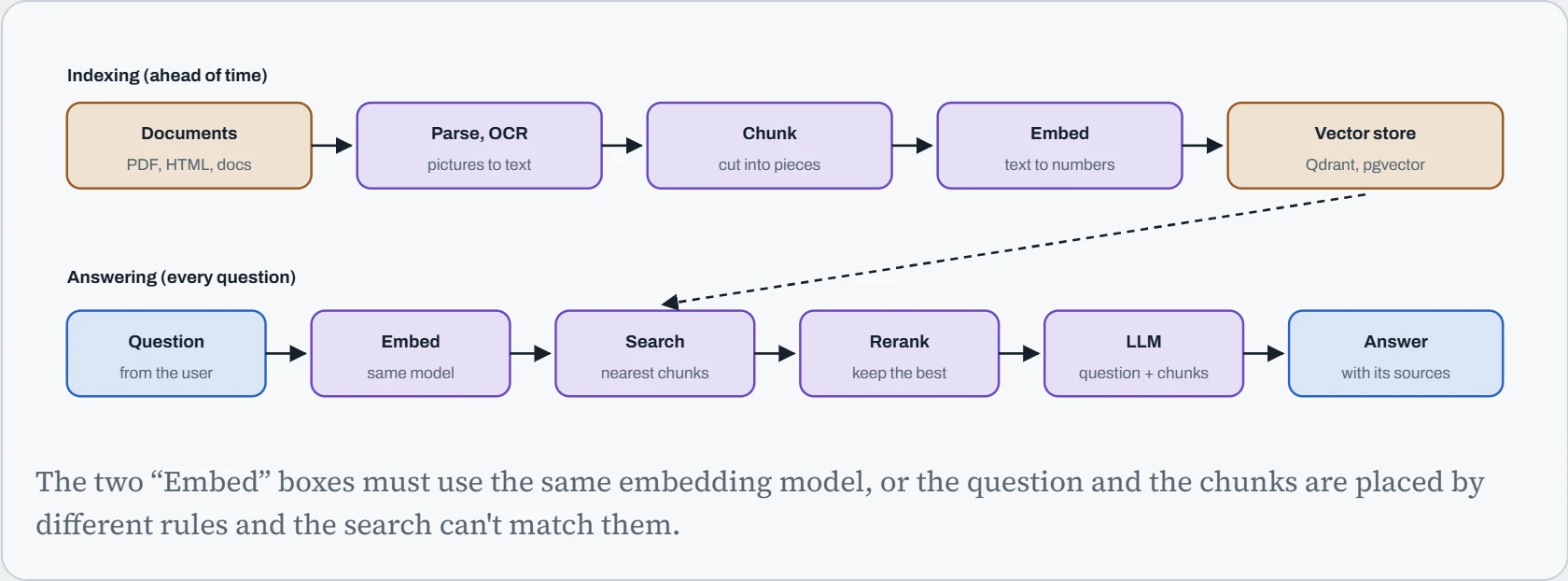
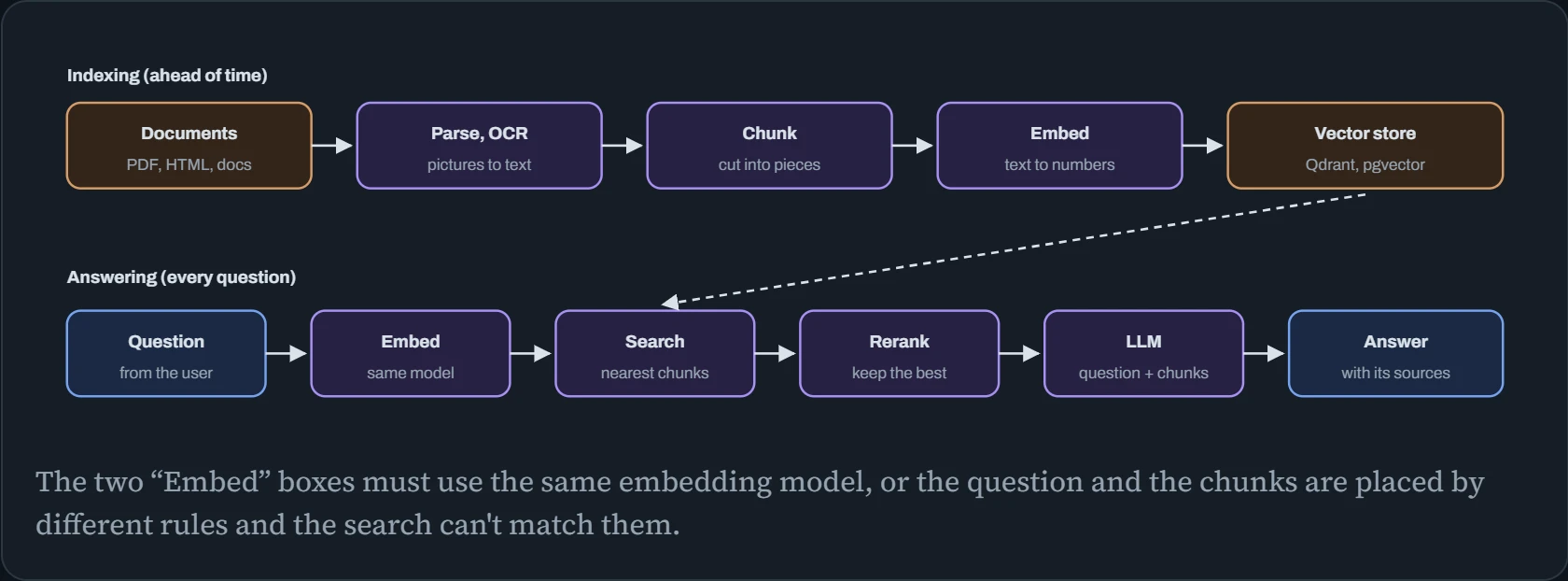
Every box is a separate program or step, which is why RAG problems are so often plumbing problems. The hook broke at the second box. The next figure looks at the third, chunking, which quietly decides what the model gets to see.
Chunks decide the answers
The search returns whole chunks, never half a chunk. If the answer is split across two chunks, the model may get only half of it. If chunks are huge, the answer arrives buried in text about other things, which costs tokens and distracts the model. Below is a short team policy, cut into chunks of the size you choose. The question is “How long are checkpoints kept, and can I keep one longer?” The answer needs two sentences, marked in copper. The search returns the single best-matching chunk, shown in blue, and only that chunk goes to the model.
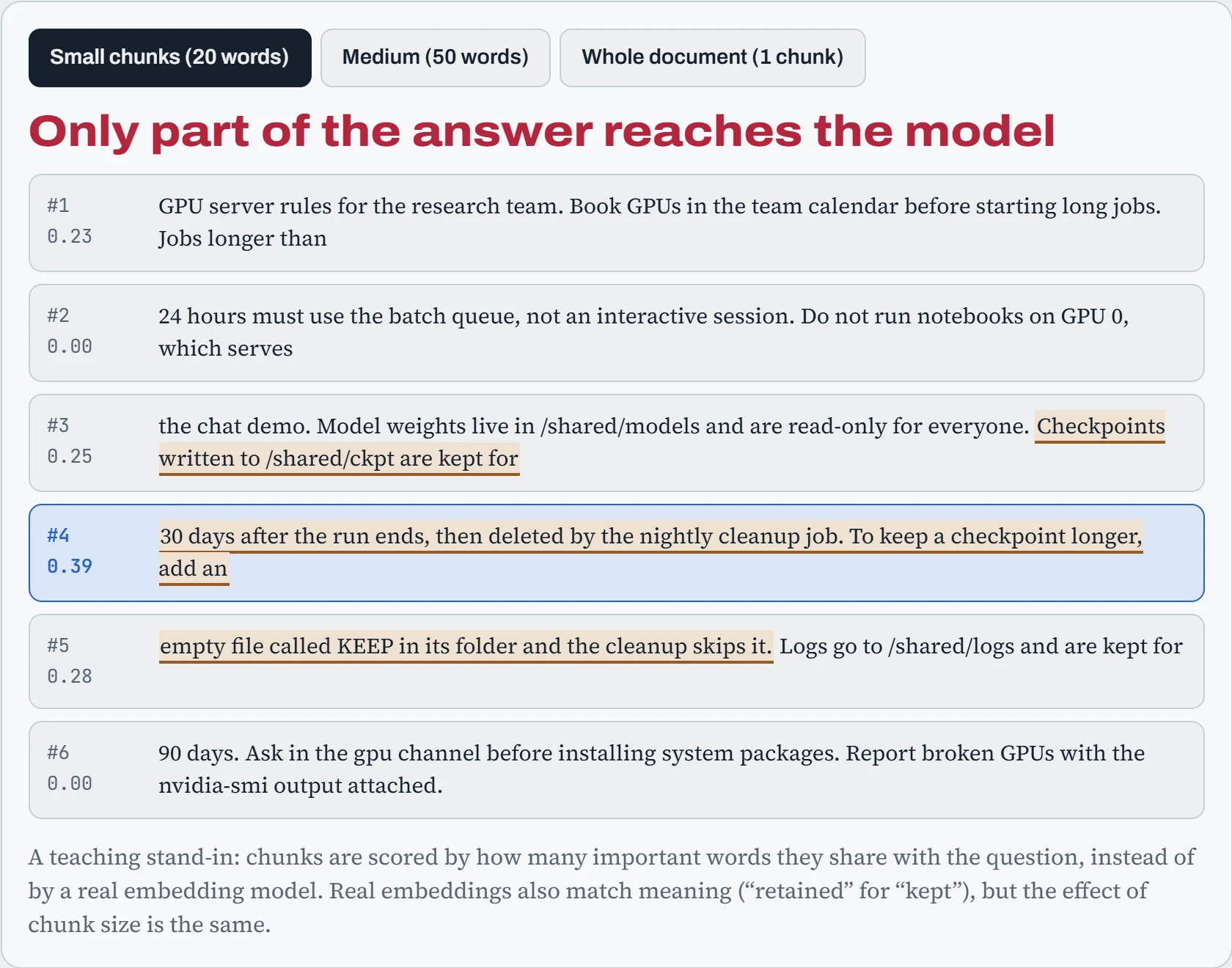
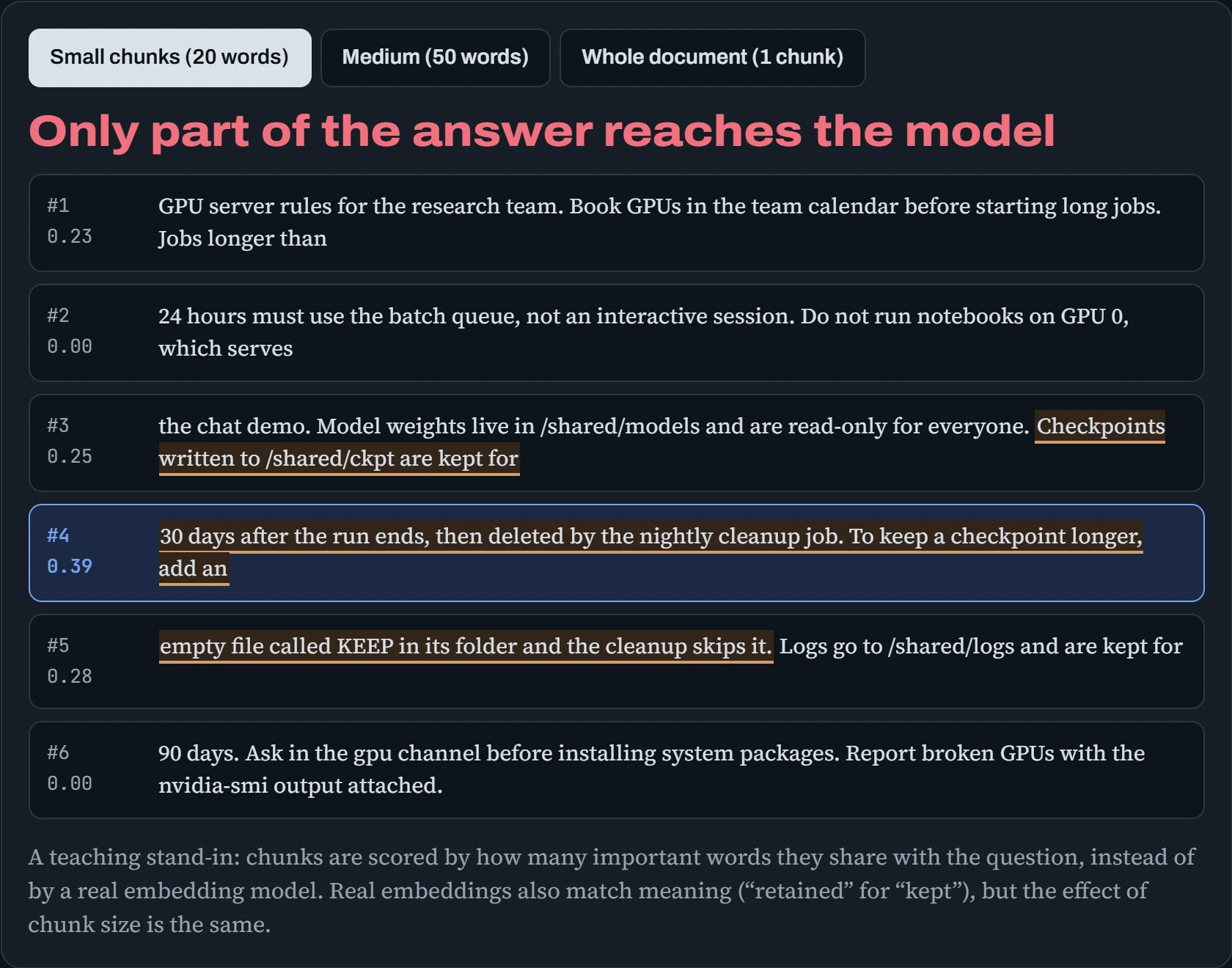
With small chunks, the two answer sentences end up in different pieces, and only one may be retrieved. With one giant chunk, the answer is always “found”, but surrounded by everything else, and with a real document collection a giant chunk can't be specific enough to win the search at all. Medium chunks keep the answer together without much noise. In practice, a few hundred tokens per chunk, cut at sentence or heading boundaries, with a little overlap between neighbours, is a good starting point. Then test it with real questions.
Parsing, embedding, storing
Each box in the pipeline is a service you run. Parsing uses tools like pdftotext for normal PDFs, ocrmypdf (built on the Tesseract OCR engine) for scans, and libraries like docling or unstructured for tables and layouts. Embedding and reranking are small models served behind an API, for example Hugging Face's Text Embeddings Inference (TEI). And the vector store is a database built to find nearest neighbours fast. Three common choices:
| Store | What it is | Good fit |
|---|---|---|
| pgvector | An extension that adds vector columns to PostgreSQL | You already run Postgres and want one database for everything |
| Qdrant | A dedicated vector database, one container | Simple local setups up to many millions of chunks, with filtering |
| Milvus | A distributed vector database with several services | Very large collections across a cluster |
For a local stack, Docker Compose (Down the Overlay) runs all of it with one command. Here's the shape of the lab's stack: a vector store, an embedding server, a model server, and your app, with only the app reachable from outside:
# compose.yaml
services:
  qdrant:
    image: qdrant/qdrant:v1.15.0
    volumes: ["./qdrant:/qdrant/storage"]
  embed:
    image: ghcr.io/huggingface/text-embeddings-inference:cpu-1.8
    command: ["--model-id", "BAAI/bge-m3"]
    volumes: ["/data/hf:/data"]
  llm:
    image: ollama/ollama:0.12.6
    volumes: ["/data/ollama:/root/.ollama"]
    deploy: { resources: { reservations: { devices: [{ driver: nvidia, count: 1, capabilities: [gpu] }] } } }
  app:
    build: .
    ports: ["127.0.0.1:8000:8000"]
    depends_on: [qdrant, embed, llm]
$ docker compose up -d && curl -s localhost:8000/health
{"qdrant":"ok","embed":"ok","llm":"ok"}
Inside Compose, services find each other by name (http://qdrant:6333, http://embed:80), so only the app publishes a port, and only on 127.0.0.1. Indexing then runs as a job, not as part of answering questions: it walks the documents, skips files whose hash hasn't changed, and writes new chunks. Store each document's hash and the embedding model's name with its chunks, so you always know what's stale.
Predict. You switch to a better embedding model, restart the embedding server, and leave the existing vectors in the database. What happens to search quality?
Answer. It collapses. Questions are now embedded by the new model, but the stored chunks were placed by the old one, and the two models' numbers don't mean the same thing. If the sizes differ (1,024 numbers versus 768, say) the database rejects the search outright; if they happen to match, you get confident nonsense, which is worse.
Changing the embedding model means re-embedding every chunk. Build the new index in a separate collection, switch the app over when it's complete, then delete the old one. That's also why the model's name belongs next to every stored chunk.
Browsers without a screen
Agents that read websites, fill in forms or test web apps drive a real browser, usually Chromium through Playwright. On a server there's no screen, so the browser runs headless, drawing pages in memory. It still needs dozens of system libraries, fonts to draw text, and shared memory. Playwright can install the libraries for you:
$ uv run playwright install --with-deps chromium     # the browser plus the system libraries it needs
$ fc-list | wc -l                                     # fonts installed? a bare server may have very few
14
$ sudo apt install fonts-noto fonts-noto-cjk fonts-noto-color-emoji
$ docker run --shm-size=1g --rm my-agent-browser python crawl.py   # Docker gives /dev/shm only 64 MB by default
$ xvfb-run -s "-screen 0 1280x800x24" python desktop_agent.py     # a virtual screen for apps that insist on one
Three Linux details cause most failures. Missing fonts make pages render text as empty boxes, which ruins screenshots that an AI then tries to read. Docker's tiny /dev/shm makes Chromium crash on heavy pages, the same shared-memory limit that trips up PyTorch's data loaders (Down the Image). And desktop-style “computer use” agents need a whole virtual display: Xvfb provides one with no monitor, and a VNC server lets a person watch (Down the Senses). A browser is also an excellent way for an agent to read hostile text, so run it inside the sandbox from Down the Sandbox, never as root, and without your own logged-in browser profile.
The application backend
Most AI app backends in Python use FastAPI, run by uvicorn. Two habits make them feel fast. First, stream the answer token by token as the model writes it, instead of making people wait for the whole thing. Second, move slow work, like indexing a 300-page upload, to a background worker that takes jobs from a queue, usually in Redis, so the web request returns at once:
from fastapi import FastAPI
from fastapi.responses import StreamingResponse
from redis import Redis
from rq import Queue
import httpx

app = FastAPI()
jobs = Queue(connection=Redis(host="redis"))
llm = httpx.AsyncClient(base_url="http://llm:11434", timeout=None)

@app.post("/ask")
async def ask(q: dict):
    async def tokens():
        async with llm.stream("POST", "/api/generate", json={"model": "qwen3:8b", "prompt": q["q"]}) as r:
            async for line in r.aiter_lines():
                yield f"data: {line}\n\n"            # server-sent events, one line per chunk
    return StreamingResponse(tokens(), media_type="text/event-stream")

@app.post("/upload")
def upload(path: str):
    job = jobs.enqueue("indexer.index_document", path)   # a separate `rq worker` process does the work
    return {"job": job.id}
Run it with uvicorn app:app --host 127.0.0.1 --workers 4, and the queue's worker with rq worker, each as a systemd service (Down the Unit). If a reverse proxy sits in front, switch off its response buffering for the streaming route, or the tokens arrive in one lump at the end (Down the Tunnel). The same goes for tool servers: an MCP server your agent calls over HTTP is just another backend service, and deserves its own locked-down unit:
# /etc/systemd/system/files-mcp.service
[Service]
ExecStart=/opt/files-mcp/.venv/bin/files-mcp --http 127.0.0.1:7801 --root /srv/agent-work
DynamicUser=yes
ProtectSystem=strict
ProtectHome=yes
ReadWritePaths=/srv/agent-work
PrivateTmp=yes
NoNewPrivileges=yes
RestrictAddressFamilies=AF_INET AF_INET6 AF_UNIX
EnvironmentFile=/etc/files-mcp/token.env
DynamicUser=yes gives the server a throwaway user of its own, ProtectHome hides every home folder, and ReadWritePaths opens exactly one folder. systemd-analyze security files-mcp scores the result, as in the Sandbox lab.
Personal AI agents that run 24/7
The most exciting kind of AI app right now is a personal agent that never sleeps: it lives on a small server at home, you message it from WhatsApp, Telegram or Discord, and it does real things for you. It reads and sorts your email, runs commands, fills in forms, checks on your other machines. Projects like OpenClaw made this go viral in 2026, and many people set one up in an afternoon.
They also showed what goes wrong. Security researchers reported a one-click remote-code-execution flaw, and tens of thousands of agent servers reachable from the internet, most of them with no login at all. Its skill marketplace (skills are add-ons that give the agent new abilities) was found to contain hundreds of malicious packages, by one count close to a fifth of everything listed. The software had bugs, as all software does. The damage came from how it was deployed: a program that can run commands and read your private messages, given the run of the machine and an open door to the internet.
The good news is that everything this course has covered so far applies directly. A safe always-on agent is just a service with very few permissions, reached only through a private network, with a hard limit on what it can spend. Here's the shape of one:
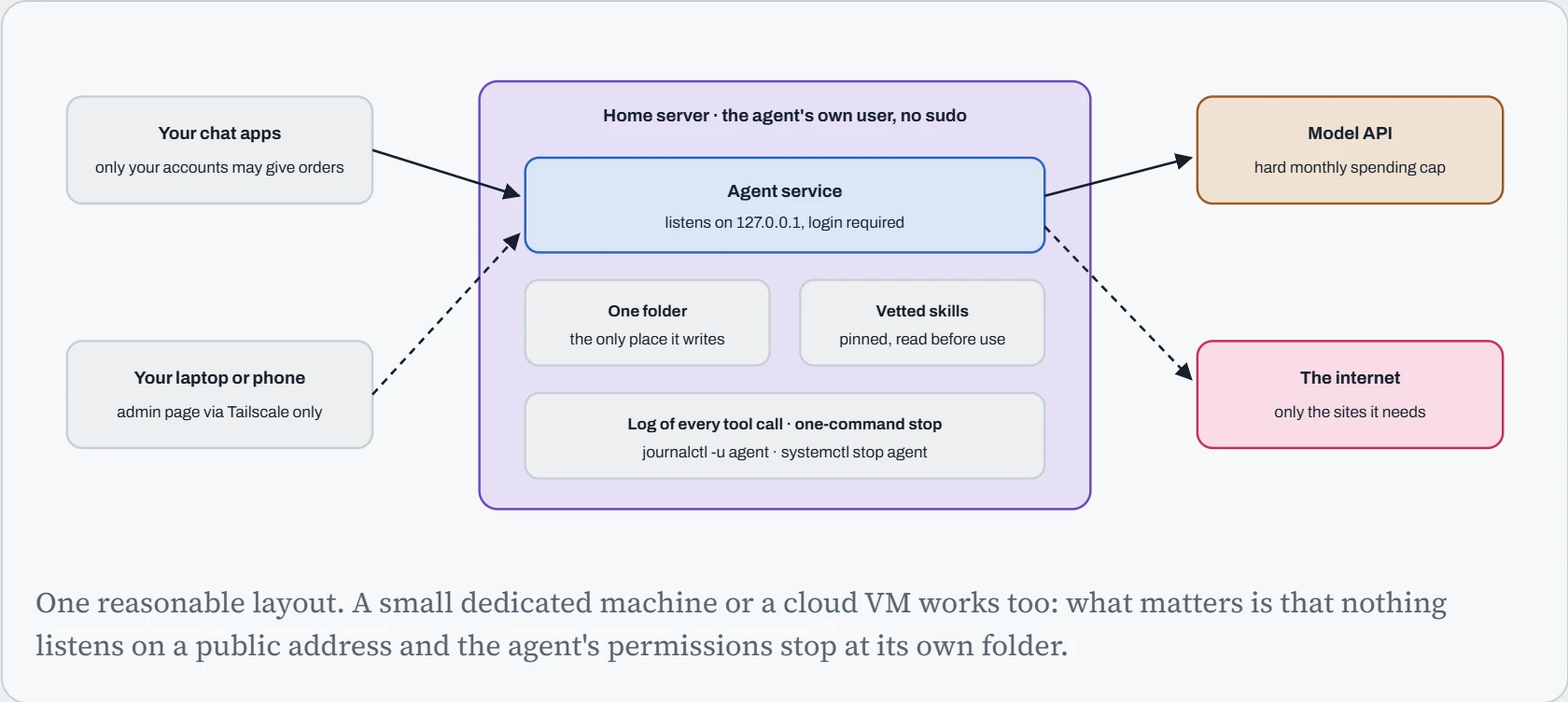
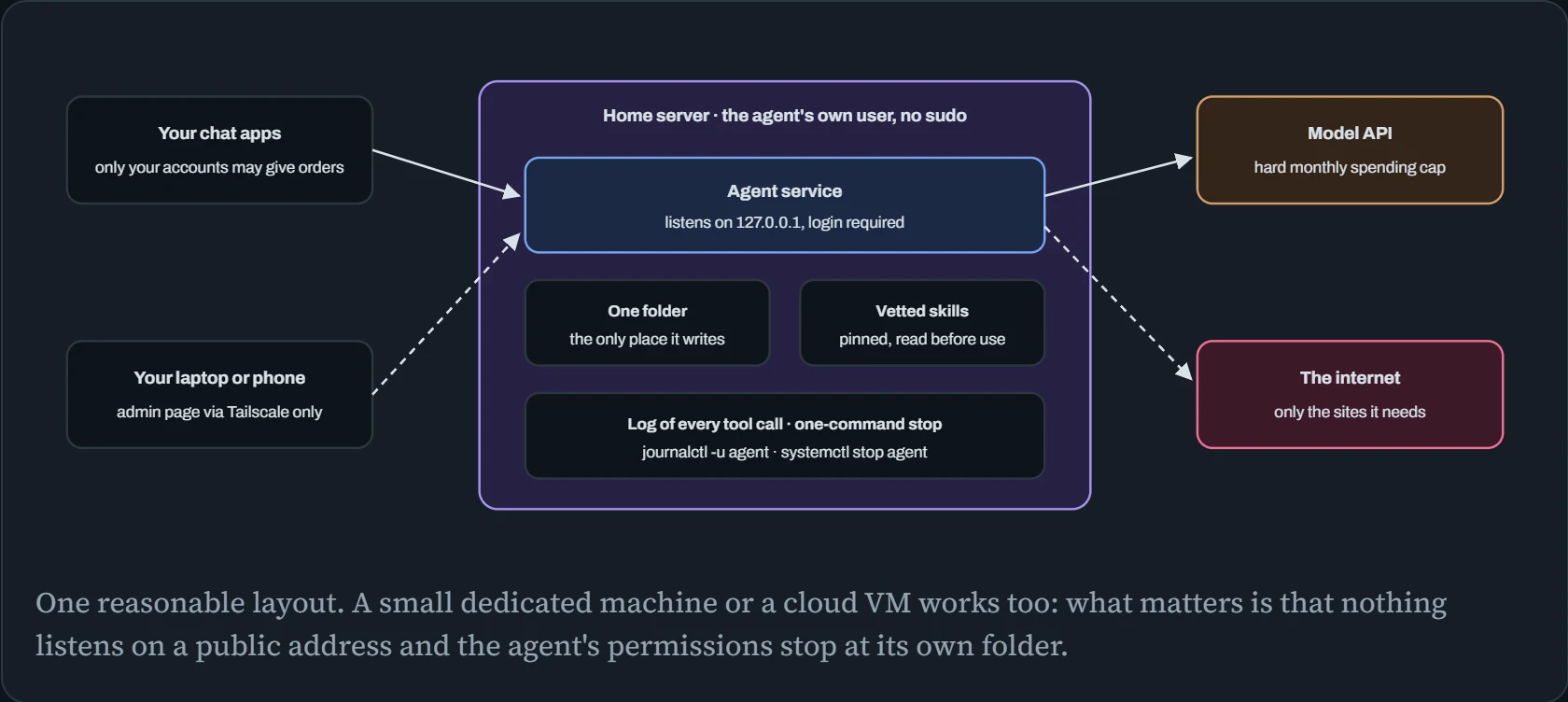
Each box is something you've already built in earlier chapters. The agent runs as a systemd service under its own user, with the same sandboxing settings as the MCP server above. It listens only on 127.0.0.1, and you reach its admin page through Tailscale or an SSH tunnel (Down the Tunnel). The API key lives in a file only the service can read, and the provider's dashboard has a hard monthly limit on it. In unit form:
# /etc/systemd/system/agent.service
[Service]
User=agent                         # its own user: no sudo, not in the docker group
ExecStart=/opt/agent/bin/agent --listen 127.0.0.1:8080
EnvironmentFile=/etc/agent/secrets.env   # chmod 600, owned by root
ProtectSystem=strict
ProtectHome=yes
ReadWritePaths=/srv/agent
PrivateTmp=yes
NoNewPrivileges=yes
CapabilityBoundingSet=
MemoryMax=4G
Restart=on-failure
$ sudo systemd-analyze security agent | tail -1
→ Overall exposure level for agent.service: 2.1 OK
Continue the lesson
The whole lesson, with its drawings and its questions. The rest of this section and 3 more after it.