
Data engineering for AI: the small-files problem, Parquet and WebDataset shards, and GPU input pipelines
Fetching small files one request at a time keeps GPUs waiting: with 120 KB images, each request's fixed delay of about 30 ms dwarfs a 1.5 ms download, so workers spend 95% of their time waiting. Packing samples into shards, such as WebDataset tar files or Parquet, turns many requests into a few large reads.
What this page answers
Why is GPU utilization low when training from object storage?
Each small file is a separate request with a fixed delay, about 30 ms in the example, against 1.5 ms to download it. Workers spend 95% of their time waiting and deliver about a tenth of what the GPUs want. Read it in “Eight GPUs at 12%”
Which data format should AI training use?
Text and records are often collected as JSONL, one JSON object per line, and stored as Parquet once ready. Images and audio belong in WebDataset shards, ordinary tar files with each sample's files side by side. Read it in “Formats and shards”
Eight GPUs at 12%
A team trains an image model on an 8-GPU machine. The dataset is 1.28 million JPEG files in object storage, mounted as a folder so the training code can read it like local files. The GPUs could chew through about 2,400 images a second. Here's what they actually do:
$ nvidia-smi --query-gpu=index,utilization.gpu --format=csv,noheader
0, 14 %
1, 11 %
…
$ aws s3 ls s3://team-data/images/train/ --recursive --summarize | tail -2
Total Objects: 1281167
   Total Size: 147.9 GiB
$ py-spy dump --pid 51207 | head -4          # one DataLoader worker
Thread 51207 (idle): "MainThread"
    _fetch_range (s3fs/core.py:…)
    read (fsspec/spec.py:…)
Speeds, latencies and outputs on this page are realistic round examples. Real numbers depend on your storage and network. Formats, commands and the mechanisms are real.
The GPUs sit mostly idle while every worker waits on a read. Which change helps most?
- A faster network connection
- Many more DataLoader workers
- Packing the images into a few hundred big files
Answer. Each image is about 120 KB. Fetching one from object storage means a separate web request, and every request has a fixed delay, about 30 milliseconds here, before the first byte arrives. The download itself is only about 1.5 ms. So each worker spends 95% of its time waiting for requests to start, and eight workers manage about 250 images a second: roughly a tenth of what the GPUs want. That's the 12%.
Pack the same images into files of about 1 GB each, called shards, and the fixed delay is paid once per 8,000 images instead of once per image. The same eight workers then deliver over 5,000 images a second. Nothing got faster. The data just changed shape. The next section works it through.
The small-files problem
Every read from storage costs two things: a fixed delay to start (open the file, look up where it lives, or send a web request and wait for the reply), and then the time to move the bytes. For a big file, the fixed delay hardly matters. For a 120 KB image, it's almost the whole cost. And the fixed delay is very different on different storage: about 0.1 ms on a local NVMe drive, a few milliseconds on a network file system (NFS), and tens of milliseconds for object storage like S3.
The calculator models one worker as reading one file at a time. Workers run side by side, up to the storage's total bandwidth. The top bar is how many images per second your loader delivers. The grey bar below it is what 8 GPUs need, 2,400 per second. If blue is shorter than grey, the GPUs wait.
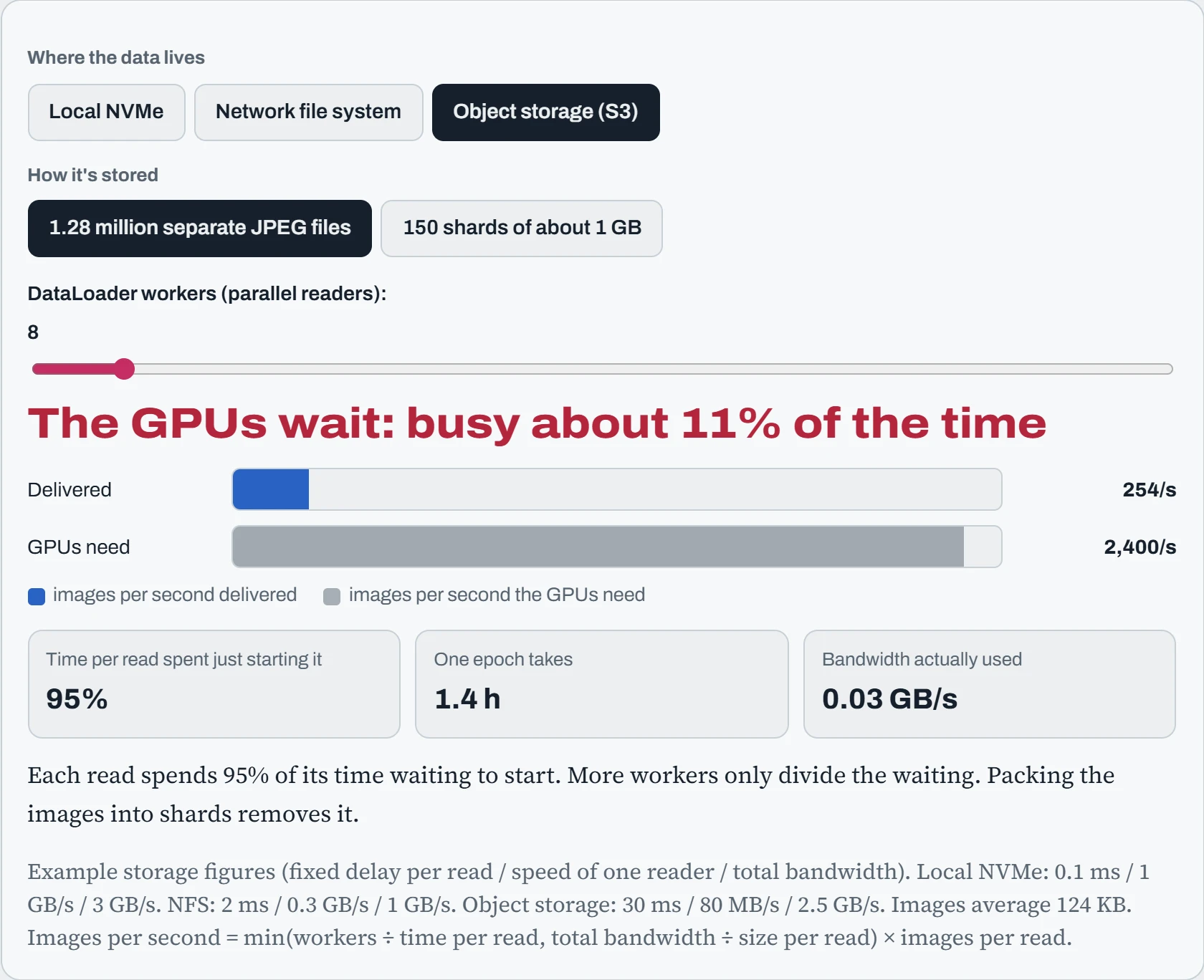
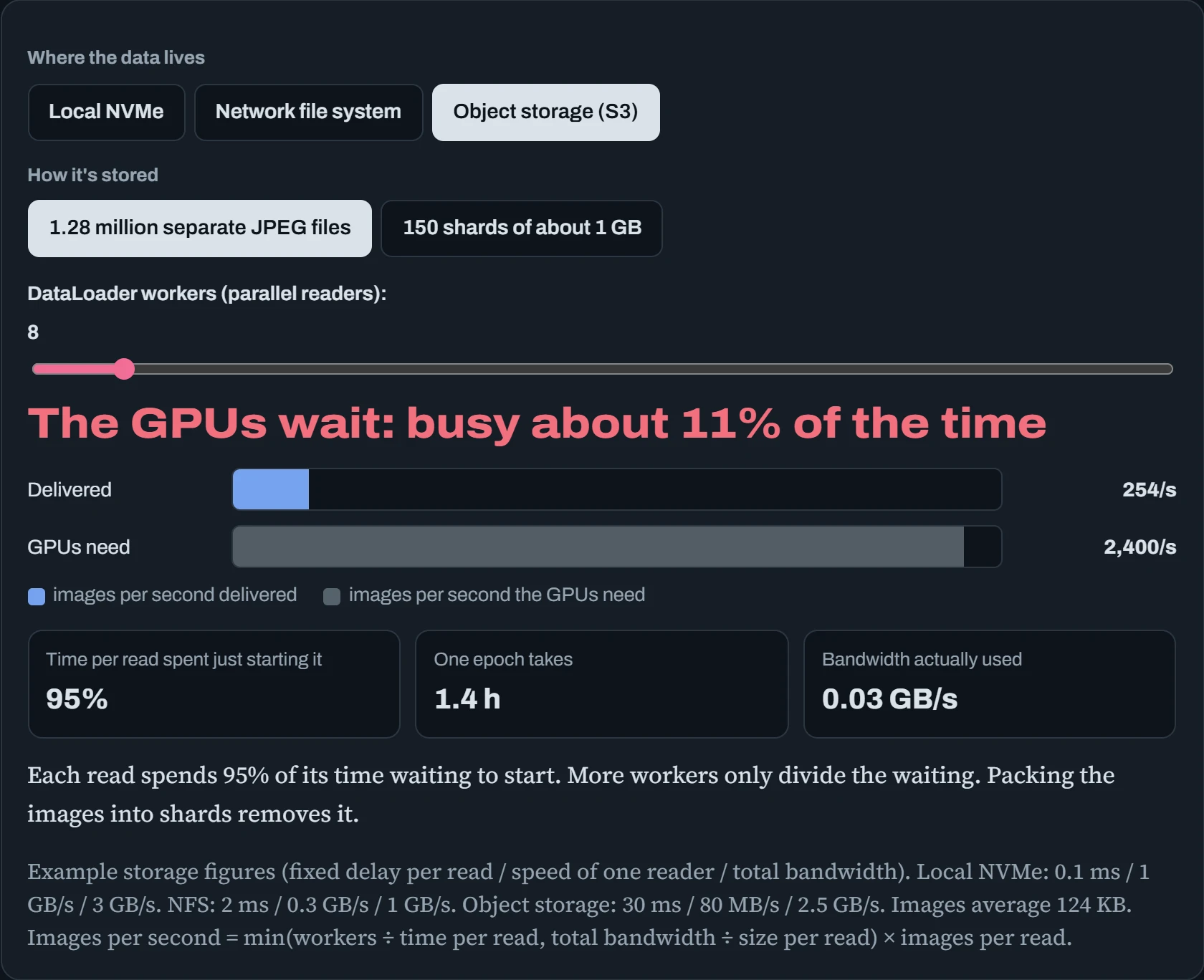
Three lessons fall out. On local NVMe, even separate files are fine, because the fixed delay is tiny. On object storage with separate files, adding workers helps, but even 64 of them can't keep up, and 64 processes cost CPU and memory of their own. With shards, eight workers outrun the GPUs on every kind of storage.
That's why almost every serious training pipeline packs data into shards. It's not about compression or neatness. It's about paying the fixed cost of a read once per thousands of samples instead of once per sample. The same logic explains why ls on a folder with a million files takes forever, and why copying a million small files is so much slower than copying one big file of the same size.
Predict. Stay with separate files in object storage. Roughly how many workers would it take to feed the GPUs their 2,400 images a second? And with shards, what's the fewest workers that would do it?
Answer. Each worker manages about 32 images a second (one read every 31.5 ms), so it would take about 76 workers, plus the CPU and memory to run them all. With shards, each worker delivers about 640 images a second, so 4 workers are enough to keep up.
The ratio between those, about 20 times fewer workers for the same throughput, is the whole argument for shards in one number. On the calculator: 76 workers with files, and 4 with shards.
Formats and shards
AI data mostly comes in three shapes, and each has a natural format. Text and records are often stored as JSONL (one JSON object per line) while they're being collected, and as Parquet once they're ready for analysis or training. Images, audio and other files belong in WebDataset shards: ordinary .tar files in which all the files for one sample sit next to each other with the same base name. The table compares them:
| Format | What it is | Good for | Watch out for |
|---|---|---|---|
| JSONL | Plain text, one record per line | Collecting data, logs, chat transcripts. Easy to read and append | Big and slow to query: every query reads every byte |
| Parquet (and Arrow) | Compressed, stored column by column, in blocks with summaries | Tables you filter and analyse. Hugging Face datasets use it underneath | Not for appending one row at a time |
| WebDataset (.tar shards) | Samples packed into tar files, read front to back | Images, audio and video for training. Streams well from object storage | Shuffling happens within a buffer, not across the whole dataset at once |
A WebDataset shard is just a tar file, so standard tools can open it. Inside, 000123.jpg and 000123.json together make one sample:
$ tar tf train-000041.tar | head -4
n01440764_10026.jpg
n01440764_10026.cls
n01440764_10027.jpg
n01440764_10027.cls
>>> import webdataset as wds
>>> ds = (wds.WebDataset("pipe:aws s3 cp s3://team-data/shards/train-{000000..000149}.tar -", shardshuffle=True)
...         .shuffle(5000).decode("pil").to_tuple("jpg", "cls"))
Two rules make sharding work well. Make shards big enough that the fixed cost of opening one doesn't matter, but small enough that there are plenty of them to spread across workers and GPUs: somewhere between 100 MB and a few GB, and many more shards than workers. And because a tar file is read in order, randomness comes from two places: shuffling the order of shards, and a shuffle buffer that mixes samples from several shards as they stream past. That's nearly as good as a perfect shuffle, and far cheaper.
Getting data in
Downloading terabytes is its own skill. Single connections are slow and fragile, so the tools that work all do two things: open many connections at once, and resume after a failure instead of starting over. For object storage, s5cmd and rclone copy many files in parallel. For single large files, aria2c splits one download across several connections. For Hugging Face, the hf command downloads in parallel and picks up where it left off:
$ hf download HuggingFaceFW/fineweb-edu --repo-type dataset --include "sample/10BT/*" --local-dir /data/fineweb
$ s5cmd --numworkers 64 cp "s3://team-data/shards/*" /nvme/shards/
$ rclone copy remote:datasets/audio /data/audio --transfers 32 --checkers 32
$ rsync -a --partial --info=progress2 gpu-old:/data/corpus/ /data/corpus/   # resumable, between machines
Before a big download, check three things: where it's going (enough disk, on the fast drive), what it'll cost (egress fees from Down the Cloud), and the license. Datasets carry licenses and terms just like code, and “it was on the internet” isn't one.
Processing on one machine, and more
A single modern server, with dozens of cores, hundreds of GB of RAM and fast NVMe, can process datasets that people used to rent clusters for. The trick is to use all the cores and never load more than fits. GNU parallel runs any command across many files at once. DuckDB and Polars query Parquet files directly, use every core, and stream through data bigger than RAM:
$ ls raw/*.jsonl | parallel -j 32 --bar 'python clean.py {} > clean/{/.}.jsonl'
$ duckdb -c "COPY (SELECT * FROM read_json_auto('clean/*.jsonl')) TO 'corpus.parquet' (FORMAT parquet)"
$ duckdb -c "SELECT lang, count(*) AS docs, avg(length(text)) AS avg_chars
           FROM 'corpus.parquet' GROUP BY lang ORDER BY docs DESC LIMIT 5"
┌─────────┬──────────┬───────────┐
│  lang   │   docs   │ avg_chars │
├─────────┼──────────┼───────────┤
│ en      │ 41203318 │    3127.4 │
│ de      │  2290117 │    3541.0 │
…
When one machine truly isn't enough, frameworks spread the work across a cluster. Ray Data fits naturally into Python and GPU pipelines, Spark is the long-standing standard for huge tables, and Dask scales pandas-style code. They all share one Linux detail that bites: when data doesn't fit in memory, they spill it to a scratch folder, and the default is often /tmp. That's frequently small, and sometimes lives in RAM. Point the spill folder at a big NVMe drive (Ray's object spilling setting, Spark's spark.local.dir, Dask's temporary-directory), or a big job will fill the root disk and take the machine down with it.
Trusting your data
A model learns whatever is in its data, including the mistakes. Four habits keep data trustworthy. Deduplicate. Exact copies are easy to find by hashing each document. Near-copies, like the same article with a different footer, need a smarter trick called MinHash, which estimates how similar two documents are without comparing every pair. Duplicates waste compute and make models memorize.
Keep a manifest: a file listing every data file with its size and checksum. It proves exactly which data a model was trained on, and spots corrupted or missing files at once. Validate the shape of records: empty texts, broken images, wrong labels. Scrub personal data (emails, phone numbers, names) before it reaches training, because what a model learns, it can repeat. And record where each dataset came from and what was done to it. That's called lineage, and it's what lets you answer “why did the model learn this?” months later.
$ find shards -name '*.tar' -print0 | xargs -0 -P 16 sha256sum > MANIFEST.sha256
$ sha256sum --quiet -c MANIFEST.sha256          # after any copy: prints only the failures
shards/train-000088.tar: FAILED
sha256sum: WARNING: 1 computed checksum did NOT match
One bad shard out of 150 after a copy. Without the manifest, that would have shown up as a strange crash in the middle of training, or worse, as quietly broken samples. Checksums cost a few minutes of CPU, and they're the cheapest insurance in data engineering.
Scrubbing personal data deserves a tool rather than a few regular expressions, because names and addresses don't follow neat patterns. Microsoft's open-source Presidio finds names, emails, phone numbers, card numbers and more, then replaces them with placeholders. Run it as one step of the processing pipeline, log how many items it replaced per file, and spot-check samples by hand: no tool catches everything, and a missed customer's phone number in a training set is a real leak.
from presidio_analyzer import AnalyzerEngine
from presidio_anonymizer import AnonymizerEngine
text = "Call Maria on +44 20 7946 0958 or write to maria@example.com"
found = AnalyzerEngine().analyze(text=text, language="en")
print(AnonymizerEngine().anonymize(text=text, analyzer_results=found).text)
Call <PERSON> on <PHONE_NUMBER> or write to <EMAIL_ADDRESS>
Continue the lesson
The whole lesson, with its drawings and its questions. 4 more sections after the ones above.