
Voice and vision workloads: latency budgets, PipeWire and ALSA, FFmpeg and headless EGL graphics
A voice assistant usually feels slow because each stage waits for the previous one to finish completely: detecting silence, writing the whole answer, then turning all of it into audio. Real-time systems overlap the stages. Past about a second, a reply feels like a bad phone line, so treat it as a budget.
What this page answers
Why does my local voice assistant take so long to answer?
Not slow computing but waiting: a full second deciding you stopped talking, the whole answer written before any is spoken, and the whole answer turned into audio before any is played. Overlap the steps instead. Read it in “The assistant that thinks too long”
What latency should a voice assistant aim for?
People usually reply about 200 milliseconds after the other person stops, and past about a second it feels like a bad phone line. That second is shared between end-of-speech detection, speech-to-text, the model, text-to-speech and playback. Read it in “A conversation has a latency budget”
The assistant that thinks too long
You build a voice assistant on one GPU server: a microphone, Whisper to turn speech into text, an 8B model to write an answer, and a text-to-speech model to say it. Every part is fast on its own. But talking to it feels awkward: you ask a question, and there's a long silence before it answers. You add timestamps to see where the time goes:
[voice] user stopped speaking                        t=0 ms
[vad]   silence confirmed                            t=1000 ms
[stt]   "what's the weather like on mars"            t=1600 ms
[llm]   full answer ready (80 tokens)                t=2550 ms
[tts]   whole answer turned into audio (5.2 s long)  t=3450 ms
[out]   first sound plays                            t=3510 ms
Timings, sizes and outputs on this page are realistic examples, and real numbers depend on models and hardware. Commands, formats and the image-token rule are real.
3.5 seconds from the end of your question to the first sound. People expect a reply in well under a second. Where should you look first?
- A faster GPU for the language model
- The places where each step waits for the previous one to finish
- A smaller speech recognition model
Answer. Read the log again, as a list of waits. A full second just deciding that you've stopped talking. Then the whole answer written before any of it is spoken. Then the whole answer turned into audio before any of it is played. None of that is slow computing. It's each step politely waiting for the previous one to finish completely.
Real-time voice systems overlap the steps instead. They start transcribing while you're still talking, hand the first sentence of the answer to the speech model the moment it's written, and start playing the first chunk of audio while the rest is still being made. The next section lets you build that budget yourself, and see a 3.5-second pipeline become one that answers in under a second, on the same hardware.
A conversation has a latency budget
In conversation, people usually start replying about 200 milliseconds after the other person stops. A voice assistant doesn't need to be that fast, but past about a second it feels like talking to someone on a bad phone line. So treat it like a budget: one second to spend, shared between five stages. First, detecting the end of speech: a voice activity detector (VAD) waits for a stretch of silence before it decides you've finished. Then speech-to-text (STT), the language model, text-to-speech (TTS), and finally getting the sound out of the speakers.
Each stage below has the choices real systems make. The bar is the time from the moment you stop talking to the first sound you hear, with each stage in its own colour.
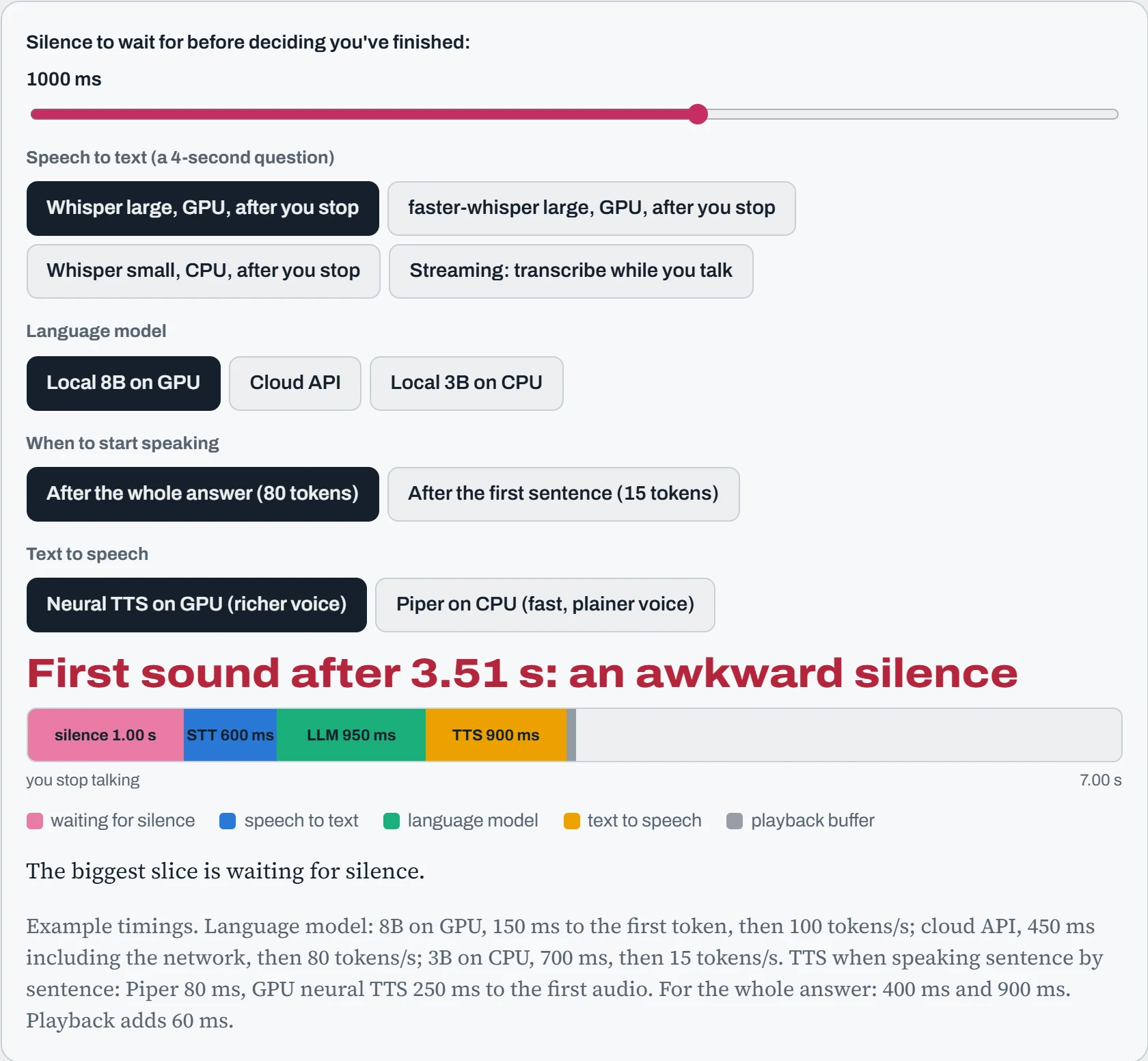
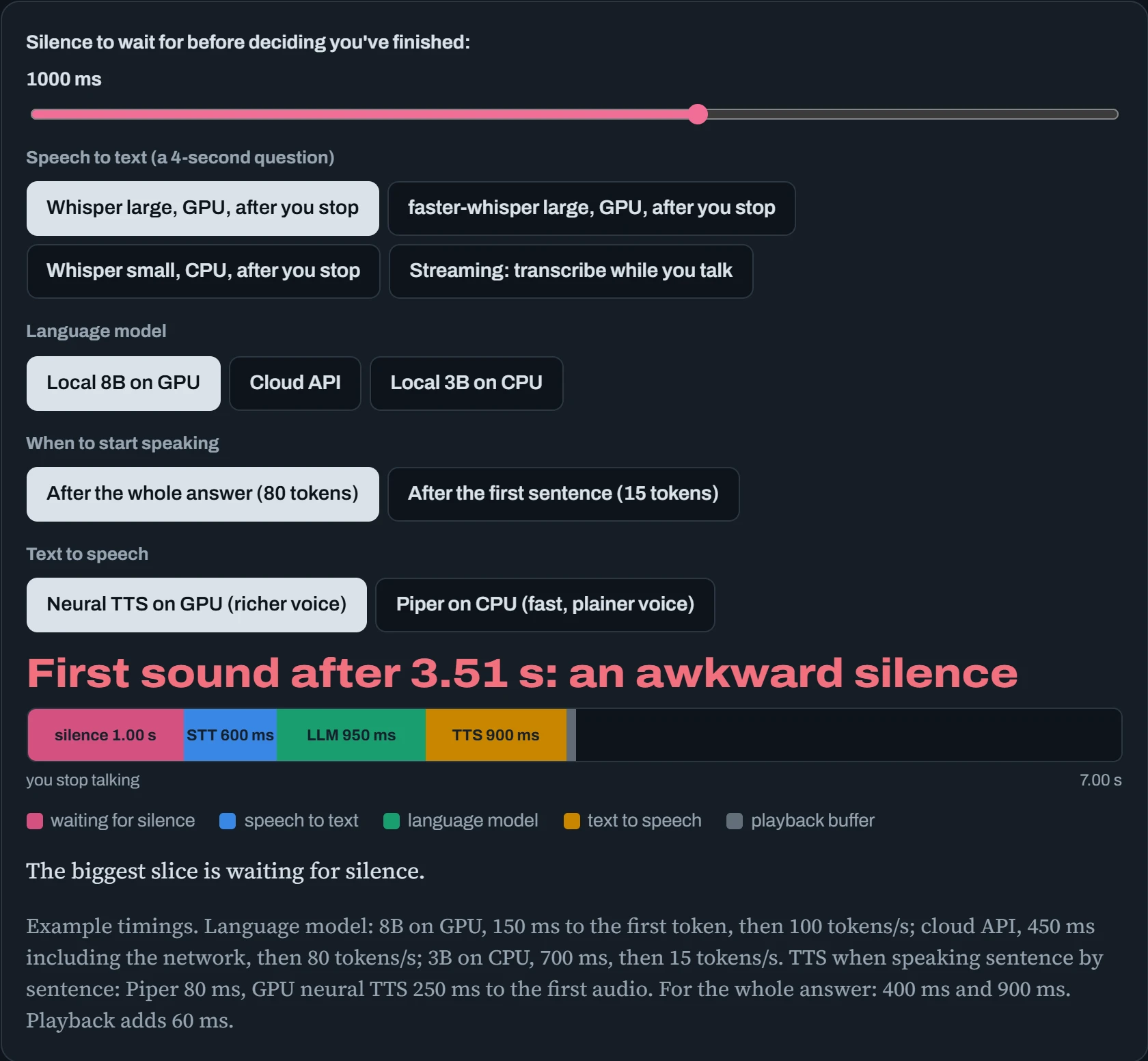
The biggest wins aren't faster models. Waiting for 300 ms of silence instead of 1,000 saves 700 ms on its own. Speaking after the first sentence instead of the whole answer saves most of the language model's time. Streaming speech-to-text hides nearly all the transcription inside the time you're still talking. Combine them and the same hardware answers in under a second.
Each shortcut has a cost, and good systems tune them carefully. A short silence threshold makes the assistant interrupt people who pause to think. Speaking the first sentence before the rest is written means it can't revise how it started. Streaming STT sometimes changes its mind about a word as more audio arrives. Most voice products also let you interrupt the assistant mid-answer (called barge-in), which means listening to the microphone while it's speaking, and telling your own voice apart from its echo.
Predict. Start from the best setup you found. Now switch the language model to the 3B model on CPU. Which number changes most, and does speaking sentence by sentence still save you?
Answer. The language model's slice grows the most: 700 ms before its first token, then 15 tokens per second, so a 15-token first sentence takes another second. Speaking sentence by sentence still matters a great deal. Waiting for all 80 tokens on that CPU would take over six seconds.
This is why voice assistants are built around time to the first token and the first sentence, not total speed. The rest of the answer only has to be written faster than it's spoken. A person speaks about 2 to 3 words a second, which even a modest CPU can keep ahead of.
The Linux audio stack
Sound on Linux passes through layers, just like GPU work does. At the bottom, ALSA is the kernel's sound system: it drives the sound card, USB microphone or headset, and shows each one as a device like hw:1,0 (card 1, device 0). Directly, one program at a time can use an ALSA device. So on top runs a sound server that mixes many programs, switches devices and converts formats. On most current desktops that's PipeWire, which also pretends to be the older PulseAudio, so old programs keep working. The diagram shows the path from microphone to model.
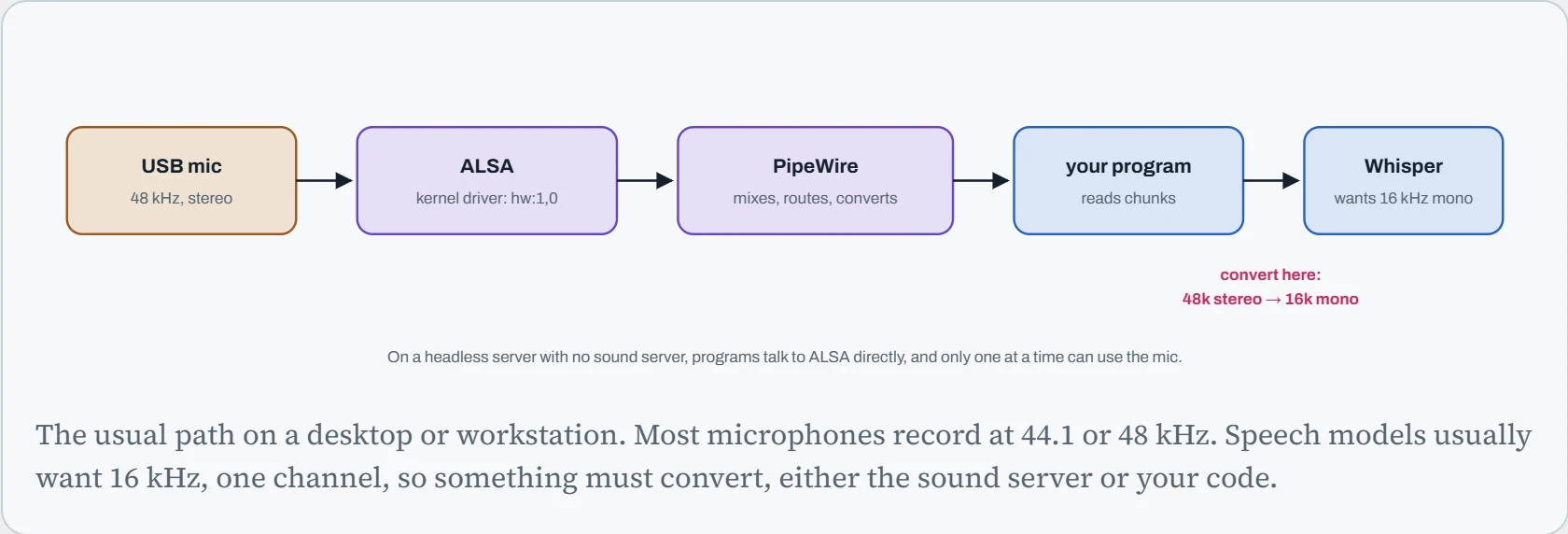
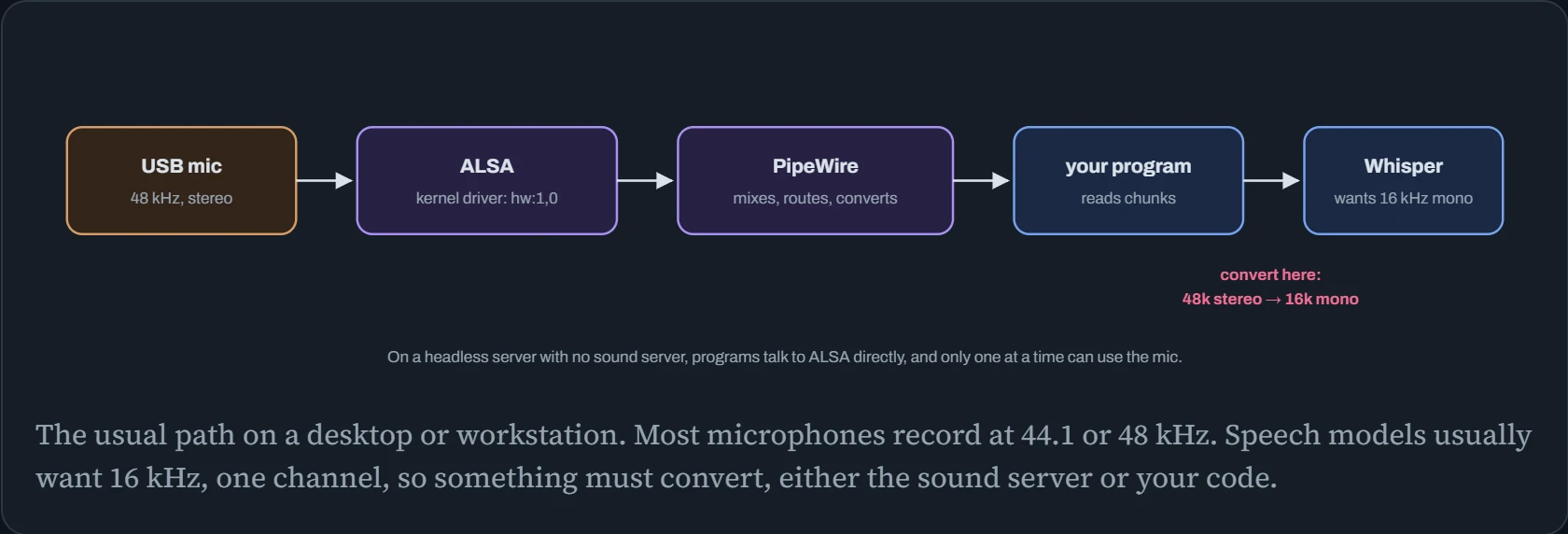
That last conversion is where audio quietly goes wrong. Sound is stored as a stream of numbers: a sample rate (how many numbers per second, like 16,000 or 48,000), a sample format (16-bit whole numbers or 32-bit decimals), and a number of channels. Feed 48 kHz audio to a model that thinks it's 16 kHz, and to the model it plays three times too slow and an octave and a half too low. The transcript turns to nonsense, with no error message. These commands find your devices and record in exactly the format a speech model wants:
$ arecord -l                                     # ALSA's list of capture devices
card 1: Microphone [USB Microphone], device 0: USB Audio [USB Audio]
$ wpctl status | grep -A3 Sources                # what PipeWire sees
$ arecord -D plughw:1,0 -f S16_LE -r 16000 -c 1 -d 5 test.wav
Recording WAVE 'test.wav' : Signed 16 bit Little Endian, Rate 16000 Hz, Mono
plughw, unlike hw, lets ALSA convert the rate and channels for you, so the file comes out at 16 kHz mono even though the mic records 48 kHz stereo. In containers there's no sound server unless you share one. Either pass the sound devices in with --device /dev/snd, which gives ALSA access only, or mount the host's PipeWire or PulseAudio socket into the container and set PULSE_SERVER to point at it.
FFmpeg, the universal adapter
Almost every audio and video file passes through FFmpeg on its way into a model. It reads nearly any format, and converts, cuts, resamples or splits it into frames. Three commands cover most AI pipelines:
# 1. any audio or video file → 16 kHz mono WAV for speech models
$ ffmpeg -i meeting.mp4 -vn -ar 16000 -ac 1 -c:a pcm_s16le meeting.wav
# 2. one frame per second from a video, for a vision model
$ ffmpeg -i drive.mp4 -vf fps=1 frames/%06d.jpg
# 3. the same, with the video decoded by the GPU's video engine (NVDEC)
$ ffmpeg -hwaccel cuda -i drive.mp4 -vf fps=1 frames/%06d.jpg
The third command uses a part of the GPU most people forget exists. NVIDIA GPUs have separate hardware for decoding video (NVDEC) and encoding it (NVENC), apart from the cores that run models. Decoding 4K video is hard work for a CPU. On a video pipeline feeding a vision model, the CPU often becomes the bottleneck long before the GPU is busy. Moving decoding to NVDEC frees the CPU and costs the model nothing. Intel and AMD GPUs offer the same through VA-API (-hwaccel vaapi). For very large pipelines, NVIDIA's DeepStream and DALI keep the decoded frames on the GPU the whole way, so they never travel back through CPU memory.
Two smaller tools are worth knowing next to FFmpeg. SoX is a command-line tool just for audio: trim silence, change volume, resample, and print statistics that catch broken recordings before they reach a speech model. libvips (the vips command) does the same job for images at scale: it resizes and converts huge batches of pictures much faster and with far less memory than loading each one whole, which matters when you prepare millions of images for training:
$ sox meeting.wav -n stat 2>&1 | grep -E "Length|Maximum amplitude"   # is there any sound at all?
$ sox raw.wav clean.wav silence 1 0.1 1% reverse silence 1 0.1 1% reverse   # trim silence at both ends
$ vips thumbnail photo.jpg small.jpg 512                              # resize to 512 pixels wide, quickly
Continue the lesson
The whole lesson, with its drawings and its questions. 6 more sections after the ones above.