
Local LLM inference: memory bandwidth, model files and quantization, llama.cpp, Ollama and vLLM
Every token a model writes reads all of its weights from memory, so speed is roughly memory bandwidth divided by bytes per token. A model too big for the GPU spills into system RAM, which is about eleven times slower, and the slow part sets the pace. Quantization shrinks the bytes read.
What this page answers
Why is a 70B model so slow on a 24 GB GPU?
The model needs about 47 GB, so Ollama put about half on the GPU and the rest in system RAM. GPU memory delivers about 1,000 GB per second and desktop RAM about 90, roughly eleven times less. Read it in “Nine times bigger, fifty times slower”
How fast will a local LLM run?
Each token reads the whole model, so tokens per second is roughly memory speed divided by bytes read per token. The slow part is moving the weights, not the math. Read it in “Every word reads the whole model”
Nine times bigger, fifty times slower
You have one RTX 4090, a gaming card with 24 GB of memory. You run Llama 3.1 8B with Ollama, and it writes about 130 tokens a second. A token is a word or a piece of a word, so that's faster than you can read. Then you try Llama 3.3 70B, a model nine times bigger:
$ ollama run llama3.3:70b --verbose "Explain RAID 10 in two sentences."
…
eval rate:            2.61 tokens/s
$ ollama ps
NAME            ID              SIZE     PROCESSOR          UNTIL
llama3.3:70b    a6eb4748fd29    47 GB    48%/52% CPU/GPU    4 minutes from now
Speeds and outputs on this page are realistic examples for typical hardware, and real numbers vary with versions and settings. Commands, flags, formats and memory sums are real.
Nine times the size, but about fifty times slower. Where did the speed go?
- The big model does far more math per word
- Half the model sits in the computer's main memory
- The GPU overheated and slowed down
Answer. Look at the PROCESSOR column: 48%/52% CPU/GPU. The 70B model needs about 47 GB, and the card has 24 GB. So Ollama put about half of it on the GPU and the rest in the computer's main memory (RAM), where the CPU works through it.
The GPU's own memory can deliver about 1,000 GB per second. Normal desktop RAM delivers about 90 GB per second, roughly eleven times less. And as the next section shows, every new token has to read all of the model's numbers. So each token waits for the slow half. Even with half the model on a fast GPU, the whole thing runs at nearly RAM speed.
How an LLM writes text
Before going further, it helps to see what a language model actually does when it “writes”. There's no hidden sentence waiting to come out. The model does one small job, over and over: given all the text so far, it scores every possible next piece of text, picks one, adds it to the end, and starts again.
The pieces are tokens. A tokenizer cuts text into common chunks: short words stay whole, longer or rarer words are split into parts, and spaces and punctuation are pieces too. On average a token is about three quarters of an English word. Each model has a fixed list of possible tokens, its vocabulary. Llama 3 has 128,256 of them. Every token in the list has a number, and the model only ever sees those numbers.
Here is one turn of the loop for Llama 3.1 8B, from text in to one new token out:
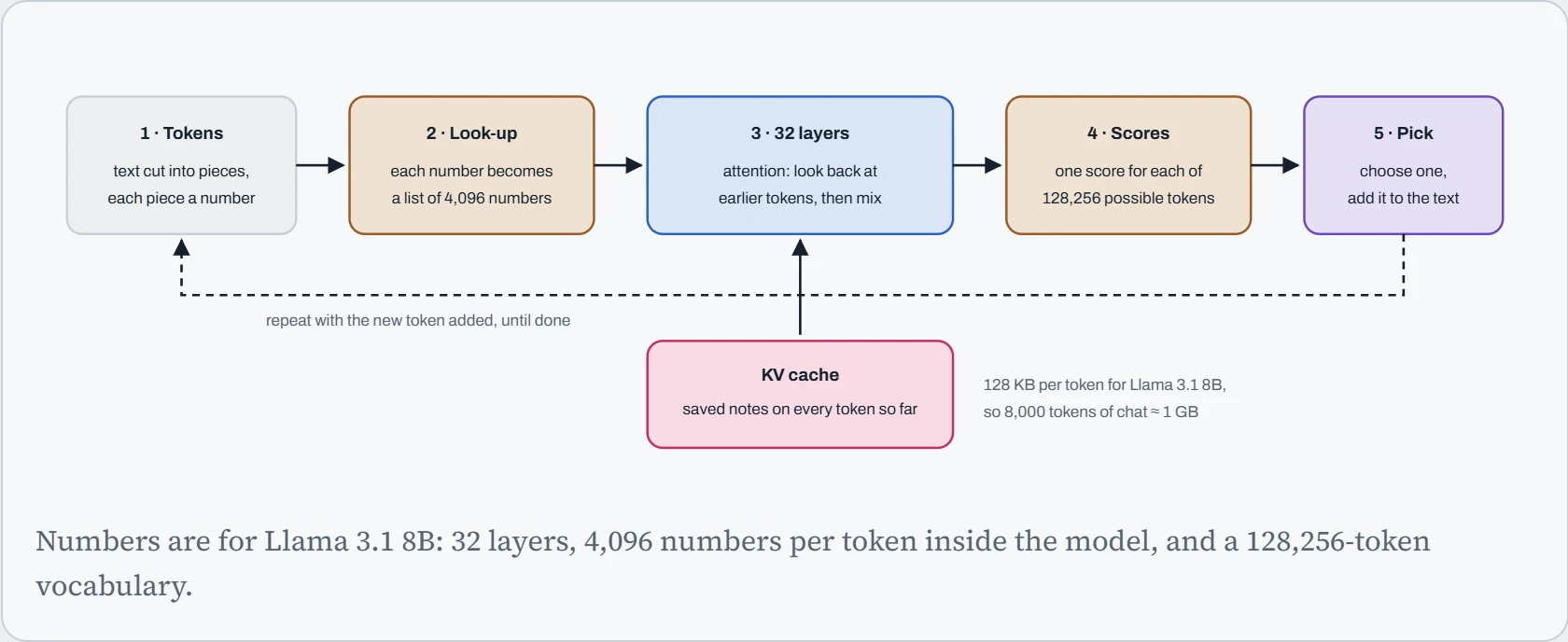
Step 3 is where the knowledge lives. Each layer does two things. Attention lets the current token look back at every earlier token and pull in what matters (“it” finds the noun it refers to). Then a block of plain multiplications mixes that information. The model's 8 billion weights are the numbers used in those multiplications, and they're what training adjusted.
The pink box explains the KV cache you'll meet all through this course. To look back, attention needs two lists of numbers for every earlier token, called keys and values. Recomputing them for the whole conversation at every step would waste enormous work, so the engine saves them and only computes them once for each new token. For Llama 3.1 8B that's 2 (keys and values) × 32 layers × 8 attention groups × 128 numbers × 2 bytes = 128 KB per token. It's small per token and large per conversation, which is why long contexts eat GPU memory.
Step 5 is a choice, not a fact. The scores become probabilities, and the engine picks one. A setting called temperature controls how adventurous that pick is. At 0, it always takes the top token. Higher values flatten the odds, so less likely tokens get picked more often. Here is a real-looking example: the model has read “The GPU in my server is” and scored its options.
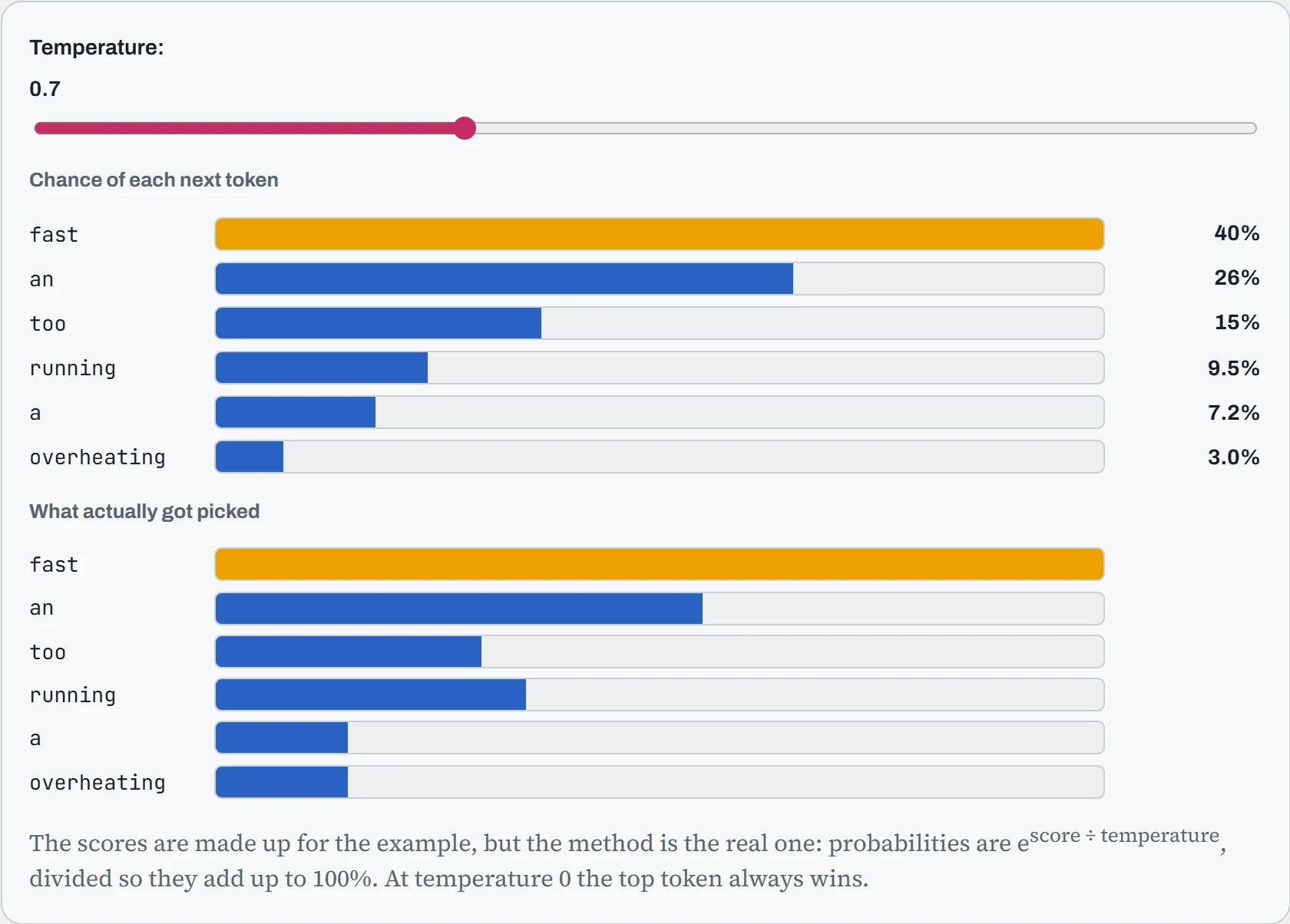
At temperature 0, pick 50 times: you get “fast” every time. Around 0.7, a common default, “fast” is still the likeliest pick, but the others turn up often. At 2, the rare word “overheating” shows up surprisingly often. That's the whole reason the same question can get different answers: the model's scores are the same each time, and the pick is a dice roll weighted by them. Everything else in this lesson is about how fast the machine can run that loop.
Predict. You set temperature to 0 and ask your local server the same question twice. Will you get exactly the same answer both times?
Answer. Almost always, but not guaranteed. At temperature 0 the pick is no longer random, so the same scores give the same token. But GPUs add up numbers in slightly different orders depending on how many requests are batched together, and tiny rounding differences can occasionally flip a close call between two tokens. After one token differs, everything after it can differ too.
If you need repeatable outputs for testing, use temperature 0, a fixed seed, one request at a time, and the same engine version. Even then, treat “almost identical” as the realistic goal on a busy server.
Every word reads the whole model
As the last section showed, a language model writes one token at a time. To choose each token, it runs every one of its weights through some math, using everything written so far. Then it does it all again for the next token. For one person chatting, there's very little math per weight: about two simple operations each time a weight is read. The slow part isn't the math. It's moving 8 billion weights out of memory and into the chip, again and again, for every token.
That gives a rule of thumb you can work out on a napkin:
tokens per second ≈ memory speed ÷ bytes read per token
The bytes read per token are about the size of the model in memory, plus the conversation so far (the KV cache from Down the Queue). In practice, real programs reach about 70% of the memory's top speed. The picture shows the idea: a model stored in memory on the left, the chip that does the math on the right, and a pipe between them whose width is the memory speed.
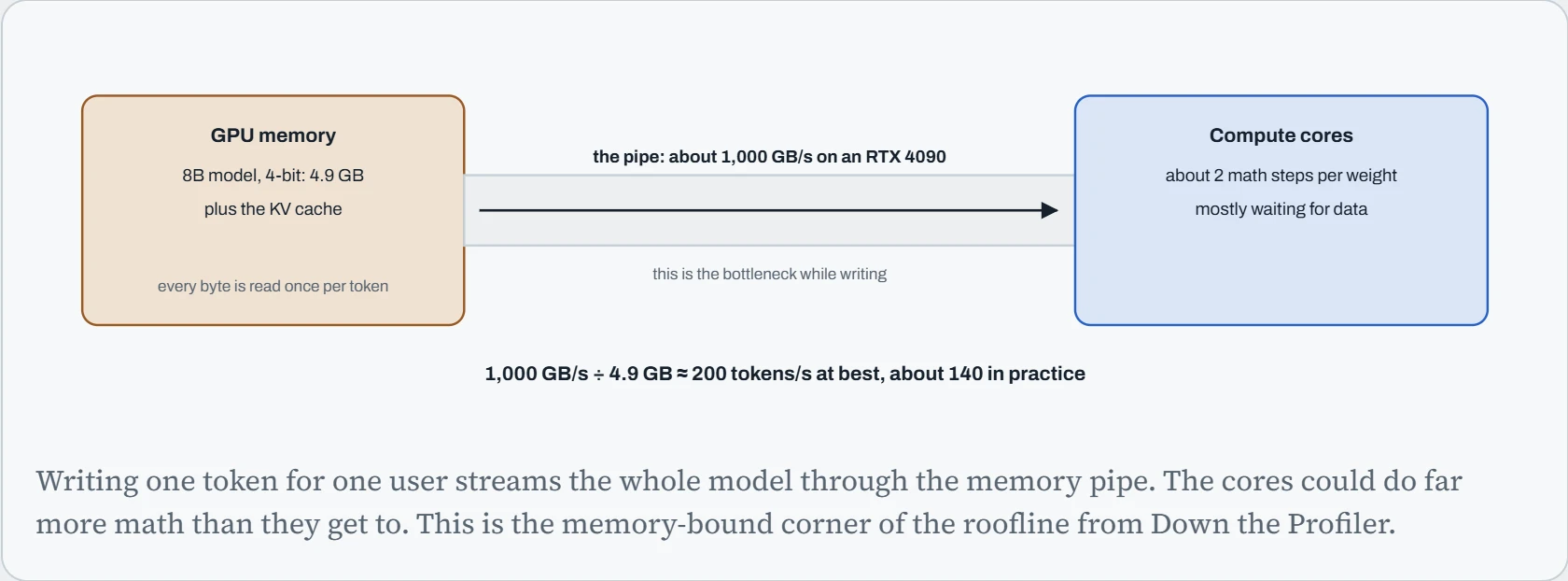
The formula explains a lot at once. A smaller model is faster. A model stored in fewer bits is faster, not only smaller, because there are fewer bytes to move. A GPU with faster memory is faster even if its math units are the same. And a model split between the GPU and the much slower RAM runs close to RAM speed, because every token has to read the slow part too. Here's how common hardware compares, using the same formula for an 8B model at 4 bits:
| Hardware | Memory | Memory speed | Ceiling for an 8B 4-bit model |
|---|---|---|---|
| Desktop CPU, DDR5-5600, two channels | your RAM | about 90 GB/s | about 13 tokens/s |
| RTX 4060 Ti 16 GB | 16 GB | 288 GB/s | about 41 tokens/s |
| RTX 3090 | 24 GB | 936 GB/s | about 133 tokens/s |
| RTX 4090 | 24 GB | 1,008 GB/s | about 143 tokens/s |
| RTX 5090 | 32 GB | 1,792 GB/s | about 255 tokens/s |
| H100 SXM | 80 GB | 3,350 GB/s | about 477 tokens/s |
The ceiling column is 70% of memory speed divided by 4.92 GB. Real llama.cpp numbers land close to it, which is the sign of a good rule of thumb. Notice the RTX 3090, a card from 2020: it's nearly as fast as the 4090 for this job, because their memory speeds are close. For local chat, memory size and memory speed matter more than anything printed in large type on the box.
Predict. The RTX 5090 has about 1.8 times the memory speed of the 4090. It also has much more raw math power. When it writes an answer with an 8B model, how much faster should it be? And when it reads a long prompt?
Answer. Writing: about 1.8 times faster, matching the memory speed, because that's the part writing waits on. The extra math power barely helps.
Reading a long prompt is the opposite. The model handles all the prompt's tokens together, so each weight is read once and used for thousands of tokens. That makes it limited by math, not memory. So prompt reading scales with math power instead. The mechanism section covers this split, because it explains why a long document can take longer to read than the answer takes to write.
Will it fit, and how fast?
Now put the pieces together. The memory a model needs is its weights (number of weights × bits per weight ÷ 8), plus the KV cache for the longest conversation you'll allow, plus about 1 GB of working space. If that fits on the GPU, speed follows the formula above. If it doesn't, tools like llama.cpp and Ollama put as much as they can on the GPU and the rest in RAM, and each token pays for both parts.
The bar shows what has to be stored. The dashed pink line is your GPU's memory. Anything past the line lives in RAM.
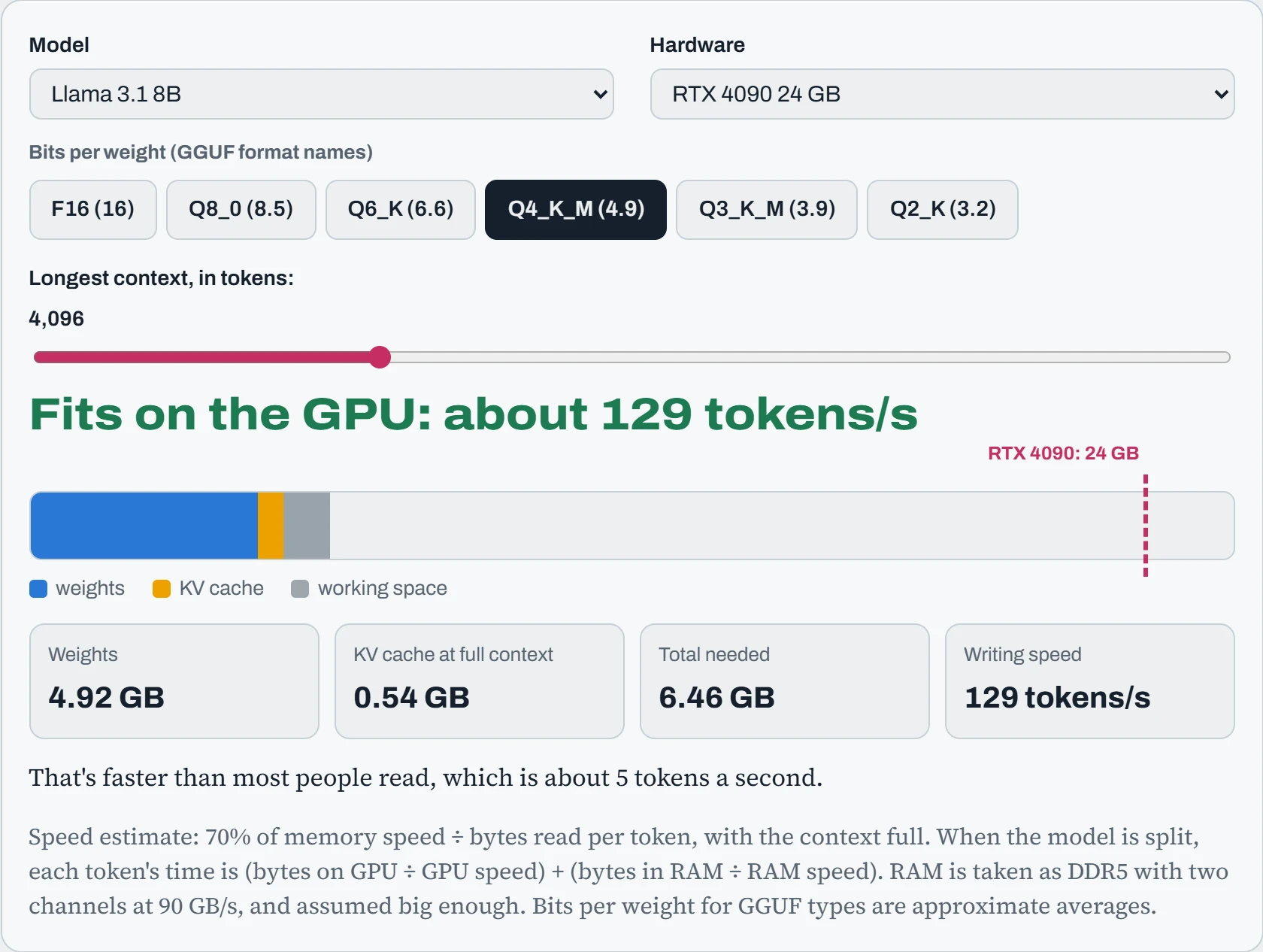
The hook's case: Llama 3.3 70B at Q4_K_M on one RTX 4090. About half lives in RAM, and the estimate lands around 2.7 tokens a second, close to what Ollama reported. Switch to Q2_K and more of it fits on the GPU, so it gets faster. But read the next section before you celebrate: at 2 or 3 bits, quality drops in ways you'll notice.
Then take an 8B model with the context at 128K tokens. The weights are under 5 GB, but the KV cache alone needs about 17 GB. Long context costs memory and speed, because every new token also reads the whole conversation so far. If you never paste in whole books, setting a smaller context is free speed.
Predict. You add a second RTX 3090, so the 70B Q4_K_M model now fits entirely in 48 GB of GPU memory. llama.cpp splits it by layers: the first half on one card, the second half on the other. Will it run twice as fast as on a single 48 GB card with the same memory speed?
Answer. No: about the same speed as that single card, around 15 tokens a second. Split by layers, the cards take turns. Card one reads its half of the weights, hands its result to card two, and then sits idle while card two reads its half. Each token still streams the whole model through one memory pipe at a time.
Compared with one 3090 and a lot of RAM, though, it's more than five times faster, because nothing has to come from slow RAM any more. So two cards bought you room, not speed. Engines like vLLM can instead split every layer across both cards (tensor parallelism), so both read at the same time. That needs a fast link between the cards to really pay off.
Model files and quantization
Models are shared in a few file formats, and the format usually decides which tool can run it. Most also come in several quantized versions, meaning the weights are stored with fewer bits each. Fewer bits means a smaller file, less memory and faster writing, in exchange for a little accuracy. The table sorts out the names you'll see on a model download page:
| Format | What it is | Used by |
|---|---|---|
| safetensors | The original weights, usually 16-bit, in a safe file that holds only numbers (no code) | Hugging Face, vLLM, SGLang, and for fine-tuning |
| GGUF | One file with weights, tokenizer and settings. Comes in many quantized versions (Q8_0, Q6_K, Q4_K_M…) | llama.cpp, Ollama, LM Studio |
| AWQ, GPTQ | 4-bit versions that were quantized carefully, using sample text to protect the weights that matter most | vLLM, SGLang and other GPU engines |
| FP8, FP4 | 8-bit or 4-bit floating-point numbers that newer GPUs can do math on directly (FP8 on Ada and Hopper, FP4 on Blackwell) | vLLM, TensorRT-LLM, SGLang |
| bitsandbytes | Quantizes ordinary weights to 4 or 8 bits while loading, with no special file | Transformers, and QLoRA training (Down the Memory) |
For GGUF files, a sensible default is Q4_K_M. In most tests it sits close to the original's quality, at under a third of the size. Q5_K_M and Q6_K are a bit better if they fit. Q8_0 is very close to the original. Below about 4 bits, quality drops faster and faster, and small models suffer most: a 70B model at 3 bits is often better than an 8B model at 16 bits, but an 8B model at 2 bits is often worse than a 3B model at 4 bits. You can measure this yourself with llama-perplexity, which scores how surprised a model is by real text. Lower is better.
Quantizing your own model, for example after a fine-tune, takes two commands in llama.cpp. First convert the Hugging Face folder to a 16-bit GGUF, then shrink it:
$ python convert_hf_to_gguf.py ./my-finetune --outtype f16 --outfile my-finetune-f16.gguf
$ llama-quantize my-finetune-f16.gguf my-finetune-Q4_K_M.gguf Q4_K_M
…
llama_model_quantize_impl: model size  = 15317.02 MB
llama_model_quantize_impl: quant size  =  4685.30 MB
15.3 GB down to 4.7 GB: about 4.9 bits per weight instead of 16, for an 8B model. That's the Q4_K_M number from the planner. Why “4.9” and not “4”? Each small group of weights also stores its own scale factor, and a few sensitive layers are kept at higher precision. The mechanism section shows why those scales are needed.
llama.cpp, Ollama and vLLM
Three programs cover nearly all local use, and they suit different jobs. llama.cpp is the engine underneath many tools. It runs GGUF files on almost anything (NVIDIA, AMD, Apple, Intel, plain CPUs) and gives you every setting. Its server takes a model and a few key flags:
$ llama-server -m Llama-3.1-8B-Q4_K_M.gguf -ngl 99 -c 16384 --host 127.0.0.1 --port 8080
load_tensors: offloaded 33/33 layers to GPU
llama_context: n_ctx = 16384
main: server is listening on http://127.0.0.1:8080
-ngl 99 means “put up to 99 layers on the GPU”, in other words all of them. Lower it when a model doesn't fit, and the rest run on the CPU. -c sets the context, which decides the KV cache size. The log line offloaded 33/33 layers is the first thing to check: if it says 20/33, a third of the model is running from RAM. To measure speed properly, llama-bench reports the two numbers that matter separately: pp (prompt processing, reading) and tg (text generation, writing):
$ llama-bench -m Llama-3.1-8B-Q4_K_M.gguf -ngl 99
| model             |     size | params | backend | ngl |  test |              t/s |
| llama 8B Q4_K - M | 4.58 GiB | 8.03 B | CUDA    |  99 | pp512 |  9842.17 ± 51.30 |
| llama 8B Q4_K - M | 4.58 GiB | 8.03 B | CUDA    |  99 | tg128 |    139.62 ± 0.41 |
Writing at about 140 tokens a second, right on the formula. Reading the prompt runs at almost 10,000 tokens a second. That's seventy times faster per token, because reading is limited by math, not memory.
Ollama wraps llama.cpp in a friendly service. It downloads models by name, picks the GPU layers for you, and runs as a systemd service. Its settings are environment variables, so you change them with a systemd override:
$ sudo systemctl edit ollama
[Service]
Environment="OLLAMA_KEEP_ALIVE=30m"            # keep models loaded 30 min after use (default 5m)
Environment="OLLAMA_MODELS=/data/ollama"        # models are big: put them on the big disk
$ sudo systemctl restart ollama
By default, the Linux service keeps models in /usr/share/ollama/.ollama/models and unloads a model after 5 idle minutes. That's why the first question after a coffee break is slow: the model is being read back from disk.
vLLM (and SGLang) are the engines from Down the Queue. They're built for many users at once and use safetensors, AWQ, GPTQ or FP8 models, not GGUF. On a workstation with two to four GPUs, they can split every layer across the cards:
$ vllm serve Qwen/Qwen2.5-32B-Instruct-AWQ --tensor-parallel-size 2 \
       --max-model-len 16384 --gpu-memory-utilization 0.90
A simple way to choose: Ollama for “I want a model on my machine in five minutes”, llama.cpp when you need control or unusual hardware, and vLLM when several people or programs will use it at once. For one person typing, all three are limited by the same memory pipe. For twenty people, vLLM's batching wins easily, because a batch reads each weight once for everyone.
Continue the lesson
The whole lesson, with its drawings and its questions. 7 more sections after the ones above.