
GPU topology and management: PCIe and NUMA affinity, nvidia-smi, sharing, power caps and throttling
nvidia-smi numbers GPUs by PCI bus address, while CUDA by default numbers them fastest first, so on a machine with mixed cards GPU 0 means two different cards. CUDA_VISIBLE_DEVICES uses CUDA's numbering. Setting CUDA_DEVICE_ORDER=PCI_BUS_ID makes the two agree.
What this page answers
Why does CUDA_VISIBLE_DEVICES pick the wrong GPU?
CUDA numbers GPUs fastest first by default, while nvidia-smi numbers them by PCI bus address. Export CUDA_DEVICE_ORDER=PCI_BUS_ID and CUDA numbers them the same way nvidia-smi does. Read it in “GPU 1 isn't always GPU 1”
Which GPUs should a multi-GPU job use?
Training jobs swap gradients every step, and the swap runs at the speed of the slowest link between the GPUs involved, so give a job GPUs that sit close on the server's map. Read it in “Picking GPUs that sit close”
GPU 1 isn't always GPU 1
A small lab server has two different cards: an RTX 3060 and an RTX 4090. A colleague is training on the 4090. You check nvidia-smi, see that GPU 1 is busy and GPU 0 is free, and start your job on GPU 0. A minute later your colleague's job crashes with “out of memory”. Here's what the two tools say:
$ nvidia-smi -L
GPU 0: NVIDIA GeForce RTX 3060 (UUID: GPU-3a1f9c2e-…)
GPU 1: NVIDIA GeForce RTX 4090 (UUID: GPU-8b5c07d1-…)
$ CUDA_VISIBLE_DEVICES=0 python -c "import torch; print(torch.cuda.get_device_name(0))"
NVIDIA GeForce RTX 4090
Outputs on this page are realistic examples, and bandwidth and power figures are rough. Commands, flags, the topology codes and environment variables are real.
You asked CUDA for GPU 0 and got the 4090, the card nvidia-smi calls GPU 1. Why do the two tools disagree?
- A driver bug swapped the cards
- They number the GPUs in different orders
- CUDA_VISIBLE_DEVICES was ignored
Answer. nvidia-smi numbers GPUs by where they sit on the motherboard: their PCI bus address, the way a street numbers its houses. CUDA, by default, numbers them fastest first. So on a machine with mixed cards, CUDA's 0 is the 4090, while nvidia-smi's 0 is the 3060. CUDA_VISIBLE_DEVICES uses CUDA's numbering, so =0 picked the 4090.
The fix is one line: export CUDA_DEVICE_ORDER=PCI_BUS_ID makes CUDA number GPUs like nvidia-smi does. Even safer, use the GPU's UUID, a permanent ID that never changes: CUDA_VISIBLE_DEVICES=GPU-3a1f9c2e-…. On servers with identical cards the two orders usually agree, which is exactly why this surprise waits for the day someone adds a different card.
A GPU server is a map
Inside a typical 8-GPU server there are two CPUs, called sockets. Each GPU plugs into a PCIe switch, a junction box that lets several devices share one connection to a CPU. The two CPUs are joined by their own link (Intel calls it UPI). So data going from one GPU to another can take a short road through one switch, a longer road up through a CPU, or the longest road across both CPUs. Some servers also have NVLink, a separate high-speed road built just for GPU-to-GPU traffic.
The diagram is that layout. Read it top to bottom: CPUs, then switches, then GPUs. Every GPU-to-GPU trip climbs only as high as it must. GPU 0 to GPU 1 meets at their shared switch. GPU 0 to GPU 5 has to go all the way up and across.
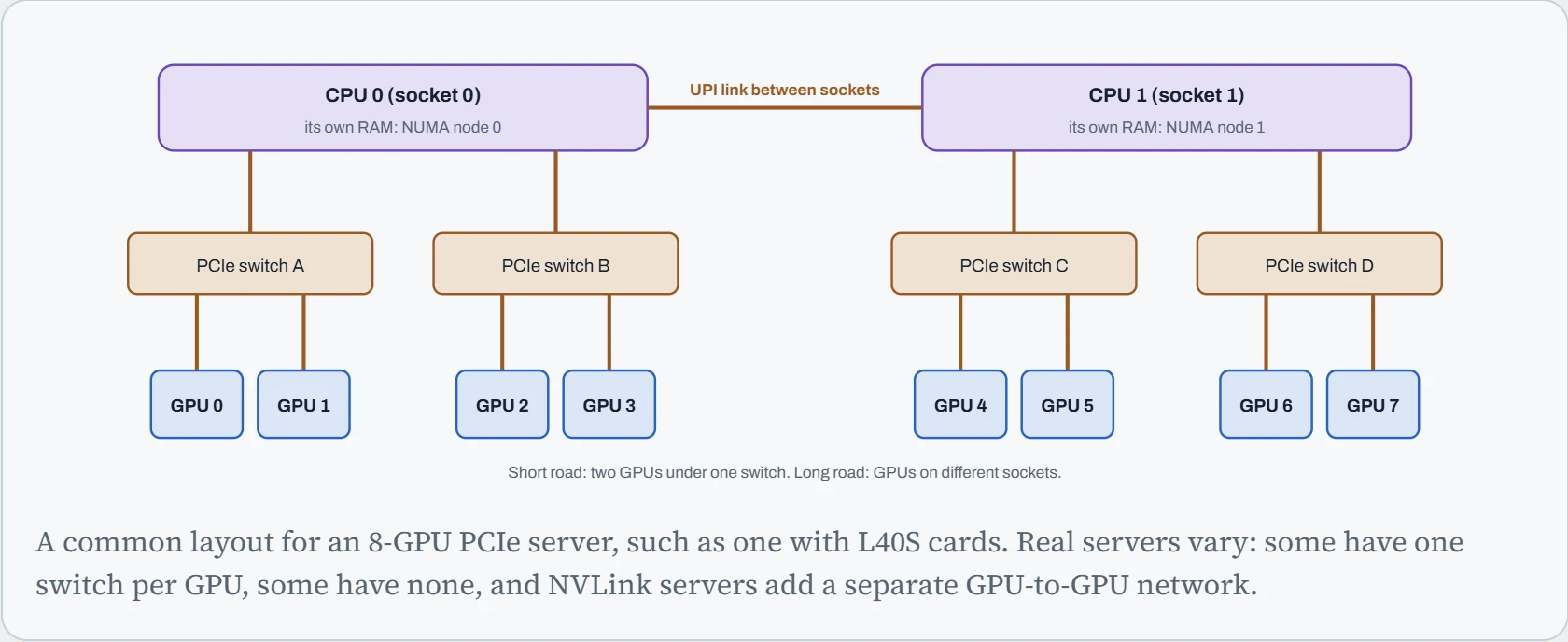
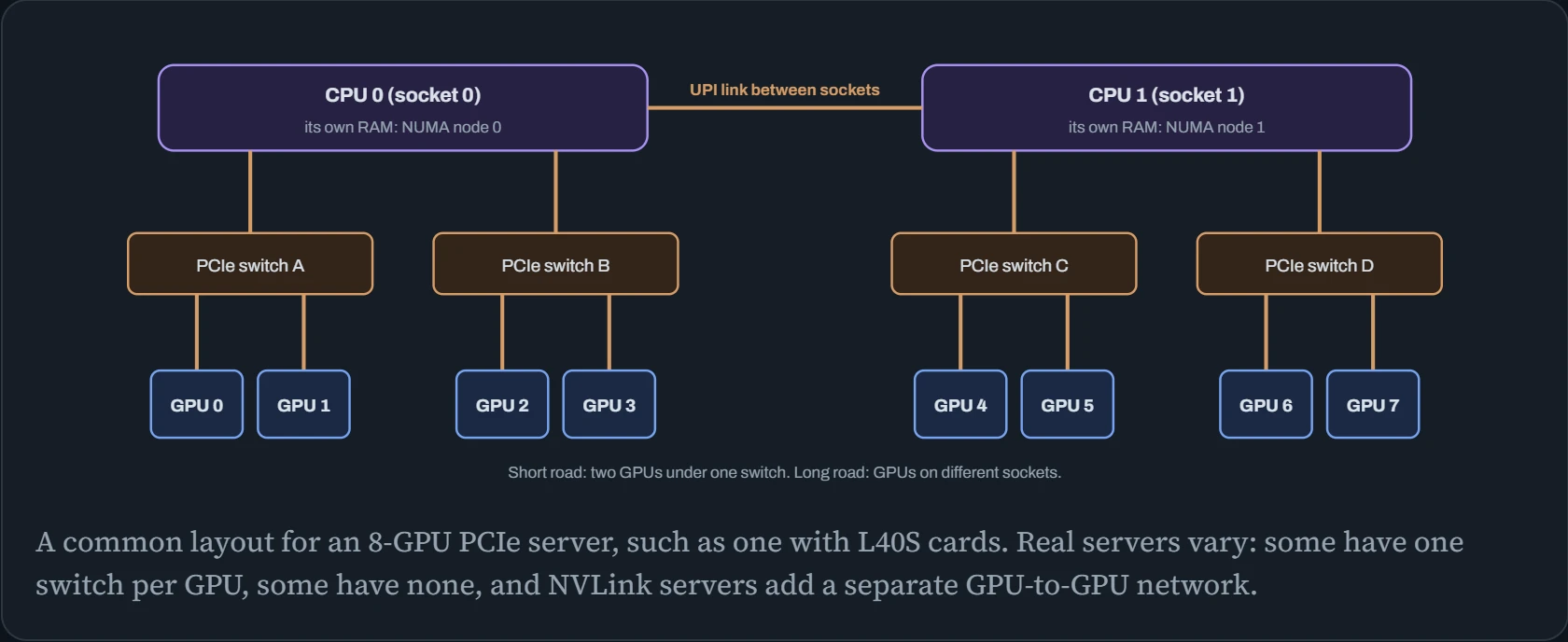
You don't need to open the case to see this. nvidia-smi topo -m prints the map as a table, with one short code for every pair of GPUs. The codes are listed at the bottom, from slowest to fastest:
$ nvidia-smi topo -m
        GPU0  GPU1  GPU2  GPU3  GPU4  GPU5  GPU6  GPU7  CPU Affinity   NUMA Affinity
GPU0     X    PIX   NODE  NODE  SYS   SYS   SYS   SYS   0-31,64-95     0
GPU1    PIX    X    NODE  NODE  SYS   SYS   SYS   SYS   0-31,64-95     0
GPU2    NODE  NODE   X    PIX   SYS   SYS   SYS   SYS   0-31,64-95     0
…
GPU7    SYS   SYS   SYS   SYS   NODE  NODE  PIX    X    32-63,96-127   1

Legend:
  X    = Self
  SYS  = Connection traversing PCIe as well as the SMP interconnect between NUMA nodes (e.g., QPI/UPI)
  NODE = Connection traversing PCIe as well as the interconnect between PCIe Host Bridges within a NUMA node
  PHB  = Connection traversing PCIe as well as a PCIe Host Bridge (typically the CPU)
  PXB  = Connection traversing multiple PCIe bridges (without traversing the PCIe Host Bridge)
  PIX  = Connection traversing at most a single PCIe bridge
  NV#  = Connection traversing a bonded set of # NVLinks
In plain words: PIX means “same switch, short road”. NODE means “same CPU, different switch”. SYS means “across both CPUs, longest road”. NV# means “NVLink, with # links bundled together”, the express road. The last two columns matter too. CPU Affinity lists the CPU cores closest to each GPU, and NUMA Affinity says which socket's memory is local. Those are the numbers to use with numactl from Down the Profiler.
Picking GPUs that sit close
When a job uses two or four GPUs on a shared server, which ones you give it matters. Training jobs swap gradients between GPUs every step (Down the Wire). That swap runs at the speed of the slowest road between the GPUs involved.
The pink line shows the road the data takes. The panel gives the code nvidia-smi would print for that pair, a rough copy speed, and how long it would take to swap 10 GB, about the gradients of a 5-billion-parameter model in 16-bit. On an SXM-style server with NVLink, every GPU has its own fast road.
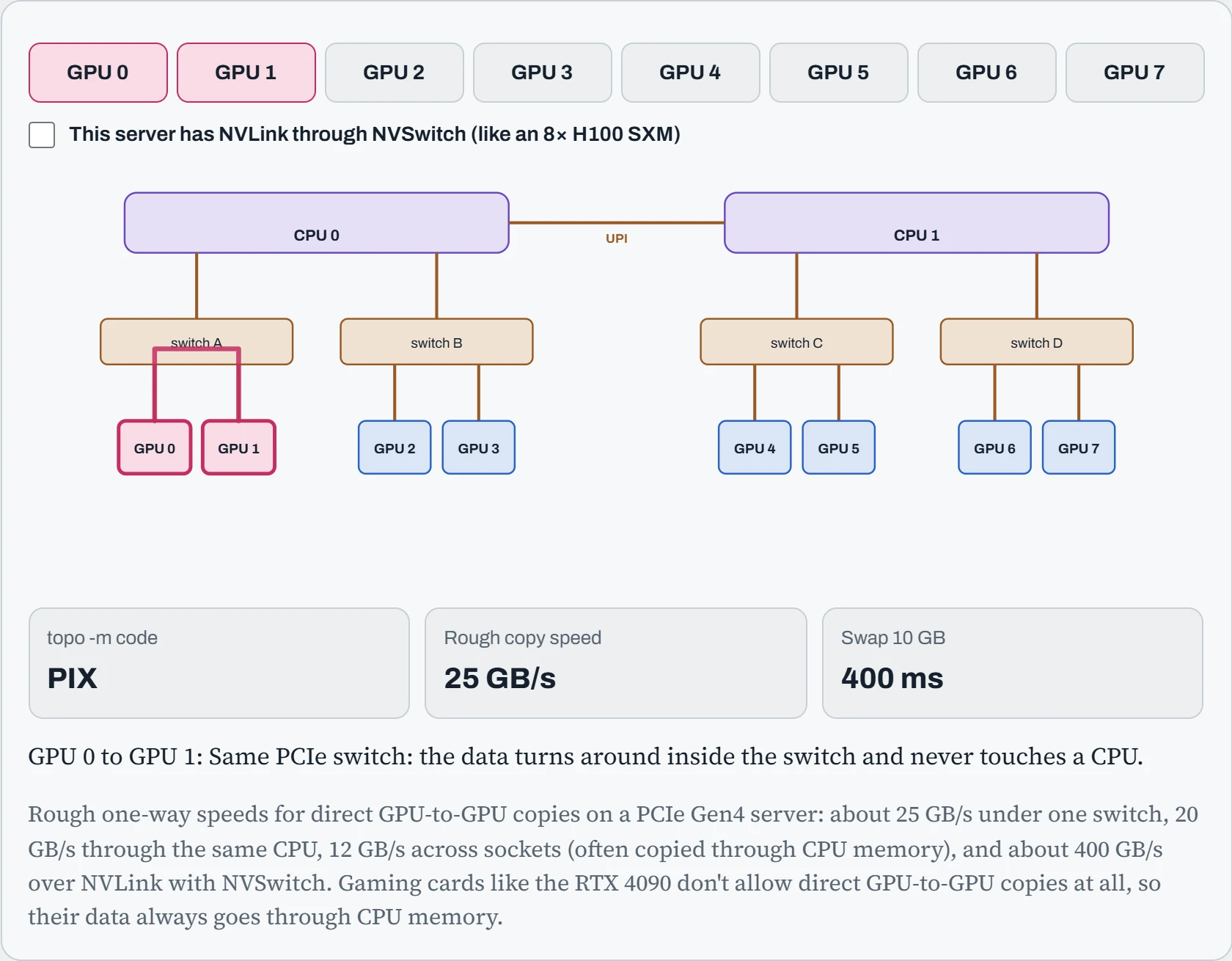
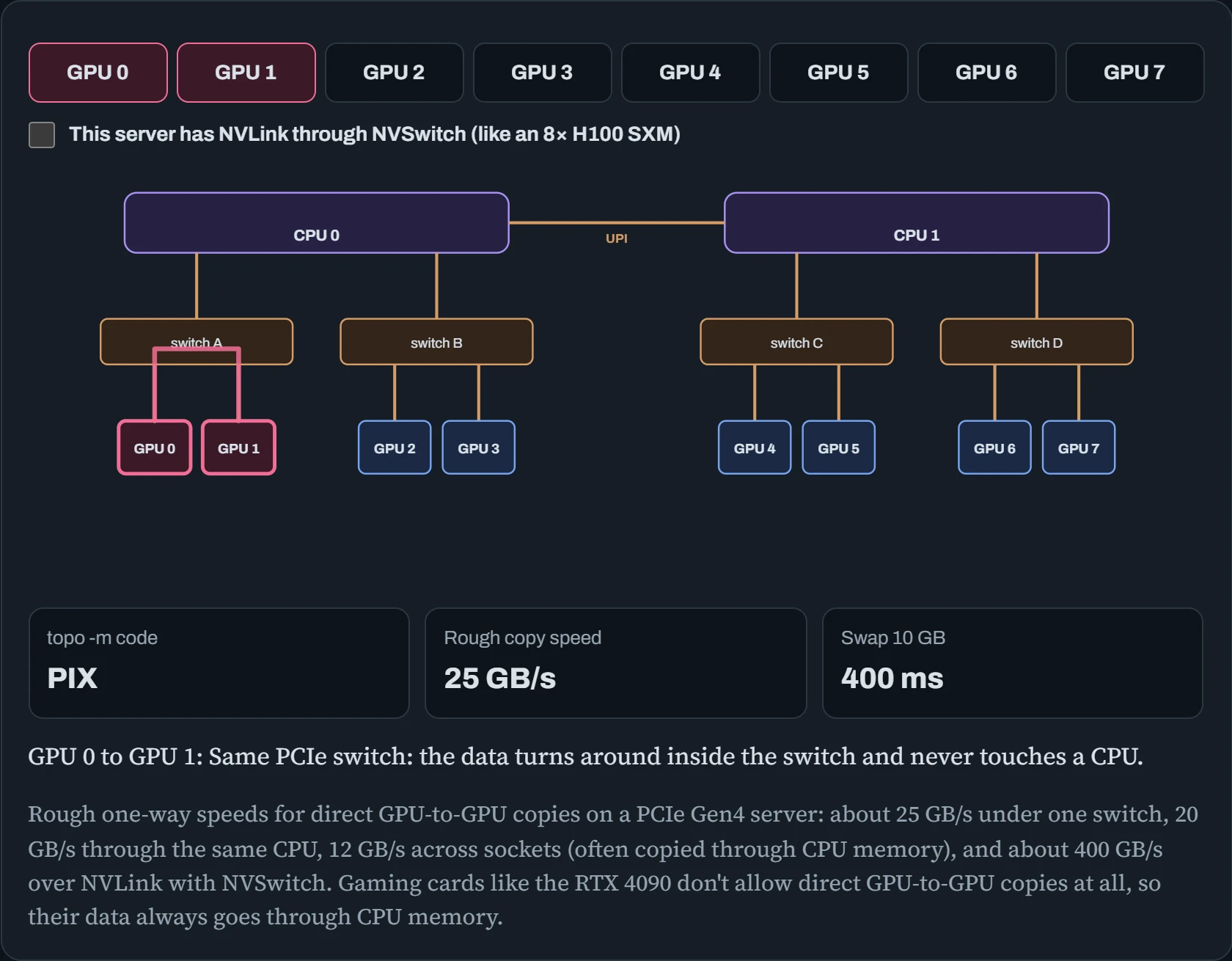
On this PCIe server, the best pair (PIX) is about twice as fast as the worst (SYS). For a 4-GPU job, the right choice is clear: all four GPUs on one socket (0 to 3 or 4 to 7), not a scattered set like 0, 2, 5 and 7. With NVLink, the gap between pairs disappears, and every road is more than ten times faster than the best PCIe one. That's a big part of why SXM servers cost what they do.
To measure your own server rather than trust a diagram, NVIDIA's nvbandwidth tool (or p2pBandwidthLatencyTest from the CUDA samples) prints a matrix of real copy speeds between every pair:
$ ./nvbandwidth -t device_to_device_memcpy_read_ce
memcpy CE GPU(row) -> GPU(column) bandwidth (GB/s)
           0        1        2        3        4   …
 0       N/A    25.71    20.13    20.09    11.96
 1     25.68      N/A    20.11    20.15    11.94
Keep that matrix with the server's records. If one pair ever comes in much lower than its neighbours, it points to a badly seated card, a link running at fewer lanes than it should, or a BIOS setting. Those are hardware problems that no code change will fix.
Predict. Two people each want 2 GPUs for training on this PCIe server, and GPUs 0, 1, 4 and 5 are free. One person gets 0 and 1. Should the other get 4 and 5, or would 1 and 4 have been just as good for someone?
Answer. Give out 0+1 and 4+5. Both pairs are PIX, the fastest road, at about 25 GB/s. A pair like 1+4 crosses both CPUs (SYS) at about 12 GB/s, so that job would swap gradients at half speed for no reason.
Each job should also run its CPU work on its own GPUs' socket: cores 0–31 for GPUs 0 and 1, and cores 32–63 for GPUs 4 and 5, according to the CPU Affinity column. Allocating by the map instead of by “whatever's free” costs nothing and is pure speed.
nvidia-smi as a stethoscope
Most people only ever look at nvidia-smi's default table. But it can answer precise questions, in a format that scripts can read. --query-gpu picks the fields you want, and --format=csv prints them as plain comma-separated values. Add -l 5 to repeat every five seconds:
$ nvidia-smi --query-gpu=index,uuid,pci.bus_id,memory.used,utilization.gpu,temperature.gpu,power.draw,power.limit,clocks.sm --format=csv
index, uuid, pci.bus_id, memory.used [MiB], utilization.gpu [%], temperature.gpu, power.draw [W], power.limit [W], clocks.sm [MHz]
0, GPU-71c2e4a9-…, 00000000:01:00.0, 61442 MiB, 97 %, 71, 348.21 W, 350.00 W, 2235 MHz
1, GPU-c04e5b13-…, 00000000:41:00.0, 3 MiB, 0 %, 34, 23.90 W, 350.00 W, 210 MHz
$ nvidia-smi --query-compute-apps=gpu_uuid,pid,process_name,used_memory --format=csv
gpu_uuid, pid, process_name, used_memory [MiB]
GPU-71c2e4a9-…, 48211, python, 61200 MiB
Read the first GPU like a doctor would. It's 97% busy, at 348 of its 350 watts, and very hot. So it's working flat out, right at its power limit. Hold that thought for the power section. The second query answers the most common question on a shared server, “who is using GPU 0?”, with a process ID you can look up using ps -o user= -p 48211.
For watching live, nvtop, nvitop and gpustat draw the same information as friendly charts. AMD's equivalent of nvidia-smi is amd-smi (older systems have rocm-smi), and it has similar query options. One more command worth knowing: nvidia-smi -q -d ROW_REMAPPER shows whether the GPU has swapped out bad memory rows (Down the Dashboard), which is often the first sign of failing hardware.
Continue the lesson
The whole lesson, with its drawings and its questions. 4 more sections after the ones above.