
The NVIDIA CUDA stack: driver and runtime compatibility, forward compatibility and the call path to the GPU
nvidia-smi, nvcc and PyTorch can each print a different CUDA version, and all three are right. The driver's number is the newest CUDA it can handle, a ceiling. nvcc's is the toolkit for compiling CUDA code. PyTorch's is the CUDA it ships with and runs on.
What this page answers
Which CUDA version do I actually have?
Each tool describes a different layer. nvidia-smi shows the newest CUDA the driver can handle, nvcc shows the toolkit in /usr/local/cuda used to build code from source, and PyTorch shows the CUDA runtime it carries inside its own package, the one training actually runs on. Read it in “Pick your CUDA version”
What sits between PyTorch and the GPU?
The lesson stacks eight layers of software from your Python down to the card, owned by two parties and joined at four seams, each a place where versions must agree. Read it in “Eight layers, two owners, four seams”
Pick your CUDA version
Here's a perfectly healthy GPU server. Let's ask it which CUDA version it has, three different ways.
$ nvidia-smi | head -3
+-----------------------------------------------------------------------------------------+
| NVIDIA-SMI 580.95.05              Driver Version: 580.95.05      CUDA Version: 13.0     |
+-----------------------------------------+------------------------+----------------------+
$ nvcc --version | tail -2
Cuda compilation tools, release 12.6, V12.6.85
Build cuda_12.6.r12.6/compiler.35059454_0
$ python -c "import torch; print(torch.version.cuda)"
12.8
All the output on this page comes from one typical 2025–26 machine: an H100 GPU running driver 580.95.05. Your numbers will be different, but the patterns will be the same.
Quick: which one is this machine's CUDA version?
- 13.0, from nvidia-smi
- 12.6, from nvcc
- 12.8, from PyTorch
Answer. All three are correct, because each tool is describing a different layer:
- nvidia-smi’s 13.0 is the newest CUDA version this driver knows how to handle. It's a ceiling, not something you installed.
- nvcc’s 12.6 is the CUDA toolkit, the compiler kit that lives in
/usr/local/cuda. You only need it to build CUDA code from source. PyTorch doesn't touch it at all when it runs. - PyTorch’s 12.8 is the CUDA runtime library that PyTorch carries inside its own install package (its wheel). This is the one your training actually runs on.
So you could delete /usr/local/cuda and your training would keep running. (Please don't. The next time something like flash-attn builds from source, it'll come looking for nvcc.) Once you can tell which layer each number comes from, most GPU setup problems stop being a mystery.
Why AI needs GPUs
Before the layers, the reason this whole stack exists. Almost all the arithmetic in a neural network is one operation: multiplying big grids of numbers (matrices). Multiplying a 4,096 × 4,096 grid by another takes about 69 billion multiply-and-add steps, and a model does thousands of these per second. The useful property is that the answers don't depend on each other: every one of the 16.7 million results can be worked out at the same time.
A CPU is built for the opposite kind of work: long chains of steps where each depends on the last, with lots of decisions along the way. It has a few powerful cores (8 to 128). A GPU has thousands of simple ones, plus special units called tensor cores that each multiply a small block of numbers in one go, and memory that's built to feed all of them at once:
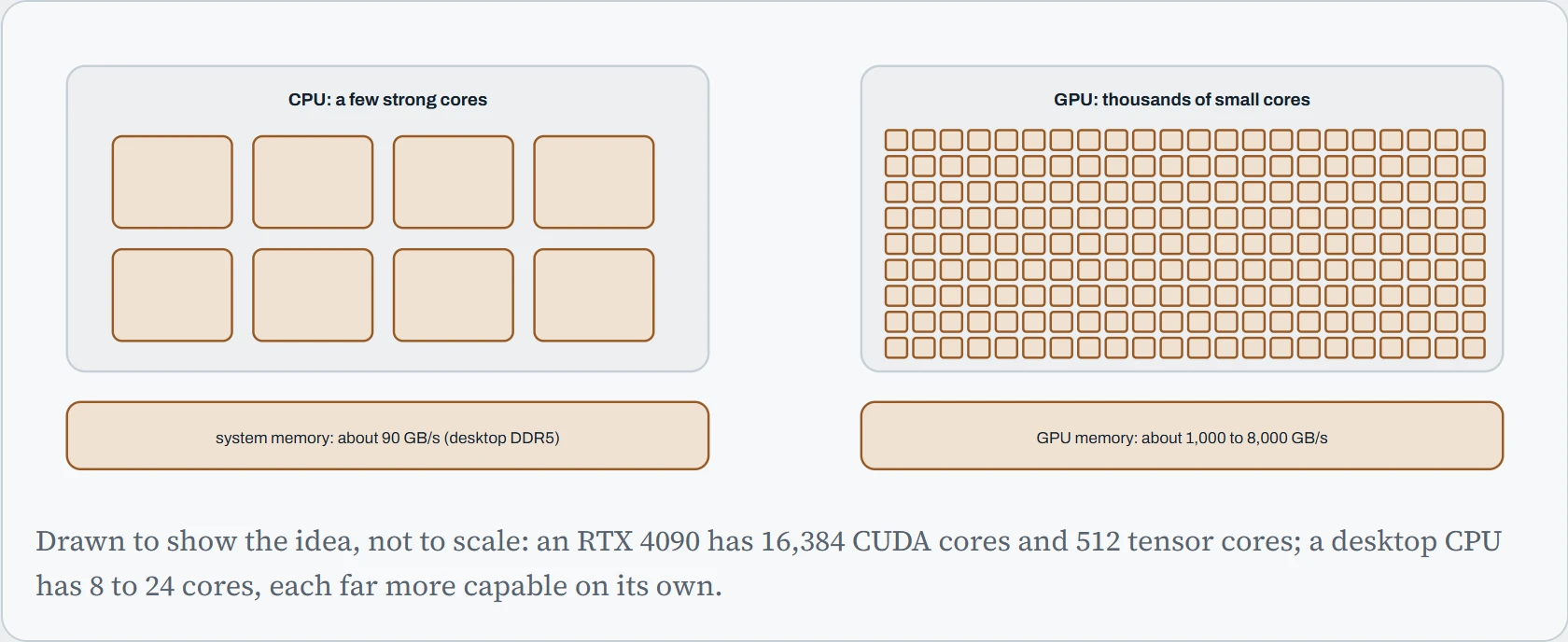
For matrix work, the GPU wins twice. Thousands of cores do the independent multiplications at the same time, and its memory delivers numbers ten to a hundred times faster than system memory, which matters because the cores spend much of their time waiting for data (the theme of Down the Bits). CUDA, and everything in the rest of this lesson, is the software that lets an ordinary Python program hand that work to the GPU.
One more idea makes the rest of the course readable: number formats. A number can be stored in 32, 16, 8 or even 4 bits. Fewer bits means half the memory, half the data to move, and tensor cores that do roughly twice as many operations per second. The price is that fewer bits can represent fewer distinct values, so numbers get rounded, and some formats can't hold very large or very small numbers at all.
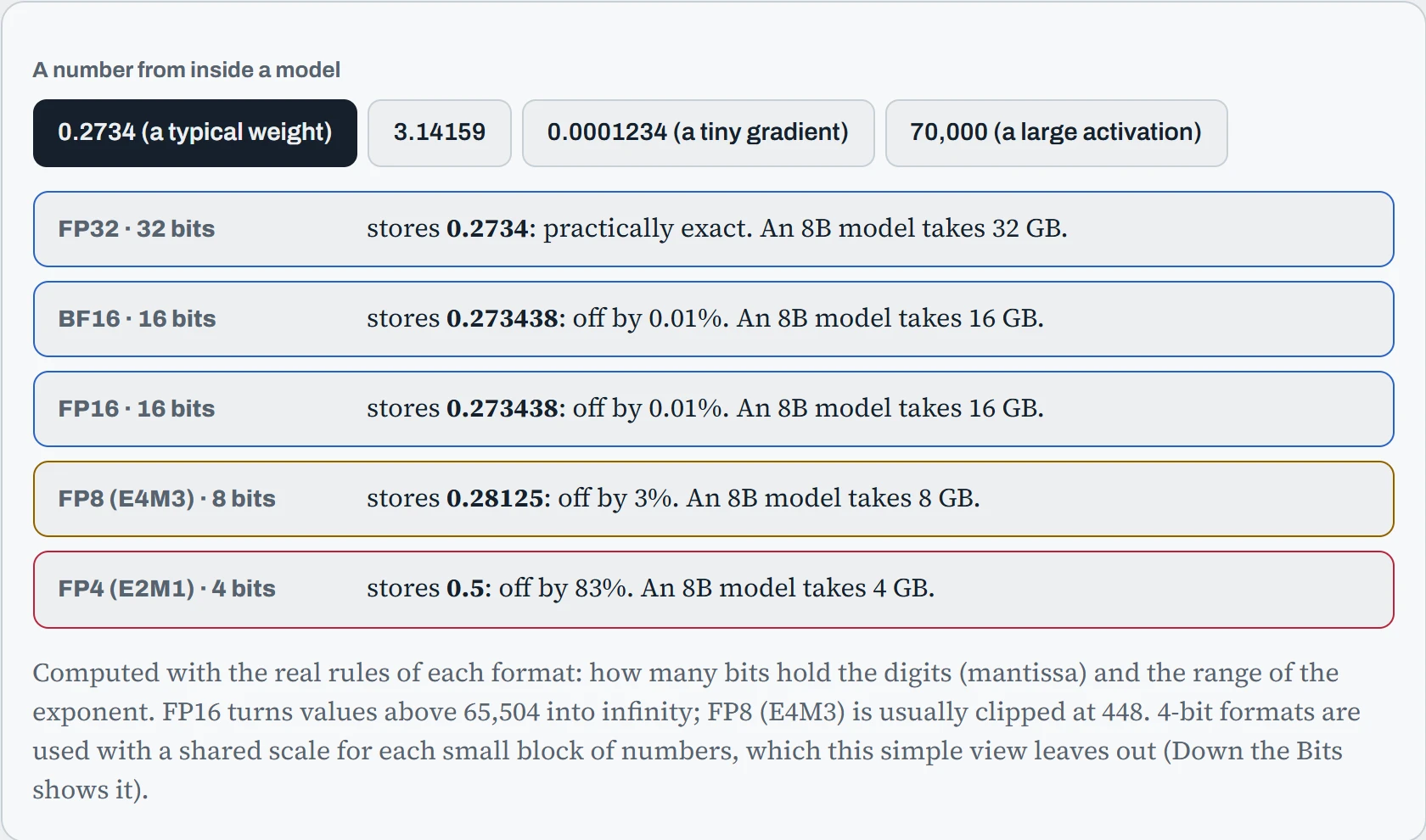
BF16 keeps every one of them, slightly rounded: it has the same range as FP32, which is why it became the standard for training. FP16 keeps more digits (compare the two on the tiny gradient), but the large activation turns into infinity, and one infinity spreads through a calculation and ruins it. FP8 and FP4 are coarse, fine for weights that have been carefully scaled, useless for raw numbers. That trade-off between bits, memory and accuracy runs through the rest of the course: quantization in Chapter 20, mixed precision in Chapter 24, and FP8 and FP4 serving in Chapter 26.
Predict. A training run in FP16 is fine for an hour, then the loss suddenly shows inf and soon nan. The same run in BF16 never does. What changed?
Answer. Some value grew past 65,504, the largest number FP16 can hold, and became infinity. Infinity minus infinity, or zero times infinity, gives nan (“not a number”), and from there it spreads to every number it touches. BF16 can hold numbers up to about 3 × 1038, the same range as FP32, so the same value just gets rounded.
That's why modern training uses BF16 where the GPU supports it (Ampere and newer). FP16 training needs a “loss scaler” that keeps numbers in range, which PyTorch's automatic mixed precision provides.
Eight layers, two owners, four seams
Those three numbers came from three different layers. A request from your code to the GPU works like a note passed down a line of people. Each person mostly talks to the one just above and the one just below.
The diagram below stacks every piece of software between your Python and the silicon. Your code sits at the top and the physical card at the bottom.
The colors follow the key at the top of the page, and each pink label marks a seam.
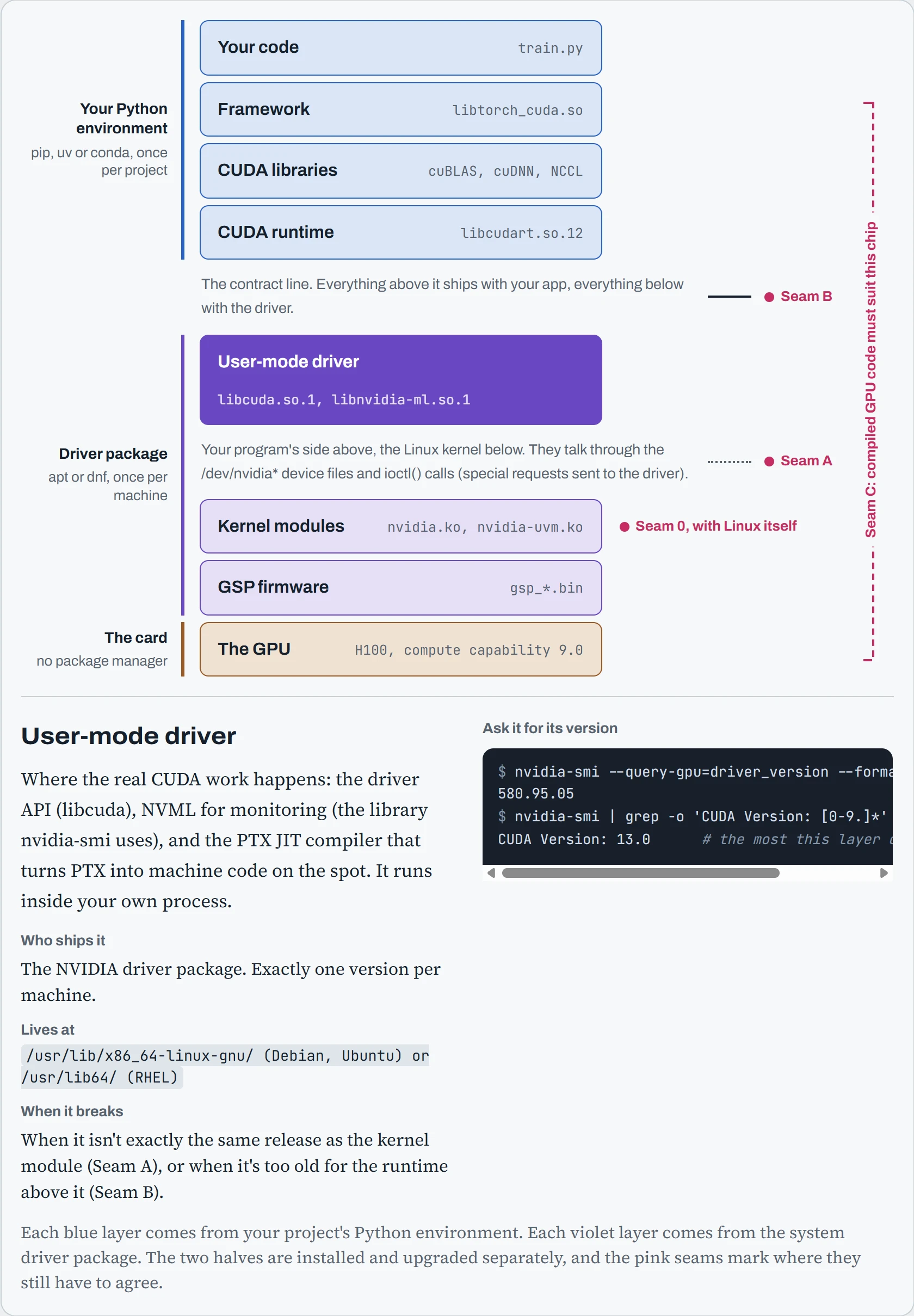
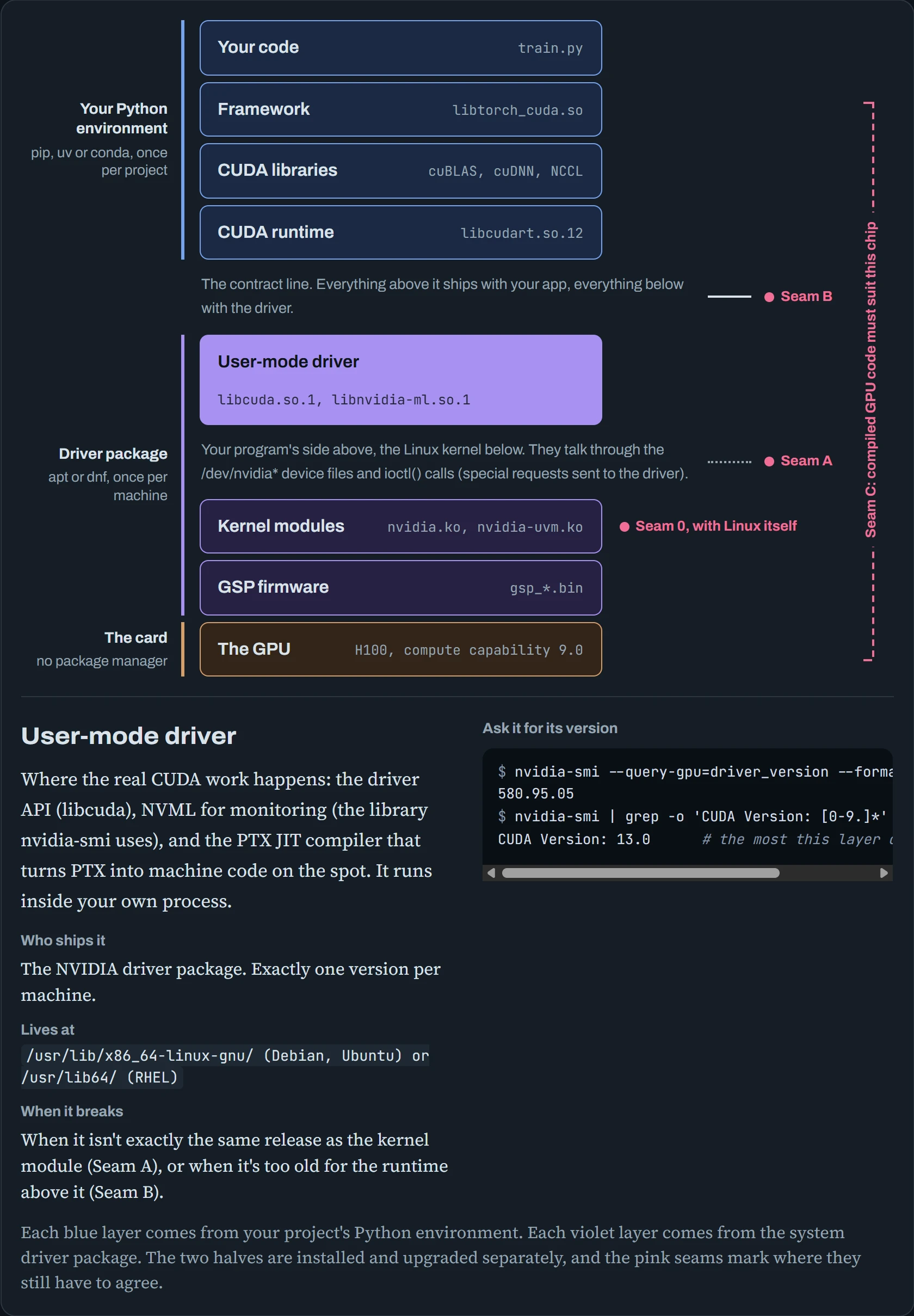
Look at the colors. The blue layers come from your Python environment: pip, uv or conda installs them, separately for each project. The violet layers come from the driver package, installed once per machine by apt or dnf. That's two package managers, each upgrading on its own schedule, and neither one knows the other exists.
The line between them is the most important line on this page, so let's give it a name: the contract line. Wherever two layers touch, they have to agree on something. There are four places where that agreement can break:
| Seam | Where | What must agree | What you see when it breaks |
|---|---|---|---|
| 0 | Kernel module and the running Linux kernel | The module was built for exactly this kernel | NVIDIA-SMI has failed because it couldn't communicate with the NVIDIA driver |
| A | User-mode driver and kernel module | The same driver release, to the last digit | Failed to initialize NVML: Driver/library version mismatch |
| B | CUDA runtime and user-mode driver | The driver is new enough for the runtime | CUDA driver version is insufficient for CUDA runtime version |
| C | Compiled GPU code and the GPU | The code was compiled for this kind of chip (its architecture) | no kernel image is available for execution on the device |
Don't memorize the table. By the end of this lesson you'll be able to rebuild it from scratch, because you'll know what each seam is doing.
Seam B: is the driver new enough?
This is the seam you'll bump into most, because it decides which PyTorch package (wheel) you should install. The rule only works in one direction. A newer driver always runs code built for an older CUDA, as long as that driver still supports your GPU. NVIDIA is careful to keep that promise.
The other direction is where it gets interesting. Every driver has a ceiling, the newest CUDA version it knows how to serve. That ceiling is the “CUDA Version” that nvidia-smi prints, so the 580 driver from earlier tops out at 13.0.
The chart below shows what happens on either side of that ceiling. The bottom axis is the CUDA version an app was built with, and the dark vertical line is your driver's ceiling. Green runs, amber runs with catches, and red fails.
With driver 550, a 12.4 build is green, a 12.6 or 12.8 build is amber, and a 13.0 build is red.
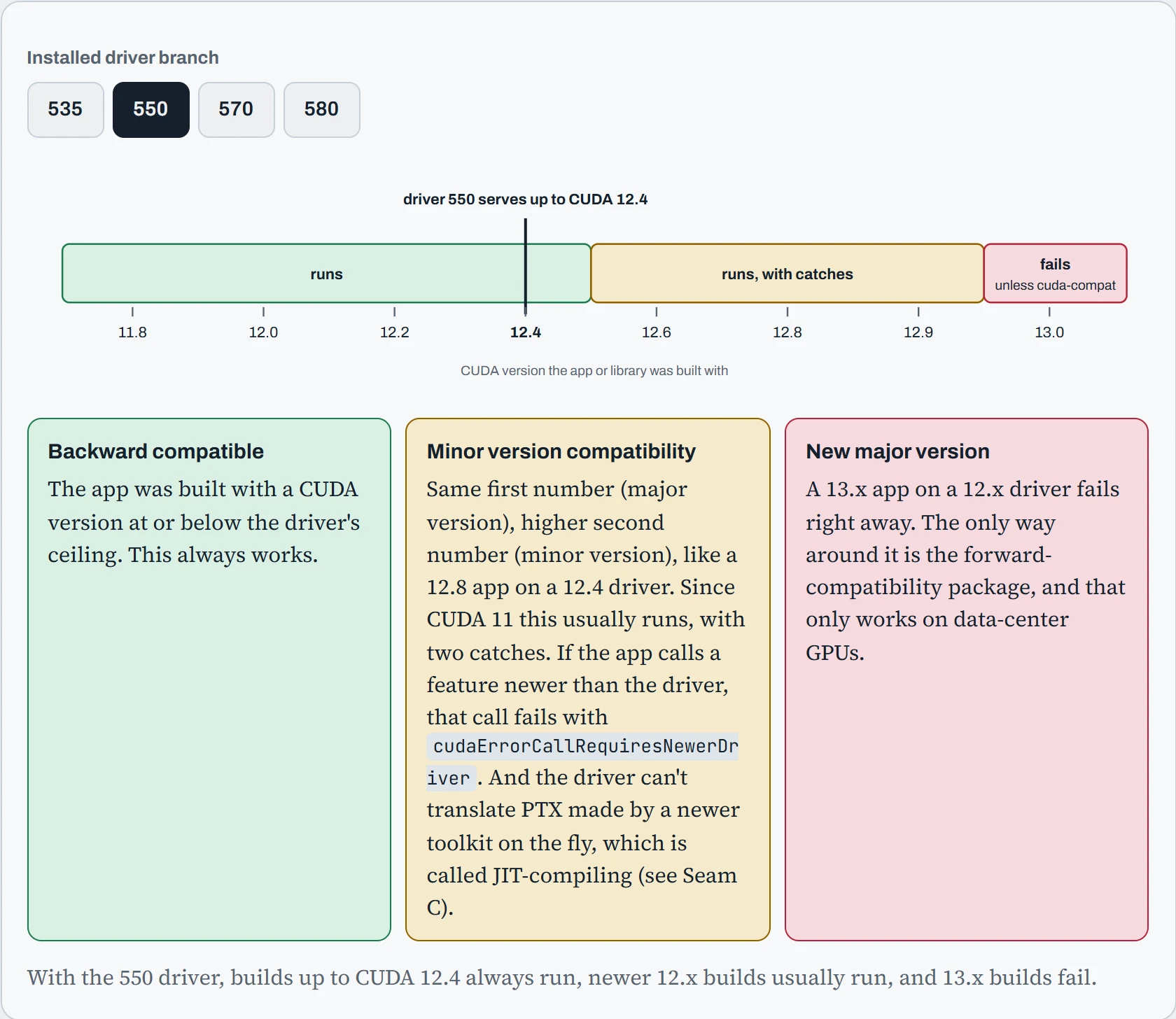
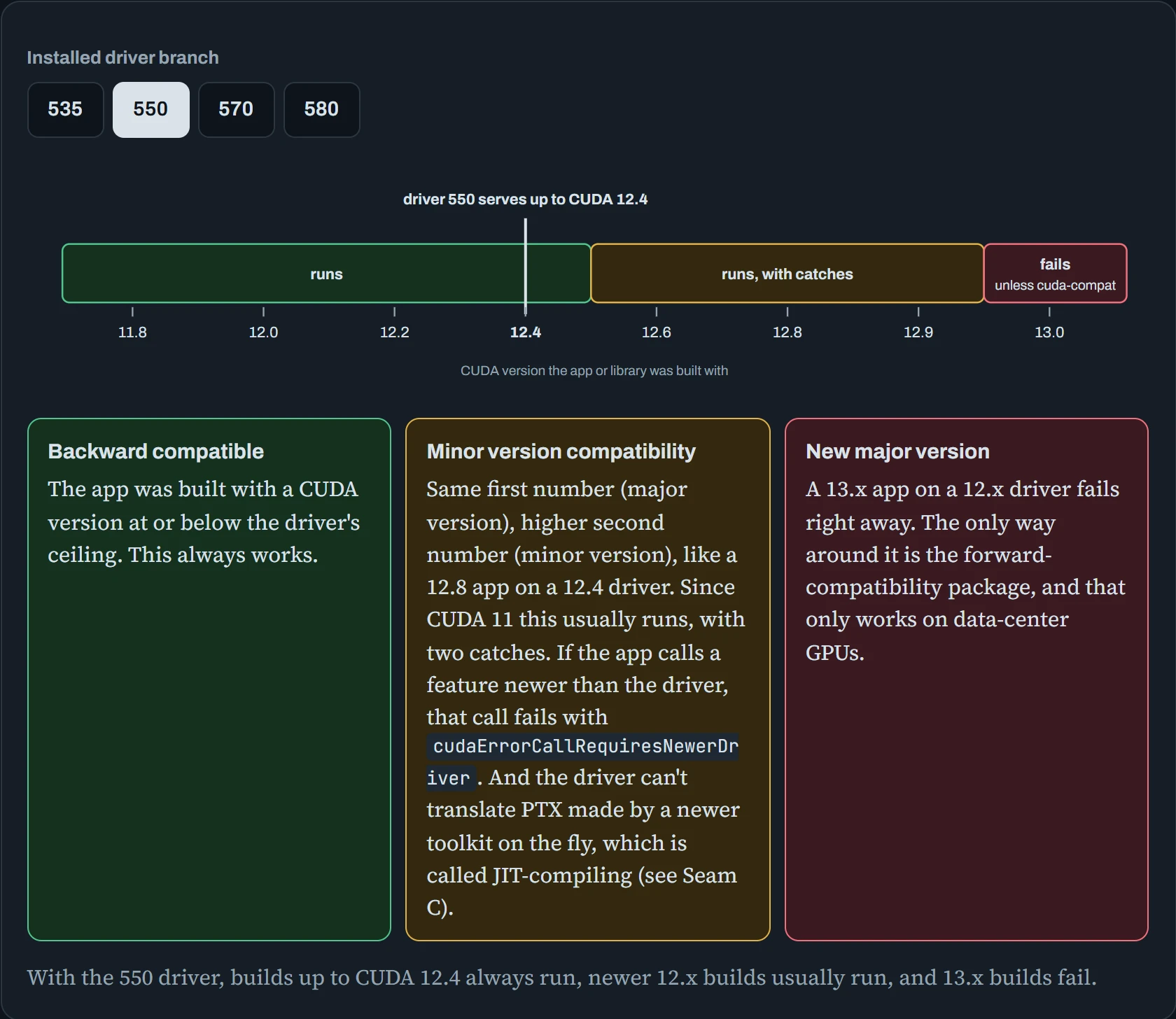
Notice where the red always starts. It's the jump in the first number, the major version. A newer 12.x build usually still runs on a 12.x driver, but a 13.x build won't without extra help.
Here's the red zone in practice: a CUDA 13.0 build of PyTorch on a machine still running the 535 driver.
$ python -c "import torch; torch.zeros(1, device='cuda')"
RuntimeError: The NVIDIA driver on your system is too old (found version 12020).
Please update your GPU driver by downloading and installing a new version from the
URL: http://www.nvidia.com/Download/index.aspx Alternatively, go to:
https://pytorch.org to install a PyTorch version that has been compiled with your
version of the CUDA driver.
The found version 12020 is the driver's ceiling packed into one number: 1000 × major + 10 × minor. So 12020 means 12.2, the ceiling of the 535 branch. You have two ways out. On a machine you control, upgrade the driver. On a machine you don't control, install a PyTorch build made for an older CUDA:
$ uv pip install torch --index-url https://download.pytorch.org/whl/cu126
$ python -c "import torch; print(torch.version.cuda, torch.zeros(1, device='cuda'))"
12.6 tensor([0.], device='cuda:0')
The escape hatch: forward compatibility
On data-center GPUs there's a third option. The cuda-compat package puts a newer copy of libcuda.so (the user-mode driver) in a folder of its own. You tell your app to look in that folder first, and the old kernel module stays as it is.
$ sudo apt install cuda-compat-13-0
$ export LD_LIBRARY_PATH=/usr/local/cuda-13.0/compat:$LD_LIBRARY_PATH
$ python train.py        # the 13.0 runtime now finds a 13.0-capable libcuda
Predict. Hold on. You're about to learn (Seam A) that the user-mode driver must match the kernel module exactly. Doesn't this break that rule?
Answer. It bends the rule, on purpose. NVIDIA builds and tests the compat libcuda specifically so it can talk to the kernel modules of certain older driver branches. That's why it's only supported on data-center GPUs, and only on top of certain branches. It's also why nvidia-smi keeps showing the old version: the compat package doesn't replace NVML, the monitoring library that nvidia-smi reads from.
Treat it as an escape hatch for clusters where someone else owns the driver. It's not a way to skip driver upgrades on your own machine.
Seam A: the same release, exactly
Seam B allowed a range of versions. This seam allows no range at all. libcuda.so (the user-mode driver), libnvidia-ml.so (the monitoring library), the kernel module and the GSP firmware must all come from the same driver release, down to the last digit. 580.95.05 won't talk to 580.82.09. (You'll see exactly why in the traced section below.)
There are two sides to check: what's loaded in the kernel right now, and what's installed on disk.
$ cat /proc/driver/nvidia/version          # loaded in the kernel, right now
NVRM version: NVIDIA UNIX Open Kernel Module for x86_64  575.64.03  Release Build
$ modinfo -F version nvidia                 # on disk, for the next boot
580.95.05
$ ls /usr/lib/x86_64-linux-gnu/libcuda.so.*  # the user-mode side
/usr/lib/x86_64-linux-gnu/libcuda.so.1  /usr/lib/x86_64-linux-gnu/libcuda.so.580.95.05
Spot the problem? The module running in the kernel is 575, but everything on disk is 580. Overnight, the automatic updater (unattended-upgrades) installed a new driver package.
Predict. A training job started yesterday and is still running. What happens to it? And what happens when you type nvidia-smi right now?
Answer. The job keeps going, happily. It loaded the old 575 libcuda into memory before the upgrade. Linux is very polite about this: it won't really delete a file that a running process still has loaded in memory (mapped). It removes the file's name and keeps the contents until the last program using it lets go. So the job's old library still matches the old kernel module.
nvidia-smi fails. It's a new process, so it loads the new 580 libnvidia-ml.so from disk, does the version check with the 575 module, and gets turned away:
$ nvidia-smi
Failed to initialize NVML: Driver/library version mismatch
NVML library version: 580.95
$ sudo dmesg | grep NVRM | tail -4
NVRM: API mismatch: the client has the version 580.95.05, but
NVRM: this kernel module has the version 575.64.03.  Please
NVRM: make sure that this kernel module and all NVIDIA driver
NVRM: components have the same version.
The fix is to get the kernel to load the new module. Rebooting is the simple way. On a headless server (no screen attached) that you can't reboot yet, stop everything that's using the GPU and reload the modules by hand:
$ sudo lsof /dev/nvidia*                      # who still holds the GPU?
$ sudo systemctl stop nvidia-persistenced
$ sudo rmmod nvidia_uvm nvidia_drm nvidia_modeset nvidia
$ sudo modprobe nvidia_uvm                    # pulls nvidia back in as a dependency
$ cat /proc/driver/nvidia/version | head -1
NVRM version: NVIDIA UNIX Open Kernel Module for x86_64  580.95.05  Release Build
To stop it happening again, put a “hold” on the driver packages on GPU servers, which tells apt to leave them alone, even during a normal upgrade, until you remove the hold. Then upgrade them on purpose, during a planned maintenance window, and reboot straight after:
$ dpkg -l | awk '/^ii/ && /nvidia.*580/ {print $2}' | xargs sudo apt-mark holdSeam 0: when the kernel moves underneath you
The nvidia kernel module is compiled to fit the insides of one specific Linux kernel. Linux makes no promise to keep those insides the same between versions. That's on purpose: there is no stable interface for modules. So a module built for 6.8.0-85 won't load into 6.8.0-87, and every kernel update needs a fresh build of the module.
Think of the module as a key cut for one lock. Each new kernel is a new lock, so the key has to be cut again.
DKMS does that build for you. When apt installs a new kernel, a hook rebuilds every registered module against the new kernel's headers. Headers are the description files that tell a builder what that kernel looks like inside.
Read the diagram left to right. The top row is the happy path, from a new kernel arriving to the driver loading after a reboot. Each red dashed arrow drops to a box showing what goes wrong at that step, and the message you'd see.
Two of those boxes need a word of explanation. Secure Boot is a firmware setting that makes the kernel load only modules signed with a key it trusts. A MOK (Machine Owner Key) is a key you add yourself, so your own builds count as trusted.
nouveau is the free NVIDIA driver that comes with Linux. If it grabs the card first, NVIDIA's module can't have it.
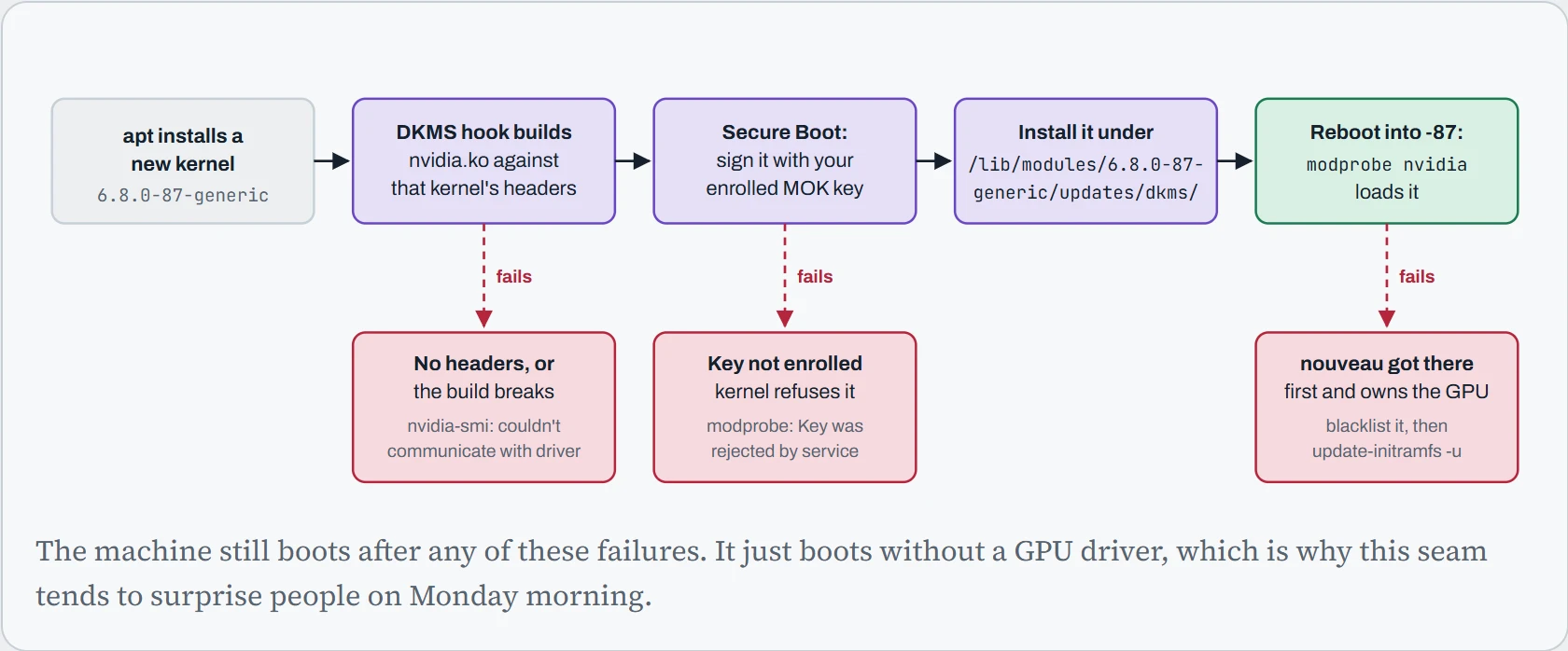
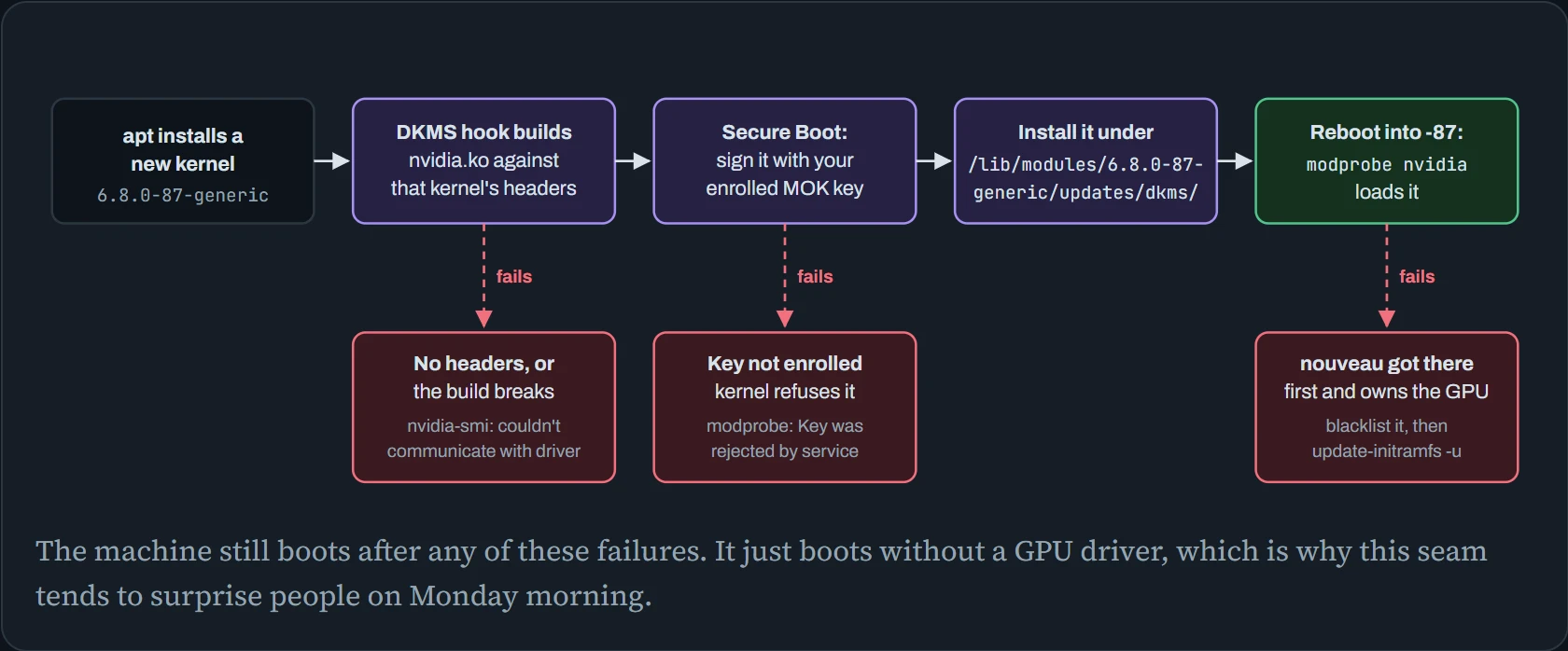
The three red boxes have different causes, but from the top they look alike. The NVIDIA driver isn't running the card, so you have to work out which step broke.
Here's the most common version: a kernel update arrived without matching headers, so DKMS had nothing to build against.
$ nvidia-smi
NVIDIA-SMI has failed because it couldn't communicate with the NVIDIA driver.
Make sure that the latest NVIDIA driver is installed and running.
$ uname -r
6.8.0-87-generic
$ dkms status
nvidia/580.95.05, 6.8.0-85-generic, x86_64: installed
$ lsmod | grep -c ^nvidia
0
The module exists, but only for the kernel you were running last week. Build it for this one:
$ sudo apt install linux-headers-$(uname -r)
$ sudo dkms autoinstall
$ sudo modprobe nvidia && nvidia-smi --query-gpu=name,driver_version --format=csv,noheader
NVIDIA H100 80GB HBM3, 580.95.05
With Secure Boot on, there's one more condition: the kernel only loads modules signed by a key it trusts. If you skipped the blue MOK enrollment screen that appears on the next boot after installing the driver, you'll see this:
$ sudo modprobe nvidia
modprobe: ERROR: could not insert 'nvidia': Key was rejected by service
$ mokutil --sb-state
SecureBoot enabled
$ sudo mokutil --import /var/lib/shim-signed/mok/MOK.der   # confirm it on the next boot
On Ubuntu, sudo ubuntu-drivers install can skip this whole dance. It installs modules that are already built and signed for each Ubuntu kernel, so there's no DKMS build at all. One more detail: Blackwell GPUs only work with the open kernel modules (the open-source version NVIDIA publishes), so pick the -open package variant for those cards.
Predict. Your GPU cluster's base image installs every security update automatically. Which seam breaks first after an update, and when?
Answer. It depends on what the update contained. A driver update breaks Seam A immediately, but only for new processes. Running jobs are fine until they restart. A kernel update without working DKMS breaks Seam 0, but not until the next reboot, which might be weeks later and nowhere near the update that caused it.
That delay is why “nothing changed and it stopped working” is such a common report. Something did change, a while ago.
One call, traced to the metal
So far you've seen the rules. Now let's see why they exist, by following exactly what happens when you run torch.zeros(1, device="cuda").
The diagram reads like the script of a conversation. Each column is one layer, with PyTorch on the left and the GPU on the right. Each arrow is one layer asking the next for something, and time runs top to bottom.
The vertical line marked “user space” and “kernel” splits your program's side from the core of Linux, which guards the hardware. Normally a program crosses it with a system call, a formal request to the kernel.
Two kinds of system call appear here. ioctl sends a device a custom command. mmap makes a piece of device memory show up inside your program, so the program can write to it directly.
The pink arrow is the Seam A version check. Then compare the bottom part, “every kernel launch”, with the setup above it.
In GPU talk, a kernel is a small program that runs on the GPU. It has nothing to do with the Linux kernel, and yes, the name clash is annoying.
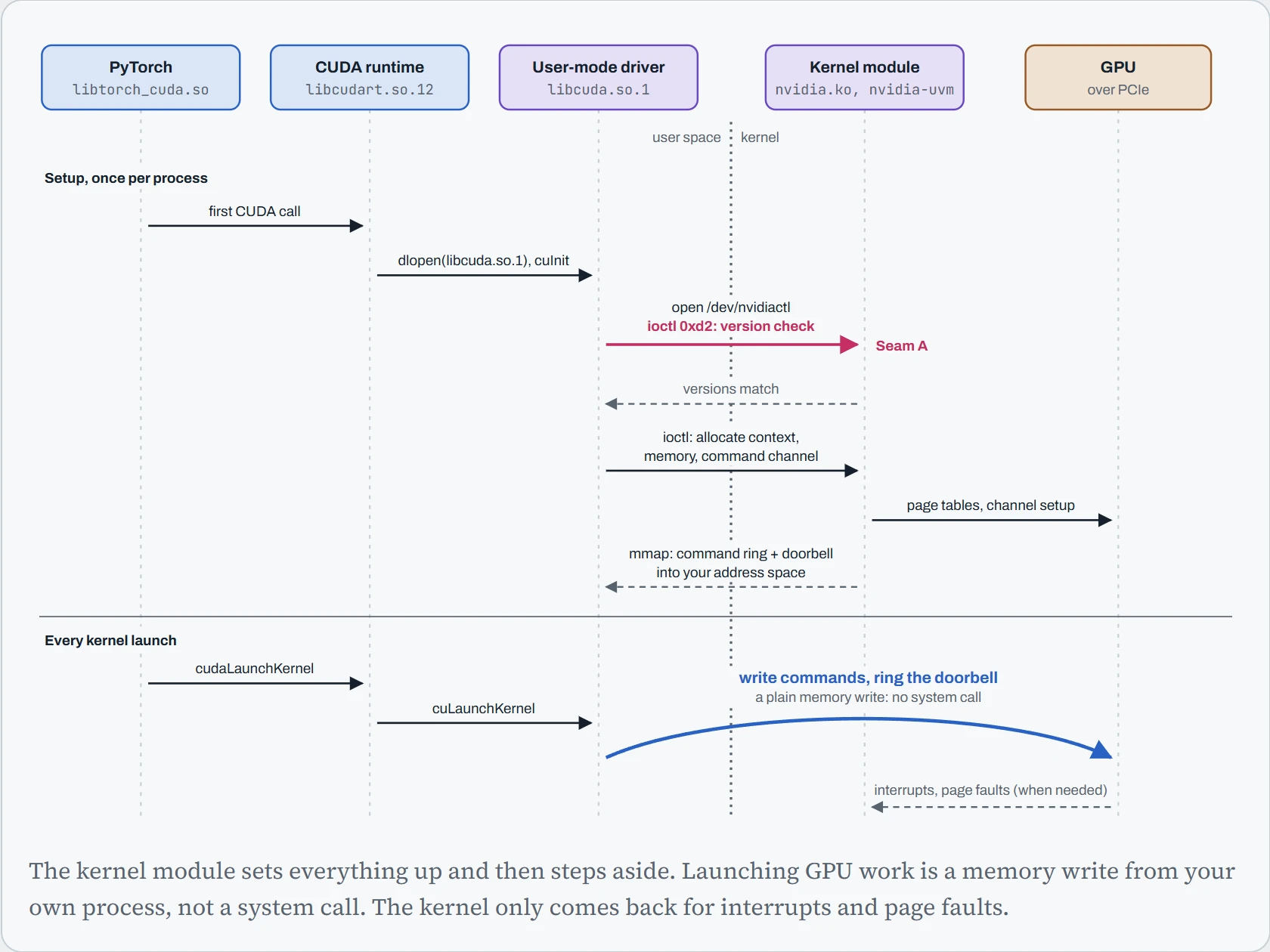
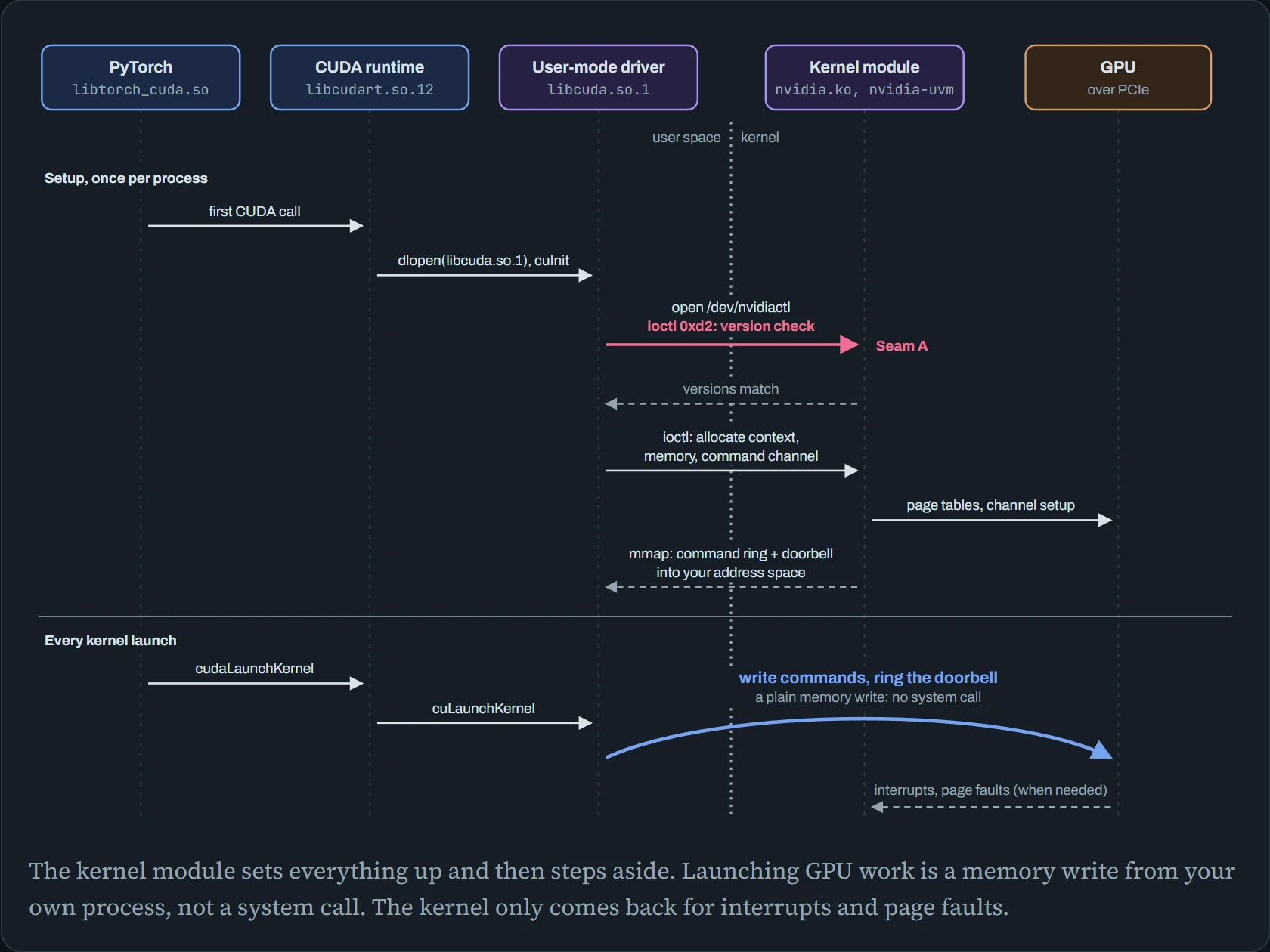
That last part surprises people. You'd expect every GPU operation to go through the Linux kernel, the way reading a file does. But one training step launches thousands of small GPU kernels, and a system call for each one would cost far too much time. So during setup, the driver maps two things straight into your process's memory. One is a command queue the GPU reads from, called a ring buffer. The other is a special address that tells the GPU new work is waiting when you write to it, called a doorbell register. From then on, libcuda writes commands into the ring and then writes to the doorbell, and the GPU picks up the work by itself.
The kernel module is the landlord, not the courier. It hands out memory and keys, then shows up again only when something needs attention, like an interrupt or a page fault.
You don't have to take this on faith. strace, a tool that prints every system call a program makes, shows the setup half. (-y makes it print which file each fd, or open-file number, points to.)
$ strace -f -y -e trace=openat,ioctl,mmap \
    python -c "import torch; torch.zeros(1, device='cuda')" 2>&1 | grep -E 'libcuda|nvidia'
openat(AT_FDCWD, "/lib/x86_64-linux-gnu/libcuda.so.1", O_RDONLY|O_CLOEXEC) = 3
                    # the runtime found the user-mode driver via the linker cache
openat(AT_FDCWD, "/dev/nvidiactl", O_RDWR) = 4</dev/nvidiactl>
ioctl(4</dev/nvidiactl>, _IOC(_IOC_READ|_IOC_WRITE, 0x46, 0xd2, 0x48), 0x7ffd5e1c9a30) = 0
                    # 'F' (NVIDIA), command 210, 72 bytes: the version handshake
openat(AT_FDCWD, "/dev/nvidia-uvm", O_RDWR|O_CLOEXEC) = 5</dev/nvidia-uvm>
openat(AT_FDCWD, "/dev/nvidia0", O_RDWR|O_CLOEXEC) = 6</dev/nvidia0>
ioctl(6</dev/nvidia0>, _IOC(_IOC_READ|_IOC_WRITE, 0x46, 0xc9, 0x4), 0x7ffd5e1c9b18) = 0
                    # 201: tie this GPU's fd to the control fd
ioctl(4</dev/nvidiactl>, _IOC(_IOC_READ|_IOC_WRITE, 0x46, 0x2b, 0x30), 0x7ffd5e1c9c40) = 0
                    # 0x2b: ask the driver to allocate an object (context, memory, channel)
mmap(NULL, 2097152, PROT_READ|PROT_WRITE, MAP_SHARED, 6</dev/nvidia0>, 0) = 0x7f3c9a000000
                    # GPU-visible memory, mapped straight into this process
... several hundred more ioctls during setup, then they slow to a trickle
Trimmed for length. The exact command numbers, sizes and addresses change between driver releases.
Predict. Look at the order. Before it even opens the GPU, libcuda tells the kernel module its version: 72 bytes holding a version string. Why would it lead with that?
Answer. Because the two halves talk in a private format: chunks of binary data whose layout can change in any driver release. If libcuda and the module came from different releases, the module could misread every request after this one. Inside the kernel, a misread can do real damage. So it checks once, up front, and refuses to talk to a stranger.
That handshake is Seam A. Now “Driver/library version mismatch” should read less like a riddle and more like a doorman doing his job.
Continue the lesson
The whole lesson, with its drawings and its questions. 5 more sections after the ones above.