
Developer workflow for AI: Git LFS and DVC, model licences, remote GPU work and parallel coding agents
Git stores every commit as a full snapshot, so a checkpoint committed once stays in the history after you delete it, and push sends every commit the server lacks. If nothing has been pushed, rewrite those commits. Keep checkpoints out of git, or use Git LFS, which stores a small pointer instead.
What this page answers
Why is my git repo still large after deleting a model file?
Git stores every commit, and each commit is a full snapshot, so an earlier commit still contains the checkpoint. git count-objects -vH shows the size, and unpushed commits can be rewritten to drop it. Read it in “Deleted, but still 5 GB”
Should model checkpoints go in git?
Git is built for text that changes in small pieces. A checkpoint changes almost every number each step and barely compresses, and git keeps every version forever. Use Git LFS pointers or keep big files out of git. Read it in “What belongs in git”
Deleted, but still 5 GB
You accidentally committed a model checkpoint. You noticed, deleted it, and committed again. Then you pushed:
$ git log --oneline -3
9d41e0a remove checkpoint
5b77c2f add eval script and results
1e0f3aa tune learning rate
$ ls checkpoints/
ls: cannot access 'checkpoints/': No such file or directory
$ git push
remote: error: File checkpoints/step-2000.pt is 4823.45 MB; this exceeds GitHub's file size limit of 100.00 MB
remote: error: GH001: Large files detected. You may want to try Git Large File Storage - https://git-lfs.github.com.
 ! [remote rejected] main -> main (pre-receive hook declined)
Outputs on this page are realistic examples. Commands, file layouts and error messages are real.
The file is gone from your folder. So why is git still trying to send it?
- GitHub cached the earlier failed attempt
- The file is still inside an earlier commit, and push sends every commit
- The deletion only counts once it's in .gitignore
Answer. Git doesn't store “the current files”. It stores every commit, and each commit is a full snapshot. Commit 5b77c2f still contains the checkpoint, and git push sends all the commits the server doesn't have yet, not just the last one. Your local repo is carrying the same weight:
$ git count-objects -vH | grep size-pack
size-pack: 4.39 GiB
The fix, since nothing was pushed yet, is to rewrite those unpushed commits so the file was never in them: git reset --soft origin/main keeps your changes but undoes the commits, then you commit again without the checkpoint. For history that's already shared, a tool like git filter-repo does it, and everyone has to re-clone. The real lesson: keep big files from ever entering git.
What belongs in git
Git was built for text that changes in small pieces: code, configs, notes. It's brilliant at that, because it can store just the differences. A model checkpoint is the opposite. Every training step changes nearly every number in it, so each saved version is a complete new file that barely compresses. Git keeps all of them, forever, and everyone who clones gets all of them too.
There are two common ways out. Git LFS (Large File Storage) replaces each big file in git with a tiny text “pointer”, and keeps the real file on a separate server. A clone downloads only the versions it needs. Or you keep big files out of git entirely (with .gitignore) and store them somewhere made for them, like the Hugging Face Hub or object storage. Below, a project saves a checkpoint file many times over its life, always under the same name. Compare what a fresh clone downloads, and what the git server has to keep:
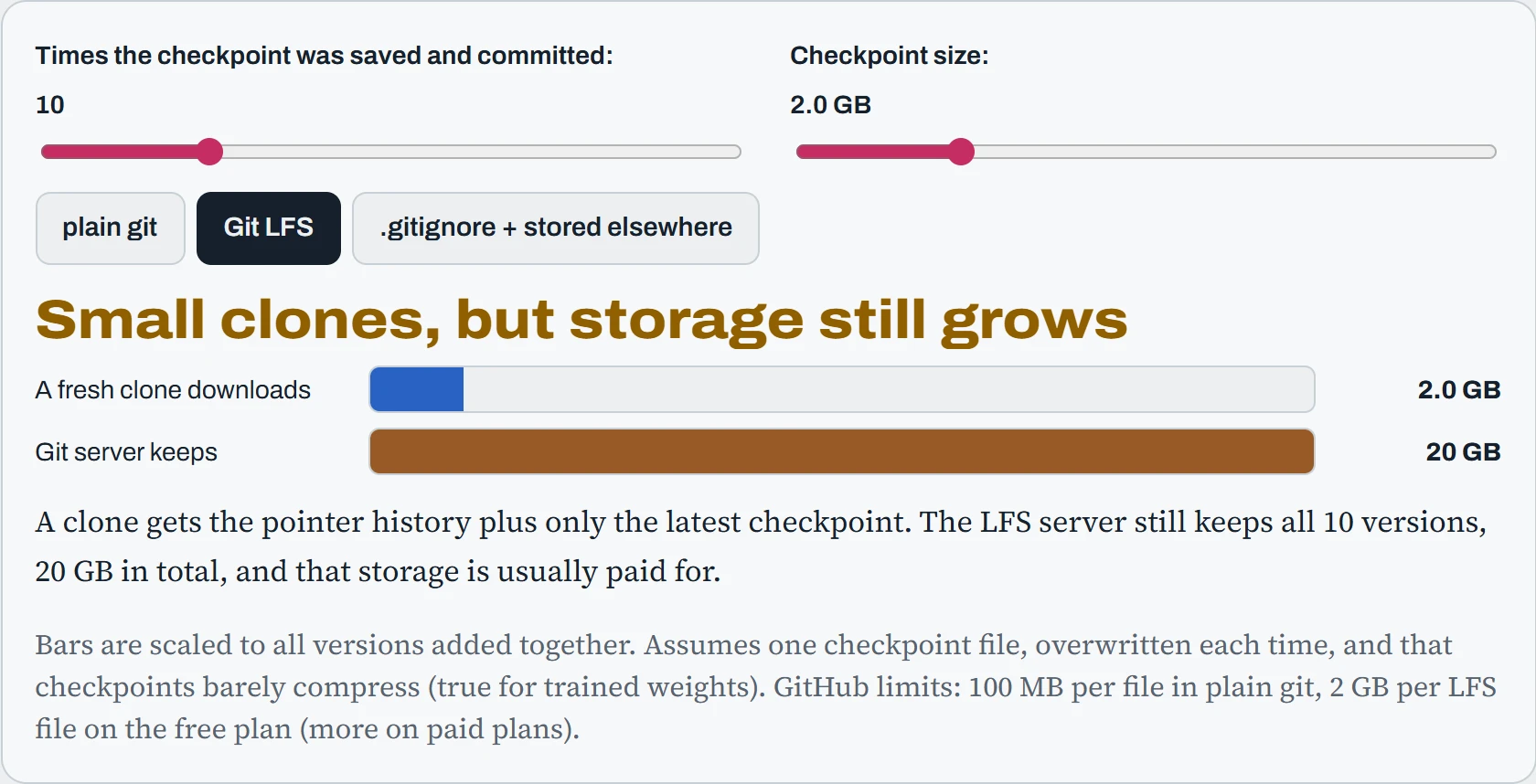
Notice that LFS fixes the clone, not the storage. The server still keeps every version, and LFS storage is usually paid for by the gigabyte. For checkpoints, the third option is normally best: git keeps the code and a small note saying which checkpoint goes with it, and the checkpoints live in storage where you decide what to keep. LFS is a good fit for medium-sized files that really belong with the code, like a small test model or sample images.
Guard rails for the repo
The cheapest fix for the hook is to make the mistake impossible. Start every AI project with a .gitignore that already excludes the usual heavy and secret things:
# .gitignore
.venv/
__pycache__/
data/
checkpoints/
outputs/
wandb/
*.pt
*.safetensors
*.ckpt
.env
Then add a safety net that checks every commit before it happens. The pre-commit tool runs small checks (called hooks) each time you type git commit, and refuses the commit if one fails. Three hooks catch most AI-project accidents: one blocks large files, one blocks private keys, and nbstripout removes notebook outputs (which can be megabytes of images and sometimes contain secrets):
# .pre-commit-config.yaml   (then run: pre-commit install)
repos:
  - repo: https://github.com/pre-commit/pre-commit-hooks
    rev: v5.0.0
    hooks:
      - id: check-added-large-files
        args: ["--maxkb=1024"]
      - id: detect-private-key
  - repo: https://github.com/kynan/nbstripout
    rev: 0.8.1
    hooks:
      - id: nbstripout
Code is now safe, but data and models still need versions. Knowing exactly which dataset trained which model matters a lot when results change. Several tools do this, all built on the same idea as LFS: git holds a small pointer, and the big data lives in storage. They differ in where that storage is and who it's for:
| Tool | What git holds | Where the data lives | Good for |
|---|---|---|---|
| Git LFS | A pointer file per big file | The git host's LFS storage | Medium files that belong with code |
| DVC | A small .dvc file with a hash | Your own S3, GCS, NFS or SSH storage | Datasets and pipelines |
| Hugging Face Hub | Nothing (or a model ID and revision) | Hugging Face, as its own git repo | Sharing and downloading models |
| lakeFS | Nothing: it adds branches to object storage itself | Your object storage | Large data lakes, team-wide |
Whichever you use, name things so a file explains itself: something like chat-8b_sft_data-2026-10_lr2e-5_9d41e0a says the model, the stage, the data version, a key setting and the code commit that made it. Months later, that name is often the only clue you'll have.
Models from the Hub
Most open models are downloaded from the Hugging Face Hub, with the hf command or automatically by libraries like transformers. Every model there is a git repository, so it has commits, and the name main points at whatever is newest. That's convenient, and it's a trap: if the owner updates the model, your next download quietly gets different files.
$ hf auth login                                   # token for gated or private models
$ hf download example-org/chat-8b --revision 3f2a91c
$ export HF_HOME=/data/hf                         # move the cache off the home disk
$ export HF_HUB_OFFLINE=1                         # never contact the Hub, use the cache only
$ hf upload my-org/chat-8b-lora ./outputs/adapter --private   # publish your own work
Downloads land in a cache with a clever layout. The real file contents are stored once each, in a blobs folder, named by their hash. Each model revision you've downloaded gets a snapshots folder full of links pointing at those blobs. A small file in refs remembers which revision main meant last time.
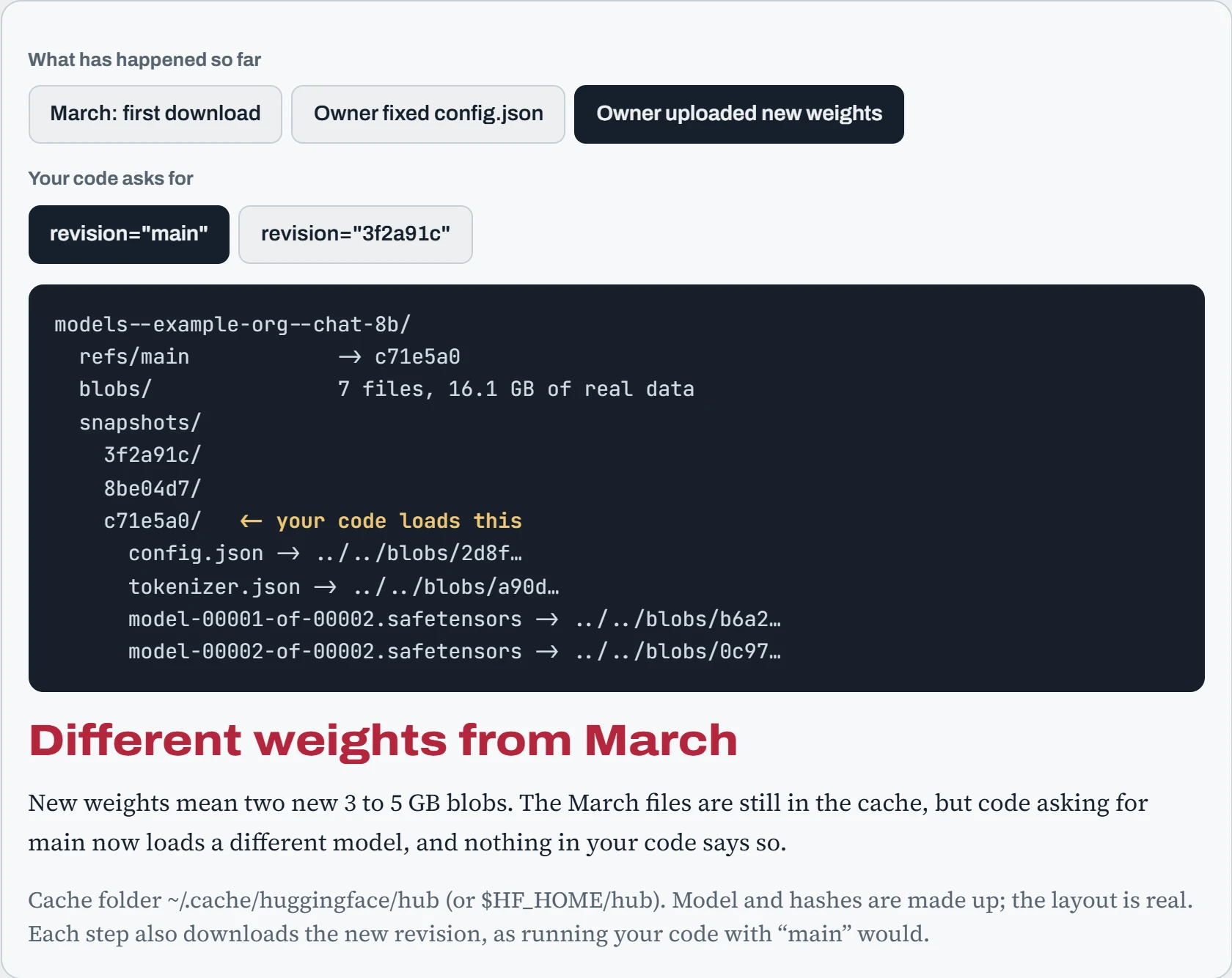
Two lessons from this. First, the cache only stores a file again when its contents change, so a config fix costs almost nothing, while new weights cost the full 8 GB again. Second, only a pinned revision gives you the same model in October as in March. For anything you need to reproduce, put the commit hash in your config. On clusters without internet, download once, then set HF_HUB_OFFLINE=1 so nothing even tries to connect. Companies that can't reach the Hub at all run a mirror and point HF_ENDPOINT at it. Newer Hub repos also use a storage system called Xet, which splits files into chunks so an updated model only downloads the changed chunks. Installing the hf_xet package makes that work. Going the other way, hf upload pushes a folder to a repo on the Hub (creating it if needed, private with --private), which is how you share a fine-tune or keep a copy of your own artifacts off the machine.
Predict. The disk is full. You find an old revision of a 16 GB model in snapshots/ and run rm -rf on that folder. How much space do you get back?
Answer. Almost none. A snapshot folder only holds links, a few bytes each. The 16 GB is in blobs/, and those blobs are still there, now with nothing pointing at them.
To free space properly, use the cache tools that understand the layout (the hf cache commands, or scan_cache_dir() from the huggingface_hub Python package). They remove a revision together with the blobs only it was using. Or, if you don't need the model at all, delete the whole models--… folder.
Can I use this model?
Every model you download comes with a license, just like code. It says what you may do with the weights: run them, change them, build them into something you sell, share your own version. “Open weights” only means you can download them. It doesn't mean you can do anything you like, and the terms differ a lot between model families. The license is on the model's page, in the license: line at the top of its model card, and you can read it from the shell:
$ curl -s https://huggingface.co/api/models/Qwen/Qwen3-8B | jq -r .cardData.license
apache-2.0
$ curl -s https://huggingface.co/api/models/meta-llama/Llama-3.1-8B-Instruct | jq -r .cardData.license
llama3.1
$ hf download meta-llama/Llama-3.1-8B-Instruct LICENSE --local-dir .   # read the full text
Most licenses you'll meet fall into five families. Here's the short version of each, what it allows and where its catches are:
| Family | Examples | In short |
|---|---|---|
| Apache 2.0, MIT | Qwen3, Gemma 4, gpt-oss, DeepSeek-R1, Mistral Small | Use, change and sell freely. Keep the license text (and Apache's NOTICE file) when you pass the weights on. |
| Llama Community License | Llama 3.x, Llama 4 | Free for nearly everyone, with conditions: show “Built with Llama”, name derived models “Llama-…”, follow the use policy, and get a separate license above 700 million monthly users. |
| Gemma Terms of Use | Gemma 1 to 3 (Gemma 4 moved to Apache 2.0) | Commercial use allowed, but a list of banned uses must be passed on to anyone you share it with or serve it to. |
| OpenRAIL family | Many image models, BLOOM | Commercial use allowed, with a list of banned uses that travels with the model and must be passed on. |
| Non-commercial | CC BY-NC, research-only licenses | Personal and research use only. Using it for a business, even internally, usually needs a separate license. |
The question is never just “is it allowed?” but “is what I want to do allowed?”.
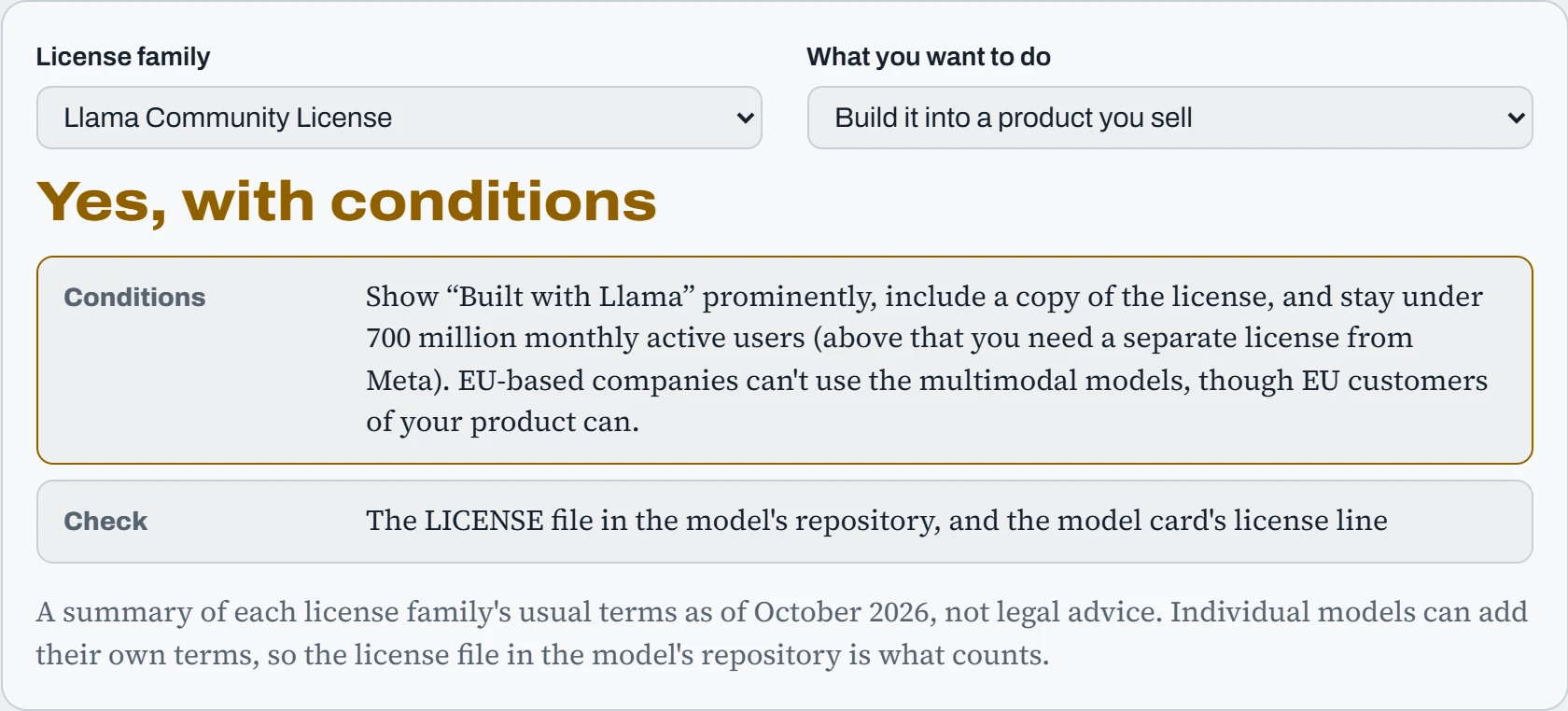
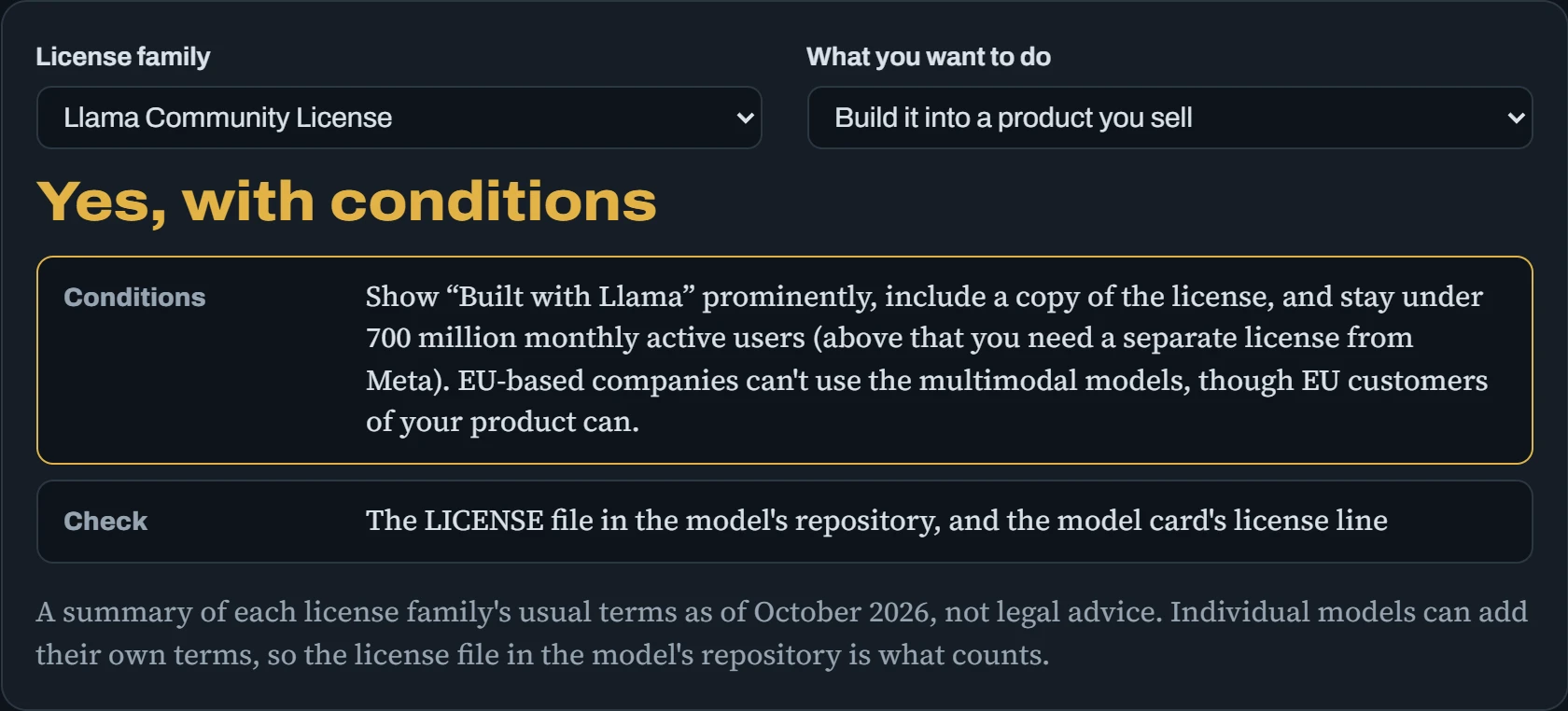
Two patterns are worth remembering. Permissive licenses (Apache 2.0, MIT) ask almost nothing except keeping the license text with the weights. The custom licenses mostly allow commercial use too, but they come with duties: words to show, names to use, rules to pass on. For a company, the duties are usually the real cost, which is why many teams now pick permissive models by default and treat everything else as a small legal review.
Predict. You fine-tune Llama 3.1 8B on your support tickets and publish it on the Hub as SuperChat-8B, with an Apache 2.0 license on your repo. What's wrong?
Answer. Two things. The Llama license requires a model built from Llama to have a name that starts with “Llama”, for example Llama-3.1-SuperChat-8B, and to show “Built with Llama”. And you can't relicense Llama's weights as Apache 2.0: your fine-tune contains them, so it has to ship with a copy of the Llama license.
A third, quieter question: were the support tickets yours to publish? Weights can memorise their training data, so publishing a fine-tune can publish pieces of the data too. Check that before the license.
Working on a remote GPU
The GPU is in a data centre, and you're on a laptop. Remote editors like VS Code and Cursor (Remote-SSH) or JetBrains Gateway make that feel local, and it helps to know what they actually do. When you connect, the editor installs a small server program on the GPU machine and starts it over SSH. From then on, your laptop is mostly a screen and keyboard, and everything else runs on the server. The picture shows the split. Read it left to right: only the thin link crosses the network.
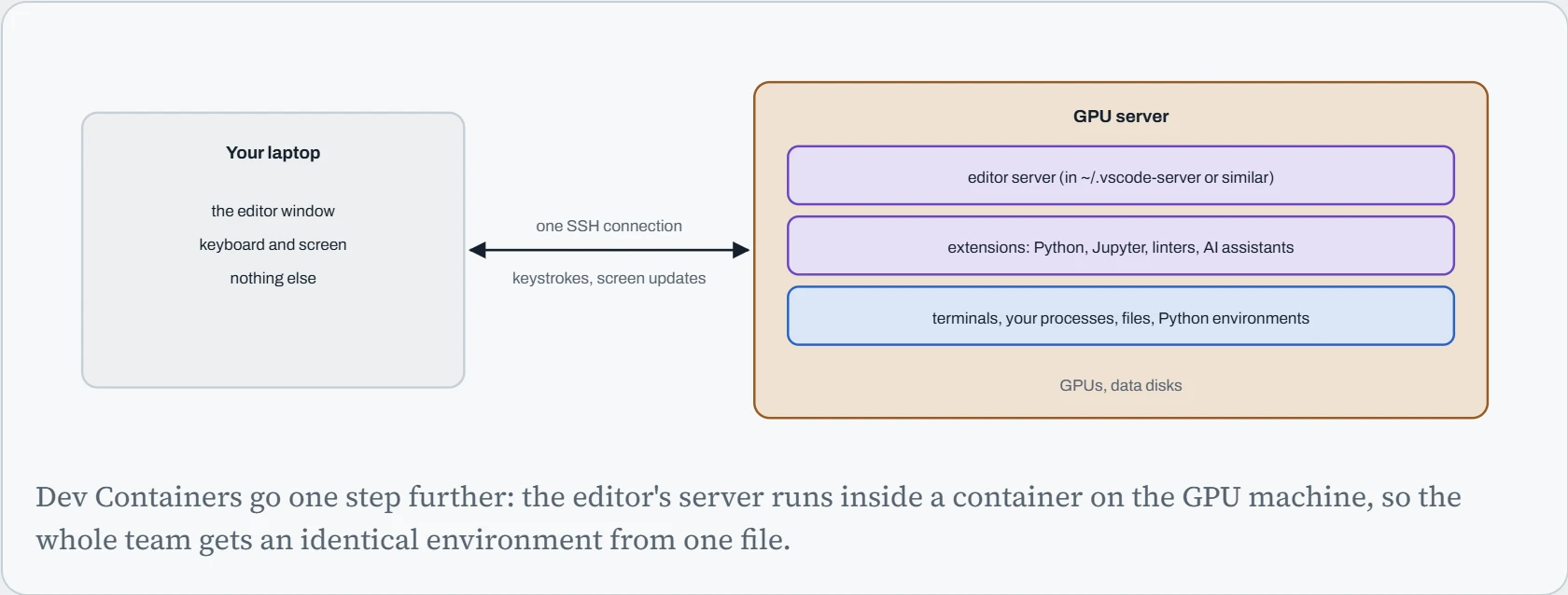
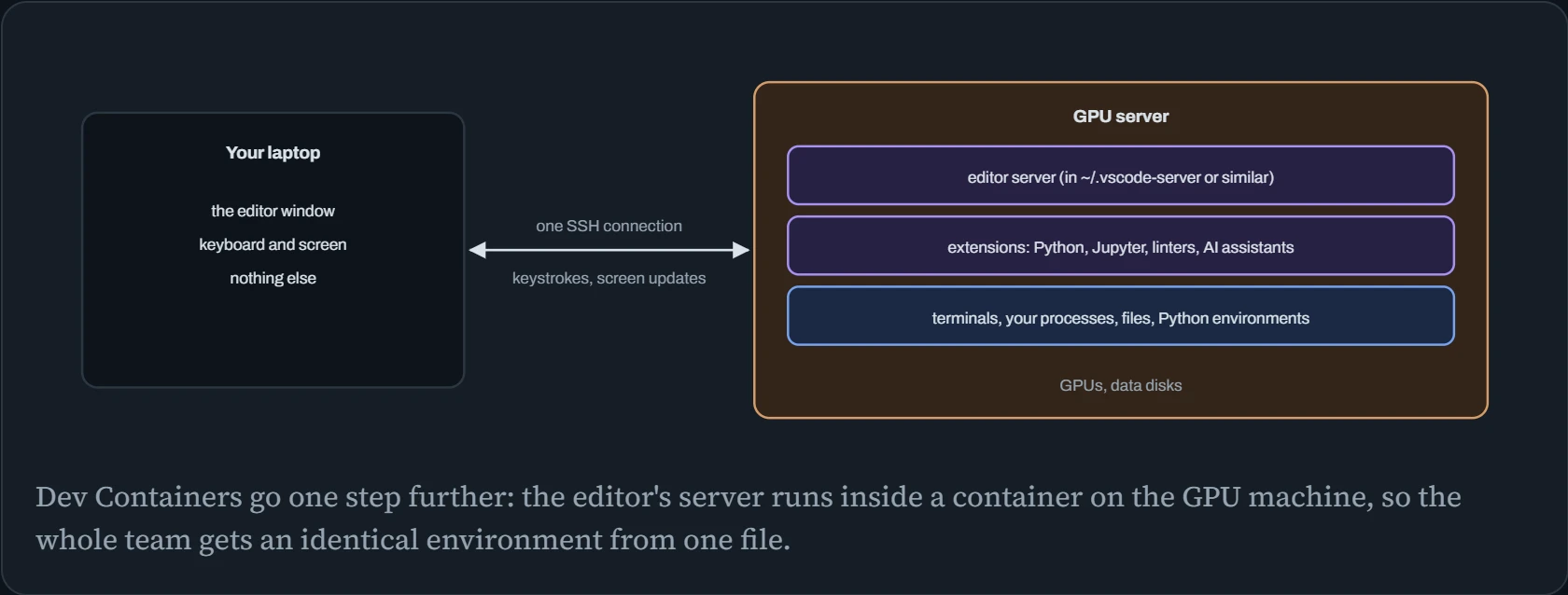
This has practical effects. Extensions run on the server, so they use its CPU and memory, and an AI assistant extension reads files there. The editor's server lives in your home folder, and old versions pile up, so a full home disk is a common reason a connection suddenly fails. Ports also come along: when something on the server listens on 127.0.0.1:6006 (TensorBoard, say), the editor can forward it to your laptop, using the same tunnel trick as Down the Tunnel. Many people skip the big editors entirely and use neovim inside tmux over plain SSH, which works on any connection.
tmux matters for everyone, though. It's a terminal that lives on the server and keeps running after you disconnect. You start it with tmux new -s train, detach with Ctrl+b then d, and come back later with tmux attach -t train.
Predict. You SSH into the GPU server, start a 9-hour training run straight in that shell, and close your laptop to go home. What happens to the run?
Answer. It dies, as soon as the server notices the connection is gone (anywhere from seconds to a couple of hours, depending on keep-alive settings). When the SSH connection drops, the shell on the server gets a “hang up” signal (SIGHUP), and it passes that on to the programs it started. Training processes don't handle it, so they exit, often with no error in their own log.
Start long runs inside tmux, so the program belongs to tmux's terminal and never sees the hang-up. Even better, run them as a service or a scheduler job (Down the Unit), which also restarts them and keeps their logs.
Continue the lesson
The whole lesson, with its drawings and its questions. 5 more sections after the ones above.