
Threat defense and the next-generation firewall
No single product secures an organisation from every threat, so Cisco SAFE designs security by place in the network: branch, campus, data centre, edge, cloud and WAN, each with typical threats. At the gate, firewalls, IDS, IPS and next-generation firewalls do different jobs, and only some of them can stop what they see.
By Arif, founder of Daveth · Updated
The full 11 min walkthrough is in Daveth Pro (Network). See what the plan opens
What this page answers
What is Cisco SAFE?
Cisco's framework for designing security by places in the network: the branch, the campus, the data centre, the edge, the cloud and the WAN, each with its own typical threats, such as phishing on campus and DDoS at the edge. Read it in “4.1 One framework, six places, six jobs”
4.1 One framework, six places, six jobs
"There is no single product in the industry that can successfully secure organizations from all these threats," so Cisco built a framework instead, Cisco SAFE, to design security for the "places in the network (PINs)". You can think of it as a house's floor plan: the rooms are the places, and each room has its own weak spots. SAFE's six are the branch, the campus, the data center, the edge, the cloud and the WAN, each with its typical threats. Branches are "typically less secure" because there are so many of them that full controls cost too much; campuses have lots of users and are "easy targets for phishing"; the data center holds an organization's "most critical information assets" and is "the primary goal of all targeted threats"; the edge is "the highest-risk PIN"; the cloud's security is "dictated by service-level agreements"; and the WAN "connects the PINs together". The threats differ by place: point-of-sale malware and rogue access points at a branch; phishing, unauthorized access and botnets on campus; data extraction and privilege escalation in the data center; DDoS, web server vulnerabilities and MitM at the edge; loss of access and data loss in the cloud; sniffing and malware propagation on the WAN. Cisco's current SAFE overview lists the same six places.
The other half of the framework is the jobs. SAFE's secure domains are "operational areas used to protect the different PINs": management, security intelligence, compliance, segmentation, threat defense and secure services. Management is central control of policy, patching and alerting; security intelligence is dynamic threat reputation; compliance means standards such as PCI DSS 3.0 and HIPAA; segmentation is boundaries for data and users, from manual VLANs and addressing to identity-aware enforcement; and secure services are "access control, virtual private networks (VPNs), and encryption". Cisco's page puts it plainly: the domains are "the operational side of the Key", divided "by function and the people in the organization that are responsible for them". It's like the jobs in a household, locking up, fitting the alarm, keeping the paperwork: each applies to every room. Threat defense is the one 5.4.a names, and the guide defines it as visibility into "the most dangerous cyber threats" through "network traffic telemetry, file reputation, and contextual information". SAFE itself "focuses on the integration of security services within each of the PINs", leaving the network design to Cisco's CVD guides.
Figure 25-1, the SAFE key, draws both: the PINs in the bow of the key, the domains along its blade. And it's modular: "PINs that do not exist in a network can be removed".
The SAFE key draws the Internet right in its middle, and the chapter's quiz still marks "Internet" as the one wrong answer for PINs.
SAFE's threat defense spans what the guide calls the attack continuum: before, during and after an attack. Think about the last time you worried about a break-in at home. Before: locks, and knowing what's worth protecting. During: an alarm that goes off and someone who responds. After: working out what was taken, and fixing the window they came through. The guide's phases match. Before means knowing the assets and the threats, "establishing policies and implementing prevention"; during, "threat analysis and incident response" for attacks that got through; after, the ability "to detect, contain, and remediate an attack", with lessons learned fed back in.
Each phase has its products. Figure 25-2 gives each phase three verbs (Control, Enforce, Harden; Detect, Block, Defend; Scope, Contain, Remediate) and places AMP, the NGFW and network access control before; NGIPS and web and email security with AMP during; and AMP, behaviour analysis and security analytics after. (AMP, Talos, Threat Grid and the web and email gateways are 08-6's.) The prose on p710 puts the NGFW in all three phases and names Stealthwatch in "after". Stealthwatch's part of that is basically like the CCTV review after a burglary: it doesn't stop anything, it tells you what happened and where to look next, while the rest of "after" is containing and remediating.
| Phase | Verbs (Figure 25-2) | Products |
|---|---|---|
| Before | Control, Enforce, Harden | NGFW, network access control, network security analysis, identity services; AMP in the figure |
| During | Detect, Block, Defend | NGIPS, NGFW, malware protection, web and email security |
| After | Scope, Contain, Remediate | AMP, NGFW, Stealthwatch's behaviour analysis; security analytics in the figure |
"After" is the only phase every organisation is guaranteed to reach, which is why the guide asks for lessons learned to be "incorporated into the existing security solution".
Start with the plain firewall. It "monitors incoming and outgoing network traffic and allows or blocks traffic by performing simple packet filtering and stateful inspection based on ports and protocols", a barrier "between trusted internal networks and untrusted outside networks". If you've ever been through airport security, the firewall is the first desk: it checks your boarding pass and your gate, and it remembers who went out so they can come back in. It never opens your bag.
Now two watchers. An IDS "passively monitors and analyzes network traffic for potential network intrusion attacks and logs the intrusion attack data"; an IPS "provides IDS functions and also automatically blocks intrusion attacks". The difference is placement and power: the IDS watches a copy (from a SPAN port, for example: 07-6) and reports, the IPS sits in the path and drops. In practice the same detection can run either way, passively or inline, so an IDS usually sees what an IPS would have blocked and can only alert. It acts kind of like a smoke detector against a sprinkler: both notice the fire; only one does anything about it.
An NGFW is the firewall with those jobs built in. Beyond stateful inspection, Gartner's definition, as the guide quotes it, requires "An integrated IPS", "Application-level inspection (to block malicious or risky apps)" and "The ability to leverage external security intelligence to address evolving security threats". Cisco's current page defines an NGFW with "user identity awareness" as well, and its Gartner-attributed list includes TLS/SSL decryption, "decrypt and inspect encrypted traffic where modern threats hide"; its one-line contrast is the one to remember: "A traditional firewall filters traffic by IP, port, and protocol. An NGFW does that and also inspects the application and user behind the traffic".
That decryption line matters more than it looks. Data sent after the TLS handshake "is only visible to the endpoints", so no IPS can match a signature inside HTTPS unless it decrypts the session, and no file policy can inspect a file carried inside it either (Malware Defense, formerly AMP, checks the file it can see). Firepower can: SSL policies work "on any device type except NGIPSv", with "Decrypt - Known Key" for traffic to your own servers (it uses the server's private key) and "Decrypt - Resign" for outbound traffic, where the device acts "as a man in the middle". Some things stay visible without decrypting: the handshake, which is what Cisco's Encrypted Visibility Engine reads "to identify client applications and processes utilizing Transport Layer Security (TLS) encryption" on FMC-managed devices running Snort 3; and the flow's shape, which is what flow analytics reads. Cisco says Secure Network Analytics can "analyze encrypted traffic without any decryption", but that needs telemetry carrying Encrypted Traffic Analytics data, which the Flow Sensor can generate from release 7.1, and it's a classifier that may flag malware, not something that sees an exploit. Before you use D1, predict which components stop an exploit aimed at a web server on its allowed port; then check what the paragraph above says changes when that session is encrypted.
D1
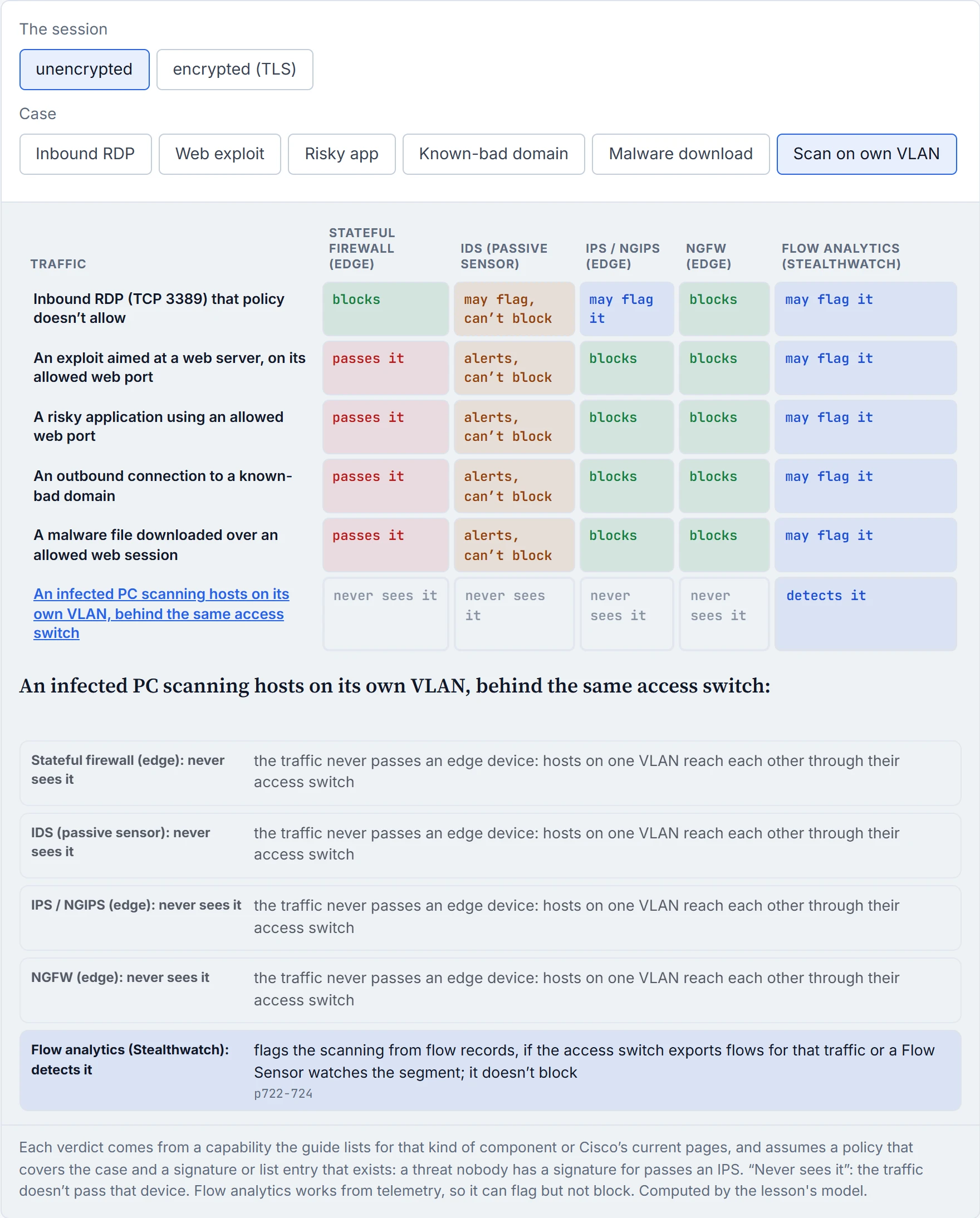
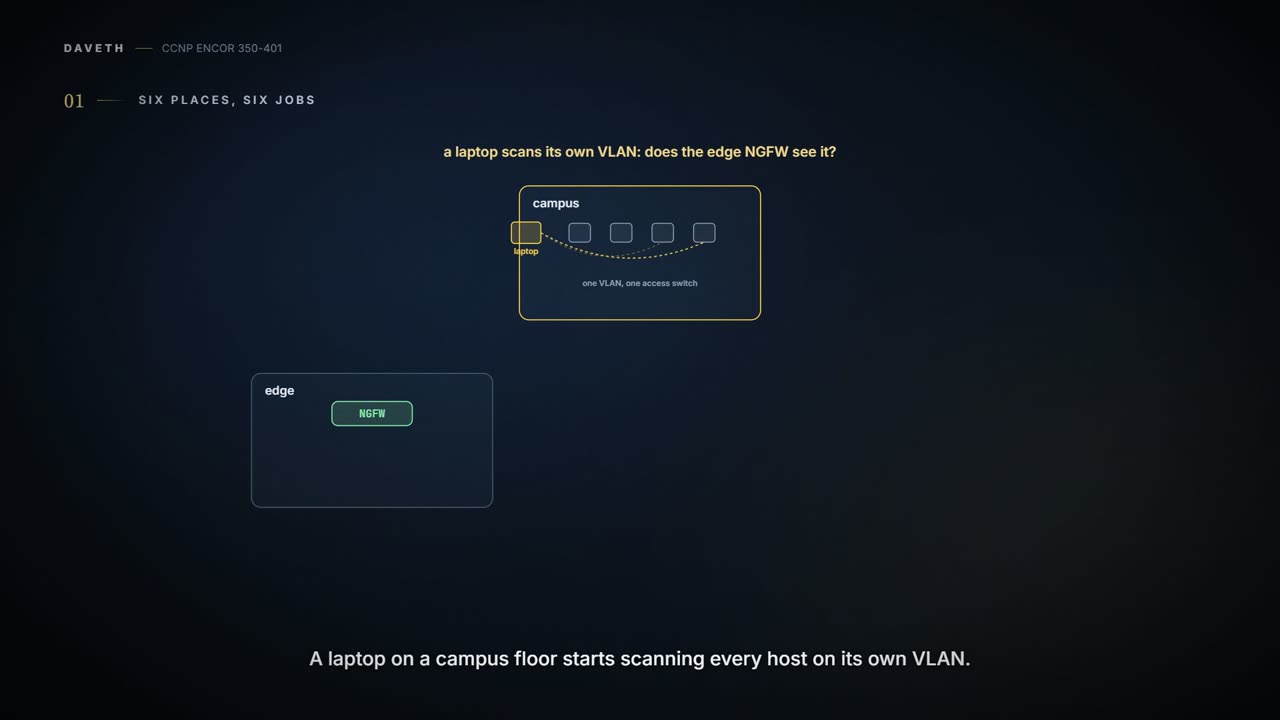
So the memory hook: the firewall decides which door; the IDS sees; the IPS stops; the NGFW does all three and knows the application and user; flow analytics sees whatever the network exports and stops no one. And the case D1 opens with, a laptop scanning its own floor: it never passes the edge NGFW, so the NGFW does nothing; flow records show it, if the access switch exports them or a Flow Sensor watches that segment. An internal firewall between VLANs would change that; the lesson's devices sit at the edge.
An IDS is a smoke detector with no sprinkler attached: superb at telling you exactly how the fire is going.
Gartner's list for an NGIPS, as the guide gives it, is IPS functionality plus "Real-time contextual awareness", "Advanced threat protection", "Intelligent security automation", "Unparalleled performance and scalability" and "Application visibility and control (AVC) and URL filtering". Cisco bought Sourcefire in 2013 and with it the Firepower NGIPS. Its contextual awareness means it knows the "applications, users, endpoints, operating systems, vulnerabilities" and more on the network. That's roughly equivalent to a doctor who reads your history before judging a symptom: the same alert matters differently on a patched server and an unpatched one. Its threat protection comes from "integrated AMP for Networks and Threat Grid sandboxing solutions".
The automation correlates events, context and vulnerabilities to update policies, find users hit by a client-side attack, flag hosts that break configuration policy, spot malware spreading by "baselining normal network traffic", and tag likely-compromised hosts "with an IoC". The numbers are the guide's, from 2020: application detection for "more than 4000 commercial applications", and URL filtering across "more than 80 categories" and "more than 280 million individual URLs".
Beyond Gartner's list, the guide names FMC as its "single pane of glass" for events and policy; Talos (08-6) for "up-to-the-minute IPS signature updates" and for blocking "connections to or from IP addresses, URLs, and/or domain names"; Snort as its detection engine; active/standby high availability and clustering; and "an open API". Have you ever noticed how your phone's apps update themselves overnight without asking? The signature feed works the same way, and a sensor with a stale feed is guarding against last month's attacks. Snort today is Snort 3: "For new 7.0 FTD deployments, Snort 3 is now the default inspection engine". Snort 2 is on its way out: "upgrading to Firewall Threat Defense Version 7.2–7.6 also upgrades eligible Snort 2 devices to Snort 3", "Version 7.6.0 is the last major version that supports Snort 2", and "Snort 2 is deprecated in Version 7.7+, and prevents Firewall Threat Defense upgrade".
The NGIPS can also act beyond its own box. FMC can use Cisco ISE to "Quarantine" an endpoint (limit or block its access), "Unquarantine" it, or "Shutdown" the switch port it's attached to; ISE as the AAA server is 08-2's, and what it sends after 802.1X is 08-7's. And it ships as Firepower appliances, as FTD for ISR, and as NGIPS Virtual.
The guide calls Snort "the world’s most powerful open-source IPS engine", which is about as modest as a vendor's guide gets about software its owner bought.
Cisco's NGFW came from joining two things it already had: "Cisco integrated existing ASA firewall software with the Firepower NGIPS services software". In the guide it runs on Firepower appliances and on "All ASA 5500-X appliances (except 5585-X)". Which job the box does depends on its software, and there are three images:
| Image | What the box becomes | Supported on |
|---|---|---|
| ASA | "a standard legacy firewall with no Firepower NGIPS services" | all Firepower and ASA appliances |
| ASA with Firepower Services | two images in one box, "each one requiring different management applications" | 5500-X only, except the 5585-X |
| Firepower Threat Defense (FTD) | ASA and Firepower Services merged "into a single unified image" | all Firepower and ASA 5500-X, except the 5585-X |
In a way, it's just a phone that replaced the camera and the music player you used to carry: two devices' jobs in one image, with one set of settings. FTD also runs on ISR modules and as NGFWv on VMware, KVM, AWS and Azure.
How you manage it depends on the image. FTD and Firepower Services are managed by FMC, or by Firepower Device Manager on small appliances; ASA by the CLI, Cisco Security Manager, ASDM or Cisco Defense Orchestrator. One note to remember: "FTD or Firepower Services software CLI configuration is not supported. CLI is only available for initial setup and troubleshooting purposes".
FMC is the centre of it. It "aggregates and correlates threat events, contextual information, and network device performance data", and it manages the NGFW and NGFWv, the NGIPS and NGIPSv, FTD for ISR, ASA with Firepower Services, and AMP. Consider it your building's control room: every camera and door sensor reports there, and the rules for every door are set there. Today its data sheet calls it "Cisco Secure Firewall Management Center (formerly Firepower Management Center)", managing "Cisco Secure Firewall Threat Defense (FTD)", "Cisco Secure IPS (formerly Firepower NGIPS)" and "Cisco Malware Defense (formerly Advanced Malware Protection, or AMP)". It also comes cloud-delivered, through what was Cisco Defense Orchestrator and is now "Security Cloud Control (formerly Cisco Defense Orchestrator)".
| The guide (2020) | Today |
|---|---|
| Firepower Management Center (FMC) | Secure Firewall Management Center |
| Firepower Threat Defense (FTD) | Secure Firewall Threat Defense (still FTD) |
| Firepower NGIPS | Secure IPS |
| AMP | Malware Defense |
| Cisco Defense Orchestrator | Security Cloud Control |
| ASA | Secure Firewall ASA |
| UDP Director | Cisco Telemetry Broker (the virtual edition's replacement) |
| Stealthwatch Enterprise | Secure Network Analytics |
| Stealthwatch Cloud | Secure Cloud Analytics, now part of Cisco XDR |
Firepower Threat Defense became Secure Firewall Threat Defense, which still abbreviates to FTD: the rename changed one word and kept all three letters.
Everything so far inspects traffic that passes a box. Stealthwatch works from what the whole network reports about its traffic. It's "a collector and aggregator of network telemetry data" that detects "threats that manage to infiltrate a network as well as the ones that originate from within a network": command-and-control, ransomware, DDoS, "illicit cryptomining", unknown malware and insider threats. Just like when you check an itemised phone bill: you can't hear the calls, but a number called at 3 a.m. every night for a month tells you plenty. NetFlow is that bill, one line per conversation (07-5 built the records). The guide calls it "an agentless solution" and says it detects "malware in encrypted traffic" without decryption; today's data sheet says it can "analyze encrypted traffic without any decryption".
It came in two offerings, Enterprise and Cloud. Stealthwatch Enterprise, now "Cisco Secure Network Analytics (formerly Stealthwatch Enterprise)", needs three things. The Flow Rate License sets "the volume of flows that can be collected". The Flow Collector collects NetFlow, IPFIX and other flow data, including proxy data for Global Threat Analytics, and uses Encrypted Traffic Analytics. The Stealthwatch Management Console (SMC) "aggregates, organizes, and presents analysis from up to 25 Flow Collectors, Cisco ISE, and other sources"; today it's called the Manager, with the same 25. Optional components add threat intelligence from Talos, endpoint visibility and cloud visibility, and the benefits the guide lists run from real-time threat detection to "Ability to satisfy regulatory requirements".
Two more optional boxes. The Flow Sensor "Produces telemetry data for segments of the networking infrastructure that can’t generate NetFlow data and also provides visibility into the application layer data"; today it also generates the ETA telemetry. The UDP Director takes one stream and sends it to several places. Picture yourself in a situation where every router must send its NetFlow to "Stealthwatch Flow Collectors, LiveAction, Arbor, and so on": that's one export per destination on every router. With a UDP Director, "every router could be configured with a single NetFlow export", and the Director replicates the data to all of them. It works behind the scenes just like a mailing list: you write to one address, and the list delivers to everyone on it. D2 counts the exports; predict first how many ten routers need for three destinations, a Flow Collector, LiveAction and Arbor. Today the UDP Director's virtual edition "is being replaced by Cisco Telemetry Broker".
Continue the lesson
The whole lesson, with its drawings and its questions. The rest of this section and 9 more after it.