
AAA with TACACS+ and RADIUS
AAA splits access control into three jobs: authentication identifies the user, authorization decides what they may do, and accounting records what they did. A central server keeps one list instead of fifty. TACACS+, over TCP 49, keeps the three separate and suits device administration; RADIUS, over UDP 1812 and 1813, suits network access. Local users are the fallback.
By Arif, founder of Daveth · Updated
The full 9 min walkthrough is in Daveth Pro (Network). See what the plan opens
What this page answers
What is the difference between TACACS+ and RADIUS?
TACACS+ uses TCP 49, protects the whole message body, keeps authentication, authorization and accounting separate, and authorizes and accounts per command: the choice for device administration. RADIUS uses UDP 1812 and 1813, protects only the password, and suits network access. Read it in “4.1 Why a server, and what the three As are”
Does a router fall back to its local users when the AAA server rejects a login?
No. The local method is a fallback for when the servers cannot be reached, not for when they say no; a rejected password stays rejected even if a local account has it. Read it in “4.1 Why a server, and what the three As are”
4.1 Why a server, and what the three As are
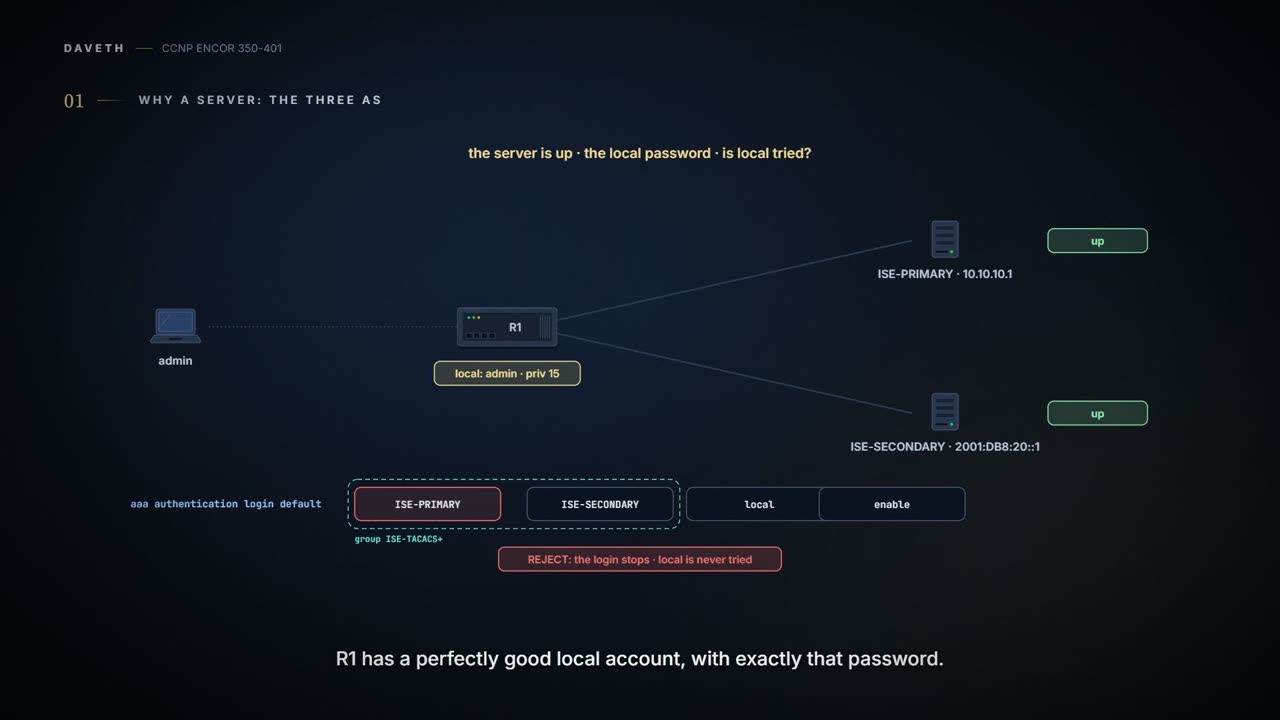
ISE is up. An admin types their local password, which ISE doesn't have for them; R1 has a perfectly good local account with exactly that password. Does R1 try the local account? Keep that one for section 4.4.
AAA splits access control into three separate jobs. Authentication identifies the user before they get in. Authorization decides what an authenticated user may do. Accounting keeps the record: who, when they started and stopped, and which commands they ran. It works like a front desk with three staff: one checks your badge, one hands you the list of floors you may visit, and one writes you into the sign-in book.
It has two common uses: controlling who administers network devices, where TACACS+ is the protocol of choice, and controlling which users and devices get onto the network, where RADIUS is. The local users of 08-1 do the first job on one box. Fifty boxes means fifty user lists, and the guide expects them to drift apart; a server keeps one list and one policy, with the local users kept for when the servers can't be reached. That's like a hotel chain moving from a guest book at every front desk to one booking system, with a paper list at each desk for the day the system is down.
Accounting is the one A nobody asks about until the morning after someone typed reload on the core switch, and then it's the only A anyone cares about.
Both are client/server: the network device is the client and asks the server. Figure 26-1 shows the pieces: an admin reaches a switch over Telnet, SSH or the console, and the switch asks ISE over TACACS+.
TACACS+ is Cisco's. The guide says it was released as an open standard in the early 1990s; RFC 8907, an Informational RFC, says the protocol "was never standardized" and documents it as deployed. It runs over TCP port 49. Its key trait is that it keeps authentication, authorization and accounting apart. So the device can ask the server about every single command after login. RADIUS is an IETF standard that returns all the authorization in one reply, and it carries EAP, which is what 802.1X network access runs on (802.1X and EAP in outline: 08-7; in depth: bonus B-11). Per-command authorization over RADIUS would mean sending every allowed command up front, and "since there could be thousands of CLI command combinations" that could exhaust the device's memory. RADIUS works like a theme-park wristband: decided once at the gate. TACACS+ is like the cashier who calls the supervisor over for each refund.
| RADIUS | TACACS+ | |
|---|---|---|
| transport | UDP 1812 and 1813 (standard); 1645 and 1646 (Cisco's) | TCP 49 |
| what's protected | the password only | the whole body, but see below |
| AAA split | authentication and authorization together | all three separate |
| per-command authorization | no | yes |
| command accounting | no | yes |
| EAP (802.1X) | yes | no |
| main use | network access | device administration |
RADIUS was given UDP 1812 for authentication and 1813 for accounting; early RADIUS used 1645, and Cisco's radius server still defaults to 1645 and 1646. Match the server, or nothing answers.
Now the protection row. The guide's table has TACACS+ encrypting the entire payload, and Cisco's 17.9 guide says its exchanges "are encrypted". RFC 8907, which documents the protocol, disagrees: the body "may be obfuscated", the method "would not meet modern standards", and it gives "no meaningful integrity, privacy, or replay protection", so you "MUST control the security of the entire transmission path". RADIUS hides the password with a method "based on the RSA Message Digest Algorithm MD5", and the guide's table has it protecting only that field. So for both, the shared key works like a net curtain that keeps out casual eyes, and a management network you control keeps out the rest. Since ISE 2.0, ISE is Cisco's AAA server for both.
The RFC that finally wrote TACACS+ down spends a whole section politely refusing to call its encryption "encryption", which is the standards-body way of saying pig Latin.
The guide's order matters, and step 1 is the one people skip:
! 1: a way in if AAA goes wrong
username admin privilege 15 algorithm-type scrypt secret <password>
! 2: turns AAA on
aaa new-model
! 3: one block per server
tacacs server ISE-PRIMARY
 address ipv4 10.10.10.1
 key <shared-key>
tacacs server ISE-SECONDARY
 address ipv6 2001:DB8:20::1
 key <shared-key>
! 4: the group, in failover order
aaa group server tacacs+ ISE-TACACS+
 server name ISE-PRIMARY
 server name ISE-SECONDARY
! 5: the login method list
aaa authentication login default group ISE-TACACS+ local
The local user comes first "to avoid being locked out after enabling AAA". Consider it your spare key left with the neighbour before you change the locks. Then aaa new-model, without which no other AAA command works. Each server is a tacacs server block with address {ipv4 | ipv6} and a key that "must match the key used on the TACACS+ daemon". The IPv6 address here is this lesson's. The server must know R1 as a client, with its hostname, IP address and key, and a dual-stack R1 reaches ISE-PRIMARY from an IPv4 address and ISE-SECONDARY from an IPv6 one. Pin both with ip tacacs source-interface and ipv6 tacacs source-interface under the group, which take priority over the global form, and enter both addresses on the server. For RADIUS over IPv6, Cisco says to enable ipv6 unicast-routing. Older IOS used a one-line tacacs-server host ... key ....
The group lists its servers in failover order: "the first one added is the highest priority". Then the method list. default applies to every line that doesn't name another list; a named list applies only where a line asks for it with login authentication list-name. It's a bit like a house rule against a sign on one door: the rule covers every room, and the sign wins where it's posted.
For RADIUS the server block is radius server name, with address {ipv4 | ipv6} ip-address [auth-port port] [acct-port port] and a key that Cisco says to configure last.
aaa new-model is one of the few commands that can lock you out of the router you're typing it into, which is exactly why the guide's step 1 is a local user and not a leap of faith.
Here's the rule, in Cisco's words: the software uses the first method listed, and "if that method does not respond, the software selects the next method in the list". But "If authentication fails at any point in this cycle: meaning that the security server or local username database responds by denying the user access: the authentication process stops, and no other authentication methods are attempted". An ERROR reply counts as no verdict: T1 says the switch "typically tries to use an alternative method", and RFC 8907 says the login proceeds "as if that host could not be contacted". No verdict moves on; no stops. If you've ever phoned someone's office, got no answer and tried their mobile, you know the first half. The second half: if they pick up and say no, you don't then ring their assistant hoping for a yes.
Inside a group, the servers are tried in the order they were added, so with ISE-PRIMARY down the login goes to ISE-SECONDARY before it ever reaches local. And the guide's list group ISE-TACACS+ local enable shows the end of the line: with no usernames defined, the enable password is the last resort, and with no enable password either, "the user is effectively locked out".
You know what happens when ISE answers no. Predict before D1: both ISE servers are down, and the admin types their local password, which only R1 has. Who lets them in?
D1
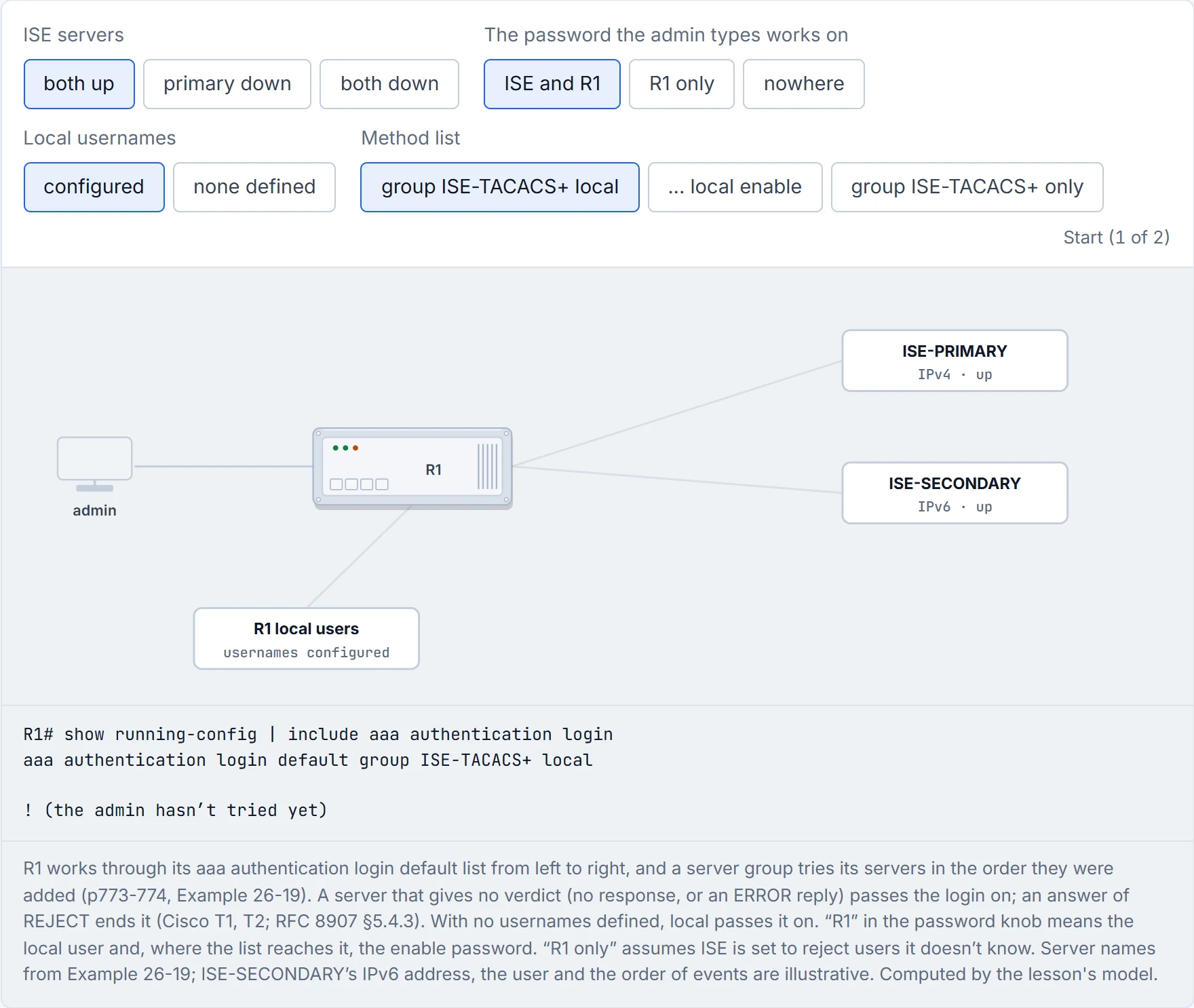
Step 1 of 2 The admin opens an SSH session to R1 and types a username and password.
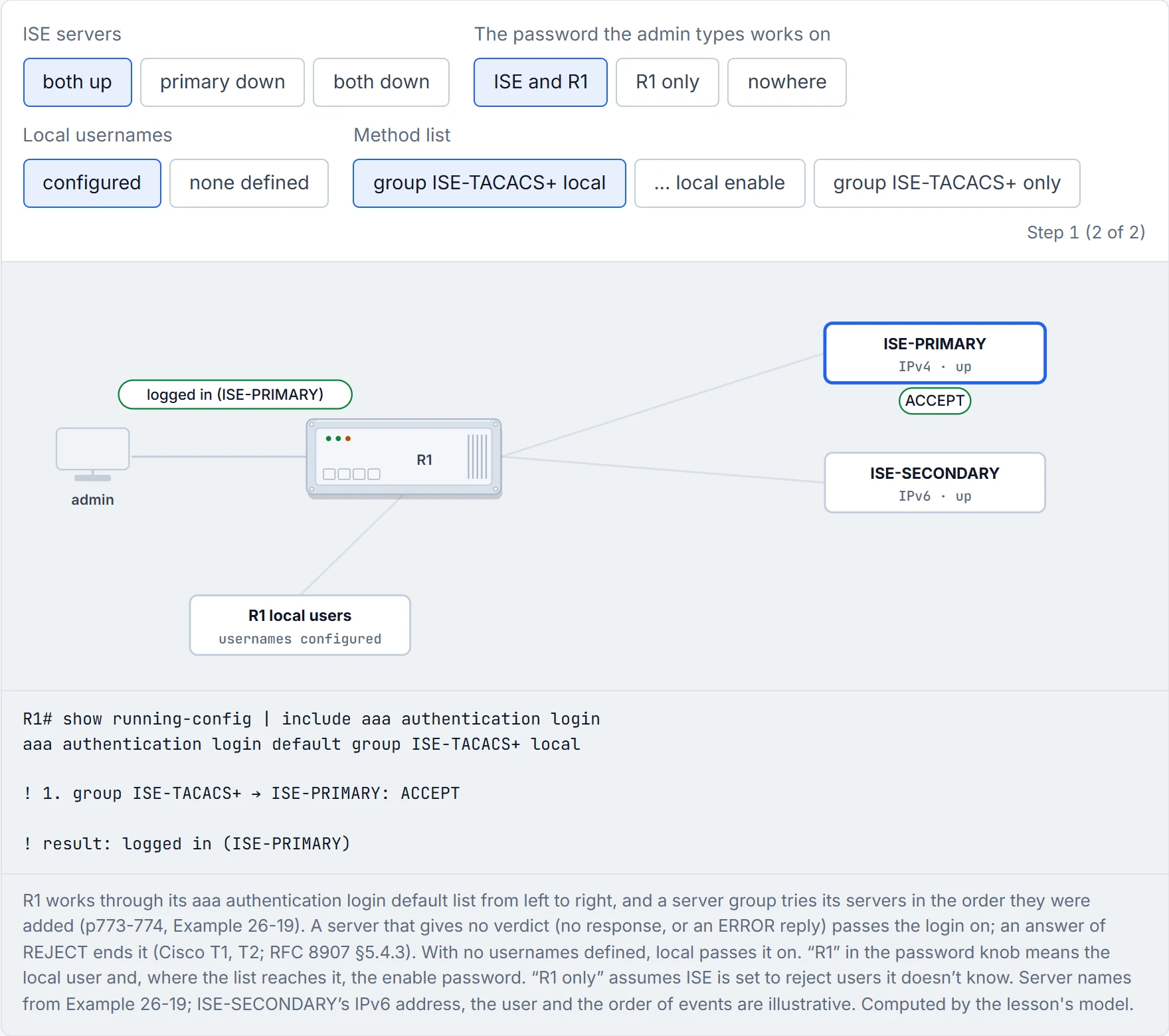
Step 2 of 2 ISE-PRIMARY: ACCEPT. The login is accepted.
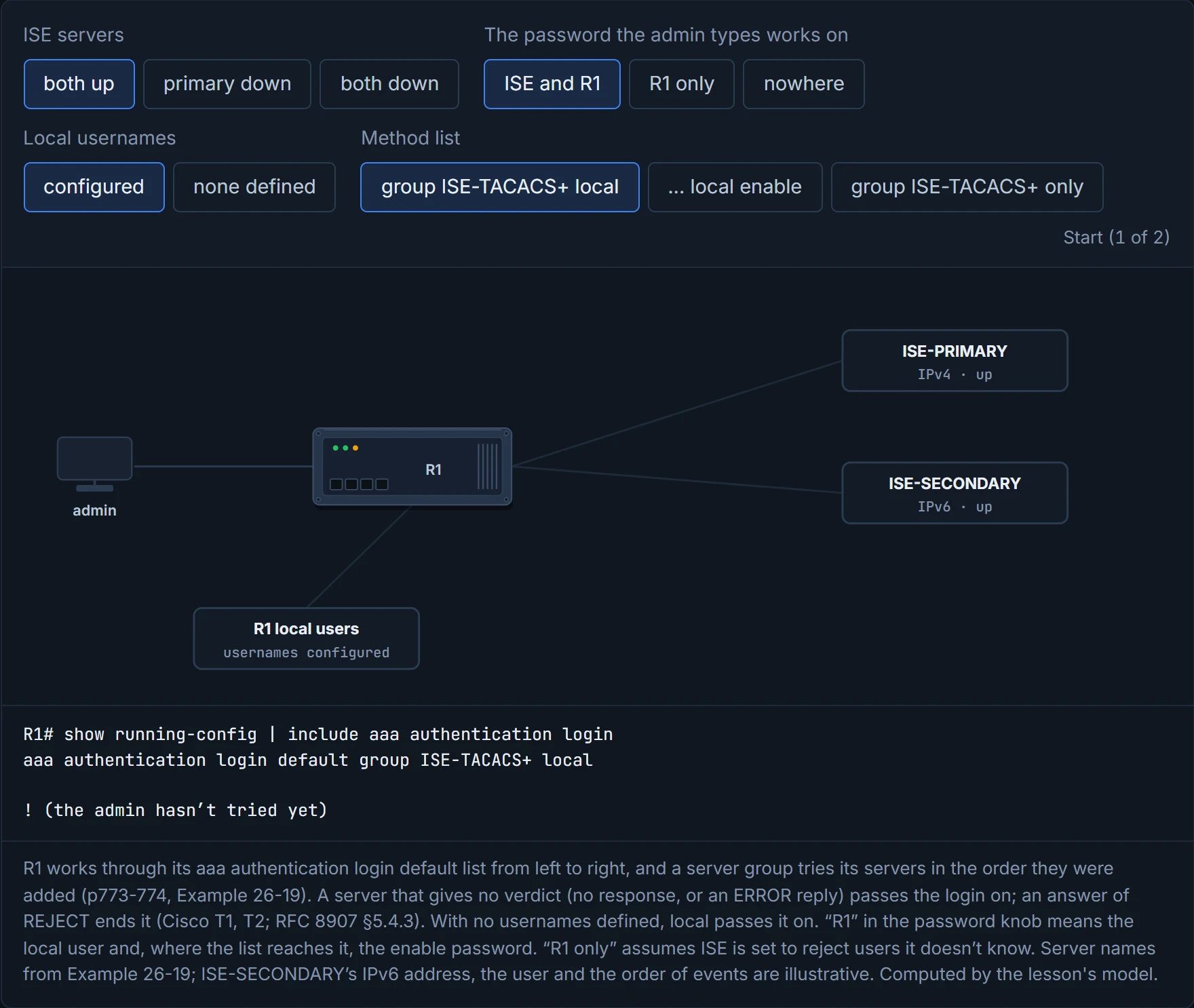
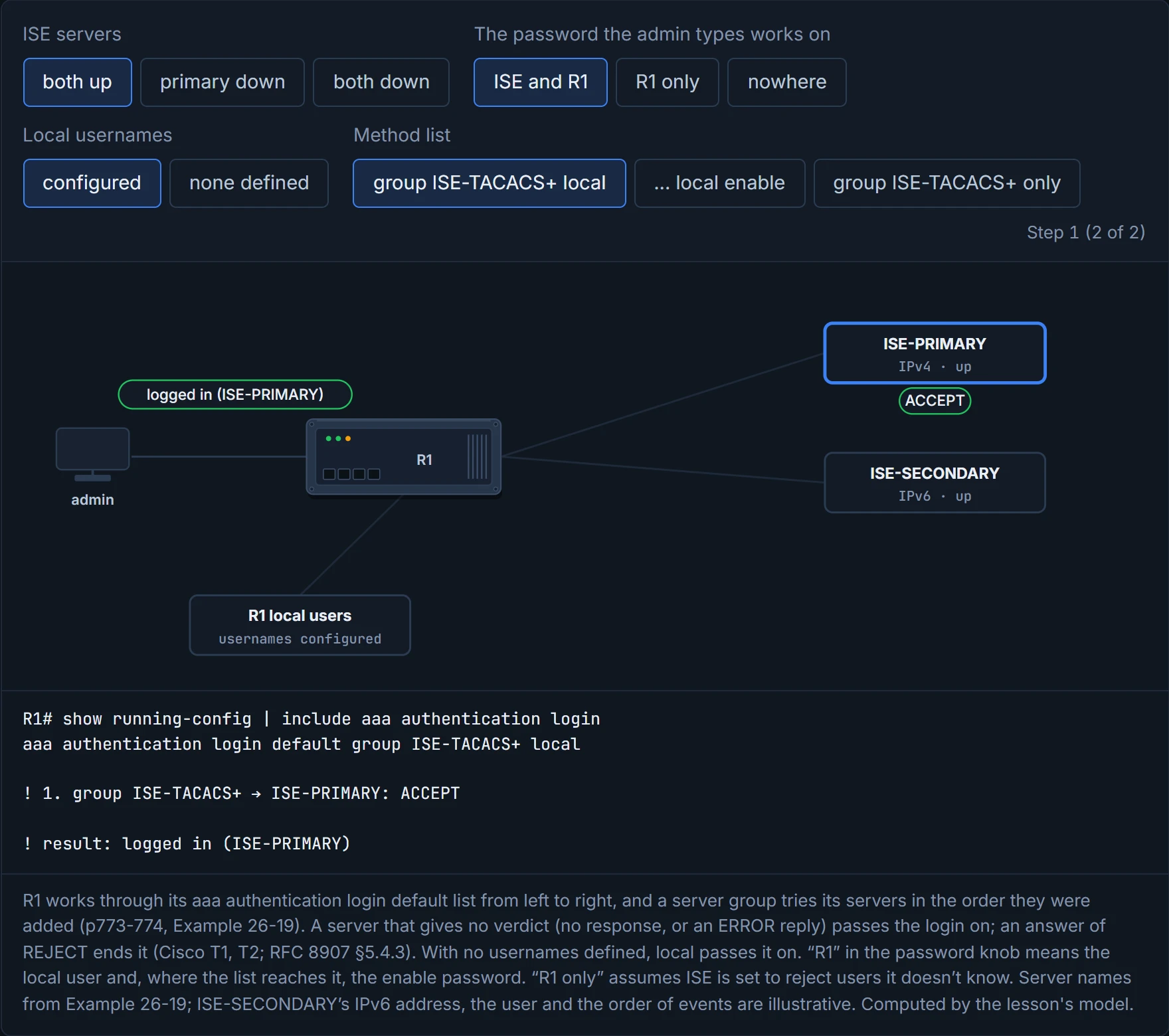
R1 does: the group never answered, so the login moves on to local. Bring ISE back and the same password gets nobody in: ISE-PRIMARY answers REJECT, and that's the end. (A server set to stay silent about unknown users would give no verdict instead, and R1 would move on.) A list with only group ISE-TACACS+ and both servers down has nothing left to try. Picture yourself at 2 a.m. during a data-centre outage with that list on every router: that's the lockout the guide's step 1 exists to prevent.
A method list is the only place in networking where "no response" is better news than "no".
Authorization has three switches. aaa authorization exec {default | list} methods authorizes starting an EXEC shell, and it covers every line except the console. The console is covered only once you add aaa authorization console, which is off by default "to prevent unexperienced users from locking themselves out". Commands and configuration leaves it off on purpose, as the guide's default, and gives the console its own login list and privilege level 15, as Example 26-19 does. aaa authorization commands level {default | list} methods asks the server before each command at that level, so you configure it per level; 0, 1 and 15 are the usual ones, since levels 2 to 14 are for local privilege use. aaa authorization config-commands extends it to configuration mode.
Exec authorization is also where a session's privilege level comes from. T1: "When AAA authorization is enabled, the switch uses information retrieved from the user's profile, which is located either in the local user database or on the security server, to configure the user's session", and a TACACS+ authorization reply carries a priv-lvl, "The privilege level to be assigned". That's why netadmin lands at R1# in Example 26-20. It's also why Commands and configuration's exec list is group ISE-TACACS+ local if-authenticated: with ISE down, local lets R1 use the local user's profile, privilege 15 from step 1. With if-authenticated alone, the session starts, but the sources read don't say at which level; lab task 3 finds out. Example 26-19 also keeps a second way up, aaa authentication enable default group ISE-TACACS+ enable with an enable secret, so enable works when ISE doesn't answer. Command authorization acts kind of like a supervisor's sign-off on each till override: the cashier can't skip the supervisor, even for the easy ones.
When the servers go down, login falls back to local, but command authorization "might still be trying to reach the AAA server", so commands at every level that has a command authorization list fail. So the guide ends each authorization list with if-authenticated: allow the command if the user authenticated. none turns authorization off and can't be combined with it. The price of if-authenticated: while the servers are down it authorizes every command for anyone who logged in, so per-command policy is off until they come back. Example 26-19 gives the console its own authorization lists that are just none, so the console always works, like a fire exit that stays open whatever the card readers think.
Accounting is aaa accounting exec for sessions and aaa accounting commands level for commands, usually with start-stop, which sends a record when the session starts and another when it ends.
Continue the lesson
The whole lesson, with its drawings and its questions. The rest of this section and 9 more after it.