
Reading a QoS configuration
Every MQC configuration has three layers: class maps that decide which class a packet is in, a policy map that says how each class is treated, and a service policy that applies it to an interface. A class map with no keyword is match-all, and a packet goes to the first matching class in the policy's order.
By Arif, founder of Daveth · Updated
The full 8 min walkthrough is in Daveth Pro (Network). See what the plan opens
What this page answers
What is the difference between bandwidth and bandwidth remaining?
priority and bandwidth percent are fixed shares of the interface or parent shaper rate, like the rent and bills in a budget; bandwidth remaining percent splits whatever is left over after them. Read it in “4.1 The exhibit, and the three pieces”
How do you read an MQC QoS policy?
In three layers: class maps say which class a packet belongs to, the policy map says what each class gets, and service-policy applies it to an interface in one direction. Check each class map's match-all or match-any, then the class order. Read it in “4.1 The exhibit, and the three pieces”
4.1 The exhibit, and the three pieces
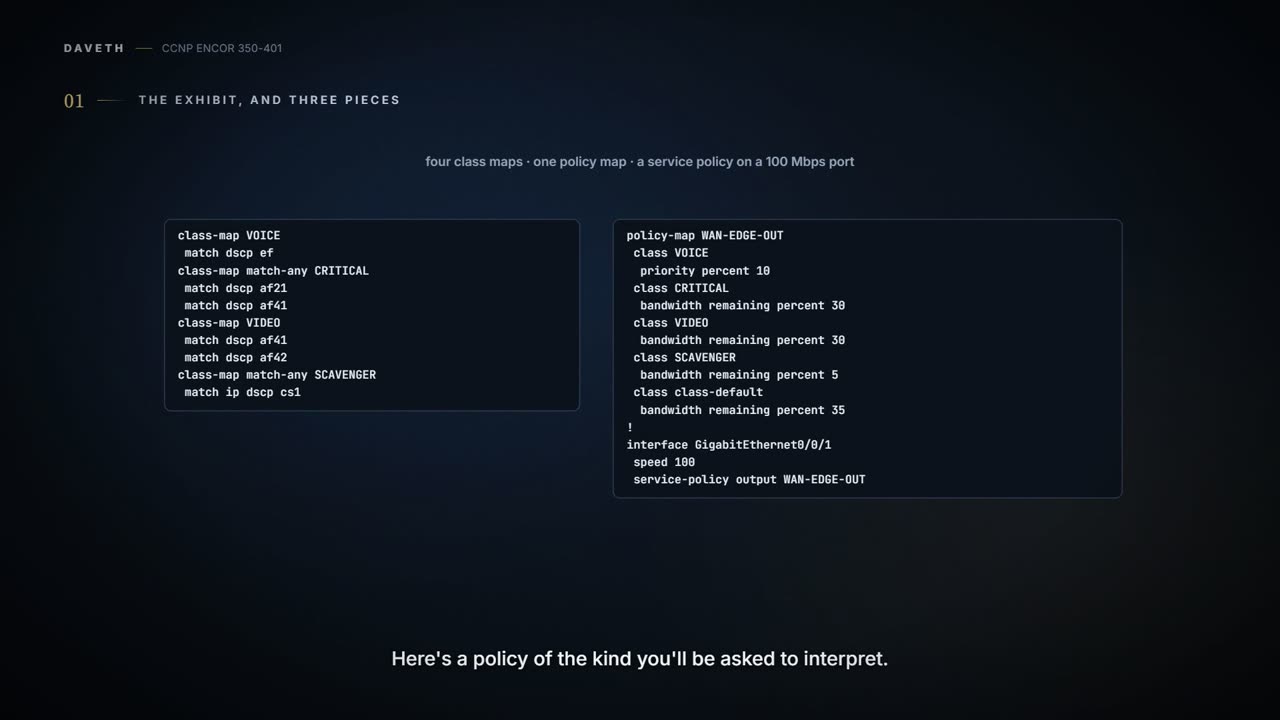
Here's a policy of the kind you'll be asked to interpret. Read it once before going on.
class-map VOICE
 match dscp ef
class-map match-any CRITICAL
 match dscp af21
 match dscp af41
class-map VIDEO
 match dscp af41
 match dscp af42
class-map match-any SCAVENGER
 match ip dscp cs1
!
policy-map WAN-EDGE-OUT
 class VOICE
  priority percent 10
 class CRITICAL
  bandwidth remaining percent 30
 class VIDEO
  bandwidth remaining percent 30
 class SCAVENGER
  bandwidth remaining percent 5
 class class-default
  bandwidth remaining percent 35
!
interface GigabitEthernet0/0/1
 speed 100
 service-policy output WAN-EDGE-OUT
The port runs at 100 Mbps, and that matters: a percentage in priority percent is "a percentage of the interface (or parent shaper) rate", so 10% here is 10 Mbps, where on the same port at 1 Gbps it would be 100 Mbps.
Every MQC configuration has the same three layers: "traffic class, policy map, and service policy". You can think of it as a sorting office: the class maps are the rules for which pigeonhole a letter goes in, the policy map says how each pigeonhole is handled, and the service policy says which door the rules apply to and whether it's incoming or outgoing post. The guide's only QoS MQC shows the same shape: ACLs, class-map match-all entries that match them, a policy-map that polices each class, and service-policy input under control-plane.
Reading it well is mostly about rules the configuration doesn't spell out, like the small print on a parking sign that decides whether you get a ticket. There are six, and every one is Cisco's: a class map with no keyword is match-all; a packet takes "the first traffic class defined in the policy" that matches; unmatched traffic is class-default; match ip dscp is IPv4 only; queuing isn't supported inbound; and a priority class is held to its rate only when the link is congested. The first question is what those rules do to an IPv6 video packet marked AF42. Hold your answer until D1.
Every QoS policy has one class that gets more traffic than all the others combined, and it's usually the one nobody configured: class-default.
"If you specify the match-any keyword, the traffic ... must match one of the specified criteria. If you specify the match-all keyword, the traffic ... must match all of the specified criteria. If you do not specify either keyword ... the behavior of the match-all keyword is used". So the exhibit's VOICE is match-all with one criterion, which is harmless, and its VIDEO is match-all with two DSCP values, which matches nothing: a packet carries one DSCP. It's like a recipe card that says "use butter and margarine" when it meant "or": nothing in the fridge satisfies it. The exhibit is what someone typed; on a device the default tends to be written out, as in the guide's own listing, class-map match-all CLASS-CoPP-IPsec, so in a running configuration the same trap reads class-map match-all VIDEO with two DSCP lines. Whether IOS XE always writes the keyword back isn't in the pages read (unconfirmed).
Order matters as much as content. "A packet can match only one traffic class within a traffic policy. If a packet matches more than one traffic class in the traffic policy, the first traffic class defined in the policy will be used". Just like when you queue at the first checkout that's open: CRITICAL comes before VIDEO and also matches AF41, so AF41 video is checked out at CRITICAL whatever VIDEO says. And anything no class claims goes to the lost-property shelf: "(that is, unclassified traffic) is treated as belonging to the default traffic class".
Then the address family. "The match command allows matches to be made on DSCP values and precedence for both IPv4 and IPv6 packets", but with the optional ip keyword "the match is for IPv4 packets only". The exhibit's SCAVENGER says match ip dscp cs1, so IPv6 scavenger traffic misses it and becomes class-default. Cisco's advice is to use match dscp to treat both families alike, or match protocol ip and match protocol ipv6 in a match-all class to separate them.
The lesson's D1 runs both: an IPv6 AF42 packet and an IPv6 CS1 packet, as written, then corrected.
D1
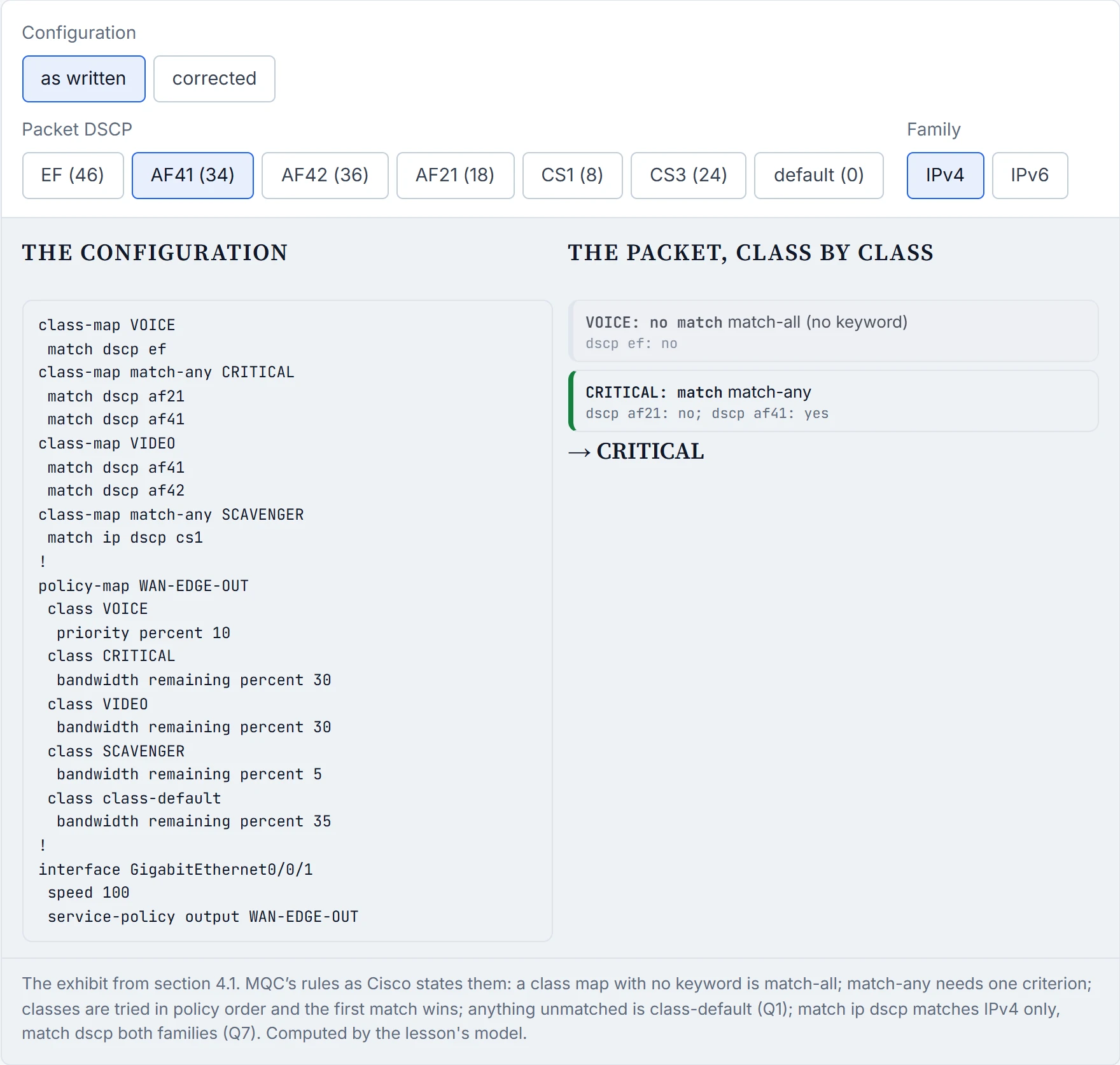
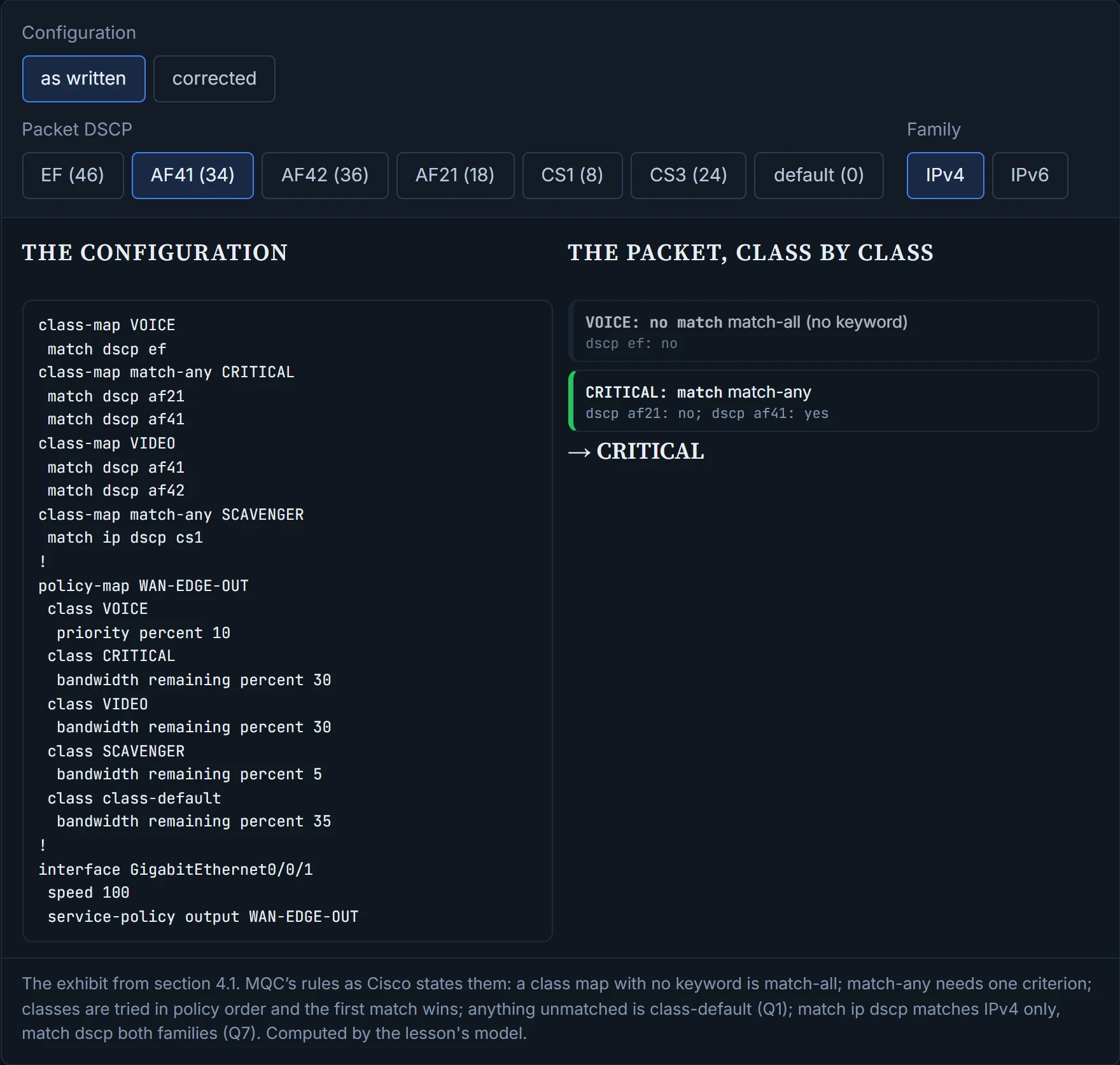
As written, AF41 goes to CRITICAL (first match), AF42 goes to class-default (VIDEO can never match), and IPv6 CS1 goes to class-default (match ip dscp). The corrected version makes VIDEO match-any, takes AF41 out of CRITICAL, and uses match dscp cs1.
A match-all class with two DSCP values is the tidiest line in any configuration: it never makes a mistake, because it never matches anything.
Each class's action is something 05-2 to 05-4 already explained; the configuration just names it. Have you ever noticed how a kitchen order ticket says "no onions" rather than explaining onions? The policy map works the same way.
| You read | It means |
|---|---|
set dscp <value> | mark the class (05-2) |
police cir <bps> [bc <bytes>] [be <bytes>] conform-action ... exceed-action ... violate-action ... | a single-rate policer with three actions: transmit, drop or mark down (05-3) |
police cir <bps> [bc <bytes>] pir <bps> [be <bytes>] ... | a two-rate policer: conform up to CIR, exceed between CIR and PIR, violate above PIR (05-3) |
shape average <bps> [<Bc in bits>] | "the primary means of configuring a Max rate for a class" (05-3) |
bandwidth <kbps or percent> | "the Minimum bandwidth (Min) guarantee" for the class's queue (05-4) |
bandwidth remaining percent <n> | the queue's "share of the excess bandwidth" |
priority [<kbps> or percent <n> or level <1/2>] | low-latency queue; with a rate, policed to it only under congestion |
priority plus police cir <bps> | low-latency queue policed to the rate "regardless of congestion conditions" |
queue-limit ... | the class queue's maximum threshold |
random-detect dscp-based | WRED on the class's queue, dropping by DSCP (05-4) |
The units trip people up, so read them off the line: a policer's CIR and PIR are bits per second and its bc and be are bytes; a shaper's rate is bits per second and its Bc is bits ("For a shaper ... it specifies bits per burst; for a policer ... bytes per burst"). So 05-3's shaper, 50 Mbps with a 10 ms Tc, is shape average 50000000 500000: 500,000 bits.
The one that fools people is priority percent 10. "Conditional priority rate limits traffic with a policer only if congestion exists at the parent (policy-map or physical interface) level", whereas a priority class with an explicit police command "is limited to the policer rate regardless of congestion conditions". It acts kind of like an ambulance lane with a speed limit that applies only when the road is jammed: on an empty road the ambulance takes what it likes, but in traffic it's held to its share so the lane can't eat the road. On an idle link, then, the priority class isn't limited to its 10% at all; it can use whatever the link has spare. Cisco's examples of the explicit form pair police cir with plain priority or priority level 1, not with priority percent; whether a rated priority percent with its own police is accepted isn't in the pages read (unconfirmed).
Bandwidth and bandwidth remaining are different promises. "The bandwidth command sets the Minimum bandwidth (Min) guarantee", while "The bandwidth remaining command configures the excess weight ... and so determines a queues share of the excess bandwidth". The exhibit only uses the second, so after voice, the classes share what's left 30:30:5:35. And a note on the guide's CoPP policy: police 8000 conform-action transmit exceed-action transmit violate-action drop means the class is policed at 8000 bps and only violating packets are dropped.
priority percent 10 is the only speed limit that's enforced exclusively during traffic jams, which, to be fair, is when it matters.
"You need to specify the direction of the traffic policy by using the input or output keyword", and "queueing mechanisms are not supported in the input direction. Nonqueueing mechanisms (such as traffic policing and traffic marking) are supported in the input direction". So a policy full of bandwidth and priority belongs on output, and attaching it inbound is unsupported: expect the service-policy input line to be refused (the exact message isn't in the pages read, unconfirmed). One that marks and polices can go on input. That's roughly equivalent to a loading dock: you can inspect and label parcels as they come in, but you can only decide which lorry leaves first on the way out.
"Each interface can have only one traffic policy attached in the input direction and only one traffic policy attached in the output direction", though one policy can serve many interfaces. The attachment point isn't always an interface: the guide's CoPP policy is attached with service-policy input POLICY-CoPP under control-plane, which applies it to traffic going to the router's own CPU (what CoPP protects, and how to design it, is 08-4). If you've ever set a timer on the wrong oven, you know why the attachment line is the first thing to check: the settings are right and they're working on something else.
A queuing policy applied inbound is the one QoS plan that fails before it can do any harm, because "queueing mechanisms are not supported in the input direction".
"show class-map", "show policy-map" and "show policy-map interface" are the three views: the definitions, the policy, and the policy as it runs on an interface. The last one is the one to read closely. Each class prints its match, its offered and drop rates, and its action's counters; a policer prints its CIR, bc and be, and how many packets conformed, exceeded and violated, with the action for each. Queuing classes add their own lines, such as "Priority: Strict, b/w exceed drops: 0" for a priority class and "(queue depth/total drops/no-buffer drops)" for a queue: the b/w exceed drops are where conditional priority policing shows up. It's basically like a bank statement: every line is a fact about what happened, and none of them tells you why.
The guide's Example 26-37 shows why you read the numbers together. CLASS-CoPP-Routing has "92 packets", a "5 minute offered rate 4000 bps" against a cir 64000 bps, and yet "violated 86 packets". The average is a sixteenth of the rate, like a trip's average speed that hides one burst of overtaking. The packets are big: 123557 bytes over 92 packets is about 1,343 bytes each, against buckets of 2000 bytes (bc and be), so each bucket holds about one and a half packets and any burst runs them dry. And nothing was lost: the violate action is transmit, the drop rate is "0000 bps", and the guide set it that way on purpose, to transmit "until a baseline for normal traffic flows is established". The offered rate is an average; the conform/exceed/violate counts are per packet.
D2 runs a traffic mix through the exhibit on a 100 Mbps link and prints the counters in the same layout, computed by the model. Before you look: with the exhibit as written and 142 Mbps offered, how much does the VIDEO class get?
D2
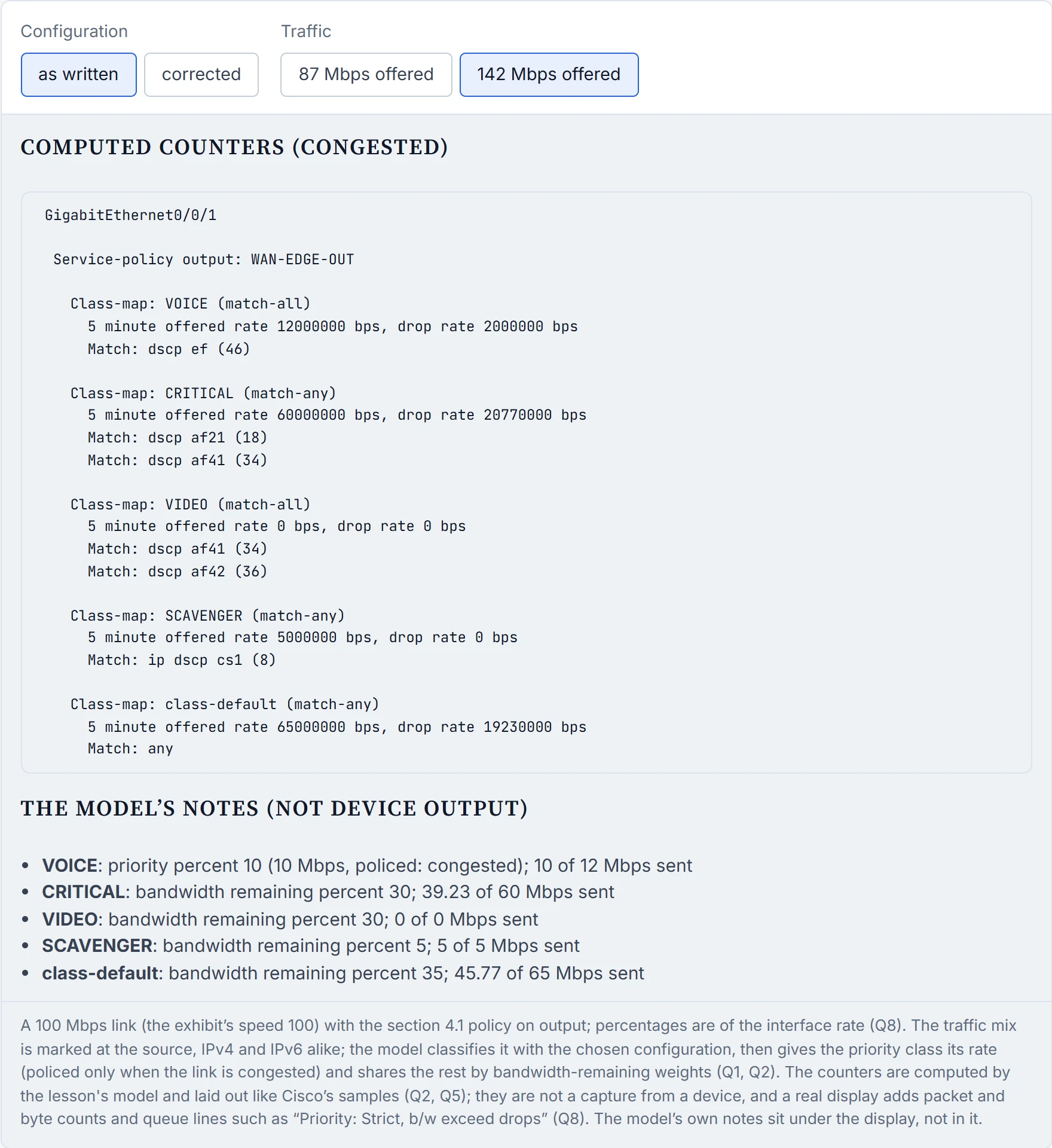
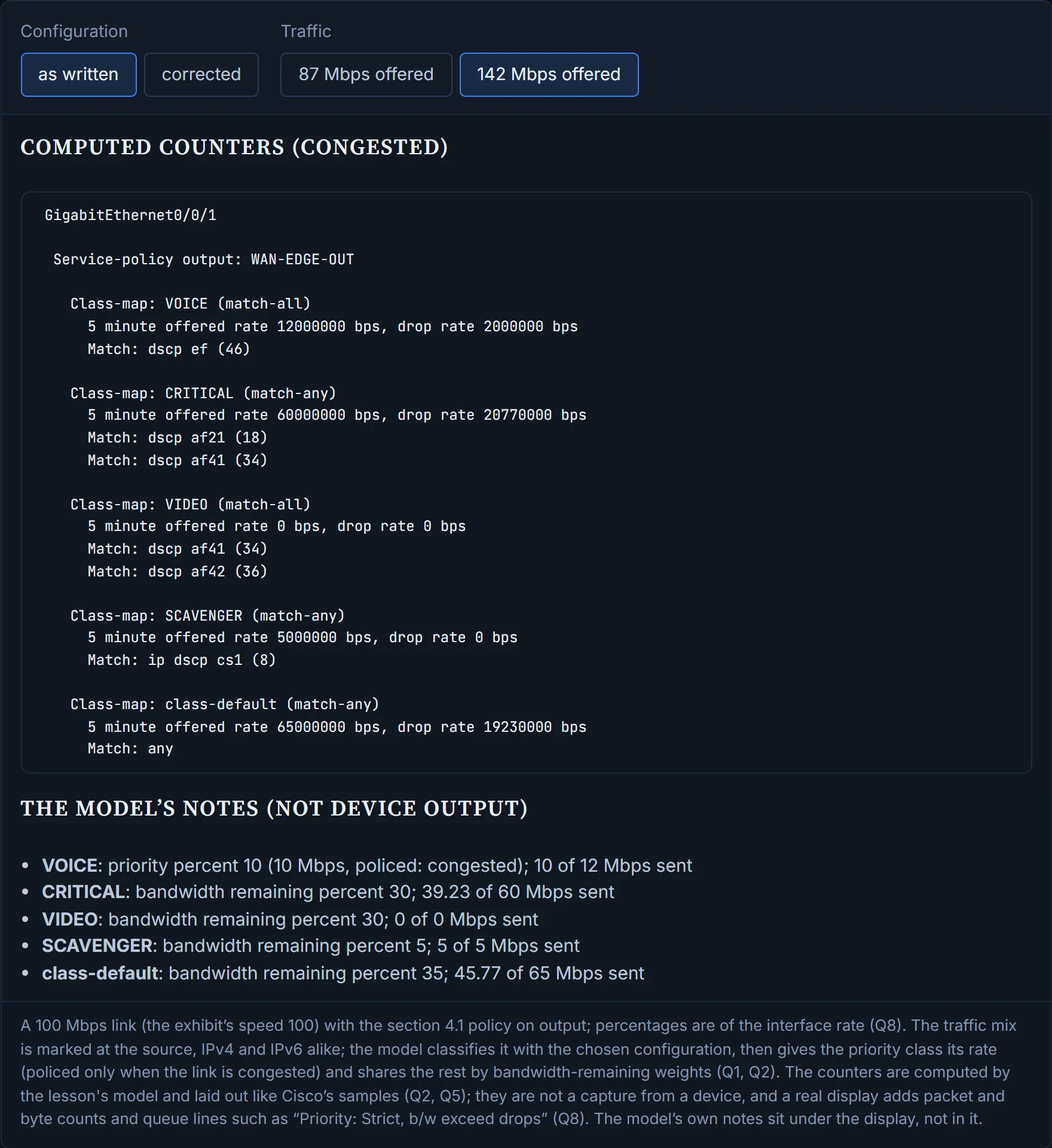
Nothing, because nothing reaches it: AF41 went to CRITICAL and AF42 to class-default, so VIDEO's offered rate is zero and CRITICAL and class-default absorb the video. IPv6 scavenger traffic sits in class-default at weight 35, not in SCAVENGER at 5, so the least important traffic competes like business data. And voice, at 12 Mbps offered against a 10% priority on a congested link, is held to 10 Mbps. Corrected, each class gets its intended share.
Example 26-37's routing class racked up 86 violations and paid nothing for any of them, because its violate action is transmit: the network's version of a warning letter.
Switches and routers read the same MQC, with their own rules. The Catalyst 9300 trusts markings by default: "the Differentiated Services Code Point (DSCP), precedence, or CoS values coming in from the end points are retained in the absence of any explicit policy configuration". Picture yourself in a situation where a shop takes every customer's word for their loyalty tier unless a sign says otherwise: that's the default, and a marking policy is the sign.
| Rule | Where |
|---|---|
| Two priority levels, level 1 above level 2 | both: routers ("a priority queue may be P1 or P2") and the Catalyst 9300 |
| Don't mix bandwidth units (kbps and percent) across non-priority classes | both |
| "You cannot configure both priority and set for a policy map"; the error appears "when the policy map is applied to an interface" | Catalyst 9300 |
| "You cannot configure IPv4 and IPv6 classification criteria simultaneously in the same class-map" | Catalyst 9300 |
bandwidth percent: "The total sum cannot exceed 100 percent"; any unallocated rest is divided equally | Catalyst 9300 |
shape average is output only; police works both ways | Catalyst 9300 |
queue-buffers ratio tunes a queue's buffers | Catalyst 9300 |
Trust: markings retained by default; trust device trusts a Cisco IP phone detected by CDP (keyword syntax: unconfirmed) | Catalyst 9300 |
Routers have their own limit, and it's narrower than it sounds: "By default, when the bandwidth percent and priority percent commands are used to allocate bandwidth, the sum ... cannot exceed 99 percent of the total bandwidth available on the interface". It's about bandwidth percent and priority percent. The exhibit's bandwidth remaining percent values are shares of what's left, so they add up to 100 on their own, and 10 + 30 + 30 + 5 + 35 isn't a sum the rule cares about. It works behind the scenes just like a household budget: the rent and the bills (priority and bandwidth percent) must fit inside the income, but how you split the leftover money is a separate list.
Continue the lesson
The whole lesson, with its drawings and its questions. The rest of this section and 9 more after it.