
Classification, marking and the trust boundary
Before any QoS tool acts, traffic is sorted into classes from business requirements, using descriptors from every layer, and classified as close to the source as possible. Marking then writes the class into a header: CoS at Layer 2, EXP at Layer 2.5, DSCP or IP Precedence at Layer 3. At the trust boundary a switch decides whose marks to believe.
By Arif, founder of Daveth · Updated
The full 11 min walkthrough is in Daveth Pro (Network). See what the plan opens
What this page answers
What is QoS classification?
Telling traffic streams apart with traffic descriptors, from the arriving interface, MAC address and CoS bits up to DSCP, IP addresses, TCP or UDP ports and NBAR2, and putting each packet into a class. Classify at the edge, close to the source. Read it in “4.1 Sorting before anything: classification”
What is QoS marking?
Writing a value into a header field so later devices can recognise the class without looking deeper: CoS at Layer 2, MPLS EXP at Layer 2.5, DSCP or IP Precedence at Layer 3, or an internal QoS group. Read it in “4.1 Sorting before anything: classification”
What is a QoS trust boundary?
Where the network decides whose marks to believe. A switch port can trust an endpoint's mark and not reclassify, or reject it and re-mark it; by default, an IP phone re-marks traffic from the PC behind it to CoS 0, DSCP 0. Read it in the lesson
4.1 Sorting before anything: classification
Before any QoS tool can do anything, the traffic has to be sorted into classes, and the classes come from business requirements, not from the network. Classification works like the sorting office before the postmen go out: nothing gets delivered faster until someone has put it in the right pile.
Classification tells traffic streams apart, using traffic descriptors to put each packet into a class. The descriptors come from every layer:
- Internal: QoS groups, which mean something only inside that router.
- Layer 1: the physical interface, subinterface or port it arrived on.
- Layer 2: the MAC address and the 802.1Q/p CoS bits.
- Layer 2.5: the MPLS EXP bits.
- Layer 3: DSCP, IP Precedence, and source or destination IP address.
- Layer 4: TCP or UDP ports.
- Layer 7: NBAR2.
Enterprises mostly use Layers 2, 3, 4 and 7. And classify at the edge, as close to the source as possible. Once a packet is classified, you can mark it, queue it, police it or shape it.
Port numbers don't always work, because some applications pick their ports on the fly. NBAR2 is a deep packet inspection engine that uses Layer 3 to 7 data to recognise more than 1000 applications, including those, and monthly protocol packs add new ones without an IOS upgrade or a reload. It has two modes:
- Protocol Discovery: watch the network and report which applications are running, with statistics. That's how you find out what classes you need.
- Modular QoS CLI (MQC): match a protocol (Webex in one class, YouTube in another) and apply a different policy to each class. 05-5 reads MQC.
That's a bit like a new restaurant manager who spends the first week just watching which dishes get ordered, and only then rewrites the menu: discovery first, policy second.
NBAR2 recognises more than 1000 applications. That's more than most IT departments can name on their own network, which is rather the point.
Marking writes a value into a header field, so that later devices can recognise the class without looking deeper than the mark. You can mark with QoS groups (internal), CoS at Layer 2, EXP at Layer 2.5, and DSCP or IP Precedence at Layer 3. Enterprises mostly mark at Layers 2 and 3. It works behind the scenes just like the priority boarding tag on your suitcase: someone at check-in decides once, and everyone after that just reads the tag.
A QoS group is a mark that lives only inside one router: set on the way in, removed on the way out. It's for the rare case where a mark wouldn't be visible on the way out because of encapsulation or de-encapsulation.
At Layer 2 the mark sits in the 802.1Q tag you met in 01-1. The tag adds two 2-byte fields after the source MAC: the TPID, always 0x8100, and the TCI. The TCI holds three things:
- PCP, 3 bits: the CoS value, 0 to 7, defined by 802.1p; the guide calls 0 the lowest and 7 the highest.
- DEI, 1 bit: 0 by default; 1 means "drop me first if there's congestion".
- VLAN ID, 12 bits, which is why 802.1Q is limited to 4096 VLAN IDs (01-1 covers which are usable).
(The quiz answer adds that PCP used to be called PRI, and DEI used to be CFI.)
The guide's table of CoS values:
| PCP | Acronym | Traffic type |
|---|---|---|
| 0 | BK | Background |
| 1 | BE | Best effort |
| 2 | EE | Excellent effort |
| 3 | CA | Critical applications |
| 4 | VI | Video, < 100 ms latency and jitter |
| 5 | VO | Voice, < 10 ms latency and jitter |
| 6 | IC | Internetwork control |
| 7 | NC | Network control |
Look closely at 0 and 1, because the guide disagrees with itself. Its own wireless table two pages later marks background traffic with 802.1p 1 and best effort with 0. RFC 8325, mapping DiffServ to Wi-Fi, also ranks user priority 1 (Background) below 0 (Best Effort); it's about 802.11 access categories, not the 802.1Q table, so it supports the order of those two values and nothing more. The IEEE 802.1Q table itself isn't archived for this course, so the wired names stay unconfirmed. What to carry: know both tables, and expect a question to follow whichever table it was written from. The two tables are like a pair of maps of the same town that disagree about which of two side streets is which: until you've walked it yourself, you note both and don't bet on either.
The catch with CoS: it lives in the 802.1Q tag, so it's lost when the frame crosses a link without 802.1Q, or a Layer 3 hop. If you've ever had a luggage label torn off at a transfer, it's that: the bag still arrives, but nobody downstream knows it was priority. So mark at a higher layer as well, usually by mapping the CoS into another mark; CoS values map straight across to IPv4's IP Precedence.
A CoS value is a VIP wristband that falls off the moment you leave the building. Great party, short memory.
A Layer 3 mark survives links that don't carry 802.1Q, including non-Ethernet links, so it can be preserved end to end. It started as the IPv4 ToS byte. The guide says only its first 3 bits were used, as IP Precedence (IPP), 0 to 7. (RFC 791 did define the next three as low delay, high throughput and high reliability flags; DiffServ later replaced all of it. RFC 791 also numbers the bits 0 to 7 from the left, the opposite of the guide's 7 to 0.) That gives up to six usable classes, because IPP 6 and 7 are reserved for internal network use. You can think of it as a building with eight floors where the top two are plant rooms: the lift has eight buttons, but only six take visitors.
RFC 2474 made the ToS field obsolete: newer standards redefined those same 8 bits, in the IPv4 ToS field and the IPv6 Traffic Class field, as the DiffServ field. It's made of:
- a 6-bit DSCP: 64 values, 0 to 63;
- a 2-bit ECN field (Explicit Congestion Notification; 05-4 uses it).
The quiz tries to catch you here: the DiffServ field is 8 bits, the DSCP inside it is 6. And because DSCP uses the same bits IP Precedence did, the top three bits of any DSCP still read as an IP Precedence to an old device. Same byte, both address families: a dual-stack policy marks IPv4 and IPv6 the same way, in the same six bits. (IP Precedence itself is IPv4 history; IPv6 arrived with a Traffic Class octet, which DiffServ redefined the same way.) The byte is now like a house that's been renumbered by the council: the old postman still finds it by the first part of the address, and the new one uses the whole thing.
(The guide's Figure 14-3 draws an "FCS" field in the IPv4 header between Protocol and the source address. IPv4 has a Header Checksum there; the FCS belongs to the Ethernet trailer.)
IP Precedence reserved two of its eight values for the network itself. Even the ToS byte had a staff car park.
Packets are marked so that each node along the path gives them a particular treatment: expedite, delay or drop. The guide's terms:
- A Behaviour Aggregate (BA) is all the packets with the same DiffServ value crossing a link in one direction. SSH, Telnet and SNMP can share one BA if they share a value.
- A per-hop behaviour (PHB) is the forwarding treatment a DiffServ node gives a BA, based on the DSCP.
That split is why DiffServ scales: the edge classifies, marks, polices and shapes; the core only reads the value and applies a simple PHB. It works behind the scenes just like hospital triage: one nurse at the door assesses you and puts a coloured band on your wrist, and every ward after that just reads the colour.
There are four PHBs. Quiz Q9 offers "Best Effort (BE)" as a fifth; it isn't one:
- Class Selector (CS): the first 3 bits of the DSCP, so DSCP stays backward compatible with IP Precedence. Eight classes, CS0 to CS7, each an IPP value followed by 000. Higher IPP should be forwarded in less time; RFC 2474 puts it as a CS value getting a "probability of timely forwarding that is not lower" than a lower one. So within the class selectors, the number is an order. Hold that thought for section 4.5.
- Default Forwarding (DF): best effort, value 000000, the same as CS0. It's also what a packet gets when the node can't classify it: an incomplete policy, or a DSCP outside the defined PHBs. RFC 2474 says an unrecognised value should be forwarded as default and left unchanged.
- Assured Forwarding (AF): a guaranteed amount of bandwidth for a class, and extra if it's free.
- Expedited Forwarding (EF): low delay.
AF is where the arithmetic lives. The DSCP is aaadd0: three bits of class, two bits of drop probability, and a trailing 0. The name AFxy is class x, drop probability y (x in binary fills the aaa bits and y the dd bits), and the decimal is 8x + 2y: AF41 is 8(4) + 2(1) = 34. There are four classes, AF1 to AF4, each with Low (1), Medium (2) and High (3) drop probability, from AF11 = 10 to AF43 = 38. (A clarification: the guide says the drop bits are "bits 2 to 4, where bit 2 is unused and always set to 0"; the two drop-probability bits are 4 and 3, and bit 2 is the trailing 0.)
Now the trap. The AF class number isn't a priority. AF4 gets no preferential treatment over AF1; each class should be handled on its own, in its own queue. RFC 2597 calls the four classes "independently forwarded", each with its own configured resources. Any difference between them comes from the bandwidth and queue your policy gives each class (RFC 2597's own example gives its "gold" class, mapped to AF3, the lighter load), never from the digit. Inside one class, though, the drop probability is an order: under congestion, a congestion-avoidance tool such as WRED (05-4) drops the higher drop probability first (3 before 2 before 1), and a queuing tool such as CBWFQ (05-4) absorbs short bursts if each class has its own queue. WRED is for long-term congestion, the queue for short-term bursts. (RFC 2597 calls drop probability drop precedence.) The AF spec says what those tools must achieve, not which algorithm to use. It's a bit like four separate queues at four separate counters: the counter numbers are just labels, but inside each queue, people holding a drop-probability-3 ticket start being turned away first, before the queue is even full.
EF is DSCP 101110, 46. It's built for low loss, low latency, low jitter and assured bandwidth: it guarantees a minimum departure rate, uses low-latency queuing (a strict-priority queue), and is policed under congestion (both 05-4) so it can't starve everything else. Its top bits, 101, read as IP Precedence 5, the highest user-definable value, used for voice. RFC 3246 recommends that same codepoint.
Before you look at D1, work out AF32 in decimal. D1 builds it from the bits.
D1
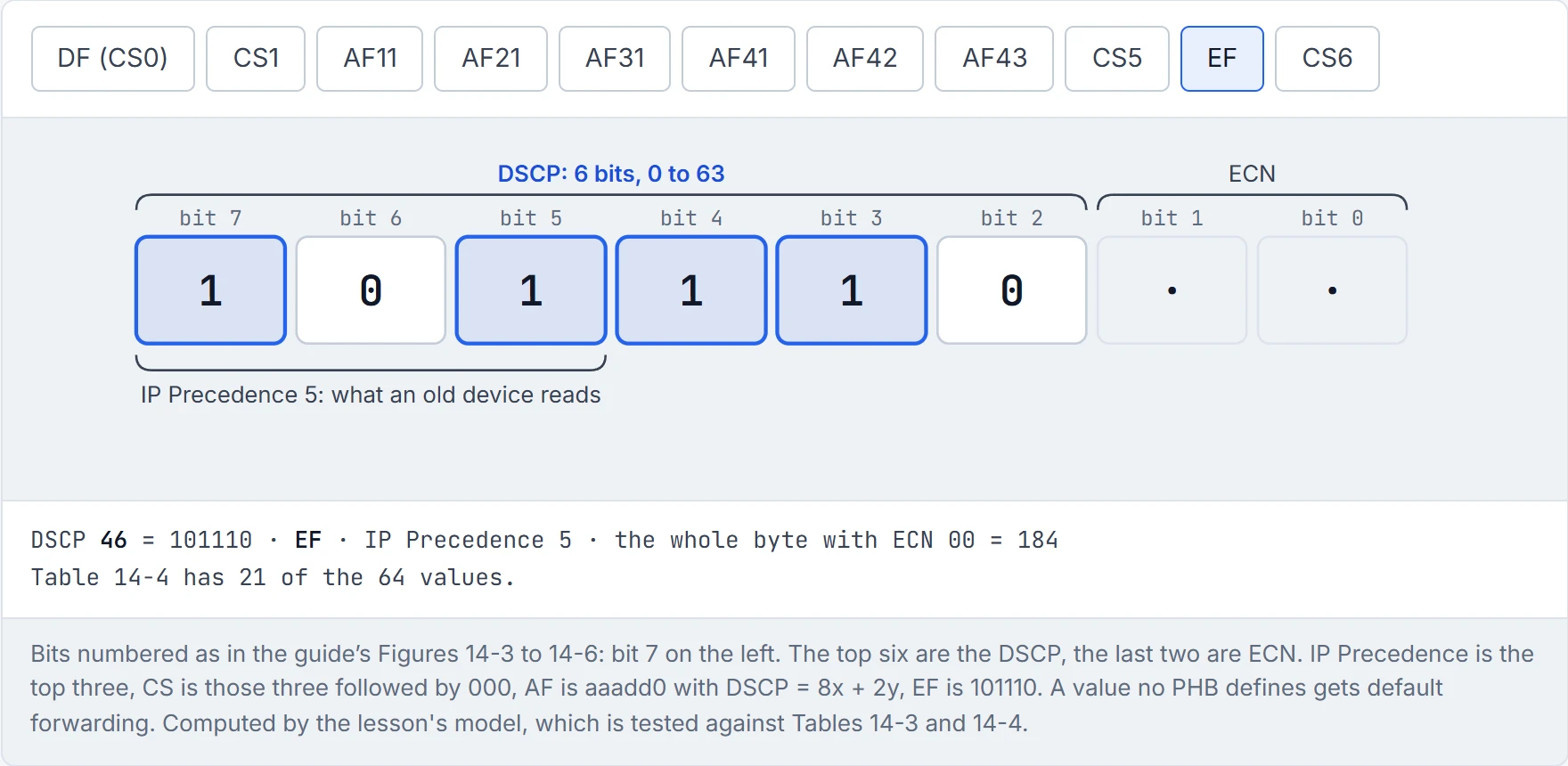
(AF32: 8 × 3 + 2 × 2 = 28, binary 011 10 0.) The full list is the guide's Table 14-4: DF, CS1-CS7, the twelve AF values and EF, with the IP Precedence each one reads as.
AF41 and AF11 are like two checkout lanes numbered 4 and 1. Nobody thinks lane 4 is four times better. Nobody except people learning DiffServ.
Some traffic contributes nothing to the business: peer-to-peer, games, entertainment video. The scavenger class is for it, and it gets less than best effort: usually heavily rate-limited or blocked.
The odd part is the number. Best effort is already 000000, and there are no negative DSCP values, so scavenger was given CS1, 8. RFC 4594 lists CS1 as "Low-Priority Data". The guide calls it "very peculiar", and it is: remember RFC 2474's rule that a higher class selector should get no worse forwarding? Scavenger deliberately breaks it. So here's a number that's bigger than best effort and means worse. That's roughly equivalent to the "economy basic" fare that costs a little more to print than the free ticket and gets you a seat by the toilets: a real ticket, just not a better one.
Continue the lesson
The whole lesson, with its drawings and its questions. The rest of this section and 9 more after it.