
MPLS: how labels move packets
MPLS is not much faster than IP routing today; its value is what labels make possible. Each router assigns its own label for every network it knows, a forwarding equivalence class, and shares it with its neighbours through LDP. A label sits in a shim header between the frame and the IP header, and packets are pushed, swapped and popped along the path.
By Arif, founder of Daveth · Updated
The full 17 min walkthrough is in Daveth Pro (Network). See what the plan opens
What this page answers
What is MPLS?
Multiprotocol Label Switching: routers forward packets by a label instead of the IP address. Packets forwarded the same way form a forwarding equivalence class, and each router picks its own label for each class. Read it in “What a label stands for”
What is LDP (Label Distribution Protocol)?
The most common control plane protocol for distributing labels for IPv4 prefixes: each router shares the labels it assigned with its directly connected neighbours, so they can build the label switched path hop by hop. Read it in “Telling the neighbors: LDP”
What is an MPLS label switching router (LSR)?
A router that supports MPLS: it understands labels and can receive and transmit labeled packets on its interfaces. A label goes in a shim header between the Layer 2 frame header and the IP header. Read it in “The routers, and the network they're in”
If it isn't faster, why?
Why forward on a label when the router could just read the IP address? Start with the answer you won't get. With today's routers, MPLS is not much faster than traditional IP routing. If you've heard that MPLS exists for speed, set it down here.
Multiprotocol Label Switching is a packet-forwarding method that makes its forwarding decisions on labels instead of on the packet's Layer 3 destination. It was designed to support many different Layer 3 protocols; this lesson looks at IP only, and its scenarios forward IP packets on labels where you'd expect the destination IPv4 address to be used. That's every lesson so far turned over. In the first routing lesson a router read the destination and found the longest match. In this lesson's MPLS domain, the routers in the middle forward the packet without reading its destination at all.
So why consider it? Three reasons. MPLS decreases forwarding overhead on the core routers, which makes them more efficient. It can forward other Layer 3 protocols besides IPv4, and it supports several services: unicast routing, multicast routing, VPNs, Traffic Engineering, QoS and Any Transport over MPLS. That makes MPLS very efficient and flexible. Read the list again, because flexible is the real answer: a router that forwards on a label doesn't need to understand what's under the label. One of those services, the VPN, is the next lesson, and it's the reason this lesson sits beside the VRF lessons at all.
About IPv6, one honest line. MPLS can carry other Layer 3 protocols, and LDP, which you'll meet below, is the most common protocol for distributing labels for IPv4 prefixes. Labels for IPv6 prefixes aren't covered here, so every address in this lesson is IPv4.
Four tables in one router
The first routing lesson gave a router two tables: the routing table, the RIB, where the best route to each network is chosen, and the FIB, the copy that packets are actually forwarded from. An MPLS router has two more, and they pair up the same way.
Look at the control plane first. It's responsible for exchanging labels with other MPLS-enabled routers, using a label distribution protocol, in addition to exchanging routing information with routing protocols to fill the IP routing table, the RIB. Once labels have been exchanged, the label information fills the Label Information Base, the LIB. Then the best label information is used to fill two data-plane tables: the FIB, so that unlabeled packets can be labeled, and the Label Forwarding Information Base, the LFIB, so that labeled packets can be forwarded, or have their labels removed when they need to be forwarded by the FIB.
So one router has a control plane holding the routing protocol, the RIB, the LIB and LDP, and a data plane holding the FIB and the LFIB. The split in two lines: the LIB is a control plane table that stores label information, and the LFIB is a data plane table used to forward labeled packets.
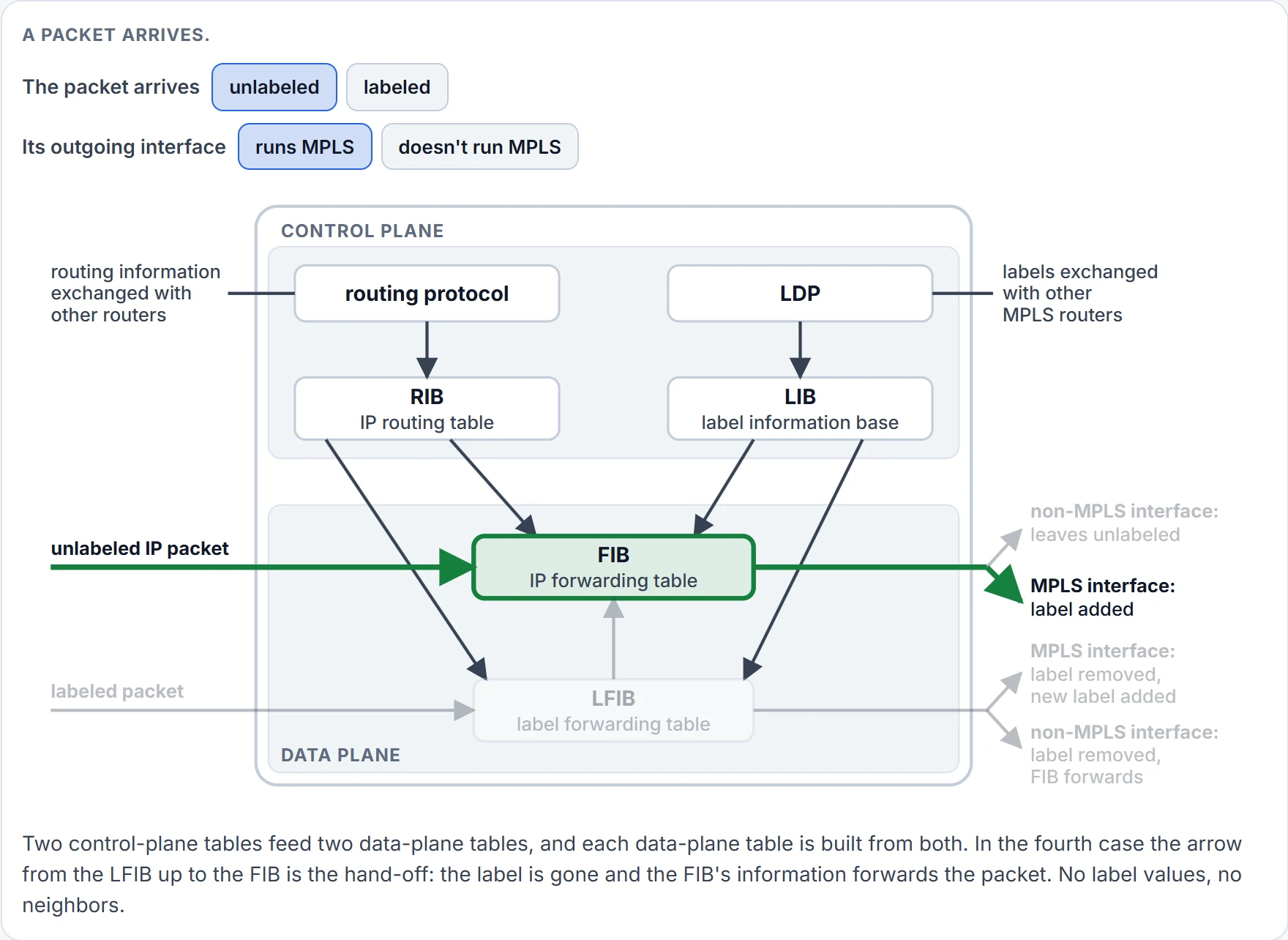
Which table does a packet meet? That depends on one thing: whether it arrives with a label.
An unlabeled IP packet arrives, say for 10.0.0.5. Because it's unlabeled, the FIB makes the forwarding decision. If the FIB says the outgoing interface isn't MPLS-enabled, the packet is forwarded unlabeled; if the outgoing interface is MPLS-enabled, a label is added and the packet leaves labeled.
A labeled packet arrives on an MPLS-enabled interface. Because it's labeled, the LFIB makes the decision. If the LFIB says the outgoing interface is MPLS-enabled, the label is removed, a new label is added, and the packet leaves labeled. If the outgoing interface isn't MPLS-enabled, the label is removed and the packet is forwarded unlabeled, using the information in the FIB.
Two kinds of arrival, two kinds of exit: four cases, and every router in this lesson is doing one of them. Hold the last one, a label removed and the packet handed to the FIB. It comes back twice: at the last router, and when the row is cut.
The routers, and the network they're in
Here's the network the rest of the lesson runs on. Five routers in a row, R1 to R5, are the MPLS domain. They're called label switching routers, LSRs, because they support MPLS: they understand labels and can receive and transmit labeled packets on their interfaces. Left of R1 is 192.168.0.0/24. Right of R5 is 10.0.0.0/24.
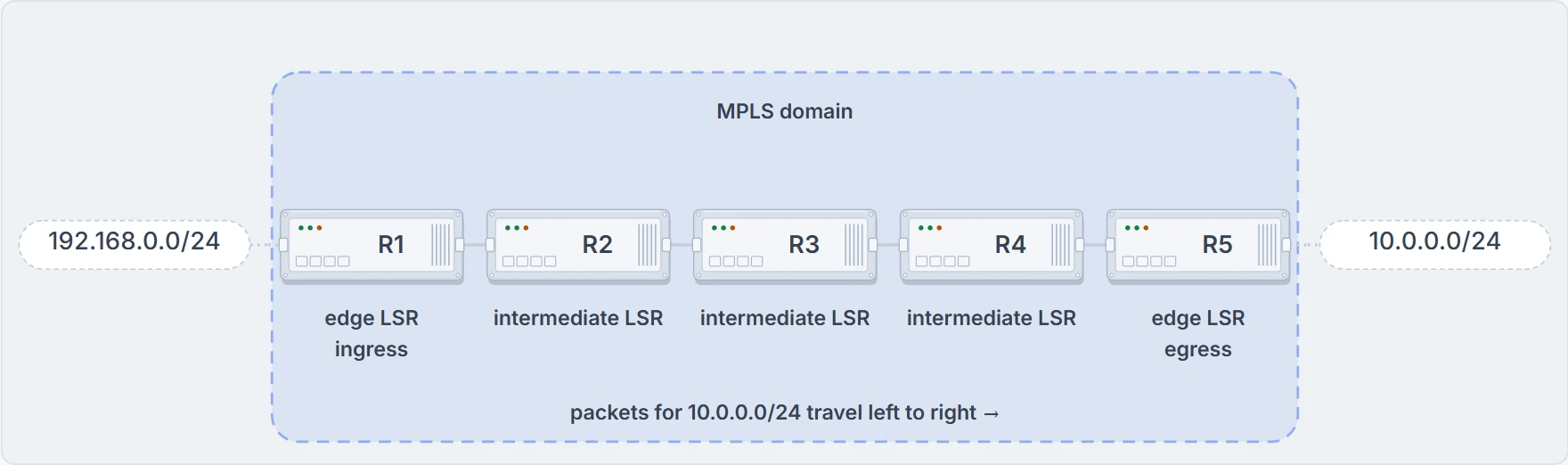
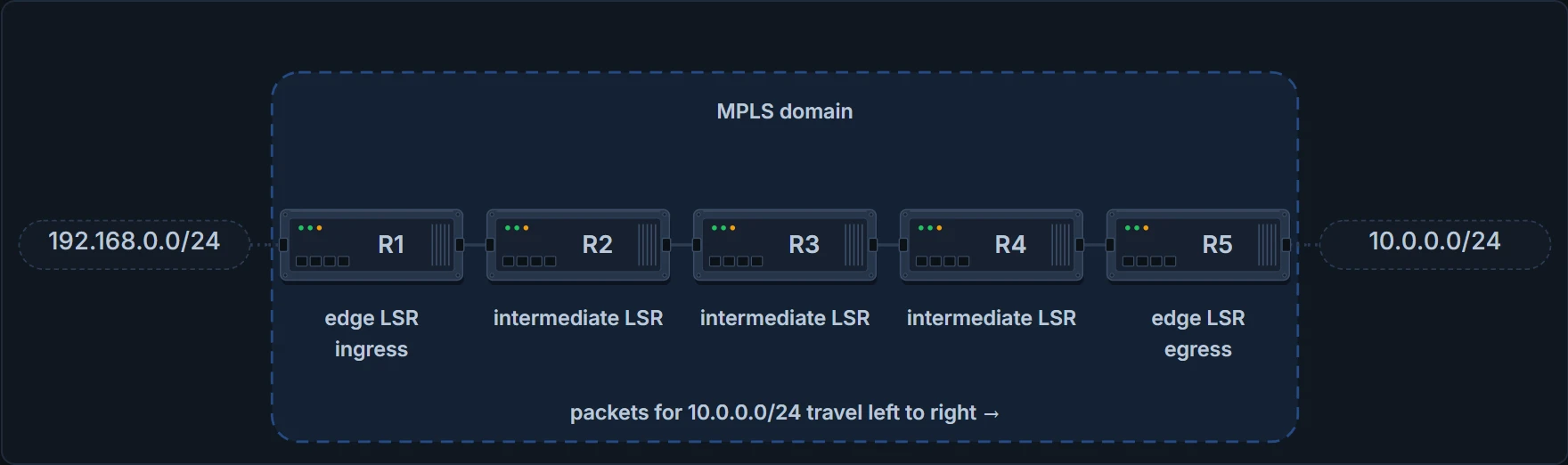
Five label switching routers in a row. For packets going to 10.0.0.0/24, R1 is the ingress and R5 the egress. No interface names or link addresses: this lesson never uses any.
R1 and R5 are edge LSRs, and R2, R3 and R4 are intermediate LSRs. An edge LSR sits at the edge of the MPLS domain. It adds labels to packets entering the domain, and in that job it's called an ingress LSR; it removes labels from packets that will be leaving the domain, and in that job it's an egress LSR; and it forwards packets as needed based on labels or the lack of one. An intermediate LSR sits within the domain and primarily forwards packets using label information.
Ingress and egress are jobs, not boxes. For a packet going to 10.0.0.0/24, R1 is the ingress and R5 the egress. For the reply, it's the other way round. In the other direction, the two words change ends.
What a label stands for
A label doesn't stand for a packet, and it doesn't stand for an address. MPLS is a forwarding technology based on classification: behind the scenes it groups packets that will be forwarded in the same manner into a class, the forwarding equivalence class, the FEC, and any packets in the same FEC are handled in exactly the same way. Classification can be based on any of six things: source address, destination address, source port, destination port, protocol type, or VPN.
For this lesson, take the familiar one. With traditional IP forwarding, decisions are based on destination addresses, so every packet going to the same destination is in exactly the same FEC, and they're all handled the same way: they receive the same label and follow the same label-switched path. In our row, "every packet for 10.0.0.0/24" is one FEC. That's the class the labels in the rest of this lesson name.
The label-switched path, the LSP, is the cumulative labeled path, the sequence of routers, that labeled packets of the same FEC take through the MPLS domain. And it runs one way. An LSP is unidirectional, so in a complex network with several possible paths, the LSP from source to destination could differ from the LSP the return traffic uses; typically, though, the same path in reverse is used, because of the dynamic routing protocols underneath, such as OSPF and EIGRP, which build the symmetrical network and its forwarding paths. Two directions means two LSPs, even when they cross the same five routers.
Now the sentence to hold. The LSP from R1 to 10.0.0.0/24 uses labels 87, 11, 65 and 23, and along the path each router examines the label to make a forwarding decision, removes it, adds a new label if required, and forwards the packet. One path. One class of packet. Four labels. Two sections on, you'll see why.
The label itself
For MPLS to work, a label has to be added to the packet, and it goes in as a shim header between the Layer 2 frame header and the Layer 3 packet header. Frame header, label, IP header, payload: the label goes in front of the IP header, not inside it.
The label is 4 bytes, 32 bits, and has four fields. The first 20 bits, Label, are the label number. The next 3 bits, TC, are used for quality of service. One bit, S, says whether this is the last label in the stack when the packet carries more than one, as it does with MPLS VPNs. The final 8 bits are a TTL. The TTL is used just like IP's, so that MPLS frames are discarded if they haven't reached the destination by the time it reaches 0; RFC 3032 puts it as a rule: a labeled packet whose outgoing TTL is 0 must not be forwarded further, with its labels or stripped of them (§2.4.2).
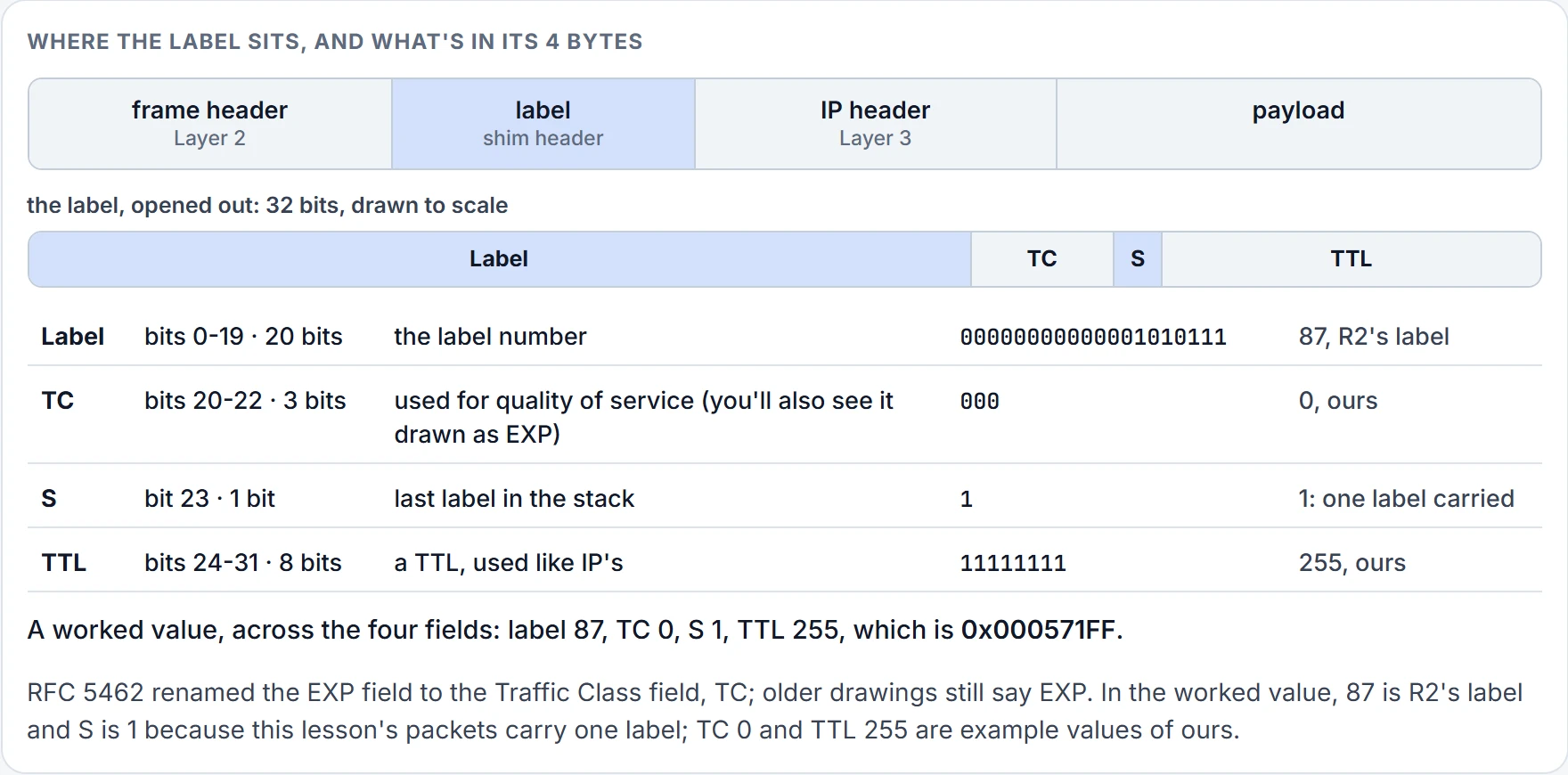
Two things to notice in that layout. Twenty bits of label number is a little over a million values, and the lowest sixteen aren't ordinary: RFC 3032 reserves 0 to 15, and two of those reserved values come back in the features section. And the S bit is telling you early that labels stack. A packet can carry more than one of these 4-byte shims, and S marks the bottom one. In this lesson every packet carries one. The next lesson adds the second.
Every router picks its own number
Start the first pass at the right-hand end of the row, at R5, and walk left.
MPLS-enabled routers automatically assign labels to every network they know about. And a router knows about a network in the two ways you'd expect: the network is local, an IP address configured on an interface with no shutdown, or it arrived through a dynamic routing protocol such as OSPF or EIGRP. All five routers know 10.0.0.0/24: R5 is locally connected to it and the other four aren't, and how those four learned it makes no difference. So all five label it. R5 gave 10.0.0.0/24 the label 23, R4 gave it 65, R3 gave it 11, R2 gave it 87 and R1 gave it 19. The lesson's drawing of the row, three sections back, can put each number over its router.
Five routers, one network, five different numbers. Notice what that is: the local significance of labels. Each router, whether it's locally connected to the network, like R5, or not, like the others, generates a local label for the network it knows about, regardless of how it learned about it. Adding a label to a destination prefix has a name, LDP label binding.
So what is R3's 11? It's R3's own number for "packets for 10.0.0.0/24". RFC 3031 says it in a sentence: a label is a short, fixed-length, locally significant identifier used to identify a FEC (§3.1).
R3's 11. When a labeled packet arrives, R3 looks the label up in its own LFIB, so 11 is the number R3 will recognise, and the only number R3 can look up is its own. And that means R2 has to have been told. This is the first half of the surprise, and it's worth saying slowly: the label on a packet is chosen by the router the packet is going to, and it's that router's number and no other router's. Put 11 on a packet and hand it to R4, and it means nothing there: R4 looks up 65, its own.
That isn't the same as R4 never hearing of 11. R4 will be told R3's 11, in the next section, and will hold it without using it. Knowing a neighbor's number and being able to receive it are two different things. RFC 3031 states the direction outright: the decision to bind a label to a FEC is made by the router that is downstream for that binding, the one the labeled packets are sent to, which then informs the upstream router, the one that sends them (§3.4).
That's why one path needed four labels: four links, four receiving routers, each naming the network for itself. And it's why there are two currents on this row. The numbers have to travel from each router to its neighbors before a single packet can travel the other way.
(One more look at R3's label. RFC 3032 reserves values 4 to 15, so 11 isn't a number a router should be handing out. And a Cisco router won't hand it out: by default the lowest label it assigns is 16, and 0 to 15 are reserved. The numbers on this row are illustrations. Keep 11 anyway. Every figure from here on uses it.)
Telling the neighbors: LDP
R2 needs R3's number. To build the LSP, labels have to be shared with the directly connected LSRs, and that's done with a label distribution protocol such as Label Distribution Protocol, LDP: the most common control plane protocol for distributing labels for IPv4 prefixes, and an industry-standard method for hop-by-hop, dynamic label distribution in an MPLS network.
Follow it on one link, R3 to R4.
Once MPLS has been enabled on an interface, LDP hello packets are sent out of it to the multicast address 224.0.0.2, the all-routers address, using UDP port 646. This is called basic discovery, and it's symmetrical. Any device on that same link that's also enabled for MPLS and receives the hello forms an LDP TCP session with the neighbor, on port 646, so that label information can be exchanged. Two things about that sentence. It takes both ends: a router whose interface isn't enabled for MPLS sends no hellos and forms no session, whatever its neighbor does. And there are two conversations, a hello over UDP to find the neighbor and a TCP session to exchange labels with it.
Enabling it is one command in interface configuration, mpls ip. It has to be on for the interface and for the router as a whole; the router-wide mpls ip is on by default, so the interface is the one you type, and typing it is what starts the hellos on that interface.
Inside the hello is an LDP ID. It uniquely identifies the neighbor and the label space, which is either per platform, the same label used out of all interfaces for a single destination, or per interface, a different label out of each interface for a single network. You'll see an LDP ID in an output two sections on: 5.5.5.5:0. RFC 5036 explains both halves of it: an LDP identifier is six octets, four for the router and two for the label space, and the last two are always zero for a platform-wide label space (§2.2.2). So the part before the colon identifies the router, and :0 is the per-platform case. It's also the only case you'll meet: on Cisco routers every interface type except one, LC-ATM, uses the platform-wide label space, and for that label space the last two bytes of the LDP ID are always 0.
One of the two routers has to start the TCP session, and it's called the active router. On a Cisco router the two compare their transport addresses, the addresses they'll use for the TCP connection, and the one with the higher address takes the active role and sets up the session; RFC 5036 has the same rule (§2.5.2). You'll also see it worded another way, "the router with the higher LDP ID is selected as the active router and sets up the TCP session", which picks the same router wherever each router's transport address is its router ID.
Where does the ID come from? For LDP to work properly each router needs a unique identifier, a router ID, which becomes part of the LDP ID. It can be configured by hand or chosen by the router when MPLS is being set up. It's a 32-bit value in dotted-decimal notation, so it looks like an IPv4 address, and be firm about this: it's a router ID and not an IPv4 address. Left alone, the router looks for loopback interfaces with IP addresses and uses the highest of those addresses; if there are no loopbacks, it uses the highest IP address of the remaining interfaces. You've seen that order before. It's the same shape as OSPF's router ID in the OSPF adjacency lesson. The automatic choice can go wrong in one way worth knowing: the router may pick an address that the routing protocol can't advertise to a neighbor.
To set the ID by hand, Cisco's command takes an interface, mpls ldp router-id interface [force], and the router uses that interface's address as its ID; the interface has to be up. You'll also see it written mpls ldp router-id router-id, as if you typed the ID itself. That isn't the form the command takes. Without force the change waits until the router next has to select an ID, which is typically the next time the interface is shut down or the address is configured. With force it happens at once, and it costs you: the existing LDP sessions are torn down, the bindings learned over them are released, and the forwarding that used those bindings is interrupted.
Does an LDP neighbor have to be on the same link? No. This lesson's row uses directly connected neighbors and basic discovery throughout, but two routers that aren't directly connected can form a session too, and that's needed with AToM (Any Transport over MPLS, from the services list) and with Traffic Engineering tunnels using Layer 2 VPNs. You target the hellos at a specific address instead of 224.0.0.2, with mpls ldp neighbor ip-addr targeted ldp on each router, and that's extended discovery: unlike basic discovery, it's asymmetrical. "On each router" has one alternative. A router ignores targeted hellos by default and answers them only when it's configured to accept them, with mpls ldp discovery targeted-hello accept; so either both ends name the neighbor, or one names it and the other accepts.
(Two things in this section we haven't confirmed on a current router: LDP's hello and hold timers, and the exact form of the targeted neighbor command.)
Now the labels. With the TCP sessions up, every router distributes its label out of all its MPLS-enabled interfaces: R1 its 19, R2 its 87, R3 its 11, R4 its 65 and R5 its 23, each for 10.0.0.0/24. All of them, in both directions. R3 tells R2 about 11. R3 also tells R4 about 11, although no packet for 10.0.0.0/24 travels from R4 to R3. And it's the same 11 on both links: with a per-platform label space a router uses one label out of all its interfaces for a destination. So a label belongs to a router, not to a link, and every neighbor is told it and stores it, whether it will ever send that router such a packet or not.
One more fact before the question. A router's LIB has a row in it before any neighbor has spoken: its own label for the network, marked Local.
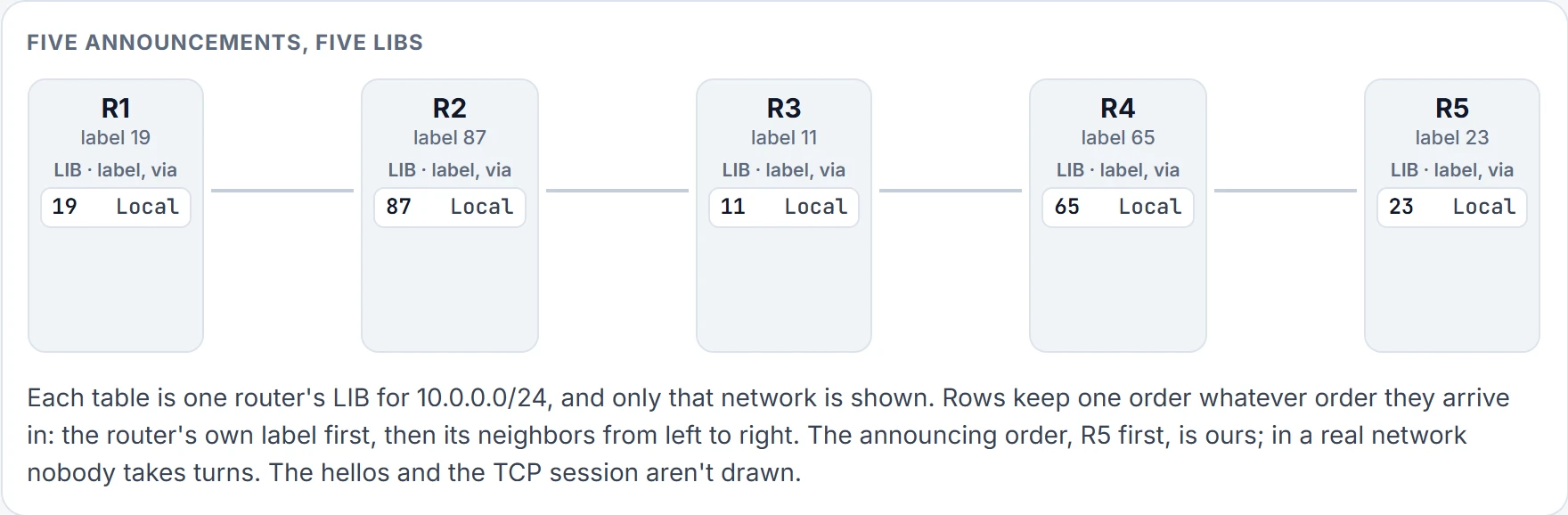
Step 1 of 6 Before anyone speaks: each LIB holds one row, the router's own label, marked Local.
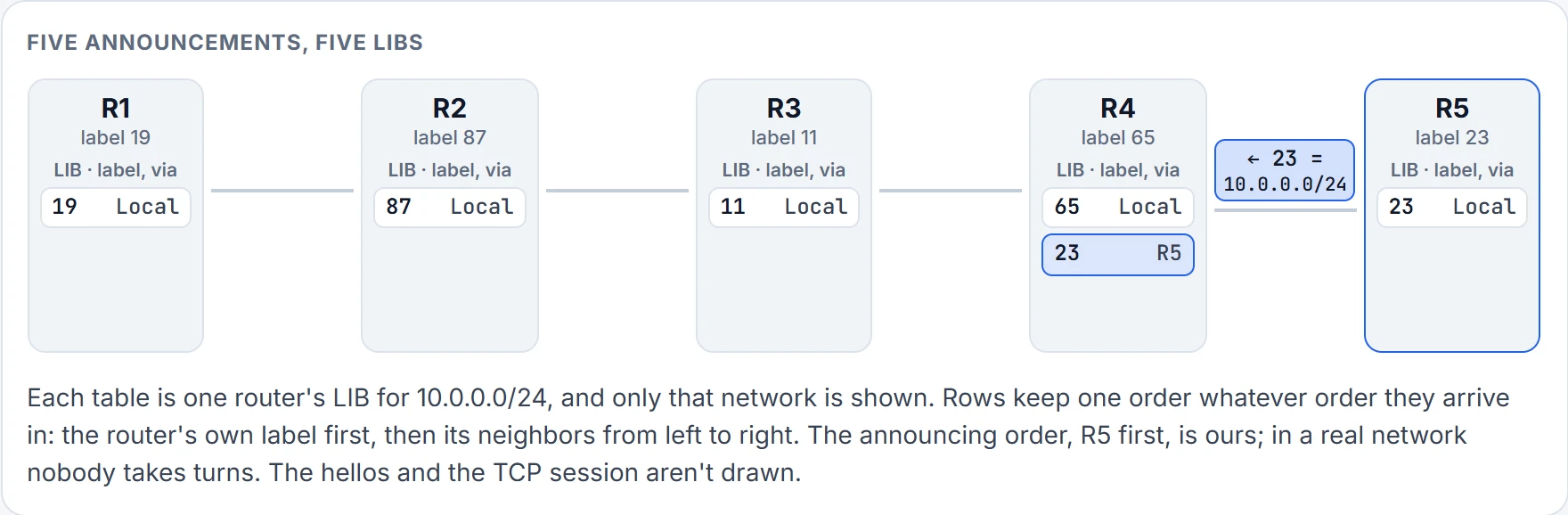
Step 2 of 6 R5 sends 23 = 10.0.0.0/24 out of its one interface with an LDP session: to R4. R4 now holds 65 (its own) and 23 from R5.
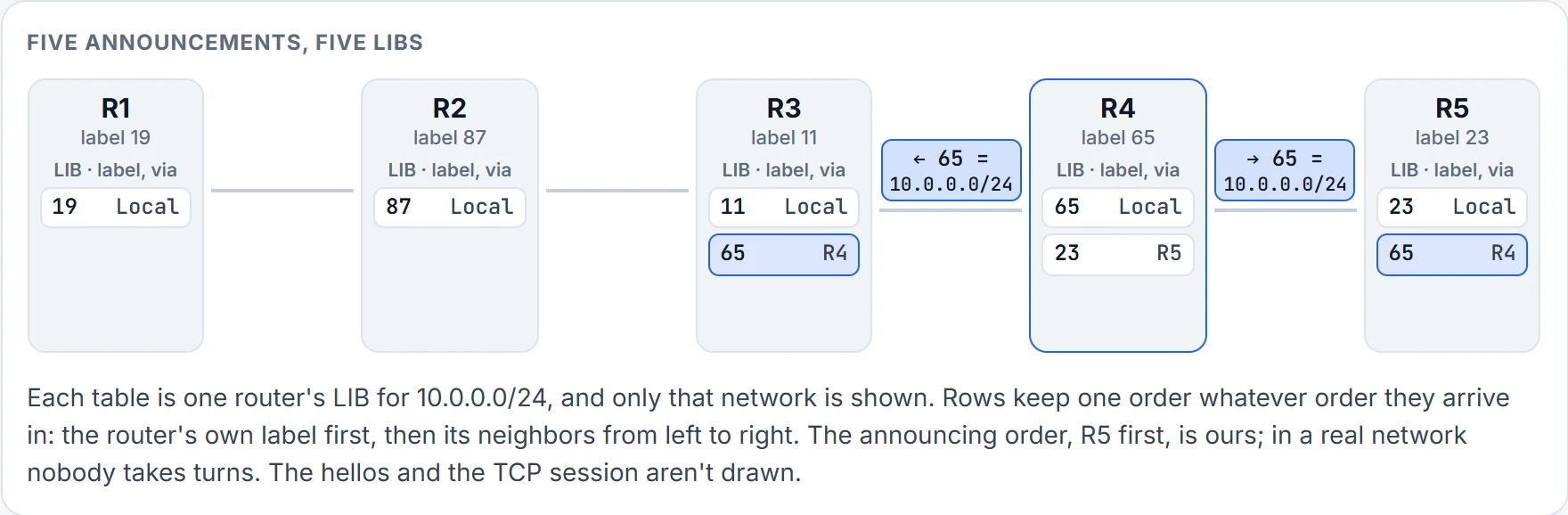
Step 3 of 6 R4 sends 65 = 10.0.0.0/24 out of both its MPLS interfaces: to R3 and R5. The same number both ways, and both neighbors store it. R3 now holds 11 (its own) and 65 from R4. R5 now holds 23 (its own) and 65 from R4.
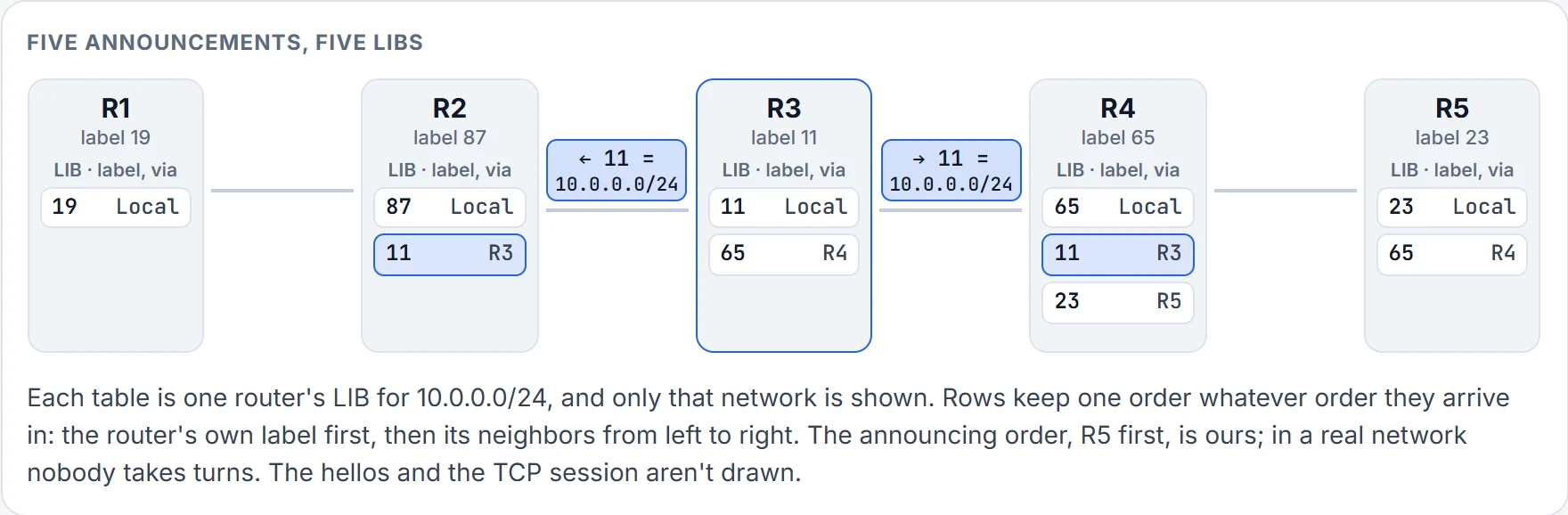
Step 4 of 6 R3 sends 11 = 10.0.0.0/24 out of both its MPLS interfaces: to R2 and R4. The same number both ways, and both neighbors store it. R2 now holds 87 (its own) and 11 from R3. R4 now holds 65 (its own), 11 from R3 and 23 from R5.
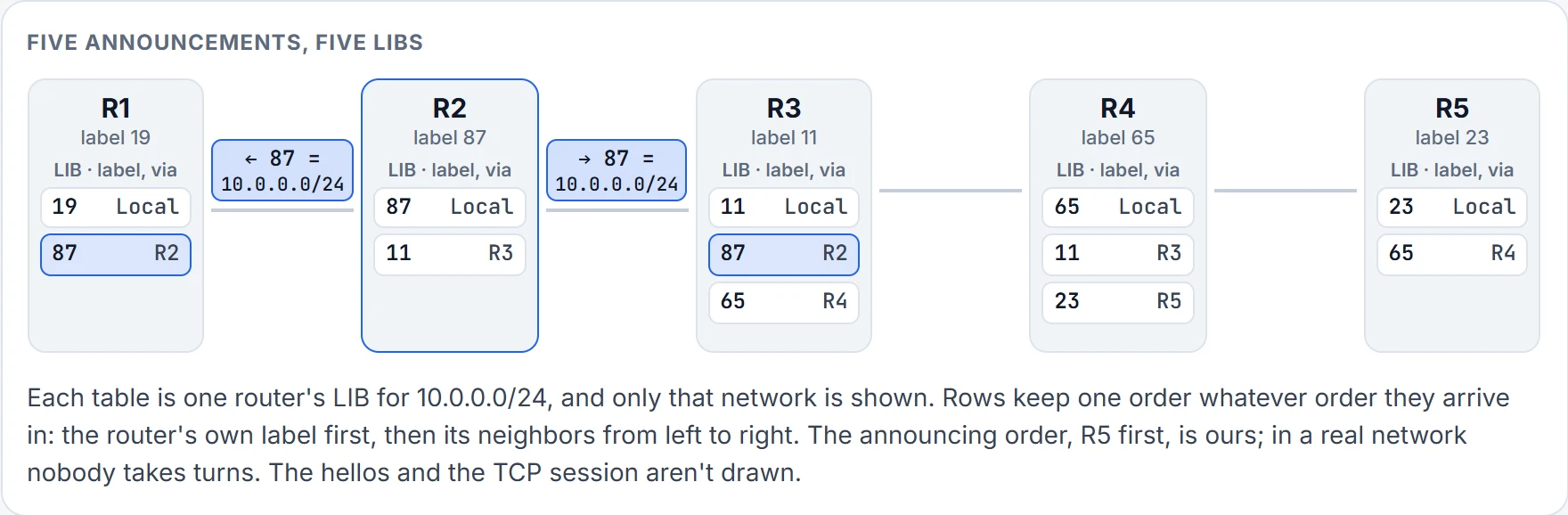
Step 5 of 6 R2 sends 87 = 10.0.0.0/24 out of both its MPLS interfaces: to R1 and R3. The same number both ways, and both neighbors store it. R1 now holds 19 (its own) and 87 from R2. R3 now holds 11 (its own), 87 from R2 and 65 from R4.
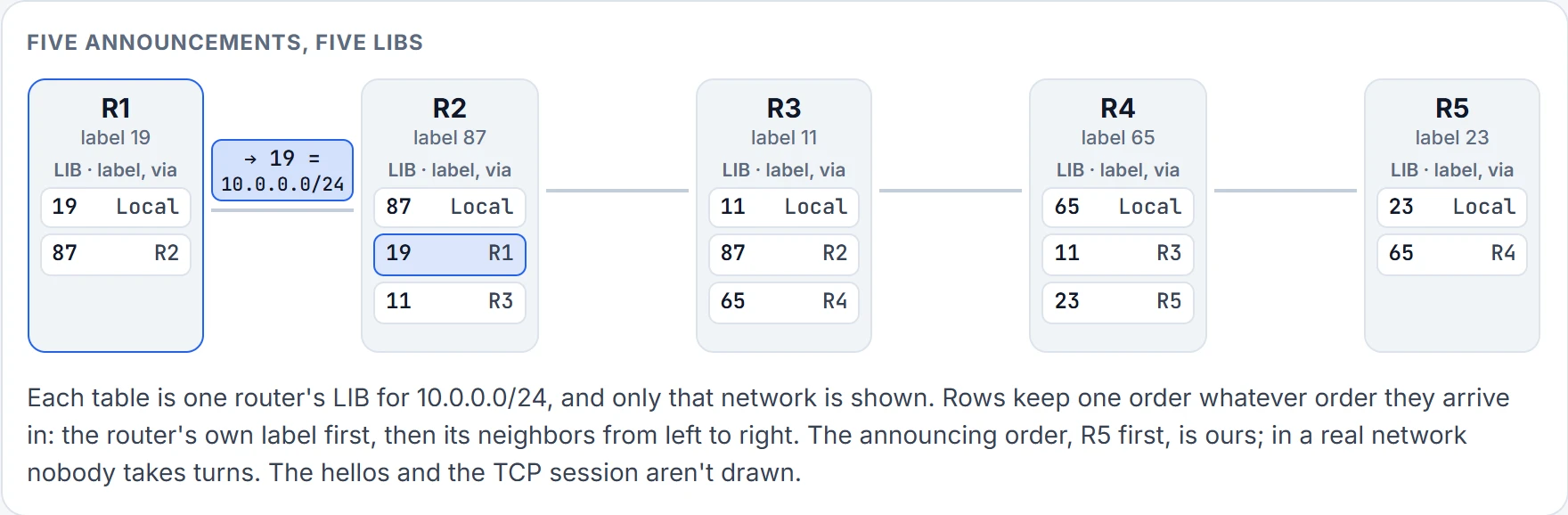
Step 6 of 6 R1 sends 19 = 10.0.0.0/24 out of its one interface with an LDP session: to R2. R2 now holds 87 (its own), 19 from R1 and 11 from R3.
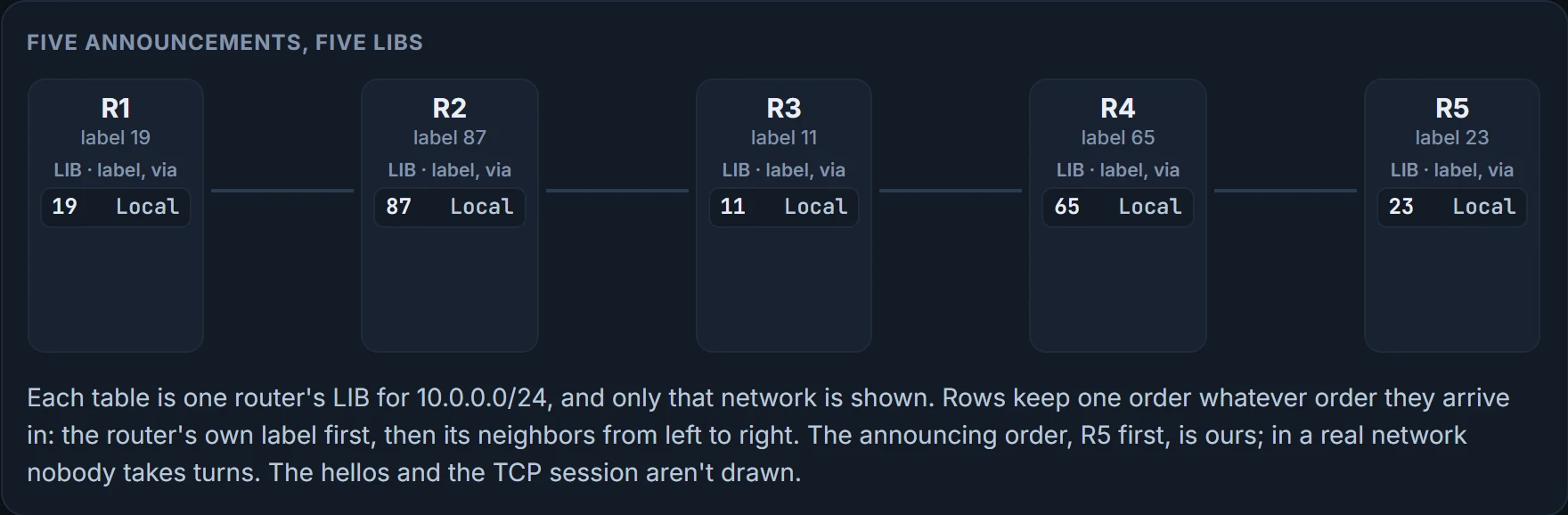
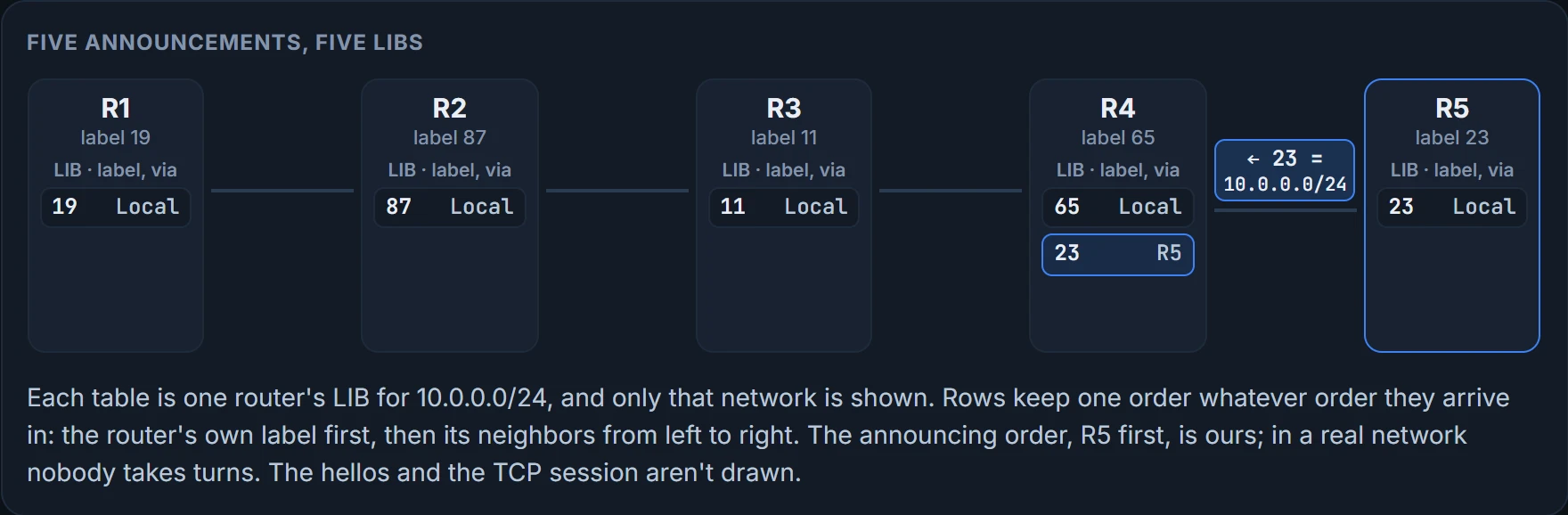
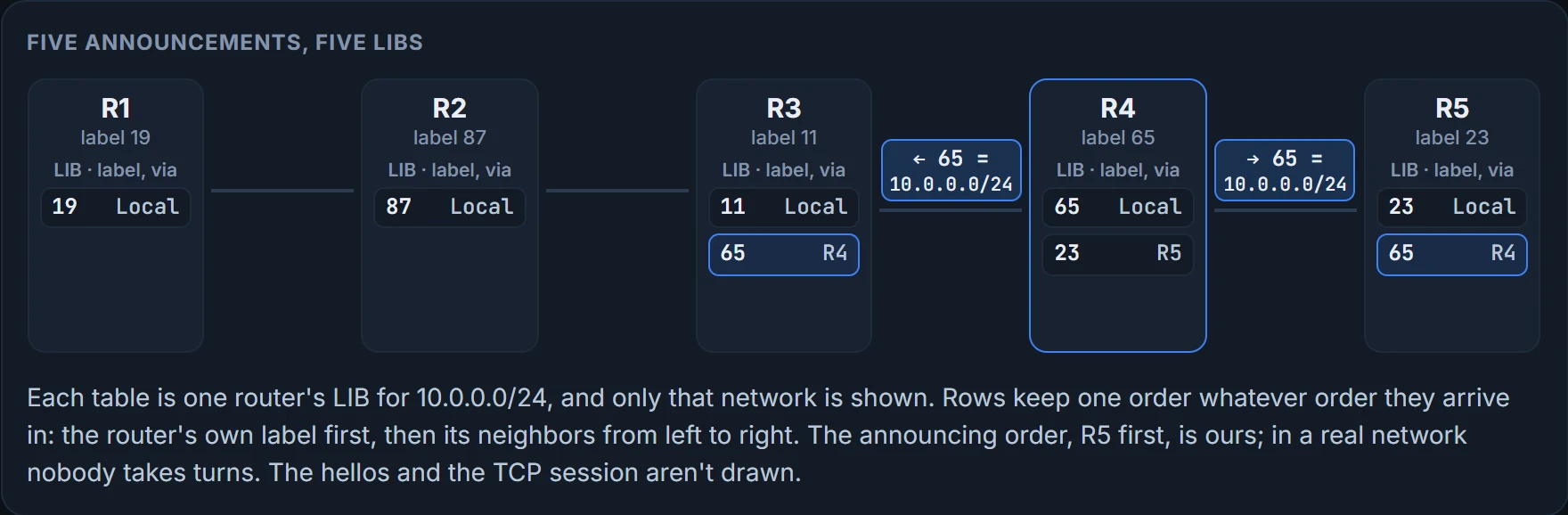
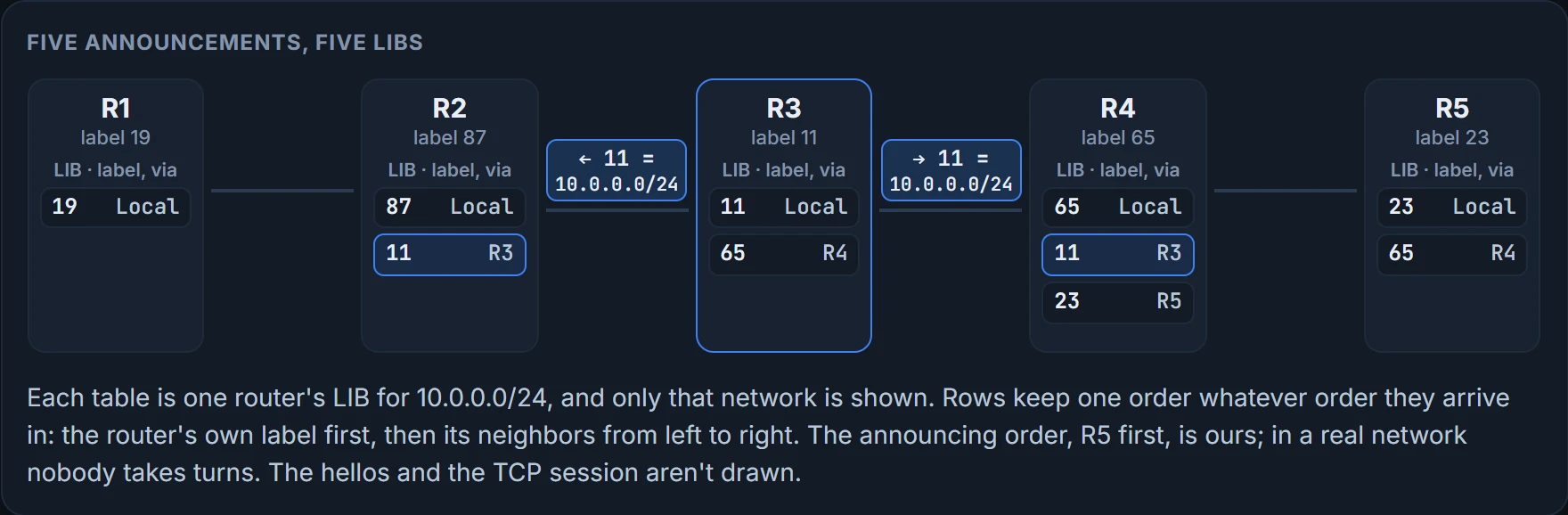
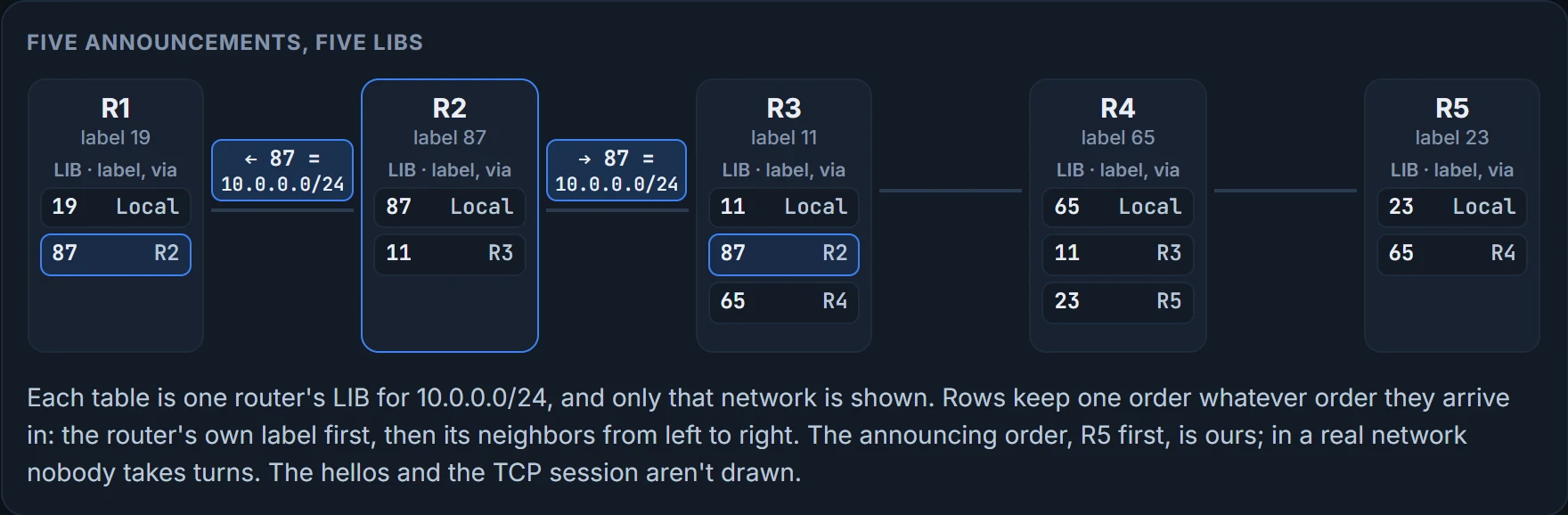
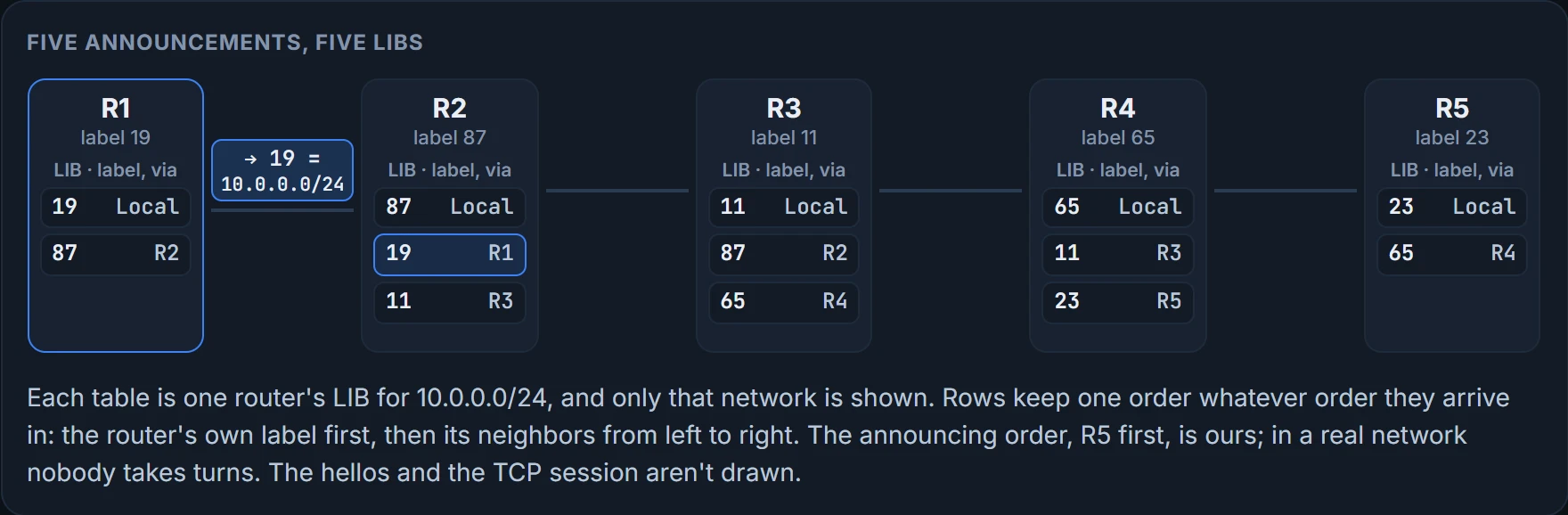
Three, and two. Each router takes the labels it has learned from its LDP neighbors and fills its LIB, and R3's has three entries for 10.0.0.0/24, which doesn't look right at first. The entry with 11 is R3's own, the locally significant label, the one it advertises so that others know what to put on a packet they send to R3. The entry with 87 is from R2: the label R2 wants R3 to use when R3 sends R2 a packet for 10.0.0.0/24. The entry with 65 is from R4: the label R4 wants R3 to use when R3 sends R4 one. R1, at the end of the row, has one neighbor and so two entries, its own 19 and R2's 87.
All five LIBs for 10.0.0.0/24, each router's rows in one fixed order, its own label and then its neighbors from left to right:
| Router | LIB rows: label and Via |
|---|---|
| R1 | 19 Local; 87 R2 |
| R2 | 87 Local; 19 R1; 11 R3 |
| R3 | 11 Local; 87 R2; 65 R4 |
| R4 | 65 Local; 11 R3; 23 R5 |
| R5 | 23 Local; 65 R4 |
Look at R4's middle row. That's R3's 11, the number from the last section: told to R4, stored by R4, and on no packet R4 sends while R5 is its next hop. R2 holds R1's 19 the same way, and R5 holds R4's 65. Expect unused labels in a LIB: they're a neighbor's offers, kept, not a fault. RFC 3031 calls keeping them liberal label retention and gives the reason: quicker adaptation to routing changes (§3.8).
Read the LIB as a list of offers. "If you ever send me a packet for this network, call it this." R3 holds two offers and will take up one.
The packet's turn: push, swap, swap, swap
Second pass, left to right, with a packet.
The LIB contains all the labels the router knows about for all the destination networks it knows about. The router then takes the best labels and fills the LFIB, which is what makes forwarding decisions. Best according to what? The LFIB and the FIB are built from two things, the IP routing table and the LIB. The routing table says which neighbor is the next hop for 10.0.0.0/24, and the label that goes into the LFIB is the one that neighbor advertised. With LDP, labels follow routes. They never choose the path.
Here's the step rule for the figure below. It's the four cases from the four-tables section, with two additions, each marked:
- Unlabeled packet: look in the FIB. The condition you met was the interface: if the outgoing interface is MPLS-enabled, a label is added. The word for adding an MPLS label to a packet is push. The figure asks one thing more, and it's the first addition: a label is added only if the next hop has advertised one. On this row the two conditions give the same answer at every router. The addition is there for the closing case, where an MPLS-enabled interface faces a neighbor that has offered no number.
- Labeled packet: look the label up in the LFIB. If the label out is a number, take the old label off and put the new one on. RFC 3031's label swapping includes this step (§3.13).
- The second addition. If the LFIB says the next hop has asked for the label to be taken off, remove it and send the packet to that next hop: one lookup, and no second one. No router on this row has asked yet. The next section is where one does.
- If the LFIB has no label out at all, remove the label and forward with the FIB.
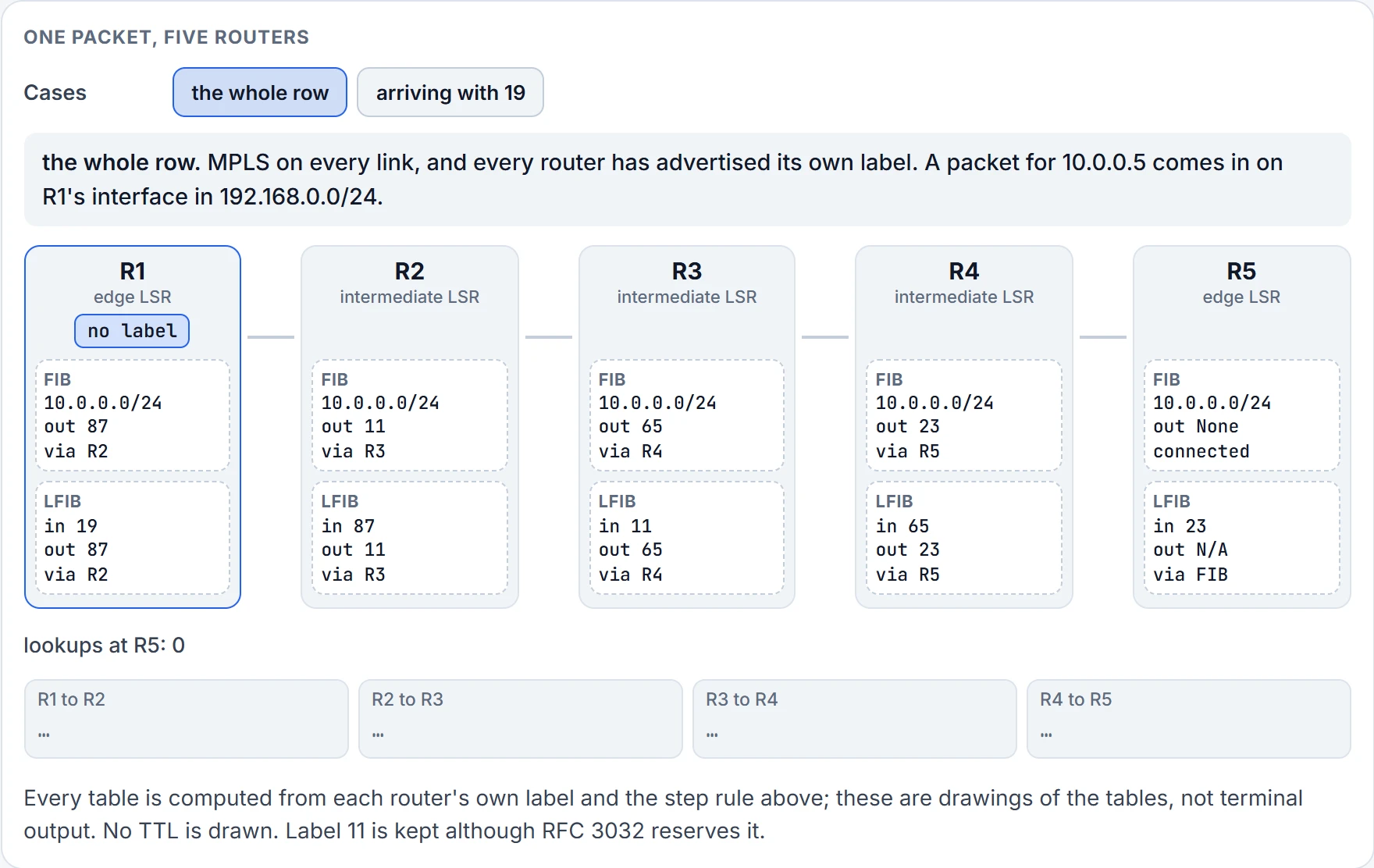
Step 1 of 11 Ready. A packet for 10.0.0.5 is about to enter at R1, with no label on it.
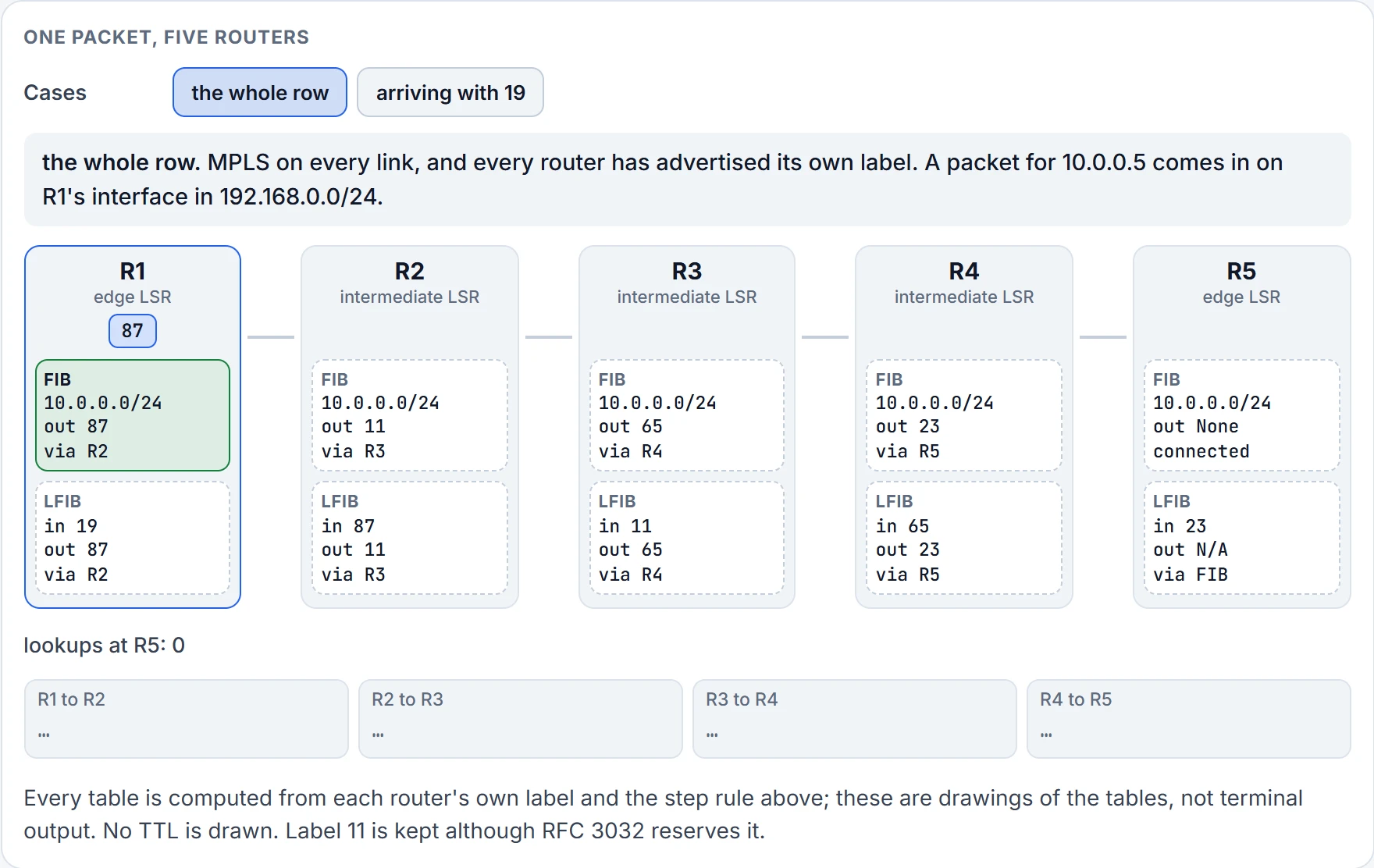
Step 2 of 11 No label on the packet, so R1 uses the FIB: add 87, send to R2. Push 87.
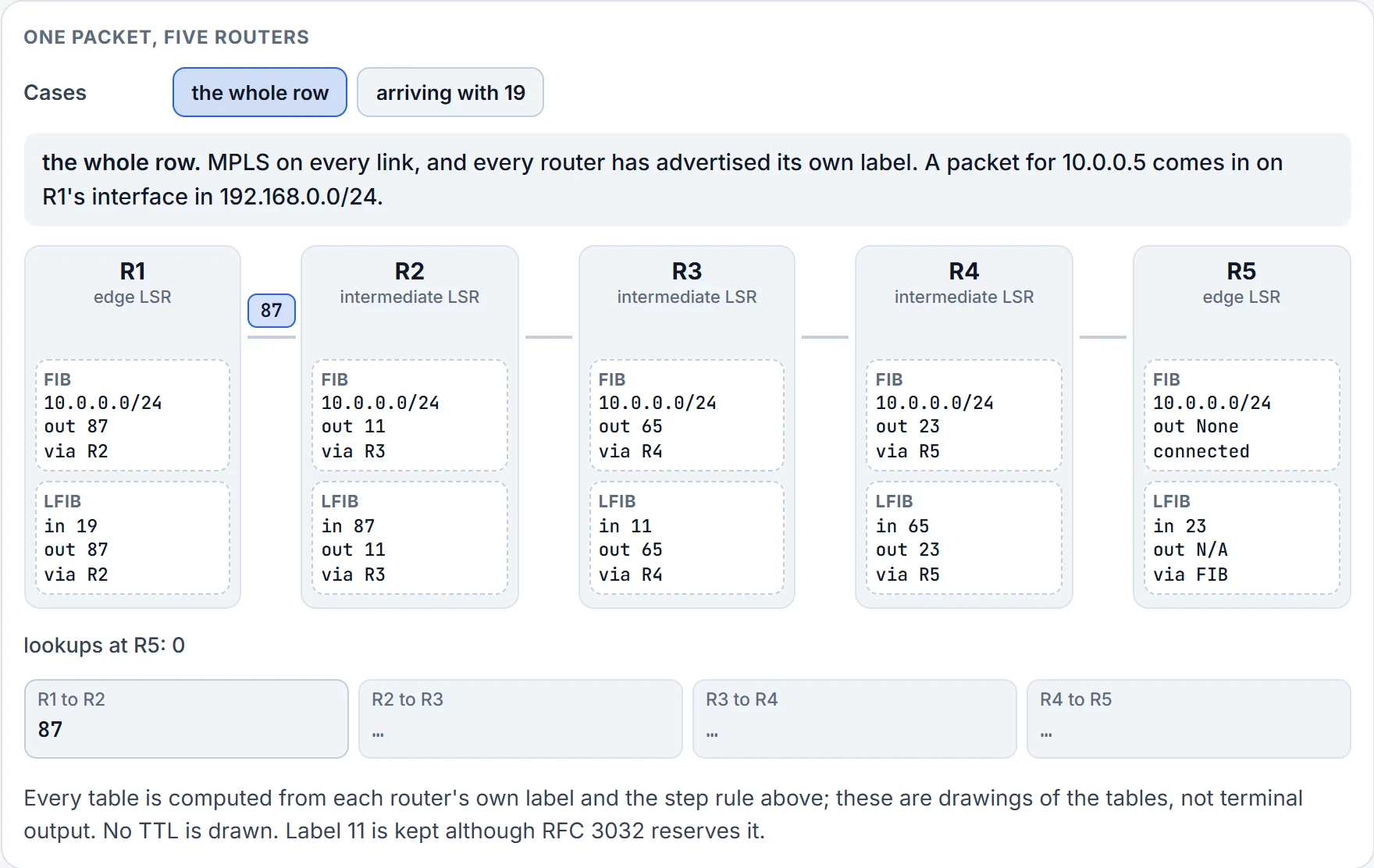
Step 3 of 11 On the link from R1 to R2: label 87, R2's own number.
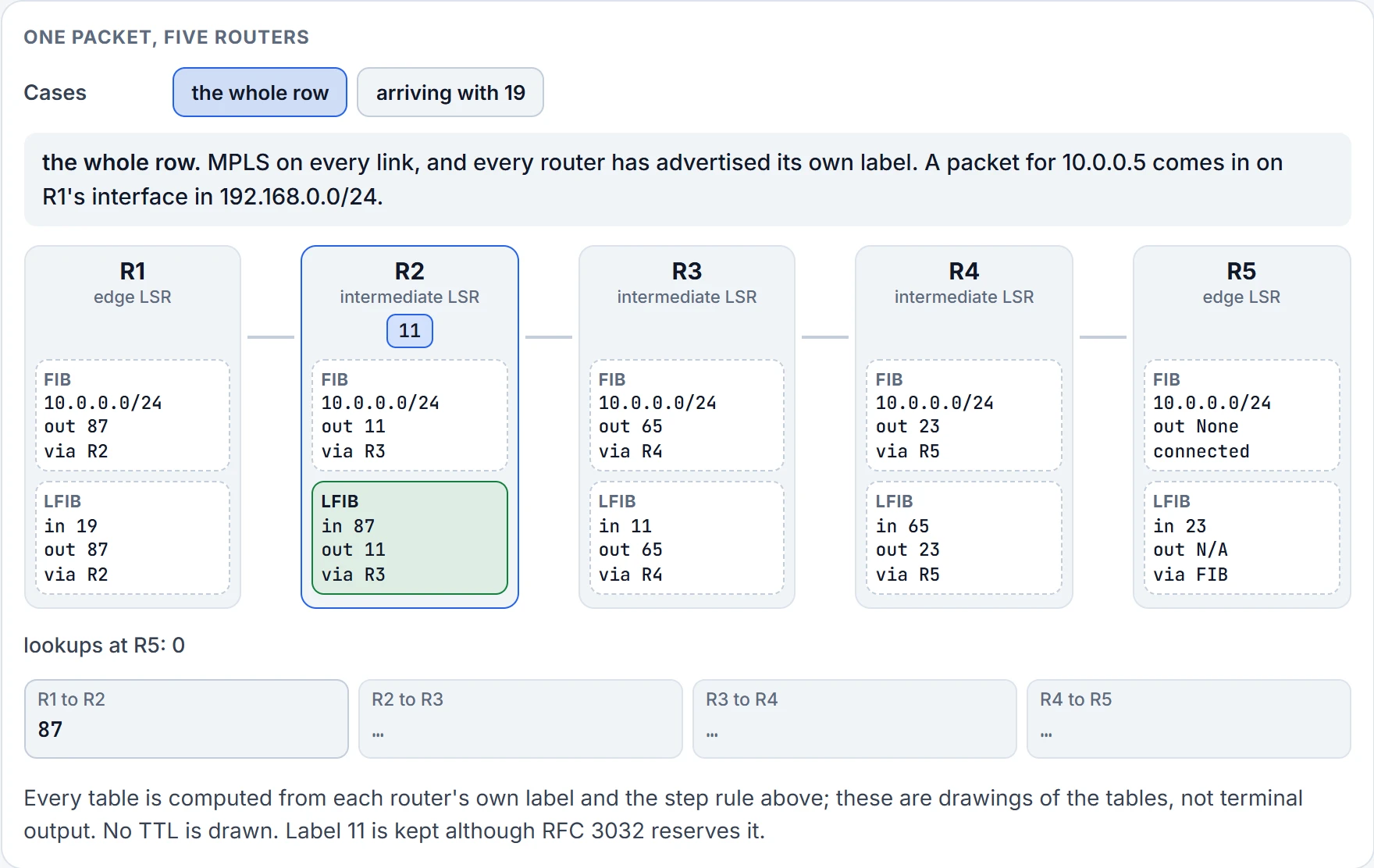
Step 4 of 11 R2 looks up 87 in its LFIB: 87 off, 11 on (swap), to R3.
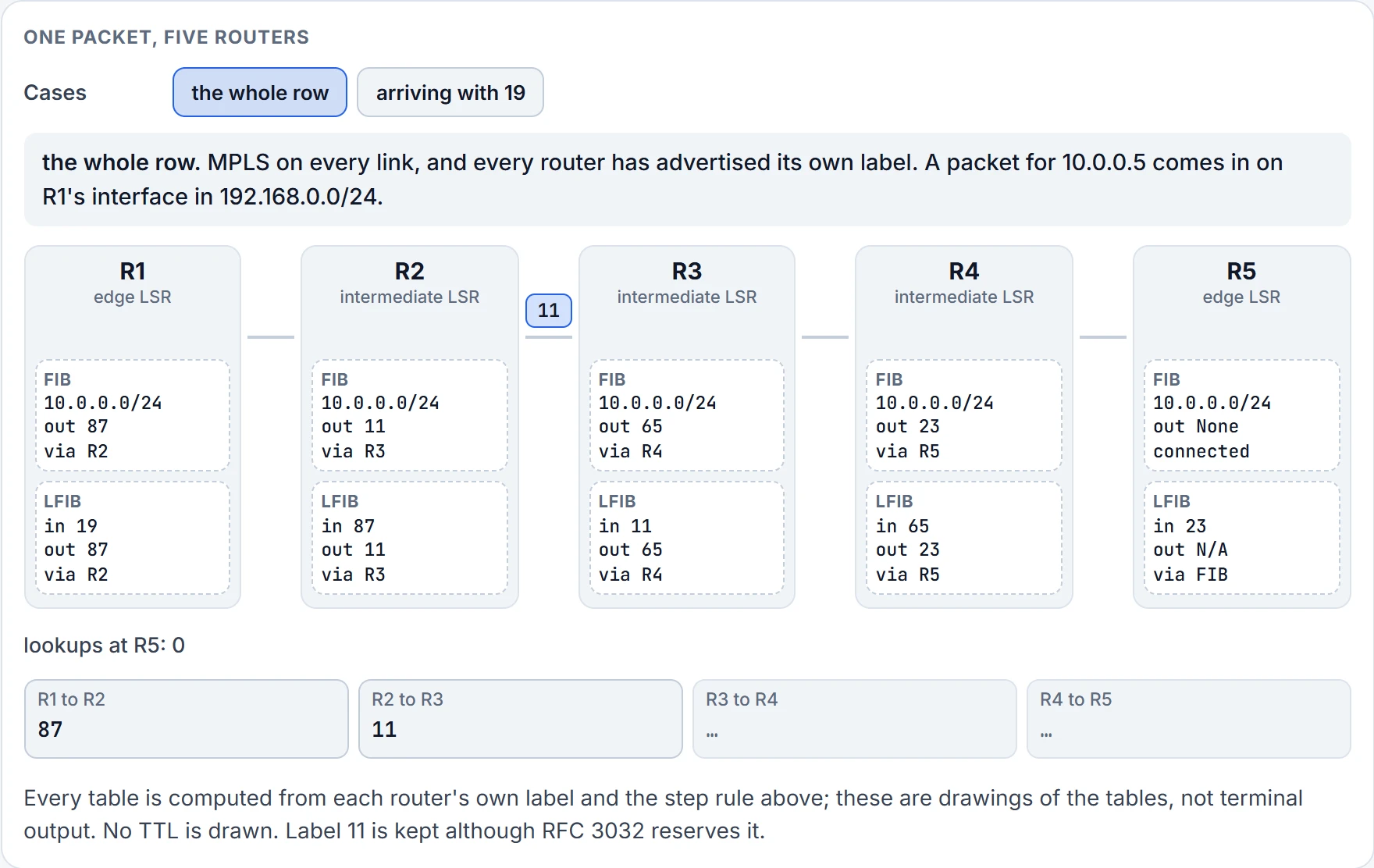
Step 5 of 11 On the link from R2 to R3: label 11, R3's own number.
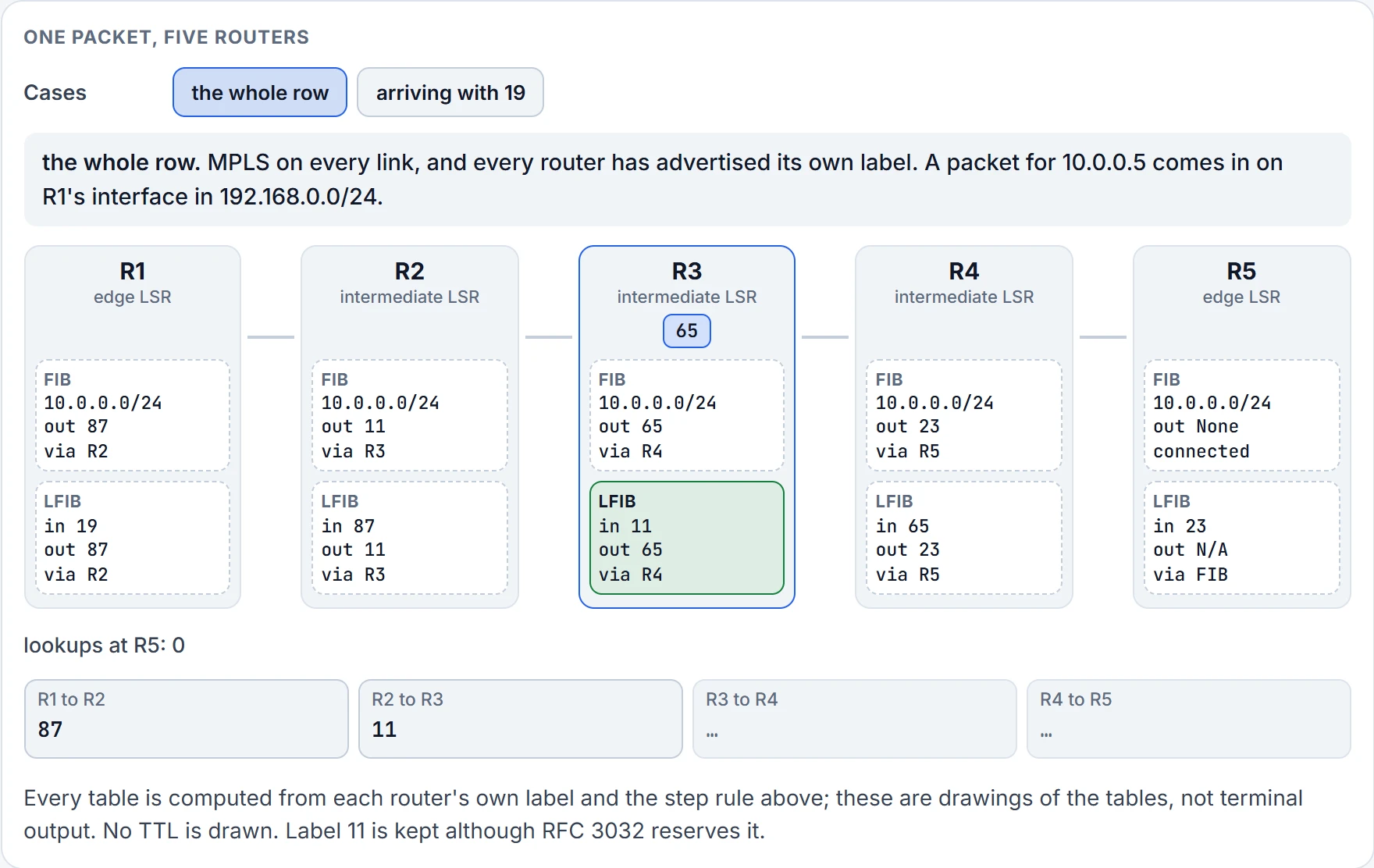
Step 6 of 11 R3 looks up 11 in its LFIB: 11 off, 65 on (swap), to R4.
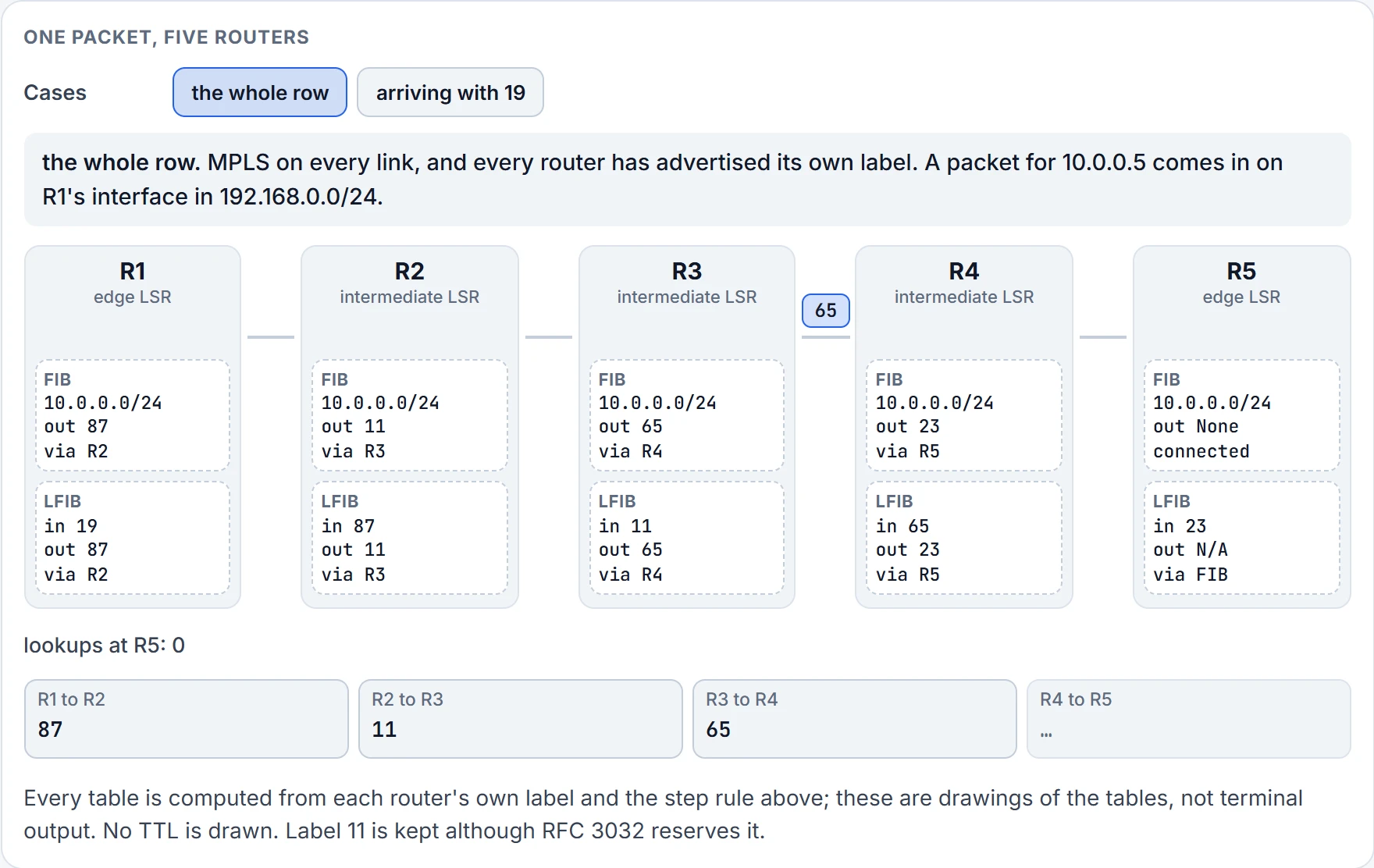
Step 7 of 11 On the link from R3 to R4: label 65, R4's own number.
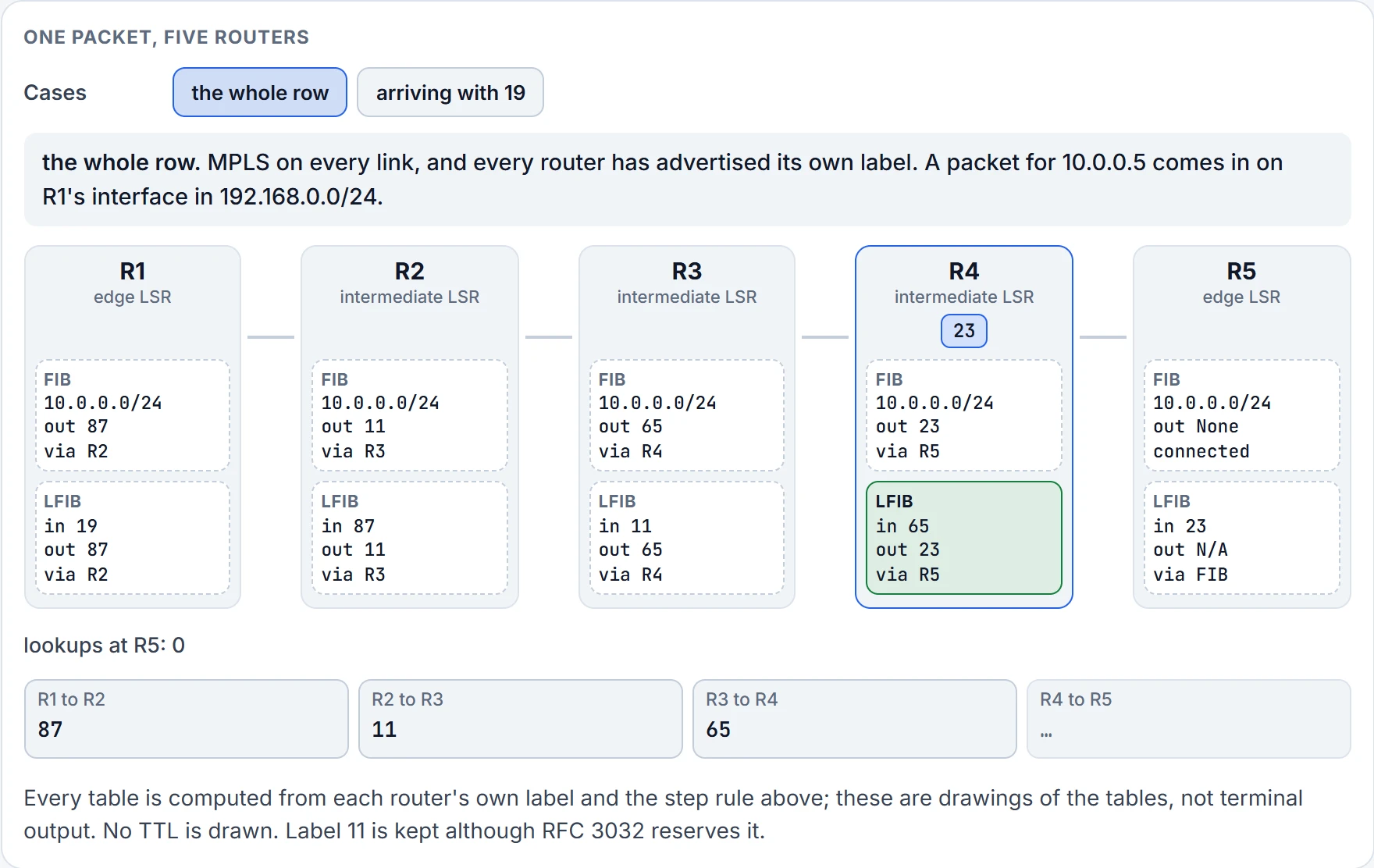
Step 8 of 11 R4 looks up 65 in its LFIB: 65 off, 23 on (swap), to R5.
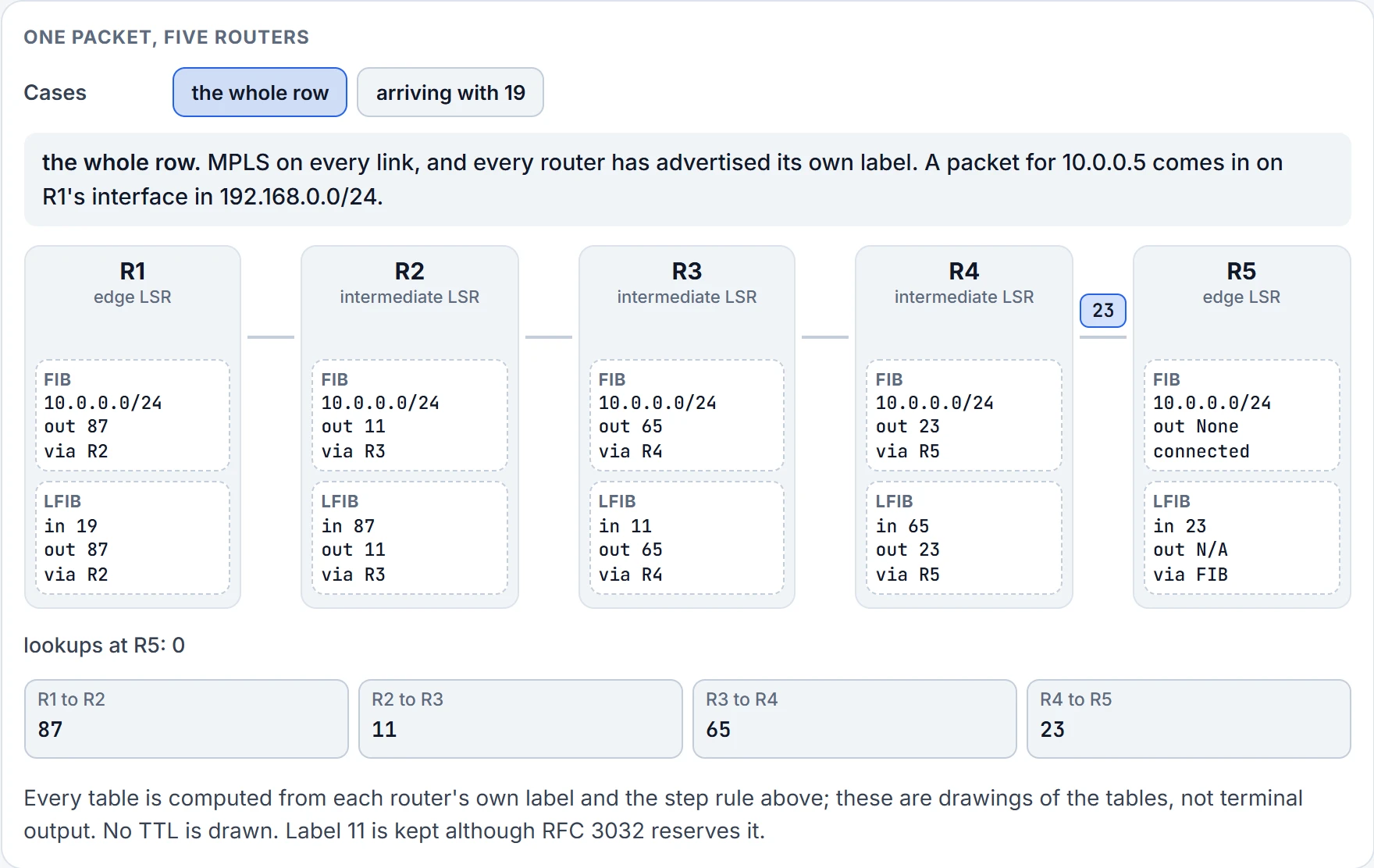
Step 9 of 11 On the link from R4 to R5: label 23, R5's own number.
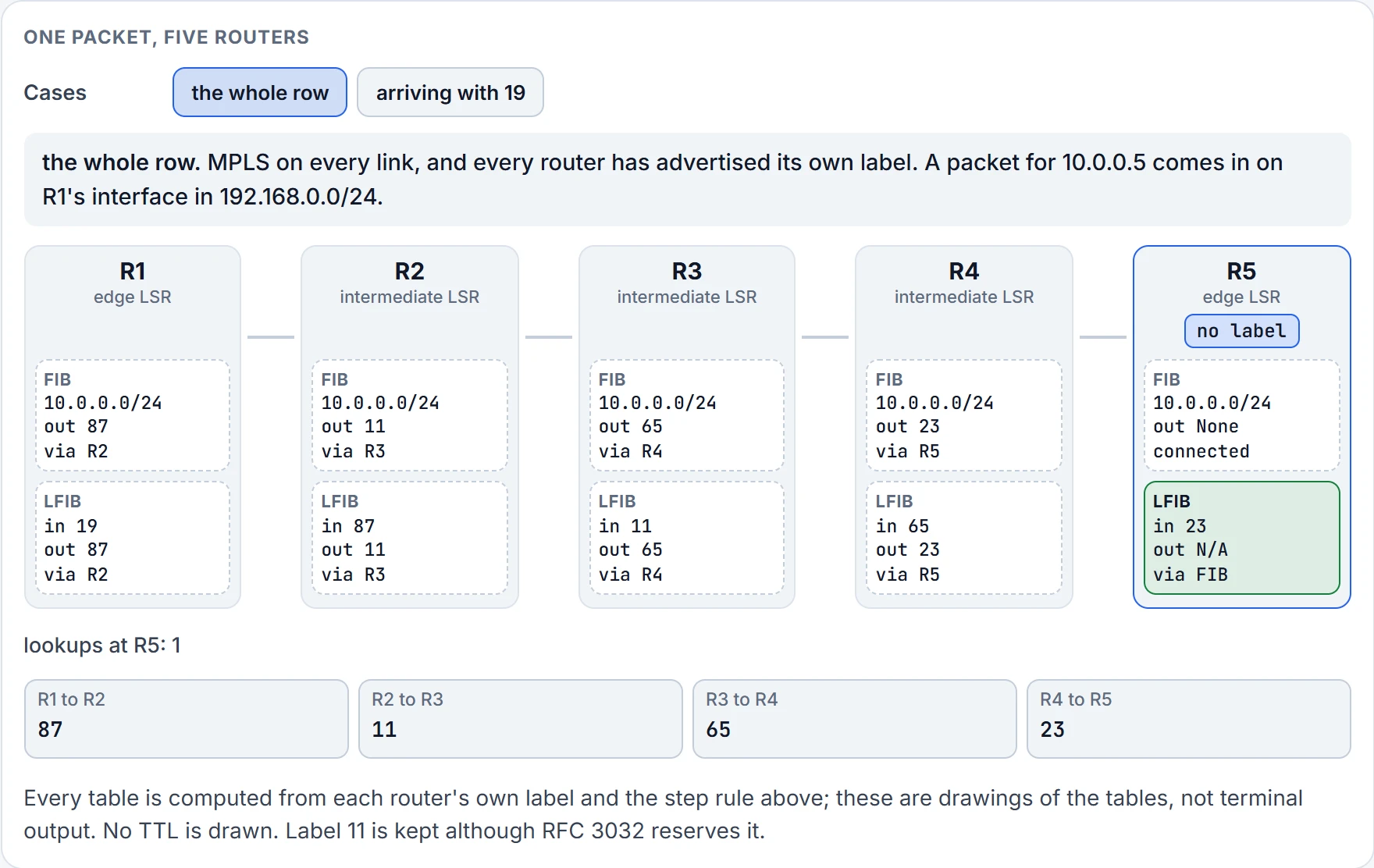
Step 10 of 11 R5 looks up 23 in its LFIB: label out N/A, so this is the end of the path.
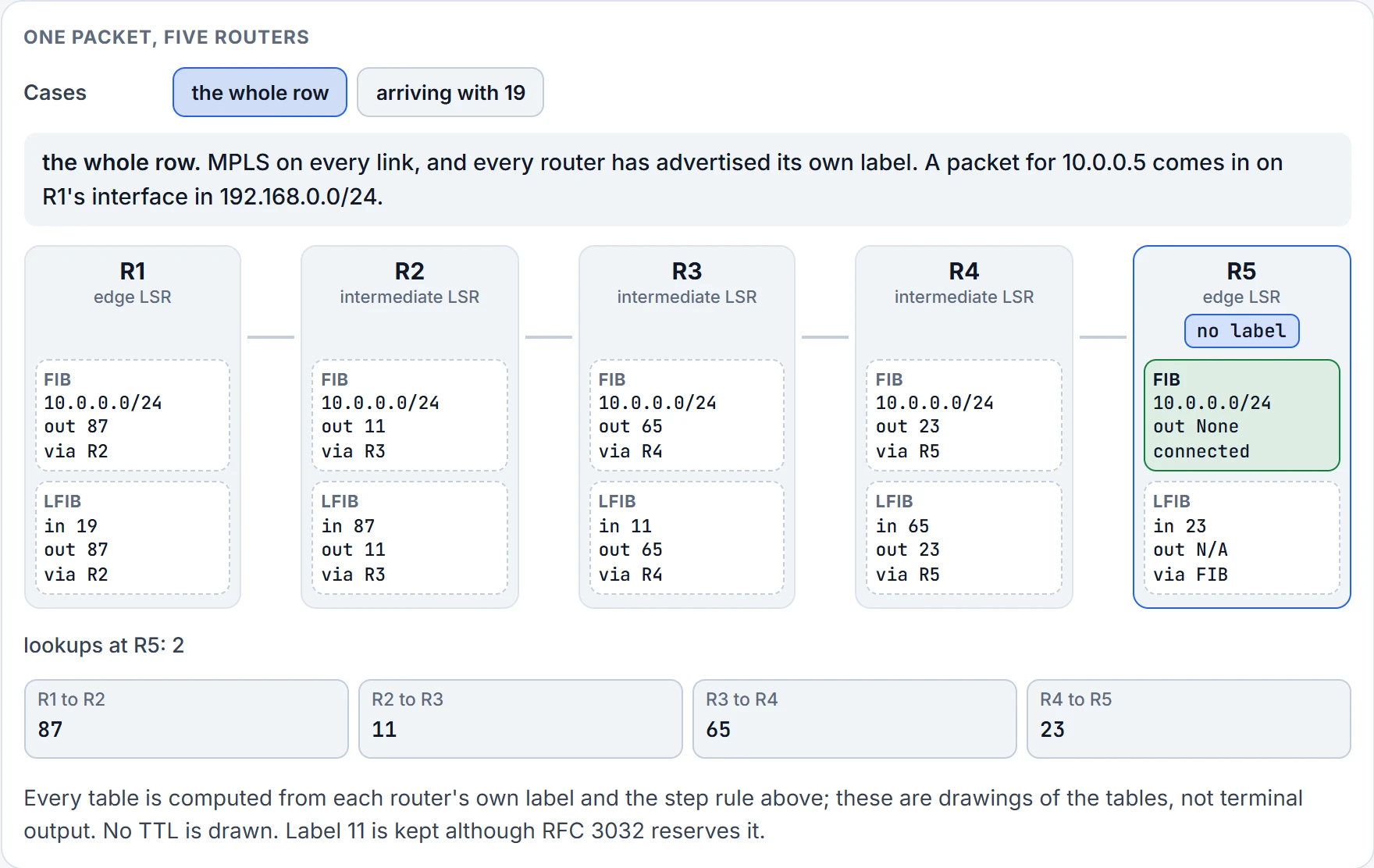
Step 11 of 11 Second lookup at R5, in the FIB: 10.0.0.0/24 is connected. Delivered.
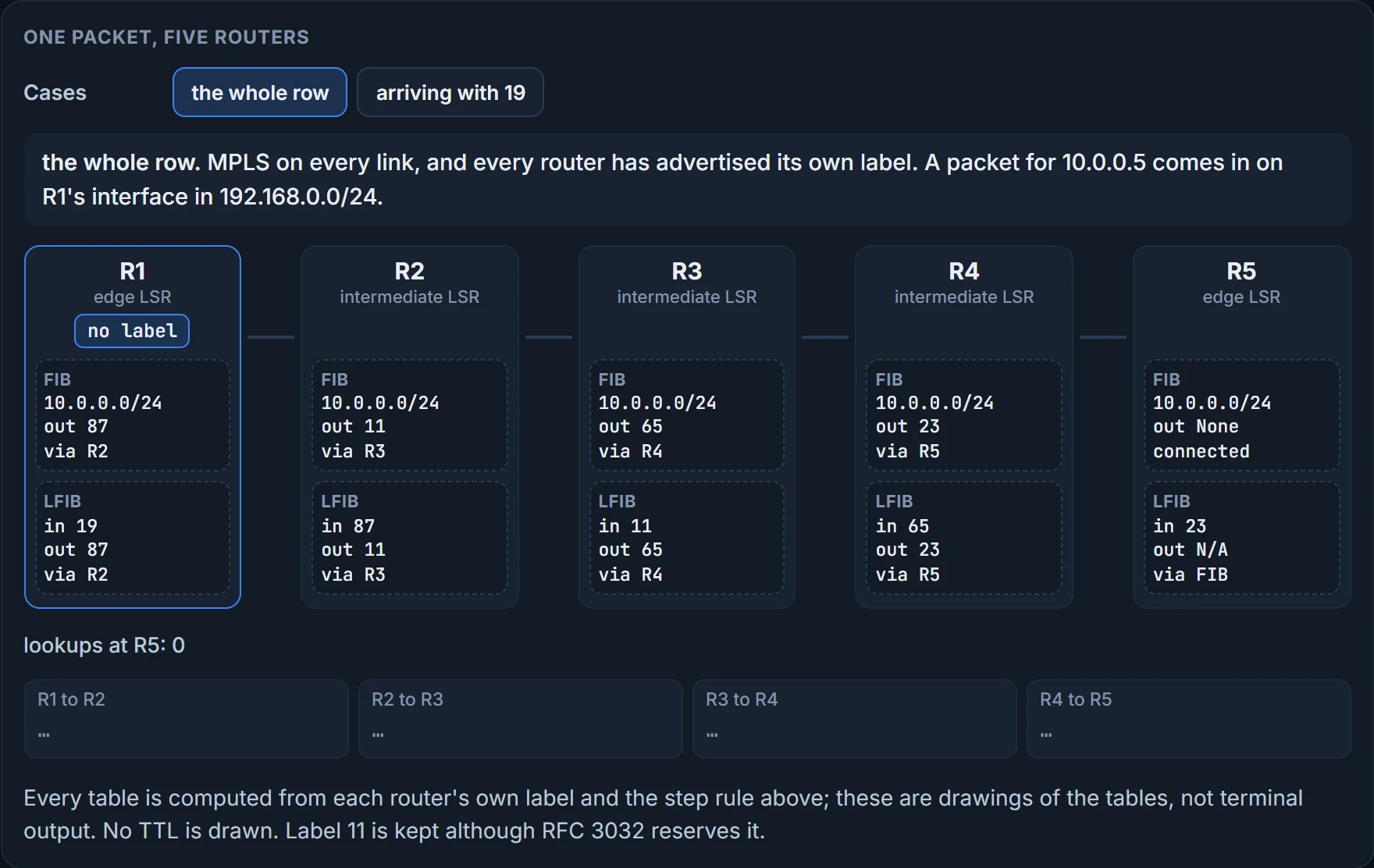
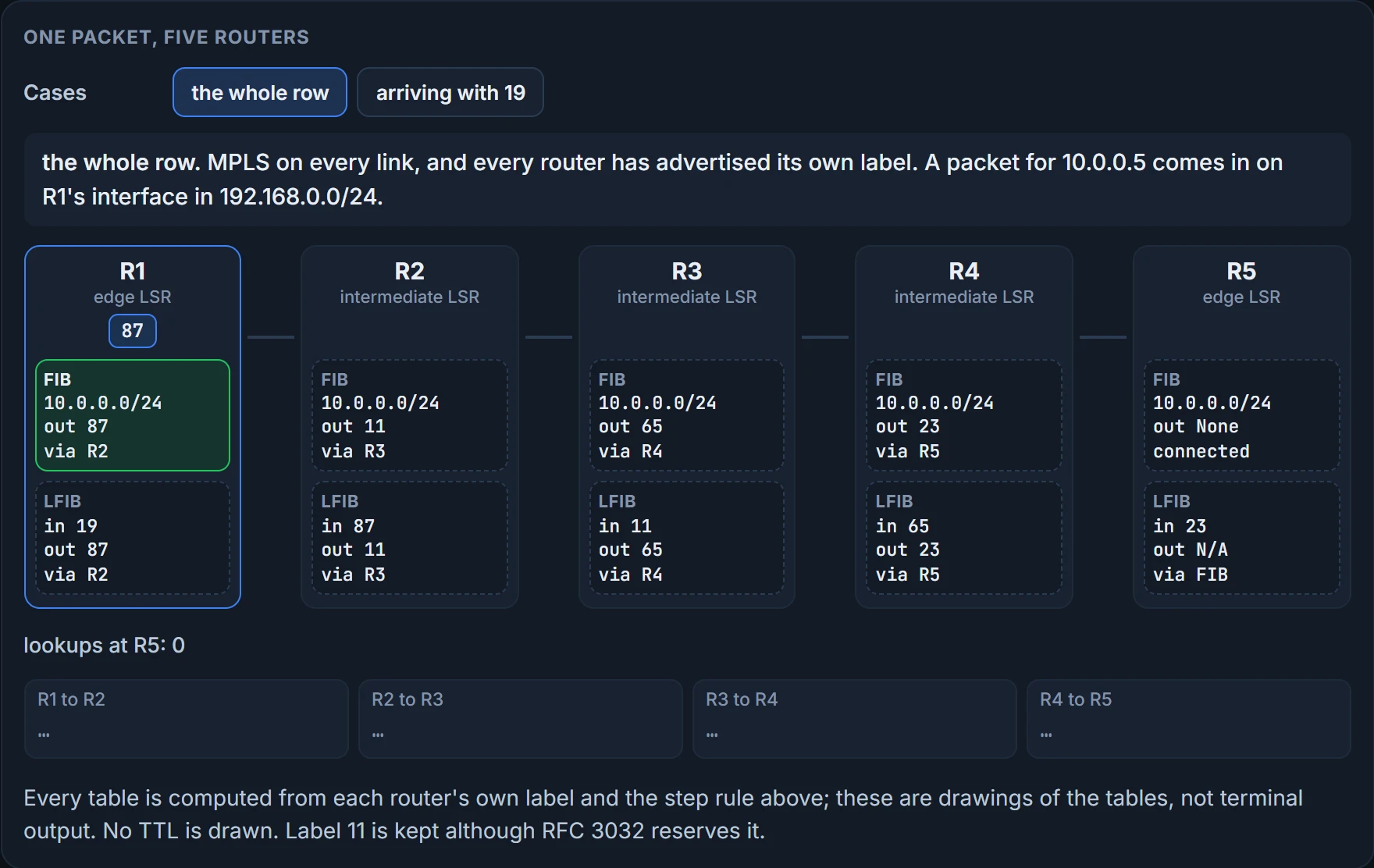
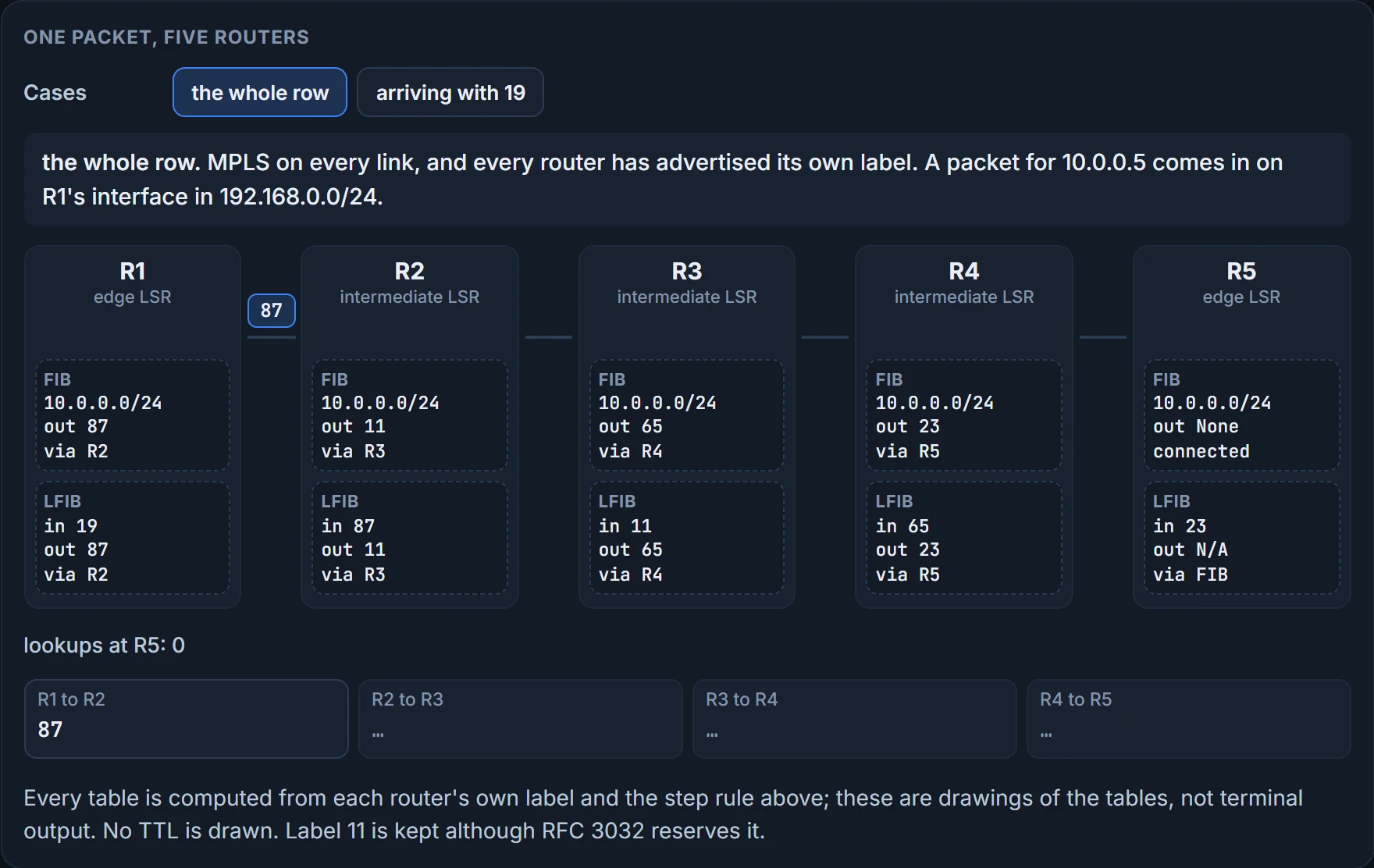
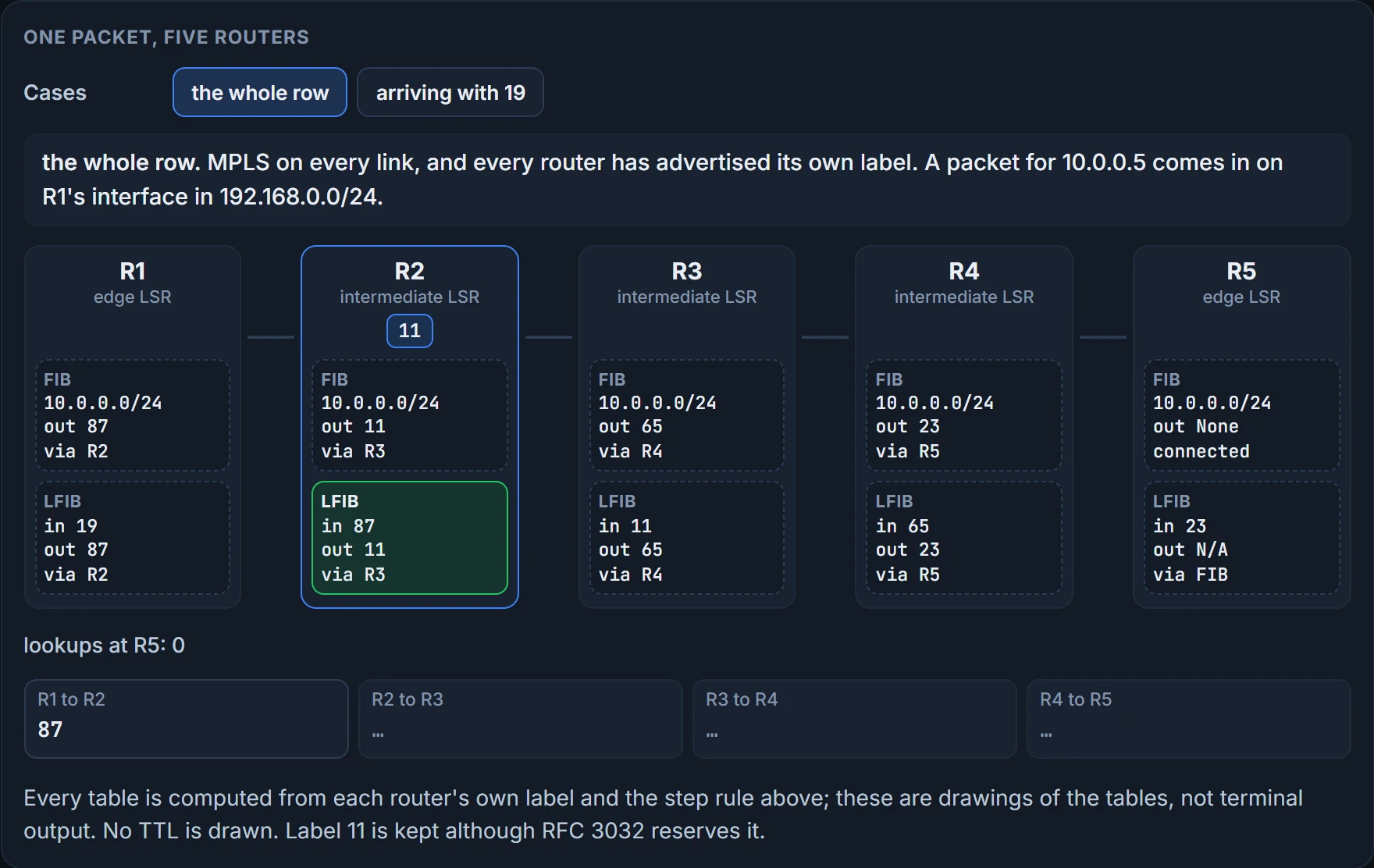
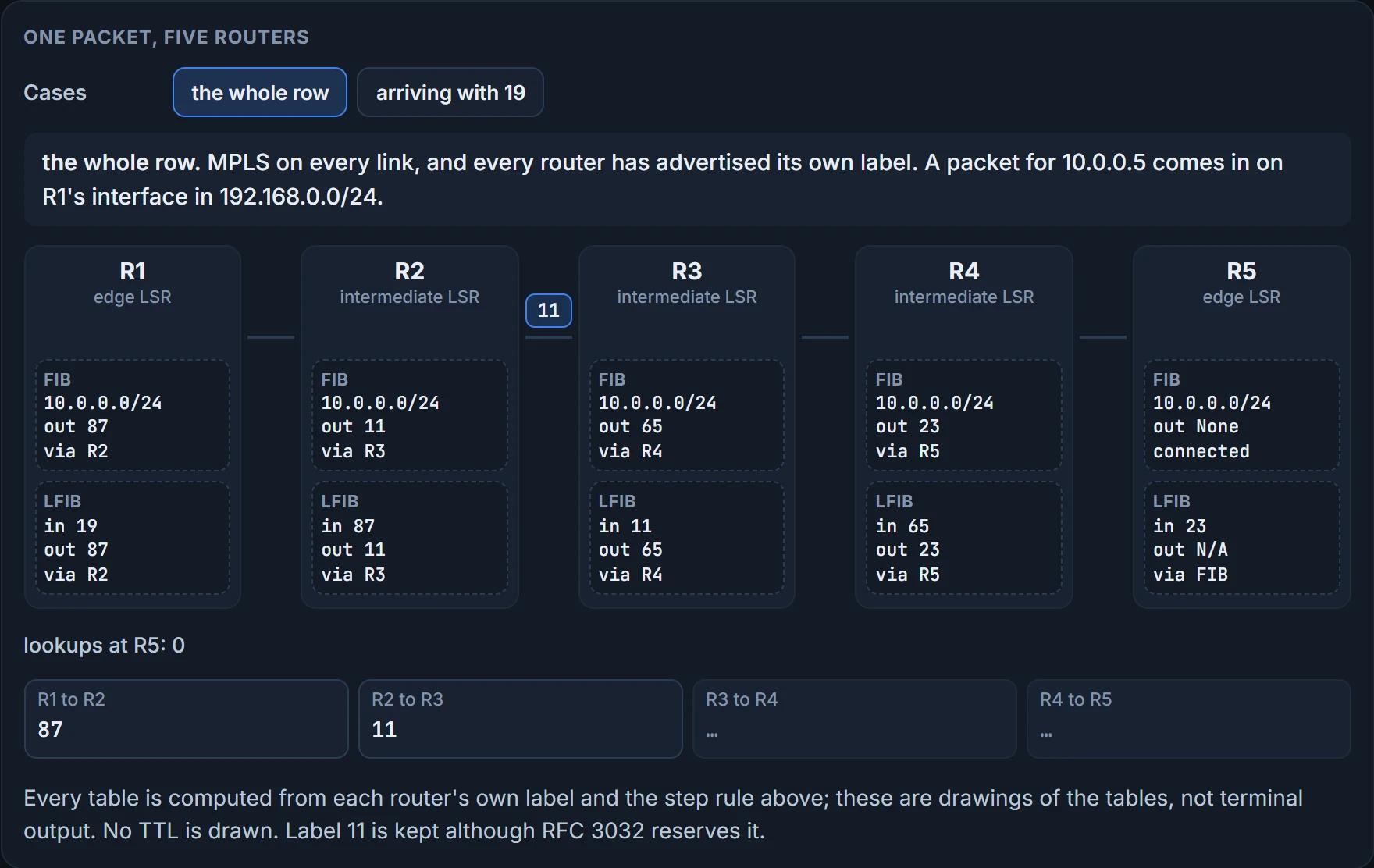
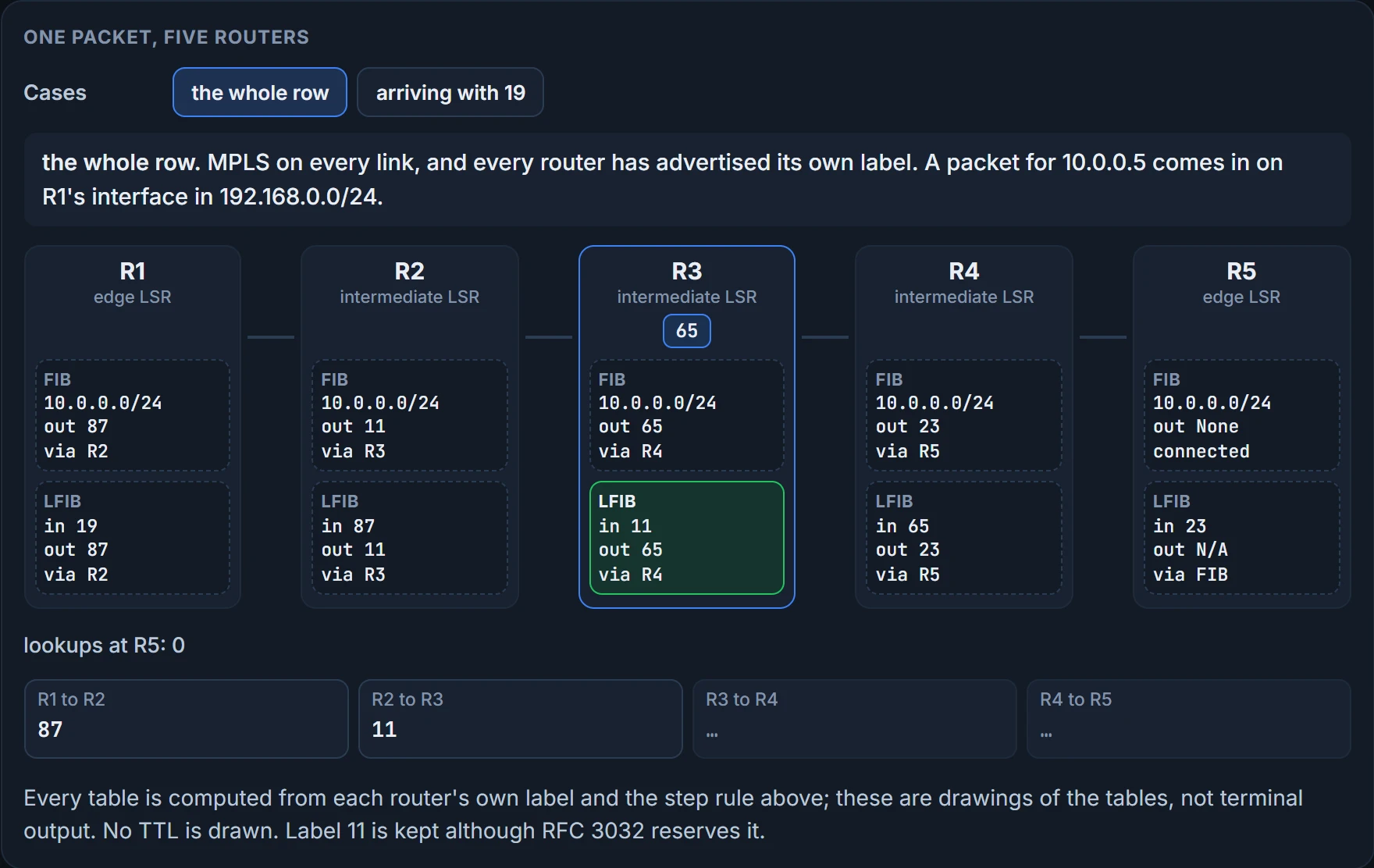
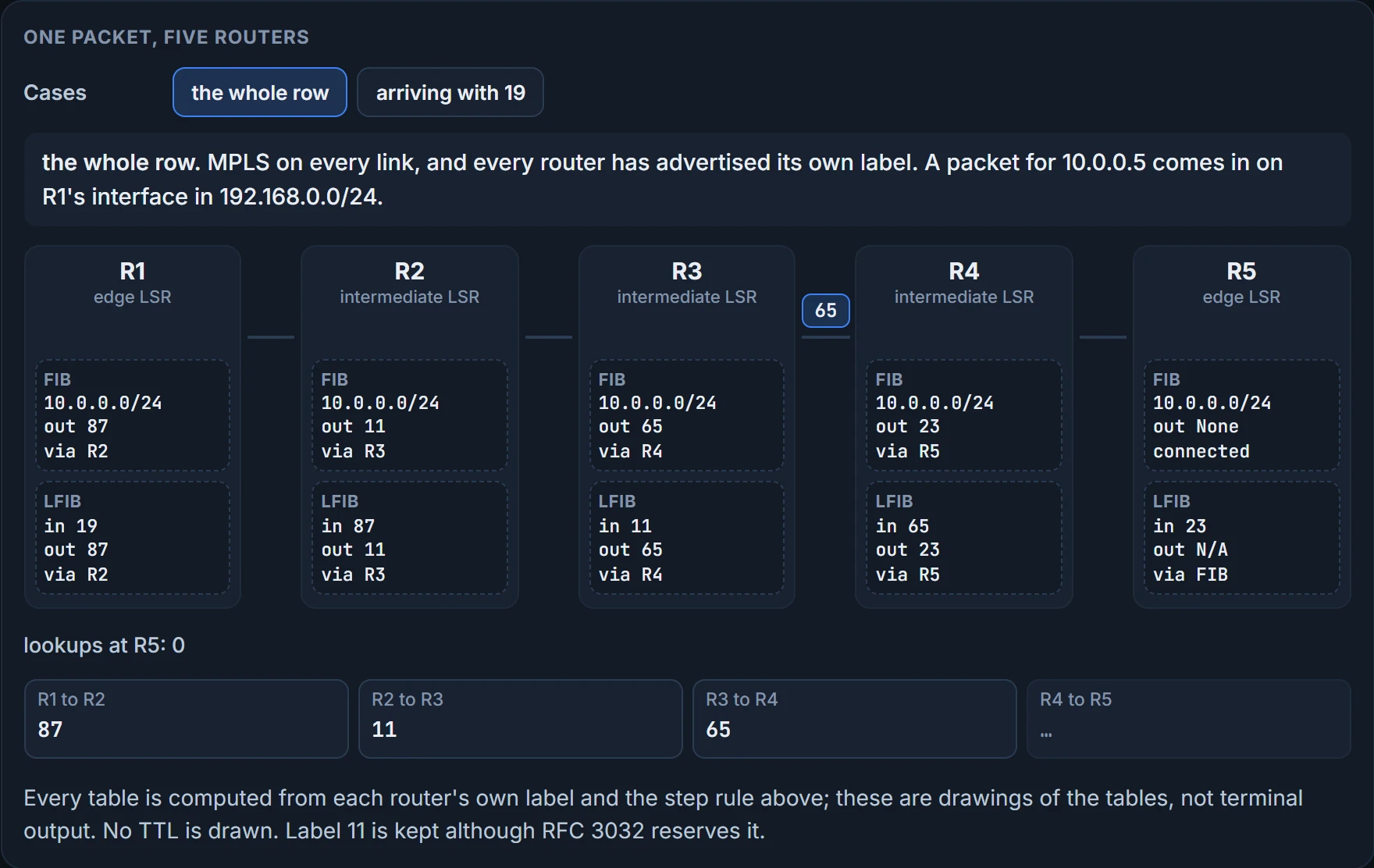
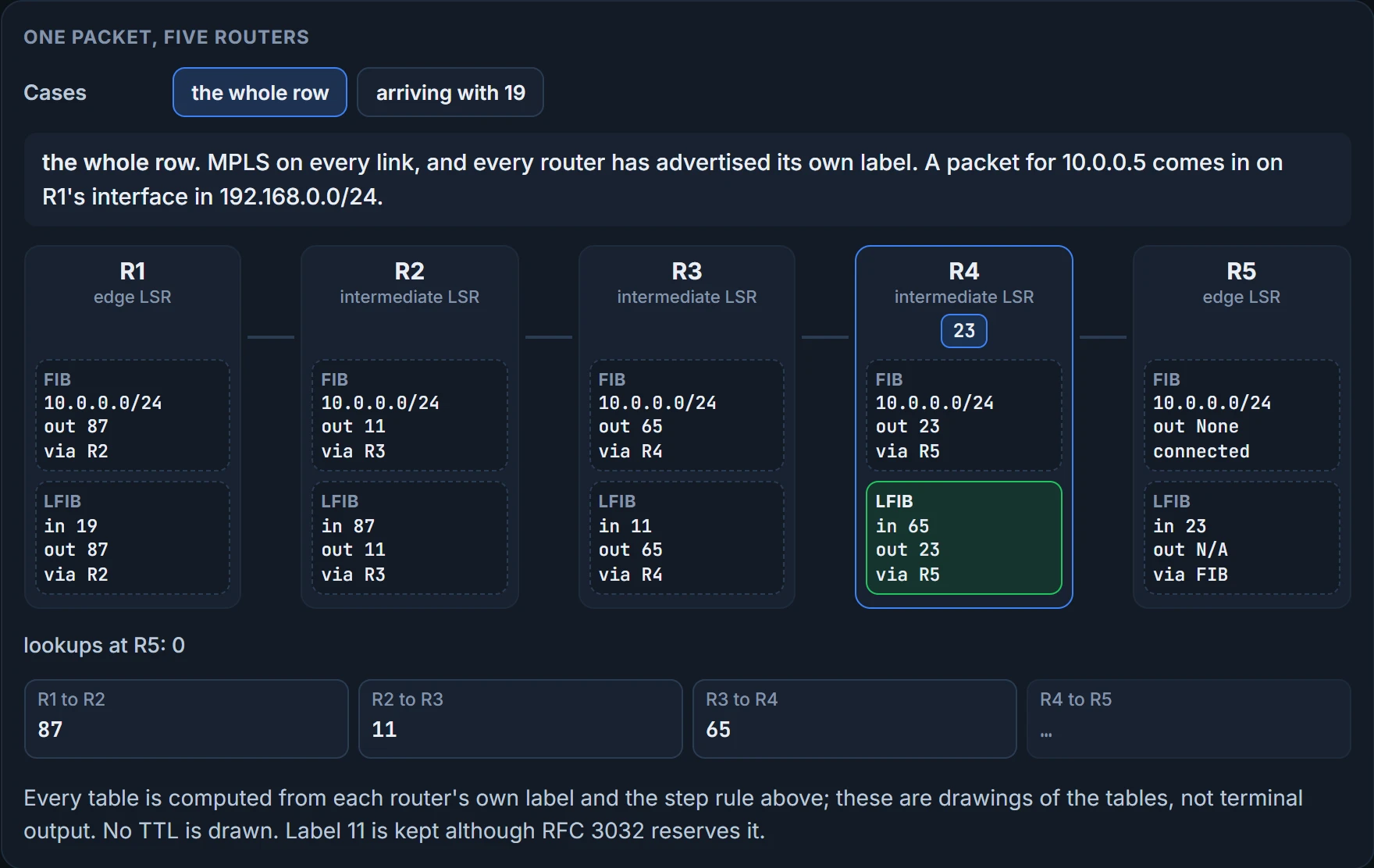
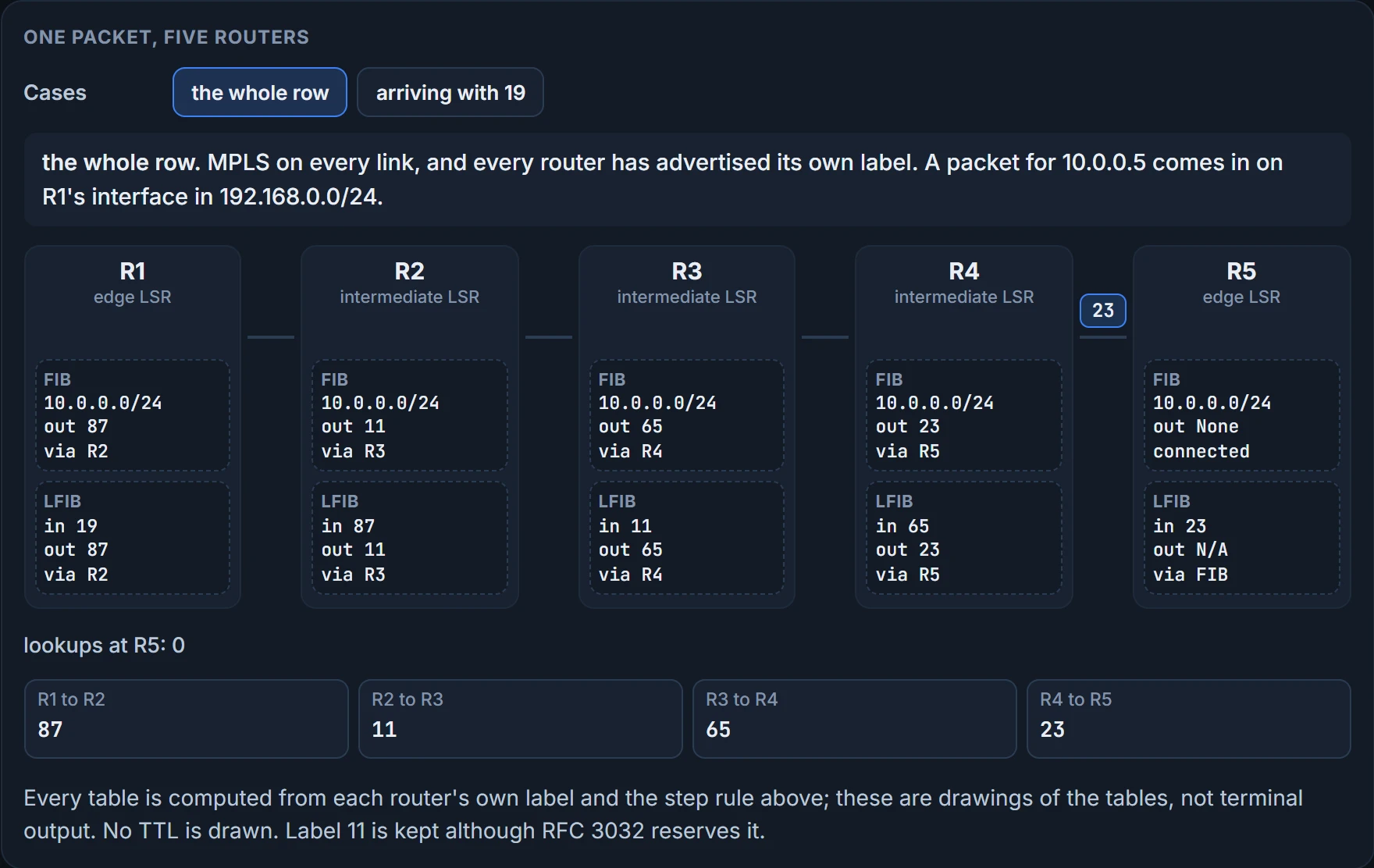
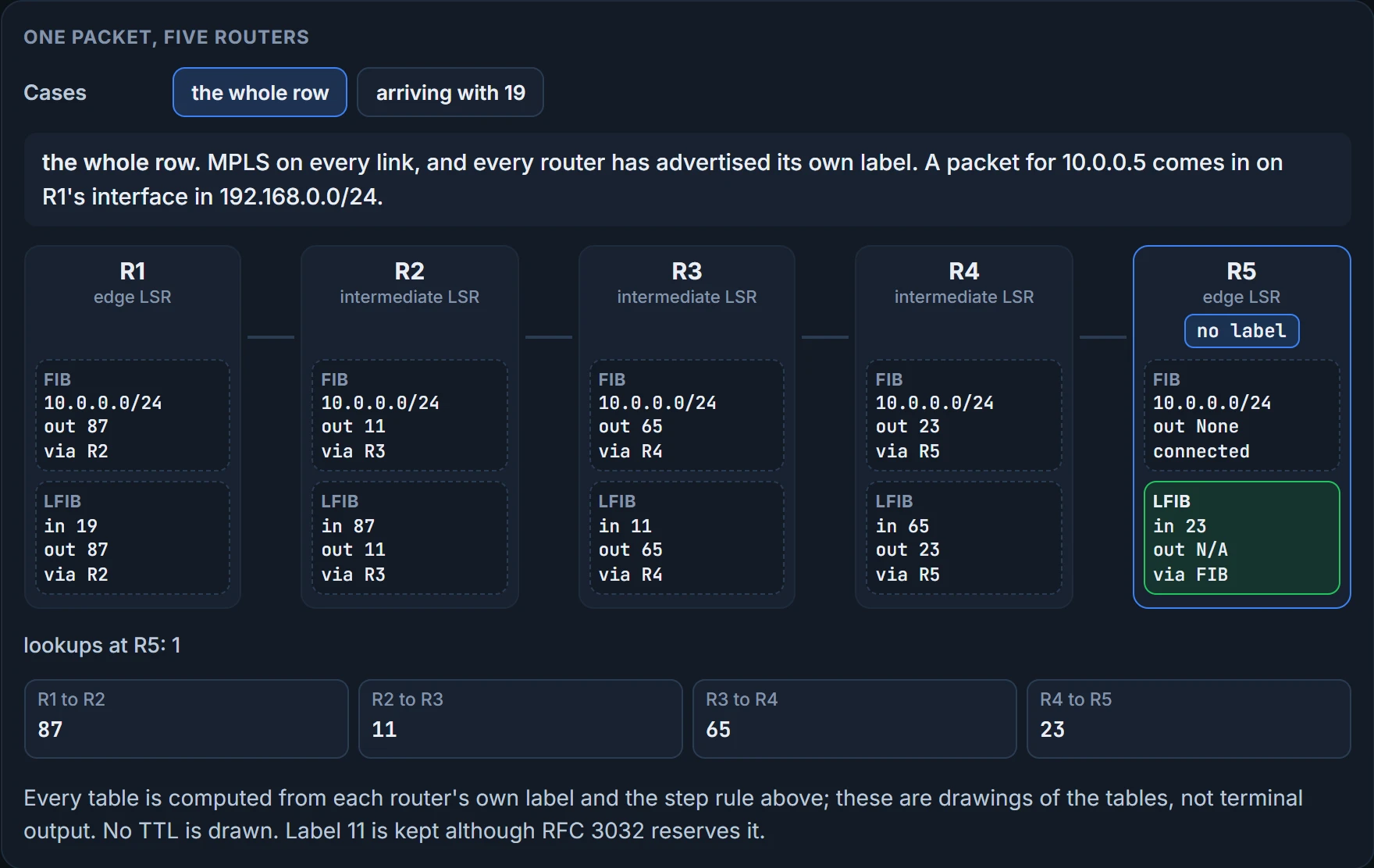
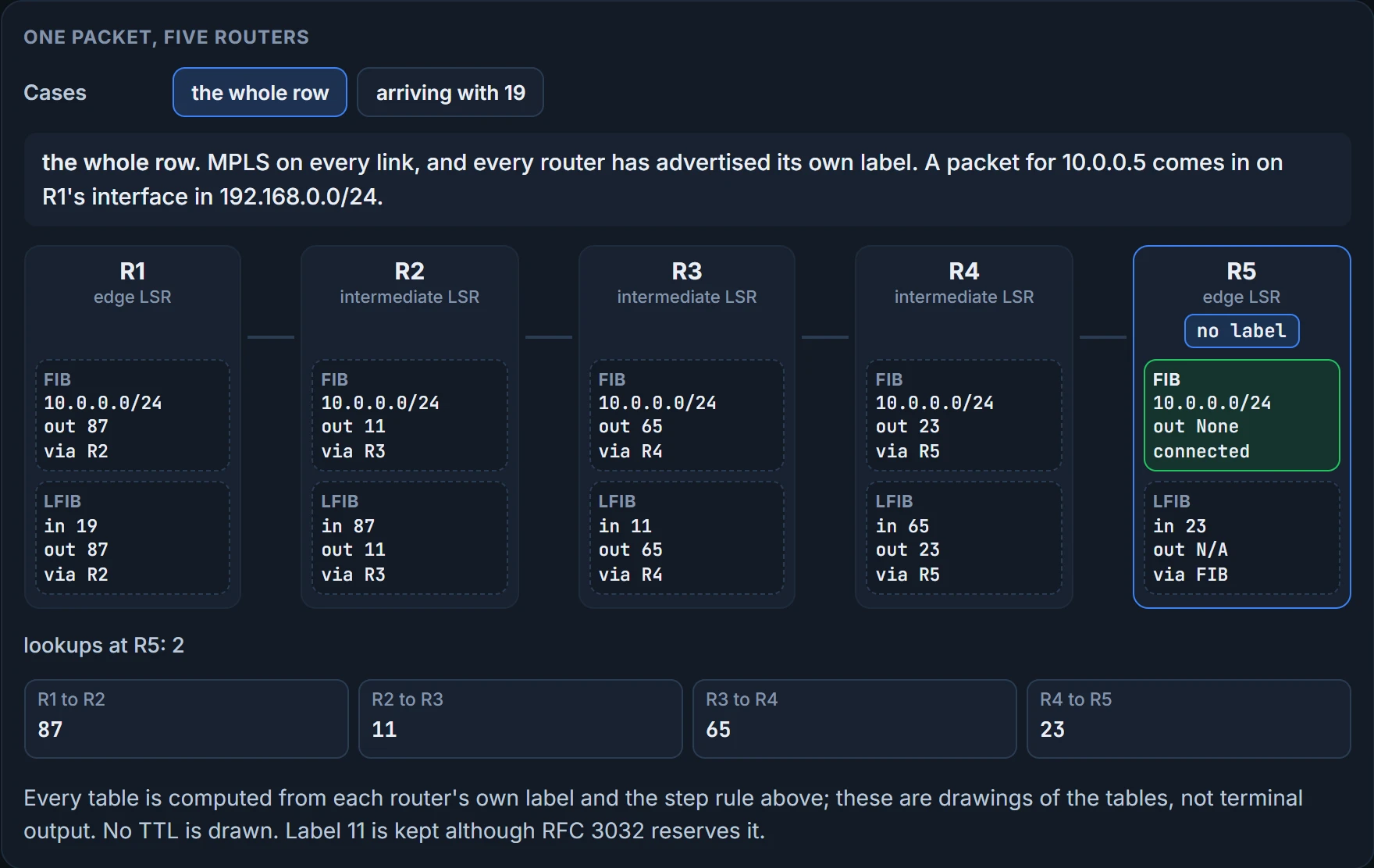
Based on the routing table and the LIB, the routers have filled their LFIBs and FIBs like this:
| Router | Table | Label in | Label out | Via |
|---|---|---|---|---|
| R1 | FIB | (10.0.0.0/24, unlabeled) | 87 | R2 |
| R1 | LFIB | 19 | 87 | R2 |
| R2 | LFIB | 87 | 11 | R3 |
| R3 | LFIB | 11 | 65 | R4 |
| R4 | LFIB | 65 | 23 | R5 |
| R5 | LFIB | 23 | N/A | FIB |
| R5 | FIB | (10.0.0.0/24, unlabeled) | None | Connected |
Now ride it. A packet for 10.0.0.0/24 comes in on R1's interface in 192.168.0.0/24. It has no label, because no router is putting labels on packets out of that interface. So the FIB decides: label 87 has to be added, and the packet goes to R2 as the next hop. Push. (R1 has an LFIB row too. Had the packet arrived with label 19 on it, R1 would look in the LFIB and forward it with 87 to R2. The figure's second case runs that.)
R2 receives the packet with 87, looks in its LFIB, and forwards it with 11 to R3. R3 receives it with 11, looks in its LFIB, and forwards it with 65 to R4. R4 receives it with 65 and forwards it with 23 to R5. Swap, swap, swap. That's the first question: 65, toward R4, the label R4 offered, because R4 is R3's next hop. The 87 in R3's LIB stays where it is. It's R2's offer, and R3's way to 10.0.0.0/24 doesn't go through R2. The announcements figure in the last section has one more step now: it lights the learned row each router uses and greys the rows it only holds.
Stop and look at what R2, R3 and R4 did not do. None of them looked at the destination address. None of them looked in a routing table. One lookup each, on a 20-bit number they chose themselves. There's the better answer to this lesson's opening question: a core router can move a packet it knows nothing else about.
Then R5. It receives the packet with 23, looks in its LFIB, and finds there's no outgoing label. That means it's the end of the LSP: the label has to be removed, and normal routing has to happen with the FIB. Two tables, which settles the second question, and the next section is about it.
What does this table of tables prove? It's a drawing of what each router holds, not a router's output. The command that shows a router's LFIB is show mpls forwarding-table, and its columns are Local Label, Outgoing Label or VC, Prefix or Tunnel Id, Bytes label switched, Outgoing interface and Next Hop. These five routers haven't been run, so what follows is described, not captured. For 10.0.0.0/24, R3's row would carry local label 11, outgoing label 65 and R4 as the next hop; R4's would carry 65, 23 and R5. R5's row is the one we won't describe: what a router prints for a network connected to itself isn't confirmed. One more reading of that column matters later, the words No Label: that's what the column reads when the next hop has given no label for the destination, or when label switching isn't on for the outgoing interface.
What the command proves is what this router would do with a labeled packet. It doesn't prove that the session to the neighbor is up, or that the next router has an entry for the label it's being sent.
Continue the lesson
The whole lesson, with its drawings and its questions. 3 more sections after the ones above.