
Static, dynamic and policy-based NAT
The four NAT address names are two questions: whose host is it, inside or outside, and who is looking, local or global. NAT runs on the device between two networks, told which interface is inside and which outside. Static translation maps one inside local address to one inside global; dynamic maps to a pool; overload, PAT, maps many to one address by port. An existing entry bypasses the rules.
By Arif, founder of Daveth · Updated
The full 6 min walkthrough is in Daveth Pro (Network). See what the plan opens
What this page answers
What is the difference between inside local and inside global?
Both are addresses of a host on your network. Inside local is the address as the inside sees it; inside global is the address as the outside sees it. Outside local and global are the same two views of a host on the other network. Read it in “Which address is which”
What is NAT overload?
Port Address Translation: many unregistered addresses map to a single registered address, distinguished by port, so thousands of users can share one global address. Read it in “Overload”
When is static NAT used?
When a host on the inside must be reachable from the outside at a fixed address: static translation maps one inside local address to one inside global address. Read it in “Static”
Which address is which
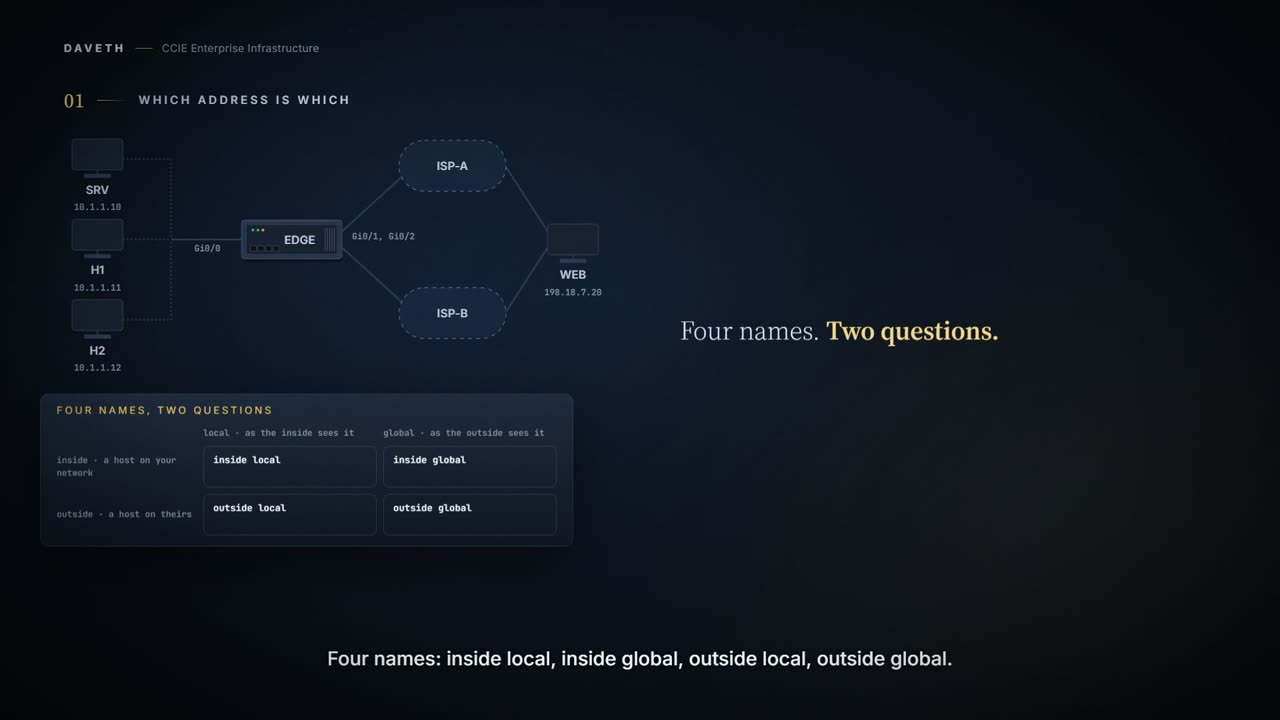
Four names: inside local, inside global, outside local, outside global. Almost everyone who configures this can name two of them confidently and guesses at the other two.
They're not four things to memorise. They're two questions, each with two answers. Whose host is it? Inside is a host on your network; outside is a host on theirs. Who is looking? Local is the address as the inside sees it; global is the address as the outside sees it.
| Local, as the inside sees it | Global, as the outside sees it | |
|---|---|---|
| Inside host | An IP address that is assigned to a host on the inside network. The address that the Network Information Center (NIC) or service provider assigns is probably not a legitimate IP address. | A legitimate IP address assigned by the NIC or service provider that represents one or more inside local IP addresses to the outside world. |
| Outside host | The IP address of an outside host as it appears to the inside network. Not necessarily a legitimate address, it is allocated from the address space that is routable on the inside. | The IP address that is assigned to a host on the outside network by the owner of the host. |
Derive rather than memorise. The cell most people have never used is outside local: an outside host's address as your inside network sees it, which differs from its real address only when the far end is translated too. That's rare, which is why the shortcut inside local is private, inside global is public survives so long before it breaks.
One person, two numbers. Inside the building you are an extension. From the street you are the company number and a routing instruction. Same person. Which number somebody uses depends entirely on where they are standing when they dial.
The comparison stops at the naming. A phone system does not have to care about who initiates, and this one does: which translation applies depends on the direction traffic is moving, and that is the next section.
Hold on to the two questions. Inside or outside says whose host. Local or global says who is looking.
What it is for, and where it happens
NAT enables private IP internetworks that use nonregistered IP addresses to connect to the Internet. NAT operates on a device, usually connecting two networks. Before packets are forwarded onto another network, NAT translates the private (not globally unique) addresses in the internal network into legal addresses. NAT is a feature that allows the IP network of an organization to appear, from the outside, to be using a different IP address space than the one that it is actually using.
And the device has to be told which side is which:
A device that is configured with NAT has at least one interface to the inside network and one to the outside network.
EDGE# configure terminal
EDGE(config)# interface GigabitEthernet0/0
EDGE(config-if)# ip nat inside
EDGE(config-if)# interface GigabitEthernet0/1
EDGE(config-if)# ip nat outside
EDGE(config-if)# interface GigabitEthernet0/2
EDGE(config-if)# ip nat outside
EDGE(config-if)# end
Where do you see whether both are there? Not in the translation table, which is empty either way. In the statistics, which list both:
A list of interfaces marked as outside with the ip nat outside command. A list of interfaces marked as inside with the ip nat inside command.
Computed for this scenario on EDGE, in the layout of the cited samples. Not a published sample: the addresses, ports and counts are this course's.
EDGE# show ip nat statistics
Total active translations: 0 (0 static, 0 dynamic; 0 extended)
Outside interfaces:
  GigabitEthernet0/1, GigabitEthernet0/2
  ! Both provider-facing interfaces, marked outside.
Inside interfaces:
  GigabitEthernet0/0
Hits: 0  Misses: 1
! One lookup so far, and it missed: the flow found no entry, and nothing configured could create one.
Expired translations: 0
Dynamic mappings:
nat-limit statistics:
 max entry: max allowed 0, used 0, missed 0
In-to-out drops: 0  Out-to-in drops: 0
Pool stats drop: 0  Mapping stats drop: 0
Port block alloc fail: 0
IP alias add fail: 0
Limit entry add fail: 0
Proves: which interfaces are marked inside and outside, and how often a lookup has missed.
Does not prove: that any rule matches the traffic you care about. A boundary is where translation can happen, not a decision that it should.
Static
Which hosts need an address that never moves?
Static translation establishes a one-to-one mapping between the inside local address and an inside global address. Static translation is useful when a host on the inside must be accessible by a fixed address from the outside.
EDGE# configure terminal
EDGE(config)# ip nat inside source static 10.1.1.10 203.0.113.5
EDGE(config)# end
What did that one line put in the translation table?
Computed for this scenario on EDGE, in the layout of the cited samples. Not a published sample: the addresses, ports and counts are this course's.
EDGE# show ip nat translations
Pro  Inside global         Inside local          Outside local         Outside global
! Look at the order: the device prints inside global before inside local.
---  203.0.113.5           10.1.1.10             ---                   ---
! No protocol, and no outside addresses: this entry names only the inside host.
Total number of translations: 1
Here's the same entry arranged as the two questions. This arrangement is the course's, not the device's:
              local, as the inside sees it     global, as the outside sees it
inside host   10.1.1.10                         203.0.113.5
outside host  – not in this entry               – not in this entry
One host, one permanent address, reachable from outside. The entry is there as soon as the mapping is configured, whether or not traffic flows. This is what a server gets.
Dynamic, and pools
Dynamic translation establishes a mapping between an inside local address and a pool of global addresses.
EDGE# configure terminal
EDGE(config)# ip nat pool POOL-A 203.0.113.1 203.0.113.4 netmask 255.255.255.248
EDGE(config)# access-list 1 permit 10.1.1.11
EDGE(config)# access-list 1 permit 10.1.1.12
EDGE(config)# ip nat inside source list 1 pool POOL-A
EDGE(config)# end
Both workstations send. What does each one get from the pool, and what does its entry name?
Computed for this scenario on EDGE, in the layout of the cited samples. Not a published sample: the addresses, ports and counts are this course's.
EDGE# show ip nat translations
Pro  Inside global         Inside local          Outside local         Outside global
---  203.0.113.5           10.1.1.10             ---                   ---
---  203.0.113.1           10.1.1.11             ---                   ---
! One pool address for this workstation, and dashes where the ports and the outside host would be.
---  203.0.113.2           10.1.1.12             ---                   ---
Total number of translations: 3
Two simple entries from the access list, plus the static one. An access-list entry is simple:
Also, it will not include any TCP or UDP port information.
Many inside hosts, a pool of global addresses, taken on demand. What happens when the pool runs out? The next host misses, and there's nothing to give it. The statistics count that, on the pool's own line:
The number of times the software does a translations table lookup, fails to find an entry, and must try to create one. The number of failed allocations from the pool.
Do not configure the interface IP address as part of the IP address NAT pool.
Here that's 203.0.113.9, and it isn't in either pool. The model behind this page refuses a pool that contains it. The chapter doesn't say what breaks, and this page doesn't guess.
Overload
Overloading—Maps multiple unregistered IP addresses to a single registered IP address (many to one) by using different ports. This method is also known as Port Address Translation (PAT). Thousands of users can be connected to the Internet by using only one real global IP address through overloading.
Before changing the rule, notice something about the table you already have:
NAT only uses access lists and route maps when it needs to create a translation entry. If a translation entry already exists that matches the traffic then the translation entry will be used; any access lists or route maps will not be consulted.
You changed the rule. The connection that is already up never asked.
The rules are asked only when there's no entry. Change the rule and leave the table alone, and the two simple entries go on being used. So clear the dynamic translations first:
EDGE# clear ip nat translation *
EDGE# configure terminal
EDGE(config)# no ip nat inside source list 1 pool POOL-A
EDGE(config)# ip nat inside source list 1 pool POOL-A overload
EDGE(config)# end
Clears either all dynamic translations (with the * or forced keyword), a single dynamic half-entry containing an inside translation, or a single dynamic half-entry containing an outside translation.
All dynamic translations: the static mapping's entry stays. Then both workstations miss, and the access list, now with overload, creates new entries:
When NAT uses an access list, and overload has also been specified, NAT will create a 'fully extended' translation entry.
So what does a fully extended entry carry that a simple one didn't?
Computed for this scenario on EDGE, in the layout of the cited samples. Not a published sample: the addresses, ports and counts are this course's.
EDGE# show ip nat translations
Pro  Inside global         Inside local          Outside local         Outside global
---  203.0.113.5           10.1.1.10             ---                   ---
tcp  203.0.113.1:50101     10.1.1.11:50101       198.18.7.20:443       198.18.7.20:443
! Protocol, ports, and the outside host: a fully extended entry.
tcp  203.0.113.1:50210     10.1.1.12:50210       198.18.7.20:443       198.18.7.20:443
Total number of translations: 3
Overload is a keyword on the same rule, not a separate feature. Both workstations wear one global address, and the port tells their flows apart:
203.0.113.1 2 entries, told apart by port: 50101, 50210
PAT/Overload can only be done on protocols where the ports are known, that is, UDP, TCP, and ICMP.
Which global address and port the device picks isn't in the chapter. This scenario uses the pool's first address and keeps each host's own port.
Continue the lesson
The whole lesson, with its drawings and its questions. 6 more sections after the ones above.