
NTP and PTP
Logs need clocks that agree to a millisecond; grid measurements need far finer time, which is PTP's job. NTP runs over UDP and makes every clock agree, and the lowest stratum is not the whole rule. NTP never takes time from a source that is not synchronized itself, and it cross-checks sources to discard one that disagrees. Authentication keeps somebody from moving your clock.
By Arif, founder of Daveth · Updated
The full 11 min walkthrough is in Daveth Pro (Network). See what the plan opens
What this page answers
Which NTP server does a Cisco device use?
Not simply the lowest stratum. A source that is not synchronized itself is never a candidate, NTP cross-checks several sources and rejects one whose time disagrees, and with authentication a server without a matching key is not used. Read it in “The two things NTP refuses”
Why configure NTP authentication?
Moving a device's clock moves every log line, certificate check and timestamped event. An access list says who may speak to you; authentication with a shared key proves who they are, which a spoofed address cannot. Read it in “Authentication, and why”
What is the difference between NTP and PTP?
NTP keeps network devices' clocks in agreement to around a millisecond, enough for logs. PTP delivers much finer time for devices such as protection relays that timestamp measurements. Read it in “How accurate does the time need to be?”
How accurate does the time need to be?
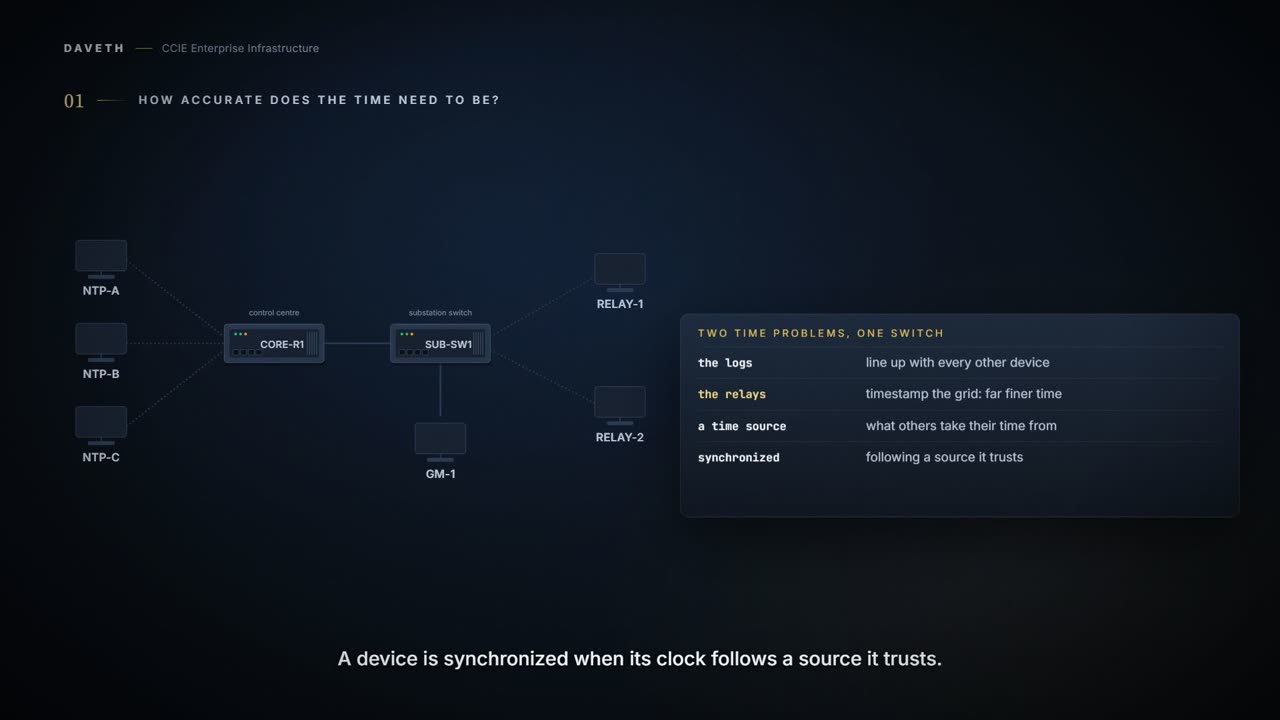
An electricity distribution company has a substation switch, SUB-SW1, with two very different time problems. Its logs have to line up with every other device the company runs. And the two protection relays cabled to it timestamp measurements of the grid, which need far finer time than any log does.
Plain words first. A time source is a device other devices take their time from. A device is synchronized when its clock follows a source it trusts. NTP, the Network Time Protocol, is how switches normally do that; PTP, the Precision Time Protocol, is the much finer one.
So ask the question before either protocol: how accurate does this particular time have to be? The answer decides which protocol, and for PTP it decides whether this switch can run it at all.
NTP, as a client
NTP's whole job is to make every clock in the network agree. It rides on UDP, over IP. Fire and forget, no connection, because a timestamp that needs a handshake has already gone stale by the time it arrives.
One packet a minute buys you a millisecond. That is the entire bill: two devices a minute apart in conversation end up a thousandth of a second apart in time. Nobody has ever switched NTP off to save bandwidth.
SUB-SW1 is a client: it asks servers for the time and does not hand it out. A client polls every server it has been given, then picks one to follow. Note the verb: it considers each one. Being configured is not the same as being chosen, and the rest of this page is about the difference.
You name each server with ntp server, and the useful options ride on the end of that one line: [vrf <name>] <address> [version <n>] [key <id>] [source <interface>] [prefer]. One line per server, and the key is the one to remember, because it comes back two sections from here.
What does a server's number mean?
Stratum is your distance from a real clock. Stratum 1 has an atomic clock or a radio receiver bolted to it. Stratum 2 asks a stratum 1. Stratum 3 asks a stratum 2. Every hop is one more step away from the truth, and the number is how you know how far you have drifted from it.
A switch can never be stratum 1. There is nowhere to plug the atomic clock in. The best any switch does is ask something that has one, which means the number on your switch is always somebody else's number, plus one.
The control centre runs three servers: NTP-A at stratum 2, NTP-B at 3 and NTP-C at 4. SUB-SW1 is given all three:
Configuration: SUB-SW1 with three NTP servers. The names, ports and addresses are this course's own.
SUB-SW1# configure terminal
SUB-SW1(config)# ntp server 10.10.0.11
SUB-SW1(config)# ntp server 10.10.0.12
SUB-SW1(config)# ntp server 10.10.0.13
SUB-SW1(config)# end
Given a choice, lowest stratum wins. The client takes the source closest to a real clock. You do not vote on it and you do not configure it; it just picks.
Computed from the state: the three servers and which one SUB-SW1 uses. No command prints it in this form.
server  address     stratum  used by SUB-SW1
NTP-A   10.10.0.11  2        yes
NTP-B   10.10.0.12  3        no: lower stratum available
NTP-C   10.10.0.13  4        no: lower stratum available

SUB-SW1: stratum 3, from NTP-A
Read the line under the table: stratum 3, from NTP-A. By this course's reading, a client's stratum is one more than the server it follows. One hop further from the clock than its source is.
The two things NTP refuses
Lowest stratum wins. Is that the whole rule? Two weeks later, NTP-A's time drifts well away from NTP-B and NTP-C, while it still reports stratum 2. Before you read on, decide which server SUB-SW1 uses now.
First refusal: NTP will not take the time from a device that has not got the time itself. A source that is not synchronized is never a candidate, whatever it claims. Unsynchronised is contagious, so it is refused at the door.
Second refusal: NTP cross-checks. It compares what several sources say, and the odd one out loses, even when the odd one out has the lowest stratum. A confident liar is still a liar, and stratum is a claim about pedigree, not about being right.
Computed from the state: the servers after NTP-A drifts. No command prints it in this form.
server  address     stratum  used by SUB-SW1
NTP-A   10.10.0.11  2        no: differs from the others
NTP-B   10.10.0.12  3        yes
NTP-C   10.10.0.13  4        no: lower stratum available

SUB-SW1: stratum 4, from NTP-B
Look at NTP-A's row: no, it differs from the others. Its stratum is still the lowest, and it no longer matters. Stratum is where the choosing starts; agreement is what finishes it. Nothing states a threshold for how far is too far, so by this course's reading the scenario says only that NTP-A differs, and the lesson judges a disagreement only when there are at least three sources to compare.
Now notice what that says about configuring one server. With one, there is nothing to compare it against, and the second refusal can never fire. A single source is not a source you are checking. It is a source you are trusting. Three is the smallest number that can outvote a liar.
Authentication, and why
What does somebody gain by moving a switch's clock? Move the clock and you move every log line, every certificate check and every timestamped event with it. The timestamps stop lining up, which is the one job SUB-SW1 was given NTP for. A clock is worth attacking, and that is why NTP has a way to lock it.
An access list says who is allowed to speak to you. Authentication says who they are. An address can be spoofed by anyone who can reach the wire; a key cannot be guessed. If the time actually matters, the key is the control that means something.
Three commands turn it on. ntp authenticate switches the checking on. ntp authentication-key <n> {md5 | cmac-aes-128 | hmac-sha1 | hmac-sha2-256} <value> defines a key and picks the algorithm. ntp trusted-key <n> says which of your keys you are willing to accept time from. All three, or nothing happens.
Do not choose MD5. It is still offered, and it is still in half the examples you will find, and it is the one type not to pick. SUB-SW1 uses HMAC-SHA2-256.
NTP-A has been repaired. NTP-B and NTP-C get the new key; NTP-A's administrators have not loaded it yet. Which server does SUB-SW1 use now?
Configuration: SUB-SW1 with authentication: the key, and each server typed again with it. The names, ports and addresses are this course's own.
SUB-SW1# configure terminal
SUB-SW1(config)# ntp authenticate
SUB-SW1(config)# ntp authentication-key 1 hmac-sha2-256 SubstationTime2026
SUB-SW1(config)# ntp trusted-key 1
SUB-SW1(config)# ntp server 10.10.0.11 key 1
SUB-SW1(config)# ntp server 10.10.0.12 key 1
SUB-SW1(config)# ntp server 10.10.0.13 key 1
SUB-SW1(config)# end
A packet that does not carry a key you trust is ignored. Not logged at you, not argued with. Ignored. Once authentication is on, the switch will take time only from sources that can prove who they are.
And be exact about what that sentence promises, because it is narrower than it sounds. A key proves the packet came from something holding the key. It says nothing at all about whether the time inside the packet is right. A server whose own upstream has drifted, or whose administrator has typed something wrong, signs its bad time just as convincingly as its good time, and the switch has no grounds to refuse it. Authentication closes the question of who is speaking. Whether what they are saying is true is the selection process above, and the two controls do not cover for each other.
Computed from the state: the servers with authentication on. No command prints it in this form.
server  address     stratum  used by SUB-SW1
NTP-A   10.10.0.11  2        no: no matching key
NTP-B   10.10.0.12  3        yes
NTP-C   10.10.0.13  4        no: lower stratum available

SUB-SW1: stratum 4, from NTP-B
Read NTP-A's row: no matching key. Its time is fine again and its stratum is still the lowest, and it is out. That is the third way to be passed over, and it is the one you caused. Turning authentication on is how a healthy server becomes invisible to you.
One cost worth knowing before you turn it on everywhere: the encrypting and decrypting is hard work for a CPU, and enough of it can degrade the accuracy of the very time it is protecting. The protection and the precision pull against each other.
Defaults, and what not to assume
Is NTP listening on every interface before you configure anything? This is genuinely ambiguous ground: you will find it stated both ways, and the two statements cannot both describe the same switch.
So do not design on either answer. Configure the servers and the key you mean, and treat what NTP does on an interface you never touched as something to go and check on the switch in front of you. When two answers exist, the device is the only authority.
Two defaults that are not in doubt. Before reading them, ask yourself what clock timezone ought to change.
A switch keeps time internally in UTC, always. clock timezone changes what it prints, not what it knows. That is why a timezone change never fixes a synchronisation problem, and why comparing logs across regions is a display question, not a time question.
And NTP outranks everything. Whatever else has set the clock (by hand, at boot, from anywhere), NTP overrides it. A clock you set yourself is a clock that lasts until the next NTP packet.
Configured, and not on the server you expect
A month on, NTP-B loses its own upstream time. SUB-SW1's configuration has not changed. Where does it get its time now?
Computed from the state: the servers after NTP-B loses its source. No command prints it in this form.
server  address     stratum  used by SUB-SW1
NTP-A   10.10.0.11  2        no: no matching key
NTP-B   10.10.0.12  3        no: not synchronized
NTP-C   10.10.0.13  4        yes

SUB-SW1: stratum 5, from NTP-C
Read the rows from the top. NTP-A: still no matching key. NTP-B: not synchronized itself, so never a candidate. NTP-C is all that is left, and SUB-SW1 is now stratum 5: two hops further from a real clock than it started, without anybody changing a line on it.
When a client lands on a server you did not expect, check the other servers, not the client. There are only three reasons a server gets passed over, and you now know all of them: it is not synchronized itself, it does not carry a key you trust, or its time disagrees with the rest. The client is rarely the problem. The client is the symptom.
What command shows those reasons on the switch? This course will not name one it has not stood behind, so it names none and imitates none. The readings on this page are computed from the scenario, and they are labelled that way.
Continue the lesson
The whole lesson, with its drawings and its questions. 5 more sections after the ones above.