
DHCP client, server, relay and options
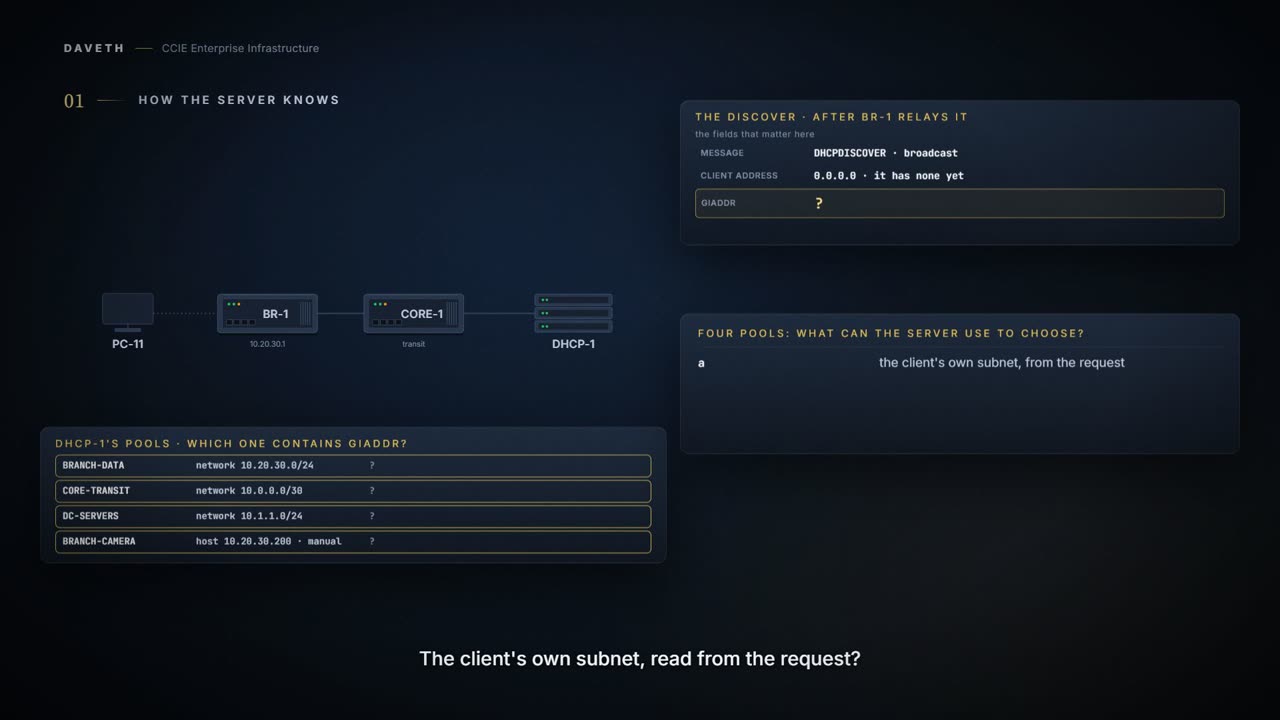
A DHCP server three hops away answers from the right pool without knowing where the client is, because of giaddr. A zero giaddr means the client is directly connected and the receiving interface's subnet selects the pool; a non-zero giaddr selects the pool containing that address. The relay writes its own interface address there, so ip helper-address belongs on the interface closest to the client.
By Arif, founder of Daveth · Updated
The full 4 min walkthrough is in Daveth Pro (Network). See what the plan opens
What this page answers
How does a DHCP server choose the pool for a relayed request?
From the giaddr field: if it is non-zero, the server uses the pool whose subnet contains the giaddr address. If it is zero, the client is directly connected and the receiving interface's subnet selects the pool. Read it in “The two rules”
Where should ip helper-address be configured?
On the Layer 3 interface closest to the client, where the client's broadcast arrives, because a broadcast cannot cross a router. Read it in “Where helper-address goes”
What is the default DHCP lease on a Cisco DHCP server?
One day. If no lease is specified for a pool, the server assigns a one-day lease. Read it in “Building a pool”
How does the server know which pool
A DHCP server sits in a data centre. A client broadcasts on a branch VLAN three hops away, and the server answers from the correct pool for that branch.
It does not know where the client is. No route to that information, no interface on that subnet, and nothing in the request that says "branch office".
The Cisco DHCP server accepts address assignment requests and renewals from the client and assigns the addresses from predefined groups of addresses within DHCP address pools. The DHCP server assigns IP addresses from specified address pools on a switch or router to DHCP clients and manages them. The Cisco DHCP server and the relay agent services are enabled by default.
So the question is what it reads. One field, and everything else on this page follows from it.
One thing before the first block. The IP Addressing guide prints one sample, of show ip dhcp binding, so this page draws that command in that sample's layout. No sample output for show ip dhcp pool or show ip dhcp conflict is published on either page consulted, so neither is drawn: what this page shows for them is computed from the pools and labelled as a computation.
The two rules
Giaddr field is the gateway IP address field of a DHCP packet. If the client is directly connected (the giaddr field is zero), the DHCP server matches the DHCPDISCOVER with DHCP pool(s) that contain the subnet(s) configured on the receiving interface. If the client is not directly connected (the giaddr field of the DHCPDISCOVER broadcast message is non-zero), the DHCP server matches the DHCPDISCOVER with a DHCP pool that has the subnet that contains the IP address in the giaddr field.
giaddr is the pool selector. Zero means I arrived directly, use the subnet of the interface I came in on. Non-zero means use the pool containing this address.
| giaddr | which means | so the server matches | pool |
|---|---|---|---|
0.0.0.0 | the client is directly connected | a pool containing the subnet on the receiving interface | BRANCH-DATA |
10.20.30.1 | a relay agent put it there | the pool whose subnet contains that address | BRANCH-DATA |
Read the field, then the pool it selects. Which of the two rules is this request using?
This course's reading: the same request, relayed, against the pools this server ends up holding. Computed from the model, not taken from a command's output.
the giaddr field              10.20.30.1
so the server matches on      giaddr
and the pool it selects is    BRANCH-DATA

the subnet the client is on   10.20.30.0
the pool that contains it     BRANCH-DATA

the two agree here, which is what makes the rule easy to mistake for the idea that the
server knows where the client is. the giaddr field is 10.20.30.1, so the server
matches the request with the pool whose subnet contains that address
That is the whole of the selection logic.
What that makes a relay agent
A relay agent is not a forwarder. It is a pool selector. It writes its own interface address into giaddr and thereby tells the server which subnet to answer from.
A DHCP relay agent is a Layer 3 device that forwards DHCP packets between clients and servers. Relay agents receive DHCP messages and generate new DHCP messages to send on output interfaces. A DHCP relay agent sets the gateway address and adds the relay agent information option (option82) in the packet and forwards it to the DHCP server. The reply from the server is forwarded back to the client after removing option 82.
And it exists only where you put it:
Think about what the relay actually carries. The server may be in another country, and it has no idea what the client's corridor looks like. The relay writes down where the request came from and sends that with it. The server never meets the client. It only ever meets the neighbourhood the relay described.
The comparison stops at the description. A person describing a street can add whatever they like; this one writes a single address, and everything the server decides follows from that one field being right.
The Cisco DHCP relay agent is enabled on an interface only when you configure the ip helper-address command.
4.2.a.iii covered what happens when a switch in the middle has an opinion about those option-82 packets, and it is not re-taught here.
And one question this page names and does not answer. A relay agent with two addresses on the client-facing interface: which one ends up in giaddr? Neither page consulted for this lesson states it, so this course does not. The transferable point is that the pool follows from whatever the field holds, so read the field rather than reasoning about the interface, and confirm the behaviour against the platform in front of you.
Where helper-address goes
If the DHCP server and the DHCP clients are on different networks or subnets, you must configure the switch with the ip helper-address address interface configuration command. The general rule is to configure the command on the Layer 3 interface closest to the client.
So where does the helper go?
A broadcast cannot cross the router. That is the whole reason this command exists, and it is why the answer is never in the middle of the network.
This course's configuration: the helper, on the interface closest to the client. The commands are cited; the pool names, addresses, option values and lease are this course's own.
BR-1# configure terminal
BR-1(config)# interface GigabitEthernet0/0/1
BR-1(config-if)# ip helper-address 10.1.1.5
BR-1(config-if)# end
Closest to the client, not closest to the server, because the helper acts on a broadcast that arrives on its own interface. The command reference and the IP Addressing guide say what it forwards and where it goes:
To enable forwarding of User Datagram Protocol (UDP) broadcasts, including Bootstrap Protocol (BOOTP), received on an interface, use the ip helper-address command in interface configuration mode. To enable BOOTP or DHCP broadcast forwarding for a set of clients, configure a helper address on the router interface connected to the client. This command enables a DHCP broadcast to be forwarded to the configured DHCP server.
So whose address lands in giaddr? That interface's own, which is why it names the client's subnet:
If this field is zero, the relay agent MUST fill this field with the IP address of the interface on which the request was received.
Proves: the helper line in BR-1's configuration shows that a DHCP broadcast arriving on Gi0/0/1 will be relayed to 10.1.1.5. Does not prove: that any broadcast has arrived there, that the server answered, or that it holds a pool for the address that lands in giaddr.
Now the fault. A client that joins the branch VLAN gets no address. The change before it: somebody moved the helper to CORE-1, on the interface facing BR-1, and took it off BR-1. Which router does the client's DISCOVER actually reach?
The client broadcasts a DHCPDISCOVER message on its local physical subnet.
And where does that subnet end? At BR-1's Gi0/0/1. With no helper there, BR-1 does not pass the broadcast on. For ip helper-address the command default is UDP broadcasts are not forwarded.
So which of these three placements does the server ever hear from?
This course's reading: the same client, with the helper in three different places, against the 4 pools this server ends up holding. Computed from the model, not taken from a command's output.
helper placed on          hears the broadcast?  giaddr becomes  pool selected
nowhere                   –                     never set       never asked
BR-1, facing the client   yes                   10.20.30.1      BRANCH-DATA
CORE-1, facing BR-1       no                    never set       never asked

the row with a helper that never hears the broadcast ends where the row with no helper
ends: nothing sets giaddr, and the server is never asked
The last row fails exactly like the first. The DISCOVER stops at BR-1, CORE-1's helper has nothing to relay, nothing sets giaddr, and the server is never asked. A helper one hop too far away is configured and does nothing for this client.
Building a pool
What does a pool have to say?
This course's configuration: the branch pool, as first written. The commands are cited; the pool names, addresses, option values and lease are this course's own.
DHCP-1# configure terminal
DHCP-1(config)# ip dhcp pool BRANCH-DATA
DHCP-1(dhcp-config)# network 10.20.30.0 255.255.255.0
DHCP-1(dhcp-config)# default-router 10.20.30.1
DHCP-1(dhcp-config)# dns-server 10.1.1.10 10.1.1.11
DHCP-1(dhcp-config)# domain-name example.com
DHCP-1(dhcp-config)# option 150 ip 10.1.1.40
DHCP-1(dhcp-config)# end
Address leases are not inherited. If a lease is not specified for an IP address, by default, the DHCP server assigns a one-day lease for the address.
1 day is shorter than most people assume. It also determines how quickly a change to the pool reaches clients, and, from 4.2.a.iii, how quickly a switch that has just started snooping will have observed every host.
But read that first sentence again: leases are not inherited, which implies everything else is. The guide says what the something else is:
The DHCP server database is organized as a tree. The root of the tree is the address pool for natural networks, branches are subnetwork address pools, and leaves are manual bindings to clients. Subnetworks inherit network parameters and clients inherit subnetwork parameters. Therefore, common parameters (for example, the domain name) should be configured at the highest (network or subnetwork) level of the tree. Inherited parameters can be overridden.
Read which value came from where.
This course's reading: what the branch pool inherits, and what it does not. Computed from the model, not taken from a command's output.
domain-name  example.com  (set in this pool)
lease        1 day, from the 1-day default, because a lease is not inherited
This server has no natural-network pool above BRANCH-DATA, so nothing is inherited here and every value is set where you can see it. On a server that does have one, put what every subnet shares at the top of the tree and override it below, and write the lease wherever you actually want it, because that one will not travel.
Exclusions, which are not optional
Look at that network statement again. It covers every address in the subnet: including 10.20.30.1, which was configured on the line above as the default router.
How many addresses is that, and is the default router one of them?
We created the pool. Now keep the gateway out of the giveaway. The network statement is generous by default: it hands out everything in the subnet, and it has no idea which of those addresses you have already typed onto a router interface.
This course's reading: what that pool covers, before anything is carved out. Computed from the model, not taken from a command's output.
pool                              BRANCH-DATA
network statement                 10.20.30.0 255.255.255.0
addresses it covers               254
excluded                          0
already handed out                0
left for the server to hand out   254
lowest address still free         10.20.30.1
lease                             1 day(s): nothing was specified

the default router 10.20.30.1 is inside this range and not excluded, so the ping check
is all that keeps it from a client
You must exclude addresses from the pool if the DHCP server does not allocate those IP addresses to DHCP clients.
Why "must"? Because of what the server assumes about every other address:
The IP address configured on a device interface is automatically excluded from the DHCP address pool. The DHCP server assumes that all other IP addresses in a DHCP address pool subnet are available for assigning to DHCP clients.
DHCP-1 has no interface on the branch subnet. 10.20.30.1 is configured on BR-1, so to this server it is one of those other addresses. Note the direction of the design: a pool is opt-out, not opt-in. You describe the whole subnet and then carve out what the server must not touch.
So what has to be written before this pool goes into service? The carve-out, and the lease you actually want, since it will not arrive from anywhere else.
This course's configuration: the carve-out, and the lease this pool should carry. The commands are cited; the pool names, addresses, option values and lease are this course's own.
DHCP-1# configure terminal
DHCP-1(config)# ip dhcp excluded-address 10.20.30.1 10.20.30.20
DHCP-1(config)# ip dhcp pool BRANCH-DATA
DHCP-1(dhcp-config)# lease 7
DHCP-1(dhcp-config)# end
Read the count again. How many addresses did the carve-out take?
This course's reading: the same pool afterwards. Computed from the model, not taken from a command's output.
pool                              BRANCH-DATA
network statement                 10.20.30.0 255.255.255.0
addresses it covers               254
excluded                          20
already handed out                0
left for the server to hand out   234
lowest address still free         10.20.30.21
lease                             7 day(s)

234 of 254 addresses are available, and the default router 10.20.30.1 is excluded
And if the carve-out is forgotten, what stands between the gateway’s address and a client? The server does try to protect you.
During address assignment, DHCP checks for conflicts using ping and gratuitous Address Resolution Protocol (ARP). By default, the DHCP server pings a pool address twice before assigning a particular address to a requesting client. If the ping is unanswered, the DHCP server assumes (with a high probability) that the address is not in use and assigns the address to the requesting client. By default, the DHCP server waits 2 seconds before timing out a ping packet.
A gateway that is up answers the ping, which is a detected conflict, and the guide says what happens next:
If a conflict is detected, the address is removed from the pool. The address will not be assigned until the administrator resolves the conflict.
So a forgotten carve-out does not hand out the gateway’s address by itself. It is handed out when the ping goes unanswered: the router is powered off or reloading while the server checks, or the ping is dropped on the way. Each ping gets 2 seconds, so what the check catches is what is switched on and reachable in that window, and that holds for every statically addressed thing in the range.
Continue the lesson
The whole lesson, with its drawings and its questions. 6 more sections after the ones above.