
Python requests library and Postman
A script logs in to SD-WAN Manager and every later request returns an HTML login page. Authentication is a form post to j_security_check with j_username and j_password: success is an empty body with a session cookie, failure an HTML page, so check the body. A POST also needs an XSRF token, fetched with the cookie. Sessions last 24 hours and expire after 30 idle minutes.
By Arif, founder of Daveth · Updated
The full 5 min walkthrough is in Daveth Pro (Network). See what the plan opens
What this page answers
How do you authenticate to the SD-WAN Manager API?
POST a form, application/x-www-form-urlencoded, to /j_security_check with j_username and j_password. Success returns an empty body and a JSESSIONID cookie; failure returns an HTML login page. Read it in “Step one: the credential exchange”
Why do SD-WAN Manager POST requests fail when GET requests work?
POST requests change things, so they need an XSRF token in the header as well as the JSESSIONID cookie. GET requests need only the cookie. The token comes from /dataservice/client/token. Read it in “Why POST needs more than GET”
How long does an SD-WAN Manager API session last?
A default session lasts 24 hours, with a 30-minute inactivity timeout, and at most 100 concurrent sessions; the least recently used is invalidated when a new one starts at the limit. Read it in “How a session ends without telling you”
The login that worked
Your script logs in and carries on. Then its first real request comes back with something that will not parse as JSON, then the next one. You spend an hour on the endpoints.
Before you look at what came back, predict the first response.
So what did the script actually get back, request by request?
#   request                           carried         body
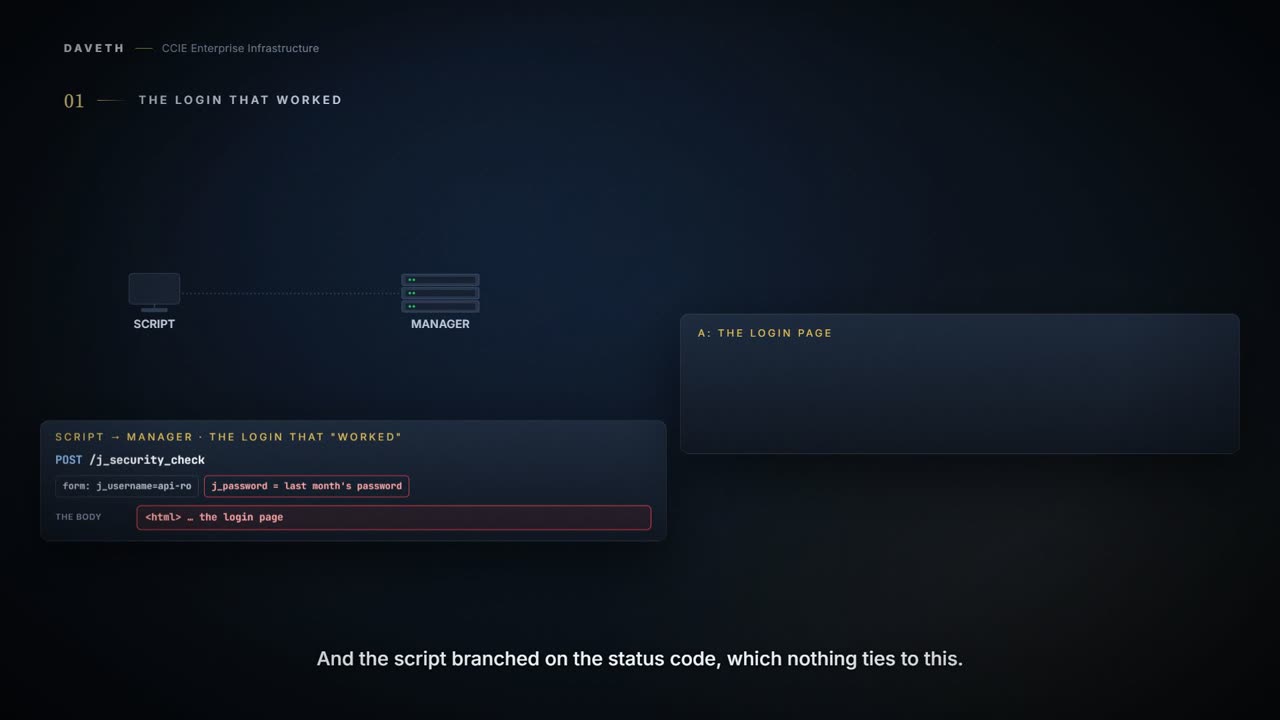
1   POST /j_security_check            –               an HTML login page
2   GET /dataservice/device           –               an HTML login page
3   GET /dataservice/device           –               an HTML login page

3 of 3 came back as the login page, and none of those reached an endpoint
The endpoints are fine. All three of those requests came back as a login page, and none reached an endpoint. There was never a session. The login's body is the documented one; what the two reads got back is this course's reading, and the section after next says why.
What did the script check? The status, and then it moved on. The next two sections are why that is the wrong thing to check for this login.
Step one: the credential exchange
It starts with a form post, not a JSON body. This is the 20.18 authentication page's own example:
curl -c cookie.text -X POST \
  https://<SD-WAN Manager IP address:port>/j_security_check \
  -H Content-Type: application/x-www-form-urlencoded \
  -d "j_username=<username>&j_password=<password>"
Note x-www-form-urlencoded, and the field names j_username and j_password. This is a form login wearing an API's clothes, and it behaves like one.
What did that buy you? An empty body and a cookie:
When a user authenticates successfully, the response body is empty, but the response header includes a valid session cookie. The session token is in the response http cookie, JSESSIONID={session hash}.
> POST /j_security_check
sends     cookie: none
          XSRF token: none

body      (empty)
cookie    JSESSIONID=session-1
! exchange a credential for a session. Proves that a session now exists for this user. Does not prove that the user's role has API access permission, which is a separate requirement.
And one prerequisite that nothing in that response will tell you about:
Your user role must have API access permission.
How does a requests client hold the cookie? Cisco's own sample reads it from the response header and sends it back itself:
    def get_jsessionid(vmanage_host, vmanage_port, username, password):
        api = "/j_security_check"
        base_url = "https://%s:%s"%(vmanage_host, vmanage_port)
        url = base_url + api
        payload = {'j_username' : username, 'j_password' : password}

        response = requests.post(url=url, data=payload, verify=False)
        try:
            cookies = response.headers["Set-Cookie"]
            jsessionid = cookies.split(";")
            return(jsessionid[0])
        except:
            print(No valid JSESSION ID returned\n)
            exit()
Look at how that sample decides the login worked: it looks for a Set-Cookie header, and gives up if there is none. Whether a failed login sets a cookie isn't stated on any page cited. The page's own instruction, next, is to check something else.
What came back
Now the part that costs people the hour: what the first body meant.
If a user fails to authenticate successfully, the response body contains an HTML login page, indicated by an <html> tag. The API client must check the response body for the <html> tag to determine if authentication was successful.
Success is an empty body. Failure is a page of HTML. The documented check is the body.
And what status does each carry? Neither the 20.15 nor the 20.18 authentication page gives one for this login. The 20.18 page does give one for a different login, the JWT flow: If a user fails to authenticate successfully, the system returns an HTTP 401 error. That number belongs to that flow. Carrying it across is how a script ends up waiting for an error this login never documents.
Proves: that a session exists, when the login body is empty; that this credential did not authenticate, when it is HTML
Does not prove: that the role has API access permission; and an HTML body from a later call says nothing about the endpoint, which the request never reached
That is why the failure presents so strangely. Every later call is handled as an anonymous request, and this course reads an anonymous request as getting the login page back too (the documented sentence is about the login response). So the JSON parser fails on <html>, over and over, on endpoints that are perfectly correct.
Step two: the token
Is the cookie the whole credential? No. There is a second artifact, fetched separately, and this is the same page's example:
# Retrieve the JSESSIONID session hash from the cookie.text file from the earlier CURL example.
curl -X GET \
  https://<SD-WAN Manager IP address:port>/dataservice/client/token \
  -H Content-Type: application/json \
  -H Cookie: JSESSIONID=<session hash>
The XSRF token is in the response body.
Notice the order that imposes. The token call is itself authenticated by the cookie, so the handshake is strictly sequential: credentials, then cookie, then token. Does the token call answer without the cookie?
> GET /dataservice/client/token
sends     cookie: none
          XSRF token: none

body      an HTML login page
! fetch the XSRF token for this session. Proves that this request was handled as an anonymous one. Does not prove that the endpoint is wrong: it was never consulted.
And with the cookie?
> GET /dataservice/client/token
sends     cookie: session-1
          XSRF token: none

body      the XSRF token for this session: token-1
! fetch the XSRF token for this session. Proves that this session has an XSRF token, and what it is. Does not prove that anything has been changed with it yet.
The cross-site request forgery prevention token (X-XSRF-TOKEN) remains valid for the duration of the session and belongs in the header of each API request. For POST requests, the user also needs to provide the matching XSRF token.
At this point the client is holding a cookie and a token, and the manager has one open session. Those are two facts about two machines, and the rest of this page is what happens when they stop agreeing.
Why POST needs more than GET
Is that belt and braces? No, and the reason tells you when the rule applies:
HTTP POST requests often not idempotent. They can include form data which can result in changes to the Catalyst SD-WAN Manager. As such, they typically do require an XSRF token in addition to the JSESSIONID cookie within the HTTP request header. Typically, HTTP request headers for these requests do not include an XSRF token. Therefore, for GET requests, the user must only include the JSESSIONID as a cookie within the request header. For HTTP GET requests, including the XSRF token in the header is optional; the system ignores it if not needed.
The dividing line is whether the call changes anything. A cookie authenticates a reader; a write also carries the token. Is the cookie alone enough to read, and is it enough to write?
> GET /dataservice/device
sends     cookie: session-1
          XSRF token: none

body      what /dataservice/device holds
! read something. Proves that the cookie is enough to read. Does not prove that the same cookie alone is enough to write.
> POST /dataservice/template/device
sends cookie: session-1
XSRF token: none
body refused: a POST was sent with the cookie and
no XSRF token
! change something. Proves that the change was not made. Does not prove that the session is bad: a GET with this same cookie still works.And the same POST with the token as well?
> POST /dataservice/template/device
sends     cookie: session-1
          XSRF token: token-1

body      accepted
! change something. Proves that the request carried both artifacts and was accepted. Does not prove that what you sent was the right change: acceptance is not correctness.
So the delta between a working read script and a working write script is one header, and the token behind it, and the call that fetched it. The manager recorded one change from the two attempts.
How a session ends without telling you
How long does a session last? Two limits. The manager only ever answers requests, so when either one ends a session there is no response in which to tell the client:
The lifespan of a default session is 24 hours, and the session inactivity timeout is 30 minutes. The maximum concurrent session number is 100. The system invalidates the least recently used session when the maximum number of concurrent sessions is reached by starting a new session.
So a session ends after 30 idle minutes whether your script is finished or not, and a new login does not end the older one: the older one stays open until it is logged out, times out, or is the least recently used when a 101st starts.
What do the two ends hold after both sessions went 31 minutes without a request?
end       holds                             means
client    a cookie and a token              it can do neither
manager   no open sessions                  so the cookie names nothing

the client is holding a cookie that names nothing
The client's cookie and token look exactly as they did when they worked. Neither names an open session.
Continue the lesson
The whole lesson, with its drawings and its questions. 7 more sections after the ones above.