
Python environments for AI: virtual environments, interpreter resolution, CUDA wheels, conda and extensions
An activated virtual environment changes what the word python means, so a test by hand can use the project's Python while a service runs the system's /usr/bin/python3, which has never heard of torch. Point the service at the environment's own Python. Modern distributions also block pip from installing into the system Python.
What this page answers
Why does a systemd service say No module named torch?
When you tested by hand, the virtual environment was activated, so python meant the project's .venv/bin/python, which has torch. The service runs /usr/bin/python3, the system's own Python. Read it in “Works by hand, fails as a service”
What does externally-managed-environment mean in pip?
The system Python belongs to the operating system, whose own tools depend on exact versions of its packages. The rule called PEP 668 stops pip from changing them; install into a virtual environment instead. Read it in “Installing without breaking things”
Works by hand, fails as a service
You set up a project, install PyTorch, and test the training script by hand. It works. Then you turn it into a nightly systemd service (as in Down the Unit), and the first run fails:
(.venv) ml@gpu-box:~/proj$ python train.py --dry-run
dry run ok: torch 2.10.0+cu128, 8 GPUs
(.venv) ml@gpu-box:~/proj$ grep ExecStart /etc/systemd/system/nightly-train.service
ExecStart=/usr/bin/python3 /home/ml/proj/train.py
(.venv) ml@gpu-box:~/proj$ journalctl -u nightly-train -n 2 --no-pager
Oct 25 02:00:01 gpu-box python3[91822]:   File "/home/ml/proj/train.py", line 3, in <module>
Oct 25 02:00:01 gpu-box python3[91822]: ModuleNotFoundError: No module named 'torch'
Outputs on this page are realistic examples. Commands, file layouts and error messages are real.
Same machine, same user, same script. Why can't the service find torch?
- The service can't read the files where torch is installed
- The service runs a different Python, one without torch
- Services can't use the GPU, so torch refuses to load
Answer. Look at the prompt: (.venv). When you tested by hand, your shell had the project's virtual environment activated, so the word python meant /home/ml/proj/.venv/bin/python, the Python that has torch. The service says /usr/bin/python3, the operating system's own Python, which has never heard of torch:
(.venv) $ which python
/home/ml/proj/.venv/bin/python
$ /usr/bin/python3 -c "import torch"
ModuleNotFoundError: No module named 'torch'
The fix is one change in the unit: ExecStart=/home/ml/proj/.venv/bin/python /home/ml/proj/train.py. No activation needed. Services, cron jobs, and new terminals never activate anything, so they always need the full path to the right Python.
What a virtual environment is
A virtual environment (a “venv”) sounds grand, but it's just a folder. Inside it are a link to a real Python program, a tiny settings file, and an empty folder for packages. When you install something “into the venv”, it lands in that folder, and nothing else on the machine changes. That's the whole trick, and it's why you can have one project on PyTorch 2.10 and another on 2.6 side by side.
$ python3 -m venv .venv
$ ls -l .venv/bin/python
lrwxrwxrwx 1 ml ml 16 Oct 20 10:02 .venv/bin/python -> /usr/bin/python3
$ cat .venv/pyvenv.cfg
home = /usr/bin
include-system-site-packages = false
version = 3.12.3
$ .venv/bin/python -c "import sys; print(sys.prefix)"
/home/ml/proj/.venv
So .venv/bin/python is the system's Python under another name. How does it end up using the venv's packages? When Python starts, it looks for a pyvenv.cfg file one folder above the program it was started as. If it finds one, it treats that folder as its home (sys.prefix) and looks for packages inside it. Here's that chain as a picture, with how to read it: follow the arrows from the command you typed to the folder the packages come from.
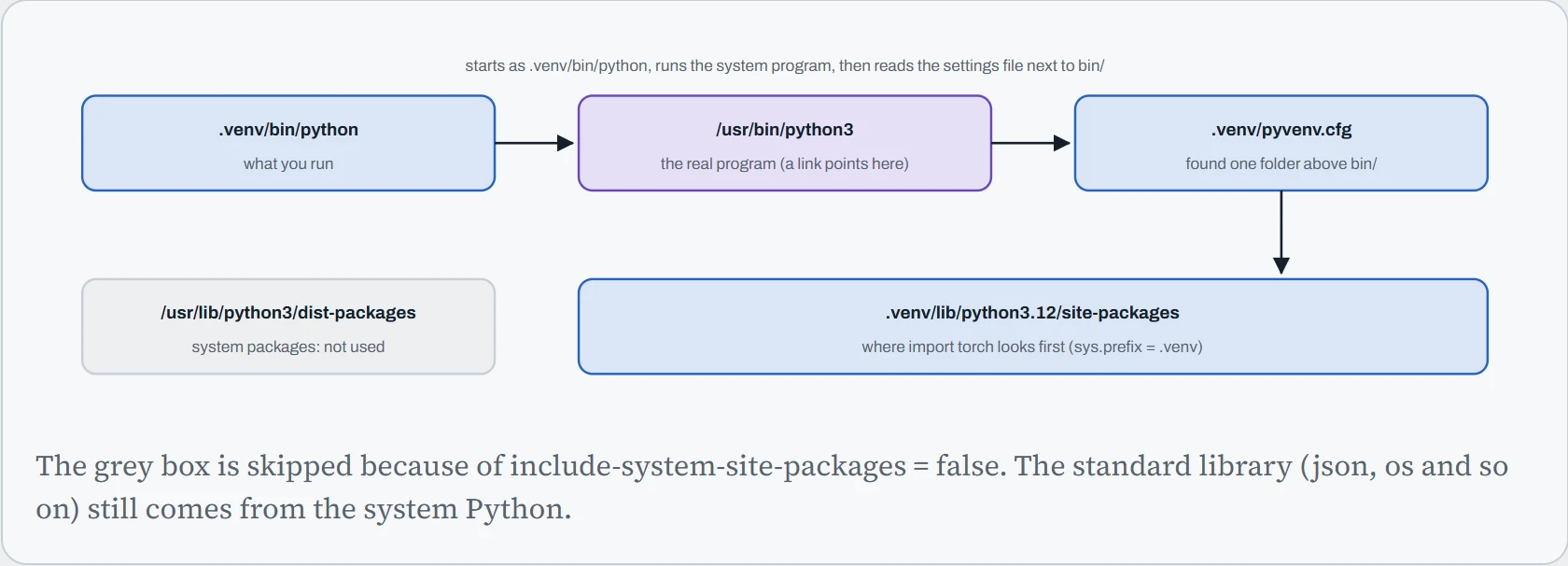
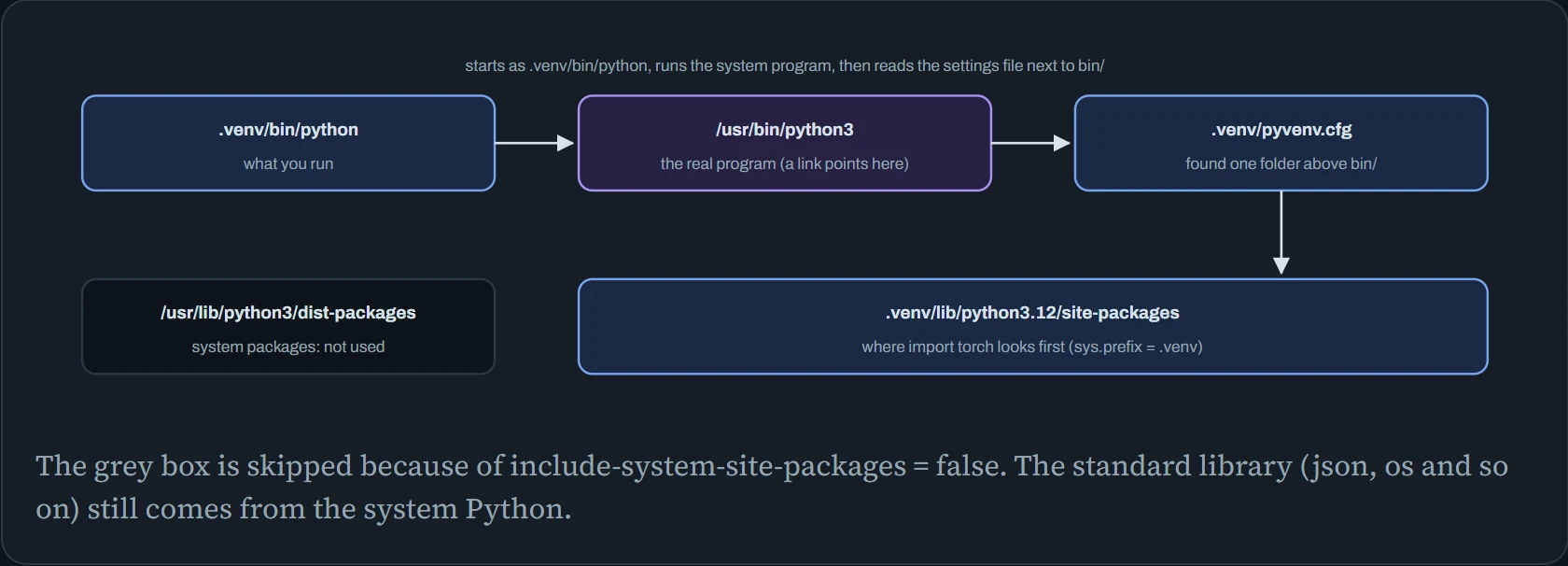
This explains the hook. source .venv/bin/activate doesn't switch anything on inside Python. It only puts .venv/bin at the front of your shell's search list (PATH), so that typing python finds the venv's one first, and it adds (.venv) to your prompt. Calling .venv/bin/python by its full path does exactly the same job, which is why services should use it.
Predict. You move a working project from ~/proj to /data/proj, venv folder and all. Then you run /data/proj/.venv/bin/pip install rich. What happens?
Answer. It fails with something like bad interpreter: No such file or directory. Small helper programs in .venv/bin, like pip, start with a first line naming the exact Python to run them, such as #!/home/ml/proj/.venv/bin/python. That path no longer exists. The activate script has the old path baked in too.
Venvs aren't meant to be moved or copied. Treat them as disposable: delete and rebuild from your project's lock file. With uv that takes seconds, because the packages come from its cache.
Which Python runs?
Every install has two halves: the command that puts a package somewhere, and the command that later runs your code. They work only when both point at the same environment. The figure below is a project folder with a .venv in it, on Ubuntu 24.04. Each row then shows which Python that command really reaches, and the bottom row says whether import torch will work.
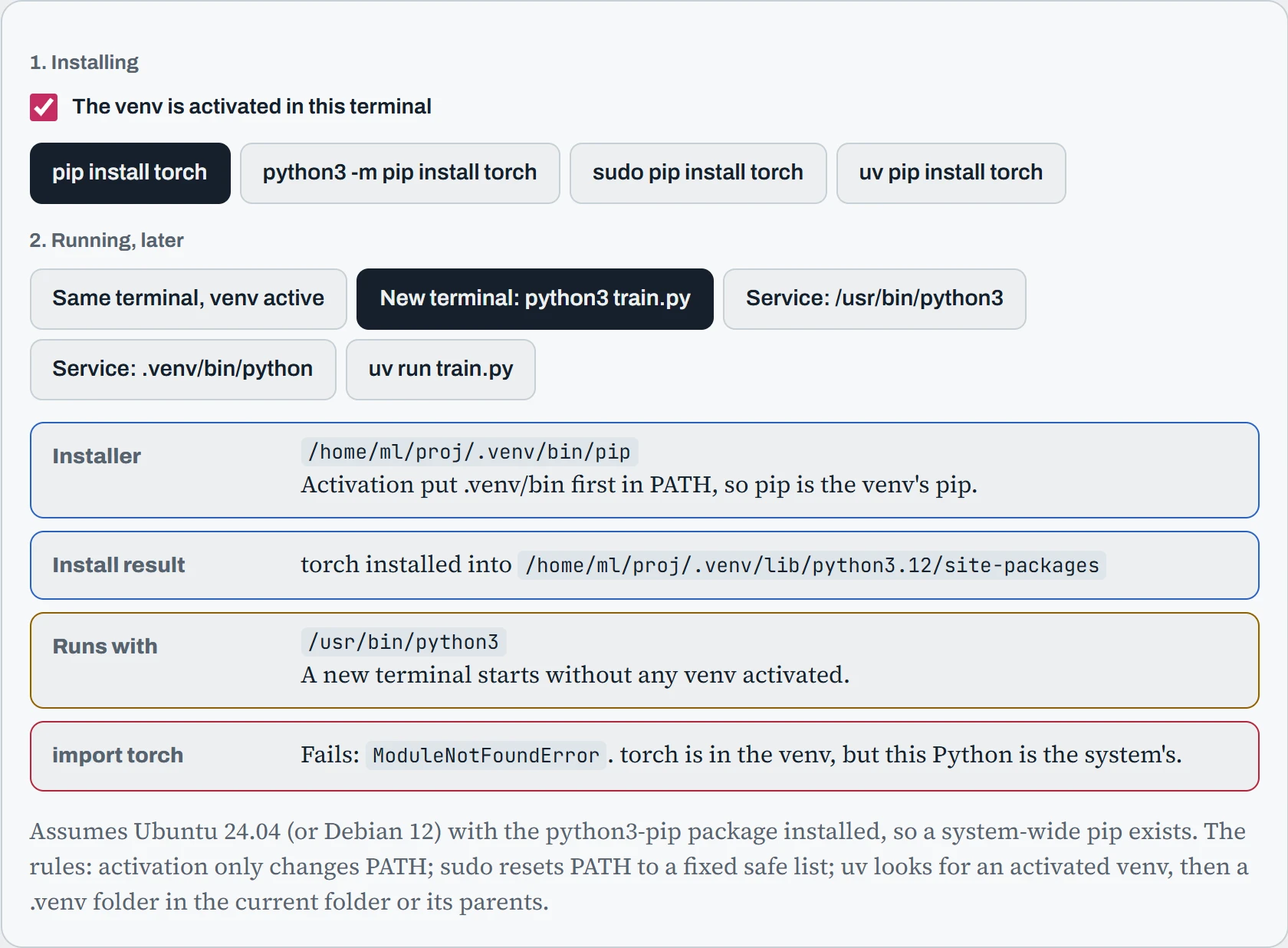
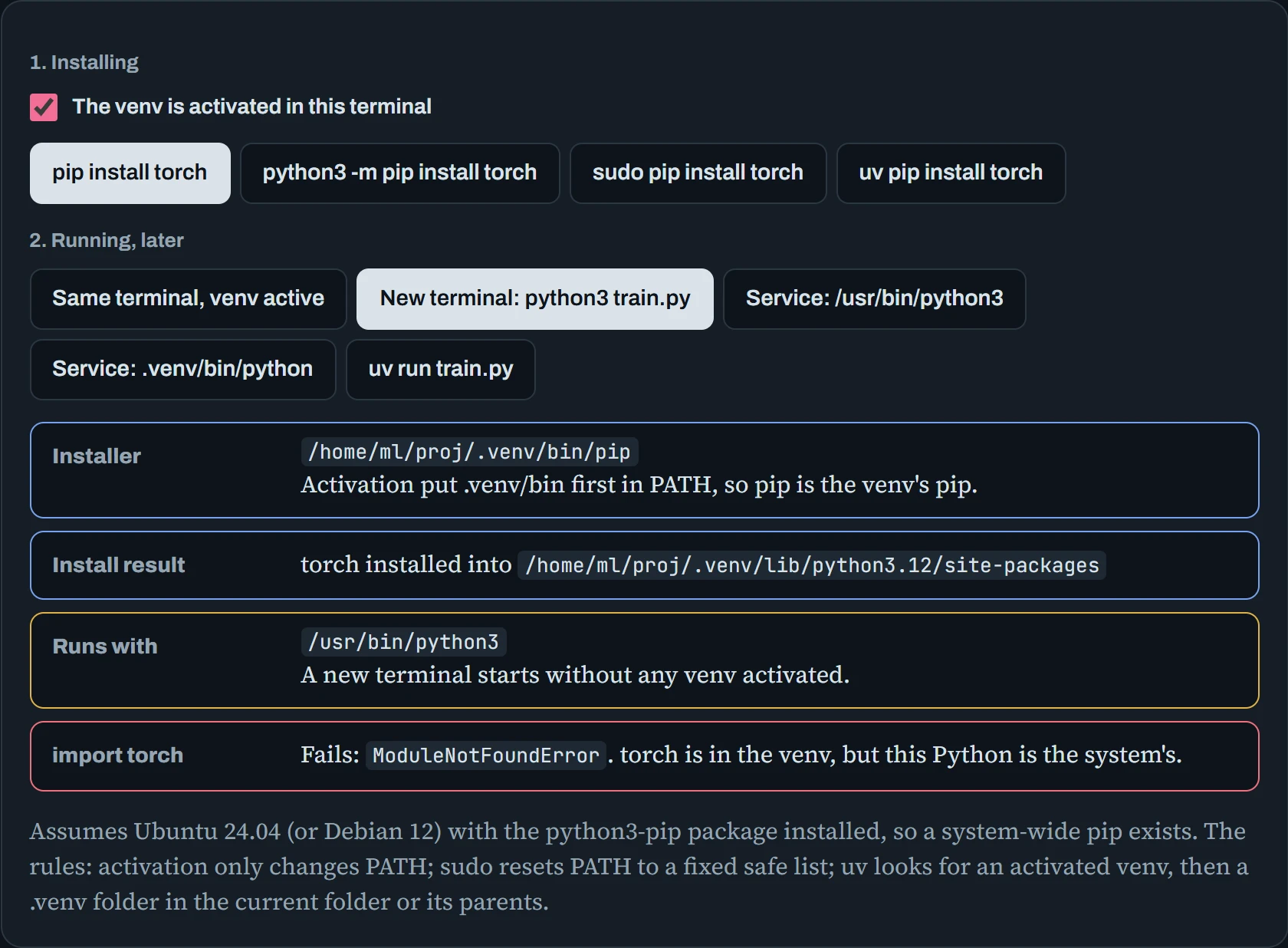
Two habits remove nearly all of these surprises. First, install with python3 -m pip (or uv) rather than a bare pip: then the installer is always the same Python you'll run. Second, anything that runs without you (services, cron, schedulers) gets the full path to the venv's Python. And notice that sudo pip never helps: sudo throws away your activated environment, so it always aims at the system Python.
Installing without breaking things
The Python in /usr/bin belongs to the operating system. Ubuntu's own tools are written in it, and they depend on exact versions of its packages. If you upgrade those packages with pip, you can break things like the package manager or the network settings tool. So modern distributions lock the door. This rule is called PEP 668, and it shows up as an error the first time you try:
$ pip install torch
error: externally-managed-environment

× This environment is externally managed
╰─> To install Python packages system-wide, try apt install
    python3-xyz, where xyz is the package you are trying to
    install.
The error is doing you a favour. There is a --break-system-packages flag, and the name is honest: don't use it. Make an environment instead. The tool most teams now use for this is uv, a very fast replacement for pip and venv. It can also download and manage Python versions itself (uv python install 3.12), so you don't depend on the version your distribution ships. (pyenv is the older tool for that.) A project managed by uv looks like this:
$ uv init proj && cd proj
$ uv add torch transformers
Resolved 42 packages in 1.2s
Prepared 42 packages in 38.40s
Installed 42 packages in 412ms
$ ls -A
.git  .gitignore  .python-version  .venv  README.md  main.py  pyproject.toml  uv.lock
$ uv run python train.py
uv add writes the package into pyproject.toml (what you asked for) and uv.lock (the exact versions and file hashes that were chosen). Commit both. On another machine, uv sync rebuilds the identical environment from the lock file, which is what makes a training run reproducible a year later. uv run always uses the project's environment, activated or not. For command-line tools you want everywhere (like nvitop or ruff), uv tool install or pipx gives each tool its own private environment.
PyTorch needs one more setting. Its CUDA builds live on PyTorch's own package server, one per CUDA version, so you tell uv where to get torch from:
# pyproject.toml
[[tool.uv.index]]
name = "pytorch-cu128"
url = "https://download.pytorch.org/whl/cu128"
explicit = true

[tool.uv.sources]
torch = { index = "pytorch-cu128" }
explicit = true means only torch comes from that server, and everything else still comes from the normal one. Without this, you may silently get a torch built for a different CUDA version than you expected, or, on some platforms, one with no GPU support at all.
Where CUDA comes from
A surprise for many people: installing PyTorch with pip doesn't use the CUDA toolkit installed on the machine. The CUDA libraries it needs (cuBLAS for matrix maths, cuDNN for neural network layers, NCCL for talking between GPUs) arrive as ordinary pip packages, inside your environment. The only CUDA part that must come from the system is the driver. The figure splits the two, and the line between them is the one rule to remember.
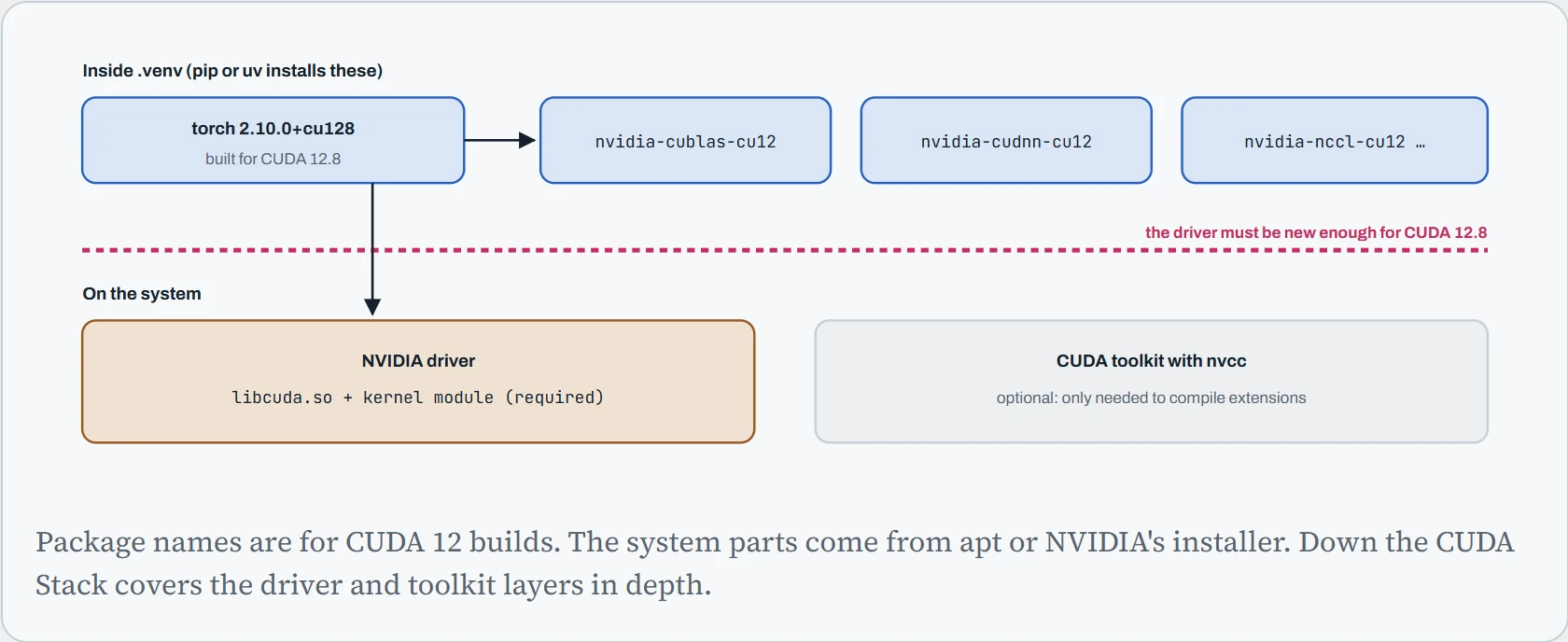
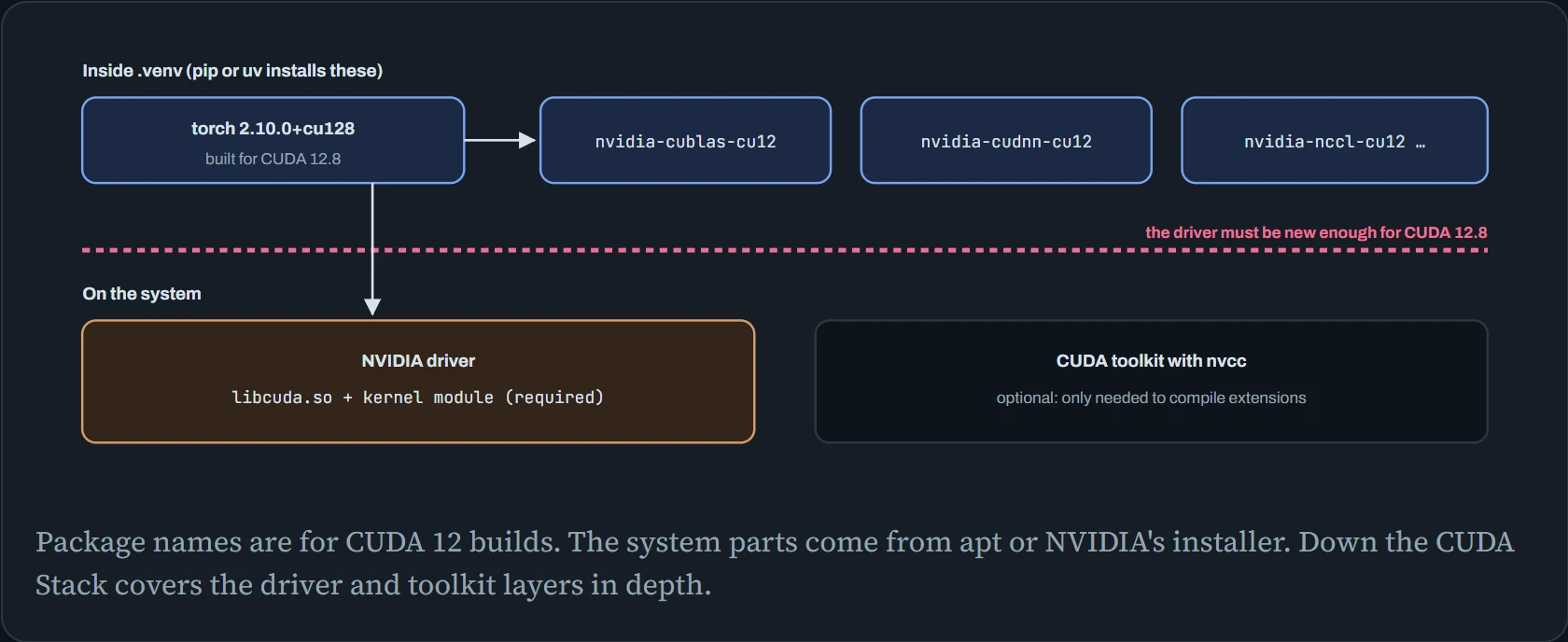
So the question “does my CUDA version match?” has a simple answer for pip-installed PyTorch. Run nvidia-smi, and look at the “CUDA Version” in the top corner. That's the newest CUDA the driver supports, and it must be at least the version in the torch build's name (cu128 means 12.8). The nvcc --version number doesn't matter at all, unless you compile something.
The price is size. These libraries are huge, and every environment gets its own copy, roughly 7 GB for a PyTorch CUDA environment. Here's where uv helps: it unpacks each package once into its cache, then hard-links the files into each environment. A hard link is a second name for the same data on disk, so ten environments can share one copy. That only works when the cache and the environments are on the same filesystem.
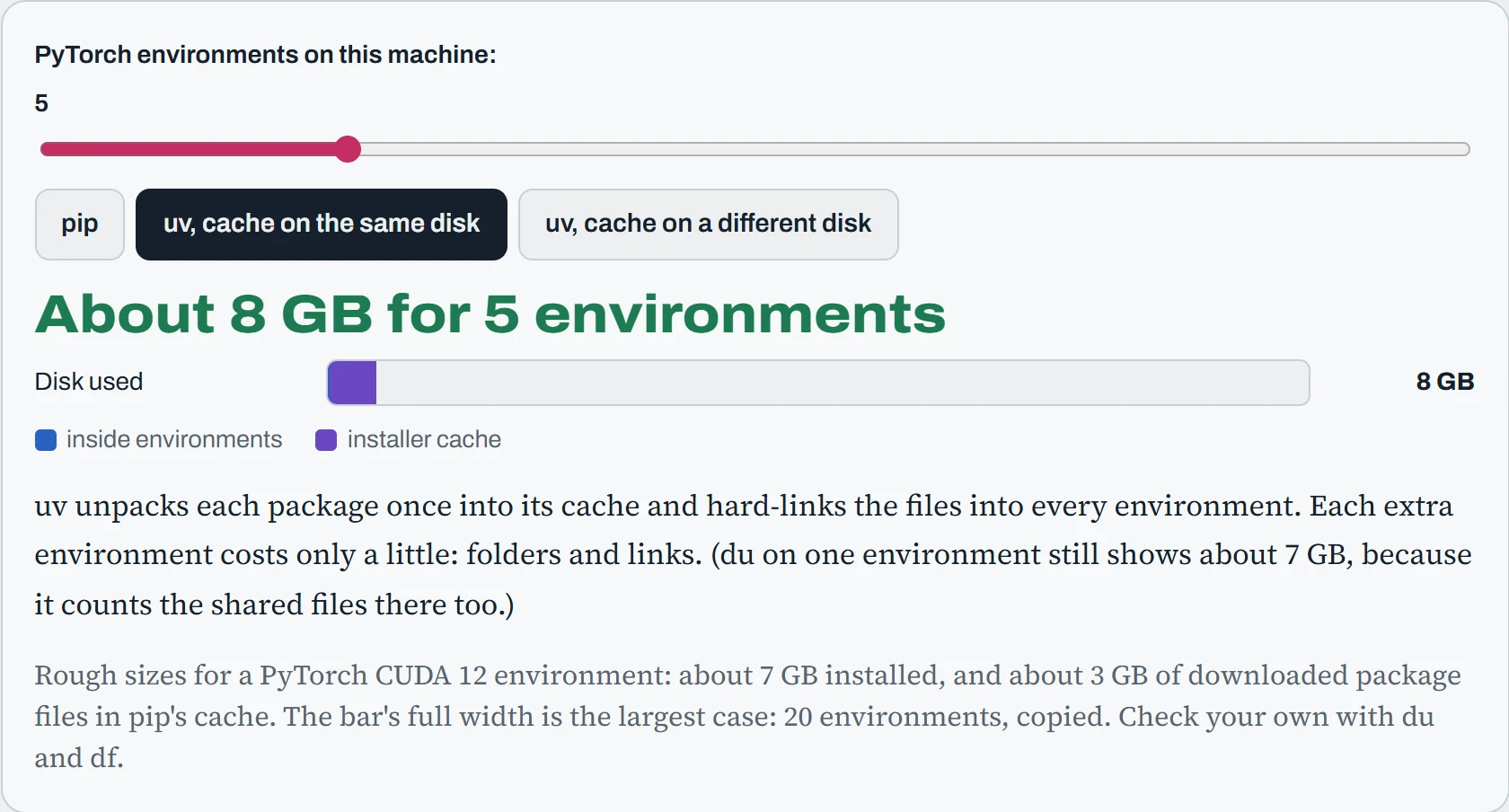
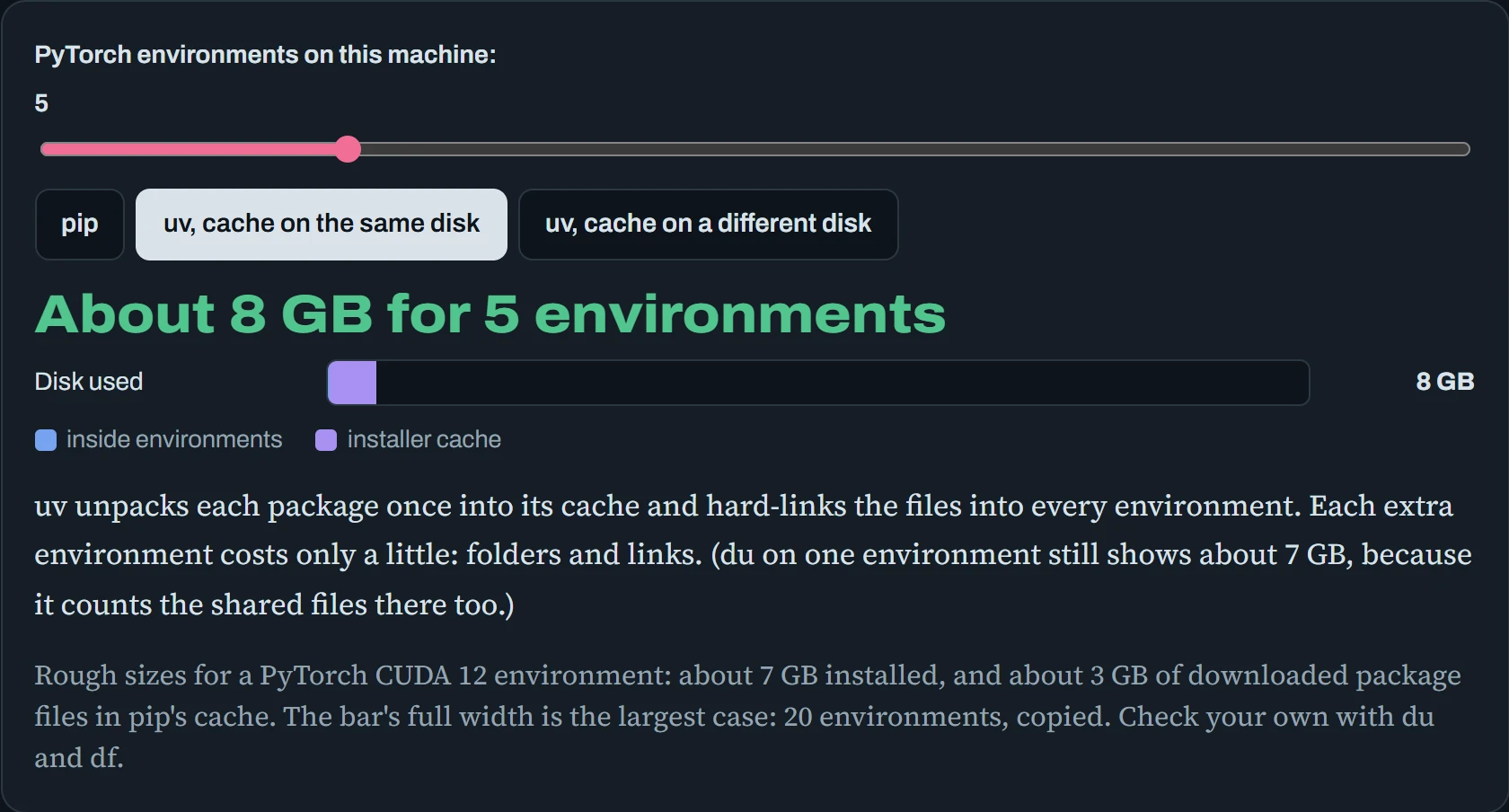
The middle case is the one to aim for, and the last one is common on GPU servers by accident. Your home folder (where uv keeps its cache, in ~/.cache/uv) is on one disk, and projects live on a big /data disk. uv then prints “Failed to hardlink files; falling back to full copy” and quietly uses the space anyway. Setting UV_CACHE_DIR=/data/uv-cache fixes it. And when a home folder fills up, check the caches first: du -sh ~/.cache/*, then uv cache prune, pip cache purge or conda clean -a.
Continue the lesson
The whole lesson, with its drawings and its questions. The rest of this section and 4 more after it.