
Flexible NetFlow
Flexible NetFlow summarises traffic into flows instead of keeping packets. A flow is a unidirectional stream arriving on a source interface with the same values for every key, so the keys you choose decide what one flow is. A record defines the keys, a monitor applies it to an interface, and an exporter sends flows to a collector. Catalyst 9000 does not support predefined records.
By Arif, founder of Daveth · Updated
The full 8 min walkthrough is in Daveth Pro (Network). See what the plan opens
What this page answers
What is a flow in Flexible NetFlow?
A unidirectional stream of packets arriving on a source interface with the same values for all the keys in the flow record. Change the keys and the same traffic becomes different flows. Read it in “The definition, and the word "unidirectional"”
Does Catalyst 9000 support predefined NetFlow records?
No. Predefined records are not supported for regular Flexible NetFlow on Catalyst 9000 switches; you define your own record with at least one match field. Read it in “Four components, assembled”
How do you apply Flexible NetFlow for IPv6?
With ipv6 flow monitor name input on the interface, a separate monitor from the IPv4 one, since each traffic type needs its own monitor. Read it in “Applying it, and the limits”
What counts as one flow
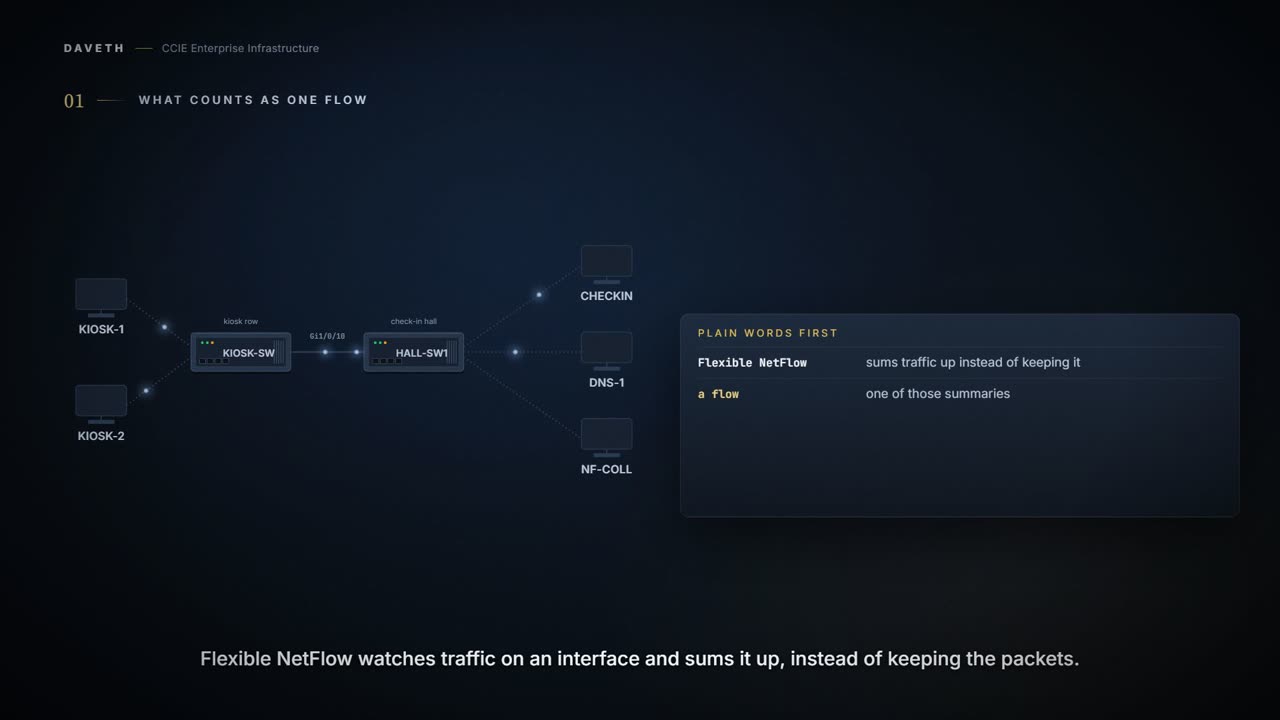
An airport check-in hall has a row of self-service kiosks. They hang off KIOSK-SW, which uplinks to HALL-SW1 on Gi1/0/10. The airline wants to know what the kiosks send, without capturing a single packet. How many flows are the kiosks sending right now?
Plain words first. Flexible NetFlow watches traffic on an interface and sums it up, instead of keeping the packets. A flow is one of those summaries. The cache is where the switch keeps its flows, and a collector is the server they are sent to afterwards.
Flexible NetFlow uses flows to provide statistics for accounting, network monitoring, and network planning. Flexible NetFlow allows the flow to be user defined.
Look at "user defined". The answer to the question above isn't a property of the traffic. It depends on a definition you write. Here is the traffic the kiosks send in on Gi1/0/10 at 07:00:
Computed from the state: the kiosks' traffic at 07:00, this course's. No command prints it in this form.
from     to       family service  connections at 07:00
KIOSK-1  CHECKIN  IPv4   TCP 443  6
KIOSK-1  DNS-1    IPv4   UDP 53   6
KIOSK-2  CHECKIN  IPv4   TCP 443  4
KIOSK-2  DNS-1    IPv4   UDP 53   4
KIOSK-1  CHECKIN  IPv6   TCP 443  3
KIOSK-2  CHECKIN  IPv6   TCP 443  2
                                  20 IPv4, 5 IPv6
The definition, and the word "unidirectional"
A flow is a unidirectional stream of packets that arrives on a source interface and has the same values for the keys. A key is an identified value for a field within the packet. All key values must match for the packet to count in a given flow.
Two phrases in there decide everything. A key is a field you pick, such as the source address. Packets belong to the same flow only when every key has the same value. Pick different keys and the same traffic becomes a different number of flows.
Then "unidirectional". A flow is not a conversation; it is one direction of one. When KIOSK-1 opens a session to CHECKIN, the packets it sends are one flow and CHECKIN's replies would be another, arriving on a different interface.
Four components, assembled
Four pieces make it work. Which one would you have to configure first?
A flow record defines the keys that Flexible NetFlow uses to identify packets in the flow, as well as other fields of interest that Flexible NetFlow gathers for the flow. You must configure at least one of the following match parameters for the flow records. Predefined records are not supported for regular Flexible NetFlow on Cisco Catalyst 9000 Series Switches.
Flow monitors are the Flexible NetFlow component that is applied to interfaces to perform network traffic monitoring. Flow exporters export the data in the flow monitor cache to a remote system, such as a server running NetFlow collector, for analysis and storage. Flow samplers are used to reduce the load on the device that is running Flexible NetFlow by limiting the number of packets that are selected for analysis.
So on this switch you always write the record yourself. The guide's own example puts all of it together:
From elsewhere: the configuration example for a flow. The names, numbers and addresses come from elsewhere, not from this scenario.
Device# configure terminal
Enter configuration commands, one per line. End with CNTL/Z.
Device(config)# flow export export1
Device(config-flow-exporter)# destination 10.0.101.254
Device(config-flow-exporter)# transport udp 2055
Device(config-flow-exporter)# exit
Device(config)# flow record record1
Device(config-flow-record)# match ipv4 source address
Device(config-flow-record)# match ipv4 destination address
Device(config-flow-record)# match ipv4 protocol
Device(config-flow-record)# match transport source-port
Device(config-flow-record)# match transport destination-port
Device(config-flow-record)# match flow cts source group-tag
Device(config-flow-record)# match flow cts destination group-tag
Device(config-flow-record)# collect counter byte long
Device(config-flow-record)# collect counter packet long
Device(config-flow-record)# collect timestamp absolute first
Device(config-flow-record)# collect timestamp absolute last
Device(config-flow-record)# exit
Device(config)# flow monitor monitor1
Device(config-flow-monitor)# record record1
Device(config-flow-monitor)# exporter export1
Device(config-flow-monitor)# exit
Device(config)# interface tenGigabitEthernet 1/0/1
Device(config-if)# ip flow monitor monitor1 input
Device(config-if)# end
Notice the order the pieces name each other in. The monitor names a record and an exporter, and the interface names the monitor. The command reference states the last link directly:
Before you can apply a flow monitor to an interface with the ip flow monitor command, you must have already created the flow monitor using the flow monitor global configuration command. The flow monitor cache is automatically created at the time the flow monitor is applied to the first interface.
HALL-SW1 gets the same shape with two keys: IPv4 source and destination address, plus byte and packet counters.
Configuration: HALL-SW1, first build, in the forms the cited pages print.
HALL-SW1# configure terminal
HALL-SW1(config)# flow record HALL-V4
HALL-SW1(config-flow-record)# match ipv4 source address
HALL-SW1(config-flow-record)# match ipv4 destination address
HALL-SW1(config-flow-record)# collect counter bytes long
HALL-SW1(config-flow-record)# collect counter packets long
HALL-SW1(config-flow-record)# exit
HALL-SW1(config)# flow exporter TO-COLL
HALL-SW1(config-flow-exporter)# destination 10.60.0.20
HALL-SW1(config-flow-exporter)# transport udp 2055
HALL-SW1(config-flow-exporter)# exit
HALL-SW1(config)# flow monitor HALL-V4-MON
HALL-SW1(config-flow-monitor)# record HALL-V4
HALL-SW1(config-flow-monitor)# exporter TO-COLL
HALL-SW1(config-flow-monitor)# exit
HALL-SW1(config)# interface GigabitEthernet1/0/10
HALL-SW1(config-if)# ip flow monitor HALL-V4-MON input
HALL-SW1(config-if)# end
Computed from the state: what HALL-V4-MON's cache holds at 07:00. No command prints it in this form.
HALL-V4-MON on Gi1/0/10 input at 07:00 · keys: source, destination
source       destination  flows
10.20.1.11   10.50.0.10   1
10.20.1.11   10.50.0.53   1
10.20.1.12   10.50.0.10   1
10.20.1.12   10.50.0.53   1
in the cache              4
Read the flows column: 1, 1, 1, 1. Twenty connections, four flows, because only four source-and-destination pairs exist. Every connection KIOSK-1 opens to CHECKIN counts in the same flow.
By this course's reading, every one of those connections is really two flows, and this cache holds only one side of each: the replies from CHECKIN and DNS-1 come in on Te1/1/1 and Te1/1/2, where no monitor sits. A capacity estimate that starts from twenty conversations is out by a factor of two before anyone counts the keys.
Applying it, and the limits
The kiosks reach CHECKIN over IPv6 too. Can a second monitor go on Gi1/0/10, inbound, next to the first?
To enable a flow monitor for IPv6 traffic that the device is receiving, use the ipv6 flow monitor command in interface configuration mode.
From elsewhere: an IPv6 monitor on an interface. The names, numbers and addresses come from elsewhere, not from this scenario.
Device(config)# interface gigabitethernet1/0/1
Device(config-if)# ipv6 flow monitor FLOW-MONITOR-1 input
Layer 2, IPv4, and IPv6 traffic types are supported. A unique flow monitor for each traffic type can be applied for a given interface and direction. Multiple flow monitors for the same traffic type cannot be applied to an interface in the same direction. The device supports up to 15 flow monitors.
Read the last two sentences carefully. One monitor per traffic type, per interface, per direction. IPv4 and IPv6 are different types, so both can sit inbound on Gi1/0/10. A second IPv4 monitor inbound there cannot.
So what does HALL-SW1 need for the second one? A record keyed on the IPv6 addresses, a monitor that names it and the same exporter, and the monitor on Gi1/0/10:
Configuration: what HALL-SW1 adds for IPv6, in the forms the cited pages print.
HALL-SW1# configure terminal
HALL-SW1(config)# flow record HALL-V6
HALL-SW1(config-flow-record)# match ipv6 source address
HALL-SW1(config-flow-record)# match ipv6 destination address
HALL-SW1(config-flow-record)# collect counter bytes long
HALL-SW1(config-flow-record)# collect counter packets long
HALL-SW1(config-flow-record)# exit
HALL-SW1(config)# flow monitor HALL-V6-MON
HALL-SW1(config-flow-monitor)# record HALL-V6
HALL-SW1(config-flow-monitor)# exporter TO-COLL
HALL-SW1(config-flow-monitor)# exit
HALL-SW1(config)# interface GigabitEthernet1/0/10
HALL-SW1(config-if)# ipv6 flow monitor HALL-V6-MON input
HALL-SW1(config-if)# end
Where do those flows actually live? In hardware tables, and the guide gives their size and how full they really get:
Network Essentials 32 K 32 K Network Advantage 32 K 32 K The capacities listed in the above table are on a per-Core/per-ASIC basis. Hash collisions can occur in the hardware. Therefore, in spite of the internal overflow Content Addressable Memory (CAM), the actual NetFlow table utilization could be about 80 percent. Depending on the fields that are used for the flow, a single flow could take two consecutive entries. IPv6 and datalink flows also take two entries. In these situations, the effective usage of NetFlow entries is half the table size, which is separate from the above hash collision limitation.
Computed from the state: flows and hardware table entries per monitor at 07:00. No command prints it in this form.
monitor      traffic  flows  table entries
HALL-V4-MON  IPv4     4      4
HALL-V6-MON  IPv6     2      4 (two per flow)
Look at the IPv6 row: two flows, four entries. So 32 K is a ceiling, not a budget. Hash collisions take some of it, and IPv6 flows count double. One more limit changes real designs:
Flexible NetFlow is not supported on the Layer 2 port-channel interface, but is supported on the Layer 2 port-channel member ports.
What would that mean for an uplink bundled into an EtherChannel? The close comes back to it.
Keys, and what adding one costs
The airline now asks which services the kiosks use. Someone suggests adding the port. The team takes HALL-V4-MON off Gi1/0/10, adds match transport source-port to HALL-V4, and puts the monitor back.
Configuration: the monitor off, the source port added to HALL-V4, and the monitor back on, in the forms the cited pages print.
HALL-SW1# configure terminal
HALL-SW1(config)# interface GigabitEthernet1/0/10
HALL-SW1(config-if)# no ip flow monitor HALL-V4-MON input
HALL-SW1(config-if)# exit
HALL-SW1(config)# flow record HALL-V4
HALL-SW1(config-flow-record)# match transport source-port
HALL-SW1(config-flow-record)# exit
HALL-SW1(config)# interface GigabitEthernet1/0/10
HALL-SW1(config-if)# ip flow monitor HALL-V4-MON input
HALL-SW1(config-if)# end
Before you read on, work out the 07:00 flow count. The traffic table above has everything you need.
Computed from the state: what HALL-V4-MON's cache holds at 07:00 with the source port as a key. No command prints it in this form.
HALL-V4-MON on Gi1/0/10 input at 07:00 · keys: source, destination, source-port
source       destination  source-port      flows
10.20.1.11   10.50.0.10   6 different      6
10.20.1.11   10.50.0.53   6 different      6
10.20.1.12   10.50.0.10   4 different      4
10.20.1.12   10.50.0.53   4 different      4
in the cache                               20
Read the port column: 6 different, 6 different, 4 different, 4 different. Every connection leaves from its own source port, so every connection is now its own flow. Twenty.
More fields doesn't mean better data when the field is a key. A key multiplies the flow count by the number of values it takes inside each flow that already existed. The source port takes a new value for almost every connection.
The opposite extreme is just as instructive. A record needs at least one match, so the smallest legal one keys on match ipv4 version alone. That's the cheapest record on the switch: one flow for the whole kiosk row, reporting with complete confidence that the traffic was IPv4.
Continue the lesson
The whole lesson, with its drawings and its questions. 5 more sections after the ones above.