
IP SLA and tracking objects
A static route stays while its interface is up, even when the gateway behind it stops answering. Three stages fix that: IP SLA sends packets and records the result, a tracked object reads a verdict and holds a state, and a client such as a static route acts on it. An ICMP echo probe defaults to a 5000 ms timeout and threshold and a 60-second frequency.
By Arif, founder of Daveth · Updated
The full 5 min walkthrough is in Daveth Pro (Network). See what the plan opens
What this page answers
What is the difference between tracking IP SLA state and reachability?
They differ on OverThreshold: with state, OK is up and OverThreshold or Timeout is down; with reachability, OK and OverThreshold are both up and only Timeout is down. Slow is not the same as gone. Read it in “Slow is not the same as gone”
What are the IP SLA ICMP echo defaults?
A 5000 ms timeout, a 5000 ms threshold and a 60-second frequency, which leaves a default route pointing at a dead gateway for a long time unless you change them. Read it in “Stage one: something that measures”
Does an IP SLA ICMP echo need a responder?
No. The responder, which timestamps packets on arrival and departure to remove processing time, is needed for operations such as UDP jitter, not for an ICMP echo. Read it in “The responder, and which probes need one”
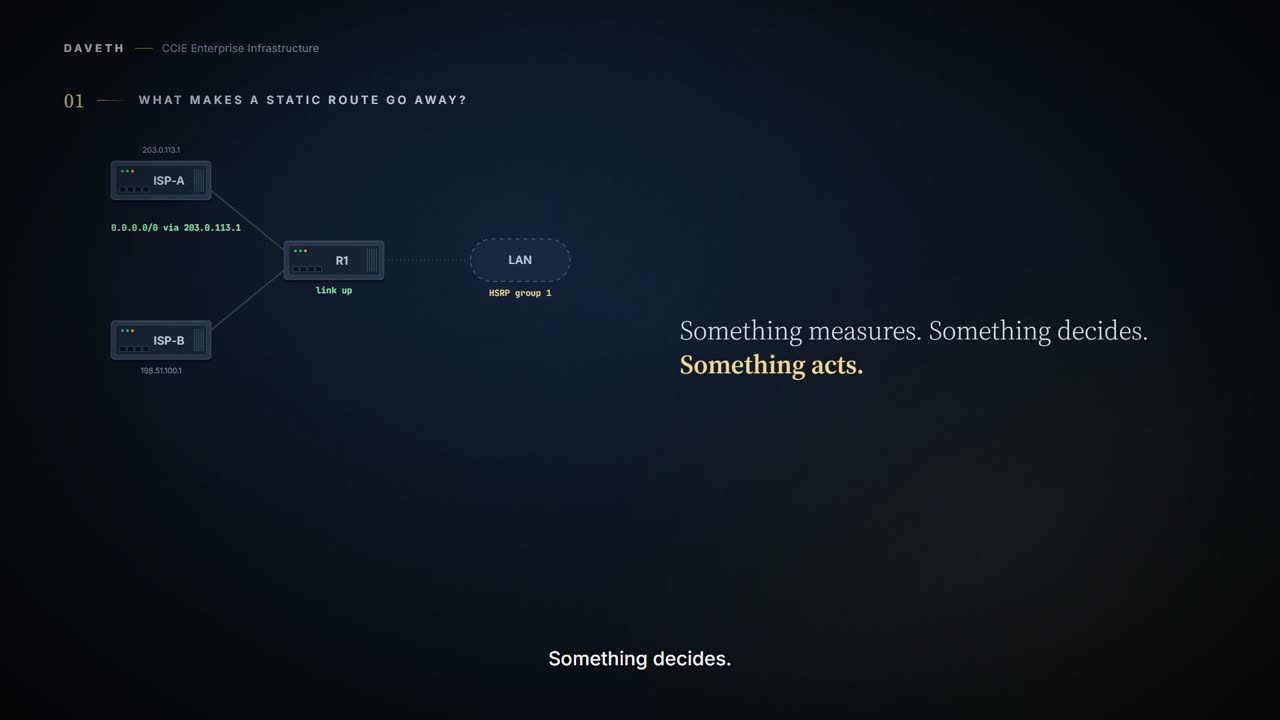
What makes a static route go away?
A default route out of ISP-A, and a site on 10.20.0.0/24 behind it. Nothing makes it go away except somebody removing it or the interface going down.
And the interface going down isn't the failure you're worried about. The gateway can stop answering with the link perfectly up: a far-end fault, a problem two hops away, maintenance on something you can't see.
Three stages answer this:
IP SLA sends packets and records what came back.
a tracked object reads a verdict and holds a state.
a client is told the state changed and does something.
You already own one of these. A thermometer measures the room and has no opinion about it. A thermostat reads the thermometer and decides too hot. The fan does not measure anything and does not decide anything; it just gets told. Three jobs, three boxes, and each one can be replaced without touching the other two.
The comparison stops at the split. A thermostat has one job and one fan; here a single measurement can feed several trackers, and one tracker can drive several clients that have never heard of each other.
The Enhanced Object Tracking feature provides complete separation between the objects to be tracked and the action to be taken by a client when a tracked object changes.
Stage one: something that measures
IOS IP SLAs send data across the network to measure performance between multiple network locations or across multiple network paths.
EDGE# configure terminal
EDGE(config)# ip sla 10
EDGE(config-ip-sla)# icmp-echo 203.0.113.1
EDGE(config-ip-sla-echo)# timeout 1000
EDGE(config-ip-sla-echo)# threshold 250
EDGE(config-ip-sla-echo)# frequency 5
EDGE(config-ip-sla-echo)# exit
EDGE(config-ip-sla)# exit
EDGE(config)# ip sla schedule 10 start-time now life forever
EDGE(config)# end
Why set those three? The 17.9 chapter's show ip sla configuration sample for an ICMP echo shows the defaults: a 5000 ms timeout, a 5000 ms threshold and a 60-second frequency. A minute is a long time for a default route to point at a dead gateway.
So what did the first result come back as?
Before you read it, notice what the whole pipeline is about to rest on: one address, chosen by somebody. Every decision downstream inherits that choice. A measurement can be perfectly accurate about a destination that was never the right question, and nothing later in the chain can recover from it.
Computed for this scenario, in the layout of the cited sample. Not a published sample: the addresses, times and counts are this course's.
EDGE# show ip sla statistics 10
IPSLAs Latest Operation Statistics

IPSLA operation id: 10
        Latest RTT: 12 milliseconds
Latest operation return code: OK
! OK: a response within the 250 ms threshold. This field is what the next stage reads.
The Command Reference sample also prints a start-time line; it isn't drawn here.
The ICMP echo operation measures the end-to-end response time between a Cisco device and any other device that uses IP. The device supports IP service level analysis by using UDP jitter, UDP echo, HTTP, TCP connect, ICMP echo, ICMP path echo, ICMP path jitter, FTP, DNS, and DHCP.
The responder, and which probes need one
The IP SLA responder is a component embedded in the destination Cisco device that allows the system to anticipate and respond to IP SLA request packets. When the IP SLA responder is enabled, it allows the target device to take time stamps when the packet arrives on the interface at interrupt level and again just as it is leaving, eliminating the processing time.
Does this probe need one? No. The 17.9 chapter's own examples are a UDP jitter operation, which requires a responder, and configuring an ICMP echo operation, which does not require a responder. That's why this probe can target a provider's gateway you don't control.
The UDP and TCP probes are where the responder comes in. ip sla responder takes tcp-connect, which Enables the responder for TCP connect operations, or udp-echo, which Enables the responder for User Datagram Protocol (UDP) echo or jitter operations. And the target has to be a Cisco device you manage, because You cannot configure the IP SLAs responder on non-Cisco devices.
Stage two: something that decides
Object tracking of IP SLAs operations allows clients to track the output from IP SLAs objects and use this information to trigger an action. Every IP SLAs operation maintains an SNMP operation return-code value, such as OK or OverThreshold, that can be interpreted by the tracking process.
EDGE# configure terminal
EDGE(config)# track 1 ip sla 10 state
EDGE(config-track)# exit
EDGE(config)# track 5 ip sla 10 reachability
EDGE(config-track)# end
What does each object say it is reading?
Computed for this scenario, in the layout of the cited sample. Not a published sample: the addresses, times and counts are this course's.
EDGE# show track
Track 1
   IP SLA 10 state
   State is Up
     0 changes, last change never
   Latest operation return code: OK
   Latest RTT (millisecs) 12
Track 5
   IP SLA 10 reachability
   Reachability is Up
     0 changes, last change never
   Latest operation return code: OK
   Latest RTT (millisecs) 12
Proves: the object's current state, how many times it has changed and when, the latest return code and round trip it read, and which clients are registered against it.
Does not prove: why the operation returned that code, or what the path looked like between results. The object reads a verdict, not the evidence.
0 changes, last change never is this page's wording for an object that hasn't changed; no sample of one was read.
Before the introduction of the Enhanced Object Tracking feature, Hot Standby Router Protocol (HSRP) had a simple tracking mechanism that allowed you to track the interface line-protocol state only. The Enhanced Object Tracking feature separates the tracking mechanism from HSRP and creates a separate standalone tracking process that can be used by processes other than HSRP.
Slow is not the same as gone
Why track the same operation twice? Because there are two questions to ask of it.
Two aspects of an IP SLAs operation can be tracked: state and reachability. The difference between these aspects is the acceptance of the OverThreshold return code.
return code     state   reachability
OK              Up      Up
OverThreshold   Down    Up
Timeout         Down    Down
The gateway answers in 400 ms, over the 250 ms threshold. What do the two objects make of the same result?
Computed for this scenario, in the layout of the cited sample. Not a published sample: the addresses, times and counts are this course's.
EDGE# show track
Track 1
   IP SLA 10 state
   State is Down   ! State accepts only OK.
     1 change, last change 00:00:04
   Latest operation return code: over threshold
   Latest RTT (millisecs) 400
Track 5
   IP SLA 10 reachability
   Reachability is Up   ! Reachability accepts OverThreshold too.
     0 changes, last change never
   Latest operation return code: over threshold
   Latest RTT (millisecs) 400
So which does a default route want? The one that matches what should move it. State takes a route off a slow gateway; reachability waits until the gateway stops answering. A timeout takes both down.
Interface state, two ways
First, ISP-A's gateway is answering in 12 ms again, so object 1 is back up. Now the other uplink.
You can track either the interface line protocol state or the interface IP routing state.
The second is stricter. When you track the IP routing state, these three conditions are required for the object to be up: IP routing must be enabled and active on the interface. The interface line-protocol state must be up. The interface IP address must be known.
EDGE# configure terminal
EDGE(config)# track 2 interface GigabitEthernet0/0/1 line-protocol
EDGE(config-track)# exit
EDGE(config)# track 3 interface GigabitEthernet0/0/1 ip routing
EDGE(config-track)# end
Gi0/0/1 loses its address: a lease that didn't renew, a half-applied change.
Gi0/0/1: the IP routing form needs all three
yes   IP routing must be enabled and active on the interface
yes   The interface line-protocol state must be up
NO    The interface IP address must be known
Which of the two objects notices?
Computed for this scenario, in the layout of the cited sample. Not a published sample: the addresses, times and counts are this course's.
EDGE# show track
Track 1
   IP SLA 10 state
   State is Up
     2 changes, last change 00:00:05
   Latest operation return code: OK
   Latest RTT (millisecs) 12
Track 5
   IP SLA 10 reachability
   Reachability is Up
     0 changes, last change never
   Latest operation return code: OK
   Latest RTT (millisecs) 12
Track 2
   Interface GigabitEthernet 0/0/1 line-protocol
   Line protocol is Up   ! The cable is fine.
     0 changes, last change never
Track 3
   Interface GigabitEthernet 0/0/1 ip routing
   IP routing is Down   ! The interface can't route IP.
     1 change, last change 00:00:00
Which do you want? If the question is whether the interface can forward IP, the second. The first answers whether the link is up, which is a real question and a different one.
Continue the lesson
The whole lesson, with its drawings and its questions. 6 more sections after the ones above.