
Retrieval-augmented generation, BM25 and HNSW search, tool use and coding agents
A model's knowledge is frozen in its weights: it stops at a cutoff, does exact arithmetic badly, forgets between conversations and can only write text. The fix is a loop with other software: the model writes a request, a program carries it out and pastes the result back. Retrieval, tools and agents are that loop.
What this page answers
What is retrieval-augmented generation (RAG)?
Searching a library of documents for passages related to the question and pasting the best ones into the model's input, so it can answer from text it was never trained on. Read it in “Retrieval: giving a model a library”
How does tool use work in a language model?
The model writes a structured request, such as a search or a calculation. A plain program carries it out and pastes the result back into the model's input, and the model continues from there. Read it in “Tool use: teaching a model to ask for help”
A model is not a system
Everything a language model knows is baked into its weights during training. That gives it four blind spots. Its knowledge stops at a cutoff date, and it can't tell you anything that happened after, or anything that was never on the web, such as your company's documents. It does arithmetic the way you'd do it in your head after one glance, by pattern, so exact sums with many digits go wrong. It has no memory between conversations: each one starts from a blank page. And it can only produce text; it can't run code, search, or change anything in the world.
The fix for all four is the same move: put the model in a loop with other software. The model writes text, and some of that text is a request (“search for this”, “run this code”, “save this note”). A plain program carries the request out and pastes the result back into the model's input. The model reads it and continues. That's the whole architecture of retrieval systems, tool use, agents and coding assistants. How to read the diagram: the model sits in the middle; each arrow out is text it writes, and each arrow back is text a program feeds it.
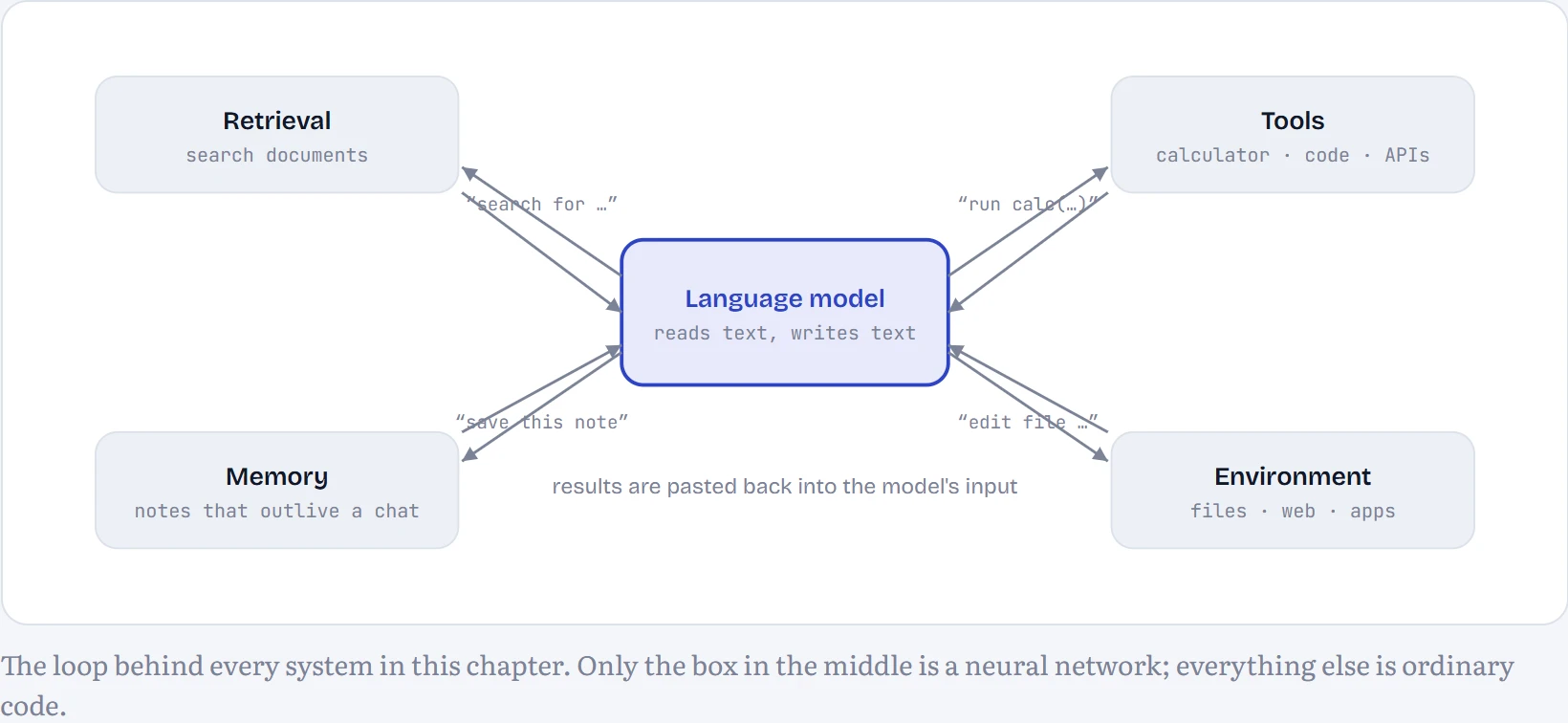
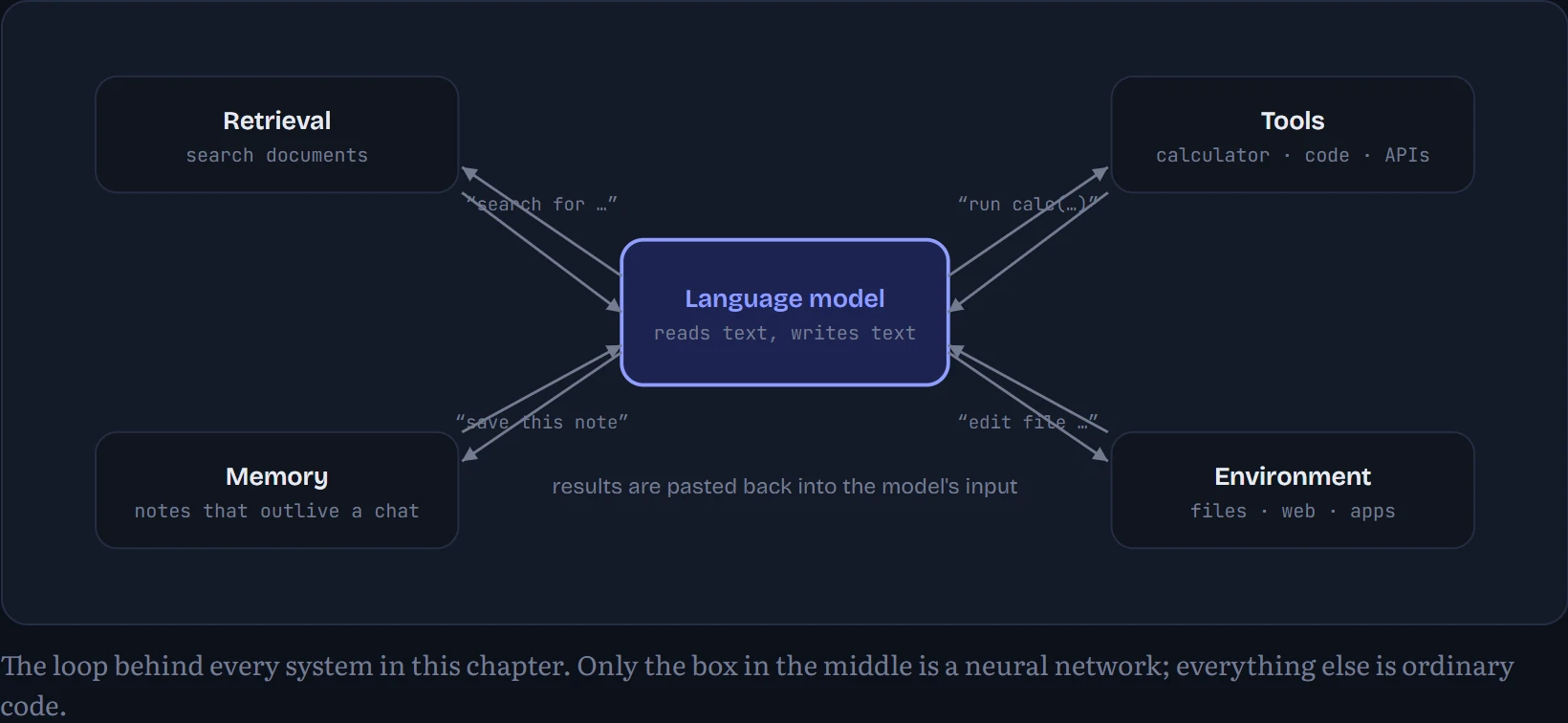
One idea runs through the whole chapter: the model doesn't need to be a calculator, a database or a file system, only to know when to ask for one and how to read the answer. That's a much easier thing to learn, as you'll see when a model with under a million parameters learns it in a few minutes.
Retrieval: giving a model a library
Retrieval-augmented generation (RAG; Lewis and colleagues, 2020) is the oldest trick here and still the most used. Before the model answers, search a collection of documents for the passages most related to the question, and paste them into the prompt. Now the model answers from the passages instead of from memory, so it can use private or fresh information and point to its sources.
The model's part is easy; the hard part is the search. To make it concrete, I built a retriever over the text of this course: every published lesson page, about 204,287 characters, cut into passages (chunks) of about 600 characters. Then I wrote 48 questions a learner might ask, each paired with a phrase that marks the passage holding the answer, and measured how often each search method finds it. I compared three methods:
Keyword search (BM25). Score each passage by how many of the question's words it contains, with two sensible corrections: rare words count more than common ones (“superposition” tells you more than “model”), and a word repeated ten times doesn't count ten times as much. BM25 (Robertson and colleagues, 1994) is decades old and still a strong baseline. Dense search. Turn the question and every passage into vectors so that related texts point in similar directions, then rank by cosine similarity, the way Chapter 6 compared word vectors. Modern systems use a neural embedding model; here I used LSA (latent semantic analysis, Deerwester and colleagues, 1990), which compresses word-count vectors into 128 dimensions so that words used in similar passages end up close. Hybrid. Run both and merge the two rankings with reciprocal rank fusion: a passage's score is 1/(60 + rank) summed over both lists, so anything near the top of either list rises.
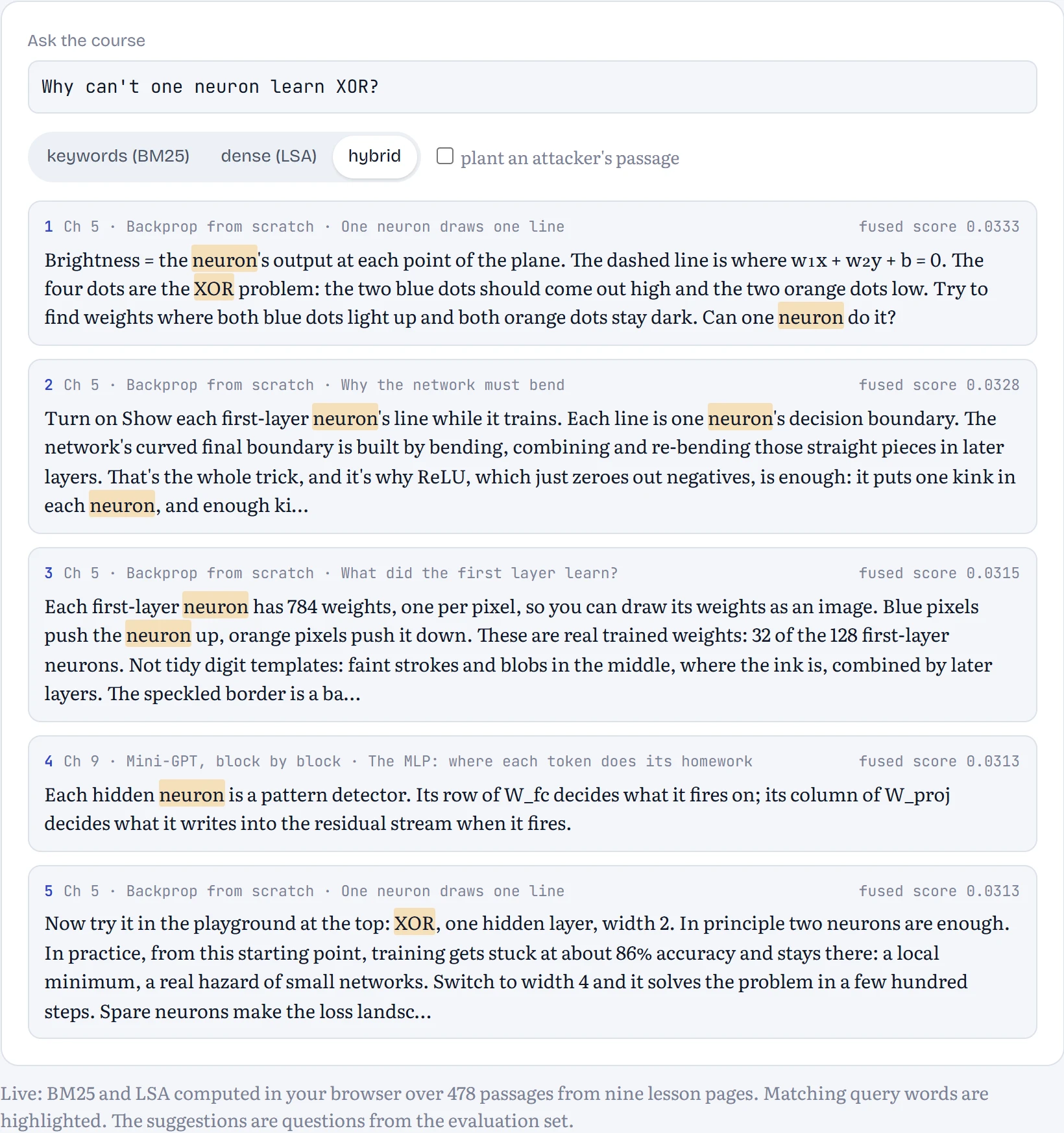
In the figure: a question, searched with each method. Each result shows the lesson and section it came from. Notice how often keyword search is thrown by wording: ask “why do deep networks stop learning” and it chases the words “deep” and “learning” wherever they appear.
Predict first. On our 48 questions, which method puts the right passage in its top 3 most often?
- Keywords, clearly
- Dense, clearly
- Roughly a tie, and none is great
Answer. Roughly a tie, and none is great. In the top 3: keywords 44%, dense 42%, hybrid 42%. By mean reciprocal rank, which rewards putting the answer first, hybrid edges ahead (0.37 against 0.33 and 0.35). Even the best method misses the right passage for more than half the questions at top 3.
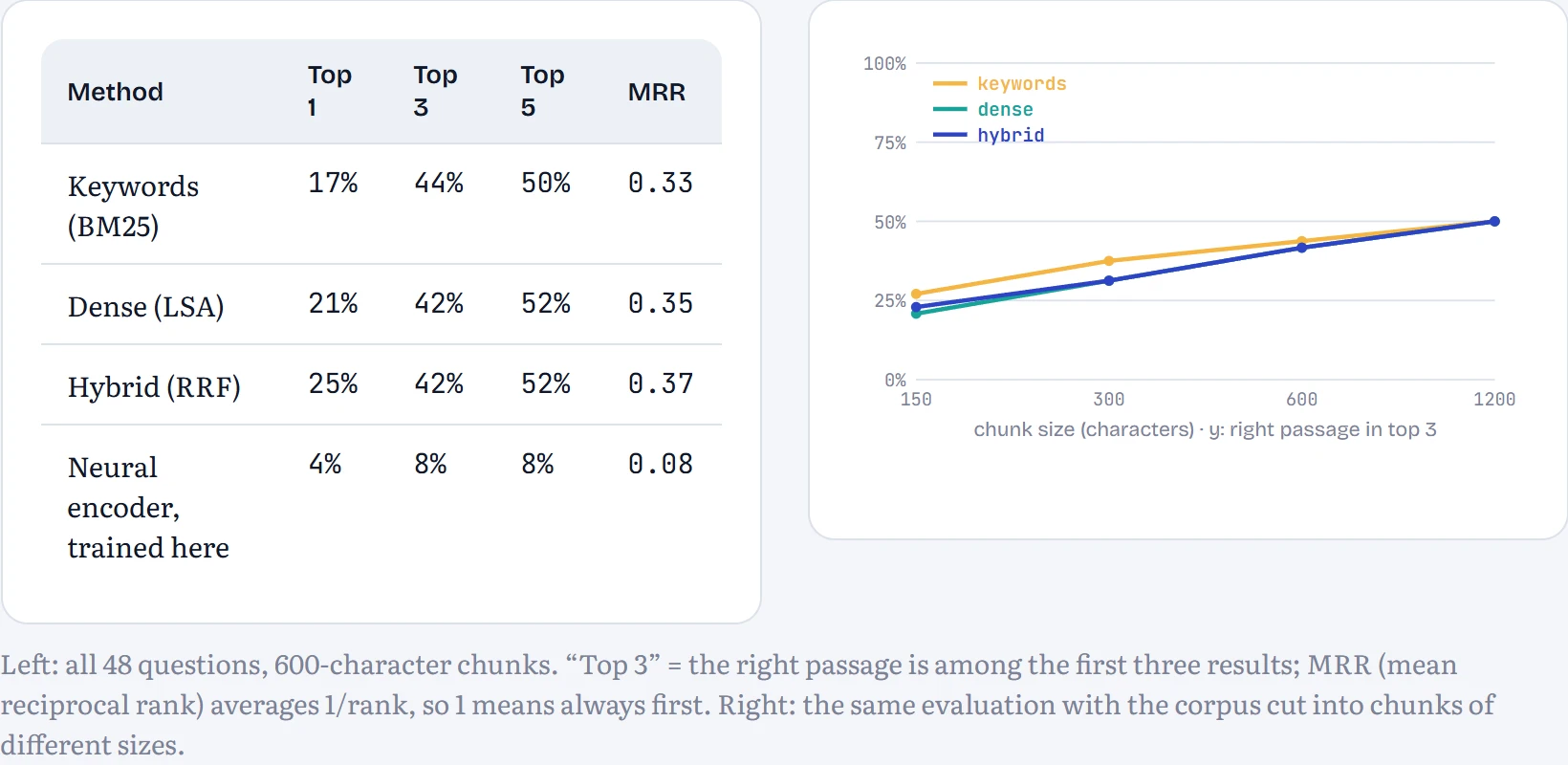
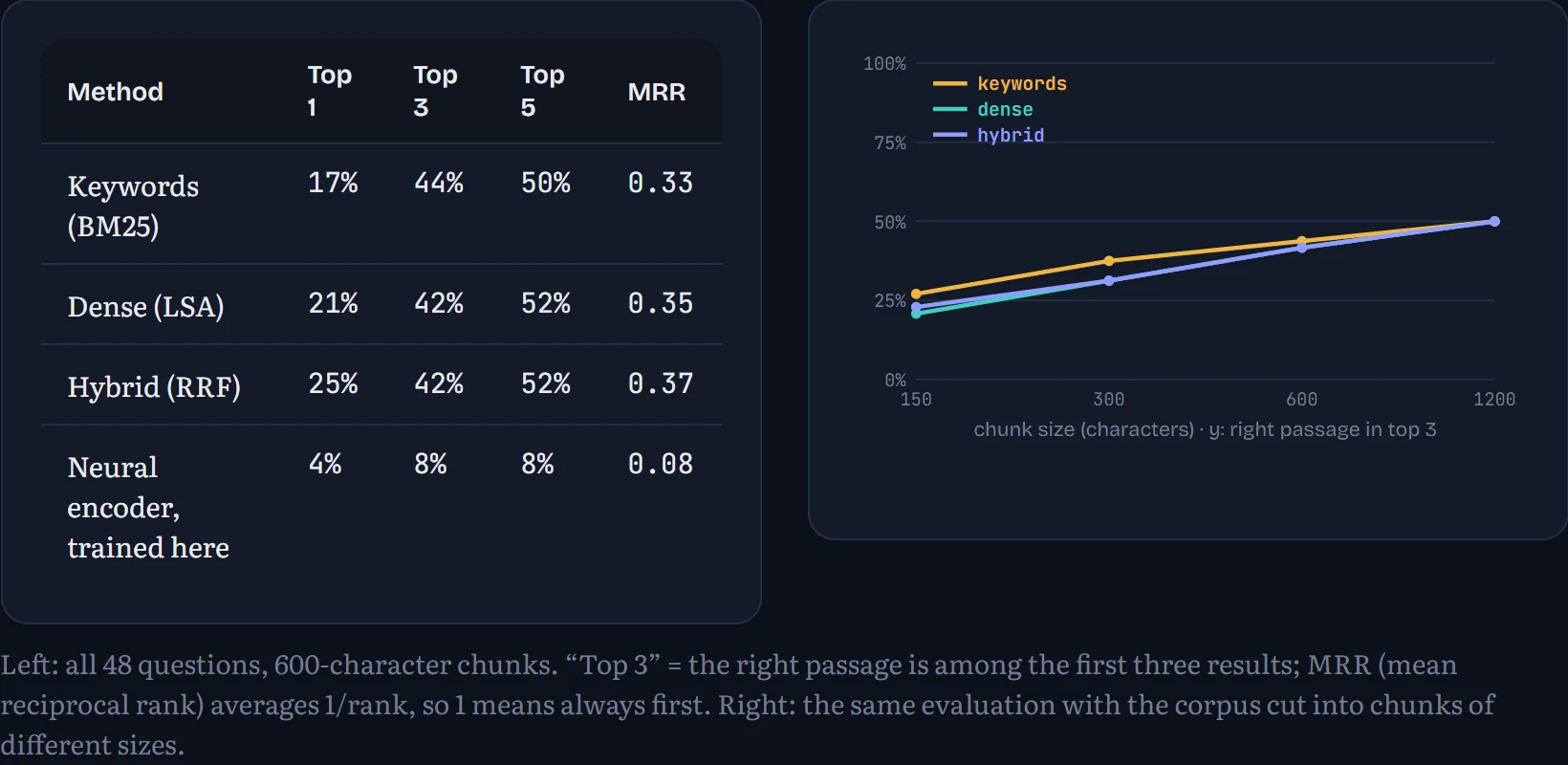
Three lessons hide in these numbers. First, retrieval is the weak link. If the right passage isn't retrieved, the best language model in the world will answer from memory or make something up, and it won't tell you which. This is why serious RAG systems measure retrieval separately, with a question set like mine, before they ever look at the generated answers. My questions are deliberately phrased the way a learner would ask, not the way the lessons word things, which is exactly what makes retrieval hard.
Second, keywords and meaning fail differently, which is why hybrid search is the industry default. Keyword search nails questions that share a distinctive word with the answer (“FlashAttention”, “RMSNorm”) and fails on paraphrase; dense search catches paraphrase but can drift to passages that are merely on the same topic. Fusing them helps most when they miss on different questions.
Third, a confession: I also trained a small neural embedding model on the course text itself (a sentence learns to find the passage it came from). It scored 8% in the top 3, far worse than 30-year-old LSA. Two hundred thousand characters is nowhere near enough to teach a network what words mean; production embedding models are trained on hundreds of millions of question–passage pairs. When you lack that data, use a pre-trained embedding model and keep BM25 in the mix. The chunk-size chart adds a trade-off: bigger chunks raise the chance that the answer is somewhere in the top 3 (23% at 150 characters, 50% at 1,200 for hybrid), but three 1,200-character chunks cost eight times the context of three 150-character ones, and pack in more irrelevant text for the model to wade through. Real systems also add a reranker, a slower model that reads the question and each of the top 50 candidates together and re-sorts them.
Finding nearest neighbours fast
With 478 passages, comparing the question with every vector is instant. With a billion, it isn't. Vector databases use approximate nearest-neighbour indexes, and the most popular is HNSW, hierarchical navigable small worlds (Malkov and Yashunin, 2016). Think of finding a street address by taking a plane to the right country, a train to the right city, then walking. Every point is a node in a graph, linked to a handful of its nearest neighbours. A few randomly chosen points also appear in sparser upper layers with long-range links. A search starts at the top, hops greedily towards the query, drops down a layer, and repeats, examining only a tiny fraction of the points.
How to read it: grey dots are 400 random points, faint lines their links on the bottom layer, and larger dots the points that also live in upper layers. A search looks for the point nearest a query. The path shows every point the search examined, coloured by layer; the ringed point is the answer.
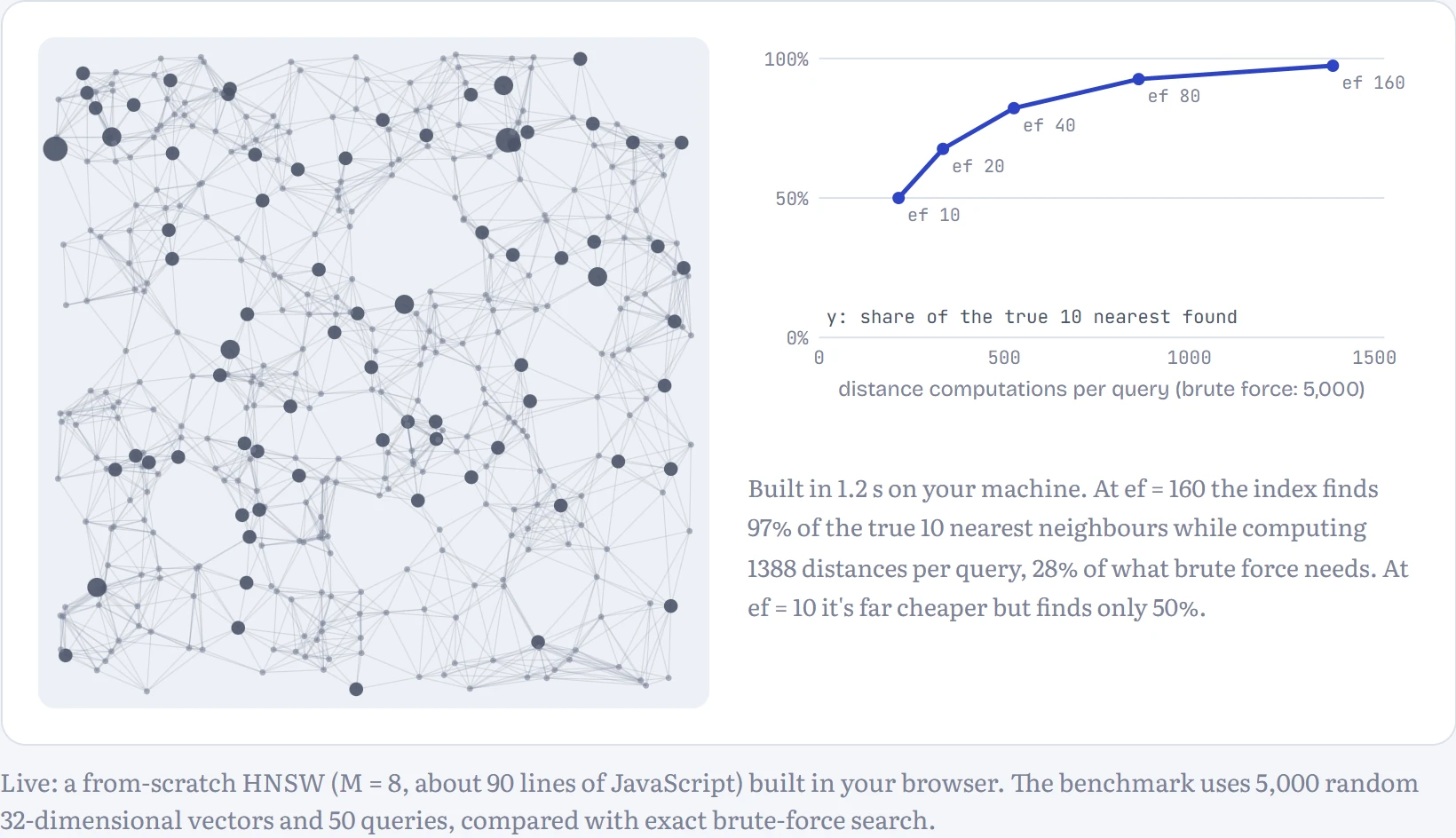
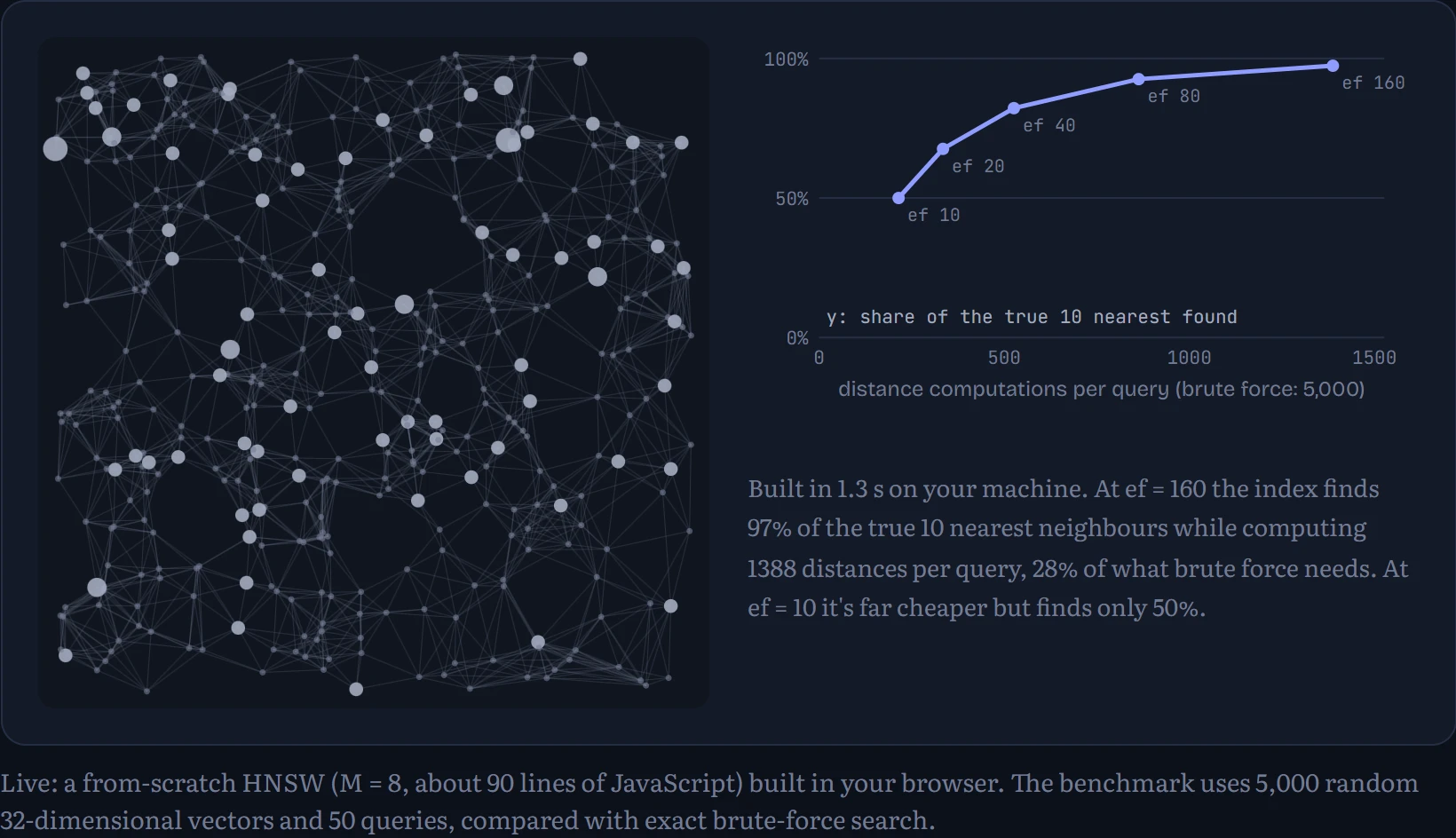
The knob that matters is ef, how many candidates the search keeps in play. Small ef is fast but sometimes misses true neighbours; large ef finds nearly all of them at a higher cost. Real systems tune it so recall is high enough that the language model never notices. Random 32-dimensional vectors, like the benchmark's, are a worst case; real embeddings cluster, which makes the graph's shortcuts work even better.
Tool use: teaching a model to ask for help
How does a model learn to use a tool? The same way it learns anything: from examples. Show it many transcripts where, faced with a sum, the assistant writes a special request instead of guessing, a program runs the request and pastes the result back, and the assistant uses the result. The model learns three things at once: when to call a tool, how to write the call, and how to read what comes back.
I trained a tiny one from scratch to show it's not magic. It's a character-level Transformer like the one from Chapter 9, with 827,648 parameters, and four tools: calc does arithmetic, look fetches a fact from a small database of fictional cities, and save and load store and retrieve notes. A training transcript looks like this:
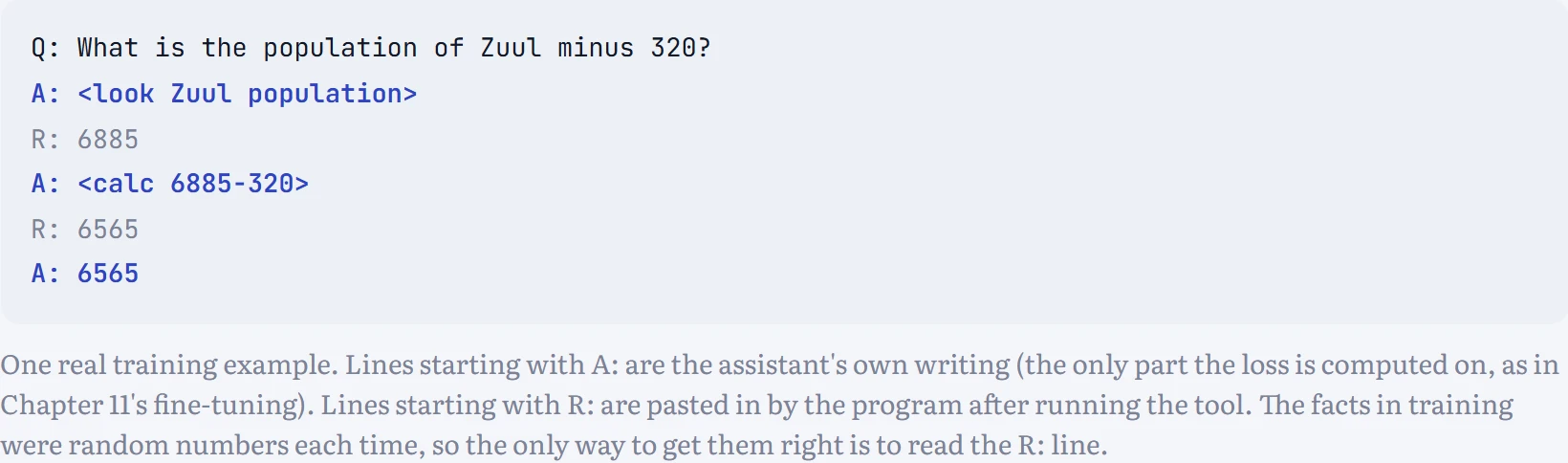
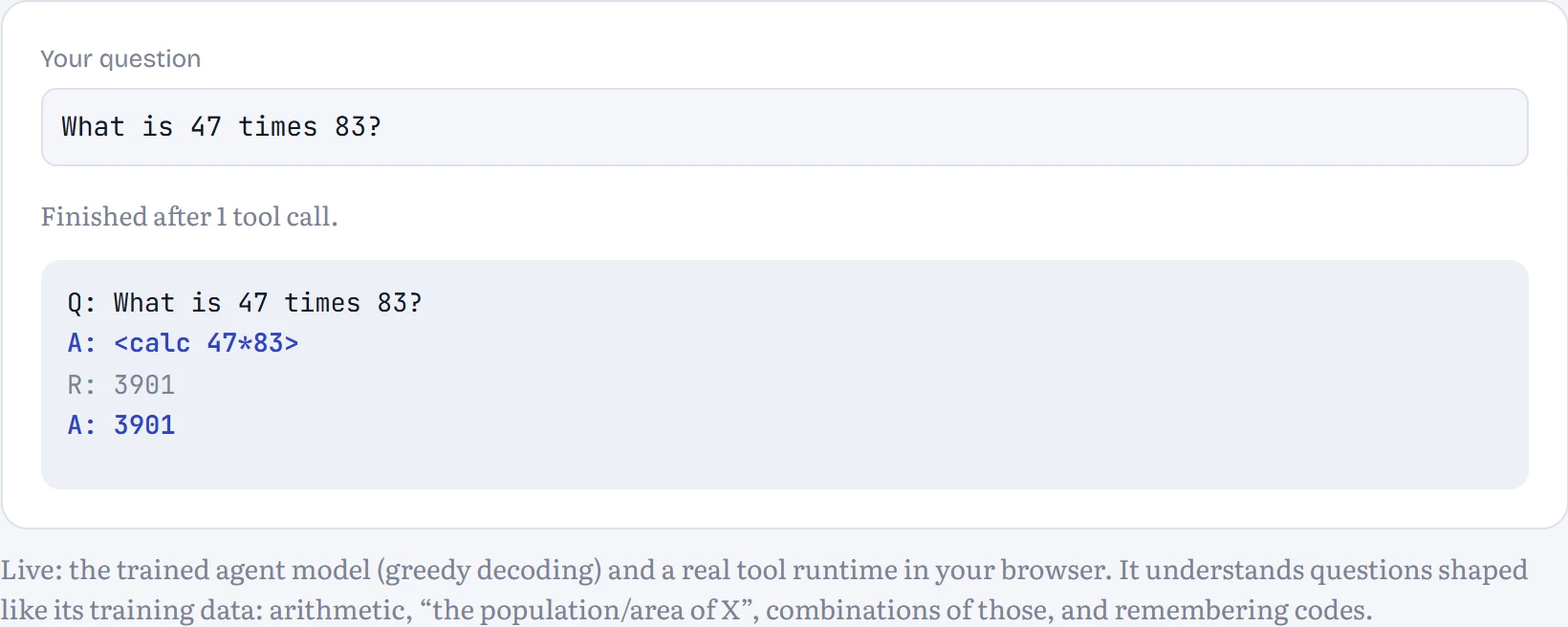
In the lesson, the page runs the model in your browser, and whenever it writes a tool call, the page runs the tool in plain JavaScript and feeds the result back, exactly the loop from the diagram above. How to read it: the transcript shows every step: the model's writing in the accent colour, the tool results in grey.
How much does the tool help? I trained a second model of the same size on the same questions with the answers written directly, no tools allowed, for three times as many steps. Then I tested both on fresh questions. How to read the table: each row is a kind of question; the columns are the share answered exactly right.
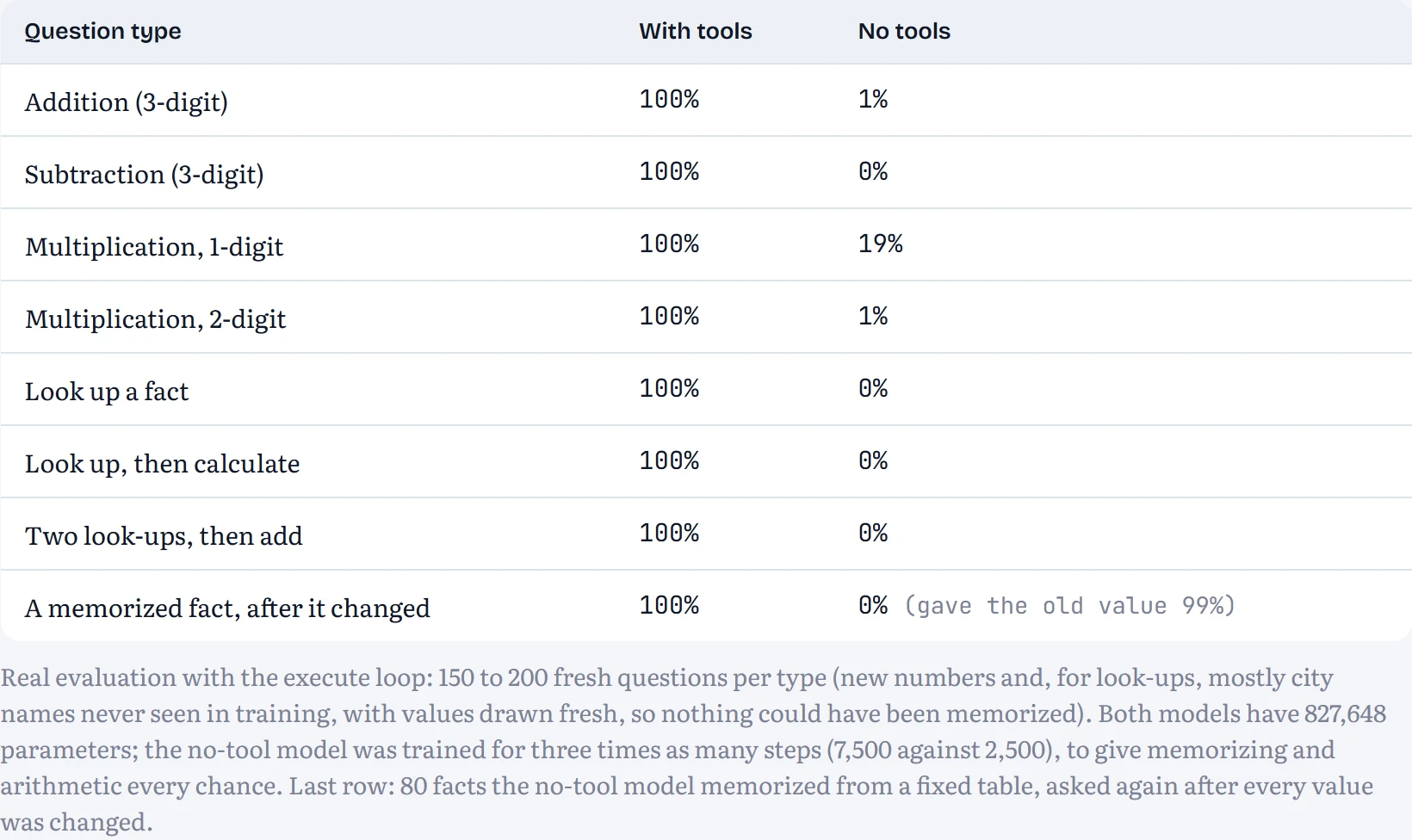
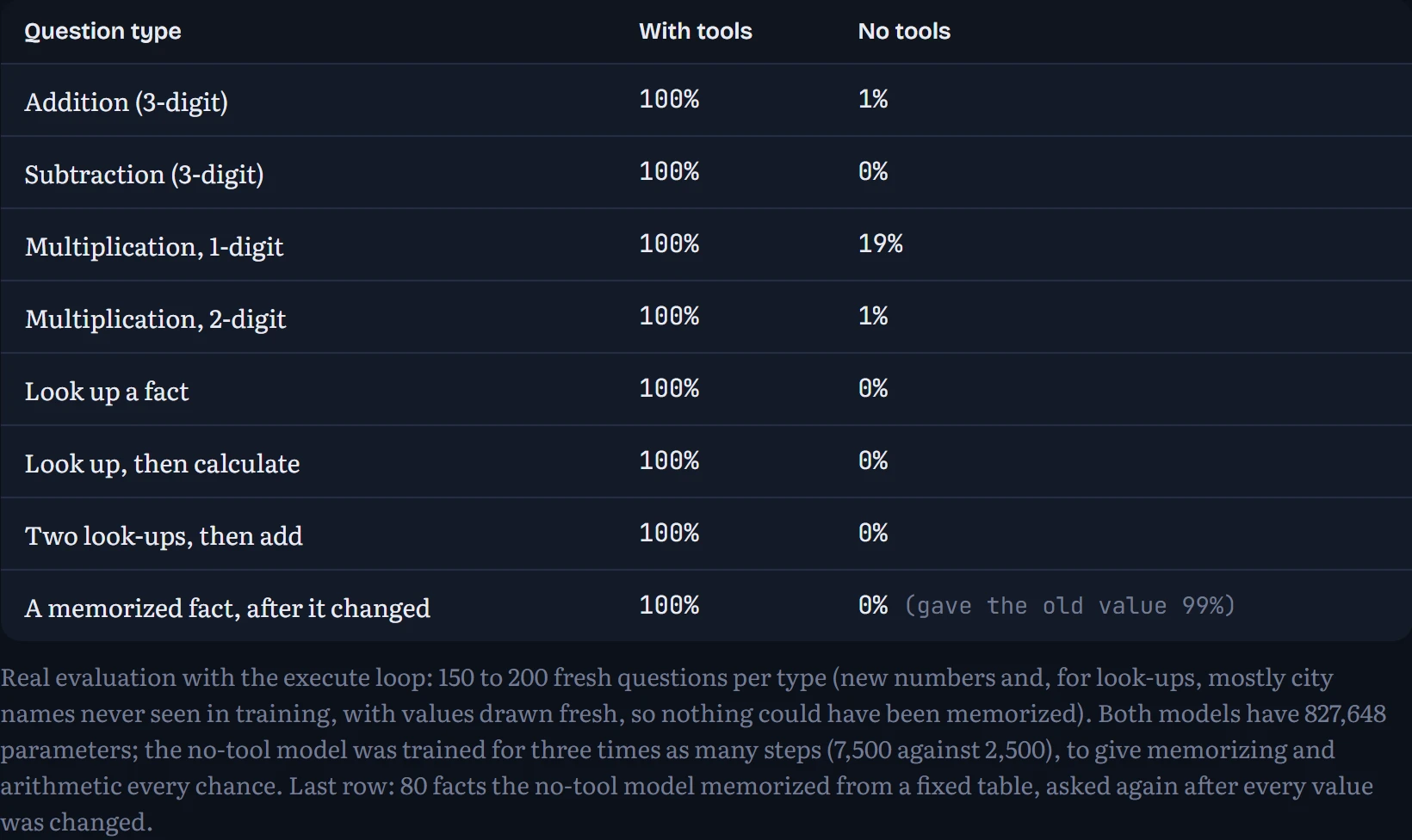
On arithmetic, the tool turns a guessing game into a lookup: with the calculator, 100% of two-digit multiplications are right; without it, the same-sized model manages 1%. Multiplication needs many carries done in the right order, exactly the kind of exact multi-step procedure a small network struggles to do in one go, and a calculator does perfectly. The model's job shrank from computing the answer to writing the right expression, which is far easier.
The last row is the case for retrieval in one line. The no-tool model memorized its fact table during training and recites it well. Then the facts changed, as facts do. It kept answering with the old values (99% of the time) and got the new ones right 0% of the time. The tool-using model never memorized anything, so it simply looked up the new values: 100%. Knowledge in the weights goes stale; knowledge behind a tool is as fresh as the database.
Tool use in real models
Production models do the same thing at scale, with structure. The developer describes each tool in a schema, a name, a description and the arguments it accepts with their types (usually JSON Schema), and the model is fine-tuned on many examples of calling tools from schemas it hasn't seen before, so it can use a new tool just from its description. The model's output contains a structured call such as {"name": "get_weather", "input": {"city": "Paris"}}; the application runs it and sends back the result; the model continues. The model never runs anything itself, which is an important security property: the application decides what actually gets executed.
Two developments made this a standard. Code execution: instead of one tool per task, give the model a sandboxed Python interpreter, and arithmetic, data analysis and plotting all become “write a program and read its output”. And the Model Context Protocol (MCP), introduced by Anthropic in 2024 and now widely adopted, standardizes how applications expose tools and data to models, so a tool written once (for a database, a calendar, a code repository) works with any MCP-compatible model and app, much as USB did for devices.
Agents: observe, think, act, repeat
An agent is the same loop, run for more than one step: the model decides what to do next based on everything it has seen so far, including the results of its earlier actions. The pattern was popularized as ReAct (Yao and colleagues, 2022): interleave reasoning (“I need the population first”), actions (a tool call) and observations (the result), until the task is done. Our tiny agent does this on questions that need two or three tool calls, like “What is the area of A plus the area of B?”: look up A, look up B, then add.
Every extra step is another chance to go wrong. If each step succeeds with probability p, independently, a task of k steps succeeds with probability about pk. That's compounding error, and it's the central reliability problem of agents.
On questions shaped like its training data, our agent is perfect: 100%, 100% and 100% for one, two and three tool calls. A tidy task, a model trained on exactly that task. So I made it harder in the way real use is harder: the same questions about cities with names of 4 syllables, one more than any name it saw in training. Now it has to copy unfamiliar, longer strings into its tool calls, and it sometimes slips. How to read the chart: for questions needing one, two and three tool calls, the bars show how often each step was exactly right on the long names, the blue line how often the whole task was, and the grey line the same model on familiar-length names.
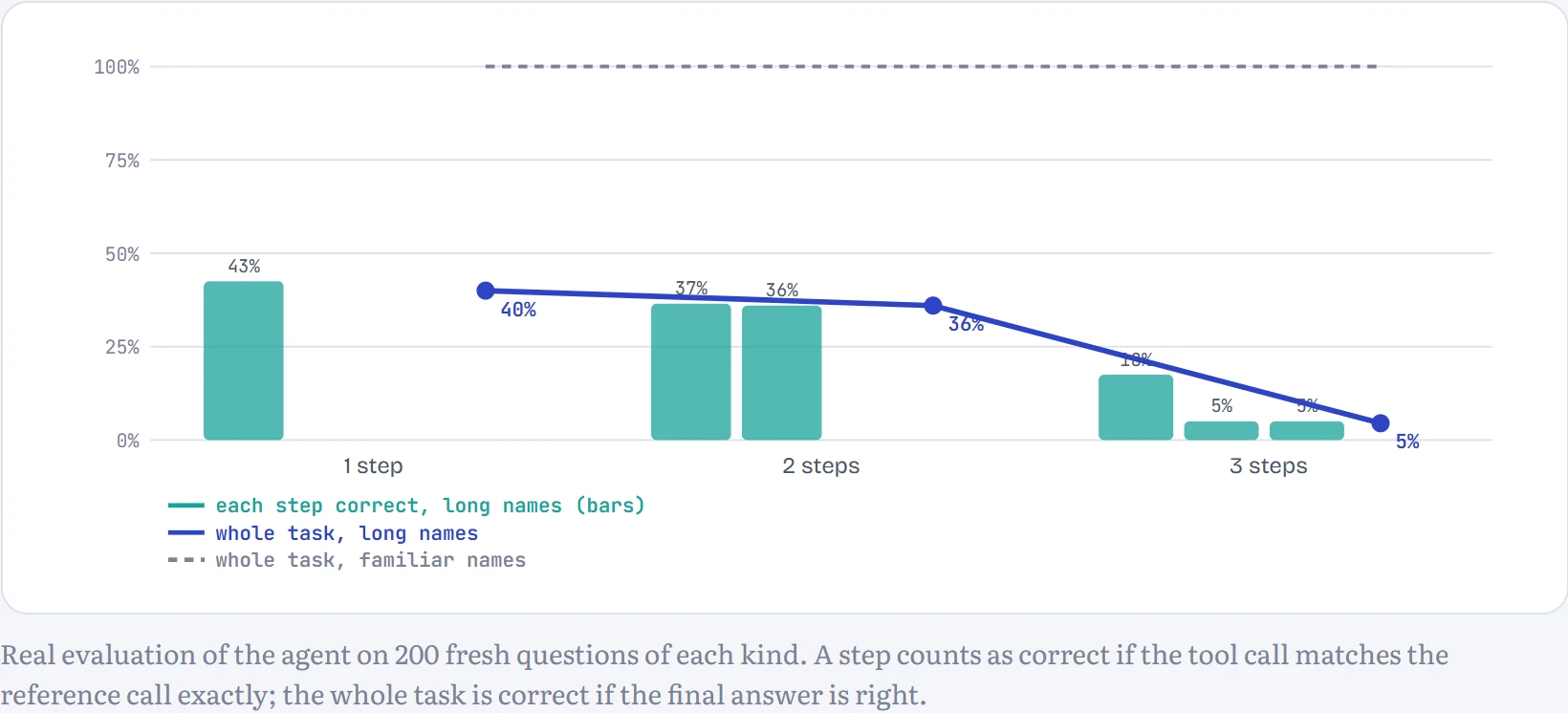
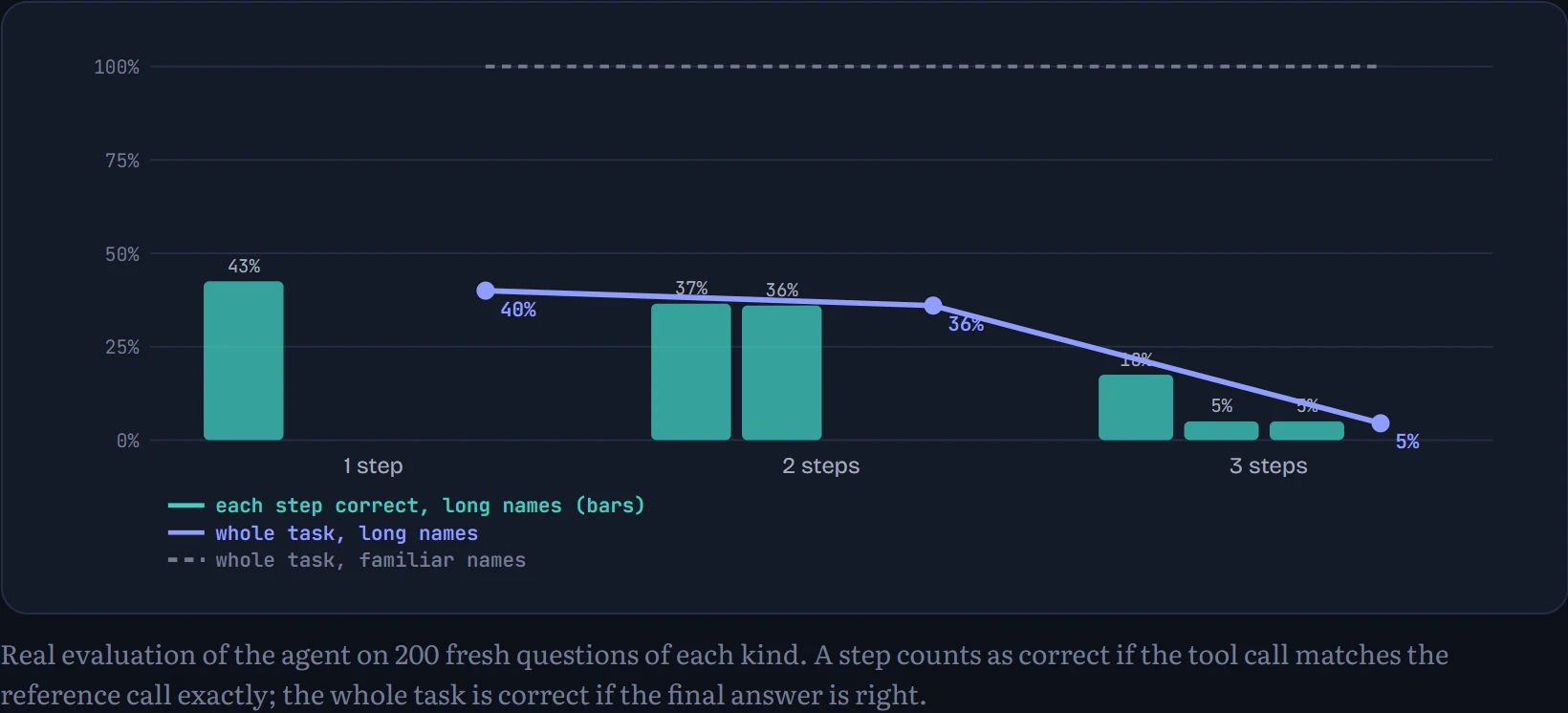
On the long names, one-step questions succeed 40% of the time and three-step ones 5%. A single look-up on a long name succeeds 43% of the time. If look-ups failed independently, a question needing two of them would succeed about 43% × 43% ≈ 18% of the time. It managed 5%, even worse than independence predicts, because errors cluster: in questions with two long names, even the first look-up was right only 18% of the time, so a hard question tends to be hard at every step. Notice where the errors live: in the look-up steps, which have to copy an unfamiliar name. When a look-up succeeds, the calculation after it almost always does too (99% of the time); the agent's arithmetic step reads numbers in a format it has seen thousands of times. And look at what a failure does to the rest of the run:
Q: What is the population of Lotororest plus 144? A: <look Lotortor population> R: unknown A: <calook population>
The model copied only part of the name, got “unknown” back, and never recovered: it had never seen a failed look-up in training, so it had no idea what to do next and produced garbage. Real agents need exactly that missing skill, reading an error and trying something else, and it's trained deliberately into production models. Nothing about the task changed except a detail of the input the model wasn't trained on. Real agents meet that kind of novelty at almost every step, and a real coding or research task may take fifty or a hundred steps. That's why reliability per step, and the ability to notice and recover from a mistake, matter far more than raw capability for agents.
Real agents add structure on top of the loop. Planning: write out the steps before acting, and revise the plan as results arrive. Reflection: after a failure, have the model critique its own attempt and try again (Reflexion, Shinn and colleagues, 2023), which works best when there's an external check such as a test or an error message, rather than the model judging itself. Multi-agent systems split work between several model instances, for example an orchestrator that hands sub-tasks to workers that each explore with a fresh context; the gain is mostly more parallel work and cleaner contexts, at the cost of more tokens and more chances for miscommunication. And computer-use agents act through a screen: they receive screenshots and output mouse clicks and keystrokes, so they can operate software that has no API at all, at the price of being slower and more error-prone than a direct tool call.
Context engineering and memory
A model knows only two things: what's in its weights and what's in its context window right now. So the craft of building an agent is largely deciding what goes into that window, at every step. People call this context engineering. The system prompt sets standing instructions and describes the tools. Retrieved passages and tool results arrive as the task proceeds. And because the window is finite (and models get worse at using information buried in the middle of very long contexts; Liu and colleagues, 2023, “Lost in the Middle”), long-running agents must decide what to keep. Compaction summarizes older parts of the conversation and replaces them with the summary. A scratchpad or notes file lets the agent write down its plan and findings outside the window and read them back later.
That last idea is what long-term memory is: storage outside the model that it reads and writes through tools. Our tiny agent has it. Each question in the demo above starts a fresh transcript, so nothing carries over in the context window, but its save and load tools write to a store that persists. A test of it: “Remember that Belor's code is 4821.”, a few other questions, then “What is Belor's code?”. (Stick to names built like its training names; given a name like “Zed”, it quietly rewrites it into one of its own syllable patterns, though it does so consistently.) I measured it on 100 fresh names: after saving a code, a later question with a fresh transcript got it back 100% of the time, and asked about a name it had never saved, it said “I don't know.” 100% of the time instead of inventing a code.
Short-term memory is the context window: fast, exact, automatic, and wiped at the end. Long-term memory is the store: unlimited and permanent, but only as good as the agent's decisions about what to save and when to look. A model that never calls load doesn't remember anything, however much is stored.
Continue the lesson
The whole lesson, with its drawings and its questions. 5 more sections after the ones above.