
Tool interface design: descriptions, schemas and error messages, measured
Everything a model knows about a tool is the few lines you wrote to describe it, and everything it learns from a failed call is the text your code sends back. Tool design is really writing for a reader who takes every word literally and can never ask a follow-up question.
What this page answers
How do you write a good tool for an LLM agent?
Write a precise description and error messages that say what went wrong and how to fix it. The model cannot ask questions, so those two pieces of text are all it has. Read it in “A reader who can't ask questions”
What is a tool definition made of?
A name, a description of what it does and when to use it, and a schema for its arguments, usually written as JSON. Read it in “Anatomy of a tool”
A reader who can't ask questions
When you hand a colleague a script with a confusing argument name, they ask you. The model can't. Everything it knows about a tool is the few lines of JSON you wrote describing it, and everything it learns when a call goes wrong is the text your code sends back. So tool design is really writing: two short pieces of text, the description and the error message, that have to work for a reader who takes them literally and never gets to ask a follow-up question.
That's the theory. Here's the test: start from lesson A1's harness, change one of those things, rerun all 30 tasks, and compare.
Predict first. Three changes to the same agent. Which one moves the score the most?
- vague tool descriptions instead of precise ones
- error messages that just say “Error.”
- a different edit tool: by line number instead of exact text
Answer. Line-numbered reads and edits: -5 tasks against the baseline's 7 of 30. Vague descriptions and names: -4. Errors that say only “Error.”: -4. With 30 tasks, a difference of one or two is within run-to-run noise (lesson A5 measures exactly how much), so look at the failure table below as well as the totals.
Anatomy of a tool
A tool is described to the model as a small JSON object in a standard format (JSON Schema, the same one every major model provider uses): a name, a description of what it does and when to use it, and the parameters it takes, each with a type and its own description. Below is the edit tool from lesson A1, then the same tool written the way rushed code often describes things, which is the “vague” variant I tested. The code behind both is identical. Only the text the model reads differs.
# the edit tool as lesson A1 described it to the model
{
  "type": "function",
  "function": {
    "name": "replace_in_file",
    "description": "Replace an exact piece of text in a file with new text. The old text must appear exactly once; copy it from read_file output, including indentation.",
    "parameters": {
      "type": "object",
      "properties": {
        "path": {
          "type": "string",
          "description": "File to edit."
        },
        "old": {
          "type": "string",
          "description": "The exact text to replace."
        },
        "new": {
          "type": "string",
          "description": "The text to put in its place."
        }
      },
      "required": [
        "path",
        "old",
        "new"
      ]
    }
  }
}
# the same tool, described carelessly: same code behind it
{
"type": "function",
"function": {
"name": "replace_in_file",
"description": "Edits a file.",
"parameters": {
"type": "object",
"properties": {
"a": {
"type": "string",
"description": ""
},
"b": {
"type": "string",
"description": ""
},
"c": {
"type": "string",
"description": ""
}
},
"required": [
"a",
"b",
"c"
]
}
}
}Three changes, measured
How to read the chart: each bar is the number of the 30 tasks whose hidden tests passed, for one version of the harness. The top bar is lesson A1's harness, unchanged; each bar below it changes exactly one thing. Everything else, including the model, the tasks and the 10-step limit, is identical.
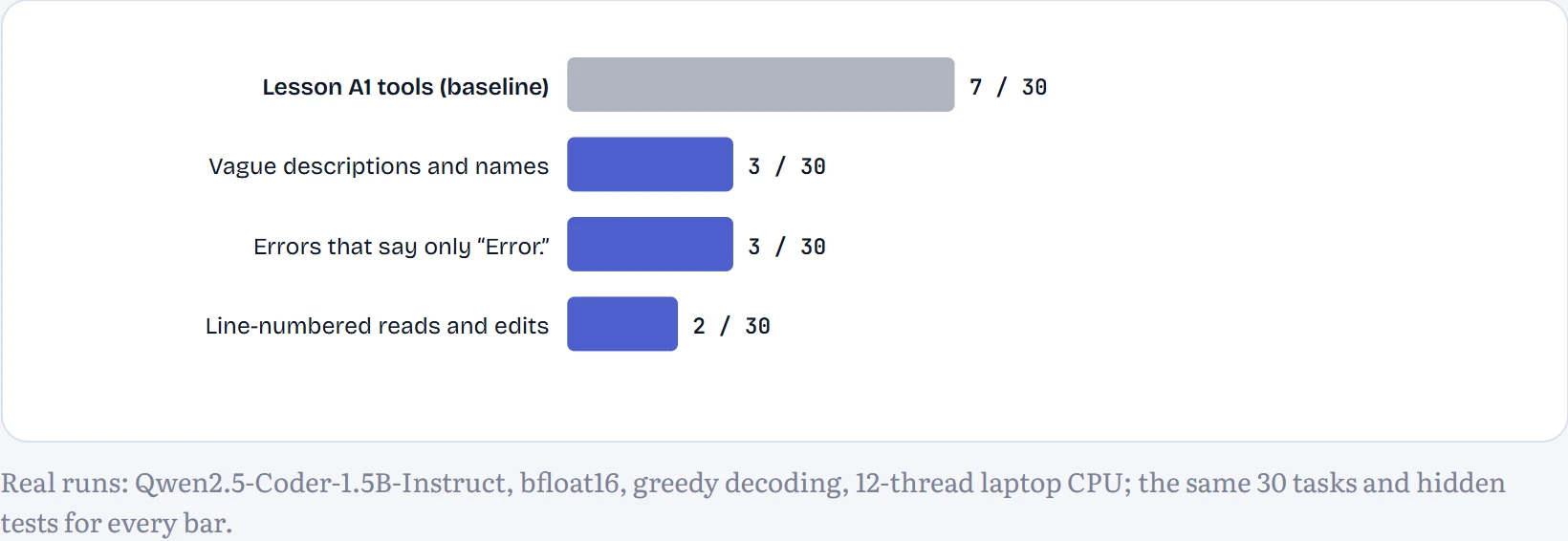
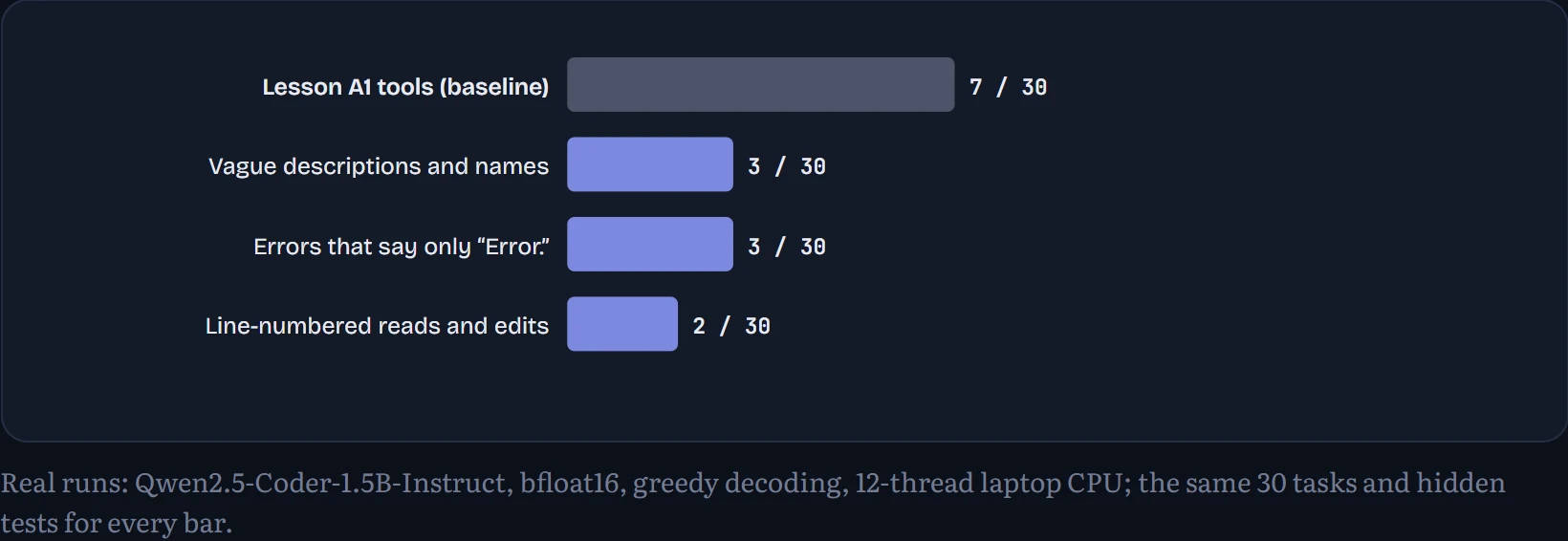
Vague descriptions and names: 3 of 30 (-4). Errors that say only “Error.”: 3 of 30 (-4). Line-numbered reads and edits: 2 of 30 (-5). Vague descriptions hurt, as you'd expect: with parameters called a, b and c, the model has to guess what goes where. Terse errors hurt: without being told to read the file first, the model repeated failed calls more than twice as often.
How to read the table: what went wrong in each version, counted over all steps of all 30 runs. A good tool change shows up here first, as a type of failure that shrinks.
| Failure, counted in steps | Lesson A1 tools | Vague descriptions and names | Errors that say only “Error.” | Line-numbered reads and edits |
|---|---|---|---|---|
| edits whose text didn't match | 60 | 77 | not detectable | 0 |
| repeats of a call that already failed | 27 | 32 | 59 | 3 |
| replies with no tool call | 66 | 53 | 107 | 156 |
| calls to a tool that doesn't exist | 0 | 2 | 0 | 0 |
| tool calls with broken JSON | 0 | 0 | 0 | 0 |
| calls naming a file that doesn't exist | 0 | 0 | 0 | 0 |
| runs that hit the 10-step limit | 20 | 24 | 25 | 28 |
| average time per task | 78 s | 4.2 min | 79 s | 3.1 min |
Read the line-numbered column closely. It did remove the failure it targeted: failed text matches dropped from 60 to 0 (there's no text to match any more), and repeats of a failed call from 27 to 3. But replies with no tool call at all jumped from 66 to 156, and 28 of 30 runs used up their 10 steps. Fixing one failure mode exposed another: the unfamiliar tool seems to have pushed this small model off its habits, and it more often wrote prose instead of a call. That's why you count failure types, not just totals. (In the terse column, failed text matches can't be counted: the harness recognises them by the helpful error's wording, which that variant replaces with “Error.”.) Times per task aren't comparable across columns: the runs happened at different hours while other experiments shared the machine.
Change the tool, not the model
Lesson A1's most common failure was the model trying to replace text it had never read, or had read but couldn't copy exactly. So the third change attacks that directly. read_file now puts a number before every line, and the edit tool takes line numbers instead of exact text:
# the replacement edit tool, used together with numbered read_file output
{
  "type": "function",
  "function": {
    "name": "replace_lines",
    "description": "Replace lines start to end (inclusive, numbered as read_file shows them) with new text. Use it to fix code.",
    "parameters": {
      "type": "object",
      "properties": {
        "path": {
          "type": "string",
          "description": "File to edit."
        },
        "start": {
          "type": "integer",
          "description": "First line to replace."
        },
        "end": {
          "type": "integer",
          "description": "Last line to replace."
        },
        "new": {
          "type": "string",
          "description": "The replacement lines, without line numbers, with correct indentation."
        }
      },
      "required": [
        "path",
        "start",
        "end",
        "new"
      ]
    }
  }
}
Here's a task the baseline failed and the line-numbered version solved: word_count. With exact-text editing it took 10 steps and never got its edit to apply; with line numbers:
step 3 of 3 · task word_count · hidden tests passed
Continue the lesson
The whole lesson, with its drawings and its questions. The rest of this section and 4 more after it.