
Context management: prompt caching, compaction and deliberate forgetting
A language model keeps nothing between calls, so an agent remembers only what is still in the conversation, and it rereads all of it at every step. A long context costs time and money and buries information in the middle, so the harness manages it: caching what was already read and deliberately forgetting the rest.
What this page answers
How does an AI agent remember things?
It doesn't, between calls. What it seems to remember is text still sitting in the conversation, which the model reads again at every step. Read it in “The conversation is the memory”
What is prompt caching?
Reusing the keys and values already computed for the part of a prompt that has not changed, so only the new tokens are processed. API providers sell it as prompt caching, at a discount on input tokens. Read it in “Caching what was already read”
The conversation is the memory
A language model is a function: text in, next token out. It keeps nothing between calls. So when an agent “remembers” that it already read stats.py, what really happens is that the file's contents are still sitting in the conversation, and the model reads them again, along with everything else, every single step. The amount of text a model can take in at once is its context window, measured in tokens. Qwen2.5-Coder-1.5B's is 32,768 tokens; the largest hosted models take hundreds of thousands to over a million.
A big window doesn't make context free. Reading costs time and, with an API, money, and models get worse at using information buried in the middle of a long context (the “lost in the middle” effect from Chapter 12). Managing what goes into the conversation is one of the main jobs of an agent harness.
Predict first. On this laptop, reading a 1,000-token prompt takes the 1.5B model a certain time. How long does an 8,000-token prompt take?
- about 8 times as long
- clearly more than 8 times
- clearly less than 8 times
Answer. Measured: 48.01 s for 1,000 tokens and 501.75 s for 8,000, 10.5 times as long. More than linear: attention compares every token with every earlier one, so its share of the work grows with the square of the length, and it starts to show at a few thousand tokens.
What a long context costs
I timed two things at six context lengths: reading the whole prompt from scratch (called prefill), and reading only 60 new tokens when everything before them is already cached. How to read the chart: across is the context length in tokens, up is seconds, both on log scales so that each doubling is the same distance. A line with slope 1 means time doubles when the context doubles.
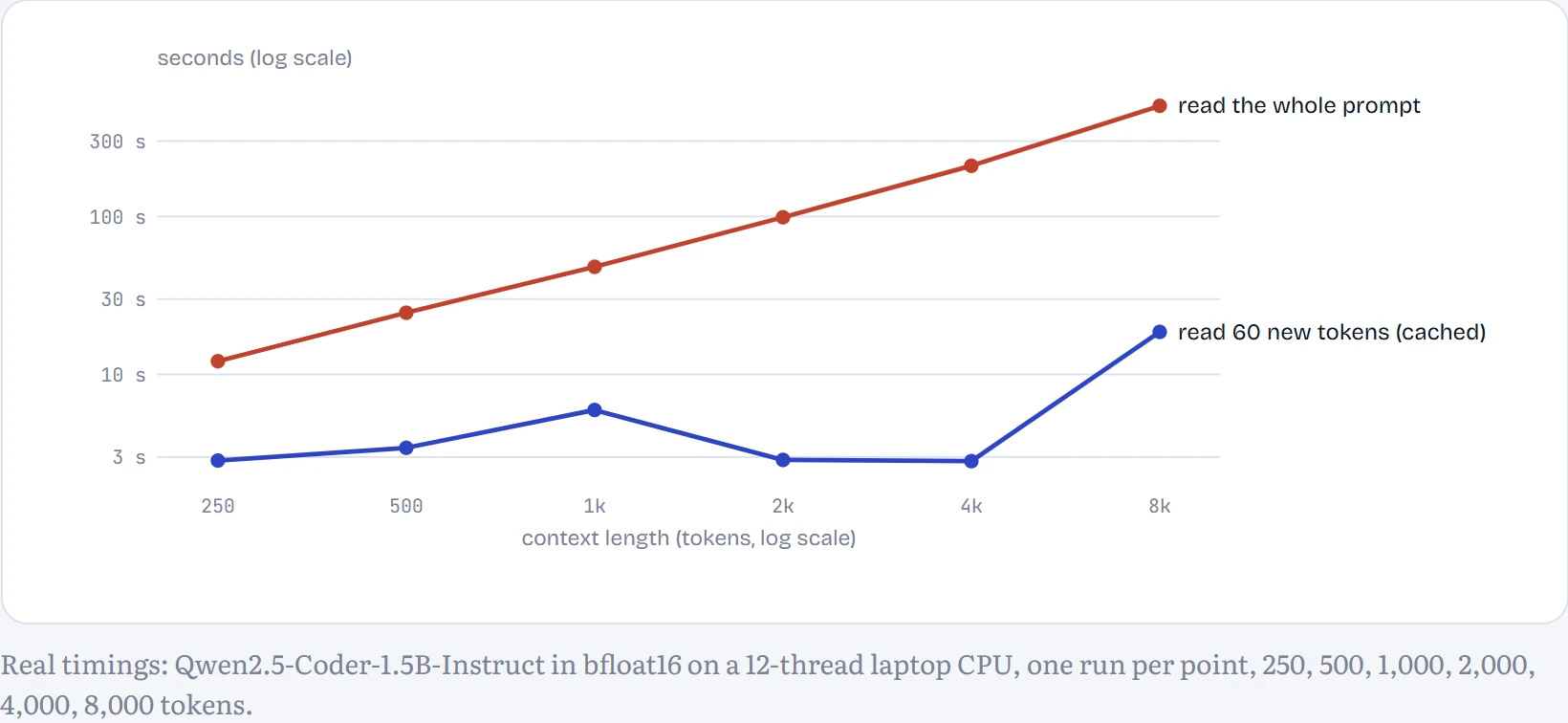
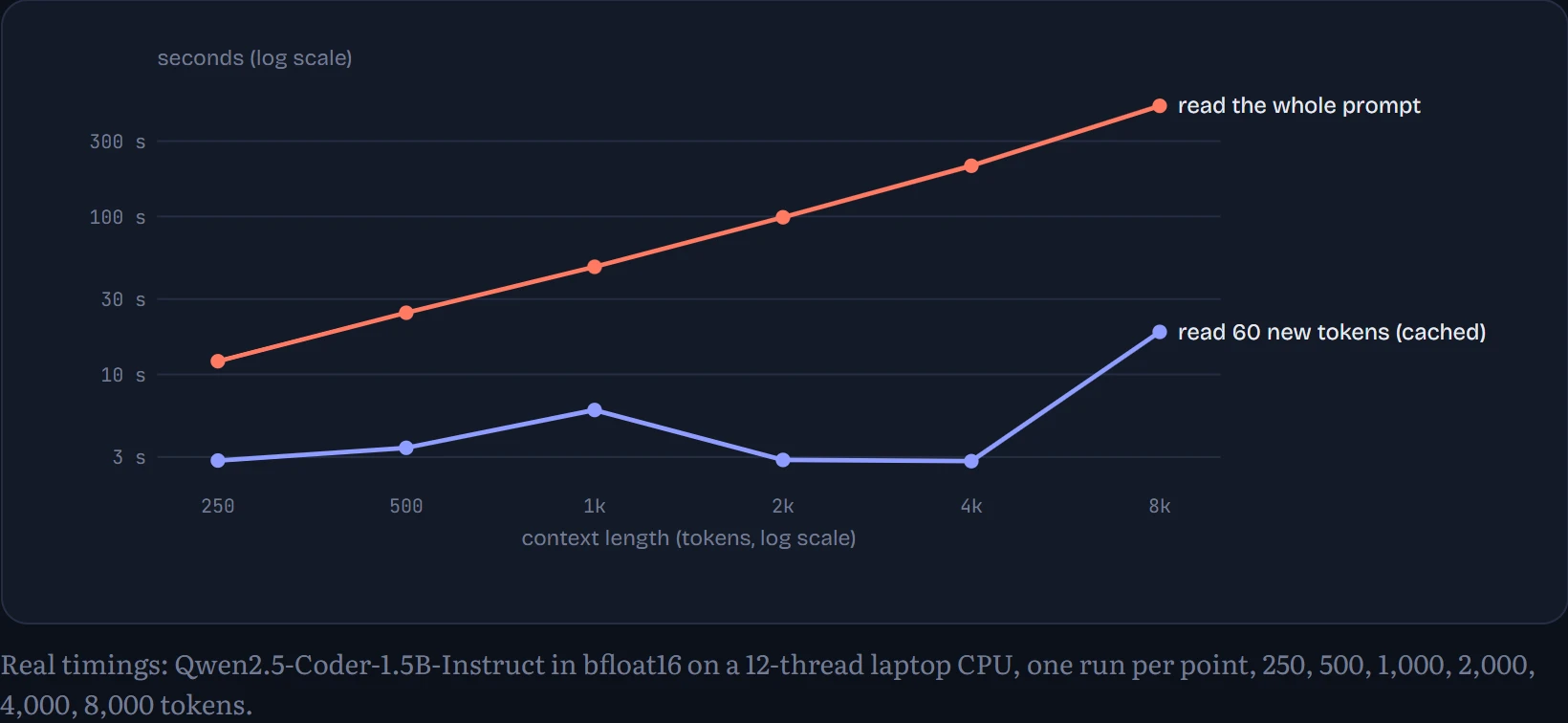
Reading the whole prompt (red) grows from 12.1 s at 250 tokens to 501.7 s at 8,000: that's about 21 tokens a second, so on this CPU a long prompt read from scratch takes minutes. Reading 60 new tokens on top of a cache (blue) stays between 2.8 and 6.0 s up to 4,000 tokens of context, then rises to 18.6 s at 8,000, because the 60 new tokens must still attend to every cached one and the cache itself has to be read from memory. Even there it's 27 times faster than starting over. The cache isn't free in memory: from the model's configuration (28 layers, 2 key/value heads of 128 numbers each, 2 bytes per number), every token of context costs 28 × 2 × 2 × 128 × 2 = 28,672 bytes, about 230 MB for 8,000 tokens.
I also tried to time writing 32 tokens, by timing prompt-plus-reply and subtracting the prompt time. That method failed: run-to-run variation in the prompt time is bigger than the writing time itself, and the result came out negative at 2 of the 6 lengths. So it's left off the chart rather than shown as nonsense.
Caching what was already read
Here's the trick. When a Transformer reads a token, it computes that token's keys and values in every layer (Chapter 8.4), and those never change once computed, because each token can only look backwards. So if step 7's prompt starts with exactly the same tokens as step 6's prompt, the harness can keep step 6's keys and values and only process what's new. This is the KV cache reused across calls, sold by API providers as prompt caching at a large discount on input tokens. My harness does it in about ten lines: compare the new prompt's tokens with the cached ones, keep the matching prefix, process the rest.
# inside Model.chat(), before generating
ids = tokenizer.apply_chat_template(messages, tools=tools, add_generation_prompt=True)
if self.cache is not None:
    n = min(self.cache.get_seq_length(), len(ids) - 1)
    same = (self.cache_ids[:n] == ids[:n])
    common = n if same.all() else first_false(same)    # length of the shared prefix
    self.cache.crop(common)                            # forget everything after it
    past = self.cache                                  # generation starts from here
out = model.generate(ids, past_key_values=past, ...)
self.cache, self.cache_ids = out.past_key_values, out.sequences   # keep for the next step
In lesson A1's 30 runs, 93% of all the tokens the model read came straight from the cache. The cache even carries over between tasks, because every task starts with the same system prompt and tool descriptions. It works because an agent's conversation only ever grows at the end: each step appends a tool call and a result, and everything before them is unchanged. Keep that property in mind; the next experiment breaks it.
Forgetting on purpose
The obvious way to keep context small is to throw old tool output away. I tested the simplest version: keep the system prompt, the issue and the three most recent tool results in full, and replace every older result with a one-line placeholder, “[older tool output removed to save space]”. Then I ran the 30 tasks again.
Predict first. Compared with keeping everything, the trimmed version is…
- faster, because it reads fewer tokens
- slower, even though it reads fewer tokens
- about the same speed
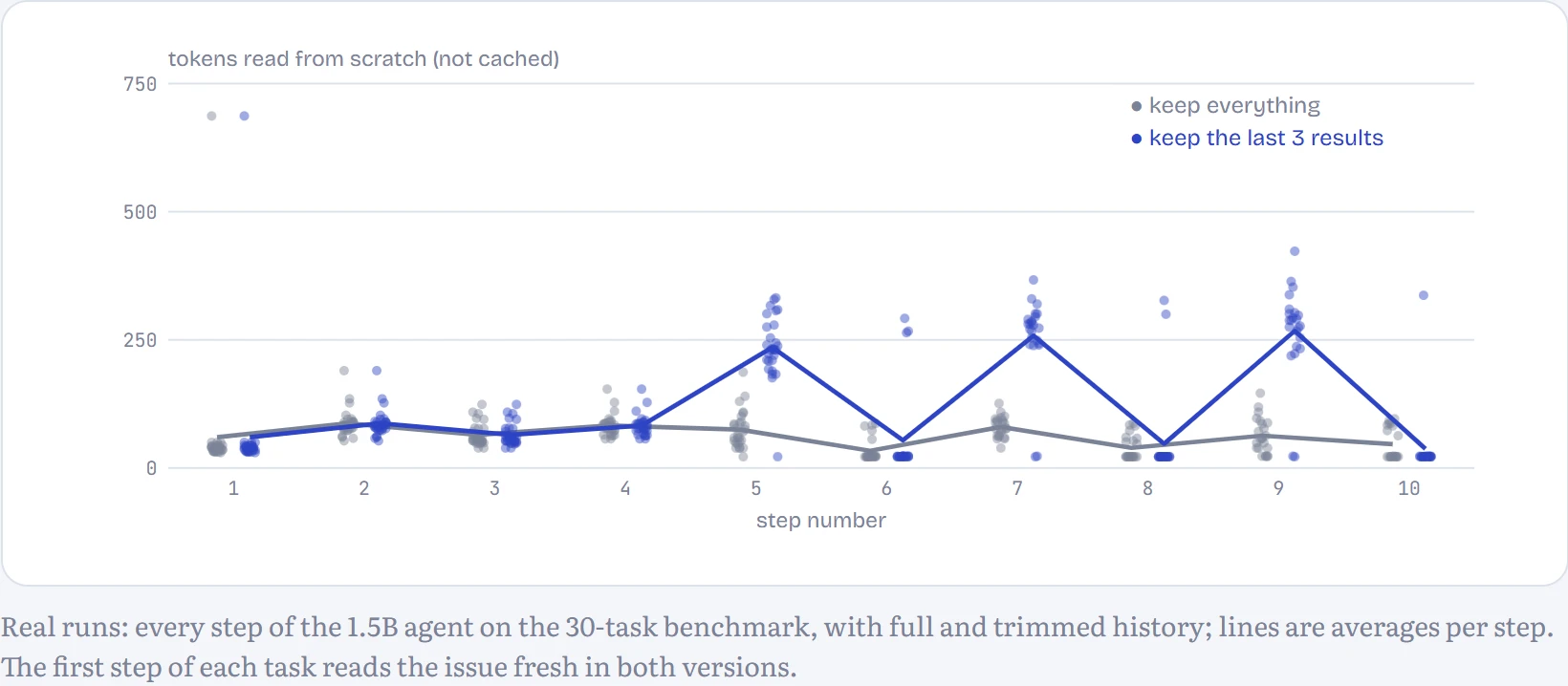
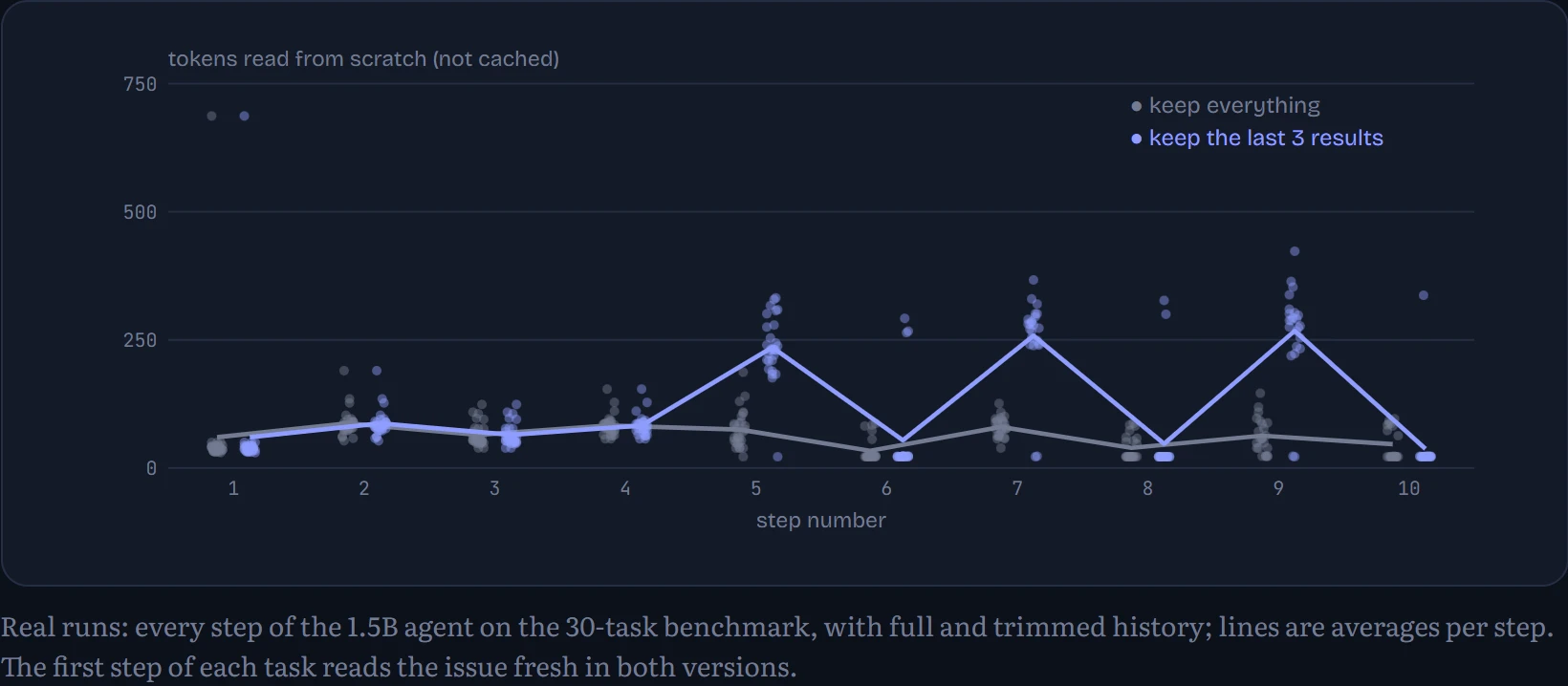
Answer. Slower: 84 s per task trimmed, against 78 s keeping everything. The trimmed version read only 2% fewer tokens in total, but it had to process 1,018 tokens per task from scratch, against 560 for the full history. It was slower even though it wrote fewer tokens of reply (226 per task against 254). The chart shows where the extra work comes from.
How to read the chart: each dot is one step of one run; across is the step number, up is the number of tokens the model read from scratch at that step, the part not served from the cache. Grey is the full history, blue the trimmed one.
| History | Solved | Tokens read per task | …of which not cached | Steps per task | Time per task |
|---|---|---|---|---|---|
| Keep everything | 7 of 30 | 8,490 | 560 | 8.7 | 78 s |
| Keep the last 3 results | 8 of 30 | 8,281 | 1,018 | 8.7 | 84 s |
Continue the lesson
The whole lesson, with its drawings and its questions. The rest of this section and 4 more after it.