
The agent loop: tool calls as text, multi-step control flow and per-step cost
An agent gives a language model a computer, one request at a time. The model writes a short structured request, a plain program called the harness carries it out and pastes the result back, and the model decides what to do next. Each request is a tool call, and the cycle is the agent loop.
What this page answers
What is an AI agent?
A language model in a loop with a harness: the model writes tool calls, the harness carries them out and returns the results, and the model decides the next step until the job is done. Read it in “What an agent is”
How does an agent call a tool?
By writing text in an agreed format. The harness reads that text, runs the matching tool and pastes the result back into the conversation; to the model, a tool call is just text. Read it in “Tool calls are just text”
What an agent is
A language model on its own can only do one thing: continue text. Ask it to fix a bug and it can write code that might fix it, but it can't open the file to see the real code, can't run the tests to check, and can't notice it was wrong. It's a brilliant colleague locked in a room with no computer, answering from memory.
An agent gives that colleague a computer, one request at a time. The model writes a short, structured request (“read the file stats.py”), a plain program called the harness carries it out and pastes the result back into the conversation, and the model decides what to do next. Each request is a tool call, and the cycle is the agent loop. That's it. The intelligence is all in the model; the harness is ordinary code you'll write in this track. How to read the diagram: follow the arrows round. The loop ends when the model calls the finish tool, or when the harness runs out of patience.
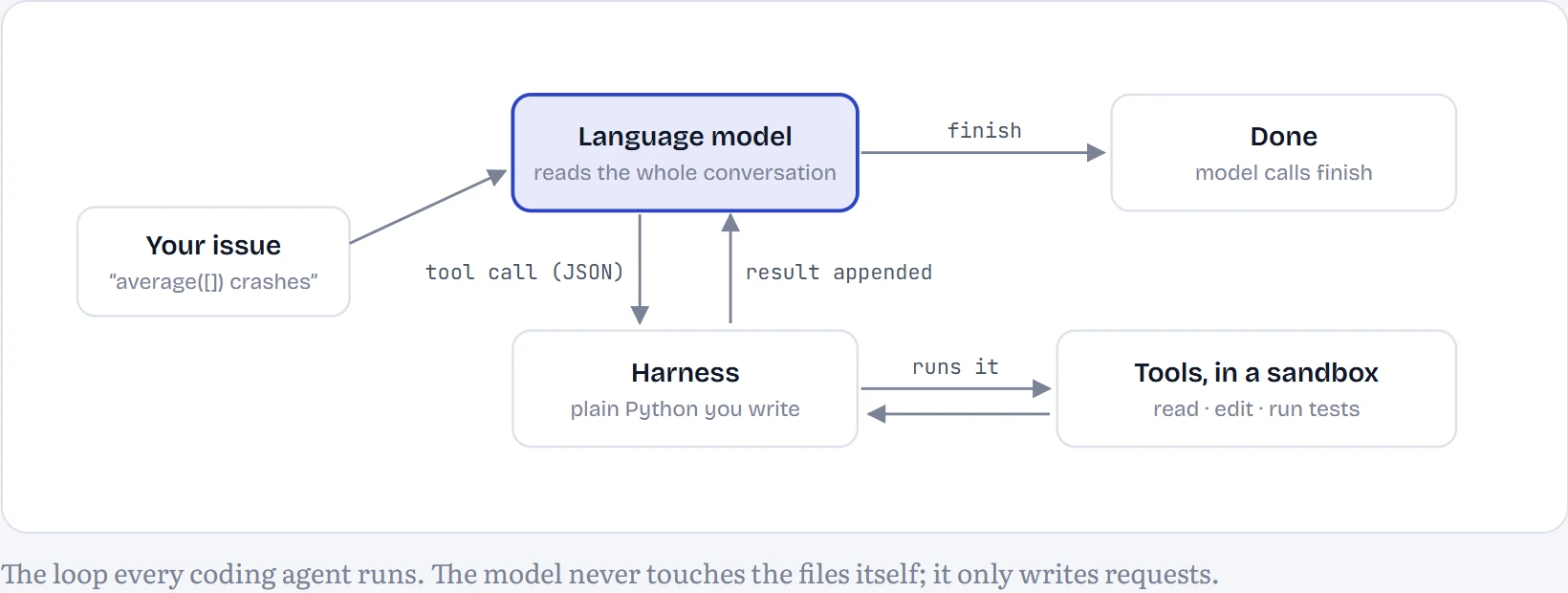
Predict first. I gave the same 30 small bug-fix tasks to the same model two ways: once with the issue and all the code pasted in, asking for the fixed file in a single reply, and once as an agent with tools that could read files, edit them and run tests. Which solved more?
- the agent
- the single reply
- about the same
Answer. With the 1.5B model, the agent solved 7 of 30 and the single reply 25 of 30. The single reply wins, which surprised me. A model this small is easily confused by a long tool conversation, while one prompt with all the code in it plays to what it was trained on. The rest of the lesson shows why, and the next five lessons are about closing that gap. With the 0.5B model: 0 of 30 as an agent, and 0 of 30 in one shot, though that zero has a twist explained below: 16 of its single replies were correct fixes that my harness couldn't apply.
The whole loop in code
Here's the heart of the harness used for every experiment in this track, trimmed only of logging. Read it top to bottom: build a conversation, ask the model for its next move, run the tool it asked for, append the result, repeat. Everything else in agent engineering, which the next five lessons cover, is refinement of these lines.
def run_agent(model, task, max_steps=10):
    repo = Sandbox(task)                         # a throwaway copy of the repository
    messages = [
        {"role": "system", "content": SYSTEM_PROMPT},
        {"role": "user", "content": task["issue"] + "\n\nRepository files: " + repo.file_list()},
    ]
    for step in range(max_steps):
        reply = model.chat(messages, tools=TOOL_SPECS)   # the model reads everything so far
        call = parse_call(reply)                          # {"name": ..., "arguments": {...}} or None
        if call is None:
            messages.append({"role": "assistant", "content": reply})
            messages.append({"role": "user", "content": "Reply with exactly one tool call."})
            continue
        name, args = call
        result, ok = call_tool(repo, name, args)          # ordinary Python does the actual work
        messages.append({"role": "assistant", "tool_calls": [{"function": {"name": name, "arguments": args}}]})
        messages.append({"role": "tool", "content": result})
        if name == "finish":
            break
    return run_hidden_tests(repo, task)                   # the only score that counts

def call_tool(repo, name, args):
    if name == "read_file":
        return open(repo.path(args["path"])).read(), True
    if name == "replace_in_file":
        text = open(repo.path(args["path"])).read()
        if text.count(args["old"]) != 1:
            return "The old text was not found. Call read_file and copy it exactly.", False
        open(repo.path(args["path"]), "w").write(text.replace(args["old"], args["new"]))
        return "Edited " + args["path"], True
    if name == "run_tests":
        return run_python(repo, "test_visible.py"), True
    ...                                                   # list_files, write_file and finish are just as short
Three things to notice. The model sees the whole conversation every step, including every file it has read, which is why context management (lesson A3) matters. The tools run inside a sandbox, a throwaway copy of the repository, so a bad edit can't hurt anything real (lesson A4). And the loop has a step limit: without one, a confused model will happily call tools forever. You'll see that happen below.
A real run, step by step
Here is a complete run of the 1.5B model on the task average_empty, exactly as it happened on this laptop, with nothing edited out. I picked it because it goes wrong and recovers: one step fails, and the error message is what puts it back on track.
How to read it: each step shows the tool the model asked for, with its arguments, and underneath it what the harness sent back. The grey line gives the step's cost: how many tokens the model had to read, how many it wrote, and how long this laptop took.
step 1 of 5 · task average_empty · hidden tests passed
1replace_in_file(path="stats.py", old="return sum(scores)", new="return sum(scores) if scores else 0.0")687 tokens in · 82 out · 43.3 s
The old text was not found in stats.py. Call read_file and copy the text exactly, including spaces.
5 steps, 79 seconds. Notice what the error message does at the failed step: the model guessed what the code looked like, the harness said the text wasn't there and told it to read the file, and it did. A good error message is half of a good tool, which is lesson A2's subject.
And here's the most common way the same model fails. Task max_index: 4 of its 10 steps repeat a call that had already failed, word for word, until the harness's 10-step limit ends the run.
step 10 of 10 · task max_index · hidden tests failed
1replace_in_file(path="lists.py", old="max_index = max(numbers)", new="max_index = numbers.index(max(numbers))")684 tokens in · 174 out · 41.7 s
The old text was not found in lists.py. Call read_file and copy the text exactly, including spaces.
2read_file(path="lists.py")768 tokens in · 18 out · 7.1 s
def max_index(xs):
    best = xs[0]
    for x in xs:
        if x > best:
            best = x
return best3replace_in_file(path="lists.py", old="max_index = max(numbers)", new="max_index = numbers.index(max(numbers))")839 tokens in · 42 out · 12.5 s
The old text was not found in lists.py. Call read_file and copy the text exactly, including spaces.
4read_file(path="lists.py")923 tokens in · 18 out · 7.2 s
def max_index(xs):
    best = xs[0]
    for x in xs:
        if x > best:
            best = x
return best5replace_in_file(path="lists.py", old="max_index = max(numbers)", new="max_index = numbers.index(max(numbers))")994 tokens in · 44 out · 12.8 s
The old text was not found in lists.py. Call read_file and copy the text exactly, including spaces.
6read_file(path="lists.py")1,078 tokens in · 20 out · 7.8 s
def max_index(xs):
    best = xs[0]
    for x in xs:
        if x > best:
            best = x
return best7replace_in_file(path="lists.py", old="max_index = max(numbers)", new="max_index = numbers.index(max(numbers))")1,149 tokens in · 44 out · 13.2 s
The old text was not found in lists.py. Call read_file and copy the text exactly, including spaces.
8read_file(path="lists.py")1,233 tokens in · 20 out · 8.0 s
def max_index(xs):
    best = xs[0]
    for x in xs:
        if x > best:
            best = x
return best9replace_in_file(path="lists.py", old="max_index = max(numbers)", new="max_index = numbers.index(max(numbers))")1,304 tokens in · 44 out · 13.0 s
The old text was not found in lists.py. Call read_file and copy the text exactly, including spaces.
10read_file(path="lists.py")1,388 tokens in · 20 out · 7.8 s
def max_index(xs):
    best = xs[0]
    for x in xs:
        if x > best:
            best = x
    return best
The model isn't stupid here; it's stuck. Each step it re-reads a conversation in which its own previous attempt is the most recent thing it did, and a small model tends to continue patterns, including its own mistakes. Lesson A6 measures harness tricks against exactly this, such as refusing to execute a call that already failed and saying so.
Tool calls are just text
There's no special machinery between a model and its tools. The harness describes the tools in the prompt, as JSON, and asks the model to answer with a JSON object between <tool_call> tags. Here is the exact text the model received at the start of the run above, and the exact text it wrote back. The model's chat template, which comes with the model, adds the markers such as <|im_start|>.
what the model read (first step)
<|im_start|>system
You are a coding agent working in a small Python repository. Fix the user's issue by calling tools. Work like this: read_file the code the issue is about, fix it with replace_in_file (or write_file), run_tests, and call finish once the tests pass. Make the smallest correct change and never edit the test files. Call exactly one tool per reply.

# Tools

You may call one or more functions to assist with the user query.

You are provided with function signatures within <tools></tools> XML tags:
<tools>
{"type": "function", "function": {"name": "list_files", "description": "List every file in the repository.", "parameters": {"type": "object", "properties": {}, "required": []}}}
{"type": "function", "function": {"name": "read_file", "description": "Return the full contents of one file.", "parameters": {"type": "object", "properties": {"path": {"type": "string", "description": "File path relative to the repository root, e.g. 'stats.py'."}}, "required": ["path"]}}}
{"type": "function", "function": {"name": "replace_in_file", "description": "Replace an exact piece of text in a file with new text. The old text must appear exactly once; copy it from read_file output, including indentation.", "parameters": {"type": "object", "properties": {"path": {"type": "string", "description": "File to edit."}, "old": {"type": "string", "description": "The exact text to replace."}, "new": {"type": "string", "description": "The text to put in its place."}}, "required": ["path", "old", "new"]}}}
{"type": "function", "function": {"name": "write_file", "description": "Overwrite a whole file with new content.", "parameters": {"type": "object", "properties": {"path": {"type": "string", "description": "File to write."}, "content": {"type": "string", "description": "The complete new file contents."}}, "required": ["path", "content"]}}}
{"type": "function", "function": {"name": "run_tests", "description": "Run the repository's visible tests (test_visible.py) and return their output. The output ends with ALL TESTS PASSED when everything passes.", "parameters": {"type": "object", "properties": {}, "required": []}}}
{"type": "function", "function": {"name": "finish", "description": "Call this when the issue is fixed and the tests pass.", "parameters": {"type": "object", "properties": {"summary": {"type": "string", "description": "One sentence on what you changed."}}, "required": ["summary"]}}}
</tools>

For each function call, return a json object with function name and arguments within <tool_call></tool_call> XML tags:
<tool_call>
{"name": <function-name>, "arguments": <args-json-object>}
</tool_call><|im_end|>
<|im_start|>user
average([]) crashes with ZeroDivisionError. It should return 0.0 for an empty list.

Repository files: stats.py, test_visible.py<|im_end|>
<|im_start|>assistant
what the model wrote
```json
{
    "name": "replace_in_file",
    "arguments": {
        "path": "stats.py",
        "old": "return sum(scores)",
        "new": "return sum(scores) if scores else 0.0"
    }
}
```

After running `run_tests`, verify that the issue is resolved. If necessary, repeat the process until all tests pass.
Look closely at the reply. The prompt asked for <tool_call> tags, and the model never once used them, writing a Markdown code block or bare JSON instead: across the whole benchmark, 0% of its 194 tool calls used the tags, 20% a ```json block and 80% bare JSON. A strict parser would have thrown most of those away. Real harnesses are forgiving about format for exactly this reason, and the bigger the model, the less forgiveness it needs. Large hosted models are trained heavily on tool calls, and many serving systems can also constrain generation so that only valid JSON can come out, which removes this failure entirely.
Continue the lesson
The whole lesson, with its drawings and its questions. 5 more sections after the ones above.