
When redistribution goes wrong: suboptimal paths and loops
Two redistribution points remove a single point of failure, and bring new problems. The seed metric hides the road a route came through, so paths can be suboptimal. A route can return as its own copy and win on administrative distance, OSPF's 110 beating EIGRP external's 170, so the table flaps and routes feed back. Fix it with distance, a distribute list or route tags.
By Arif, founder of Daveth · Updated
The full 15 min walkthrough is in Daveth Pro (Network). See what the plan opens
What this page answers
What causes routing loops with mutual redistribution?
At two redistribution points, a route redistributed into OSPF comes back to the other boundary router as an OSPF route, AD 110, which beats the original EIGRP external, AD 170. The table flaps between them and the route feeds back into its own protocol. Read it in “The table that can't sit still”
How do you configure route tagging?
In the route maps on the redistribute lines: each boundary router sets a tag on routes it redistributes, and the other matches the tag to deny them coming back. Route tags are the strongest way to stop route feedback. Read it in the lesson
Two points are safer. Usually.
The last lesson's network had one router joining EIGRP and OSPF. It worked, and it was a single point of failure. Highly available designs remove single points of failure through redundancy. Between two routing protocols, that means at least two points of redistribution, so connectivity survives a failure. That's multipoint redistribution: redistribution at multiple points between two different routing protocols.
So you add the second boundary router. Nothing breaks. No interface goes down, no neighbor drops. And the warning is that redistributing at multiple points between two protocols may bring two issues with it: suboptimal routing and routing loops. For a user, that's a slow connection or a lost one. Those are this lesson: the issues you might face when you redistribute at multiple points between the same two protocols.
Three things from earlier lessons carry this one, so bring them in now. A router redistributes only routes its routing table credits to the protocol named on the redistribute line. The seed is a number the destination protocol is handed, not one it measured. And lower AD wins, with the defaults that matter here: internal EIGRP 90, OSPF 110 and external EIGRP 170.
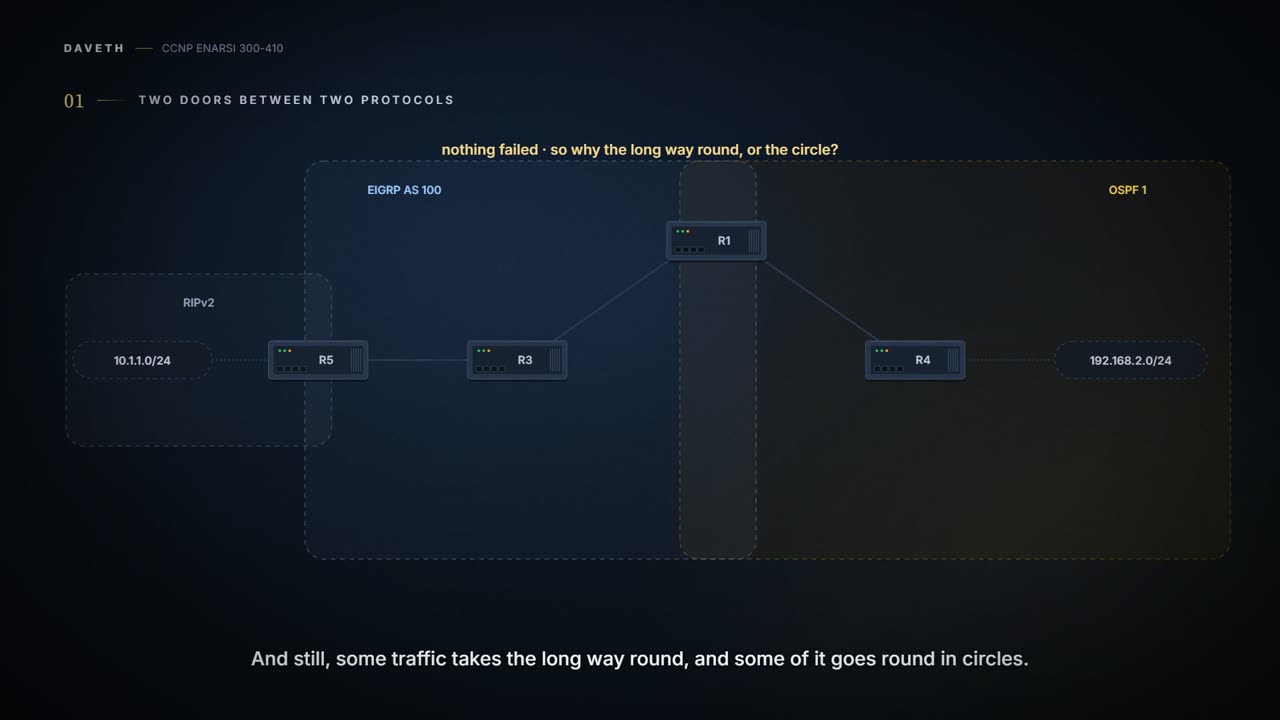
Here's the network. On the left, a RIPv2 domain with 10.1.1.0/24. Its boundary router, R5, joins it to EIGRP AS 100, where R3 sits. R3 has one link to R1 and one to R2, and R1 and R2 are the boundary routers into OSPF 1. Both connect to R4, and past R4 sits one more router, with 192.168.2.0/24. R1 and R2 aren't linked to each other. 10.1.1.0/24 is redistributed into EIGRP, and R1 and R2 redistribute it into OSPF.
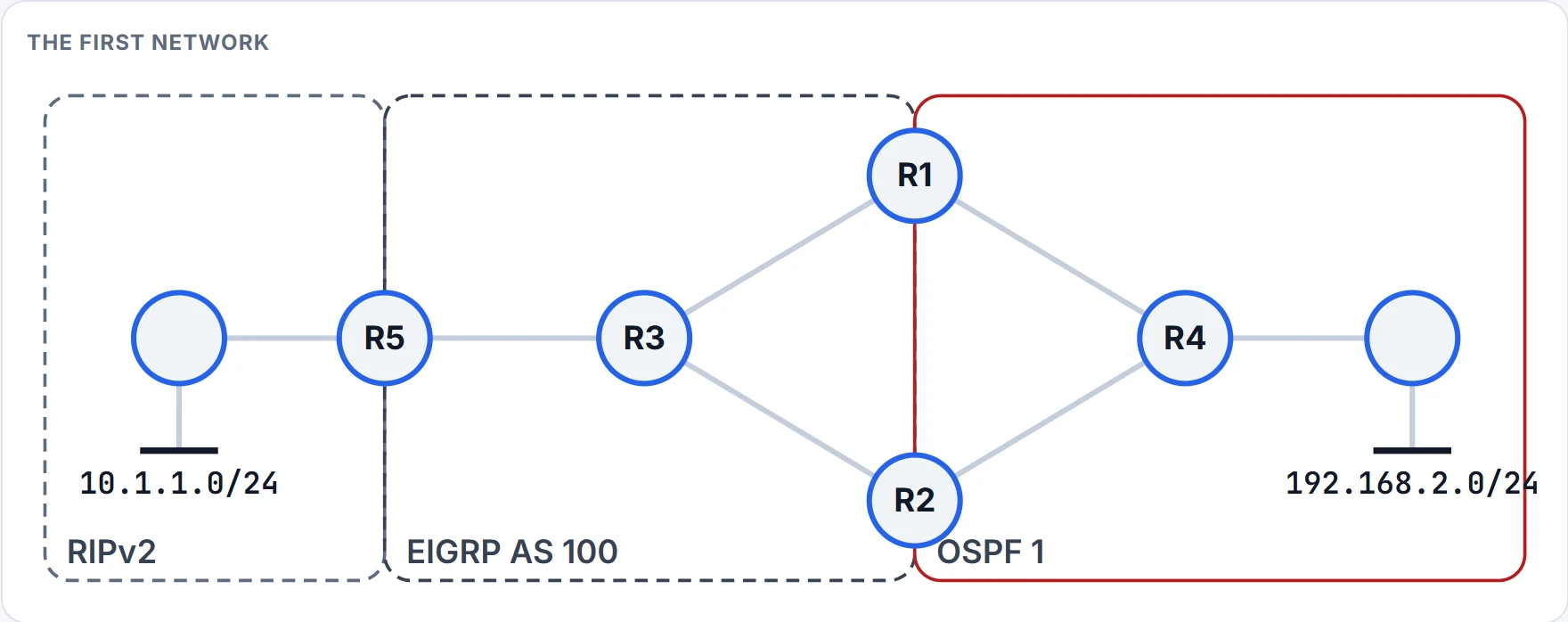
Before you read on, look at it the way you'd look at it in the exam: the drawing and the protocols, no show commands. A user on 192.168.2.0/24 opens a session to 10.1.1.0/24. Where does the traffic go, and does it keep going there? Write your answer down. Nothing in this network is going to fail.
The seed hides the road
Start with the milder problem. When routes are redistributed from one routing source into another, the original source's information is lost the moment the seed metric is injected at the redistribution point. The destination protocol can't see the network the route came through: that visibility is lost, or hidden. With one point of redistribution between two sources that costs nothing, because there's only one way across. With two, the destination protocol has to choose between the ways across, and it chooses blind. The suboptimal path may win.
A simpler drawing first: the same shape without RIP. 10.1.1.0/24 sits past R3 on the EIGRP side and 192.168.2.0/24 past R4 on the OSPF side. R3 reaches R1 over 1 Gbps and R2 over 100 Mbps. On the OSPF side it's the other way round: R1 reaches R4 over 10 Mbps, R2 over 1 Gbps. The best way to 192.168.2.0/24 is through R2, because the 1 Gbps link is much faster than the 10 Mbps one.
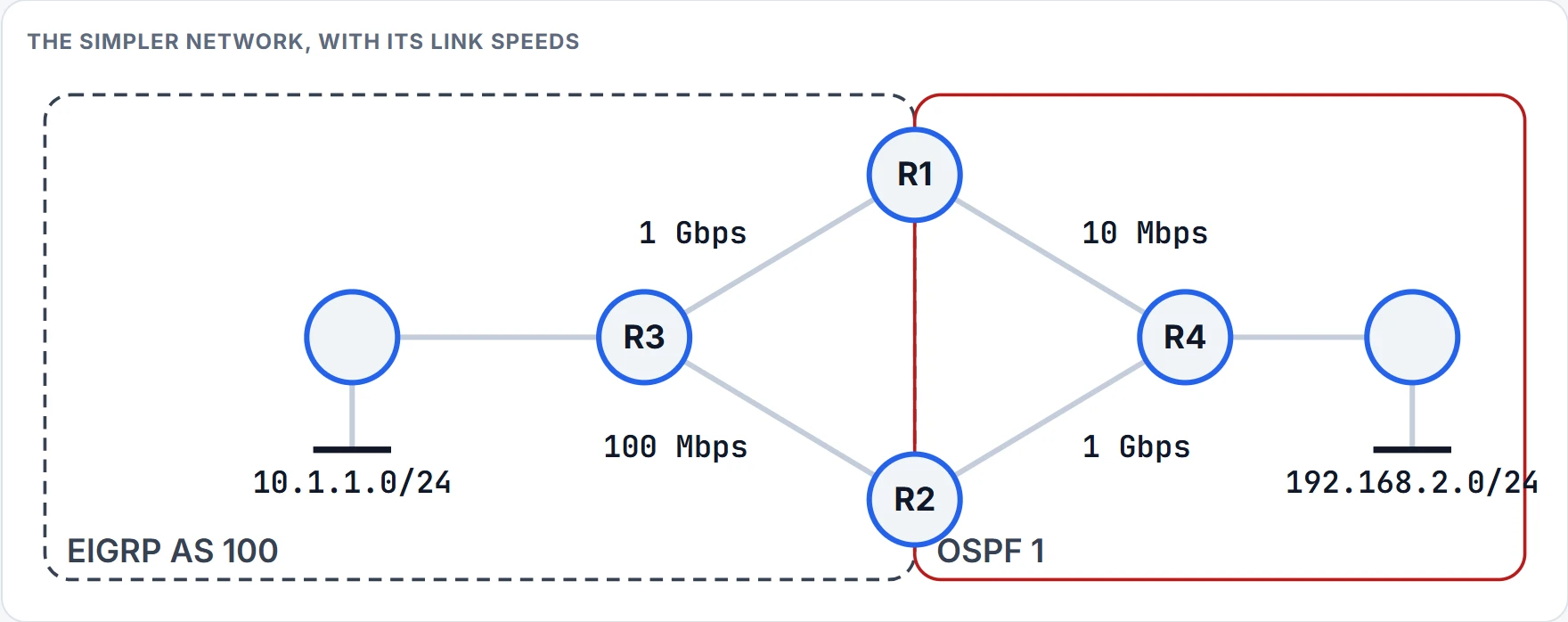
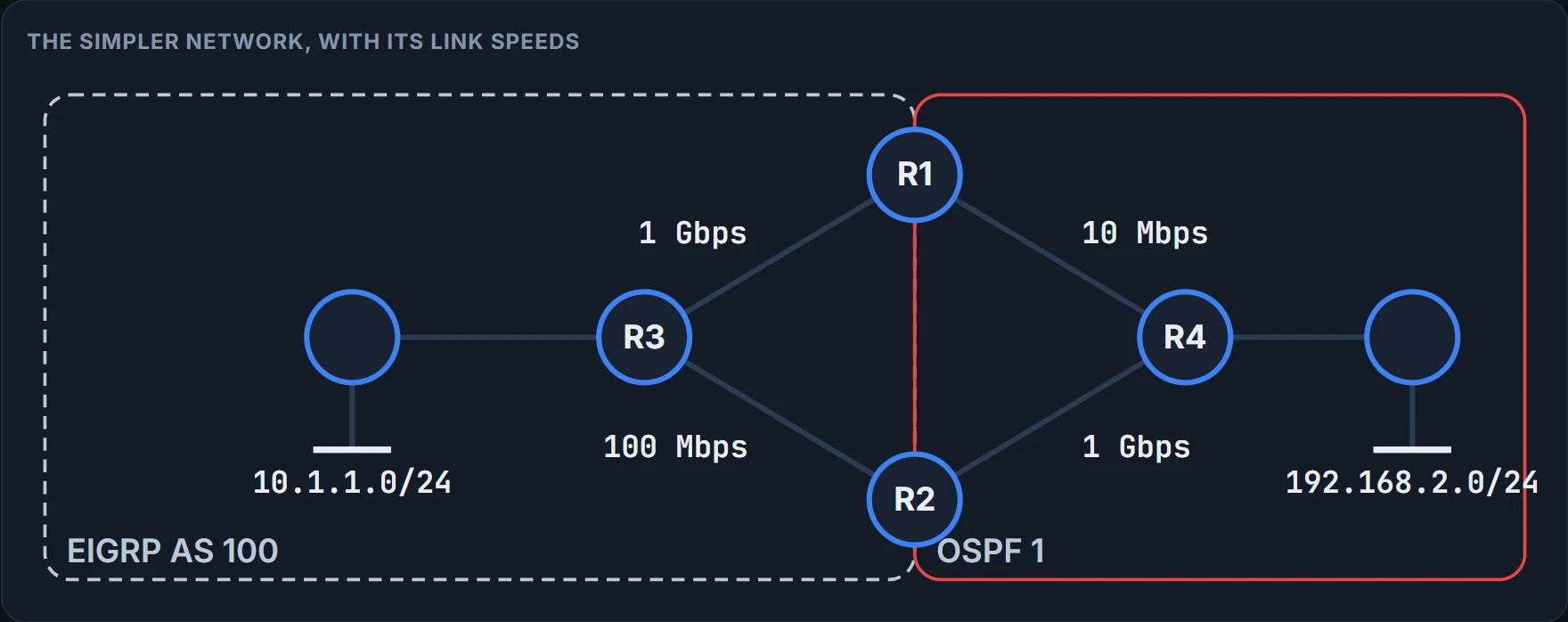
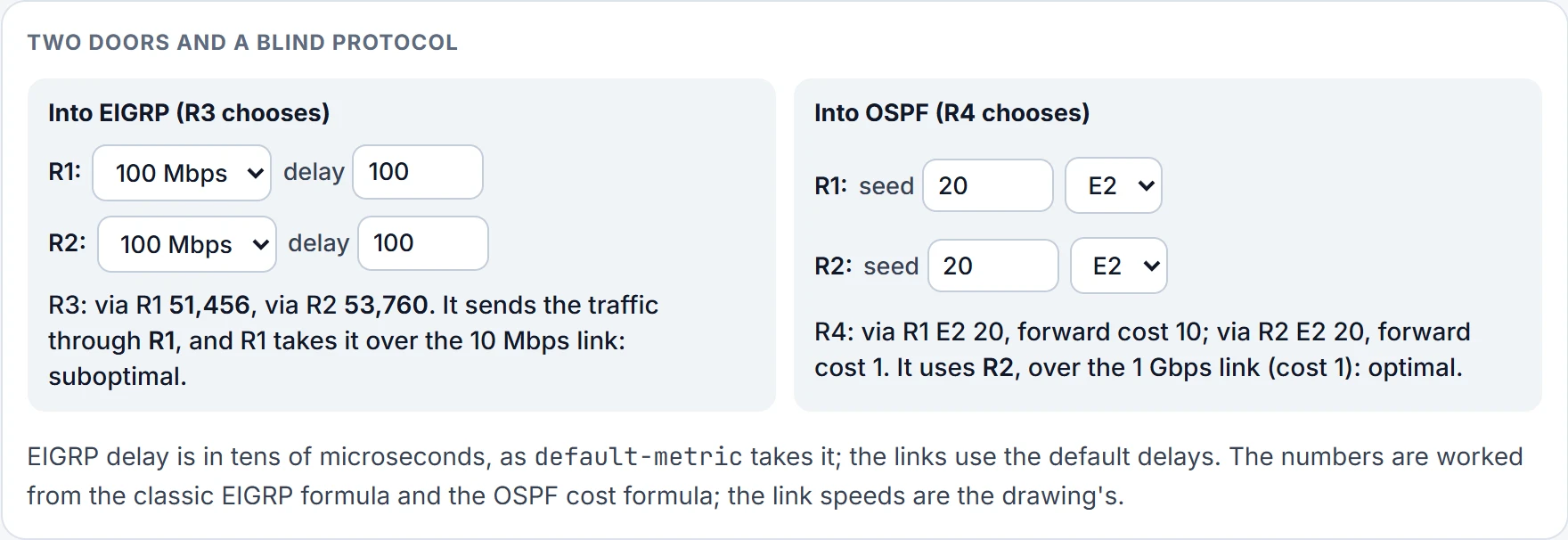
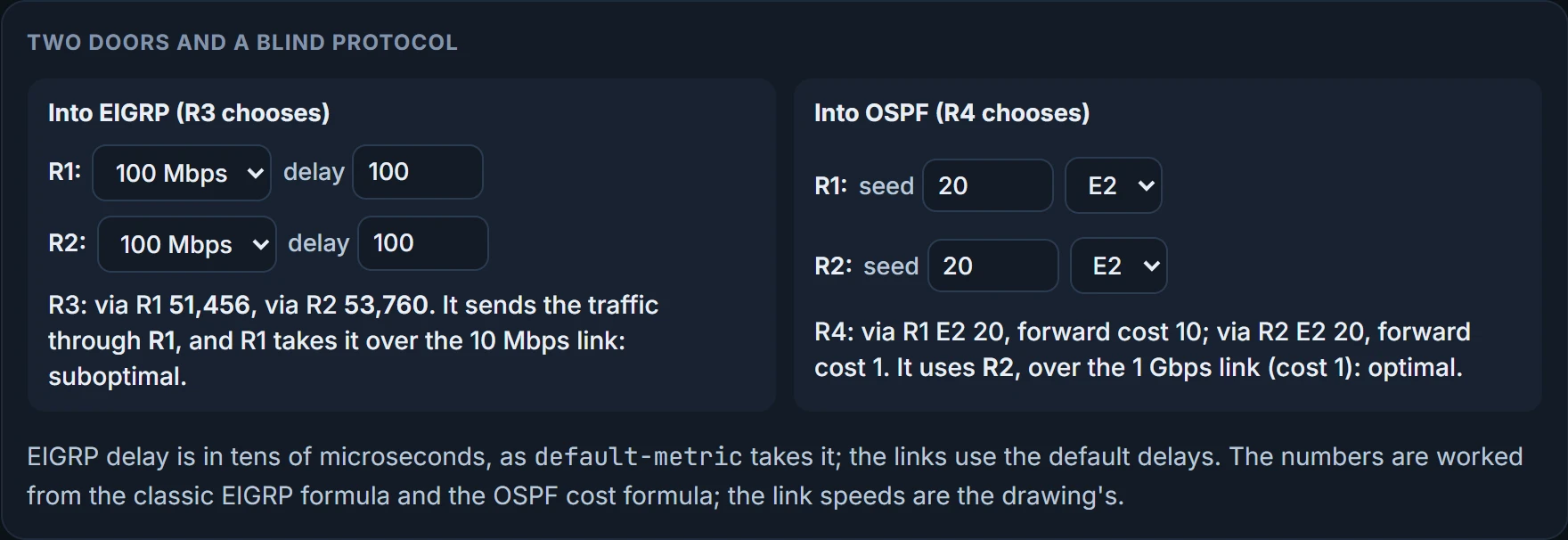
Through R1. Once R1 and R2 redistribute into EIGRP, EIGRP has no idea the 10 Mbps link or the 1 Gbps link exists in the OSPF domain. Inside the EIGRP AS, all R3 sees is the seed plus its own two links, 1 Gbps to R1 and 100 Mbps to R2, so R1 looks like the best path. Same seed on both, so the faster EIGRP link decides: the traffic goes to R1, and R1 sends it across the 10 Mbps link. It works. It's suboptimal. With an inappropriate seed on R1 and R2, traffic from 10.1.1.0/24 to 192.168.2.0/24 may take the path through R1.
The numbers, with the classic formula, 256 × (10^7 / slowest bandwidth + total delay / 10), and the default delays, 10 µs for Gigabit Ethernet and 100 µs for Fast Ethernet. Give both boundary routers the seed 100000 100 255 1 1500. Through R1: the slowest bandwidth is the seed's 100,000 Kbps, and the delay is the seed's 100, already in tens of microseconds, plus the gigabit link's 10 µs, which counts as 1, so 256 × (100 + 101) = 51,456. Through R2: 256 × (100 + 110) = 53,760. R1 wins by 2,304.
How do you catch it? On the topology diagram, and with traceroute: if a trace from 10.1.1.0/24 to 192.168.2.0/24 goes through R1, redistribution is causing suboptimal routing.
The fix is a different seed on each boundary router, so the path you want has the lower overall metric. R2's EIGRP seed has to be significantly better than R1's, so that R3 chooses R2 even though R3's link to R2 is the slower one. The point is to keep the traffic off the 10 Mbps link. How much is significantly? Keep the bandwidth at 100,000 and R2 wins once its seed delay is 90 or less against R1's 100: 256 × (100 + 100) = 51,200. Raise both seeds' bandwidth to 1 Gbps instead, delay still 100, and the 100 Mbps link becomes the bottleneck on R2's side only: 256 × (10 + 101) = 28,416 through R1 against 256 × (100 + 110) = 53,760 through R2. The gap grows from 2,304 to 25,344, and delay can't close it: even at a seed delay of 0, R2 reaches 256 × (100 + 10) = 28,160, a win by 256. In practice you'd make R1's seed worse instead. The seed's bandwidth is as much a choice as its delay.
Now the other direction. Redistributed into OSPF, EIGRP's routes get the default seed of 20 as E2, and an E2 metric stays 20 all the way across the OSPF domain. So R4 sees 10.1.1.0/24 from R1 at 20 and from R2 at 20. Load balancing? Only if the forwarding metrics to the two ASBRs are equal as well as the E2 seeds. They aren't. The 10 Mbps link costs much more than the 1 Gbps one, so all the traffic from 192.168.2.0/24 to 10.1.1.0/24 goes through R2, the lower metric to the ASBR. At the default reference of 100 Mbps that's a cost of 10 against 1. Good result. Now set R2's seed above 20 and leave R1's at 20: R1 wins on the lower seed, and it's the suboptimal path. With E2, the seed is read before the road.
So, with E2, make the preferred ASBR advertise the lowest seed. With E1, each router adds the cost of the links inside the network to the seed. Either pick the E2 seeds with care, or use E1 so the internal costs count. E1 isn't a cure on its own, though: give R2 a seed of 30 and R1 20, both E1, and R1 still wins, 30 to 31. And if one router sends E1 and the other E2, E1 is preferred whatever the numbers.
The checklist for this, in order:
- From the topology, recognise that mutual redistribution is happening at more than one point.
- From the connections, recognise the different link speeds.
- From the protocols in use, know how each one's seed is set and how it behaves.
- From the business requirement, fix it by changing the metrics on the boundary routers:
default-metric, themetricparameter onredistribute, or within a route map.
The same warning comes up with redistribution into EIGRP: the metrics you specify can cause suboptimal routing if there are multiple redistribution points. So the method that solves suboptimal routing caused by redistribution is changing the seed metrics of the redistributed routes.
A route meets its own copy
Back to the first network. It doesn't look like a problem.
Follow 10.1.1.0/24. Redistributed from RIPv2 into EIGRP AS 100, it's an external route inside EIGRP, so R1 and R2 put it in their routing tables as D EX with an AD of 170: D EX 170, 10.1.1.0/24, via R3, at both.
Now R1 and R2 redistribute it into OSPF. By default each one's type 5 LSA advertises 10.1.1.0/24, and OSPF routers install it as O E2 with an AD of 110. A type 5 is flooded through the whole OSPF domain. So R1 receives R2's LSA, and R2 receives R1's, and that's what creates the problem.
The OSPF one, on its lower AD. It is a problem, and administrative distance is why. R1 now points through the OSPF domain toward R2 to reach 10.1.1.0/24. R2 makes the same comparison with R1's LSA, and R2 points through the OSPF domain toward R1: O E2 110 at R1 via ASBR R2, at R2 via ASBR R1, and O E2 110 at R4 and at the router past it. Traffic from 192.168.2.0/24 to 10.1.1.0/24 now goes back and forth between them: a routing loop. A routing loop is traffic routed back the way it came, or in a circle through the network, so that it never reaches its destination.
Why doesn't R1 use its own type 5? When the source protocol's AD is higher than the destination's, the route in the redistributing router's own table is still the source protocol's. R1's own redistribution never hands R1 an OSPF route; the copy that beats R1's EIGRP route is R2's. That's why it takes two boundary routers.
Here's the part that should bother you. Nothing failed. No link went down, no neighbor dropped, nobody typed a wrong number. A route left EIGRP at one boundary router, crossed into OSPF, and reached the other boundary router looking better than the original, 110 against 170. Both routers are obeying the AD table perfectly, in a circle.
It's the office rumour that comes back as a memo. You tell a colleague something; an hour later it lands on your desk on letterhead, and you trust the letterhead over your own memory. The difference is that you'd recognise your own story. R1 can't: nothing in R2's type 5 says the route started in EIGRP, unless somebody wrote that on it. Hold that thought.
Now follow one packet hop by hop, because "back and forth between R1 and R2" is the short version. R4 sends it to whichever ASBR it prefers; say R1. R1's route points at ASBR R2, and R1's only way into the OSPF domain is R4, so the packet goes straight back to R4, which sends it to R1 again. It ping-pongs between R4 and one boundary router until its TTL runs out. Neither table, read on its own, looks wrong.
The table that can't sit still
It gets worse, and the ownership rule is why. To redistribute a route from EIGRP into OSPF, the route has to be in the routing table as EIGRP's.
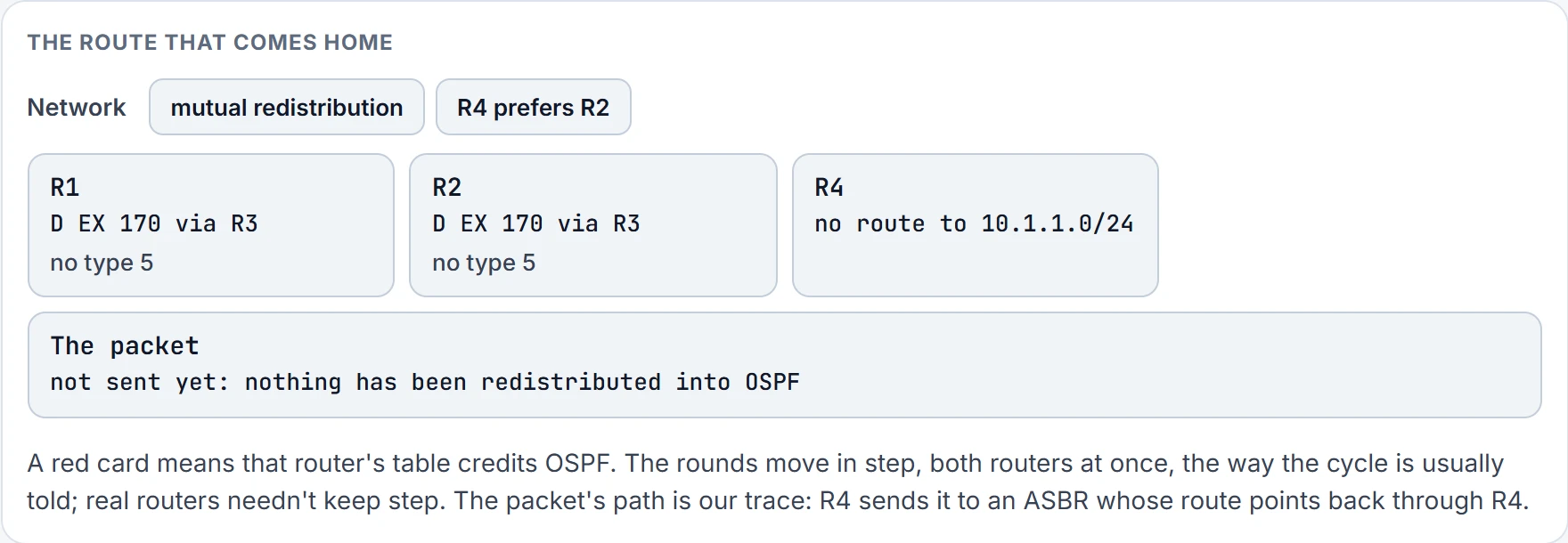
Step 1 of 9 Round 0: R1 and R2 have learned 10.1.1.0/24 from R3 as an EIGRP external, D EX at 170. Nothing has been redistributed into OSPF yet.
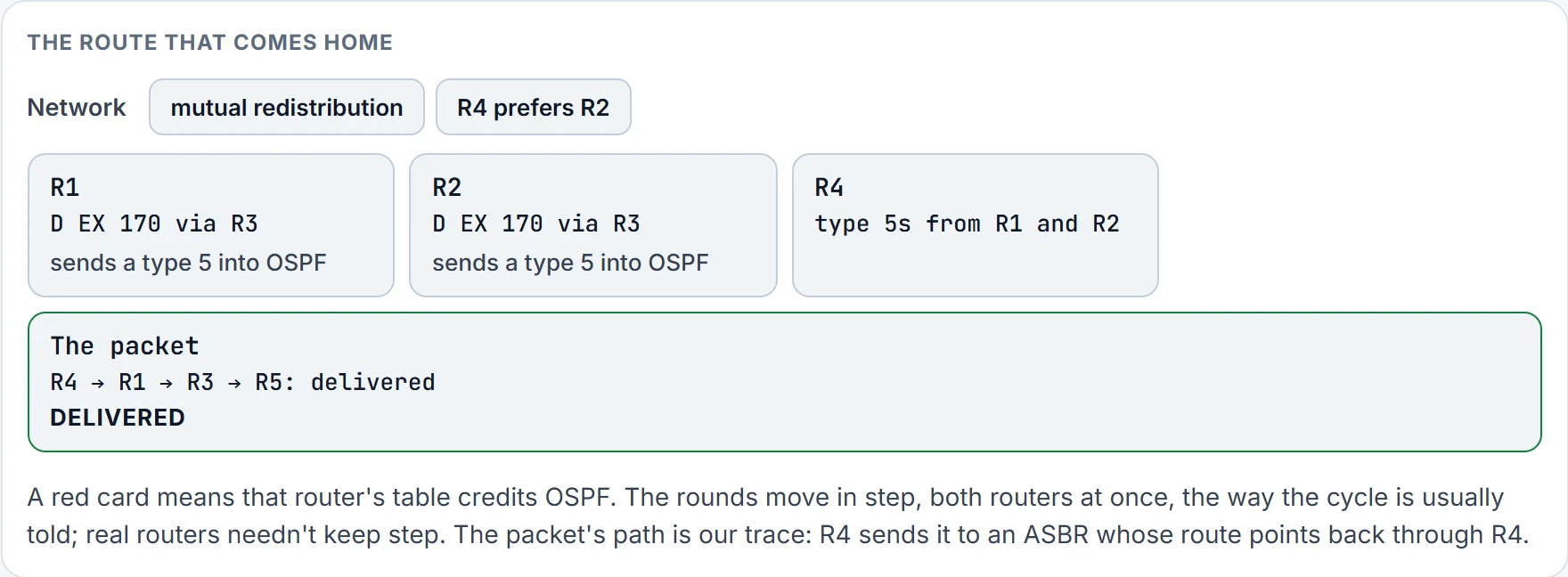
Step 2 of 9 Each table credited EIGRP last round, so each router redistributes the route: a type 5 from R1 and one from R2. R4's choice of ASBR hands the packet to R3: delivered.
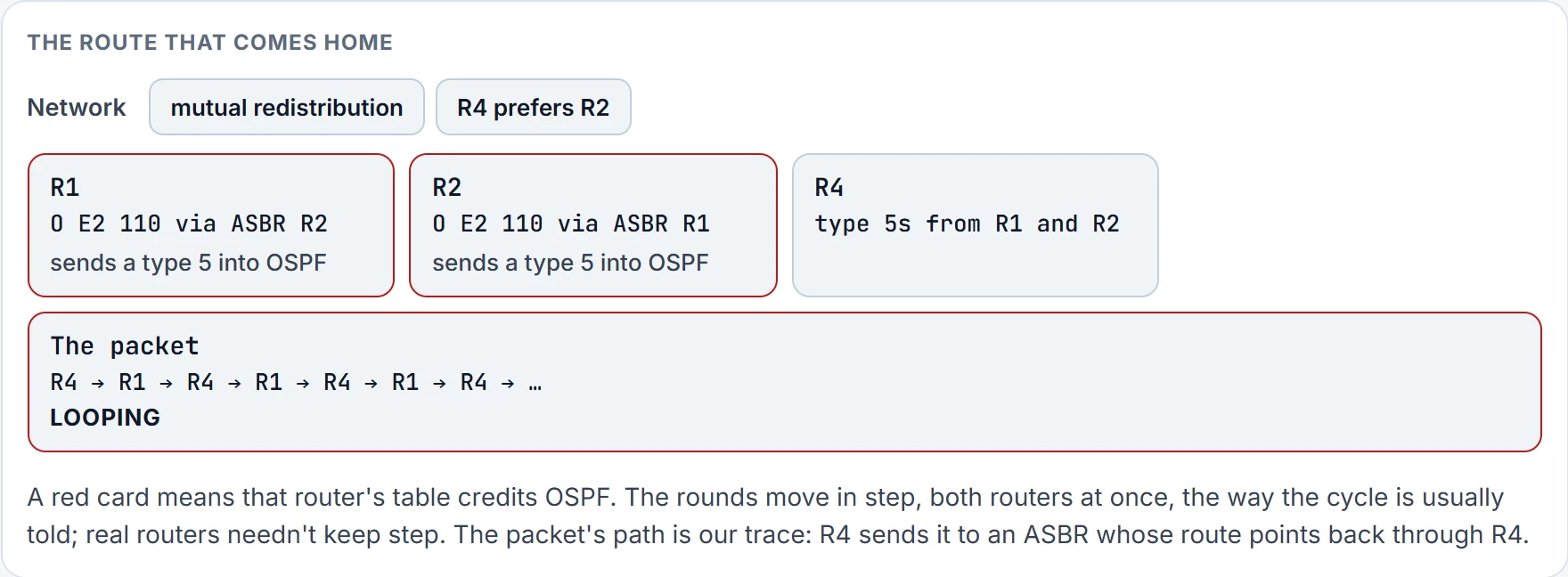
Step 3 of 9 Each now takes the other's type 5 at 110 over its own EIGRP route at 170. Their own type 5s are still out this round; they go next round. The packet's ASBR sends it back to R4: looping.
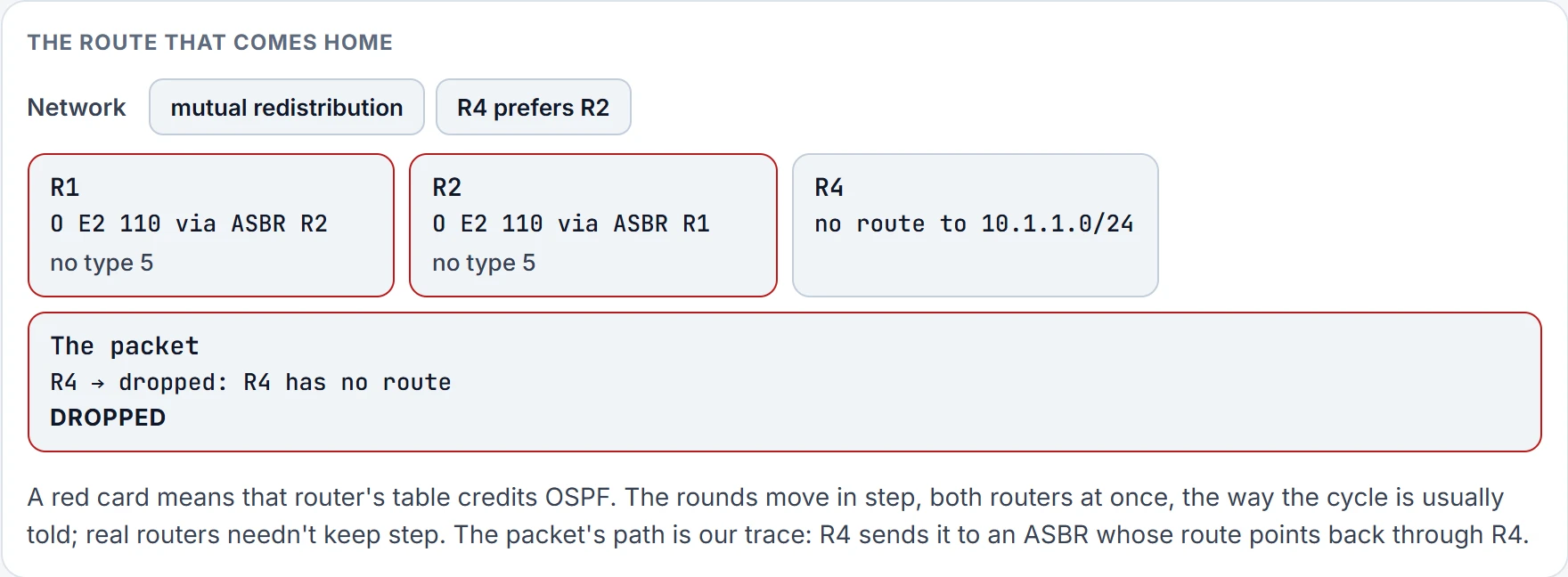
Step 4 of 9 Neither table credited EIGRP last round, so both type 5s are withdrawn and R4 has no route: dropped. R1 and R2 still hold O E2 this round; the withdrawal reaches their tables next round.
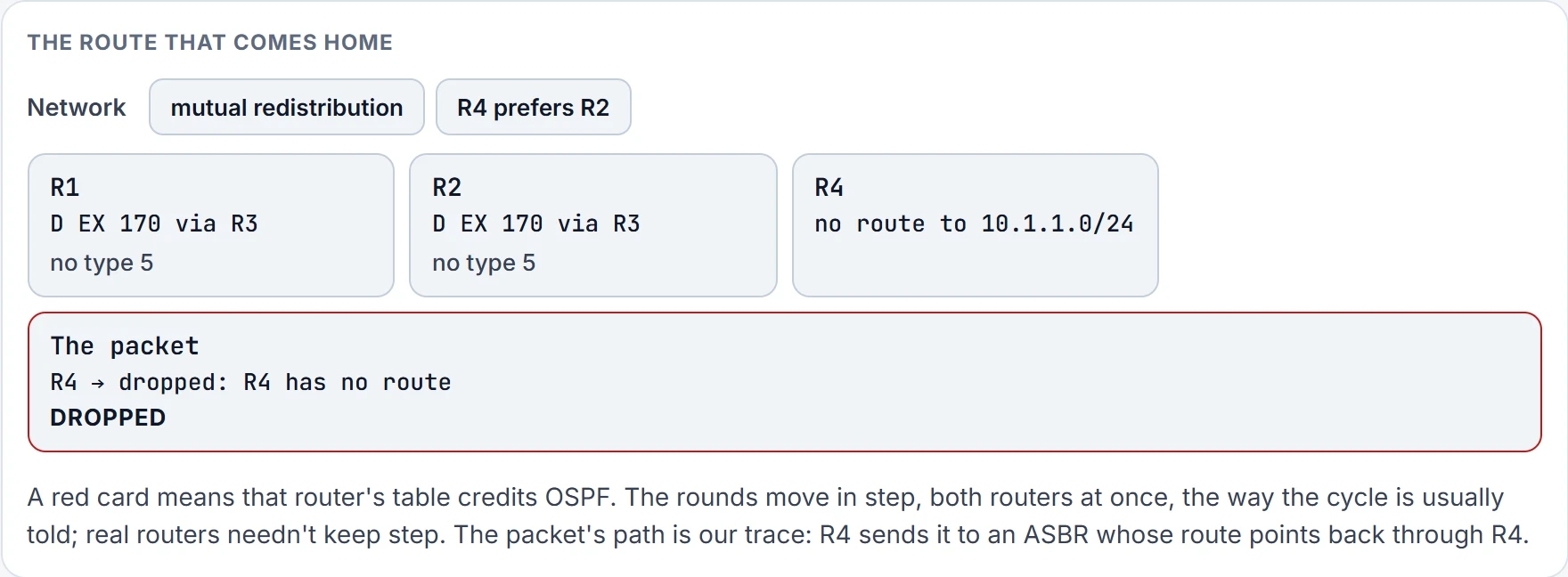
Step 5 of 9 With no OSPF copy left, EIGRP's route goes back into both tables. R4 still has no route: the type 5s come back next round.
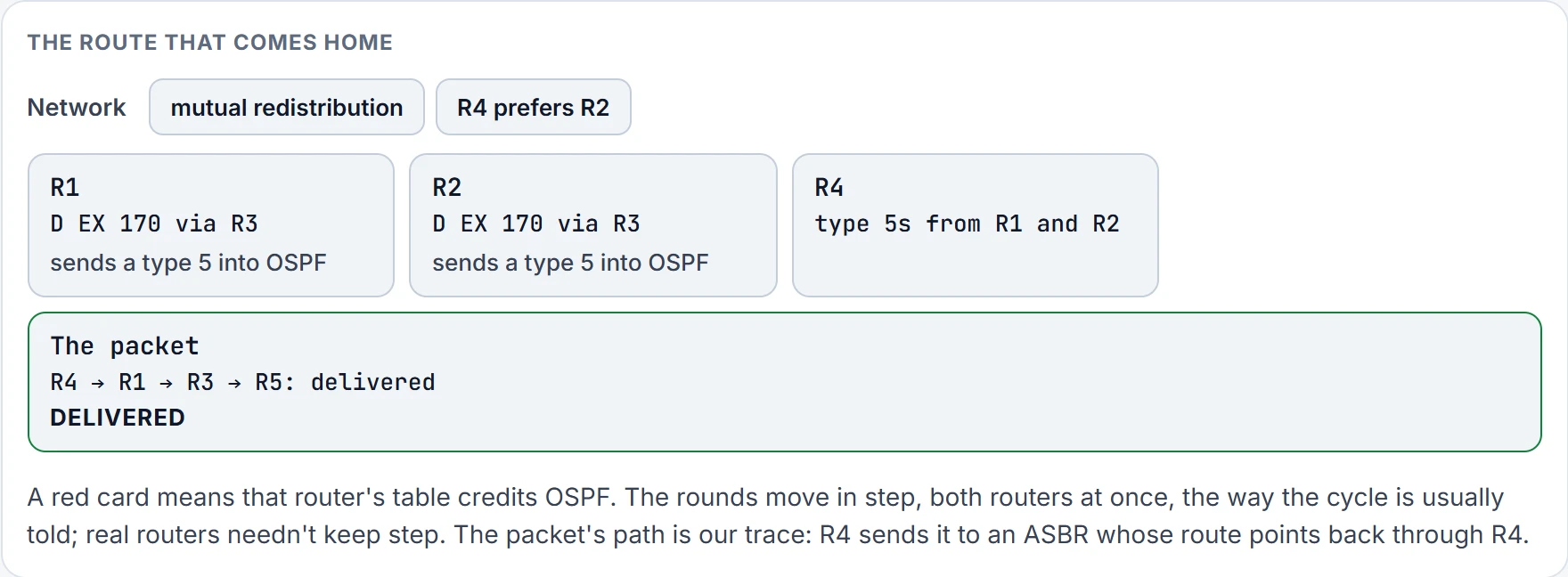
Step 6 of 9 Round 5: delivered, and round again.
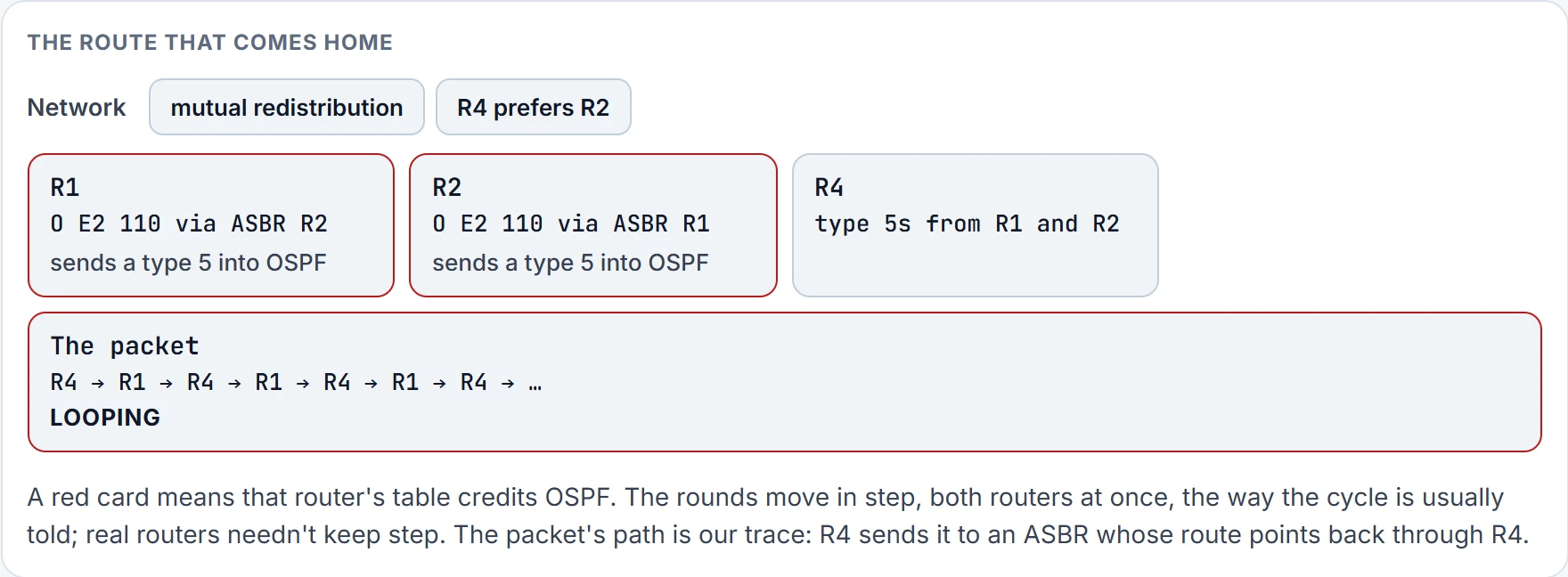
Step 7 of 9 Round 6: looping, and round again.
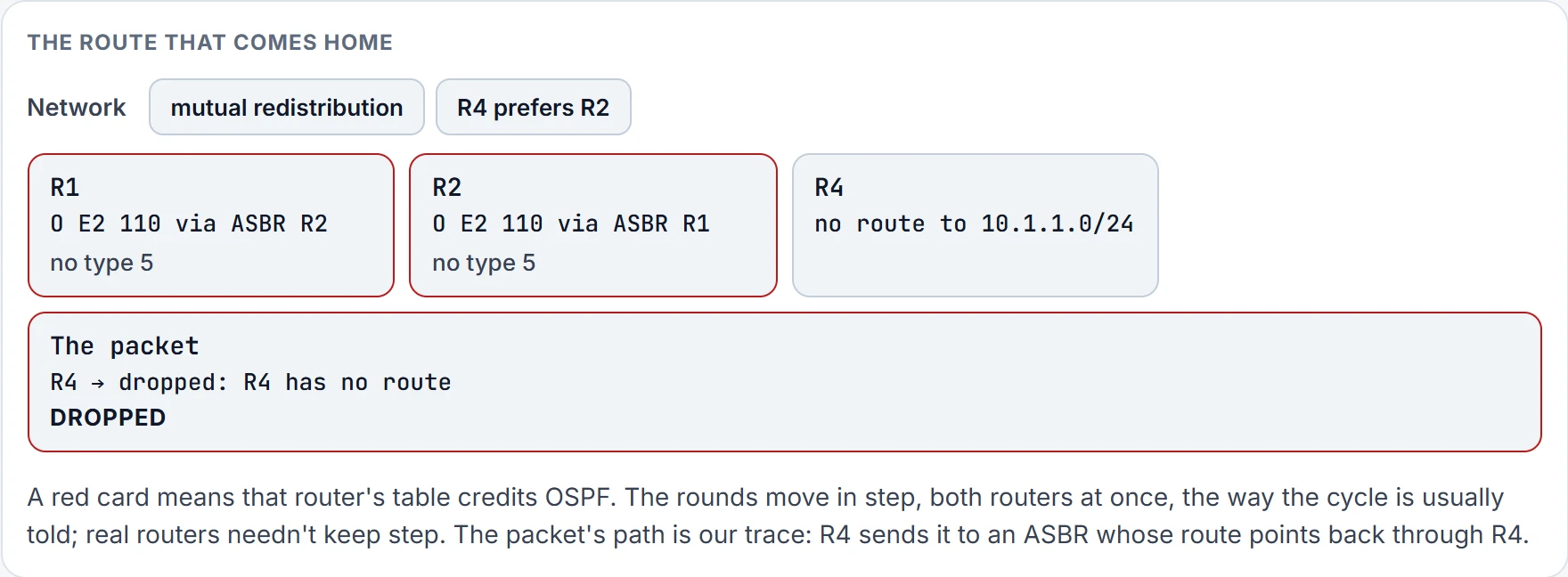
Step 8 of 9 Round 7: dropped, and round again.
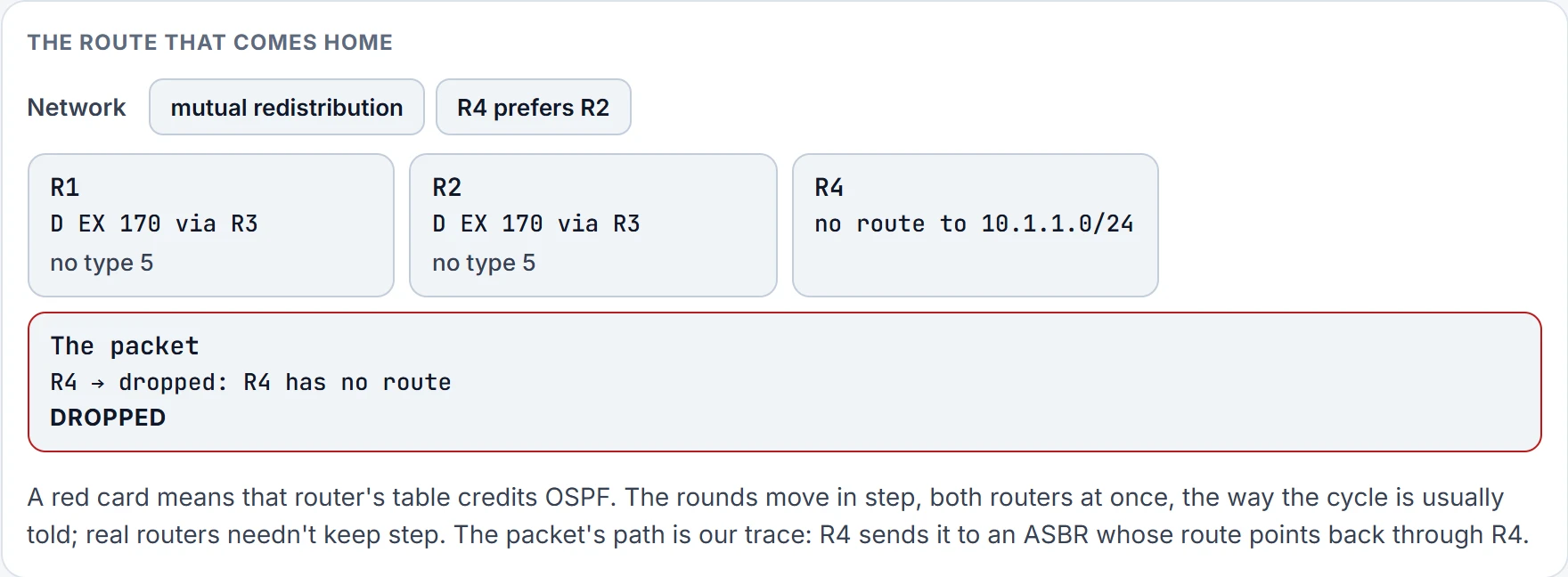
Step 9 of 9 Round 8: dropped, and round again.
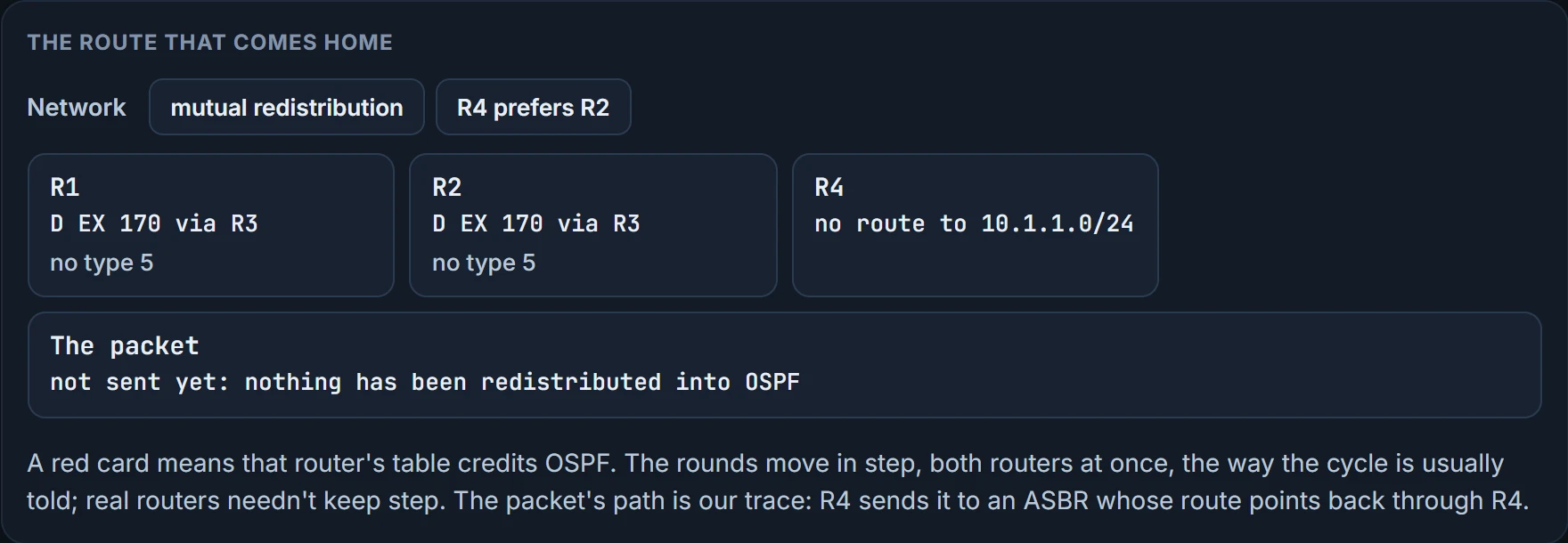
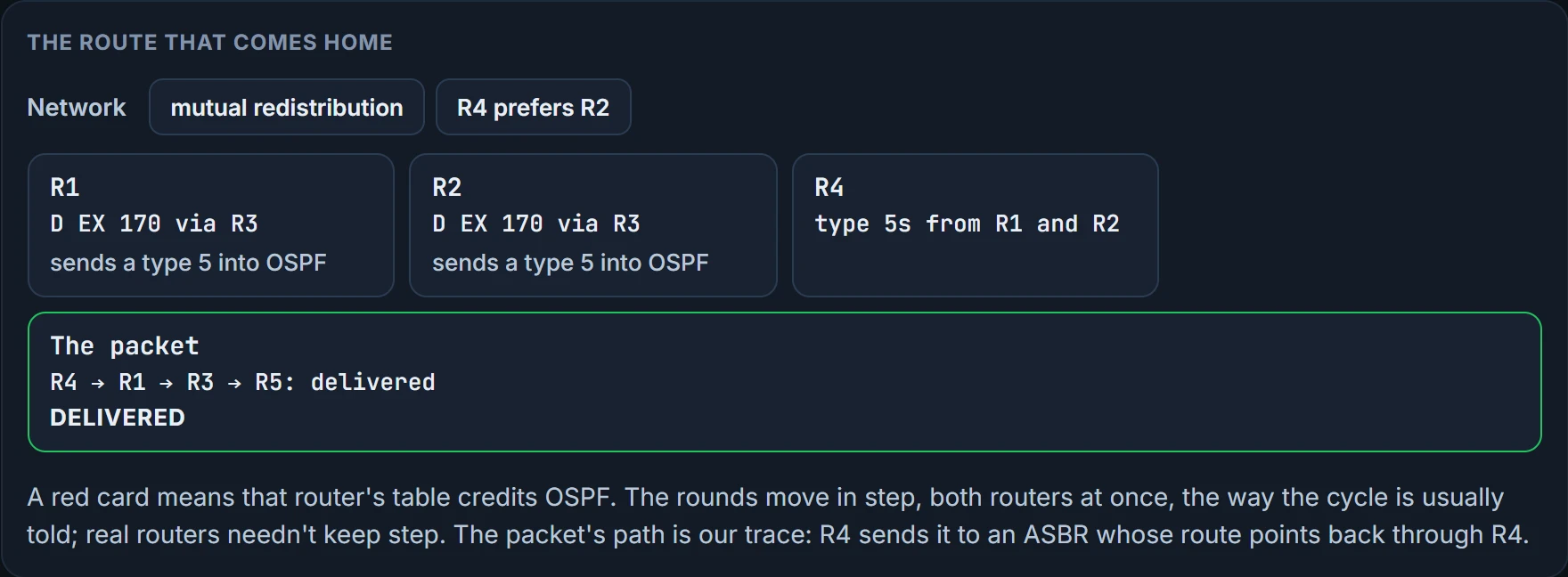
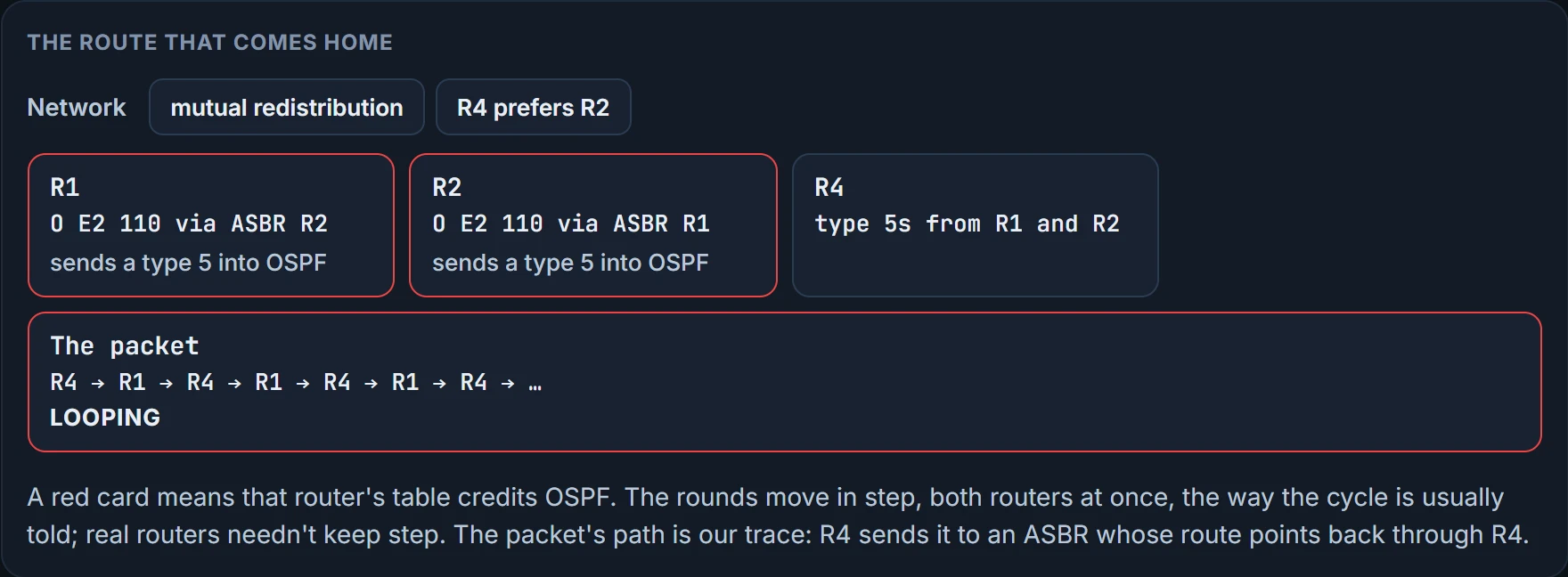
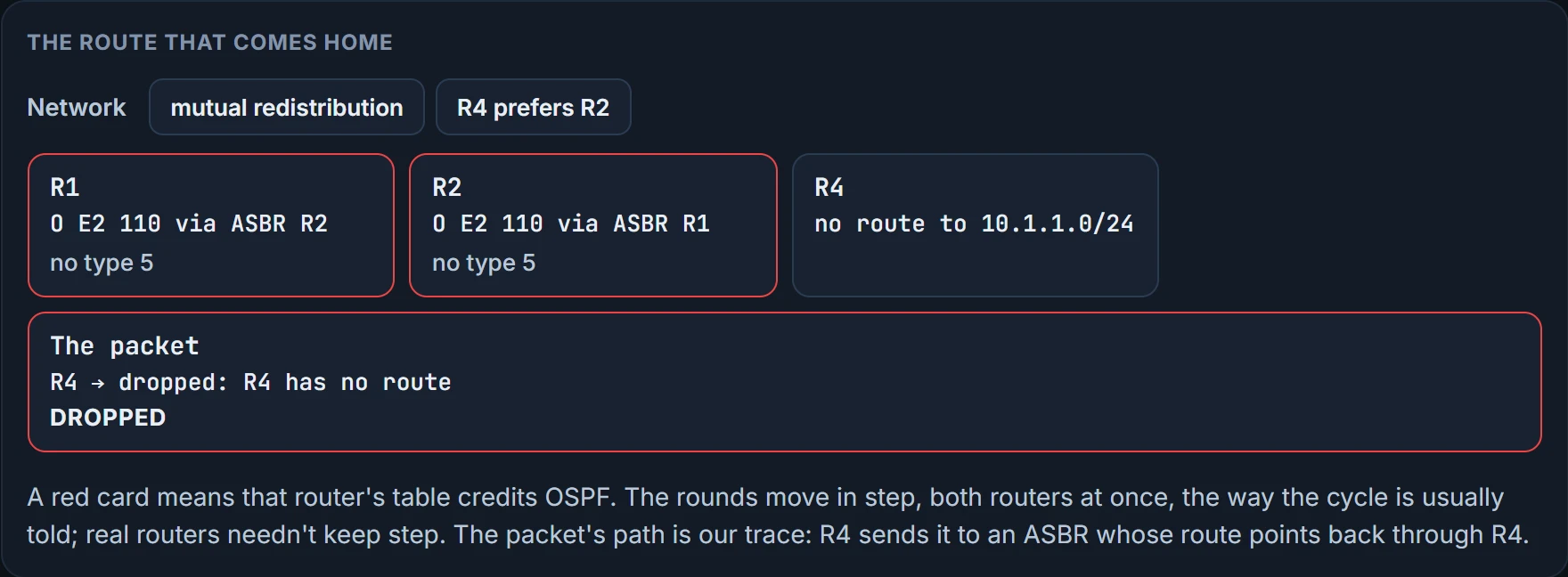
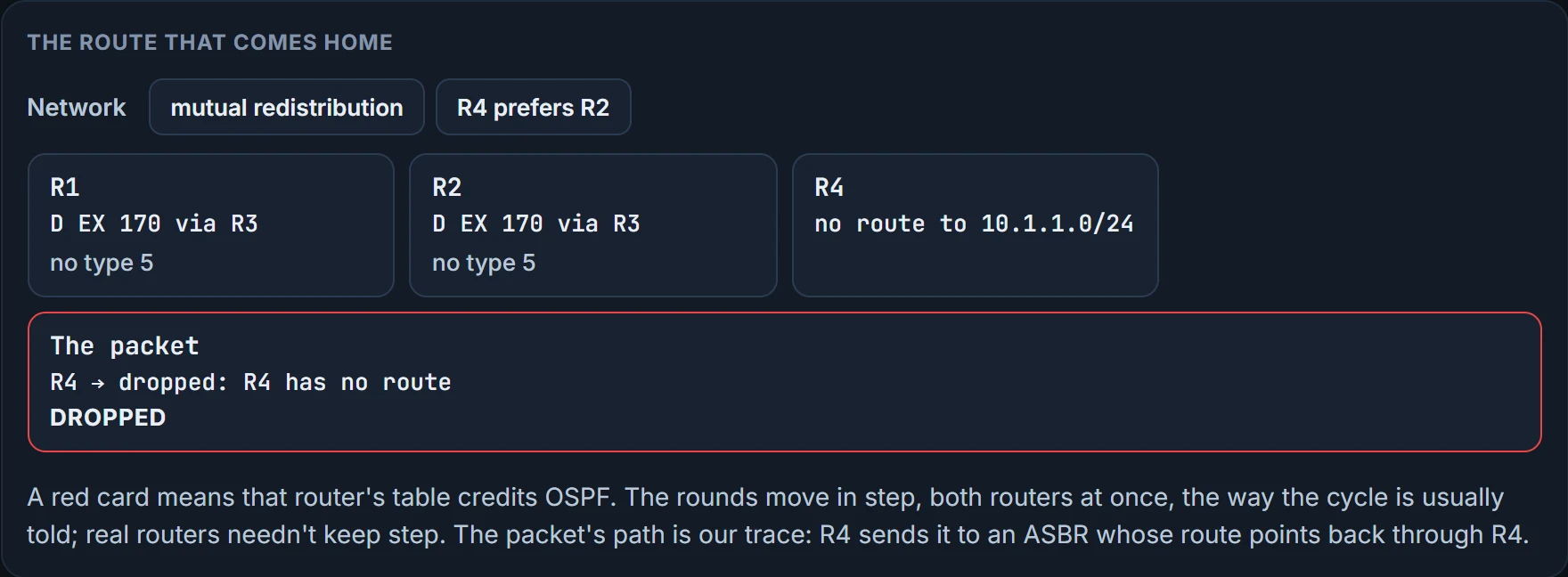
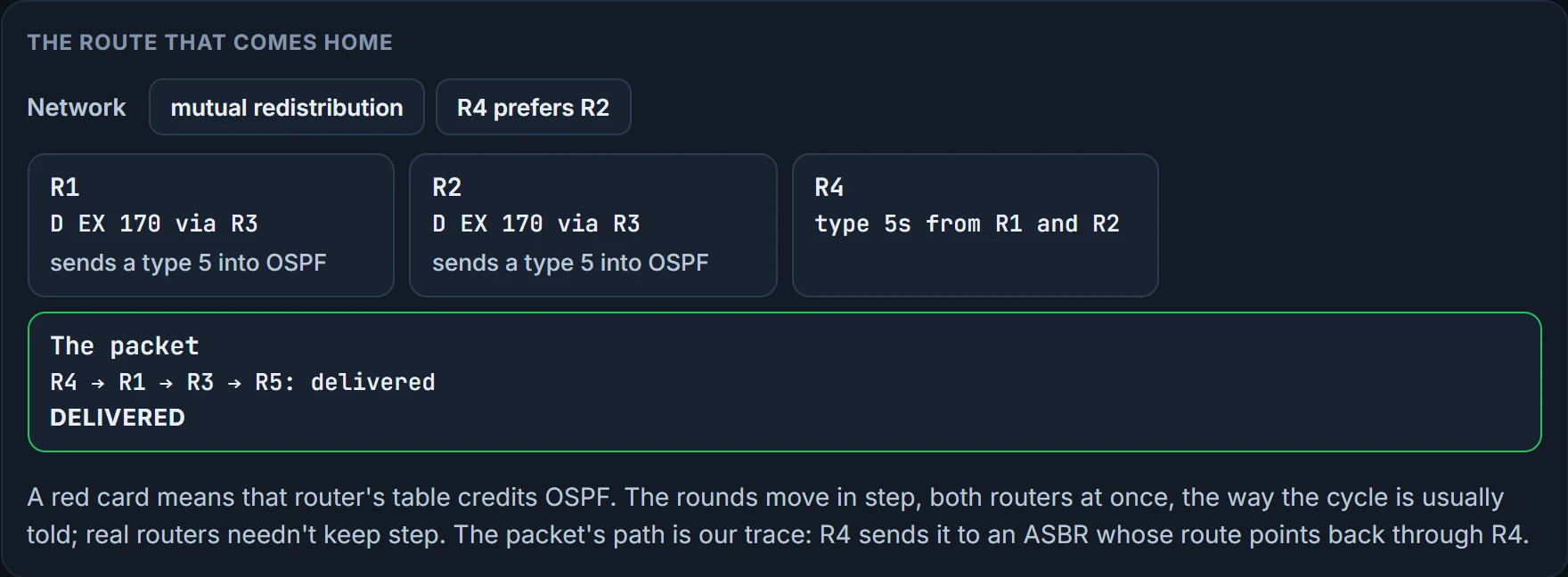
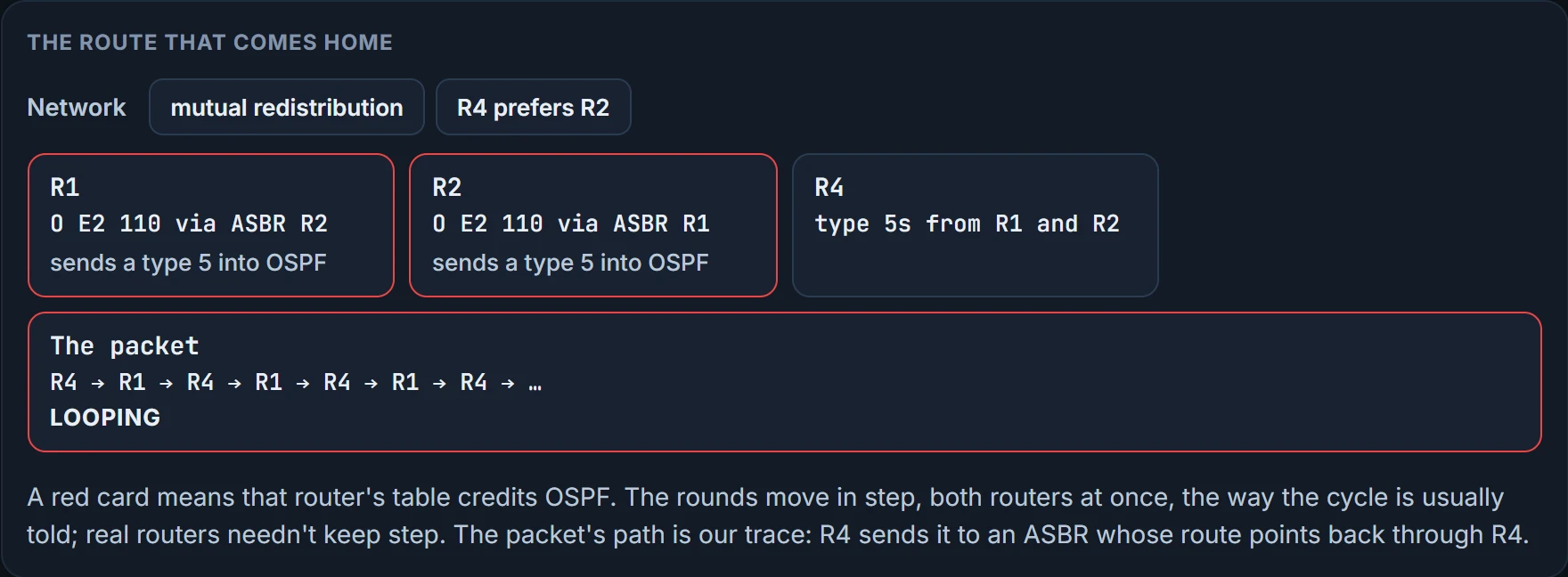
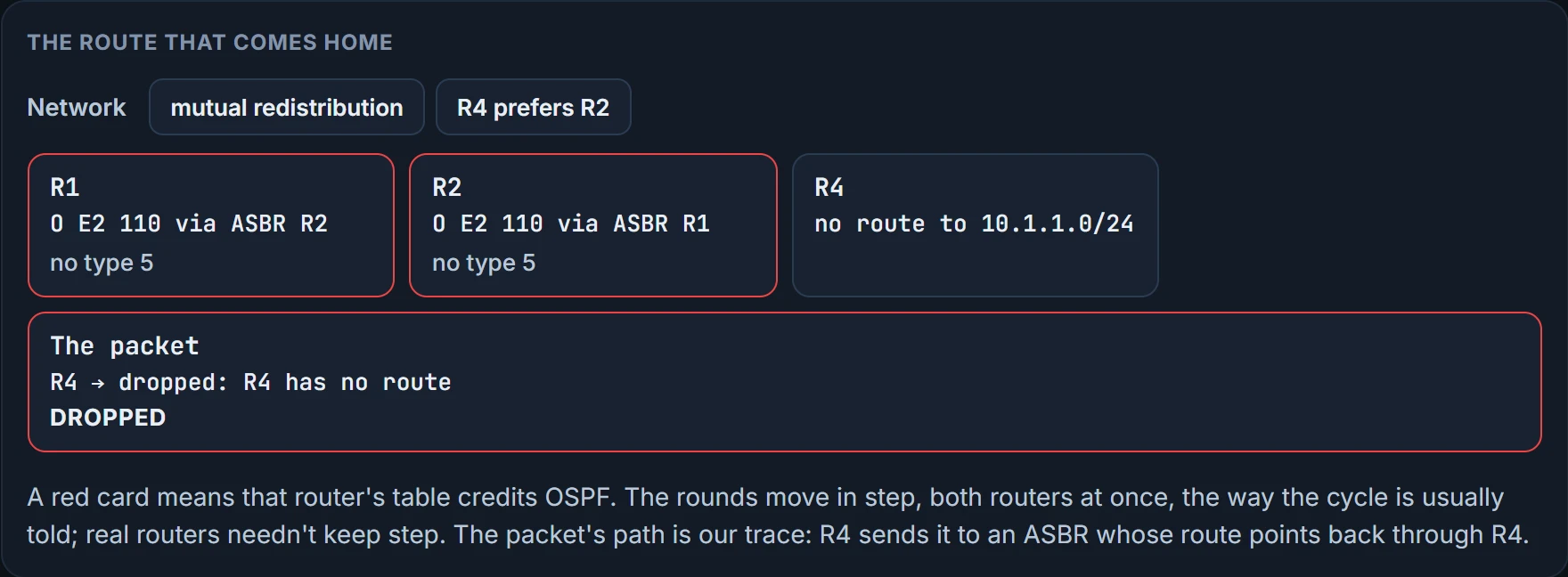
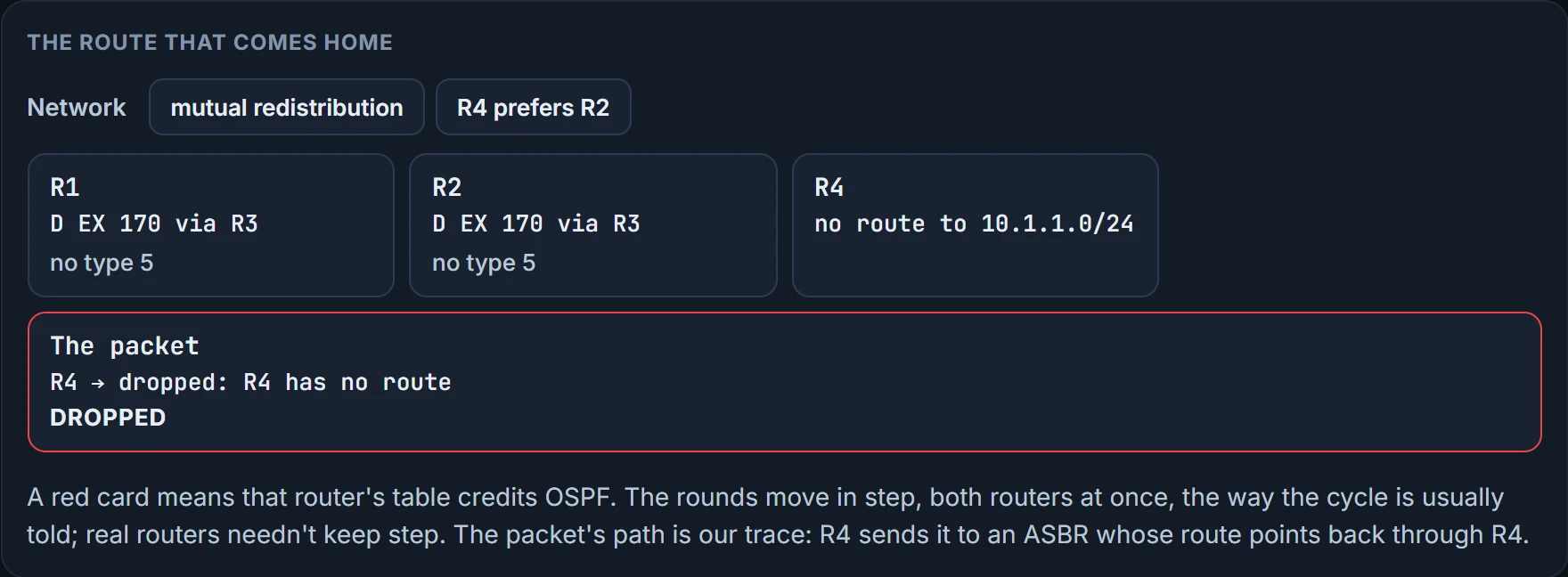
Follow the clock. R1 and R2 first learned 10.1.1.0/24 from R3 as an EIGRP external. Nothing else offered it, so EIGRP's route went into the table, and because EIGRP is redistributed into OSPF, the route went from the table into OSPF and out as a type 5. Then each one learns the other's OSPF route, sees 110 beat 170, and the OSPF route replaces the EIGRP one.
Now R1's table credits 10.1.1.0/24 to OSPF, and the type 5 R1 was sending goes. The EIGRP route is still in EIGRP's topology table but not in the routing table, so it's no longer available to redistribute, and R1 has no type 5 left to advertise. R1 and R2 tell the OSPF domain that 10.1.1.0/24 no longer exists, and so each one loses the OSPF route it had learned from the other. Now nothing beats EIGRP's route, so it goes back into the table, it's redistributed into OSPF again, and the whole thing repeats.
The routing table isn't stable. The route is inserted and removed, inserted and removed, over and over. From the user's chair, a session from 192.168.2.0/24 to 10.1.1.0/24 works for a moment, then it's lost, then it's back, then lost, because the routes keep being added and removed: a loop, then no loop, and so on. In the figure above: delivered, looping, dropped at R4 with no route, dropped again while the type 5s come back, then delivered.
That lockstep is the usual telling, with both routers moving at once. Real routers needn't move in step. Whether they keep cycling, or settle with one of them on each copy, depends on timing, and we haven't confirmed which.
You can watch it with debug ip routing, which shows changes to the routing table as they happen. Its output looks like RT: del 10.3.3.3/32 via 172.16.2.2, bgp metric [20/0] and RT: add 10.3.3.3/32 via 172.16.1.1, bgp metric [20/0] (that example comes from BGP; the command isn't specific to it), and debugs are a heavy load on a router and a last resort. Expect a del and add pair for 10.1.1.0/24 alternating between EIGRP and OSPF.
Coming home: route feedback
Now take it further. With mutual redistribution, R1 and R2 also redistribute OSPF into EIGRP. While the OSPF copy of 10.1.1.0/24 sits in their tables, that copy goes back into the EIGRP AS. That's route feedback.
Look at R3. Its topology table now holds three paths to 10.1.1.0/24, which you can write as D EX 170, 10.1.1.0/24, via R5, via R1, via R2: one through R5, the real boundary into RIP, and one each through R1 and R2. Depending on each path's metric, R3 may choose the right one, toward RIP, or one through R1 or R2, which would eventually blackhole the traffic. Which one wins depends on the seeds, R5's for the original and R1's and R2's for the copies, plus R3's own links.
The route has come home. It left EIGRP at a boundary router, crossed into OSPF, and re-entered EIGRP as a route to 10.1.1.0/24 through a router with no real path to it.
This is a known risk. Highly available designs use multiple points of redistribution, which raises the probability of route feedback, and route feedback can cause suboptimal routing or routing loops. It's why EIGRP and OSPF mark routes internal or external and can prefer internal ones: it helps prevent a loop where two routing protocols keep redistributing the same routes into each other at multiple points. EIGRP's 90 and 170 are, as we read it, that preference at work.
How would you know? Analyse a diagram and know the protocols in use; you don't even need show commands. The job is to look at a topology, spot where this can happen, and put the measures in before it does, or, if it's already happening, say why and propose the fix. For evidence, R3's topology table is where feedback shows: an external entry names its external protocol, and a copy of 10.1.1.0/24 whose external protocol is OSPF, on a router that should know it only from RIP, is a route that came home.
Back to your prediction from the start. Where did the traffic go, and did it stay? Delivered, looping, dropped, dropped, and round again, by our trace.
Making EIGRP's copy win
The diagnosis is short: this was caused by AD, 110 being better than 170. So on R1 and R2, either lower the AD of the EIGRP external routes for 10.1.1.0/24, or raise the AD of the OSPF type 5 routes; the goal is that the EIGRP route wins. Either way, the tool is the distance command on both R1 and R2, because AD is each router's own preference. Lowering EIGRP's means 109 or less, and raising OSPF's means 171 or more.
EIGRP first. EIGRP already gives routes learned inside the AS a different AD from routes learned outside it: 90 internal, 170 external. distance eigrp ad-internal ad-external changes both; values run from 1 to 255, and 255 stops the route going into the RIB at all. For specific internal networks there's a selective form, distance ad source-ip source-ip-wildcard [acl-number | acl-name]. The address and wildcard limit it to routes learned from one router, and the optional ACL picks prefixes from that source. But EIGRP won't do that by prefix for external routes. 10.1.1.0/24 is an external, so it's all externals or none. This sets 109 for every external EIGRP route on R1 and R2, below OSPF's 110, so the EIGRP routes go into their tables:
R1(config)# router eigrp 100
R1(config-rtr)# distance eigrp 90 109
R1(config-rtr)# end
R2(config)# router eigrp 100
R2(config-rtr)# distance eigrp 90 109
R2(config-rtr)# end
The selective form in use: under EIGRP, distance 165 10.1.1.1 0.0.0.0 changes the AD to 165 for the internal EIGRP routes learned from neighbor 10.1.1.1. Internal, because externals can't be picked out that way.
OSPF next. OSPF uses the same 110 for routes from inside its domain and routes from outside it. You change it with distance ospf {external | inter-area | intra-area} ad, a different AD for each kind of OSPF route. OSPF has a selective form too, distance ad source-ip source-ip-wildcard [acl-number | acl-name], and here the address and wildcard match the router ID of the router that advertised the LSA, with the ACL picking the prefixes. This raises OSPF's external routes to 171, above EIGRP's external 170, so the EIGRP routes win on R1 and R2:
R1(config)# router ospf 1
R1(config-rtr)# distance ospf external 171
R1(config-rtr)#
R2(config)# router ospf 1
R2(config-rtr)# distance ospf external 171
R2(config-rtr)#
BGP has the same tool: distance bgp external-ad internal-ad local-routes, plus distance ad source-ip source-wildcard [acl-number | acl-name] under the address family, for one neighbor. For example eBGP 44, iBGP 55 and locally learned routes 66, distance bgp 44 55 66. What those kinds of BGP route are comes later.
Continue the lesson
The whole lesson, with its drawings and its questions. The rest of this section and 4 more after it.